 MetaTrader 5
 Experts
 Indicateurs
 Bibliothèque
 Utilitaires
 Widgets
 Règles
Regardez les tutoriels vidéo de Market sur YouTube
Comment acheter un robot de trading ou un indicateur
Exécutez votre EA sur
hébergement virtuel
hébergement virtuel
Test un indicateur/robot de trading avant d'acheter
Vous voulez gagner de l'argent sur Market ?
Comment présenter un produit pour qu'il se vende bien
Nouveaux utilitaires de trading pour MetaTrader 5 - 4
 Vous trouverez ci-dessous des programmes de trading simplifiant le trading dans MetaTrader 5. Passez la souris sur un utilitaire pour lire sa description et son objectif.
Faites de votre trading un jeu. Confetti Trade Celebration transforme chaque take-profit en petite fête : une explosion de confettis sur le graphique, une bannière avec le résultat et le bruit d'un canon à confettis. Atteindre vos objectifs, c'est comme marquer un point. C'est aussi un outil de notification pratique : vous voyez immédiatement qu'un objectif est atteint, même lorsque l'onglet Trading est masqué ou que vous regardez un autre graphique. Fonctionnement Placez l'indicateur sur n'impo

Un journal de trading automatique qui sépare votre compte par EA. Indicateur, il se place sur tout graphique, même à côté de votre EA. Il lit l'historique et donne une ligne à chaque EA ayant un trade clôturé : ses trades, son net après commission et swap, et une courbe de ses résultats clôturés ; les trades manuels aussi. Avec les règles de votre prop firm, il montre la marge avant chaque limite. Il ne trade jamais. Rien à saisir. Il travaille à partir des transactions que MetaTrader conserve d

Isobar Event Shield protège vos positions contre les annonces économiques dans MetaTrader 5. Il lit le calendrier économique intégré au terminal, affiche le compte à rebours de chaque publication qui concerne vos symboles et, peu avant chacune, applique la protection choisie aux positions et ordres en attente que vous ou d'autres Expert Advisors détenez déjà. Il n'ouvre jamais de position lui-même. Démarrage rapide Attachez l'utilitaire à un graphique (une copie par terminal) et activez Algo Tr

Daytime Auto Close MT5 Daytime Auto Close est un Expert Advisor de gestion des positions basée sur le temps, qui envoie automatiquement des demandes de clôture des positions ouvertes à partir de l’heure limite que vous définissez. Choisissez une clôture quotidienne ou uniquement le vendredi pour l’adapter à votre routine de fin de journée ou de semaine de trading. Contrairement aux robots de trading traditionnels, cet utilitaire n’ouvre jamais de nouvelles transactions. Il gère les positions BUY
FREE

Chart Line Trade Manager – Panneau de trading avec lignes SL, TP et trailing déplaçables et lot calculé selon le risque
Chart Line Trade Manager est un outil de trading manuel, pas une stratégie automatique. Vous passez vos ordres depuis un panneau compact sur le graphique et gérez vos stops en déplaçant des lignes horizontales. La taille du lot est calculée à partir de la distance jusqu'à la ligne de stop et du risque choisi, coûts inclus.
FONCTIONS - BUY / SELL : ordre au marché. Lot calcul

Indicator Signal Alerts Kb surveille un indicateur et vous prévient lorsqu'il donne un signal d'achat ou de vente : fenêtre pop-up, notification push sur votre téléphone et e-mail. Commencez par une configuration prête à l'emploi pour un indicateur intégré de MetaTrader 5, ou connectez l'indicateur que vous utilisez déjà ; jusqu'à quatre indicateurs supplémentaires peuvent confirmer chaque signal en tant que filtres. Sans programmation. Manuel d'utilisation Manuel complet (en anglais) : configur
FREE
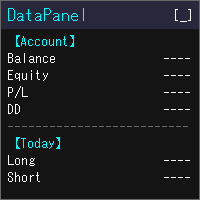
DataPanel affiche l'état de votre compte sur le graphique, dans un seul panneau. Il n'envoie aucun ordre et n'utilise aucune DLL. Je l'ai créé à l'origine avec Claude Code pour voir d'un coup d'œil comment se portent les comptes sur lesquels tournent mes autres EA. Il affiche désormais beaucoup d'informations, mais vous pouvez n'afficher que l'essentiel : réglez-le dans les paramètres. Ce qu'il affiche Solde, capitaux propres, résultat flottant et niveau de marge Drawdown du solde et des capitau
FREE

Prop Risk Guard applique automatiquement les règles de gestion du risque de votre compte. Il suffit de l’ajouter à un graphique pour qu’il surveille toutes les positions du compte. Lorsqu’une limite est atteinte, il clôture les positions, supprime les ordres en attente et bloque le trading afin qu’une mauvaise opération ou un EA incontrôlable ne compromette pas les règles de votre compte d’évaluation ou de votre compte financé. Limite de perte journalière Paramétrable en pourcentage, en montant

1 Click Trade Manager Tool EA — Outil visuel de breakout et de gestion de trades risque/rendement pour MT5 =====================================================================
DESCRIPTION COURTE ----------------- Un outil visuel, à déclenchement manuel, pour trader les breakouts et gérer les trades sur MetaTrader 5. Faites glisser votre Entrée, votre Stop Loss et votre Take Profit directement sur le graphique, voyez votre risque exact, votre gain potentiel et la taille du lot se mettre à jour

Ce qui tue les challenges, c'est la perte journalière — pas l'objectif de profit. Une nuit de levier excessif, un ordre en attente oublié, un gap.
PropFirm Shield Essential est le garde gratuit qui surveille LA règle la plus importante — et verrouille avant la violation.
Sur N'IMPORTE QUEL graphique. Surveille tout le compte — symboles, magics, manuels, copieurs, autres EAs.
- DAILY LOSS GUARD — ta limite et ton heure de reset. - LOCKDOWN — ferme les positions, supprime les pendings, bloque
FREE

$500 payés pour un challenge. Un compte de $100 000 en jeu. Une mauvaise nuit — et tout s'effondre.
Pas parce que ta stratégie a échoué. Parce que personne ne regardait à 04h07 quand le gap est arrivé, quand l'ordre en attente oublié s'est exécuté, quand une bougie a effacé trois semaines de discipline.
PropFirm Shield, c'est le garde qui ne dort jamais.
Attache-le à N'IMPORTE QUEL graphique — il surveille TOUT le compte : tous les symboles, tous les magics, trades manuels, copieurs, autres

Les prop firms ont une regle que presque personne ne surveille avant qu'il ne soit trop tard : ton meilleur jour ne peut representer qu'une fraction de ton profit total.
Apex plafonne le meilleur jour a environ 30-50% du profit total. TopStep pareil. FTMO 1-Step a une metrique "Best Day". FundedNext applique des regles de consistency aux demandes de payout. Depasse le ratio et ton payout est refuse.
Le calcul est simple mais personne ne le fait en live : si ton meilleur jour ne peut depasser

ZeroLogics . Outil de base pour la gestion des positions, la gestion du risque et la planification, avec niveaux visuels, TP, RR, calcul de lot, profits/pertes, SL et TP déplaçables, avec options automatiques de base par opération telles que le trailing stop, l'auto break-even et les clôtures partielles automatiques. Un outil conçu pour simplifier vos trades — il ne s'agit pas d'un outil professionnel et n'a pas la prétention de l'être. Il intègre 2 langues : ANGLAIS et ESPAGNOL.
Trade Manager

JT360 OrderPanel Pro – Professional Trade Execution and Risk Management for MetaTrader 5 Product Overview JT360 OrderPanel Pro is an interactive trading panel for MetaTrader 5 that combines trade execution, risk calculation, position management, and multiple protection mechanisms within a single interface. The panel is designed for traders who make their own trading decisions and want to apply structured risk rules, controlled order execution, and additional safety mechanisms. In addition to sta

SAYON Trade Copier copie les trades entre comptes MetaTrader sur le même ordinateur ou VPS : MT5 → MT5, MT4 → MT4, MT4 → MT5 et MT5 → MT4 .
Un seul EA pour les deux rôles : réglez-le en Master sur le compte qui envoie les trades et en Slave sur les comptes qui les copient. Le rôle se change aussi depuis le panneau. La version MT4 est GRATUITE. Copier entre MT4 et MT5 ne coûte qu'une licence : installez cette version MT5 sur les terminaux MT5 et la version MT4 gratuite sur les terminaux MT4. Rapi

ATS Trade Manager is the site foreman of your trades. Plan a trade on the chart with draggable lines and coloured zones, send it with the lot size worked out from your risk, and let the foreman look after it: break-even, trailing stop, up to three take-profit levels with a partial close at each, a daily loss lock and one panel to close groups of trades. It trades only when you press SEND. PLAN A TRADE ON THE CHART Press PLAN and the chart shows the trade before you take it: a blue line and zone
FREE

Know the broker symbol before you evaluate the EA. D7 Symbol Inspector is a free, read-only MetaTrader 5 chart utility. It brings the symbol fields that often decide whether an EA can size, place or protect an order into one panel — without sending or modifying a trade. Who it is for Use it before testing an Expert Advisor on a broker symbol, especially when the symbol has a suffix, unusual contract size, nonstandard volume steps or a spread that changes through the session. What it reads Last a
FREE

Account Center — Trading Journal and Account Dashboard for MetaTrader 5 Your platform shows how much you made or lost. It does not show why. Account Center turns one chart into a full-screen account center and trading journal: the chart hides, a clean panel takes its place, and every closed trade gets the human side next to the numbers — your emotion, your plan, your mistakes and your lesson. WHAT YOU GET Dashboard Equity, balance, floating P/L and today's result with your mood before the sessio

MultiOrder Dock - Dynamic Execution & Risk Manager
MultiOrder Dock is a professional, high-speed execution panel designed for MetaTrader 5 traders who require absolute control over position sizing and active order management directly from their chart.
Whether you trade Forex, Gold, Indices, or Crypto, this tool eliminates manual position calculation errors and enables instant setup execution with custom risk parameters.
================================================== KEY FEATURES ========

Copy Dog AI Trades Copier MT5 Copy Dog AI Trades Copier copies trades between MetaTrader accounts and lets you set the copying rules by talking in your language, or by typing your copying commands and account management on the chart panel in MT4 or MT5. Write or say what you want in plain words, for example: "Copy only gold from now on, half the sender's lot size, and trail each copy 200 points behind the price." Google Gemini turns your words into rules, explains them back to you in plain words
FREE

LocalTimePlus — MT5 Local Time Correction × Custom Scale Extension Tool LocalTimePlus replaces MT5’s default time and price scales with a fully custom system featuring automatic local‑time correction , high‑precision crosshair display , intuitive zoom controls , and a transparent canvas rendering engine . It completely solves the “time‑offset problem” for scalpers, short‑term traders, and users trading on overseas servers. Overview LocalTimePlus overlays a transparent canvas on the MT5 cha
FREE

Order Flow Footprint Workspace est un espace de travail d'analyse de l'order flow et de la microstructure de marché pour MetaTrader 5, entièrement en lecture seule.
Il transforme les données de ticks fournies par votre broker en une représentation footprint interactive par session avec activité par niveau de prix, profils, navigation historique et outils de diagnostic. Le workspace s'adapte automatiquement aux informations réellement disponibles dans le flux du broker et n'invente pas de direc

# Ronin Copier - Tactical Prop Sync
**Zero-Latency, Zero-DLL Local Trade Copier Built for Serious Prop Traders.**
**EARLY ADOPTER PROMOTION (LIMITED COPIES):** - **First 10 copies:** **$59** (Current Stage) - **Next 10 copies:** **$99** - **Final Price:** **$199** *Price increases automatically as review milestones are reached.*
---
Managing multiple MT5 accounts across prop firms (FTMO, FundedNext, Alpha Capital, etc.) or private brokers? **Ronin Copier** provides seamless, millisecond-

Launch Special: $30 (First 10 copies only)
Ronin Scalp Tactical Cockpit is an ultra-slim, tactical HUD designed for disciplined scalpers, Gold (XAUUSD) traders, and Prop Firm candidates (FTMO, FundedNext, etc.).
Unlike bulky panels that clutter your chart, Ronin Scalp occupies only 118 pixels on the edge of your screen. Built for high-speed precision, it provides systematic risk management, instant execution protection, and panic defense when milliseconds determine your trade outcome.
======

Ronin Shield - Daily Loss Limiter & Account Guard (MT5)
When your loss limit is hit, your trading day is over. A utility built to stop the "just one more trade" moment during prop firm challenges.
Attach it to just one chart and it protects the whole account: every symbol and every position, including manual trades and other EAs. No need to open a chart for each symbol. No external DLLs. No web requests.
============================== THREE PROTECTION LINES ============================== 1.

StatsBoard — Account P&L Statistics Board
StatsBoard is a lightweight MT5 indicator that turns your entire trading history into a clear, on-chart statistics dashboard. No equity curve, no clutter — just the numbers that matter, organized by day, week, month, quarter, year, symbol, magic number, and comment.
**Key Features**
- **10 built-in tabs**: Summary, Day, Week, Month, Quarter, Year, Symbol, Magic, Comment, Account - **Full P&L breakdown per period**: lots, min/max lots, trade count, ne

RMT Capital Firewall is a risk guard for MetaTrader 5. It watches daily loss, drawdown, an equity floor, open risk and positions without a stop loss, warns before a limit, and — only if you authorise it — closes the positions in the scope you chose and stays latched until you re-arm. Every decision is recorded as a structured audit line in the Experts journal. The problem it solves A daily-loss or drawdown rule is easy to write down and hard to keep when a position is running against you, or whe

VolPulse Telegram Bridge forwards the alerts of the free VolPulse Volume Profile indicator to Telegram: market-state changes, touches of key levels (POC, VAH, VAL, naked POC) and new entry signals with stop and target. It does not trade. It does not read your positions, balance or account number. Setup (about 2 minutes) Install the free indicator "VolPulse Volume Profile" and attach it to your charts:
https://www.mql5.com/en/market/product/200141 Tools → Options → Expert Advisors → tick "Allow W
FREE

Launch price: 39 USD for the first 10 copies. Then 59 USD, final price 79 USD. Early buyers keep every future update. Trade Panel Sextant for MetaTrader 5 – every trade sized from your risk. You set how much you want to risk, place the stop where the chart says, and Sextant calculates the lot size, sends the order and manages the trade. An account guard with a daily loss limit, a daily target and trade caps keeps a bad day from becoming a bad month. Everything sits in one calm, tabbed panel: TRA

Obiriec Order Panel is a panel shown on the chart for placing and managing orders by hand. It does not open trades on its own.
Features - Shows the current Bid price, Ask price and spread of the symbol you choose. Type the symbol in the panel (the default is XAUUSD). - Places Buy and Sell orders as Market, Limit or Stop orders, with the entry price you enter. - Takes a total lot size and up to five Take Profit levels. Each Take Profit can have its own lot size. If a lot size is left empty, the

TeekTrader OCO Trading Panel TeekTrader OCO Trading Panel is a manual trading and position management utility for MetaTrader 5, designed to make trade execution faster and position management more practical directly from the chart. Key Features OCO Orders — Place linked orders using the One Cancels the Other concept. Take Profit & Stop Loss Preview — Visualize potential Take Profit and Stop Loss levels on the chart before executing a trade. Automated Breakeven — Automatically move Stop Loss to b

Discipline Trader — Smart Trade Panel for MT5 Trade with a plan, not guesswork. Calculate lot sizes by risk %, place trades with predefined SL/TP, manage positions with one click, and enforce daily and basket loss limits. Includes break-even, partial close, trailing stop, a visual risk monitor and trade journal. You stay in control — the panel helps you stay disciplined.
You decide the trade. Discipline Trader helps you size it, protect it and manage it. Whether you trade gold, forex, indices

TrendSync Time Alarm turns your chart into a precise, dependable clock. Set an interval and it alerts you - on screen, by sound, on your phone, or by email - the moment each time block is reached.
Because it runs on a built-in timer instead of waiting for price ticks, it fires on time even in a quiet or illiquid market, when tick-based alerts go silent. It is a lightweight utility with no buffers and no plots, so it adds virtually no load, and it works on any symbol and any timeframe.
KEY FEA
FREE

Experience trading without friction. Zentriq Trade Manager is a modern, high-performance trade management utility engineered with a high-DPI canvas interface, anticipatory workflow design, and an integrated Macroeconomic News Filter. Designed for discretionary traders, scalpers, and prop firm traders who demand speed, precision, zero-clutter ergonomics, and automated news event protection. User Manual Get the most out of Zentriq Trade Manager with the complete user manual: Complete User Manual:

(New and experimental testing phase) M5S Automation EA is a free utility built to work together with the M5 Sniper Indicator. On its own it does nothing, it simply listens to the signals that M5 Sniper produces and opens the trades for you automatically, so you no longer have to sit and watch the chart to catch every entry.
It reads the entry, stop loss and the three take profit levels straight from the indicator and places the trades exactly as they appear. You can choose to run one position t
FREE

TradeMaster Pro V4.18 TradeMasterPro A lightweight chart-management utility that replaces three separate tools with one invisible indicator. ️ PRECISE MOUSE-WHEEL ZOOM (X + Y Axes) Horizontal zoom — smooth, step-by-step bar scaling ( CHART_SCALE 0–5). Fractional sensitivity is accumulated internally, so even a 0.1× multiplier works reliably on any mouse (including free-spin wheels). Vertical zoom — when Scale Fix is active, the wheel zooms the price axis around its center instead of scrolling b
FREE

# MiniBull Guard v1.30
## Never trade without a stop again.
**You open the trade. MiniBull Guard sets the stop, shows the risk and keeps your head clear.**
- **No more naked positions.** Every new trade gets a stop loss within moments, even when you forget, hesitate or trade from your phone. - **A stop the market can breathe around.** Sized from real volatility (ATR) by default, or from a distance you choose. - **Know your loss before it happens.** In money and in percent of your equity, not
FREE

Công cụ ghi lại tín hiệu giao dịch theo tâm lý [] Công cụ cộng đồng tối ưu để thử nghiệm chiến lược, rèn luyện tâm lý giao dịch và xây dựng khả năng chịu đựng trên thị trường. Giới thiệu sản phẩm:
Đây là một công cụ mô phỏng huấn luyện tâm lý giao dịch, không phải là EA tự động hay chỉ báo kỹ thuật. Đây là công cụ phát lại biểu đồ lịch sử được thiết kế MIỄN PHÍ 100% để giúp cộng đồng giao dịch thực hành tâm lý thị trường, kỷ luật và khả năng kiểm soát cảm xúc. Nếu mục tiêu chính của bạn là kiể

Non-trading MT5 tool: draws published projection lines for a limited list of instruments. Recommended M30. --- iSpectrum is a non-trading analytical tool for MetaTrader 5. It draws projection lines and background shading on the chart of the current symbol. The lines are calculated by the author with specialised timing-analysis software and are loaded from the author's data server over a secure encrypted connection. The program does not open, close or modify orders and does not manage posit

AAS Tester is a manual market replay and trading practice utility for MetaTrader 5. The program creates a separate replay chart and sequentially replays historical data from the currently connected broker. You can study past price action as if the market were moving in real time, without seeing future prices. AAS Tester is designed for manual backtesting. All trades inside the replay environment are virtual and do not affect your real trading account. MAIN FEATURES • Historical broker tick repla

FxStrike999 OA bot is a universal trading robot and trader toolkit for MetaTrader 5. It works on any symbol and can be used in three ways: as a position accelerator for small deposits, as a trader panel that manages the trades you open, and as a fully automated robot driven by signals from the CashFlow Assistant and PulseTrail Pro indicators.
It is not a fixed black box. It is a constructor: you choose how aggressive it is, how it adds to positions, and how it protects profit. The robot execut

OneClickTrading – Manual Trading Panel for MetaTrader 5 OneClickTrading is a manual trading and risk-management panel for MetaTrader 5, designed for traders who want fast order execution, precise position sizing and flexible trade management directly from the chart. The tool does not trade automatically. Every trade and management action is triggered manually by the user. Key Features Manual BUY / SELL execution BUY LIMIT / SELL LIMIT BUY STOP / SELL STOP Automatic lot-size calculation based on

Trade Exit Manager — order entry and staged position management Trade Exit Manager is a MetaTrader 5 trading utility with two chart buttons. It places two user-configured order groups and follows a predefined exit plan: five partial-close levels, break-even stop adjustment, a hidden stop and trailing. The user chooses directions, volumes, order counts and distances. The utility does not analyze the market or generate entry signals. Features Two order groups. Configure market direction, pending t

TradeArchitect Grid Manager is a chart-based manual trading utility for MetaTrader 5. It combines visual trade planning, risk-based position sizing, market and pending order execution, position management, and optional martingale or anti-martingale progression.
The utility does not generate trading signals and does not decide when to buy or sell. The trader chooses the direction, Entry, Stop Loss and Take Profit. GridPlan Trade Manager performs the calculations, checks the plan and manages th

# Omega — Session-Cycle Visualization & Analytics for MT5
**Omega** turns your chart into a structured map of the trading day. It automatically divides every session into 9 recurring time-cycles, draws them as color-coded rectangles, overlays a live Fibonacci fan, and silently logs every box, breakout, and structural event to a local SQLite database you can query, chart, or build a dashboard on top of — all with zero manual input.
This is a **visualization and analytics tool** , not a signal

Omni Signal Copier – Telegram, Discord, Slack and TradingView signals into MetaTrader Omni Signal Copier reads trading signals from Telegram, Discord, Slack, TradingView alerts (via ntfy), text files and manual input , understands them with a multi-language parser and trades them on your MetaTrader account – with multi-TP, break-even, trailing, a prop-firm guard and a live dashboard with 8 tabs. Everything runs inside the Expert Advisor: no extra program, no DLL, no external server of ours . The

Alpha TradeCommander Pro with Auto Risk Lot Calculator MT5
Modern Dark GUI Panel with Auto Risk % Calculation, 1-Click Execution & Auto Break-Even
### Overview Alpha TradeCommander Pro MT5 is an indispensable On-Chart Trading Assistant designed for professional day traders, prop firm challenge candidates, and high-frequency scalpers.
In fast-paced markets, taking 15 seconds to calculate your position size can cost you dozens of pips. Alpha TradeCommander Pro automates professional mathematic
FREE

Funded Account Guard monitors the whole trading account and enforces the risk limits you set. When a limit is reached, it closes all positions, deletes pending orders and blocks new entries until the limit period ends. It is intended for funded and evaluation accounts with a daily loss limit and a maximum drawdown limit, and for any trader who wants a fixed daily stop.
The utility does not open trades, does not give signals and does not move stop loss or take profit levels.
Rules - Daily loss
FREE

SL TP Manager is a compact on-chart panel that sets the stop loss or take profit of all open trades on a symbol in one click, or moves every stop loss to break-even. It is designed for traders who scale in with several positions and do not want to edit each trade one by one.
HOW IT WORKS - Type a price in the SL box and click Set SL: the stop loss is applied to every open trade on the chart's symbol. - Type a price in the TP box and click Set TP: the take profit is applied the same way. - Clic
FREE

️ The Must-Have Account Guard for Prop Firm Algo Traders Running third-party EAs on your funded accounts? Stop worrying about breaching firm rules. Most EAs bought from the MQL5 Market only focus on their own strategy—they know nothing about prop firm restrictions. Prop Firm Rules Manager MT5 bridges that gap completely by serving as an account-level management layer: Automated News Protection: Pauses trading and unloads EA activity before high-impact news, then automatically resumes after the
FREE

GPA_Smart_Risk_Manager Complete User Guide
PRODUCT OVERVIEW GPA_Smart_Risk_Manager is a professional-grade, all-in-one trading panel and autonomous risk management Expert Advisor for MetaTrader 5. It combines rapid one-click execution, intelligent position sizing, autonomous risk compounding, ATR-based protection, dynamic volatility adjustment, and multi-layered safety controls into a single, modern, on-chart control centre. Designed for discretionary traders, scalpers, day traders, and swing

Insider Flow puts on the chart of a US stock what the company's insiders report to the US Securities and Exchange Commission (SEC): their open-market buys and sells, together with the company's earnings dates, share offerings, buybacks and late-filing notices. A scanner mode follows the whole US market. Insider Flow is a utility. It does not open, change or close trades.
Insiders are the officers, directors and owners of 10% or more of a company. They must report their trades within two busine

Precision Trade Assistant Professional Risk Management & Trade Execution for MT5 Trade with precision. Control your risk. Execute without friction. Forget manual lot size calculations and repetitive Stop Loss and Take Profit setup. Precision Trade Assistant (PTA) is an execution utility and risk management assistant that provides one cohesive workflow — from visual trade setup and hotkey-based execution to automated position management and systematic risk controls. Designed for discretionary da

Order Manage MT5 is an Expert Advisor for pending order management and open position management in MetaTrader 5. It monitors specified levels, cancels pending orders when their conditions are met, and can partially close positions while moving Stop Loss to the entry price. The EA performs the following actions: Cancels Buy Limit and Sell Limit orders if price reaches Take Profit before execution starts. Cancels Buy Stop and Sell Stop orders if price reaches Stop Loss before execution starts. Clo

Trading Calculator & Manager – Smart Risk Management An all-in-one trading tool designed to simplify position sizing, risk management, and trade execution. Key Features: Automatic Lot Calculation: Calculates the appropriate trading volume based on account balance and your selected risk percentage. Flexible Risk Management: Define your risk by percentage or monetary amount. Automatic Take Profit: Set your Take Profit based on Risk-to-Reward (R ) ratio or a specific monetary target. Stop Loss Mana

Giskard Trade Assistant is a trade panel for MetaTrader 5 that sizes, places and manages your trades from one chart. You decide; it does the lot calculation and the order housekeeping, and it never opens a trade on a live chart without your click. Manual | Installation and first run | Demo account build, 30 days | Troubleshooting I did not set out to sell this. I scalp, and I needed a panel that opens and closes positions fast, with the lot size, the SL and the TP already worked out, and t

https://youtu.be/OKOJXSCGY-4Per2 Trade Manager — Manual Trading Panel for MetaTrader 5 Per2 Trade Manager is a trading utility designed for manual order execution, risk management, and position management directly on MetaTrader 5 charts. The tool helps traders manage their trades through an intuitive on-chart interface. Key Features Place market and pending orders directly from the chart. Set Stop Loss and Take Profit using interactive price lines. Calculate position size based on a predefined m

Smart Trade Assistant Manager - Multi-Tab Trade Panel for MetaTrader 5
Smart Trade Assistant Manager is a professional on-chart trading panel that lets you open, manage and close trades in one click. The panel has 7 menus (Trade, Manage, Close, Auto, Shield, Info, Settings), SL/TP in pips or price, click-on-chart level picking, automatic lot calculation and smart partial closing.
Works on every symbol: Gold (XAUUSD), Forex pairs, Silver, Indices and Crypto. Pip size is detected automatically

is a visual market-monitoring indicator that displays multiple trading instruments and timeframes within a single chart window. Developed using MQL5, the indicator transforms historical price data into a structured dashboard featuring custom candlesticks or price dots. Each row represents a symbol, while each column represents a selected timeframe. This arrangement allows traders to examine recent market behavior across several instruments and timeframes without continually opening and closing c
FREE

Quote Cost Parity is a MetaTrader 5 chart panel for forex majors and minors that share a quote currency. Pairs with the same quote have the same pip cost for a given lot. The indicator uses that correspondence directly: it calculates the cost once for the group, then shows that cost for three lot sizes. It acknowledges only these quote groups. JPY: USDJPY, EURJPY, GBPJPY, AUDJPY, NZDJPY, CADJPY, CHFJPY. Source: USDJPY. CHF: USDCHF, EURCHF, GBPCHF, AUDCHF, NZDCHF, CADCHF. Source: USDCHF. CAD: US
FREE

Risk Calculator Panel shows the correct lot size for your risk before you open a trade. Drag the Stop Loss line on the chart, and the panel updates immediately. What the panel shows Lot size for your risk, rounded down to the broker's lot step Money at risk and potential profit in account currency Stop loss and take profit distance in points Reward:risk ratio Required margin and free margin after the trade How to use Attach the indicator to any chart. Drag the red SL line (and the green TP line)
FREE

Spectar Daily Loss Limiter is a small, free risk utility for MetaTrader 5. It does exactly one thing: it enforces a daily loss limit that you choose.
Many traders know their daily limit but break it after a bad trade. Many prop-firm style evaluations also measure the daily loss from the broker server's midnight and count floating (open) profit and loss, not only closed trades. This tool follows the same logic, so you can see in real time how much room you have left today.
How it works
1. At t
FREE

Synchronizes all open charts to the symbol of the chart this indicator is applied to.
SyncAllCharts is a MetaTrader 5 indicator that lets one main chart control the trading symbol shown on all other open charts. Change the symbol on the main chart, and the other charts follow while keeping their own timeframes. It helps you review the same market across several timeframes without changing each chart manually. How to use it Attach the indicator to one chart that you want to use as the main contr
FREE

is designed to simplify switching between trading instruments directly from the active chart. It allows traders to cycle through symbols listed in the broker's Market Watch using on-chart navigation buttons or keyboard arrow keys . The indicator's primary motive is to make multi-symbol market analysis faster, more convenient, and more organized by reducing the need to manually locate and open individual charts. Key Features Previous / Next Navigation: Switch between Market Watch symbols using t
FREE

Economic Calendar: News Panel, Alerts and News Guard Economic Calendar puts the news calendar on your MetaTrader 5 chart and keeps you ready for it: the next events, vertical lines on the price chart, alerts on your phone, signals for your other Expert Advisors, and optional protections that act before the news. Everything is configured from a panel on the chart. The Expert Advisor itself needs no DLL and no external program. Please note that this product does not work in the strategy tester. To

Manual Trade and Risk Manager Pro MT5 is an MT5 manual Trade Manager and Prop Firm Risk Manager for discretionary traders who need disciplined account risk control. Use it as an MT5 risk management tool and manual trading panel MT5 when you trade your own strategy, a prop firm challenge, an evaluation account, or a funded account. It combines MT5 position size calculation, drawdown protection MT5 monitors, and a trade execution panel MT5 so you can size, check limits, then execute manually. This

PropBlaster Copier - Local Trade Copier for Prop Accounts
Copy trades from one MT5 account to any number of other accounts on the same PC or VPS. One EA for master and slave, lot scaling, symbol mapping, reverse copying and a daily loss stop per account.
== Full description
PropBlaster Copier copies your trades from one MetaTrader 5 account (the master) to any number of other MT5 accounts (the slaves) on the same computer or VPS. Trade once and every account follows: new positions, pending o

The simplest and most useful trading panel for every manual trader!
Are you tired of closing trades one by one during news? Do you want to protect your profit with one click?
This panel does exactly that:
CLOSE ALL - Instantly closes ALL open positions with one click. You can choose to close all symbols or only current symbol. Essential for scalpers and news traders.
BREAKEVEN ALL - Instantly moves Stop Loss to entry price (breakeven) for all profitable trades. Protect your profits and
FREE

AutoTarget Guardian is a trade management utility for MetaTrader 5 that automatically sets Take Profit and Stop Loss levels for newly opened positions. Instead of calculating point distances manually or dragging order lines on the chart, the utility can set target levels based on a specified monetary amount in the account deposit currency, or by fixed points. The target levels are calculated and applied immediately when a position opens. Key Features The utility monitors positions and applies ri
FREE

Automated Timeframe cycling with Symbols centered. Force every timeframe onto one clock window, so the story you see on Daily is the same story you are slicing on H4, H1, and M1. Traders usually flip timeframes and lose the span. A Daily chart shows a few weeks, then M15 shows a few hours, and the eye treats them as different markets. TASSERACT locks the window to N bars of the highest enabled timeframe — default 10 Daily — and maps every lower timeframe to that same stretch. You stay inside o
FREE
Le MetaTrader Market est le meilleur endroit pour vendre des robots de trading et des indicateurs techniques.
Il vous suffit de développer une application pour la plateforme MetaTrader avec un design attrayant et une bonne description. Nous vous expliquerons comment publier votre produit sur Market pour le proposer à des millions d'utilisateurs de MetaTrader.

Vous manquez des opportunités de trading :
- Applications de trading gratuites
- Plus de 8 000 signaux à copier
- Actualités économiques pour explorer les marchés financiers
Inscription
Se connecter
Vous acceptez la politique du site Web et les conditions d'utilisation
Si vous n'avez pas de compte, veuillez vous inscrire