
Title:
---
"How many lots should I trade on this?"
I've asked myself that question on every single trade for years.
And every time, the answer looked the same: open a separate calculator, enter my account balance, look up the pip value for this currency pair, factor in my stop distance, divide, round down, then finally go back to the chart and enter.
It worked. But it took 30 to 60 seconds every time.
And in fast markets, 30 seconds is an eternity.
One morning I was watching a perfect setup form on GBPUSD. ICT killzone, clean entry, everything aligned. By the time I finished calculating my lot size, the entry candle had already closed. The trade was gone.
That was the day I stopped doing it manually.

■ Why lot calculation errors are more dangerous than you think
Most traders focus on finding good setups. But risk management is what actually determines whether you survive long enough to profit.
Here's the quiet truth: more traders blow accounts from oversizing than from bad analysis.
The math isn't hard — but it's easy to make small mistakes under pressure.
Wrong pip value. Decimal error. Forgot to adjust for a news event.
And those small mistakes compound. Over 50 trades, consistently incorrect lot sizing
can turn a winning strategy into a losing account.
I've seen it happen. I've done it myself.
■ What I built: An instant lot size calculator that lives on your chart
I wanted something with zero friction.
No spreadsheet. No separate window. No context switching.
Just the information I need, right on the chart, the moment I need it.
So I built an MT4 indicator that reads two lines — your Stop Loss and your Take Profit —
and automatically calculates everything in real time.
Here's what it shows you, directly on your chart:
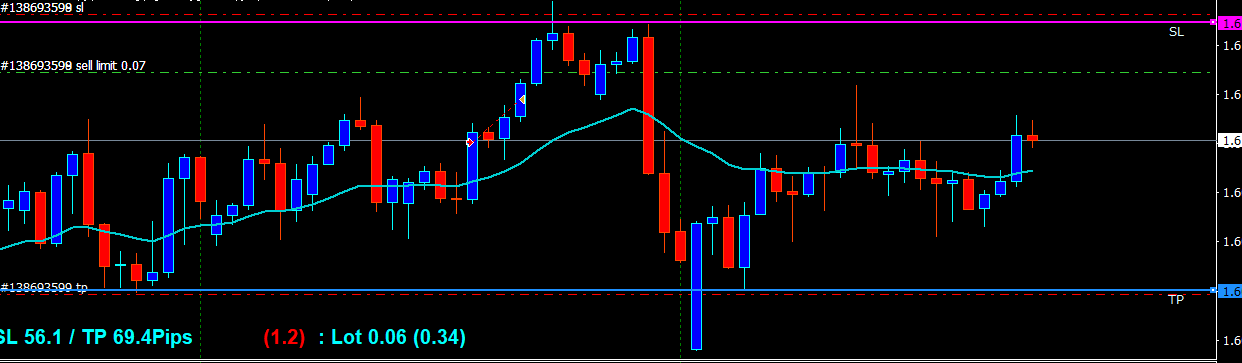
- ✔ The correct lot size for your chosen risk % (e.g., 1% or 2% of balance)
- ✔ Your Risk:Reward ratio
- ✔ Pip distance to your SL
- ✔ Pip distance to your TP
Move a line — numbers update instantly.
Change your risk % in settings — numbers update instantly.
No recalculation. No delay. No errors.
■ How to use it (3 steps)
[Step 1]
Set your risk percentage in the indicator settings (e.g., 1%).
That's the only setup you'll ever need to change.
[Step 2]
Draw a horizontal line on your chart and name it "SL" at your stop loss price.
[Step 3]
Draw a second horizontal line named "TP" at your take profit price.
The indicator reads both lines and displays your lot size and RR automatically.
That's it. Every trade, every pair, every timeframe — same 3 steps.
■ Why this changes how you trade
There's a psychological shift that happens when you know your exact risk before you enter.
You're not guessing. You're not "roughly 1%."
You see the exact number — and that clarity removes hesitation.
When you hesitate, you enter late, or you don't enter at all.
When you're clear, you execute.
I've used this tool on every trade since I built it.
Not because I have to — because it removes one more variable from the decision.
Fewer variables. Cleaner execution. Better results.
■ This is a free download — no email required
I'm releasing this indicator as a completely free tool.
ファイル:
LotCalcSP.zip
21 kb