Copier4Free

The utility copies trades from the signal provider accounts (master accounts, one or multiple providers) to unlimited number of receiver accounts (slave accounts). The provider is defined by the 'provider' parameter (any combination of numbers and letters). For example, there are two providers. Run the utility in master mode on them, and set different values to the provider parameter. On the account designated for copying these signals, run two utilities in slave mode in different windows, setting the 'provider' of the first provider to one of them, and 'provider' of the second provider to the other one.

The copying can be set in the opposite direction (reversed), and also with a size (greater or less) changed by the multiplier.

The utility monitors the changes in the stop loss and take profit orders of the positions copied from a master account. All the working parameters of the utility are displayed on the screen for clarity.

The utility does not interfere with the positions on the slave accounts opened manually or automatically by other experts/utilities.

To avoid premature closure of positions of a slave account due to the spread difference with the master account, it is possible to disable copying the stop loss and take profit orders by setting the corresponding parameters to 'off'.

The utility is able to copy the trades on instruments that have prefixes/suffixes. To do that, specify them in the 'prefix' and 'suffix' parameters. In case the master and slave accounts have the same prefixes and suffixes, these parameters can be left blank.

Note! In slave mode, the copier applies the comment field to identify copied trades. Therefore, this field should not be changed by the trading server when opening traedes.  Also, you need to use identifiers (Provider number) of the same length if you use several master copiers. For example. 1, 2, 3 or 11, 13, 22.

The utility works by timer with a second delay. If failed to set the timer (for example, during the server re-load), the utility is switched to the tick mode informing of this in a comment on a symbol chart.


Parameters of the utility specified both in master and in slave modes

  • Copier mode – operation mode of the utility: master (signal provider) or slave (signal receiver)/slave2 (manual closure of orders).
  • Provider number – unique identifier of the signal provider to copy trades from (any string value consisting of numbers and letters).
  • Prefix – set the prefix of the traded instrument (if any).
  • Suffix – set the suffix of the traded instrument (if any).


Parameters of the utility specified onlyin slave mode

  • Slave number – number of the copier. Set when copying from one account to several accounts.
  • Copy with reversal – copy trades in the opposite direction (reverse): on (enabled) or off (disabled).
  • Copy stop loss – copy the stop loss of the trade from the master account: on (copy) or off (do not copy).
  • Copy take profit – copy the take profit of the trade from the master account: on (copy) or off (do not copy).
  • Slippage & Price difference (in pips) – allowed slippage (in points) and allowed price deviation.
  • Do not copy if spread - disable copying if a spread exceeds a specified value.
  • Multiply lot of copied deals by – multiplier of the copied position.
  • Show last events - inform of the last copier actions.


Parameters of the utility specified onlyin master mode

  • Do not copy deals with magic (space separated) – disable copying trades having magic numbers specified here (space separated).


Video Copier4Free
Prodotti consigliati
Fast Trade Copier
Volodymyr Hrybachov
4.2 (5)
The trade copier is designed for a fast and accurate copying of orders between the MetaTrader 4 terminals. The trade copier copies trades from the Master account to the Slave account by writing information to the total file, which is located in the common directory of the MetaTrader 4 terminals. This allows the trade copier to either customize various schemes for receiving and transmitting trade signals by changing the file name. Reading and writing the copier file is performed by timer. The tra
XauUsd Net Strength
Pieter Gerhardus Van Zyl
The XauUsd Net Strength indicator is a professional-grade market strength tool designed to track and compare the relative performance of Gold (XAU) against the U.S. Dollar (USD) across a diversified basket of currency pairs. Instead of relying on a single chart, it aggregates information from multiple gold- and dollar-based pairs, applies weighting factors, and translates the results into an easy-to-read strength comparison. The indicator plots six components in a separate window: Green & Red Hi
Manual Trade Panel EA MT4
Juvenille Emperor Limited
5 (5)
Manual Trade Panel EA MT4 è il pannello di trading più semplice e facile da usare che puoi trovare per MT4. Ha tutte le sue opzioni e funzioni in un'unica superficie, senza la necessità di aprire finestre o pannelli aggiuntivi. È un'utilità di gestione degli ordini, calcolatore del rischio, chiusura parziale e protezione dell'account, tutto in un'interfaccia estremamente comoda da usare! Utilizzando Manual Trade Panel EA MT4 puoi fare trading molte volte più velocemente e in modo più accurato
Exp Swing
Vladislav Andruschenko
4.49 (57)
Utilizza il modello di una famosa strategia chiamata Swinger (Pendulum, Cheburashka) - posizionamento alternativo di ordini pendenti con aumento del lotto. La strategia consiste nel piazzare due ordini pendenti opposti. Quando il prezzo si muove in una determinata direzione, viene attivato un ordine pendente, mentre la dimensione del lotto dell'altro ordine viene aumentata. L'EA prevede tre tipologie di apertura degli ordini pendenti (TypeofTrade) Apertura automatica dopo il posizionamento (Ape
FREE
Currency Strength Trade Panel EA MT4
Juvenille Emperor Limited
5 (1)
Currency Strength Trade Panel EA MT4 è una soluzione innovativa per qualsiasi trader principiante o esperto! Porta il concetto di forza valutaria a un livello completamente nuovo, poiché lo combina con l'azione dei prezzi e può essere applicato su qualsiasi simbolo/coppia, a parte le solite 28 combinazioni delle 8 principali valute. Ciò significa che puoi scambiare la forza o la debolezza di qualsiasi coppia, comprese tutte le valute, le materie prime e le criptovalute (non gli indici). È un ve
Trade Assistant Pro 36 in 1
Makarii Gubaydullin
4.76 (21)
Strumento Multifunzionale: Calcolatore di Lotti, Ordini Grid, Rapporto R/R, Gestore Trade, Zone di Domanda e Offerta, Price Action e molto altro Versione Demo   |   Manuale utente L'Assistente di Trading non funziona nel tester di strategie: puoi scaricare la Versione Demo QUI per testare l' utilità . Contattami per qualsiasi domanda / idee di miglioramento / in caso di bug trovato Se hai bisogno di una versione MT5, è disponibile qui Semplifica, accelera e automatizza il tuo processo di tradin

Symbol Order Manager EA
Rohin Stirling Dufty
Symbol Order Close EA was developed to handle the closing and trailing of profit per symbol. The expert can also trail by dollars and the user can specify a particular magic number in case multiple experts are used on the same account. You can close by total profit on a symbol, start trailing, stop trailing and trailing step, all in a dollar value This EA is VERY handy if you are running an expert that trades multiple symbols and ends up with a floating profit. It can also be used to close man
Auto Trade Copier
Vu Trung Kien
4.76 (84)
Auto Trade Copier is designed to copy trades to multiple MT4, MT5 and cTrader accounts/terminals with 100% accuracy. The provider and receiver accounts must be on the same PC/VPS. With this tool, you can copy trades to receiver accounts on the same PC/VPS. All trading actions will be copied from provider to receiver perfectly. This version can be used on MT4 accounts only. For MT5 accounts, you must use Auto Trade Copier for MT5 . Reference: - For MT4 receiver, please download Trade Receiver Fre
Copier4Fee Advanced
Vladimir Tkach
4.75 (16)
The utility copies trades from the signal provider accounts (master accounts, one or multiple providers) to unlimited number of receiver accounts (slave accounts).  Attention! Y ou need to use identifiers (Provider number) of the same length if you use several master copiers. For example. 1, 2, 3 or 11, 13, 22. The copying can be set in the opposite direction. The comments with all the recently performed actions are displayed on the screen to monitor the utility actions in slave mode. To avoid p
The utility displays in a convenient form the historical trades made on the account. You can filter trades by magic or comcent, display only profitable or losing trades, and only buy or sell trades. Using this utility, you can see trade entry and exit points, stop loss and take profit levels, trade profit, magic number and comment, order ticket and order size - you only need to run the utility on the chart of the currency pair you want information on get and customize the input parameters. MT5
Direct translation of blackcat's L3 Banker Fund Flow Trend Oscillator. Get push notifications on your phone app when a signal bar has formed. Historical signals are shown with buy/sell arrow right on the main chart. Indicator uses two data calculations to check for a cross below 25% level (a signal to go long) and above 75% level (a signal to short). For any further questions  feel free to contact me directly. Including requests for product improvements.
Auto Breakeven level
Makarii Gubaydullin
Livelli automatici di break-even Utilizzando   questo   strumento ,   p uoi attivare lo spostamento automatico dello SL, quando il trade raggiunge un profitto desiderato.  Particolarmente   importante   per   i   trader   a   breve termine   .   È disponibile anche l'opzione offset: parte del profitto può essere protetta. Strumento multifunzione : 66+ funzioni, incluso questo strumento  |   Contattami  se hai domande  |   Versione MT5 Processo di attivazione della funzione automatica di break-e
Copyist MS
Aleksei Moshkin
4 (4)
Copyist MS is a simple and easy to use trade copier. It works as a single-file Expert Advisor with toggled Master and Slave operation modes. Configurations Type of work - work mode selection: Master or Slave; Copy by magic number - copy trade orders by magic number (configure in master terminal) Will not copy currency pairs - list of unwanted currency pairs to copy (configure in master terminal) Master account number - master-terminal trading account number; Selective copying currency pairs - i
Expert Advisor for MT4 Useful utility MUST have for all traders.  With 1 click button, you're able to close all your open positions. Its come with a warning pop up notification when you click to close all your trades, to avoid an accident press the button. Just press 'Yes' to confirm or 'No' to cancel it. The expert will close all your open positions no matter what pairs you currently open or directions. Just attach the expert on 1 of your chart, and you're good to go.
Symbol Manager
Taras Slobodyanik
5 (4)
Symbol Manager or Grid Manager, designed to group orders into one position (by Symbol or by Magic Number). This utility will be useful to multi-currency traders (many EAs), who can have multiple orders on several pairs. You will be able to see the total number of lots, the total profit, and set virtual stop loss and virtual take profit. To set a real TP (or SL), you must first set the virtual value, and then enter the command in this cell: "set". If you want to set real TP/SL for all orders at
Local Trade Copier EA MT4
Juvenille Emperor Limited
4.96 (105)
Sperimenta una copia di trading eccezionalmente veloce con il Local Trade Copier EA MT4 . Con la sua facile configurazione in 1 minuto, questo copiatore di trading ti consente di copiare i trades tra diversi terminali di MetaTrader sullo stesso computer Windows o su Windows VPS con velocità di copia ultra veloci inferiori a 0.5 secondi. Che tu sia un trader principiante o professionista, Local Trade Copier EA MT4 offre una vasta gamma di opzioni per personalizzarlo alle tue esigenze specifiche.
Exp COPYLOT CLIENT for MT4
Vladislav Andruschenko
4.69 (65)
Copiatore commerciale per MetaTrader 4.       Copia le operazioni, le posizioni e gli ordini forex da qualsiasi conto. È uno dei migliori copiatori commerciali       MT4 - MT4, MT5 - MT4       per il       COPYLOT MT4       versione (o       MT4 - MT5 MT5 - MT5       per il       COPYLOT MT5       versione). Versione MT5 Descrizione completa   +DEMO +PDF Come comprare Come installare     Come ottenere i file di registro     Come testare e ottimizzare     Tutti i prodotti di Expforex Versione
Golden Gestion TP SL
Matthias Hubert Patrick Snidaro
Auto SL/TP Manager EA – Gestion Automatique Intelligente Auto SL/TP Manager EA est un Expert Advisor conçu pour automatiser la gestion des commandes avec une efficacité maximale et une grande discrétion. Il gère automatiquement : Le Stop Loss (SL) et le Take Profit (TP) Le Profit Lock (verrouillage progressif des bénéfices) Le Trailing Stop avec plusieurs méthodes avancées L' affichage masqué du SL et du TP pour plus de discrétion (non visible par le courtisan) C'est l'outil idéal pour les
Virtual Collider Manual   is a trading assistant with a built-in panel for manual trading. It automatically moves a position opened by a trader in profit using innovative adaptive grid algorithm of averaging and adaptive pyramiding Know-how of the grid algorithm of averaging and pyramiding of the   Virtual Collider Manual   trading robot is based on fully automatic adaptation of all characteristics of dynamically build order grid and pyramid with actual price movement with no need for adjusting
Initial Stop Loss Setup : Automatically applies an initial stop loss (in points) immediately when a trade is opened. Provides peace of mind by ensuring every trade is protected against unfavorable price movements. Dynamic Trailing Stop : Adjusts the stop loss at the close of each candle based on a fixed point distance. Moves the stop loss incrementally closer to the current price, locking in profits as the market moves in your favor. Works Across All Timeframes : The EA adapts to any chart time
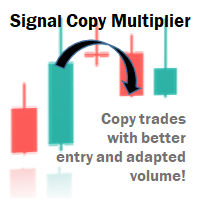
Signal Copy Multiplier automatically copies trades on the same account, for example, to get a better entry and adjusted volume on a subscribed signal. MT4-Version:  https://www.mql5.com/de/market/product/67412 MT5-Version:  https://www.mql5.com/de/market/product/67415 You have found a good signal, but the volume of the provider's trades is too small? With Signal Copy Multiplier you have the possibility to copy trades from any source (Expert Advisor, Signal, manual trades) and change the volume o
RSI Scanner
Tetyana Shcherba
Utility is designed to monitor and analyze the market conditions for all symbols of the MetaTrader 4 terminal using real-time data from the RSI indicator. Automatically detects all the pairs in your terminal, and also can filter them into groups. Gets the RSI indicator data for all timeframes and all selected pairs. Tracks up to 4 programmable signal patterns and notifies when they appear. Automatically opens a new chart for a given template when you click the desired pair in the table. Input p
Forex Trade Manager MT4
InvestSoft
4.98 (425)
Benvenuto a Trade Manager EA, lo strumento definitivo per la gestione del rischio , progettato per rendere il trading più intuitivo, preciso ed efficiente. Non è solo uno strumento per l'esecuzione degli ordini, ma una soluzione completa per la pianificazione delle operazioni, la gestione delle posizioni e il controllo del rischio. Che tu sia un principiante, un trader avanzato o uno scalper che necessita di esecuzioni rapide, Trade Manager EA si adatta alle tue esigenze, offrendo flessibilità s
Reverse copier is a tool that will open opposite buy/sell orders from your master account. It will help you with low profit EA's that lose consistenly and turn it to wins. Feel free to ask for new functions/features and I will add it. Now it's a simple MT5 to MT4 bridge with straightforward logic of one position open/close.  How to install: https://www.mql5.com/en/market/product/141604
FREE
Risk Commander
Adisorn Soodkanueng
Product Name: Risk Commander: Trade Assistant & Strategy Simulator Risk Commander is more than just a trade panel—it is a complete Manual Trading Ecosystem . It serves two powerful purposes: Live Assistant: Helps you execute trades with speed, precision, and perfect risk management in real-time markets. Training Simulator: Fully compatible with the Strategy Tester (Visual Mode) , allowing you to practice manual trading on historical data without risking a cent. NEW! Built-in Simulator Mode S
The Candlestick Pattern Detector is an advanced MetaTrader 4 indicator designed to identify and highlight candlestick patterns on your charts. Currently, the indicator detects one specific candlestick pattern - the pinbar, known for its significance in technical analysis and trading strategies. This tool provides traders with visual cues, making it easier to spot potential market reversals or continuations. Features: Customizable Colors: Users can customize the colors of the bullish and bearish
Three 3TP Easy Trade Pad Expert for MT4 – Download The 3TP Easy Trade Pad Expert is an advanced tool designed for capital management, risk control, and streamlined trading within the MetaTrader 4 (MT4) platform. With its functional and specialized interface, this expert advisor allows traders to effortlessly set and manage Stop Loss (SL) and Take Profit (TP) levels. In addition to simplifying trade execution, the tool provides features for defining acceptable risk, expected profit (R/R), and adv
Utility per la gestione automatica degli ordini e dei rischi. Ti permette di trarre il massimo dai profitti e limitare le tue perdite. Creato da un trader praticante per i trader. L'utilità è facile da usare, funziona con qualsiasi ordine di mercato aperto manualmente da un trader o con l'aiuto di consulenti. Può filtrare gli scambi per numero magico. L'utilità può funzionare con qualsiasi numero di ordini contemporaneamente. Ha le seguenti funzioni: 1. Impostazione dei livelli di stop loss
You can change the time period of the chart at the touch of a button. You can also change multiple charts at the touch of a button. You can also change multiple charts at the touch of a button, saving you the trouble of changing time periods. We are live-streaming the actual operation of the system. https://www.youtube.com/@ganesha_forex We do not guarantee your investment results. Investments should be made at your own risk. We sharll not be liable for any disadvantage or damage caused by th
Virtual Exchange Reserve Equity Monitor In an environment where exchanges offer increasingly high leverage ratios, it is all the more important for traders to tightly regulate their level of equity .  This software is designed to be run in the background on any virtual private server that can run Meta Trader 4/5.  It implements basic equity control functions ahead of the broker---allowing users to set their own equity trailing stop, an equity limit to lock-in a certain profit margin, and a unive
FREE
Gli utenti di questo prodotto hanno anche acquistato
Trade Assistant MT4
Evgeniy Kravchenko
4.42 (192)
It helps to calculate the risk per trade, the easy installation of a new order, order management with partial closing functions, trailing stop of 7 types and other useful functions. Additional materials and instructions Installation instructions   -   Application instructions   -   Trial version of the application for a demo account Line function -   shows on the chart the Opening line, Stop Loss, Take Profit. With this function it is easy to set a new order and see its additional characteris
The product will copy all telegram signal to MT4   ( which you are member  ) , also it can work as remote copier.  Easy to set up, copy order instant, can work with almost signal formats, image signal, s upport to translate other language to English Work with all type of channel or group, even channel have "Restrict Saving Content", work with  multi channel, multi MT5 Work as remote copier: with signal have ticket number, it will copy exactly via ticket number. Support to backtest signal. How to
Trade copier MT4
Alfiya Fazylova
4.58 (33)
Trade Copier è un'utilità professionale progettata per copiare e sincronizzare le transazioni tra conti di trading. La copiatura avviene dal conto/terminale del fornitore al conto/terminale del destinatario, che sono installati sullo stesso computer o vps. Prima di acquistare, puoi testare la versione demo su un account demo. Versione demo qui . Istruzioni complete qui . Funzionalità e vantaggi principali: Supporta la copia degli ordini: MT4> MT4, MT4> MT5, MT5> MT4, inclusi i conti di compensaz
Unlimited Trade Copier Pro
Vu Trung Kien
3.86 (7)
Unlimited Trade Copier Pro is a tool to copy trade remotely to multiple MT4, MT5 and cTrader accounts at different computers/locations over internet. This is an ideal solution for you if you are a signal provider and want to copy your trades to other receivers globally on your own rules. One provider can copy trades to multiple receivers and one receiver can get trade from multiple providers as well. The provider can even set the subscription expiry for each receiver, so that receiver will not b
Copy Cat More Trade Copier MT4 (Copia Gatto MT4) non è solo un semplice copiatore locale di operazioni; è un quadro completo di gestione del rischio ed esecuzione, progettato per le sfide del trading moderno. Dai challenge delle prop firm alla gestione dei conti personali, si adatta a ogni situazione grazie a una combinazione di esecuzione robusta, protezione del capitale, configurazione flessibile e gestione avanzata delle operazioni. Il copiatore funziona sia in modalità Master (mittente) che
Strategy Builder offers an incredible amount of functionality. It combines a trade panel with configurable automation (covert indicators into an EA), real-time statistics (profit & draw down) plus automatic optimization of SL, TP/exit, trading hours, indicator inputs. Multiple indicators can be combined into an single alert/trade signal and can include custom indicators, even if just have ex4 file or purchased from Market. The system is easily configured via a CONFIG button and associated pop-up
Trade Dashboard MT4
Fatemeh Ameri
4.96 (53)
Tired of complex order placement and manual calculations? Trade Dashboard is your solution. With its user-friendly interface, placing orders becomes effortless, by a single click, you can open trades, set stop loss and take profit levels, manage trade lot size, and calculate risk to reward ratios, allowing you to only focus on your strategy. Say goodbye to manual calculations and streamline your trading experience with Trade Dashboard. Download  Demo Version  right now. You can find  Details of
TradePanel MT4
Alfiya Fazylova
4.84 (89)
Trade Panel è un assistente commerciale multifunzionale. L'applicazione contiene più di 50 funzioni di trading per il trading manuale e consente di automatizzare la maggior parte delle operazioni di trading. Attenzione, l'applicazione non funziona nel tester di strategia. Prima dell'acquisto, puoi testare la versione demo su un conto demo. Versione demo qui . Istruzioni complete qui . Commercio. Ti consente di eseguire operazioni di trading con un clic: Apri ordini e posizioni pendenti con calco
Il MT4 to Telegram Signal Provider è uno strumento facile da usare e completamente personalizzabile che consente l'invio di segnali a Telegram, trasformando il tuo account in un fornitore di segnali. Il formato dei messaggi è completamente personalizzabile! Tuttavia, per un uso semplice, puoi anche optare per un modello predefinito e abilitare o disabilitare parti specifiche del messaggio. [ Dimostrativo ]  [ Manuale ] [ Versione MT5 ] [ Versione Discord ] [ Canale Telegram ]  New: [ Telegram To
CloseIfProfitorLoss with Trailing
Vladislav Andruschenko
4.87 (31)
Chiusura delle posizioni in MetaTrader 4 al raggiungimento del profitto/perdita totale con la funzione di trailing del profitto. Puoi abilitare le fermate virtuali (ordine separato) . Calcolo e chiusura per le posizioni ACQUISTA e VENDI separatamente (Separate BUY SELL) . Chiusura e calcolo di tutti i simboli o solo del simbolo corrente (Tutti i simboli) . Abilita il trailing per il profitto ( Trailing Profit ). Chiudi su profitti e perdite totali su valuta di deposito, punti, o percentuale del
News Filter EA MT4
Rashed Samir
5 (9)
News Filter EA: Advanced Algo Trading Assistant News Filter EA is an advanced algo trading assistant designed to enhance your trading experience. By using the   News Filter EA , you can integrate a Forex economic news filter into your existing expert advisor, even if you do not have access to its source code. In addition to the news filter, you can also specify   trading days   and   hours   for your expert. The News Filter EA also includes   risk management   and   equity protection   features
EchoTrade Telegram to MT4 Copier
Perpetual Chinemerem Vincent
5 (2)
EchoTrade Telegram to MT5 Copier Seamless, Instant, and Reliable Signal Copying - Direct from Telegram to MetaTrader 4! The product does not run in the strategy tester but you can get free trial version   here  for testing before purchase. Tired of manually executing trades from Telegram signals? EchoTrade automates the process, instantly copying trades from any Telegram channel or group directly into your MT5 account—accurately, efficiently, and without delay. Key Features: Universal Compatib
Grid Manual MT4
Alfiya Fazylova
4.71 (17)
Grid Manual è un pannello di trading per lavorare con una griglia di ordini. L'utilità è universale, ha impostazioni flessibili e un'interfaccia intuitiva. Funziona con una griglia di ordini non solo nella direzione delle perdite, ma anche nella direzione dell'aumento dei profitti. Il trader non ha bisogno di creare e mantenere una griglia di ordini, lo farà l'utilità. È sufficiente aprire un ordine e il manuale di Grid creerà automaticamente una griglia di ordini per esso e lo accompagnerà fino
Ultimate Extractor - Professional Trading Analytics for MT4 Ultimate Extractor transforms your MetaTrader 4 trading history into actionable insights with comprehensive analytics, interactive charts, and real-time performance tracking. Ability to combine multiple accounts and MT4 and MT5 into a single dashboard. What It Does Automatically analyzes your MT4 trading history across all Expert Advisors and generates detailed HTML reports with interactive visualizations. Tracks live performance metric
Take a Break
Eric Emmrich
5 (31)
The most advanced news filter on MQL market - free demo available Take a Break has transformed from a basic news filter into a comprehensive account protection solution. It seamlessly pauses any other Expert Advisors during news events or based on your custom filters, all while safeguarding your EA settings - restoring them automatically when trading resumes for complete peace of mind. Typical use cases: A single news filter for all your EAs. Stop trading during news/high volatility (+ close all
Discord To MT4 Receiver
Levi Dane Benjamin
5 (1)
Copia i segnali da qualsiasi canale di cui sei membro (   senza la necessità di un Token Bot o Permessi di Amministratore  direttamente nel tuo MT4. È stato progettato con l'utente in mente offrendo molte delle funzionalità di cui hai bisogno Questo prodotto è presentato in un'interfaccia grafica facile da usare e visivamente attraente. Personalizza le tue impostazioni e inizia ad utilizzare il prodotto in pochi minuti! Guida Utente + Demo  | Versione MT5 | Versione Telegram Se desideri provar
Trade Manager MT4 DaneTrades
Levi Dane Benjamin
4.09 (11)
Trade Manager per aiutarti a entrare e uscire rapidamente dalle operazioni calcolando automaticamente il tuo rischio. Incluse funzionalità che ti aiutano a prevenire l'eccessivo trading, il vendetta trading e il trading emotivo. Le operazioni possono essere gestite automaticamente e i parametri di performance del conto possono essere visualizzati in un grafico. Queste caratteristiche rendono questo pannello ideale per tutti i trader manuali e aiuta a migliorare la piattaforma MetaTrader 4. Suppo
Trading History MT4
Siarhei Vashchylka
5 (9)
Trading History - A program for trading and money management on the history of quotes in stratagy tester. It can work with pending and immediate orders, and is equipped with trailing stop, breakeven and take profit functions. Very good for training and testing different strategies. Manual (Be sure to read before purchasing) Advantages 1. Allows you to test any trading strategy in the shortest possible time 2. An excellent simulator for trading training. You can gain months of trading experience
The News Filter
Leolouiski Gan
5 (25)
Questo prodotto filtra tutti gli esperti consulenti e i grafici manuali durante il periodo delle notizie, così non dovrai preoccuparti di improvvisi picchi di prezzo che potrebbero distruggere le tue impostazioni di trading manuali o le negoziazioni effettuate da altri esperti consulenti. Questo prodotto viene fornito anche con un sistema completo di gestione degli ordini che può gestire le tue posizioni aperte e gli ordini in sospeso prima della pubblicazione di qualsiasi notizia. Una volta che
Everything for chart Technical Analysis indicator MT4 in one tool Draw your supply demand zone with rectangle and support resistance with trendline and get alerts to mobile phone or email alert -  Risk reward indicator Video tutorials, manuals, DEMO download   here .  Find contacts on my   profile . 1.   Extended rectangles and trendlines Object will be extended to the right edge of the chart when price will draw new candles on chart. This is rectangle extender or trendline extender. 2. Price to
Trade Reverse Copie4
Chukwuemeka Kingsley Anyanwu
Feel free to contact me for any extra features :) [SEE MT5 VERSION  https://www.mql5.com/en/market/product/128846 The Local Reverse Copier is an Expert Advisor designed to synchronize positions between a Master account and a Slave account with a twist: it reverses the trades. When a buy position is opened on the Master account, the EA opens a sell position on the Slave account, and vice versa. This allows for a unique form of trade copying where positions are mirrored in opposite directions bet
Automate your Trendsurfer trailing stop management - day and night With this Expert Advisor for Metatrader 4 you save time, avoid mistakes and trade more relaxed - specially developed for the Trendsurfer trading system. Always the right stop loss Fully automatic Simple to use Saves you time How it works 1. download the Expert Advisor and install it in Metatrader 4 (I will give you instructions on how to do this) 2. define your stop-loss rule 3. run your computer or VPS - the Expert Advisor
Magnifier Ruler Crosshair
Taras Slobodyanik
5 (2)
The indicator has three main tools: Magnifier (Zoom chart), Ruler  ( Time and Price scales ),   and Crosshair. You can move it all around with your mouse and customize different formats for  displaying , customize   size and color of each element. The Magnifier (zoom chart) allows you to display candles from any time frame and at different scales. Hotkeys: 'Q' - higher timeframe, 'A' - lower timeframe, 'W' - decrease candle size, 'S' - increase candle size, 'Z' - show/hide zoom chart You can
Copiatrice->Interazione dell'interfaccia comoda e veloce, gli utenti possono utilizzarla subito       ->>>> Si consiglia di utilizzarlo su computer Windows o VPS Windows Caratteristiche: Impostazioni di copy trading diversificate e personalizzate: 1. È possibile impostare diverse modalità di lotto per diverse fonti di segnale 2. È possibile impostare diverse fonti di segnale per il copy trading forward e reverse 3. I segnali possono essere impostati con commenti 4. Se calibrare il lotto in base
VirtualTradePad mt4 Extra
Vladislav Andruschenko
4.86 (59)
Pannello di trading per il trading in 1 clic.   Lavorare con posizioni e ordini!   Trading dal grafico o dalla tastiera. Utilizzando il nostro pannello di trading, puoi fare trading con un clic dal grafico ed eseguire operazioni di trading 30 volte più velocemente rispetto al controllo MetaTrader standard. Calcoli automatici di parametri e funzioni che semplificano la vita di un trader e lo aiutano a condurre le proprie attività di trading in modo molto più rapido e conveniente. Suggerimenti gra
Custom Alerts AIO: Monitora tutti i mercati — senza alcuna configurazione Panoramica Custom Alerts AIO è una soluzione di monitoraggio dei mercati pronta all’uso che non richiede alcuna configurazione. Tutti gli indicatori necessari — FX Power, FX Volume, FX Dynamic, FX Levels, IX Power — sono integrati internamente. Non vengono mostrati grafici, rendendolo ideale per generare alert in tempo reale in modo discreto ed efficiente. Supporta tutte le classi di asset offerte dal tuo broker: Forex,
Simple Assistant for Trading Precise  Risk Management in each Automatic Money Management Visual Trading Open Position Management User friendly and practical during 15 years of  considerable experience in stock market, we have dealt with many professional traders who have been used profitable and unrivalled methods in this market but failed in the long term. The reason is undoubtedly the lack of standard in their manner during their trade. Standard means the accurate repetition of a process….
EasyTrade MT4
Alain Verleyen
5 (1)
Easy Trade – Gestione Operativa Intelligente, Semplice e Potente Easy Trade è la soluzione tutto-in-uno per la gestione delle operazioni su MetaTrader, ideale per chi desidera mantenere il rischio sotto controllo e garantire un’esecuzione fluida. Progettato da zero con il feedback reale dei trader, Easy Trade rende semplice eseguire, monitorare e gestire operazioni su più simboli – senza complicare il tuo flusso di lavoro. Che tu faccia scalping manuale o gestisca un piccolo portafoglio di str
MT4 Professional Copy Trading System MT4 Professional Copy Trading System è un trade copier multi-account affidabile solo in modalità locale , pensato per fund manager, signal provider e trader professionisti che eseguono più terminali MT4 sullo stesso PC Windows . Consente la sincronizzazione in tempo reale delle operazioni tra un account Master e uno o più account Receiver , con allocazione flessibile dei lotti e funzionalità di protezione. Panoramica Il sistema è un copier locale : ogni az
Il Risk/Reward Tool è un Expert Advisor di livello professionale progettato per rivoluzionare il modo in cui pianifichi, visualizzi ed esegui le operazioni in MetaTrader 4. Che tu sia un trader discrezionale che apprezza una gestione precisa del rischio o uno sviluppatore di strategie che ha bisogno di testare visivamente le configurazioni di trading, questo strumento fornisce tutto ciò di cui hai bisogno in un'interfaccia elegante e intuitiva. A differenza dei calcolatori di posizione di base,
Altri dall’autore
Copier4Fee Advanced
Vladimir Tkach
4.75 (16)
The utility copies trades from the signal provider accounts (master accounts, one or multiple providers) to unlimited number of receiver accounts (slave accounts).  Attention! Y ou need to use identifiers (Provider number) of the same length if you use several master copiers. For example. 1, 2, 3 or 11, 13, 22. The copying can be set in the opposite direction. The comments with all the recently performed actions are displayed on the screen to monitor the utility actions in slave mode. To avoid p
LossLess Neuron
Vladimir Tkach
4 (7)
The Expert Advisor receives signals from an artificial neural network that uses the RSI indicator. Trades are closed by the opposite signals. Presence of a signal is checked at the closing of the bar. The EA also has the following functions: changing a position volume in proportion to the change in balance (function for the tester); transfer of unprofitable trades into breakeven; Parameters Start with lot - initial position volume increased in proportion to the balance change; Lotsize by balanc
FREE
The indicator analyzes the change in the minimum and maximum prices of the previous bars fixing the entrance of the big players. If the change (delta) increases, a signal is displayed on the graph in the form of an arrow. At the same time, virtual trade on history is carried out. In the free version, virtual trade is performed without refills in case of a repeat of the signal. The results of virtual trading in the form of losses / losses, profitability, drawdown and transaction lines are display
FREE
Plot results
Vladimir Tkach
4 (4)
The indicator displays on a chart trading results. You can configure the color and font of displayed results, as well as filter trades based on the magic number. If multiple trades were closed within one bar of the current timeframe, the result is summed and output in one value. Utility parameters Plot profit in - the format of output results: wither in deposit currency taking onto account commission and swap, or in points. Start from - start processing data at the specified time. Plot last dea
FREE
The indicator displays the trading statistics of the analyzed Market signal on the chart. Signal transaction data is presented in an excel (csv) file and can be taken from the Signal>Trading history ( Export to CSV:  History ). The copied file must be saved to the directory MT4>File>Open Data Folder>MQL4>Files.  Available color management and font output.  If the currency names are different on the Signal and User accounts, use the Prefix and Suffix parameters. Utility options Prefix at Signal -
FREE
The utility searches the price history looking for the pattern similar to the one within a specified interval. The length of a pattern and a specified interval is the same and set in bars. Similarity is estimated by comparing the bars' body colors, size and shadows. The subsequent price movement is displayed as lines for all detected patterns. The color of the lines defines the degree of similarity. The movement length is set as a number of bars. Search for patterns and visualization are perform
FREE
Plot Spread
Vladimir Tkach
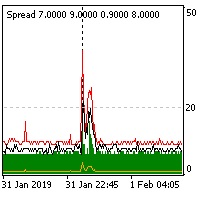
The indicator reads the current spread and displays it on the chart. The maximum value, the minimum value, the value at the time of opening the bar and the maximum value divided by 10 are displayed separately.  The indicator does not remember these values so the data will be lost if there is a change in the timeframe. The indicator is useful for analyzing market volatility, comparing the spread between brokers and different types of accounts. By default: Red line - maximum spread; Green bar -
FREE
Levels Work
Vladimir Tkach
This EA trades support/resistance levels which were placed by a trader (Trend Line from toolbar). The direction of a trade is set graphically by arrows: ↑ - buy; ↓ - sell; - buy or sell in case of crossing support/resistance level. The level is off if inconsistent directions were set, like: ↑↓, ↑, or ↓. If the price is lower than a level it is a resistance level. And opposite is true for support level. There are a few methods available for levels defining, for testing with visualization as
The Expert Advisor trades the signals from an artificial neural network. Network with one hidden layer. Presence of a signal is checked at the closing of the specified period, which significantly increases the optimization and testing speed. It differs from the previous version by a number of additional features: works with pending orders; subsequent trades are opened with a lot increased by the specified step; moves the trade to breakeven a specified time after it was opened; closes trades at t
The Expert Advisor trades the signals from an artificial neural network with one hidden layer. Presence of a signal is checked at the closing of the specified period. MAIN PARAMETERS Net option - setting the order grid. When placing a market (not pending, Pending order offset=0 ) order according to a signal, the grid order is set. The following direction are available: follow the trend , against the treand and both directions . The number of placed orders is taken from the ...maximum deals with
This utility searches the history for price patterns, which are similar to those present in the intervals selected by trader (there are several intervals, see the screenshot). The length of the pattern and selected intervals is the same and is given by the number of bars. The similarity is estimated by comparing the colors of bar bodies, sizes of bars' bodies and wicks. For all identified patterns, further movement of the price is visualized as lines. The color of lines determines the degree of
Follow Move
Vladimir Tkach
The Expert Advisor opens a trade in the direction of the previous price movement or in the opposite direction (selectable). The previous direction is determined based on the chosen time interval. The interval can be set to trading session hours and thus to check the theory that the price is inactive after session close. Multiple trades can be open at a time depending on input parameters. The Expert Advisor trails the stop loss order, and is provided with multiple breakeven and trade closing func
Trend Chaser
Vladimir Tkach
The Expert Advisor opens a trade in the specified direction at the specified time. If the price moves in the profit direction, additional trades are opened after a preset step. Trade are closed by a Stop Loss or upon reaching a target profit. The Expert Advisor trails the stop loss order, and is provided with multiple breakeven and trade closing functions (See the description of the parameters). Test and optimize the EA in the Tester using M1 open prices. The EA parameters can be controlled via
The indicator calculates the number of times the price crossed the levels and bounced off the levels in history. The levels are defined by horizontal lines (Horizontal lines element from the Toolbar). In the free version, the levels are set manually. To calculate the number of crosses and rebounds, the indicator uses the specified tolerance to touching a level. This tolerance is sensitive to the timeframe of the bars. For example: for M5 use a tolerance about 10 pips, for М30 - 30 pips, for D1 -
The indicator calculates the historic price statistics: the number of intersections of a level and the number of rollbacks. The levels are set as horizontal lines (the 'Horizontal lines' element on the Toolbar) manually, are are drawn automatically by the indicator with the specified step. Only strong levels are drawn in the automated mode. There are two options for the automated mode: 1. Strong levels of intersection and support/resistance; 2. Strong support/resistance levels. The indicator use
The indicator analyzes the change in the minimum and maximum prices of the previous bars fixing the entrance of the big players. If the change (delta) increases, a signal is displayed on the graph in the form of an arrow. At the same time, virtual trade on history is carried out. In case of a repeat of the signal, the positions are increased (refilling). Thus the lot of positions can differ. The results of virtual trading in the form of losses / losses, profitability, drawdown and transaction li
Lucky Shot
Vladimir Tkach
The cut release of Top Signals Strategy EA for less price. With default parameters EA works in Assian session and scalps market. EA opens trades by RSI indicator signals in a specified time interval. In the case of a repetition of the signal opens a unidirectional transaction. The number of transactions per day can be limited. Revolves trades on the opposite signal. Displays information on trade and its results. Also you can set virtual stop loss and take profit. Telegram channel for discation p
The cross-correlation indicator calculates the relationship between the specified pairs for the previous period. Automatically selects the instruments with the highest and the lowest correlation, and then simulates trading on the selected pairs on the same test period. Then indicator displays the pairs that have shown the best trading results. Visualizes the PAC (Pairs Arbitrage Correlation) criterion for the pairs selected by the trader. The signal to open trades is set by the PAC levels. When
PAC man
Vladimir Tkach
EA trades pairs selected by correlation criterion. The choice is made in such a way that there are pairs with negative and neutral correlation to the main pair. The PAC indicator is used to automate the selection of pairs  https://www.mql5.com/en/market/product/41985 Expert is multycurrency, thus it is no use to test it in the MT4 terminal. So, watch for real signal and joing to telegram channel. After setting the pairs, the expert Advisor simulates trading for the previous period with visualiz
Junior PAC man
Vladimir Tkach
Simplified release of PACman EA. Expert is multycurrency, thus it is no use to test it in the MT4 terminal. So, watch for real signal and joing to telegram channel. After setting the pairs, the expert Advisor simulates trading for the previous period with visualization of the results. The user can interactively change the signal levels and observe their impact on the simulation result. In this way, you can select the optimal level values. By manually moving the vertical boundary lines to the ri
Dublicator
Vladimir Tkach
Simple and fast trade duplicator that copies trades on the same account with the reverse function. The reverse can be used for locking. You can choose to duplicate transactions for the current or all instruments.  Parameters Duplicate in reverse - the direction of duplication; Duplicate symbol - duplicate the selected tool; Manual lot size - hand size of the volume; Do not duplicate if spread > - do not duplicate a trade if the current spread is larger; List of magic to be duplicated - filte
Time Cursors
Vladimir Tkach
Indicator shows the price history. The history is read for vertical lines and output for the main line. Those lines are the time cursors. You can use the indicator to analyze the price cycle over time, thereby predicting its movement. The duration of the forecast and the number of time cursors can be set in the indicator parameters. Additionally, you can link the main line to a new bar. Lines can be moved manually. Analyze the cyclical nature of the market using this indicator. Indicator para
What If
Vladimir Tkach
This expert Advisor uses the saved trading history to repeat trades in the strategy tester. Meanwhile you can set other values for take profit, stop loss, and closing time. Thus, you can check how the results of trading with other parameters would look like. The best set of parameters can be obtained using the strategy optimizer in the MT4 terminal. In addition, you can find out how the results of trading would be affected by the later opening of trades when the price went to the loss side. You
Filtro:
Martin Strachota
360
Martin Strachota 2023.01.07 16:18 
 

L'utente non ha lasciato alcun commento sulla valutazione.

Erwin Ronnie Merino Obando
167
Erwin Ronnie Merino Obando 2023.01.04 18:45 
 

L'utente non ha lasciato alcun commento sulla valutazione.

Al Farhan Saeed Abdullah
746
Al Farhan Saeed Abdullah 2022.11.14 08:43 
 

L'utente non ha lasciato alcun commento sulla valutazione.

futurebusiness789
103
futurebusiness789 2022.09.18 19:45 
 

L'utente non ha lasciato alcun commento sulla valutazione.

Vladimir Tkach
23713
Risposta dello sviluppatore Vladimir Tkach 2022.09.19 19:03
5 activations limit is set by this market. I can't change it to only 1.
Have a look at the description: Utilities Vladimir Tkach Version: 6.2 Updated: 21 April 2021 Activations: 5
Muhammad Hasnain
588
Muhammad Hasnain 2022.09.13 15:39 
 

L'utente non ha lasciato alcun commento sulla valutazione.

Vladimir Tkach
23713
Risposta dello sviluppatore Vladimir Tkach 2022.09.13 16:12
There is no option for mt5
noiseofrain
106
noiseofrain 2022.08.05 14:10 
 

L'utente non ha lasciato alcun commento sulla valutazione.

Vladimir Tkach
23713
Risposta dello sviluppatore Vladimir Tkach 2022.08.05 15:27
Это есть в платной версии. Можно размер задать пропорционально балансу, а можно мультипликатор сделать меньше единицы.
Aleksei Platonov
133
Aleksei Platonov 2022.05.10 08:23 
 

L'utente non ha lasciato alcun commento sulla valutazione.

Vladimir Tkach
23713
Risposta dello sviluppatore Vladimir Tkach 2022.05.10 10:21
Спасибо за отзыв. Эта опция есть в платном копировщике.
Vitalii Vilnyi
157
Vitalii Vilnyi 2022.04.15 14:02 
 

L'utente non ha lasciato alcun commento sulla valutazione.

Vladimir Tkach
23713
Risposta dello sviluppatore Vladimir Tkach 2022.04.15 14:51
В платной версии есть такая функция и много других.
lil vip
18
lil vip 2022.03.14 02:17 
 

L'utente non ha lasciato alcun commento sulla valutazione.

СанСаныч Фоменко
7885
СанСаныч Фоменко 2022.02.18 16:04 
 

L'utente non ha lasciato alcun commento sulla valutazione.

abeefx
14
abeefx 2022.02.09 10:19 
 

L'utente non ha lasciato alcun commento sulla valutazione.

Al Rizqi
38
Al Rizqi 2022.02.02 10:21 
 

L'utente non ha lasciato alcun commento sulla valutazione.

Nivin Swing Trader
169
Nivin Swing Trader 2022.01.27 20:14 
 

L'utente non ha lasciato alcun commento sulla valutazione.

Dmitrii Rudzon
118
Dmitrii Rudzon 2022.01.25 06:52 
 

L'utente non ha lasciato alcun commento sulla valutazione.

FXHEET
24
FXHEET 2021.10.02 08:18 
 

L'utente non ha lasciato alcun commento sulla valutazione.

Vladimir Tkach
23713
Risposta dello sviluppatore Vladimir Tkach 2021.10.02 19:36
You are not allowed to advertise any products. Complain about violation was written.
It is weekends. Wait until market will be opened and try egaine.
Harryy
154
Harryy 2021.10.01 18:45 
 

L'utente non ha lasciato alcun commento sulla valutazione.

Ardiwan Okta Firgiyanto
258
Ardiwan Okta Firgiyanto 2021.09.24 13:17 
 

L'utente non ha lasciato alcun commento sulla valutazione.

Uladzimir Kuzuyok
133
Uladzimir Kuzuyok 2021.09.21 09:54 
 

L'utente non ha lasciato alcun commento sulla valutazione.

Vladimir Tkach
23713
Risposta dello sviluppatore Vladimir Tkach 2021.09.21 11:14
Есть такой параметр
Slippage & Price difference (in pips) – допустимая величина проскальзывания (в пунктах) и допустимая разница в цене.
Mikhail Bystrov
121
Mikhail Bystrov 2021.09.11 10:35 
 

L'utente non ha lasciato alcun commento sulla valutazione.

Vladimir Tkach
23713
Risposta dello sviluppatore Vladimir Tkach 2021.09.11 11:06
На компьютере получателе открываете терминал и подключаетесь к мастер счету через пароль инвестора. Запускаете на нем копировщих в режиме master. Потом запускаете другой терминал там же и открываете на нем счет с паролем трейдера. Запускаете на нем копировщика в режиме slave.
Do Tran Tien
164
Do Tran Tien 2021.08.20 03:47 
 

L'utente non ha lasciato alcun commento sulla valutazione.

Rispondi alla recensione