
CAP Trade Pad EA MT5
- Utilità
- Mohammad Ali
- Versione: 4.7
- Aggiornato: 4 giugno 2025
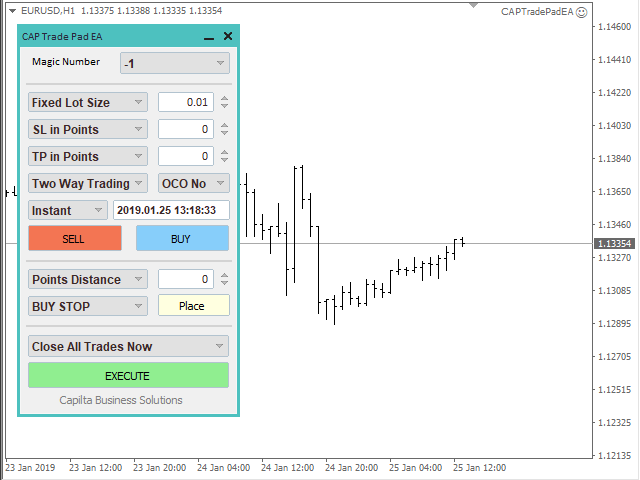
Trade easily from the chart with CAP Trade Pad EA. It handles risk management for you and can perform several useful tasks with your existing trades.
- Trade easily from the chart
- Trade with precise risk management hassle free
- Set your desired stop loss and take profit levels
- Close all existing trades with a single click
- Delete all pending orders with a single click
- Reap partial profits with a single click
- It has no input parameters
How to Use
Please Read this blog - Details Information in our blog page
Inputs
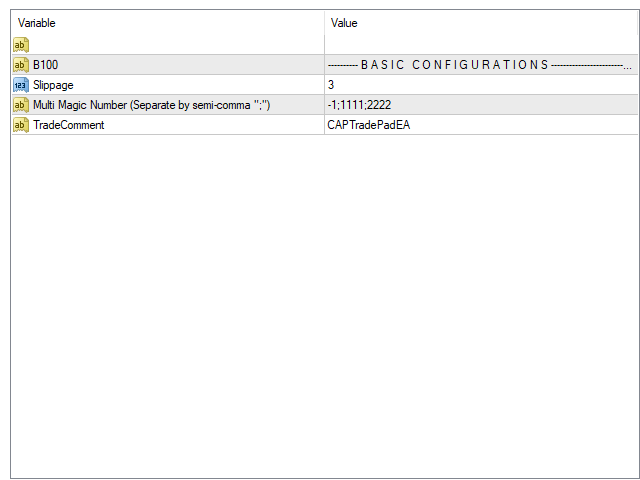
- BASIC CONFIGURATIONS
- Slippage: Set slippage of the trade.
- Multi Magic Number: Set multiple magic number separate by semicolon ";". Example- You want to open trade two different magic like 1111 and 2222 then set input here like 1111;2222. So on trade panel it will show two different magic on combo box, so when you open trade just select the magic number.
Magic number with -1 mean EA will not use magic number, EA control all trade.
Ready to Unlock Full Access?
Become a Lifetime Member with a one-time purchase — get unlimited access to all EAs & Indicators for free, forever, more details click here.
Official Channel
To get product news, setting files, and free indicators, please subscribe to our Official Channel.
Author
Mohammad Ali, technical analyst and speculator, software engineer and founder of Capilta Business Solutions.


























































Excellent for what I need. Simple and effective to quickly place orders with certain values, without relying too much on the mouse. What I would like to see: 1. a "Set BE" action, to set SL to Price entry point. Nothing fancy, nothing automated (although that would be nice as well), but manually Set BE for all orders when I choose to. 2. trailing stops 3. virtual SL and TP 4. allow the option to choose the default for SL, TP and entry price for pending orders (e.g. SL Exact Price instead of SL in Points) on the Inputs table 5. keep the input values when changing the time frame, currently they get reset. It is not optimum to re-entry the values and re-select the SL and TP types every time the time frame is changed.