MKLineCharts
- Indicatori
-
Shi Yuan Wang
 Sviluppo indicatori personalizzati, Expert Advisor (EA), script e strumenti di trading per MetaTrader 4 e MetaTrader 5, nonché indicatori per TradingView (Pine Script).
Cosa posso fare per te: - Versione: 1.5
Overview
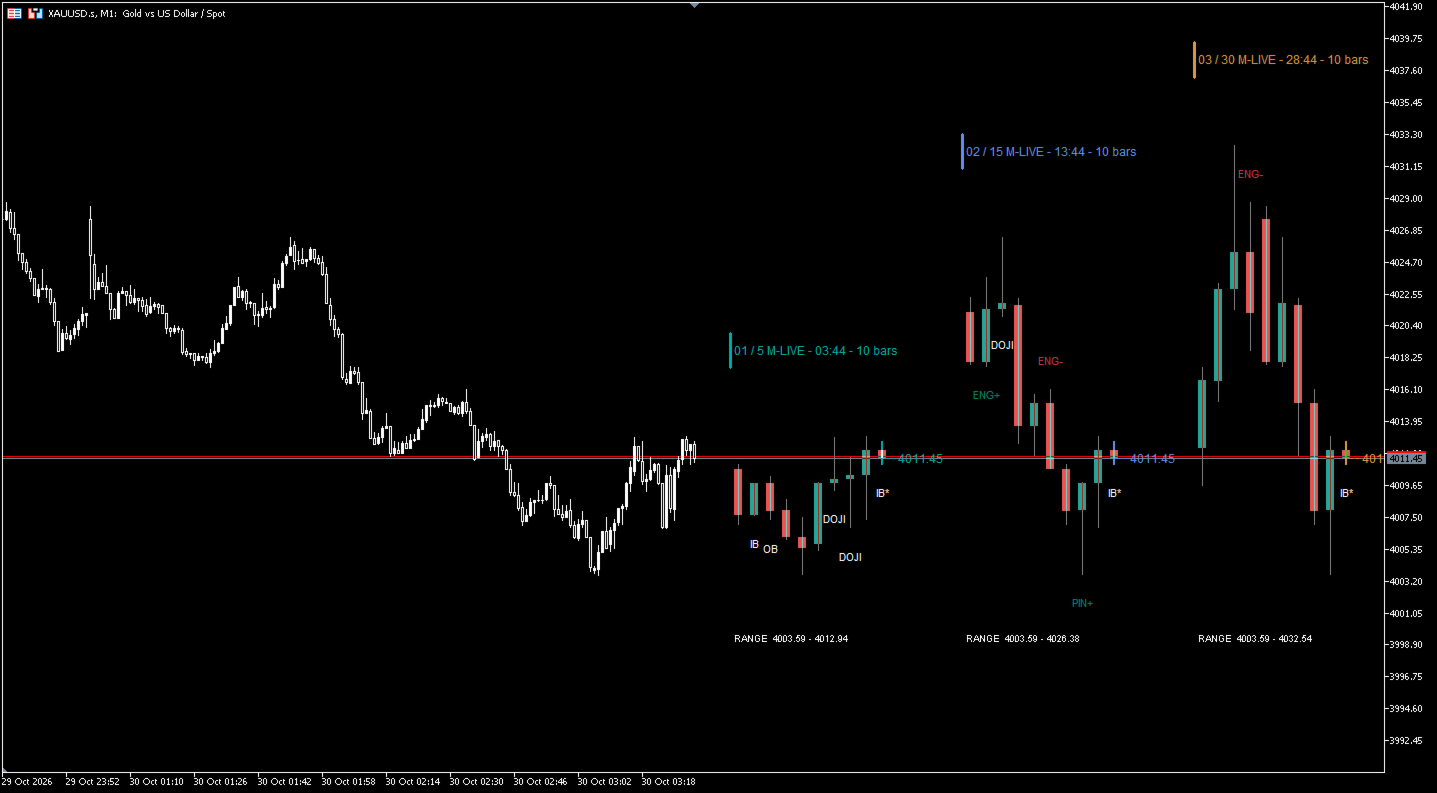
MKLineCharts turns the empty area on the right of your chart into a compact multi-timeframe dashboard. Instead of opening three extra charts or pressing the timeframe buttons again and again, you keep your trading timeframe on the screen and read the higher (or lower) timeframes right next to the current price.
Everything is drawn on the chart's real price scale, so the panels are price-aligned with your main candles: you can literally see whether the current M5 push is running into an M15 pin bar high, or whether the H1 candle is about to close as a bullish engulfing.
The indicator is a pure visualization and analysis aid. It does not open, close or manage trades, it does not send trading signals, and it makes no promises about results. It simply puts the information you already use side by side, where you can see it.
Key Features
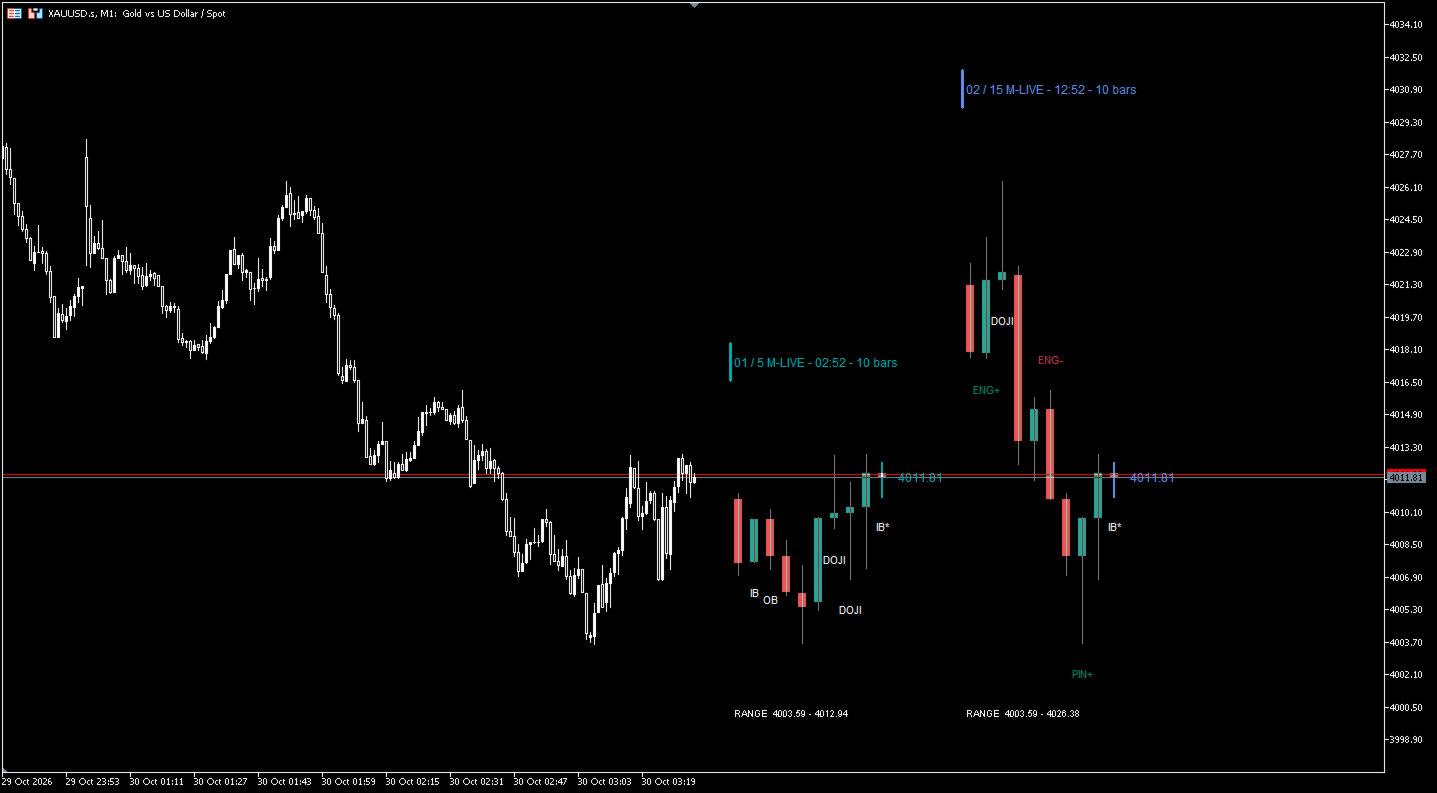
Multi-timeframe panels
- Up to 3 independent panels on one chart, each with its own timeframe.
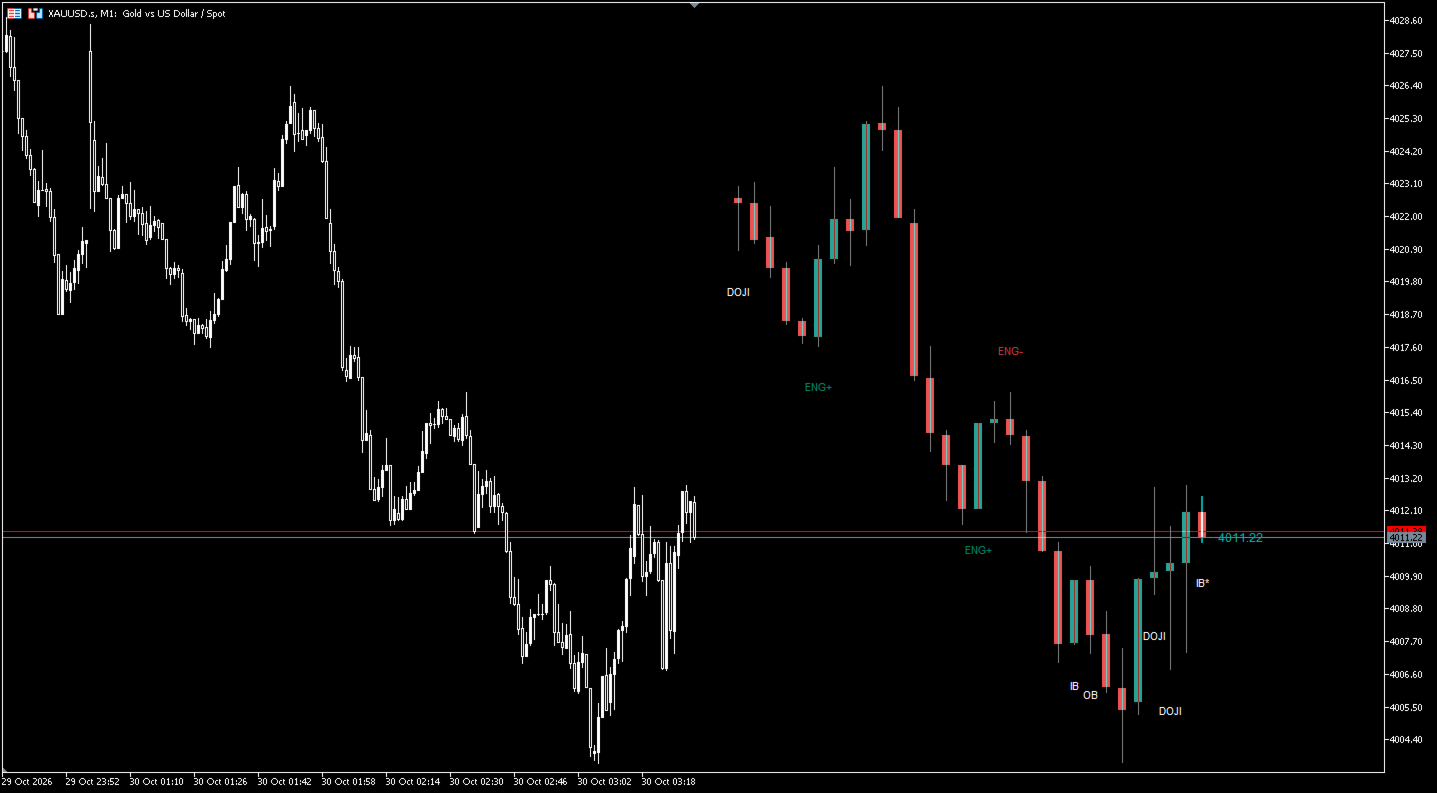
- Any standard MT5 timeframe is supported, from M1 to MN1. Selecting PERIOD_CURRENT makes a panel follow the chart timeframe.
- 3 to 30 candles per panel (default 10). The forming candle of every panel updates in real time.
- Panels are drawn on the chart's actual price scale, so price levels are directly comparable across timeframes.
Live price and countdown
- Each panel shows the latest price of its timeframe as a dotted connector plus a price label that follows the market tick by tick.
- The panel header shows whether the current candle is LIVE or CLOSED , and counts down the remaining time to the close ( mm:ss , extended to hh:mm:ss and days for slower timeframes). The countdown refreshes once per second.
- Optional high/low range readout for the displayed candles of each panel.
Automatic price action marks
- Recognized and labeled directly under/over the candle:
- ENG+ / ENG- — bullish / bearish engulfing
- PIN+ / PIN- — bullish / bearish pin bar
- IB — inside bar
- OB — outside bar
- DOJI — doji
- Each pattern type can be switched on or off individually.
- Bullish and bearish patterns are colored differently for instant reading.
- By default only confirmed (closed) candles are marked. Enable Include the unclosed candle to see provisional marks as well — those are shown with an asterisk so you always know they can still change.
- The latest candle of each panel can be highlighted with the panel accent color.
Tooltips instead of clutter
- Hovering any candle shows its Open / High / Low / Close and opening time.
- Hovering a pattern mark shows the pattern name, whether the candle is already closed, and the candle's OHLC and time.
- Panel headers carry a tooltip with the symbol, timeframe and the number of loaded bars.
Looks right on any chart
- Candle colors adapt automatically to a light or dark chart theme, so the panels never clash with your template.
- Text color follows the chart foreground by default, or you set your own.
- Every color is fully customizable: bullish/bearish bodies, wicks, bullish/bearish price action, and a separate accent color per panel.
- Font is selectable.
Built to be left running
- Tick processing is throttled and only the objects that actually change are updated; a full redraw happens on a new bar.
- Objects are reused, and anything left over is cleaned up automatically.
- The required free space on the right of the chart (chart shift) is reserved and managed automatically. The setting is reference-counted, so several instances on the same chart do not fight over it, and your original chart shift is restored when the indicator is removed.
- Several instances can be attached to the same chart if you want more than three timeframes.
- All objects are created with a unique prefix, so multiple instances never overwrite each other.
- No DLLs, no external files, no internet access required. A single indicator file, working on any symbol — Forex, metals, indices, crypto and stock CFDs.
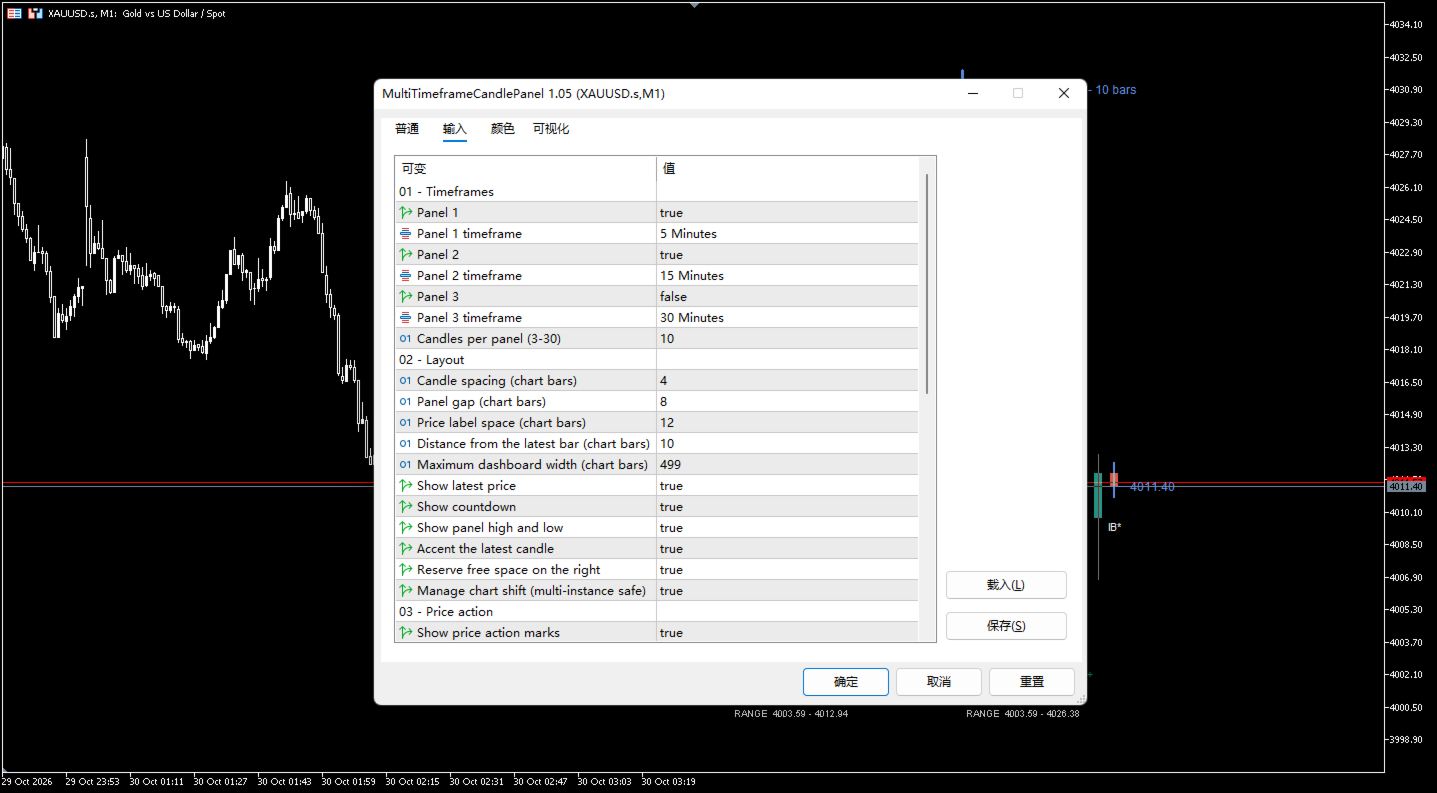
Input Parameters
01 — Timeframes
Parameter | Default | Range / Options | Description |
|---|---|---|---|
Panel 1 / Panel 2 / Panel 3 | true / true / true | true, false | Enable or disable each panel |
Panel 1 timeframe | M5 | any MT5 timeframe | Timeframe shown in panel 1 ( PERIOD_CURRENT = chart timeframe) |
Panel 2 timeframe | M15 | any MT5 timeframe | Timeframe shown in panel 2 |
Panel 3 timeframe | M30 | any MT5 timeframe | Timeframe shown in panel 3 |
Candles per panel | 10 | 3 – 30 | Number of candles drawn in every panel |
02 — Layout
Parameter | Default | Range | Description |
|---|---|---|---|
Candle spacing (chart bars) | 4 | 3 – 8 | Horizontal distance between two candles |
Panel gap (chart bars) | 8 | 4 – 30 | Space between two panels |
Price label space (chart bars) | 12 | 8 – 16 | Space reserved for the price label on the right of a panel |
Distance from the latest bar (chart bars) | 10 | 3 – 100 | Gap between the last chart bar and the first panel |
Maximum dashboard width (chart bars) | 499 | 100 – 2000 | Total width the dashboard may occupy; the spacing shrinks automatically if needed |
Show latest price | true | true, false | Price label and dotted connector per panel |
Show countdown | true | true, false | Remaining time to the close of the current bar |
Show panel high and low | false | true, false | Range readout under each panel |
Accent the latest candle | true | true, false | Highlight the forming candle with the panel accent color |
Reserve free space on the right | true | true, false | Enable chart shift so the panels have room |
Manage chart shift (multi-instance safe) | true | true, false | Let the indicator set and restore the chart shift automatically |
03 — Price action
Parameter | Default | Range | Description |
|---|---|---|---|
Show price action marks | true | true, false | Master switch for all pattern labels |
Include the unclosed candle (marked with *) | false | true, false | Also mark the forming candle; such marks get an asterisk |
Engulfing | true | true, false | Detect engulfing candles |
Pin bar | true | true, false | Detect pin bars |
Inside bar | true | true, false | Detect inside bars |
Outside bar | true | true, false | Detect outside bars |
Doji | true | true, false | Detect doji candles |
Pin: minimum long wick divided by body | 2.0 | 1.5 – 5.0 | Higher = stricter, fewer pin bars |
Doji: maximum body divided by range | 0.10 | > 0 – 0.30 | Lower = stricter, fewer doji |
04 — Colors and font
Parameter | Default | Description |
|---|---|---|
Adapt candle colors to chart | true | Auto-select bull/bear/wick colors for light or dark charts |
Bullish body | teal | Used only when theme colors = false |
Bearish body | red | Used only when theme colors = false |
Wick color | gray | Used only when theme colors = false |
Match text to the chart theme | true | Take the text color from the chart foreground |
Custom text color | dim gray | Used only when auto text = false |
Bullish price action | green | Color of bullish pattern labels |
Bearish price action | red | Color of bearish pattern labels |
Panel 1 / 2 / 3 accent | teal / blue / amber | Header, countdown, latest candle and price label of each panel |
Font | Arial | Font used for all panel text |
How to Use
- Attach MKLineCharts to any chart (drag it from the Navigator, or install it from the Market tab).
- Pick the timeframes you want in 01 — Timeframes . A typical trend-following setup on an M5 chart is M15 / M30 / H1; a scalper on M5 might prefer M1 / M5 / M15.
- Set Candles per panel — 8 to 12 is enough for most styles, 20 to 30 if you want to read a full swing.
- Adjust the layout if the panels feel cramped or too wide: increase Candle spacing for a roomier look, or reduce Maximum dashboard width on small screens.
- Turn the pattern types you actually trade on or off, and tune Pin ratio / Doji ratio to your own definition of those candles.
- Leave Reserve free space on the right and Manage chart shift enabled — this is what keeps the dashboard clear of the current bar.
Reading the panel
- Header line: panel number, timeframe, LIVE or CLOSED , countdown, and number of loaded bars.
- Candles: same color logic as your chart, forming candle accented.
- Labels below/above candles: price action patterns; an asterisk means the candle is not closed yet.
- Right side: latest price of that timeframe.
Requirements and Notes
- The indicator needs history for the selected timeframes. If a server does not provide data for a timeframe, that panel shows NO DATA and fills in as soon as the history is available. Nothing to configure — just wait or switch the symbol/timeframe once.
- The dashboard is drawn in the future area on the right of the chart. It relies on the chart's right shift; the indicator sets it up and restores your previous value on removal. If you switch Manage chart shift off, you have to reserve that space yourself.
- For intraday timeframes, the future time axis skips weekends, so the panels stay aligned after the Friday close.
- Works on any symbol and any chart timeframe, in any account type (netting and hedging).
- Can be used together with Expert Advisors and other indicators; it only draws objects and never touches trading functions.
Disclaimer
MKLineCharts is a visualization and chart-analysis tool. The pattern labels are a convenience for manual analysis, not trading signals and not investment advice. Price action patterns do not predict future prices. Trading financial markets involves substantial risk — always test on a demo account first and trade with money you can afford to lose.