LiquidX Hunter
- Experts
- Versione: 2.21
- Aggiornato: 16 settembre 2026

Overview
LiquidX Hunter è un Expert Advisor breakout costruito attorno ai livelli di liquidità del Canale di Donchian, che combina il filtraggio della volatilità basato su ATR con un take profit percentuale e un filtro di recupero post-perdita. Progettato e testato su XAUUSD, H1, mira a breakout direzionali puliti evitando di rientrare in un mercato che non si è ancora allontanato da una recente operazione in perdita.
How it works
- L'EA traccia il massimo e il minimo più alti su un periodo di lookback Donchian configurabile.
- Un'operazione si apre quando il prezzo supera il canale di un offset in punti definito — acquisto sopra il livello superiore, vendita sotto il livello inferiore.
- Lo stop loss viene posizionato usando un moltiplicatore ATR, adattandosi alla volatilità attuale invece di una distanza fissa.
- Il take profit è impostato come percentuale del prezzo di entrata.
- Un trailing stop ATR opzionale può bloccare il profitto man mano che l'operazione si sviluppa, attivandosi solo al raggiungimento di una soglia minima di profitto in ATR, e non viene mai inviato se finirebbe troppo vicino al mercato o a un take profit esistente.
- Dopo un'operazione in perdita, l'EA attende che il prezzo si sia allontanato di una percentuale minima dall'entrata in perdita prima di consentire un nuovo segnale, filtrando le entrate di vendetta immediate.
- Un filtro spread blocca le entrate quando lo spread attuale supera un massimo definito, evitando aperture gap e condizioni di liquidità anomale.
- Il dimensionamento della posizione si basa sul rischio (% del saldo del conto), con controlli di margine e limite di volume del broker prima di ogni ordine.
Inputs
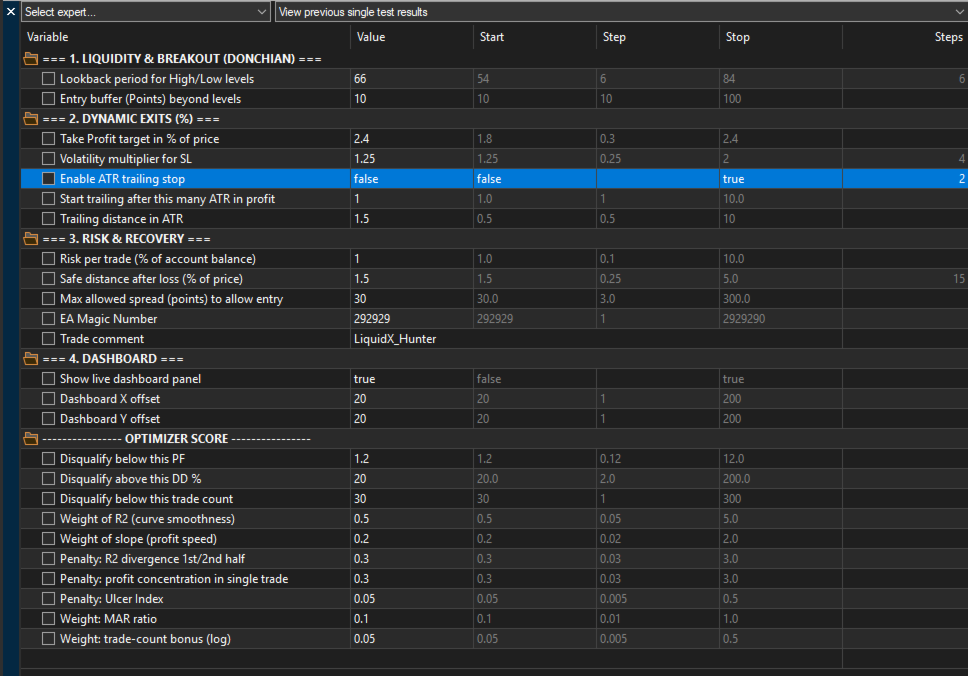
- Donchian Lookback Period: numero di barre usate per calcolare il canale di breakout
- Entry Buffer (Points): distanza oltre il livello del canale richiesta per confermare un breakout
- Take Profit (%): profitto obiettivo come percentuale del prezzo di entrata
- Stop Loss ATR Multiplier: moltiplicatore di volatilità applicato all'ATR per la distanza dello stop loss
- Enable ATR Trailing Stop: attiva il modulo di trailing stop
- Trailing Start (ATR): profitto in multipli di ATR richiesto prima dell'inizio del trailing
- Trailing Step (ATR): distanza mantenuta tra il prezzo e il trailing stop
- Base Risk (%): rischio per operazione come percentuale del saldo del conto
- Recovery Distance (%): movimento minimo di prezzo lontano da un'entrata in perdita prima di consentire il rientro
- Max Spread (Points): spread massimo consentito per una nuova entrata
- Magic Number: identificatore univoco delle operazioni di questo EA
- Trade Comment: etichetta allegata a ogni ordine
- Show Dashboard: attiva il pannello live sul grafico
- Dashboard X / Y Offset: posizione del pannello sul grafico
Optimizer scoring system
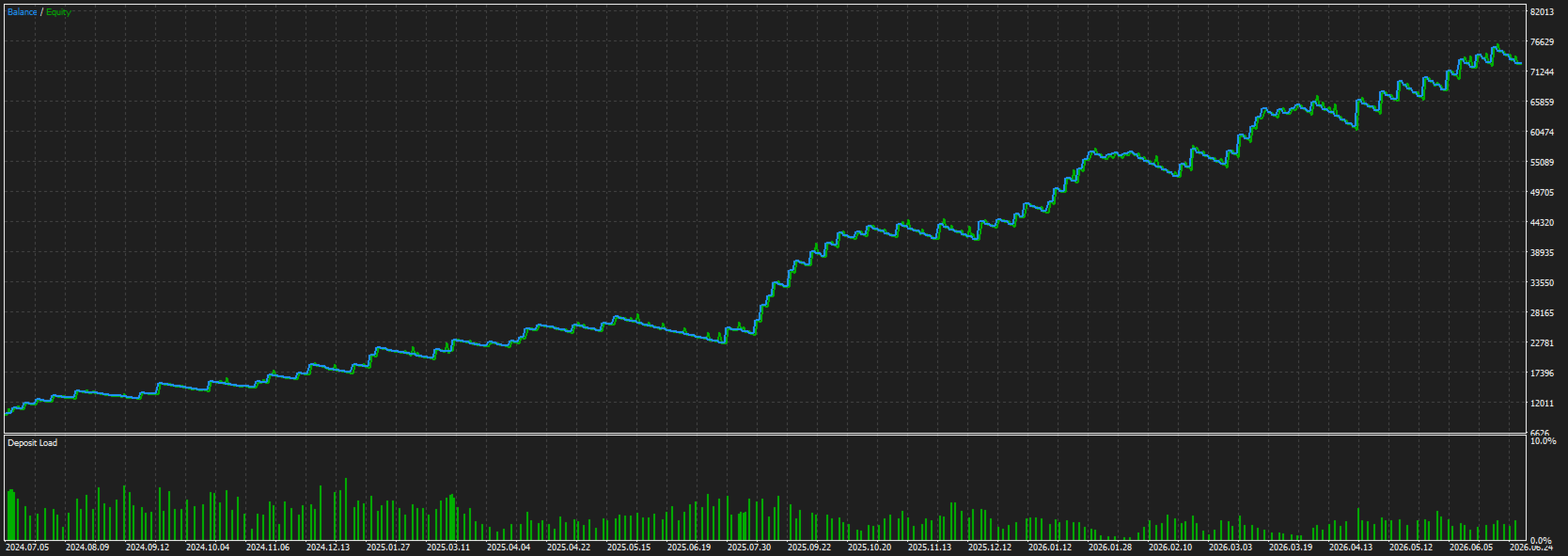
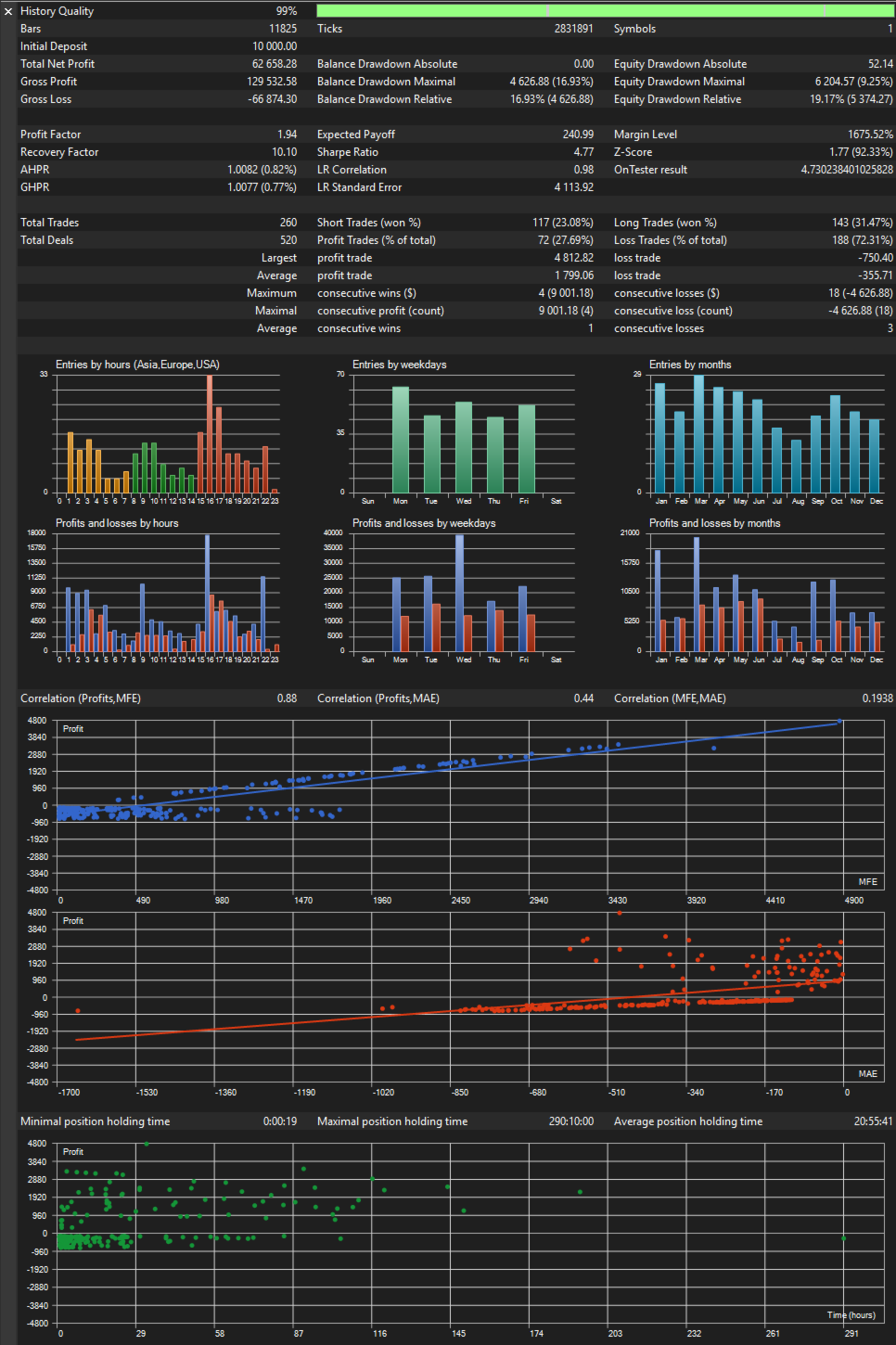
LiquidX Hunter include una funzione di punteggio OnTester personalizzata progettata per contrastare il curve-fitting durante l'ottimizzazione. Invece di classificare i risultati per profitto netto grezzo, valuta la curva di equity per levigatezza (R²), velocità di profitto (pendenza), stabilità tra la prima e la seconda metà del test (divergenza R² split), concentrazione del profitto in una singola operazione (penalità di skew), profondità e durata del drawdown (indice Ulcer), efficienza del capitale (rapporto MAR) e affidabilità del numero di operazioni. Le esecuzioni con profitto negativo, fattore di profitto insufficiente, drawdown eccessivo o troppo poche operazioni vengono automaticamente squalificate prima della valutazione.
Impostare il Criterio di Ottimizzazione su Custom max per utilizzare questo sistema di punteggio.
Recommended setup
- Simbolo: XAUUSD
- Timeframe: H1
- Modellazione: 1 Minuto OHLC per le passate di ottimizzazione, Every Tick per la conferma finale e l'uso live
- Si raccomanda un VPS a bassa latenza verso il proprio broker per un'esecuzione coerente
Screenshots
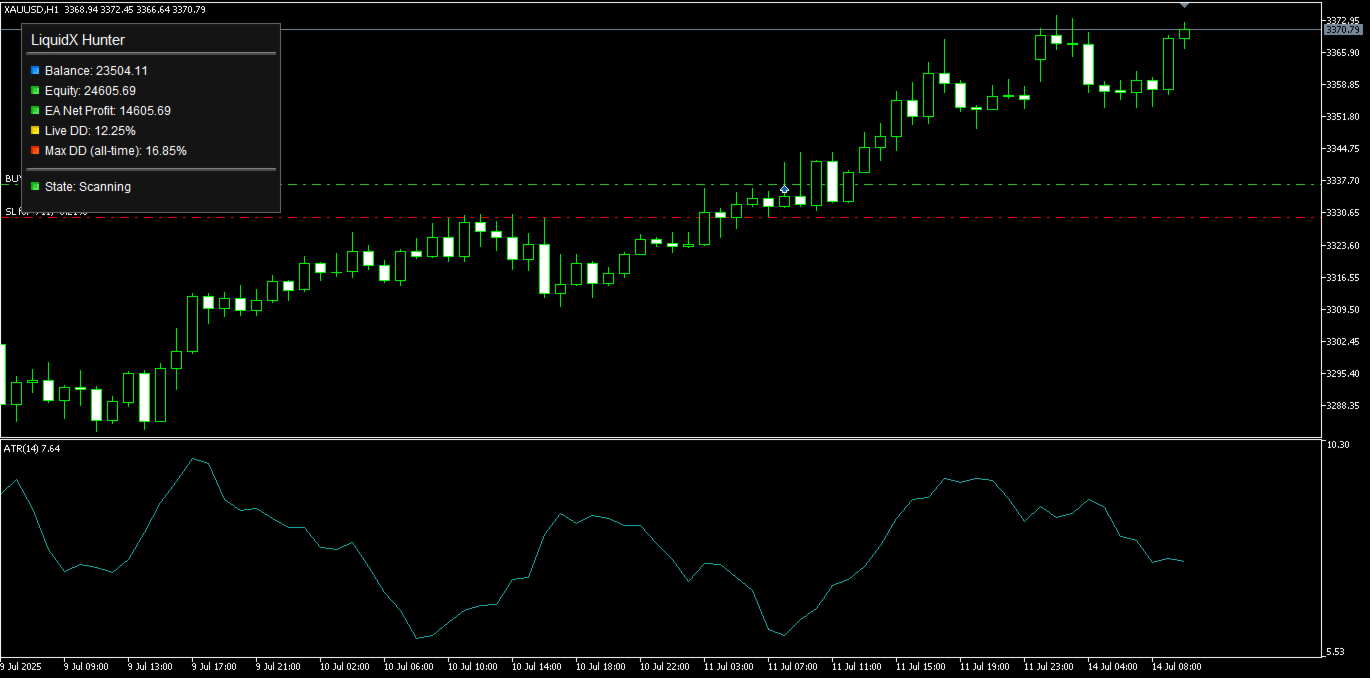
Esempio di grafico live su XAUUSD H1 che mostra il pannello sul grafico (saldo, equity, profitto netto dell'EA, drawdown live e massimo storico, stato) accanto all'indicatore ATR(14) usato per i calcoli di stop loss e trailing.
Disclaimer
Le performance passate mostrate in backtest e screenshot non garantiscono risultati futuri. Testare accuratamente su un conto demo prima della distribuzione live. Il trading comporta un rischio di perdita; usare un dimensionamento della posizione appropriato per il proprio conto.