Stacked MATR Planner
- Utilità
- Versione: 1.0

visual trade planner for MetaTrader 5. It draws multi-timeframe ATR reward and stop zones on the chart so you can judge distance and payoff before you place the trade yourself. It does not send, modify, or close orders.
Motive
A single ATR on the chart timeframe often hides the larger and smaller ranges a trade is actually working against. This EA stacks three take-profit slices, each from its own timeframe, period, and multiplier, then places an ATR stop and an optional fixed stop beside them. Buy and Sell only choose the direction of the drawing.
Purpose
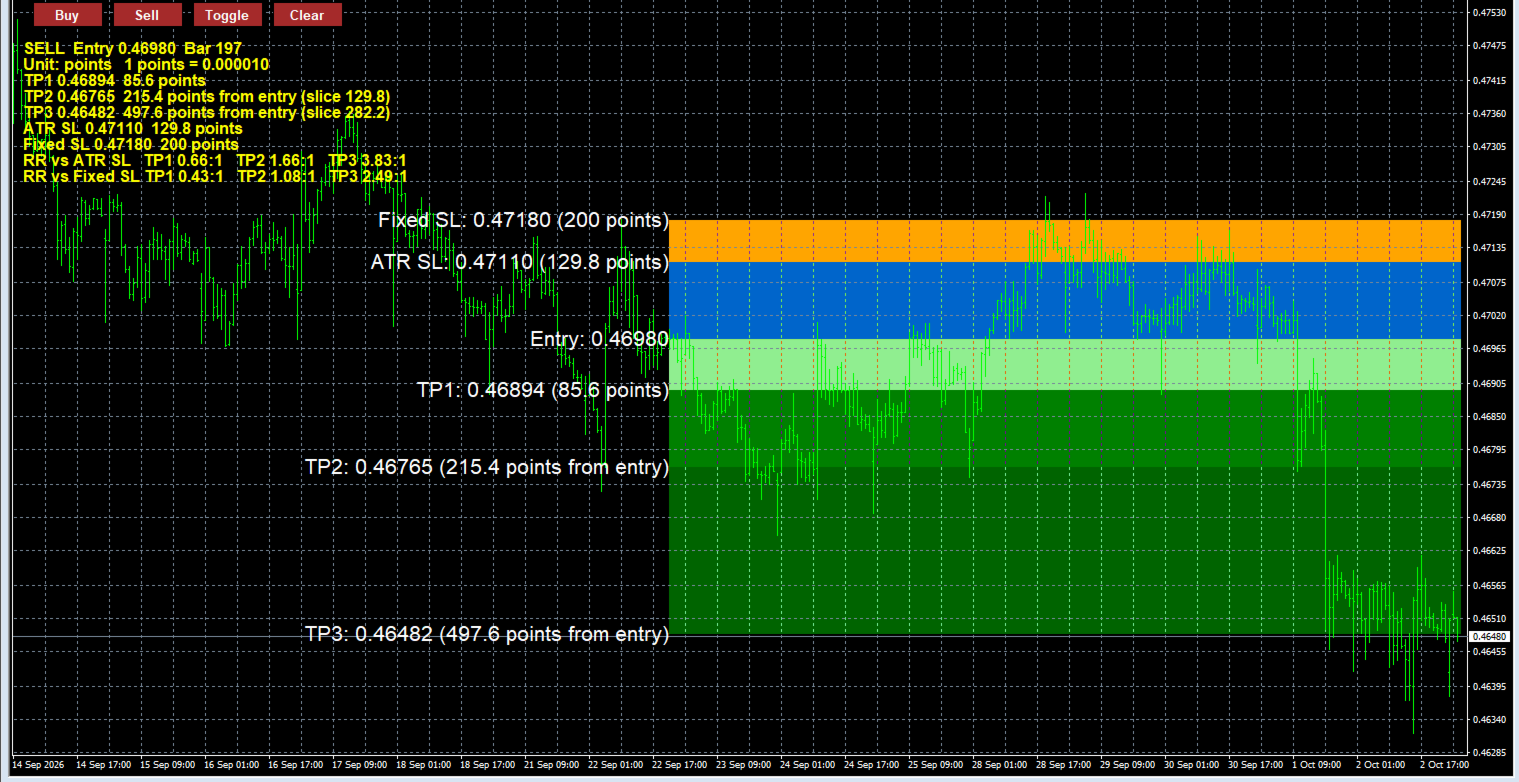
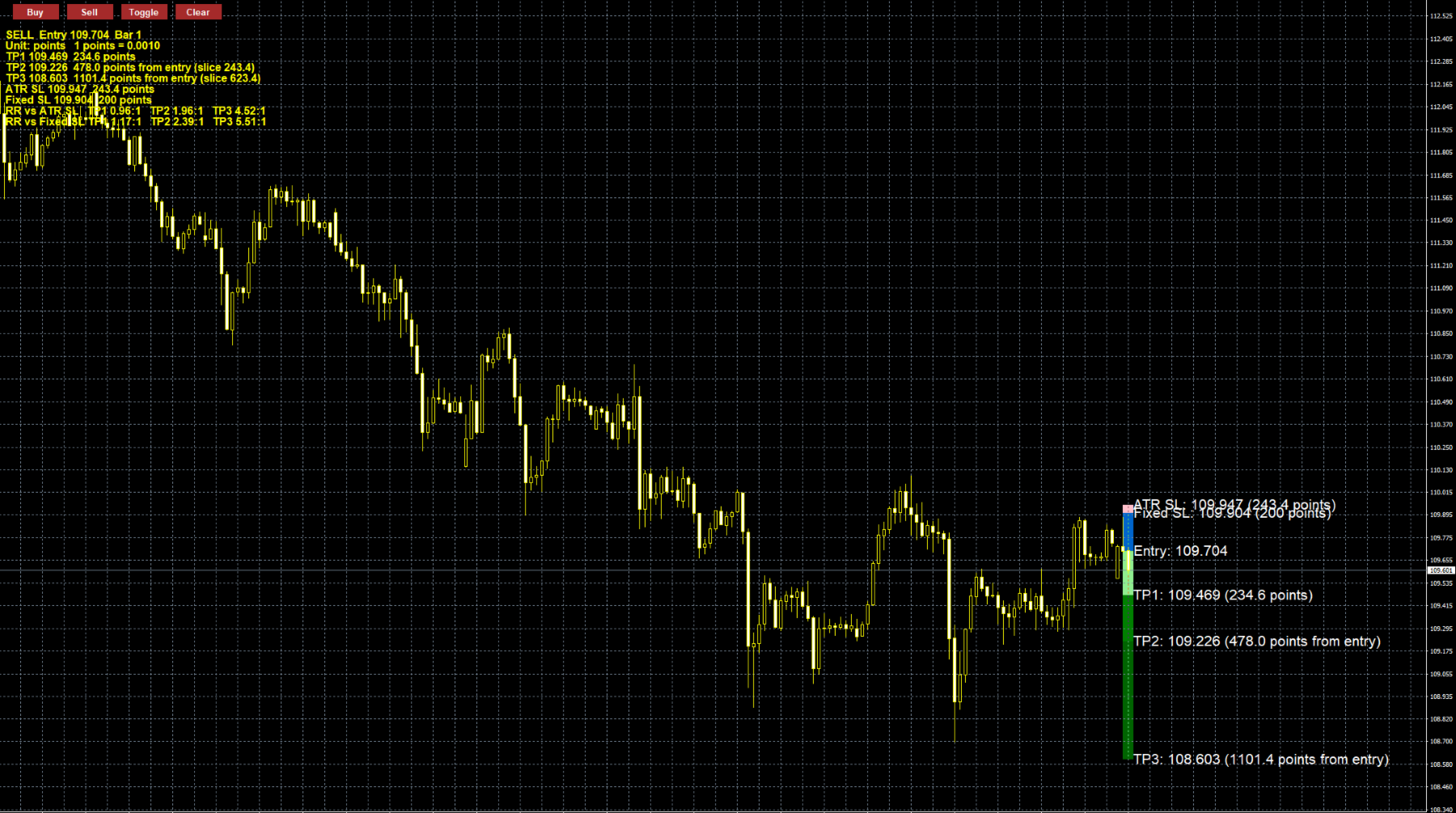
Attach it to a chart and plan the trade in price and in distance. Entry is the close of the selected bar. TP1 is one ATR slice from that entry. TP2 starts where TP1 ends. TP3 starts where TP2 ends. The ATR stop and the fixed stop are drawn from the entry in the opposite direction. The panel shows each level, the slice size, and reward-to-risk against both stops.
Objectives
- Keep the plan on the chart before an order exists.
- Let each target and the ATR stop use a different timeframe.
- Compare a volatility stop with a fixed pip or point stop.
- Review a past candle without changing the live chart setup.
- Keep price and distance labels readable when the boxes reach the price scale.
Key points
- Buy and Sell draw only. No market orders, no pending orders, no lot size.
- Three stacked ATR targets, each with its own timeframe, period, and multiplier.
- ATR stop plus an optional fixed stop. Set the fixed stop to 0 to hide it.
- Update redraws from the last closed chart bar. Freeze draws once. Historical uses the candle you click.
- Higher-timeframe ATR is taken from the bar that contains the selected candle, not from the chart bar index.
- Labels show price and distance. If the text would run into the price scale, it flips to the left of the boxes.
- The panel shows reward-to-risk against the ATR stop and, when the fixed stop is on, against that stop too.
- Distance can be shown in points or pips. Pip size follows the quote: 10 points on 3- and 5-digit symbols, otherwise 1 point.
- Colors, line style, label size, panel size, and button scale are inputs.
- Objects are prefixed by symbol and chart, so removing the EA does not delete other buttons.
Limitations
- It is not a trading robot. Entry, stop, and exit stay manual.
- It does not calculate position size, account-percent risk, margin, spread, commission, or slippage.
- Targets are stacked slices, not three independent distances from entry. The TP2 box is only the second ATR band.
- Boxes run from the selected bar to the current bar plus the extension, so a historical zone can be compared with later price but is not confined to that candle.
- On gold, indices, and crypto, a “pip” is one point unless the symbol is 3- or 5-digit. Confirm that this matches the broker’s definition, or use Points.
- Ratios are distance divided by stop distance. They are not a forecast and not a promise of return.
- One direction is drawn at a time. A higher-timeframe ATR needs enough loaded history; otherwise that level is skipped and the panel says it is not ready.
ATR targets and stops
Each target is one ATR slice. TP2 starts at the end of TP1, and TP3 starts at the end of TP2. The ATR stop is measured from the entry, in the opposite direction.
- TP1 ATR Timeframe: default M30. The chart used for the first target’s ATR.
- TP1 ATR Period: default 7. Number of bars in that ATR.
- TP1 ATR Multiplier: default 2.0. TP1 distance is ATR × this value.
- TP2 ATR Timeframe: default H1.
- TP2 ATR Period: default 7.
- TP2 ATR Multiplier: default 2.0. This is the size of the second slice, not the full distance from entry.
- TP3 ATR Timeframe: default H4.
- TP3 ATR Period: default 7.
- TP3 ATR Multiplier: default 2.0. Size of the third slice.
- ATR SL Timeframe: default H1.
- ATR SL Period: default 7.
- ATR SL Multiplier: default 2.0. Stop distance is this ATR × this value.
- Fixed SL: default 20. A second stop, measured from entry. Set it to 0 to turn that stop off. The number is pips or points, depending on the distance unit.
A period below 1 or a negative multiplier is rejected when the EA loads. If a higher timeframe does not have enough history, that level is skipped and the panel says it is not ready.
Distance unit
Added in the updates. It controls the fixed stop and every distance printed on the chart.
- Points: one point is the broker’s minimum price step.
- Pips: on a 3- or 5-digit quote, one pip is 10 points. On other symbols, one pip is 1 point.
On gold, indices, and crypto, Points is the safer choice unless the broker’s pip matches that rule.
Drawing mode
Box POV Motive, default Historical.
- Update: entry is the close of the last closed chart bar. The boxes redraw when a new chart bar opens.
- Freeze: Buy or Sell draws once and leaves the boxes in place.
- Historical: Buy or Sell arms the direction, then a click on a candle draws that candle’s boxes. A click in a subwindow is ignored.
What is drawn
- Show TP1, Show TP2, Show TP3: default on. Hide a target box without changing its ATR settings.
- Show ATR SL: default on.
- Show Fixed SL: default on. Also requires the fixed-stop value to be greater than 0.
- Show Entry Price Line: default on. A blue line at the selected bar’s close.
- TP1, TP2, TP3, ATR SL, Fixed SL, and Entry Line colors: light green, green, dark green, pink, orange, and blue.
- Rectangle Border Width: default 1.
- Rectangle Line Style: default solid.
- Rectangle Time Extension: default 1 bar. Boxes run from the selected bar to the current bar plus this many chart bars.
On-chart labels
These are the price and distance tags beside the boxes. If the full text would run into the price scale, the EA moves that label to the left of the boxes. There is no input for that flip.
- Show Price/Pip Labels: default on.
- Label X Offset: default 10 pixels. Gap between the box edge and the text.
- Label Y Offset: default 10 pixels. Vertical nudge from the level price.
- Label Font Size: default 16.
- Label Color: default white.
Info panel
The lines under the buttons. They show side, entry, bar, each distance, slice size, and the ratios.
- Show Risk-Reward Ratios: default on. Reward divided by the ATR stop, and also by the fixed stop when that stop is on.
- Comment Font Size: default 12.
- Comment Color: added in the updates, default yellow.
Buttons
- Button X Start: default 20 pixels from the left.
- Button Y Position: default 20 pixels from the top.
- Button Scale: default 1.0. Also scales the button font. If a larger scale would make the buttons overlap, the spacing widens.
- Button Spacing: default 80 pixels.
- Button Color: default brown.
Changing a timeframe, period, or multiplier applies the next time the EA draws: after OK in the inputs window, after Buy or Sell, or on the next chart bar in Update mode. Removing the EA deletes only its own objects.