MultiTimeframe ChartLauncher

is a native chart-management script. When run on a chart, it opens separate charts for the same symbol at the enabled timeframes, from M1 through MN1.

By default, it opens M15, M30, H1, H4, and D1. You can enable or disable each supported timeframe to create a workspace suited to your analysis.

Key Benefits

  • One-Click Multi-Timeframe Access: Open all selected timeframes without manually creating each chart.

  • Flexible Configuration: Enable or disable individual timeframes from M1 to MN1.

  • Cleaner Workspace: The optional CloseIrrelevantCharts setting closes charts belonging to other symbols, helping you focus on the current instrument.

  • Duplicate Prevention: Reuses existing charts for the same symbol and timeframe rather than deliberately opening duplicates.

  • Improved Analytical Workflow: Compare price action across multiple timeframes more efficiently when studying market structure, trend context, and potential trading opportunities.

Settings

Input Function
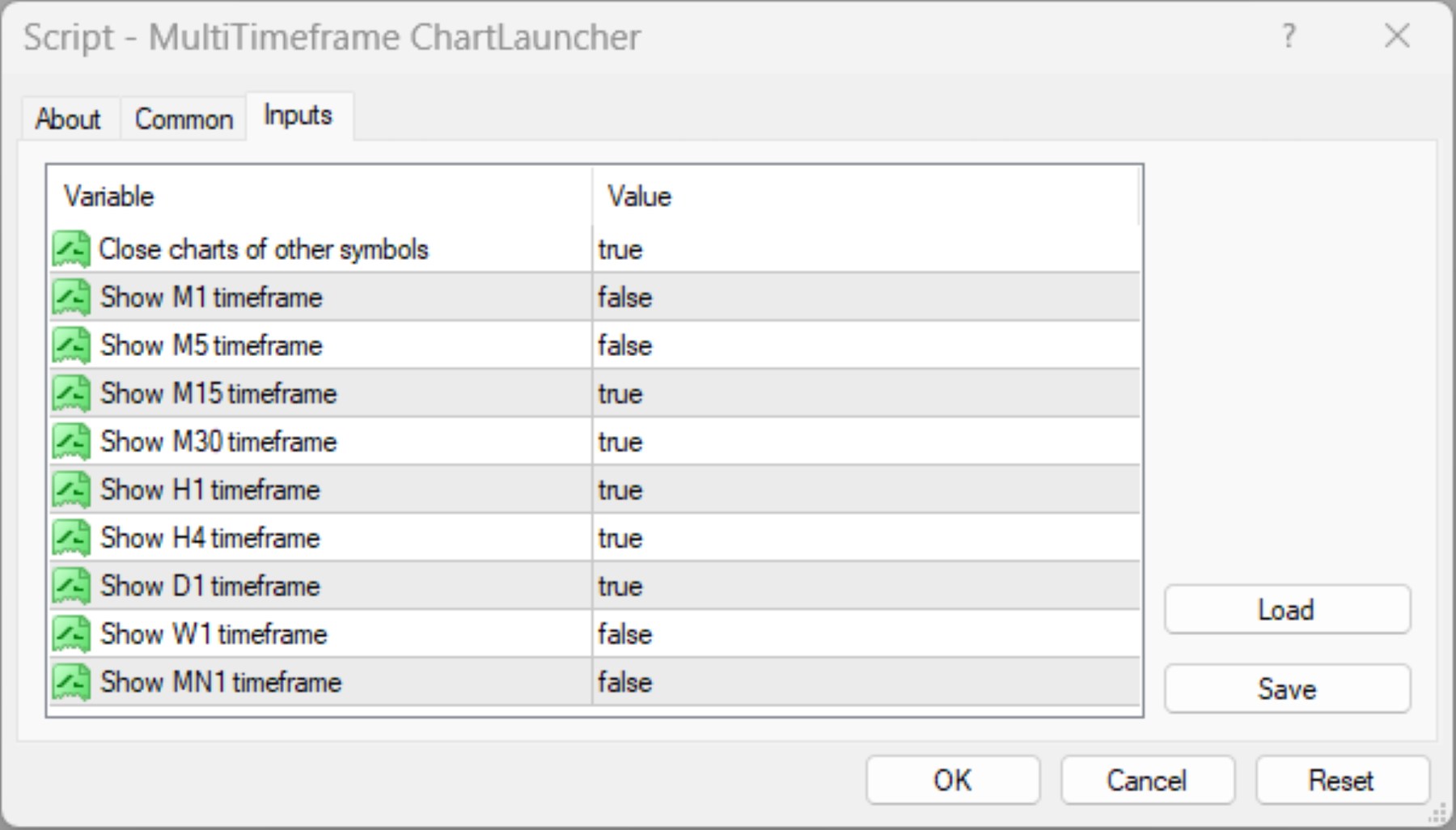
CloseIrrelevantCharts Enables or disables closing charts for other symbols. Default: true.
ShowM1 Opens the one-minute chart. Default: false.
ShowM5 Opens the five-minute chart. Default: false.
ShowM15 Opens the fifteen-minute chart. Default: true.
ShowM30 Opens the thirty-minute chart. Default: true.
ShowH1 Opens the one-hour chart. Default: true.
ShowH4 Opens the four-hour chart. Default: true.
ShowD1 Opens the daily chart. Default: true.
ShowW1 Opens the weekly chart. Default: false.
ShowMN Opens the monthly chart. Default: false.

Limitations and Important Considerations

  • Chart Management Only: This script opens and manages charts. It does not generate trade signals, predict price movements, execute trades, or guarantee profitable decisions.

  • Symbol Selection: It operates on the symbol of the chart from which it is launched.

  • Optional Chart Closure: When CloseIrrelevantCharts is enabled, charts for other symbols may be closed. Disable this option if you need to retain charts for multiple instruments.

  • Market Data Availability: The availability and completeness of historical data depend on your broker, terminal, and selected instrument. Some charts may require time to load or download data.

  • Resource Usage: Opening multiple charts can increase terminal resource consumption, particularly when many indicators, Expert Advisors, or other chart objects are running.

  • Existing Charts: The script checks for an existing chart with the same symbol and timeframe to avoid intentionally creating a duplicate. Platform conditions and chart-opening failures may still affect execution.

  • No Continuous Monitoring: The script runs when manually executed. It does not automatically reopen closed charts or continuously maintain your chosen layout.

How to Use

  1. Drag the script onto the chart of your chosen symbol.

  2. Adjust the input settings and execute the script.


Designed for traders who value efficiency, organization, and multi-timeframe perspective, the Multi-Timeframe Chart Launcher simplifies chart preparation so you can spend less time managing windows and more time analyzing the market.

This utility is an analytical and chart-management aid, not financial advice or a substitute for independent trading judgment.


Prodotti consigliati
Are your results skill or luck? This free indicator puts your closed trades next to 1,000 random traders who trade the same symbols, the same direction, the same lot size and hold each trade just as long - only at random times. Luck or Skill reads your account history and gives one plain verdict: how many of those random traders you beat. It never trades. MT5 version (free) | Pro version | All my tools What you see The verdict: SKILL (you beat 95% or more of the random traders), LEANING SKILL (8
FREE
You can check out comment #1 how does it work This is a very useful tool, enter the currency charts you need to open, use the symbol "/" to distinguish them, and select the periodicity /TF of the chart, press the button and they will open the charts for you in batches without you having to manually open them each! Because some EA use multiple currency pairs strategy, but do not support one chart to support all currency pairs, so I developed this tool, hope you like it, if you are satisfied with
FREE
SG InfoBox
Hleb Smoliar
The "InfoBox" utility is designed to display the presence of open orders, the number of lots, current profit and much more in one window. The version for the MT5 platform   is here . You've probably encountered a situation where you have an advisor that works on a currency pair, but information about its operation: - orders and their number, the size of the spread for the instrument, the volume of lots on the market, drawdown and much more - are scattered in different places of the terminal and
FREE
Show Pips
Roman Podpora
4.27 (59)
Questo indicatore informativo sarà utile per coloro che vogliono essere sempre informati sulla situazione attuale del conto. L'indicatore mostra dati come profitto in punti, percentuale e valuta, nonché lo spread per la coppia corrente e il tempo fino alla chiusura della barra nell'intervallo di tempo corrente. VERSIONE MT5 -   Indicatori più utili Esistono diverse opzioni per posizionare la linea delle informazioni sulla carta: A destra del prezzo (corre dietro al prezzo); Come commento (nell'
FREE
Market Ticker Free
John Louis Fernando Diamante
5 (1)
A scrolling Market Ticker that displays price changes from all symbols in the Market Watch list. Provides an easy snapshot of symbol prices, and keeps scrolling automatically while you trade and analyse the chart. Options include: - MTF, eg choose to show price changes of the daily chart, or the hourly - use the live candle or the recently completed - font and background coloring
FREE
#property copyright "小天" #property link      " https://www.mql5.com " #property version   "2.01" #property strict #property description "test" input int hlength=85; input int vlength=25; input int DX=-340; input int DY=-80; input string InpDirectoryName="Data"; // directory name input double lots_default=1; input int    pc_times_default=2; input double deposit_minimal=1; input double floating_loss_percent=0.1; input double margin_occupied=0.2;   input int    tradingnumber=1;//控制买卖交易数量  input
FREE
Free. Know where your account stands before you take the next trade. TrueRisk Account Dashboard shows, on the chart, what you made or lost today, this week and this month, in money and in %, and how many trades you won. It adds up what your open trades leave you with if every stop loss is hit, warns you about trades that have no stop at all, and shows how much room is left before your own daily loss limit. It only reads the account: it never opens, changes or closes a trade. TrueRisk Trade Panel
FREE
IceFX TradeInfo
Norbert Mereg
4.77 (44)
IceFX’s TradeInfo is an utility indicator which displays the most important information of the current account and position. Displayed information: Information about the current account (Balance, Equity, Free Margin). Current spread, current drawdown (DD), planned profit, expected losses, etc. Number of open position(s), volume (LOT), profit. Today’s and yesterday’s range. Remaining time to the next candle. Last day profit information (with integrated IceFX ProfitInfo indicator). Risk-based LOT
FREE
This utility binds each created graphical object to the chart symbol. Binding is performed by adding a symbol prefix to a graphical object name. Later, after you change the symbol on the chart, it provides displaying only the objects binded to the current symbol and all other objects become hidden. Parameters Ignore objects with prefix - the indicator will skip graphical objects with the specified prefix in their names. Note: demo version from the market is limited to strategy tester and cannot
FREE
Welcome. This indicator is for alarming the trader by sound when Symbol's price goes above or below certain level(s). It doesn't do any trading. Setting the levels is very handy, you just drag them with the mouse on the chart. You can customize the sounds the Indicator alarms you by (may be useful for office with a number of the terminals running). Also, this product includes an auxiliary Windows application that makes the usage even more handy. This product includes 4 parts: Sounder_TopBottomLe
FREE
Hai l'opportunità di fuggire dalla routine quotidiana del trading e tuffarti nel mondo della magia per un breve periodo. Presento alla vostra attenzione il gioco - trucco con le carte. Nel linguaggio mql, puoi creare non solo Expert Advisor, indicatori, script, ma anche giochi così piccoli. Non sono solo un trader e un programmatore, ma mi piace anche mostrare trucchi con le carte nel mio tempo libero, visto che è successo così, ho deciso di digitalizzare uno dei miei trucchi preferiti. Non è st
FREE
Automated Timeframe cycling with Symbols centered.  Force every timeframe onto one clock window, so the story you see on Daily is the same story you are slicing on H4, H1, and M1.  Traders usually flip timeframes and lose the span. A Daily chart shows a few weeks, then M15 shows a few hours, and the eye treats them as different markets. This indicator locks the window to N bars of the highest enabled timeframe — default 10 Daily — and maps every lower timeframe to that same stretch. You stay ins
FREE
This program calculates the average opening price for sell and buy positions separately. Program allows you to modify the stop loss value to the calculated breakeven price, this value could also be modified by a user-defined integer value in points. All you have to do is press the button. You can also choose Logs_Display_Enable input value if you need to get some additional, useful informations. Enjoy using !!!
FREE
Save Template
Dominik Kaczorowski
A very fast way to save your chart template. Set the keyboard shortcut to further speed up the operation. The script allows you to save a template with a specific prefix, with the current date or with the chart timeframe. The symbol is saved automatically. Script parameters: Prefix - prefix for the template name. Can be empty. With date - true = template name will containt current date With timeframe - true = template name will containt timeframe of the current chart
FREE
AQ RiskOptimizer
HIT HYPERTECH INNOVATIONS LTD
5 (1)
Risk Optimizer is the absolute solution for applying risk management on your account. Bad risk management is the main reason that causes traders to lose money. Risk Optimizer calculates and suggests the correct lot size for each position according to your personal, customized risk profile. You can give directly your preferred risk as percentage (%) for each position or you can trust our algorithms to calculate and optimize according to your risk category selection. But it is not only that! Selec
FREE
ATC Alert Manager MT4
Kassim Abdela Banko
ATC Alert Manager ti permette di impostare allarmi di prezzo direttamente sul grafico e gestirli da un piccolo pannello. Ogni allarme è mostrato come una linea sul grafico che puoi trascinare su un nuovo prezzo. Un allarme scatta una volta, nel momento in cui il prezzo attraversa il tuo livello, con un avviso popup, un suono e una notifica push opzionale sul tuo telefono. Un prezzo già oltre il livello non lo attiva, quindi non ricevi mai avvisi ripetuti a ogni tick. Questo strumento fa anche p
FREE
Spread Data
Harry Gunadi Permana
4.5 (2)
Spread Data tool will display current spread and average spread. It will record spread for every hour (from 0 to 23) and can give better data about your broker spread. Run it for 2 days or more to get better spread data . Every spread smaller than MinSpread will be recorded as MinSpread Every spread larger than MaxSpread will be recorded as MaxSpread It help to decide what spread to be used when do backtest, EA spread settings, EA that trade in specific time interval, especially for scalping EA
FREE
Script to calculate equity and balance at a specific date and time.  This script makes up for a lack of MetaTrader account history, that does not show how the balance and equity changes in time. Balance calculation includes closed orders only. Equity calculation includes orders closed before and orders that are still open at the specified time. Example: date and time set to 2020/07/06 00:00. If I had a Buy 1 lot EURUSD position opened at price 1.12470 on the 2020/07/02, the program would ca
FREE
It can only be used in EURCHF / M15 . The Expert Advisor is a great tool that allows you to control your trade with ease and precision. The tool can be moved in the graphs and offers the following characteristics: Instant order entry with a single click. Entry of pending orders using price tags and trend lines. Instant order closure with a single click. Instant order closure using trend lines as output levels that the broker can not see. We can modify the way to enter and exit the market, allow
FREE
Lot Calculate
Maksim Neimerik
This simple but useful script calculates the lot in % of the deposit. It is indispensable for risk management. There is only one customizable parameter: MaxRisk - risk in % for lot calculation. The product works as a standard script. Launch it once on an appropriate chart and start trading using the calculated lot value. Genious is simplicity! Happy trading!

FREE
TradeKeeper Lite
Evgeniy Scherbina
The utility TradeKeeper Lite can show your profits for different periods and bip a sound when you reach a profit target value. Click the tachometer to quickly switch to the next profit period. There are 5 of them: This Day, This Week, This Month, Last 90 Days and All I Made. With the utility TradeKeeper Pro , available at this link , you can also open trades with a magic number and volume of your choice, trail any orders with a simple trail or iSAR-based trail, as well as close any open trades a
FREE
Risk Panel Pro v1
Saeed Hatam Mahmoudi
Risk Panel Pro (MT4) Risk Panel Pro is a Tool for MetaTrader 4 that automates placing Stop Loss and Take Profit based on a percentage of the account balance. It is a trade management utility; it does not provide trading signals and does not guarantee any profit. Main functions Auto-apply SL/TP on new orders using balance-based risk (default: SL 2%, TP 4%). Switch Automatic mode off to manage SL/TP manually. One-click buttons to apply SL or TP to existing positions at any time. Close Chart : clo
FREE
Position Selective Close MT4
Francisco Manuel Vicente Berardo
The Position Selective Close is a multi-symbol multi-timeframe script used to close simultaneously various positions.  General Description   The Position Selective Close   possesses   three operation modes (Intersection,   Union   and All) that control the way   as   four position features (symbol, magic number,   type   and profit) are used. The modes, available through the Selection Mode input parameter, relate to the features, available through the “Select by Feature” and “Feature” input pa
FREE
Free automatic Fibonacci is an indicator that automatically plots a Fibonacci retracement based on the number of bars you select on the BarsToScan setting in the indicator. The Fibonacci is automatically updated in real time as new highest and lowest values appears amongst the selected bars. You can select which level values to be displayed in the indicator settings. You can also select the color of the levels thus enabling the trader to be able to attach the indicator several times with differe
FREE
This utility adds a customizable button to your MetaTrader 4 chart, allowing you to close all open orders with a single click. The button's position automatically adjusts based on the chart size, ensuring it remains visible and accessible. Customize the button's appearance, text, and tooltip to suit your preferences. Simplify your trading workflow and manage your open positions more efficiently with this convenient tool. The UPDATES Would be based on your feedback! Features: Single-click button
FREE
Safety
Sergey Ermolov
5 (2)
Penso che tutti conoscano una regola di gestione del denaro come "Sicuro". Per coloro che non lo sanno, safe comporta la chiusura di metà della posizione dopo che i profitti dell'operazione sono stati livellati alla dimensione del piede. Quindi, anche se il prezzo si gira e si blocca, non perderai più denaro, perché esattamente lo stesso margine di profitto è stato ottenuto quando una parte della posizione è stata chiusa in precedenza. Safety Advisor ha solo un'impostazione: il lotto di chiusu
FREE
Period Change Button
Rainer Albrecht
3 (1)
Fastest way to change the period. Suitable for traders who use many charts and timeframes. Size, shape and color can be customized. Inputs Parameters Corner — Choose corner placement Standart is "Right lower chart corner" Color — Background color of the button ColorText — Text color of the button ColorOn — Background color of the button for the current period ColorOnText — Text color of the button for the current period Font — Arial, Verdana... FontSize — Size of the font in pixels DistanceX —
FREE
Pin Bars
Yury Emeliyanov
4.83 (6)
Scopo principale: "Pin Bars" è progettato per rilevare automaticamente le barre dei pin sui grafici dei mercati finanziari. Una barra pin è una candela con un corpo caratteristico e una lunga coda, che può segnalare un'inversione di tendenza o una correzione. Come funziona: L'indicatore analizza ogni candela sul grafico, determinando la dimensione del corpo, della coda e del naso della candela. Quando viene rilevata una barra pin corrispondente a parametri predefiniti, l'indicatore la segna su
FREE
Wise Men Indicator demo
Bohdan Kasyanenko
3 (2)
The indicator displays signals according to the strategy of Bill Williams on the chart. Demo version of the indicator has the same features as the paid, except that it can work only on a demo account . Signal "First Wise Man" is formed when there is a divergent bar with angulation.  Bullish divergent bar - with lower minimum and closing price in the upper half. Bearish divergent bar - higher maximum and the closing price at the bottom half. Angulation is formed when all three lines of Alligator
FREE
Free version. Only works on EURUSD. Would you like to have statistics about your trades displayed while you operate? Have you a solid understanding of the symbol you are trading? Do you really know everything you need to about your trading account? Do you need to keep an eye on the local times around the world? Advanced Info Displayer answers to all that. It is the ultimate tool to know all sort of useful information and hidden or hard to find data. It is important if you are serious about tradi
FREE
Gli utenti di questo prodotto hanno anche acquistato
Local Trade Copier EA MT4
Juvenille Emperor Limited
4.96 (111)
Local Trade Copier EA MT4 è un trade copier rapido e flessibile per copiare e gestire operazioni tra più conti MetaTrader 4 sullo stesso computer Windows o Windows VPS. Combina la sincronizzazione locale delle operazioni con controlli lato Receiver per dimensione del lotto, gestione del rischio, filtraggio delle operazioni, mappatura dei simboli, gestione delle operazioni e protezione del conto. Configura i terminali Transmitter e Receiver in circa 1 minuto e copia operazioni manuali o aperte d
Forex Trade Manager MT4
InvestSoft
4.98 (447)
Benvenuto a Trade Manager EA, lo strumento definitivo per la gestione del rischio , progettato per rendere il trading più intuitivo, preciso ed efficiente. Non è solo uno strumento per l'esecuzione degli ordini, ma una soluzione completa per la pianificazione delle operazioni, la gestione delle posizioni e il controllo del rischio. Che tu sia un principiante, un trader avanzato o uno scalper che necessita di esecuzioni rapide, Trade Manager EA si adatta alle tue esigenze, offrendo flessibilità s
Exp COPYLOT CLIENT for MT4
Vladislav Andruschenko
4.69 (65)
Copiatore professionale di operazioni per MetaTrader 4 Un copiatore di operazioni veloce, affidabile e professionale per MetaTrader 4 . COPYLOT consente di copiare operazioni Forex tra i terminali MetaTrader 4 e MetaTrader 5 , offrendo una sincronizzazione flessibile per diversi tipi di conto e modalità operative. La versione COPYLOT MT4 supporta: MetaTrader 4 → MetaTrader 4 MetaTrader 5 Hedge → MetaTrader 4 MetaTrader 5 Netting → MetaTrader 4   Versione MT5 Descrizione completa + DEMO + PDF Com
Trade Assistant MT4
Evgeniy Kravchenko
4.43 (197)
It helps to calculate the risk per trade, the easy installation of a new order, order management with partial closing functions, trailing stop of 7 types and other useful functions. Additional materials and instructions Installation instructions   -   Application instructions   Line function -   shows on the chart the Opening line, Stop Loss, Take Profit. With this function it is easy to set a new order and see its additional characteristics before opening.   Risk management  - The risk calcu
PZ Trade Pad Pro MT4
PZ TRADING SLU
3.67 (3)
Effortlessly calculate lot sizes and manage trades to save time and avoid costly errors The Trade Pad Pro EA is a tool for the Metatrader Platform that aims to help traders manage their trades more efficiently and effectively. It has a user-friendly visual interface that allows users to easily place and manage an unlimited number of trades, helping to avoid human errors and enhance their trading activity. [ Installation Guide | Update Guide | Troubleshooting | FAQ | All Products ] One of the k
Trade Manager Pro MT4
Bryan Djoufack Nguessong
Si tratta di un'utility che semplifica il trading, mettendo a portata di clic o di pochi clic attività che richiedono molto tempo come la gestione degli ordini e la gestione del rischio. Caratteristiche Gestione del rischio  Calcola automaticamente i lotti in base al rischio specificato in % o in $ nel campo del rischio e vi permette di inserire le linee per SL TP ecc. e di visualizzare in tempo reale il Risk Reward. TrueRisk include le commissioni quando calcola la dimensione del lotto sol
Trade Assistant Pro 36 in 1
Makarii Gubaydullin
4.76 (21)
Strumento Multifunzionale: Calcolatore di Lotti, Ordini Grid, Rapporto R/R, Gestore Trade, Zone di Domanda e Offerta, Price Action e molto altro Versione Demo   |   Manuale utente L'Assistente di Trading non funziona nel tester di strategie: puoi scaricare la Versione Demo QUI per testare l' utilità . Contattami per qualsiasi domanda / idee di miglioramento / in caso di bug trovato Se hai bisogno di una versione MT5, è disponibile qui Semplifica, accelera e automatizza il tuo processo di tradin
Shepherd Safety EA
AW Trading Software Limited
4.92 (13)
AW Shepherd Safety EA è un Expert Advisor per la gestione delle posizioni aperte. Il primo ordine lo apre il trader dal pannello, poi l'EA gestisce il basket da solo: aggiunge ordini di recupero con filtro del trend, chiude il lato su TakeProfit, trailing o stop e mostra i livelli di chiusura sul grafico. Acquisti e vendite sono gestiti separatamente, entrambi i lati possono essere aperti contemporaneamente. L'ordine di recupero non si apre semplicemente al raggiungimento del passo di prezzo, ma
Rhino Chart Drawing Tools offre un flusso di lavoro per il disegno in stile TradingView per MetaTrader 4. Include 54 strumenti di disegno , una barra degli strumenti personalizzabile, Preferiti, stili rapidi, impostazioni degli oggetti, modelli e un gestore degli oggetti. Manuale utente: Come utilizzare il prodotto Versione demo gratuita: Scarica la demo Versione per MetaTrader 5: Rhino Drawing Tools per MT5 Strumenti di disegno Gruppo Elenco degli oggetti Linee Linea di tendenza, raggio, line
Trading History MT4
Siarhei Vashchylka
5 (9)
Trading History - A program for trading and money management on the history of quotes in stratagy tester. It can work with pending and immediate orders, and is equipped with trailing stop, breakeven and take profit functions. Very good for training and testing different strategies. Manual (Be sure to read before purchasing) Advantages 1. Allows you to test any trading strategy in the shortest possible time 2. An excellent simulator for trading training. You can gain months of trading experience
Trade copier MT4
Alfiya Fazylova
4.62 (37)
Trade Copier è un'utilità professionale progettata per copiare e sincronizzare le transazioni tra conti di trading. La copiatura avviene dal conto/terminale del fornitore al conto/terminale del destinatario, che sono installati sullo stesso computer o vps. Prima di acquistare, puoi testare la versione demo su un account demo. Versione demo qui . Istruzioni complete qui . Funzionalità e vantaggi principali: Supporta la copia degli ordini: MT4> MT4, MT4> MT5, MT5> MT4, inclusi i conti di compensaz
Multi Account Local Trade Copier è un copiatore locale veloce per MetaTrader: copia le operazioni tra terminali MT4/MT5 sullo stesso PC o VPS Windows, da un conto master a più conti ricevitori — i tuoi conti reali, demo o prop firm, presso lo stesso broker o presso broker diversi. Funziona a eventi : il master pubblica ogni operazione nell'istante in cui avviene, e il ricevitore misura e registra la latenza di copia reale di ogni singola operazione — tipicamente 50-150 ms . Niente DLL, niente po
Telegram to MT4 Multi-Channel Copier   copia automaticamente i segnali di trading dai tuoi canali Telegram e Discord direttamente su MetaTrader 4. Niente bot, niente estensioni del browser, niente copia manuale. Il segnale arriva su Telegram o Discord e l'EA apre l'operazione nel tuo terminale in pochi secondi. E prima di copiare un canale, il backtester integrato ti mostra cosa avrebbe fatto quel canale sul tuo conto. Il prodotto include due componenti: un'applicazione Windows che ascolta i tuo
TradePanel MT4
Alfiya Fazylova
4.84 (95)
Trade Panel è un assistente commerciale multifunzionale. L'applicazione contiene più di 50 funzioni di trading per il trading manuale e permette di automatizzare la maggior parte delle attività commerciali. Istruzioni per l'applicazione : https://www.mql5.com/it/blogs/post/762331 Versione di prova dell'applicazione per un conto demo: https://www.mql5.com/it/blogs/post/762419 Come installare l'applicazione: https://www.mql5.com/it/blogs/post/762362 Come testare l'applicazione in modalità visuale:
Magnifier Ruler Crosshair
Taras Slobodyanik
5 (2)
The indicator has three main tools: Magnifier (Zoom chart), Ruler  ( Time and Price scales ),   and Crosshair. You can move it all around with your mouse and customize different formats for  displaying , customize   size and color of each element. The Magnifier (zoom chart) allows you to display candles from any time frame and at different scales. Hotkeys: 'Q' - higher timeframe, 'A' - lower timeframe, 'W' - decrease candle size, 'S' - increase candle size, 'Z' - show/hide zoom chart You can

Telegram to MT4 Coppy
Sergey Batudayev
4.09 (11)
Da Telegram a MT4: la soluzione definitiva per la copia del segnale Semplifica il tuo trading con   Telegram su MT4   , l'utility all'avanguardia progettata per copiare i segnali di trading direttamente dai canali e dalle chat di Telegram sulla tua piattaforma MetaTrader 4, senza bisogno di DLL. Questa soluzione affidabile garantisce un'esecuzione impeccabile dei segnali con una precisione e opzioni di personalizzazione senza pari, risparmiando tempo e aumentando la tua efficienza. [ Instruction
Serve supporto? Come configurarlo? Hai domande? Chiedi qui nella tua lingua, risposta rapida: https://www.mql5.com/en/market/product/139089/comments Scarica la versione di prova funzionante Copy Cat More (Gatto Copione) — Copiatore di Trade (Trade Copier) MT4 non è solo un semplice copiatore locale di trade; è un framework completo di gestione del rischio e di esecuzione (risk management and execution framework) progettato per le sfide di trading di oggi. Dalle challenge delle prop firm alla
Trade Manager FX MT4
Rodrigo Arana Garcia
Trade Manager FX – Calcolatore del rischio, pannello di trading e gestione delle operazioni per MT4 Trade Manager FX è un pannello di trading tutto in uno per i trader manuali. Pianificate l'operazione sul grafico, lasciate che il pannello calcoli il lotto corretto per il vostro rischio e inviatela con un clic. Dopo l'ingresso gestisce la posizione al posto vostro con break even, trailing stop, chiusure parziali e protezione del capitale. Materiali aggiuntivi e istruzioni Istruzioni di instal
Trade Indicator Assistant is a powerful MT4 utility designed to turn indicators into automated trading systems. Its main feature is the ability to automatically detect an indicator’s   BUY and SELL signal buffers , without requiring you to know the buffer numbers, search through indicator settings, or modify the indicator source code. Bonus Indicator: After purchasing Trade Indicator Assistant, contact me to receive Trade Signal Pro completely free as a bonus indicator. [Download Demo Version]
Copiatrice->Interazione dell'interfaccia comoda e veloce, gli utenti possono utilizzarla subito       ->>>> Si consiglia di utilizzarlo su computer Windows o VPS Windows Caratteristiche: Impostazioni di copy trading diversificate e personalizzate: 1. È possibile impostare diverse modalità di lotto per diverse fonti di segnale 2. È possibile impostare diverse fonti di segnale per il copy trading forward e reverse 3. I segnali possono essere impostati con commenti 4. Se calibrare il lotto in base
Trade Manager MT4 DaneTrades
Levi Dane Benjamin
4.09 (11)
Trade Manager per aiutarti a entrare e uscire rapidamente dalle operazioni calcolando automaticamente il tuo rischio. Incluse funzionalità che ti aiutano a prevenire l'eccessivo trading, il vendetta trading e il trading emotivo. Le operazioni possono essere gestite automaticamente e i parametri di performance del conto possono essere visualizzati in un grafico. Queste caratteristiche rendono questo pannello ideale per tutti i trader manuali e aiuta a migliorare la piattaforma MetaTrader 4. Suppo
The product will copy all telegram signal to MT4   ( which you are member  ) , also it can work as remote copier.  Easy to set up, copy order instant, can work with almost signal formats, image signal, s upport to translate other language to English Work with all type of channel or group, even channel have "Restrict Saving Content", work with  multi channel, multi MT5 Work as remote copier: with signal have ticket number, it will copy exactly via ticket number. Support to backtest signal. How to
Take a Break
Eric Emmrich
5 (31)
Take a Break pauses your Expert Advisors when trading is a bad idea: before news, after a daily loss, outside your trading hours, or when a rule you wrote yourself says so. When the pause is over, your EAs simply continue. Account protection for all your EAs in one tool: news filter, drawdown and equity protection, time filter and custom rules. One EA on one chart protects the whole account, the free indicator gives every chart its own rules on top. Free demo | What is new in 26.09 | Support Ass
The AlgoKing Lightning Bolt Strategy is a trade manager and has multiple indicators built for a complete trading strategy.  Here is a list of indicators built in. Indicators Auto drawn Support and Resistance signals Auto drawn RSI Divergence signals Auto drawn Fibonacci Retracement signals with buy and sell entry lines. Lightning Bolt reversal signals. Auto drawn trend lines. Trade Management Auto take partials at simple moving average targets. Auto take partial and stop losses at Fibonacci ret
FCK CurrencyStrength Pro
Patel Hitendrakumar Mahendrabhai
Hi Friends, " FCK Currency Strength Pro " is a auto & semi auto trading expert with direction of pair. Buy-Sell separate or multi currency in one click. The strategy of  FCK Currency Strength Pro  is a combination of custom indicator, Trendlines, Support & Resistance levels ( Price Action ) and most important secretive trading algorithm mentioned above. Download News Ex4 and csv file You need the following SDSnews.ex4 in MQL4/Libraries and the daylightsavings.csv in MQL4/Files. Only 4 of 5 copi
News Filter EA MT4
Rashed Samir
5 (10)
News Filter EA: Advanced Algo Trading Assistant News Filter EA is an advanced algo trading assistant designed to enhance your trading experience. By using the   News Filter EA , you can integrate a Forex economic news filter into your existing expert advisor, even if you do not have access to its source code. In addition to the news filter, you can also specify   trading days   and   hours   for your expert. The News Filter EA also includes   risk management   and   equity protection   features
KT Equity Protector MT4
KEENBASE SOFTWARE SOLUTIONS
3.75 (4)
An equity protection EA for MetaTrader that enforces your loss limits and profit target for you: when your account reaches a rule you set, it closes your trades on every symbol, before one bad day turns into a lost account. It suits prop firm challenges and personal accounts alike. Attach it to one chart, answer a few questions in the on-chart setup wizard, and it watches your whole account in the background while you trade by hand or with other EAs. What it protects Daily loss limit: a percenta
Trade Dashboard MT4
Fatemeh Ameri
4.96 (55)
Trade Dashboard simplifies how you open, manage, and control your trades, with built-in lot size calculation. It allows you to execute trades, manage risk, and control positions directly on the chart, with tools such as partial close, breakeven, and trailing stop. Designed to reduce manual work and help you stay focused on your trading decisions. A demo version is available for testing. Detailed explanations of features are provided within the MQL5 platform. Installation instructions are include
Un sistema di copia locale delle operazioni tra terminali MetaTrader su un singolo PC o VPS. La copia funziona in entrambe le direzioni tra MT5 e MT4. Il volume di una copia viene calcolato in percentuale del capitale, nella valuta del conto o replicando la quota di rischio del master; le operazioni vengono selezionate tramite filtri per simbolo, magic number, commento e dimensione. Il pannello gestisce il ciclo di vita di una copia aperta: Stop Loss/Take Take Profit virtuali, punto di pareggio
Easy Trade Executor è uno strumento per il calcolo rapido del lotto, l'esecuzione degli ordini e la gestione dei trade in MT4. Posiziona direttamente sul grafico i livelli di Entrata, Stop Loss e Take Profit, ottieni il calcolo automatico del lotto e apri trade con rischio controllato in pochi clic. Perché scegliere Easy Trade Executor? Easy Trade Executor è stato progettato per i trader che cercano molto più di un semplice calcolatore del rischio. Vogliono gestire i propri trade in modo rapido
Altri dall’autore
motive is to turn market volatility and selected time/session reference points into a visual price grid . Instead of claiming to predict price direction, it gives the trader a structured way to judge where current price sits relative to ATR-derived or fixed-distance ranges. Potential Volatility awareness: ATR-based spacing expands and contracts with measured price volatility. Price-range context: Multiple grid levels show how far price has traveled from a reference point. Session analysis: The f

FREE
Swap Monitor
Abraham Correa
designed to help traders monitor the long and short swap rates of available trading instruments through a clear, organized on-chart table. Its primary purpose is to make overnight financing costs and potential swap credits easier to observe across multiple symbols without repeatedly opening individual instrument specifications. By presenting swap information in a centralized display, the application helps traders incorporate holding costs into their market analysis and trade planning. Key Benef
FREE
Automated Timeframe cycling with Symbols centered.  Force every timeframe onto one clock window, so the story you see on Daily is the same story you are slicing on H4, H1, and M1.  Traders usually flip timeframes and lose the span. A Daily chart shows a few weeks, then M15 shows a few hours, and the eye treats them as different markets. This indicator locks the window to N bars of the highest enabled timeframe — default 10 Daily — and maps every lower timeframe to that same stretch. You stay ins
FREE
This indicator builds a live correlation matrix from the symbols currently selected in Market Watch . It calculates Pearson correlation on simple returns over a user-defined lookback and displays the results in a clean, auto-sized grid. Positive correlations appear in green, negative in red, and near-zero values stay neutral. An optional automatic timeframe scanner cycles through only the timeframes you enable (M1, M5, M15, M30, H1, H4, D1, W1, MN1), updating the entire matrix at a set interval.
FREE
Synchronizes all open charts to the symbol of the chart this indicator is applied to. SyncAllCharts is a MetaTrader 5 indicator that lets one main chart control the trading symbol shown on all other open charts. Change the symbol on the main chart, and the other charts follow while keeping their own timeframes. It helps you review the same market across several timeframes without changing each chart manually. How to use it Attach the indicator to one chart that you want to use as the main contr
FREE
Adattandosi alla volatilità, il rischio potenziale per premiare le posizioni di trading viene mostrato in base al Range reale medio. Le caselle Rischio-Rendimento vengono visualizzate quando si fa clic sul pulsante "Acquista o vendi"! Un'utilità del calcolo ATR, gioire con una questione che non fa parte di una decisione difficile per quando chiudere un commercio. Questo problema aiuterebbe la tua decisione di gestione del rischio.  Specifica L'Average True Range è un indicatore comunemente usat
FREE
Displays broker-provided LONG and SHORT swap values for selected instruments in a full-chart, dynamically sized table. The Swaps Monitor Table provides a simple way to view the swap rates supplied by your broker for multiple trading instruments at once. The table can display instruments from Market Watch, all available instruments, or a manually selected list , allowing traders to monitor swap costs without opening each symbol individually. The indicator automatically adjusts the table cells an
FREE
is a panel that groups FX Major & Minor quote currencies and shows the shared pip or point cost of a trade. View that cost for three fixed lot sizes or three account-balance risk percentages. Currency Cost Constellation is a MetaTrader 4 chart panel for forex majors and minors that share a quote currency. Pairs with the same quote have the same pip cost for a given lot. The indicator uses that correspondence directly: it calculates the cost once for the group, then shows that cost for three lo
FREE
Automatically cycles through every symbol in your Market Watch at a user-defined interval, letting you scan multiple pairs hands-free without manually changing charts. Benefits Hands-free multi-pair scanning with adjustable speed and optional reverse direction Reliable play/pause button that stays on-chart and can be placed in any corner with custom colors Optional large centered Symbol + Timeframe labels (stacked, with adjustable spacing) that can sit behind or in front of price Remembers its p
FREE
is a visual market-monitoring indicator that displays multiple trading instruments and timeframes within a single chart window. Developed using MQL5, the indicator transforms historical price data into a structured dashboard featuring custom candlesticks or price dots. Each row represents a symbol, while each column represents a selected timeframe. This arrangement allows traders to examine recent market behavior across several instruments and timeframes without continually opening and closing c
FREE
Quote Cost Parity is  a MetaTrader 5 chart panel for forex majors and minors that share a quote currency. Pairs with the same quote have the same pip cost for a given lot. The indicator uses that correspondence directly: it calculates the cost once for the group, then shows that cost for three lot sizes. It acknowledges only these quote groups. JPY: USDJPY, EURJPY, GBPJPY, AUDJPY, NZDJPY, CADJPY, CHFJPY. Source : USDJPY. CHF: USDCHF, EURCHF, GBPCHF, AUDCHF, NZDCHF, CADCHF. Source : USDCHF. CAD:
FREE
visual trade planner for MetaTrader 5. It draws multi-timeframe ATR reward and stop zones on the chart so you can judge distance and payoff before you place the trade yourself. It does not send, modify, or close orders. Motive A single ATR on the chart timeframe often hides the larger and smaller ranges a trade is actually working against. This EA stacks three take-profit slices, each from its own timeframe, period, and multiplier, then places an ATR stop and an optional fixed stop beside them.
FREE
SymbolLotSizer
Abraham Correa
This EA gives traders a clean, full-window view of how large a position each Market Watch symbol can support at different percentages of account balance used as margin. It helps you quickly compare sizing options across symbols and risk levels without ever placing or modifying orders. The goal is simple position-size awareness so you can decide exposure before you trade. Benefits Shows lot size potential across Market Watch symbols at up to three different % of balance margin levels side-by-sid
FREE
Omnirange
Abraham Correa
is an exit manager for trades you open yourself. It does not open positions and it does not send signals. After a manual buy or sell, it gives that trade a stop and up to six exit stages based on volatility. Three stages come from Average True Range, each with its own timeframe. Three come from completed range: daily (ADR), weekly (AWR), and monthly (AMR). Each stage can be switched on or off. Enabled stages are sorted by distance. Nearer stages trail the stop. The furthest is posted as the take
FREE
is a multi-timeframe visual matrix that tracks the relative linear progression (log-return strength) of the eight major currencies — EUR, GBP, AUD, NZD, USD, CAD, CHF, and JPY — across selected timeframes in a single responsive panel. Motive Traders often struggle to quickly see which currencies are gaining or losing strength relative to one another across multiple timeframes. This indicator condenses that information into color-coded progression lines so you can immediately identify strong vers
FREE
Automated Timeframe cycling with Symbols centered.  Force every timeframe onto one clock window, so the story you see on Daily is the same story you are slicing on H4, H1, and M1.  Traders usually flip timeframes and lose the span. A Daily chart shows a few weeks, then M15 shows a few hours, and the eye treats them as different markets. This indicator locks the window to N bars of the highest enabled timeframe — default 10 Daily — and maps every lower timeframe to that same stretch. You stay ins
FREE
is an on-chart pre-trade planner for the symbol on that chart. It clears the price and time scales and fills the tab with a live reading of this account against this symbol: spread, pip value, point value, an ATR stop, three ATR targets, and ten lot sizes sized from a percent of balance. Targets are reduced by the live spread. The stop is increased by it. Commission and planned swap are then applied, so the money and percent figures are net of those costs before a buy or sell. It does not place
FREE
is designed to simplify switching between trading instruments directly from the active chart. It allows traders to cycle through symbols listed in the broker's Market Watch using on-chart navigation buttons or keyboard arrow keys . The indicator's primary motive is to make multi-symbol market analysis faster, more convenient, and more organized by reducing the need to manually locate and open individual charts. Key Features Previous / Next Navigation: Switch between Market Watch symbols using t
FREE
BirdsIview
Abraham Correa
is a user-friendly MetaTrader 4 indicator that creates a centralized dashboard for traders to oversee market symbols simultaneously across different timeframes, presenting price movements through simple dots or miniature candlestick charts, complemented by volume indicators to facilitate quick assessments of market trends and fluctuations. It automatically resizes grid cells according to the number of bars shown per timeframe for better use of screen space, features adjustable color schemes fo
FREE
Predetermination
Abraham Correa
5 (1)
Predetermination is an exit manager for trades you open yourself. It does not open positions and it does not send signals. After a manual buy or sell, it gives that trade a stop and up to six exit stages based on volatility. Three stages come from Average True Range, each with its own timeframe. Three come from completed range: daily (ADR), weekly (AWR), and monthly (AMR). Each stage can be switched on or off. Enabled stages are sorted by distance. Nearer stages trail the stop. The
FREE
is a multi-timeframe visual matrix that tracks the relative linear progression (log-return strength) of the eight major currencies — EUR, GBP, AUD, NZD, USD, CAD, CHF, and JPY — across selected timeframes in a single responsive panel. Motive Traders often struggle to quickly see which currencies are gaining or losing strength relative to one another across multiple timeframes. This indicator condenses that information into color-coded progression lines so you can immediately identify strong vers
FREE
is designed to enhance the visual representation of financial charts in MetaTrader 4 by dynamically altering the colors of various chart elements, including candlesticks, bars, line charts, and volume bars. Its primary purpose is to improve trader intuition and engagement during market analysis by introducing smooth, cyclical color transitions that can highlight momentum shifts, trends, or volatility without overwhelming the display. This functionality is particularly beneficial for traders who
FREE
Shut Down
Abraham Correa
gives you the power to close every open chart window at once — no matter the symbol, timeframe, number of indicators, Expert Advisors, or objects on them. When you attach it, a confirmation dialog appears. Only after you explicitly grant permission does the script shut down all charts, leaving you on the clean gray screen with Market Watch still fully available. From there you can rebuild your layout from scratch exactly the way you want it. Ideal for: Quickly clearing a cluttered multi-chart wo
FREE
Designed to mark a specific price and time point on an MT4 chart based on a single mouse click, synchronizing this data across all timeframes for the same symbol. Its primary purpose is to help traders pinpoint and track critical levels or events (e.g., support/resistance or entry points) with persistent visual markers. The indicator uses dashed lines for price and time crosshairs, accompanied by labels that dynamically adjust to stay within chart boundaries, ensuring clarity regardless of win
FREE
This EA gives traders a clean, full-window view of how large a position each Market Watch symbol can support at different percentages of account balance used as margin. It helps you quickly compare sizing options across symbols and risk levels without ever placing or modifying orders. The goal is simple position-size awareness so you can decide exposure before you trade. Benefits Shows lot size potential across Market Watch symbols at up to three different % of balance margin levels side-by-sid
FREE
is a native chart-management script. When run on a chart, it opens separate charts for the same symbol at the enabled timeframes, from M1 through MN1. By default, it opens M15, M30, H1, H4, and D1. You can enable or disable each supported timeframe to create a workspace suited to your analysis. Key Benefits One-Click Multi-Timeframe Access: Open all selected timeframes without manually creating each chart. Flexible Configuration: Enable or disable individual timeframes from M1 to MN1. Cleaner Wo
FREE
Table MATR
Abraham Correa
A Market Watch multi-timeframe ATR dashboard that turns a chart into a full-screen table showing each selected symbol’s recent volatility across multiple timeframes. It calculates ATR for the symbols visible in Market Watch, then displays the result in pips, points, or raw price units. Its practical use is volatility scanning, quickly finding instruments and timeframes that are moving enough—or quietly enough—for your trading style.                                Period that is worth using Sty
FREE
Symbol Cycler is a lightweight on-chart utility that lets you quickly switch between symbols in your Market Watch list using two simple arrow buttons (). With a single click, you can scroll forward or backward through your predefined symbols without leaving the chart. Key Features: One-click symbol switching from the chart Works with your Market Watch list order Buttons can be placed in any chart corner or even the center Timeframe remains locked while switching symbols Clean, responsive UI
FREE
Grid MATR
Abraham Correa
Grid MATR is designed to map price against dynamically measured or fixed ranges so traders can better visualize volatility, market extension, and session-based price behavior—while requiring independent analysis for direction and trade decisions.  The motive is to turn market volatility and selected time/session reference points into a visual price grid.  Instead of claiming to predict price direction, it gives the trader a structured way to judge where current price sits relative to ATR-deriv
FREE
Its primary motive is to overlay horizontal lines spaced according to multiples of the Average True Range (ATR), centered on a reference price from defined periods such as trading sessions, candlestick counts, or 12-hour intervals. This facilitates the identification of potential support and resistance levels or expected price ranges. Additionally, it marks major forex trading sessions (Sydney, Tokyo, London, and New York) with arrows to provide contextual awareness of market hours, enhancing d
FREE
Filtro:
Nessuna recensione
Rispondi alla recensione