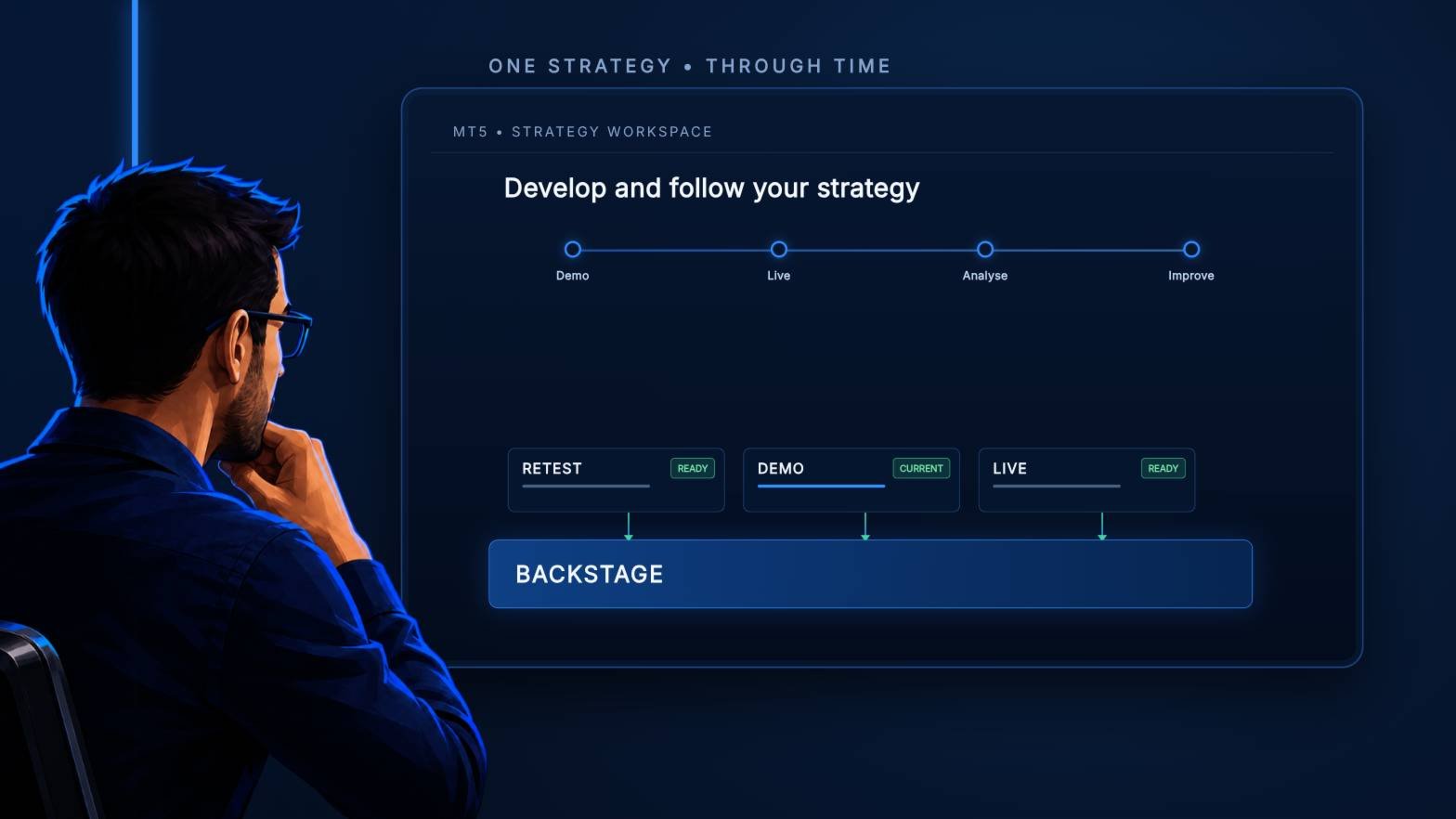
Front Row Backstage

Backstage — Preserve the History Behind Your Strategy Decisions

MT5 analysis depends on the account history still available from the terminal and broker. When older history disappears, it cannot be reconstructed later simply by choosing an earlier date.

Backstage turns the closed-trade history currently available in MT5 into a persistent local CSV source. It maintains the corresponding progress state and daily backup so Castlist, Spotlight and read-only analytical tools can reuse the same history.

Backstage does not trade. MT5 Algo Trading may remain off.

Documentation and Quick Start

  • Backstage Quick Start Manual — install one instance and verify the first persistent export.
  • Front Row User Guide 1.0 — understand the complete Castlist, Spotlight and Backstage workflow.
  • Support — see the Support section below for product questions and technical issues.

About the Automatic MQL5 Demo

The automatic MQL5 demo is restricted to the isolated Strategy Tester. This product is designed for use in a normally running MT5 terminal, so the tester demo is not a functional trial and should not be used to assess normal operation. Please use the product video and documentation for a representative overview.

Questions are always welcome. If the Comments section is available to you, please ask your question there. Otherwise, hover over the seller name and choose Send message. I am happy to help with any questions.

Start Early

Backstage can preserve history that is still available when it exports. It cannot restore trades the broker no longer supplies.

Starting early reduces dependence on broker-held history and gives later comparisons a more continuous source. Backstage backups are helpful, but you remain responsible for an independent disaster backup outside the active PC or VPS.

What You Can Do with Backstage

  • Export the closed positions available in MT5 to a structured Demo or Live CSV.
  • Keep the export current and track successful progress in a matching state file.
  • Catch up after normal terminal or VPS interruptions when the trades remain available in MT5.
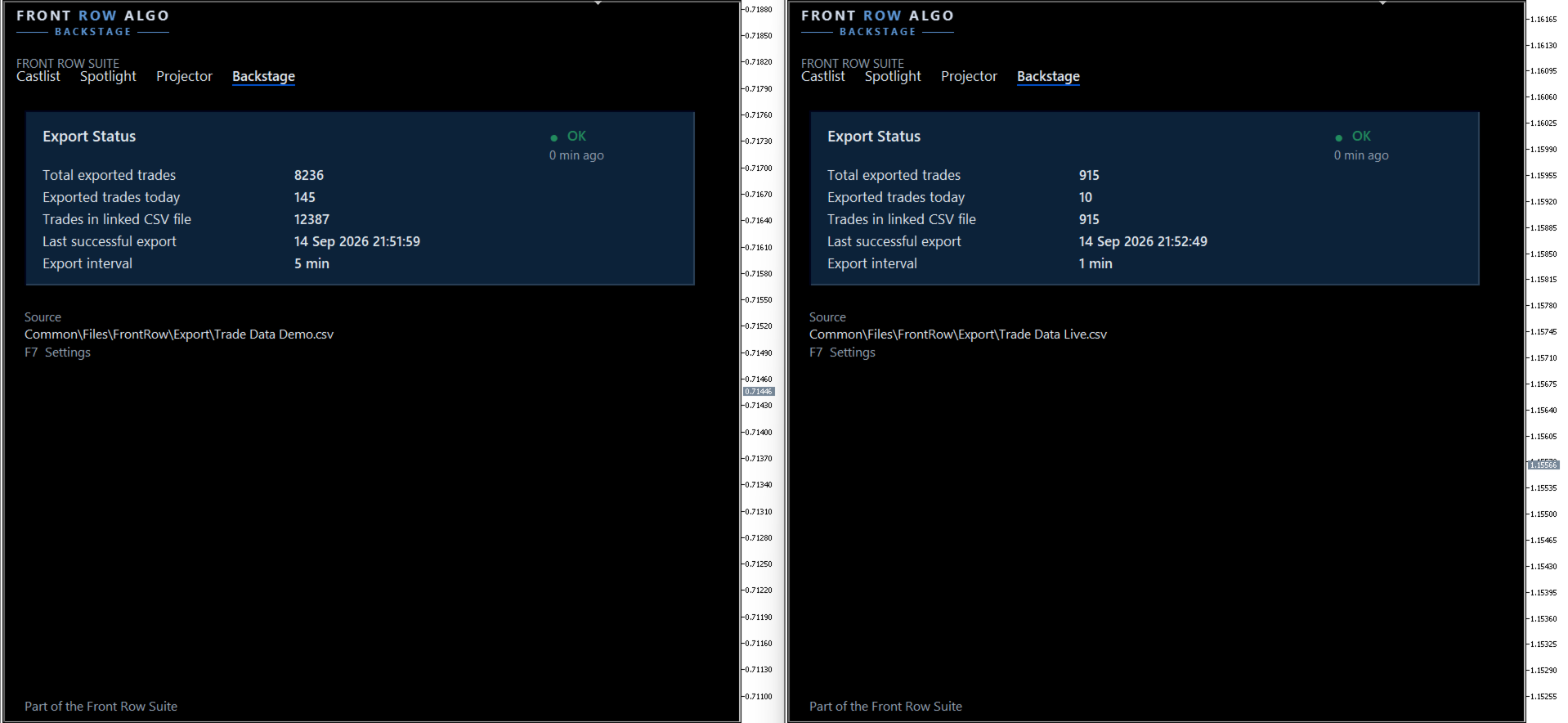
  • Create a daily backup and verify source, export time and trade counts on the dashboard.
  • Continue a deliberately maintained Demo history after an expired account is replaced.
  • Supply persistent history to Castlist, Spotlight and controlled read-only analysis with spreadsheets, databases, scripts or AI tools.

One Backstage per Terminal

Backstage has one terminal-wide task. Attach it to one chart in each intended MT5 terminal. The chart is only the control location; its symbol and timeframe do not limit the exported account history.

A second active instance is blocked. This protects one writer, one progress state and one clear managed CSV/state pair.

Demo terminal → maximum one Backstage → Demo CSV

Live terminal → maximum one Backstage → Live CSV

Your First Verified Export

  1. Confirm the intended account and visible MT5 closed-trade history.
  2. Attach Backstage to one chart.
  3. Keep FileName = AUTO and ForceFullRebuild = false initially.
  4. Allow the first historical build to finish.
  5. Verify source, export time, trade count and one known Magic#.
  6. After a new trade closes, confirm that it is appended without a full rebuild.

The first installation can take longer than a normal refresh because Backstage scans the available history, reconstructs closed positions, creates the CSV and initialises its progress state. Keep MT5 and the chart open until the dashboard reports a completed export.

CSV and State Belong Together

The CSV contains the reconstructed closed positions. The matching .state file records processed positions and successful scan progress.

Copy, rename and restore both together. Backstage is the only Front Row product that writes this active pair. Castlist and Spotlight deliberately read it.

Other applications must not open the active CSV or state file for writing. Read-only access or analysing a current copy with Excel, ChatGPT or another tool is compatible with normal Backstage operation.

Demo and Live Remain Traceable

Use separate terminals and exports for separate environments. This keeps Demo and Live history recognisable before Spotlight compares them.

When a Demo account expires, log the replacement Demo account into the same configured terminal and let Backstage continue the existing chain. Verify that older rows remain and that one newly closed trade appears once with the new account number. Do not automatically rebuild after an account change.

ForceFullRebuild Is a Recovery Action

ForceFullRebuild = true removes the active CSV/state pair and starts reconstruction from history MT5 currently supplies. Backstage automatically saves the switch back to false before rebuild success is guaranteed.

Always make an external copy first. A rebuild can shorten history when the broker no longer provides older trades. Do not use it as a normal refresh button or as a response to a temporary file lock.

Using Backstage with a VPS

Backstage works normally in your local MT5 terminal while the trading EAs continue running on MetaQuotes VPS. Connect the local terminal to the same trading account and allow MT5 history to synchronise. The trading EAs do not also need to run locally. While local MT5 is running, the local Backstage instance updates its own CSV/state pair from the closed-trade history still supplied by the broker.

Backstage can also run inside MetaQuotes VPS, but that virtual terminal has its own file environment. Its CSV and state files are not synchronised back to the local terminal. When local MT5 is opened again, local Backstage catches up from available broker history; it does not download the MetaQuotes VPS files. This is a practical operating mode, but history no longer supplied by the broker cannot be recovered this way.

On a Windows VPS, Backstage continuously updates the CSV/state pair on that VPS while MT5 is running. The files are accessible through Windows and can be included in an external backup. Run Castlist and Spotlight in the same Windows/MT5 environment when they must read that Backstage data.

Important Operating Notes

  • Algo Trading may remain off because Backstage does not place trades.
  • Hedging is preferred for clear multi-EA strategy attribution.
  • OK confirms a successful recent export; it does not prove the broker supplied every historical trade.
  • Saved terminal settings support continuity after restart, update or reattachment.
  • A new PC, VPS or terminal requires deliberate file restoration and verification.
  • Maintain an independent, multi-generation disaster backup.

The Data Foundation for Front Row

Use Backstage when the same persistent history should support Castlist management, Spotlight comparison or controlled external analysis. Castlist and Spotlight can start without it, but history that has already disappeared cannot be preserved afterward.

Support

Have a question about what Backstage does, how a feature works or whether it is suitable for a particular workflow? Post your question in the Comments section. The answer may also help other users.

Is something not working as expected in your installation? Hover over the seller name at the top of this page and click Send message.

Please use a private message for:

  • Errors or unexpected behaviour
  • Installation or configuration problems
  • Questions about your specific setup
  • Screenshots, log messages or data files
  • Information involving an account, broker, terminal or trading history

When reporting a technical issue, please include:

  • Backstage version
  • MetaTrader 5 build number
  • What you were trying to do
  • What you expected to happen
  • What happened instead
  • Steps to reproduce the issue
  • Detected account environment and active filename
  • Last successful export time and exported trade count
  • Whether ForceFullRebuild was used
  • Relevant settings, screenshots or Experts/Journal log messages

Never publish account credentials or sensitive trading information in the Comments section.

If you are unsure which option to use, send a private message.

For questions concerning purchases, downloads, payments, activations or your MQL5 account, contact the MQL5 Service Desk.

Prodotti consigliati
Synchronizer
PATRICK PAARSCH
This Expert Advisor monitors all open positions across all symbols in MetaTrader 5. Whenever a Stop Loss (SL) or Take Profit (TP) is manually set or adjusted on any position, the EA automatically applies that value to all other open positions , regardless of symbol or order type (Buy/Sell). This ensures consistent and synchronized SL and TP levels across your account. Perfect for mobile trading via tablet or smartphone!
Haven MT5 to Telegram 2.0 — Pubblica le operazioni MT5 su Telegram Haven MT5 to Telegram è un'utilità per pubblicare automaticamente su Telegram gli eventi di trading di MetaTrader 5. Monitora l'apertura e la chiusura delle posizioni, le modifiche di Stop Loss e Take Profit, le chiusure parziali e gli eventi degli ordini pendenti. I messaggi possono includere anche screenshot del grafico, Trade ID e il risultato dell'operazione. Guida utente   |   Gli altri miei prodotti ->  QUI . Novità di Hav
Aizen Trade Manager Pro
Japhet Eisenhdorf Pascua Jabulin
Aizen Trade Manager Pro Professional Trade Management for Traders Running Multiple Positions Opening a trade is the easy part. Managing it correctly—especially when you have several positions open at the same time—is where consistency is won or lost. Aizen Trade Manager Pro is a professional button-driven trade management panel that runs directly on your MetaTrader 5 chart. It does not generate signals, predict market direction, or execute trading strategies. Instead, it simplifies every repetit
Quick trade report separately by symbols 5   The  Quick trade report separately by symbols  advisor will be useful for simultaneous trading on multiple instruments. It provides the ability to assess the effectiveness of trading on each symbol separately. It is possible to set a time period for making the reports. Frequency and time of automatic generation and sending of reports via FTP. The report visualizes the changes in the balance for deals on each symbol. Also, the following key trading par
Smart Risk Manager
Abderrahmane Benali
5 (1)
Smart Risk Manager – Master Your Trades with Precision and Confidence Take complete control of your manual trading with Smart Risk Manager , a professional all-in-one trade and risk management Expert Advisor for MetaTrader 5 . Designed for traders who value speed, precision, and capital protection, it simplifies every step of trade execution while ensuring your risk remains under control. Whether you trade Forex, Gold, Indices, or Cryptocurrencies , Smart Risk Manager helps you execute trades w
Trade Panel HotKey – MT5 Scalping Utility Fast Trade Panel HotKey is a lightweight MT5 trading utility designed for traders who need to open, manage, and close positions as quickly as possible . The main purpose of this tool is to reduce the time between a trading decision and execution. Instead of moving the mouse, opening order windows, or manually modifying multiple positions, most important actions can be performed instantly through customizable keyboard hotkeys or directly from the compact
Atlas Trade Desk
Bernhard Wurzlbauer
Atlas Trade Desk MT5 Atlas Trade Desk MT5 is a visual trade panel, risk manager and lot calculator for manual MetaTrader 5 traders. Plan market and pending orders directly on the chart, calculate position size from your selected risk, adjust Entry, Stop Loss and Take Profit visually, and manage open positions from one clean dashboard. The tool is built for discretionary traders who want faster order preparation, clearer risk control and safer position management without switching between multipl
DGem Trade Manager Panel
Damien Jean Michel Gremillet
Trade Manager Panel ## Short description  Manage your manual trades with one click: automatic break-even, trailing stop, two-level partial close and risk-based lot sizing — all from a single on-chart panel. --- ## Full description Trade Manager Panel is an on-chart utility that takes care of your open trades so you can focus on the market instead of the order ticket. Drop it on any chart and it manages every position on that symbol automatically, while an interactive panel lets you size new
Questo prodotto è un EA di supporto alla chiusura automatica che aiuta i trader discrezionali a eseguire le regole di chiusura già decise. È possibile impostare condizioni di chiusura basate su un orario specificato, la conferma di una candela o un incrocio/avvicinamento di MA, e utilizzare TIME, CANDLE e MA CROSS separatamente o contemporaneamente. È inoltre possibile visualizzare le MA a 1H, 4H, giornaliero, settimanale e mensile sul grafico corrente. Non è un prodotto che automatizza le decis
(Multiple Close All) for MT5 a lightweight and efficient utility designed to help traders close their open positions and pending orders directly from the chart. It provides a clean panel with interactive buttons, allowing quick closing of opened trades and deleting the Pending Orders with one click. Key Features: Close all BUY , SELL , or ALL positions with one click. Close only profitable trades or only losing trades . Close trades filtered by Magic Number or Ticket Number . Perform par
FREE
Un grafico. Controllo totale. Smetti di perdere tempo a gestire oggetti, colori e impostazioni su ogni grafico separatamente. Con       Chart Sync Manager   , puoi       sincronizza, copia e controlla tutti i tuoi grafici MetaTrader       all'istante, utilizzando un solo pannello e poche scorciatoie. Disegna una volta, aggiorna ovunque. Apri e chiudi i grafici con un solo clic. Mantieni pulito il tuo spazio di lavoro con       gestione degli oggetti basata sui simboli   . E non perdere mai detta
Welcome to Smart Algo Trade Panel Manager MT5 - the ultimate   risk management tool designed to make trading more effective based on user needs.  It is a comprehensive solution for seamless trade planning, position management, and enhanced control over risk. It does not matter weather you a beginner or an advanced trader, or a scalper needing rapid executions, SmartAlgo Trade Panel  adapts to your needs offering flexibility across all markets of your choice. You can put SL, Lot and TP of choice

Trade Anomalo Telegram Report Trade Anomalo Telegram Report is a professional administrative utility designed for MetaTrader 5 that aggregates daily trading performance across multiple symbols and delivers a comprehensive summary report directly to your private Telegram channel, group, or a dedicated Forum Topic. Whether you run single-asset robots, multi-chart Expert Advisors, or manual strategies, this tool scans closed deal history, compiles net profits (including swaps and commissions), eval
SMT Trade Planner e un calcolatore di rischio professionale e pannello di esecuzione ordini direttamente sul grafico MetaTrader. Calcola la dimensione del lotto, mostra linee visuali di entrata, Stop Loss e Take Profit trascinabili sul grafico, valida il trade contro regole di rischio configurabili e permette l'esecuzione con un clic.   Come funziona Allega il Trade Planner a qualsiasi grafico. Il pannello mostra le informazioni del conto e pulsanti di selezione rapida del rischio. Tre linee ori
Prendi facilmente il controllo della tua routine di trading con il rivoluzionario Trades Time Manager. Questo potente strumento automatizza l'esecuzione degli ordini in orari prestabiliti, trasformando il tuo approccio al trading. Crea elenchi di attività personalizzati per diverse azioni di trading, dall'acquisto all'impostazione degli ordini, il tutto senza intervento manuale. Trades Time Manager Guida all'installazione e agli input Se desideri ricevere notifiche sull'EA, aggiungi il nostro UR
Apex StopLoss Manager
Muhammad Hassan Muhammad Ahmad Atiyah
Apex StopLoss Manager MT5 Script – Stop Loss Control Utility Overview Apex StopLoss Manager is a trade management script for MetaTrader 5 designed to provide precise, rule-based control over Stop Loss behavior on existing open positions . The script focuses on manual execution and accuracy. It does not use automated trading logic, does not open trades, and runs once per attachment . Core Functionality The script provides two independent Stop Loss control functions, both enabled only through exp
The utility is designed to display on the chart the margin zones built on the basis of margin requirements for futures of the Chicago Mercantile exchange (CME). These margin zones are good levels of resistance and support, as seen in the screenshots. How to use To trade on margin zones, use the following rules: buy after the day has closed above one of the zones to the next zone; sell after the day has closed below one of the zones to the next zone; after opening a sell trade, place limit sell
Mirror EA for MT5
Eugenio Bravetti
The new version of  MirrorSoftware 2021  has been completely rewriten and optimized.  This version requires to be loaded only on a single chart because  it can detect all actions on every symbol and not only the actions of symbol where it is loaded. Even the  graphics and the configuration mode  have been completely redesigned. The MirrorSoftware is composed of two components (all components are required to work):  MirrorController  (free indicator): This component must be loaded into the MASTER
Trade Dashboard MT5
Fatemeh Ameri
4.94 (135)
Trade Dashboard simplifies how you open, manage, and control your trades, with built-in lot size calculation. It allows you to execute trades, manage risk, and control positions directly on the chart, with tools such as partial close, breakeven, and trailing stop. Designed to reduce manual work and help you stay focused on your trading decisions. A demo version is available for testing. Detailed explanations of features are provided within the MQL5 platform. Installation instructions are include
### Take Control of Your Trading Edge with Manual Strategy Backtester Pro Do you want to achieve years of trading experience in just a few hours? Spending months testing strategies on live or demo accounts is slow, tedious, and expensive. **Strategy Backtester Pro** is a lightweight, ultra-fast manual charting simulator designed to let you backtest any mechanical or discretionary strategy with total control and speed. Whether it is the weekend or after hours, you can instantly spin up a simul
Equity Pulse MT5 Real-time equity, drawdown, and portfolio performance tracking in one clean trading panel. Equity Pulse MT5 is a practical account-monitoring indicator for MetaTrader 5. It helps traders see exactly where they stand across today, yesterday, recent days, the current week, month, and year. Instead of checking account history manually or relying only on the terminal’s floating profit number, Equity Pulse gives you a clear performance snapshot directly on the chart. It is designed
AutoJournal MT5
Sergio Marquez Uroz
Il tuo diario di trading, scritto per te. Ogni operazione chiusa viene registrata automaticamente — con uno screenshot del grafico, statistiche complete e una dashboard a calendario. 100% locale, senza abbonamenti. AutoJournal è una utility che lavora silenziosamente in background e trasforma il tuo storico di trading in un diario HTML professionale. Nessun inserimento manuale dei dati, niente fogli di calcolo, nessun servizio esterno: tutto viene generato e salvato sul tuo computer, e funziona
Signal Provider Utility Pro (Telegram & Discord) The Professional Solution for Signal Providers. Automated Broadcasting | Smart GUI Panel | Performance Reports Stop managing your signals manually. Signal Provider Utility Pro is the realiable bridge between your MetaTrader 5 terminal and your community on Telegram and Discord. Designed for high-performance signal services, this tool gives you instant control over your broadcasts without ever needing to open the settings window. From real-time tr
Xiao Dan Kuai Pao is a fast and clean one-click order panel for MetaTrader 5. Open and manage your trades instantly, with Stop Loss and Take Profit placed automatically — no more typing TP distances by hand. Key features: - One-click buttons: BUY, SELL, CLOSE, BREAK EVEN - Custom Stop Loss and Take Profit (in points) — set any distance you want - Flexible risk/reward — combine SL and TP freely to build any ratio, such as 1:1, 1:2, 1:3, 1:4 or 1:5 - Real-time price display (Bid) - Bar countdown t
Quick Simple Trade
Gabriele Giorgetti
Quick Simple Trade è un pannello di ordini molto semplice per MT5 per aprire rapidamente un trade specificando Stop Loss e Take Profit calcolando e mostrando i valori dei prezzi. Il pannello può anche essere ridotto al minimo per non interferire con il grafico. Quando l'ordine è aperto, puoi spostare istantaneamente SL e TP direttamente sul grafico. Sopperisce una delle mancanze di MT5, che piú reputo fastidiosa.
Prop Firm Trade Manager MT5  Managing risk and staying compliant with strict evaluation rules requires absolute precision. The Prop Firm Trade Manager MT5 is a professional trading panel MT5 designed to streamline your manual execution, automate complex calculations, and protect your funding account from rule violations. Featuring mt5 advanced dashboards, this tool displays real-time data directly on your main chart. It functions as an all-in-one trade manager for mt5, combining a position siz
ProTrading Panel — L'assistente definitivo per il trading manuale Migliora la tua esperienza di trading manuale con il ProTrading Panel . Progettato per un'esecuzione ultrarapida degli ordini, questo Expert Advisor (EA) offre un'interfaccia verticale elegante e piacevole per gli occhi che si adatta perfettamente ai tuoi grafici senza ingombrare lo spazio di lavoro. Sia che tu preferisca cliccare sullo schermo o eseguire operazioni alla velocità della luce utilizzando le scorciatoie da tastiera,
Trade Control Panel
Jerry Jilun Anak Liban
Trade Control Panel Function Normal One Click Function Close All Close All Profit Close All Loss Close All Pending Order Close All Sell Close All Buy Advance One Click Function 1.  Close Partial Lot Sell by Percent It will help you partial close for all open position by desire percent you wanted. No longer partial close one by one for every open position Manual input for desire percent 2. Close Partial Lot Buy by Percent It will help you partial close for all open position by desire percent
TradingX Hotkeys
Johannes Stephanus Lombard
Inputs Available Lotsizes Partial Close % You can change lotsizes as you require On an open chart click once to select chart to be able to use hotkeys on specific chart. All Pairs can be used with this expert We created this expert to be able to still trade C300 with a 0.06 Lotsize If you enter a 0.6 lot and close 0.90% you can trade with 0.06 Lot Keys to be used: B -Buy S -Sell C -Close Profitable D -Breakeven (Note if stoploss is set it won't break even) P -Partial close X -Close all
Stop checking charts one by one to discover which markets deserve your attention. Multi Market Scanner monitors multiple symbols and timeframes from a single panel, compares their technical conditions, and organizes the results by signal, score, alignment, and freshness. This helps you focus your analysis on the most relevant instruments without wasting time reviewing markets with no clear conditions. It is a market analysis and decision-support tool. It does not open, modify, or close trades: t
Gli utenti di questo prodotto hanno anche acquistato
Trade Assistant MT5
Evgeniy Kravchenko
4.43 (216)
It helps to calculate the risk per trade, the easy installation of a new order, order management with partial closing functions, trailing stop of 7 types and other useful functions. Additional materials and instructions Installation instructions - Application instructions - Trial version of the application for a demo account Line function -   shows on the chart the Opening line, Stop Loss, Take Profit. With this function it is easy to set a new order and see its additional characteristics bef
Forex Trade Manager MT5
InvestSoft
4.98 (685)
Benvenuto a Trade Manager EA, lo strumento definitivo per la gestione del rischio , progettato per rendere il trading più intuitivo, preciso ed efficiente. Non è solo uno strumento per l'esecuzione degli ordini, ma una soluzione completa per la pianificazione delle operazioni, la gestione delle posizioni e il controllo del rischio. Che tu sia un principiante, un trader avanzato o uno scalper che necessita di esecuzioni rapide, Trade Manager EA si adatta alle tue esigenze, offrendo flessibilità s
Local Trade Copier EA MT5
Juvenille Emperor Limited
4.94 (149)
Local Trade Copier EA MT5 è un trade copier rapido e flessibile per copiare e gestire operazioni tra più conti MetaTrader 5 sullo stesso computer Windows o Windows VPS. Combina la sincronizzazione locale delle operazioni con controlli lato Receiver per dimensione del lotto, gestione del rischio, filtraggio delle operazioni, mappatura dei simboli, gestione delle operazioni e protezione del conto. Configura i terminali Transmitter e Receiver in circa 1 minuto e copia operazioni manuali o aperte d
Telegram to MT5 MultiChannel Copier
Sergio Marquez Uroz
4.61 (18)
Telegram to MT5 Multi-Channel Copier   copia automaticamente i segnali di trading dai tuoi canali Telegram direttamente su MetaTrader 5. Niente bot, niente estensioni del browser, niente copia manuale. Il segnale arriva su Telegram e l'EA apre l'operazione nel tuo terminale in pochi secondi. E prima di copiare un canale, il backtester integrato ti mostra cosa avrebbe fatto quel canale sul tuo conto. Il prodotto include due componenti: un'applicazione Windows che ascolta i tuoi canali Telegram, e
Strategy Ledger Pro
Abdullah Uygar Tuna
5 (7)
Ora disponibile in italiano. Strategy Ledger Pro è un pannello di analisi del conto in sola lettura per MetaTrader 5. Separa i risultati del conto per Expert Advisor, strategia, simbolo e numero magic, così puoi vedere quanto contribuisce davvero ciascuno. Il pannello è disponibile in 11 lingue: English, Français, Deutsch, Español, Italiano, Português, Русский, Türkçe, 中文, 日本語 e 한국어. Prima di scaricare la demo. Il Market esegue la demo di qualsiasi prodotto a pagamento solo nello Strategy Teste
================================================================================ POC BREAKOUT - V20.72. Full Professional Grade Toolkit ================================================================================ POC Breakout is a full MetaTrader 5 trading dashboard for discretionary traders who want breakout signals, Point of Control (POC) context, volume profiles, order flow, market structure, news, alerts, and advanced trade planning in one professional workspace. Attached directly to you
TradePanel MT5
Alfiya Fazylova
4.88 (170)
Trade Panel è un assistente commerciale multifunzionale. L'applicazione contiene più di 50 funzioni di trading per il trading manuale e permette di automatizzare la maggior parte delle attività commerciali. Istruzioni per l'applicazione: https://www.mql5.com/it/blogs/post/762331 Versione di prova dell'applicazione per un conto demo: https://www.mql5.com/it/blogs/post/762419 Come installare l'applicazione: https://www.mql5.com/it/blogs/post/762362 Come testare l'applicazione in modalità visuale:
Copia i segnali Telegram con le tue regole di trading Telegram to MT5 Signal Trader copia automaticamente i segnali di trading testuali dai canali e gruppi Telegram pubblici e privati in MetaTrader 5. Gestisci più fornitori e conti MT5 da un'unica applicazione desktop, con impostazioni di rischio e di trading specifiche per ogni fornitore . Per copiare i segnali non servono bot Telegram né configurazioni API. Accedi semplicemente con il tuo account Telegram tramite numero di telefono o codice QR
Power Candles Strategy Scanner - Strumento di ricerca configurazioni multi-simbolo con ottimizzazione automatica Power Candles Strategy Scanner utilizza lo stesso motore di auto-ottimizzazione che alimenta l'indicatore Power Candles, applicandolo a tutti i simboli presenti nel tuo Market Watch, uno accanto all'altro. Un unico pannello ti indica quali simboli sono statisticamente negoziabili in questo momento, quale strategia è vincente su ciascuno di essi, la coppia ottimale di Stop Loss / Take
FarmedHedge Pair Trading Dashboard
Tanapisit Tepawarapruek
5 (5)
Farmed Hedge Yield Farming | All Markets (Manual - Hybrid - Semi/Automated EA) VERIFIED TRADING RESULTS - Farmed Hedge Yield Axi Copy:  https://www.mql5.com/en/signals/2356376 - Farmed Hedge Yield Exn Copy:   https://www.mql5.com/en/signals/2356404 - Farmed Hedge Yield V Copy:  https://www.mql5.com/en/signals/2357156 IMPORTANT NOTICE: FarmedHedge is a MANUAL-FOCUSED TRADING UTILITY ,not a fully automated EA. Results shown on this Signal include manual trades and overall strategic management.
Exp COPYLOT CLIENT for MT5
Vladislav Andruschenko
3.97 (35)
Copiatore professionale di trade per MetaTrader 5 Un copiatore di trade veloce, professionale e affidabile per MetaTrader . COPYLOT consente di copiare operazioni Forex tra terminali MT4 e MT5 con supporto per conti Hedge e Netting . La versione MT5 di COPYLOT supporta: - MT5 Hedge → MT5 Hedge - MT5 Hedge → MT5 Netting - MT5 Netting → MT5 Hedge - MT5 Netting → MT5 Netting - MT4 → MT5 Hedge - MT4 → MT5 Netting Versione MT4 Descrizione completa + DEMO + PDF Come acquistare Come installare Come ot
Trade copier MT5
Alfiya Fazylova
4.61 (56)
Trade Copier è un'utilità professionale progettata per copiare e sincronizzare le transazioni tra conti di trading. La copiatura avviene dal conto/terminale del fornitore al conto/terminale del destinatario, che sono installati sullo stesso computer o vps. Prima di acquistare, puoi testare la versione demo su un account demo. Versione demo qui . Istruzioni complete qui . Funzionalità e vantaggi principali: Supporta la copia degli ordini: MT5> MT5, MT4> MT5, MT5> MT4, inclusi i conti di compensaz
Grid Manual MT5
Alfiya Fazylova
4.73 (22)
Grid Manual è un pannello di trading per lavorare con una griglia di ordini. L'utilità è universale, ha impostazioni flessibili e un'interfaccia intuitiva. Funziona con una griglia di ordini non solo nella direzione delle perdite, ma anche nella direzione dell'aumento dei profitti. Il trader non ha bisogno di creare e mantenere una griglia di ordini, lo farà l'utilità. È sufficiente aprire un ordine e il manuale di Grid creerà automaticamente una griglia di ordini per esso e lo accompagnerà fino
Footprint Chart Pro — Professional OrderFlow EA for MetaTrader 5 Version 6.34 | Professional tool for real traders | Institutional-Grade Visualization DEMO USERS - PLEASE SELECT EVERY TICK / REAL TICK WHEN TESTING AND YOU HAVE DOWNLOADED HISTORICAL DATA. IF YOU SEE A WAITING SCREEN AND IT IS NOT DOWNLOADING, IT MEANS YOU HAVE LOW HISTORICAL DATA. TRY 1 MIN AND 5 MIN FIRST ON 1 DAY DATA. ONE DAY DATA SHOULD BE THE NEWEST AND MOST CURRENT DATE. PLEASE WAIT UNTIL THE MARKET HAS ROLLED OVER PERIOD.
HINN MagicEntry Extra
ALGOFLOW OÜ
4.74 (19)
HINN MAGIC ENTRY – the ultimate tool for entry and position management! SIMPLE. FASTEST. INTUITIVE. MAX AUTOMATED. Place orders by selecting a level directly on the chart! full description   ::  demo-version  :: 60-sec-video-description Key features: - Market, limit, and pending orders - Automatic lot size calculation - Automatic spread and commission accounting - Unlimited partitial take-profits  - Breakeven and trailing stop-loss and take-profit  functions - Invalidation leves - Intuitive, a
Welcome to ENTRY IN THE ZONE AND SMC MULTI TIMEFRAME /  Official Website :   https://www.fableedge.net Entry In The Zone and SMC Multi Timeframe is a real-time market analysis tool based on Smart Money Concepts (SMC), designed to analyze market structure, price direction, and key trading zones. It supports both Single-Timeframe Analysis and Multi-Timeframe Analysis, providing a clearer view of the overall market structure across multiple timeframes, with real-time BUY / SELL signals that do not
Signal Trading View to MT5 Pro
Mirel Daniel Gheonu
4.5 (2)
Signal TradingView to MT5 Pro Automator Esecuzione professionale istantanea tra TradingView e MetaTrader 5 Automatizza la tua strategia di trading con il ponte di comunicazione più robusto tra gli alert di TradingView e l'esecuzione reale in MT5. Progettato per i trader che richiedono velocità, flessibilità e una gestione del rischio impeccabile, questo Expert Advisor trasforma qualsiasi messaggio di avviso in un preciso ordine a mercato o limite. PUNTI DI FORZA E VANTAGGI Motore di Parsing Univ
MT5 to Telegram Signal Provider è un'utilità facile da usare e completamente personalizzabile che consente l'invio di segnali specificati a una chat, canale o gruppo Telegram, rendendo il tuo account un fornitore di segnali. A differenza della maggior parte dei prodotti concorrenti, non utilizza importazioni DLL. [ Dimostrativo ] [ Manuale ] [ Versione MT4 ] [ Versione Discord ] [ Canale Telegram ]  New: [ Telegram To MT5 ] Configurazione Una guida utente passo-passo è disponibile. Nessuna cono
Premium Trade Manager - Il pannello di trading con un coach integrato Premium Trade Manager porta un coach di trading direttamente nel tuo grafico, con un motore di esecuzione completo al di sotto. Imposta il trade come fai sempre, poi lascia che Max, il tuo coach di trading IA, legga esattamente quel setup rispetto al tuo conto live e ti dia un verdetto chiaro prima che tu confermi: lo stop rispetta un approccio disciplinato, il rischio è ragionevole, c'è un evento ad alto impatto tra pochi min
Anchor Trade Manager
Kalinskie Gilliam
5 (9)
Your EAs cannot see each other, but Anchor can. Anchor gives you one place to coordinate your EAs, manage risk, and decide when trading is allowed. It works alongside the trading bots you already use without any changes to them. The Problem One EA opens a trade. Then another starts trading. The next thing you know, you wake up to multiple grids built across your account. Each EA may be doing exactly what it was designed to do, but together they can place far more risk on your account than you in
Trade Indicator Assistant   is a powerful MT5 utility designed to turn indicators into automated trading systems. Its main feature is the ability to automatically detect an indicator’s   BUY and SELL signal buffers , without requiring you to know the buffer numbers, search through indicator settings, or modify the indicator source code. Bonus Indicator:   After purchasing Trade Indicator Assistant, contact me to receive   Trade Signal Pro   completely free as a bonus indicator. [Download Demo V
Telegram To MT5 Ultra
Mirel Daniel Gheonu
5 (5)
Telegram To MT5 — Copiatore di segnali Trasforma le indicazioni di trading dei tuoi canali Telegram in veri ordini MT5 — automaticamente, su quanti account vuoi, con rischio e regole totalmente sotto il tuo controllo. Telegram To MT5 collega i canali VIP / di segnali che già segui su Telegram al tuo terminale MetaTrader 5. Un'app desktop companion gratuita legge i messaggi (anche dai canali che bloccano i bot), e questo Expert Advisor li esegue sul tuo conto — applicando le tue impostazioni di r
Trade Manager Panel Pro MT5
VividMind Digital Solutions
5 (6)
Scrivimi dopo l’acquisto per ricevere il kit completo del manuale + 3 giorni di prova dell’API OpenAI per testare le funzionalità AI + un altro regalo bonus Il prezzo attuale è uno sconto limitato per l’aggiornamento del rilancio di agosto — assicurati subito la tua edizione prima che il prezzo aumenti. Prossimo prezzo: $340 È completamente diverso da qualsiasi pannello di trading tu abbia mai provato o visto sul mercato. È uno dei pannelli di trading basati sull’IA più innovativi attualmente d
Quant Panel
Kevin Craig E Gittins
QUANT PANEL Independent per-algo analytics, protected MT5 history and professional PDF reporting Quant Panel is built for traders who run several Expert Advisors or strategies on one MT5 account and need to know how each algo is actually performing. Instead of treating the terminal as one combined portfolio, Quant Panel groups closed positions by EA comment or magic number and calculates every strategy independently. It gives you one clear dashboard for comparing algos, finding weak systems and
Telegram to MT5 Coppy
Sergey Batudayev
5 (10)
Da Telegram a MT5:   la soluzione definitiva per la copia del segnale Semplifica il tuo trading con Telegram su MT5, il moderno strumento che copia i segnali di trading direttamente dai canali e dalle chat di Telegram sulla tua piattaforma MetaTrader 5, senza bisogno di DLL. Questa potente soluzione garantisce un'esecuzione precisa dei segnali, ampie opzioni di personalizzazione, fa risparmiare tempo e aumenta la tua efficienza. [ Instructions and DEMO ] Caratteristiche principali Integrazione d
YuClusters
Yury Kulikov
4.93 (43)
Attention: You can view the program operation in the free version  YuClusters DEMO .  YuClusters is a professional market analysis system. The trader has unique opportunities to analyze the flow of orders, trade volumes, price movements using various charts, profiles, indicators, and graphical objects. YuClusters operates on data based on Time&Sales or ticks information, depending on what is available in the quotes of a financial instrument. YuClusters allows you to build graphs by combining da
Trade Manager DaneTrades
Levi Dane Benjamin
4.23 (30)
Trade Manager per aiutarti a entrare e uscire rapidamente dalle operazioni calcolando automaticamente il tuo rischio. Incluse funzionalità che ti aiutano a prevenire l'eccessivo trading, il vendetta trading e il trading emotivo. Le operazioni possono essere gestite automaticamente e i parametri di performance del conto possono essere visualizzati in un grafico. Queste caratteristiche rendono questo pannello ideale per tutti i trader manuali e aiuta a migliorare la piattaforma MetaTrader 5. Suppo
DrawDown Limiter
Haidar Lionel Haj Ali
5 (23)
DrawDown Limiter v5.0 — Controller avanzato per la protezione del conto DrawDown Limiter v5.0 è un controller di protezione del conto lato client, progettato per monitorare il tuo conto di trading e reagire automaticamente quando vengono raggiunti i limiti configurati relativi a rischio, profitto, notizie, pianificazione, rollover o numero di posizioni. Può monitorare operazioni manuali, strategie automatizzate, più Expert Advisor, ordini pendenti e posizioni aperte da un unico grafico dedicato.
The News Filter MT5
Leolouiski Gan
4.78 (23)
Questo prodotto filtra tutti gli esperti consulenti e i grafici manuali durante il periodo delle notizie, così non dovrai preoccuparti di improvvisi picchi di prezzo che potrebbero distruggere le tue impostazioni di trading manuali o le negoziazioni effettuate da altri esperti consulenti. Questo prodotto viene fornito anche con un sistema completo di gestione degli ordini che può gestire le tue posizioni aperte e gli ordini in sospeso prima della pubblicazione di qualsiasi notizia. Una volta che
VirtualTradePad One Click Trading Panel
Vladislav Andruschenko
4.59 (74)
Pannello di trading per MetaTrader 5 — controllo professionale del trading in un clic dal grafico e dalla tastiera Un pannello di trading avanzato progettato per trader attivi, pensato per aprire, gestire e chiudere operazioni molto più velocemente rispetto all’interfaccia standard di MetaTrader. Questa soluzione è dedicata a chi desidera controllare posizioni, ordini pendenti, profitto totale ed esecuzione da un unico spazio di lavoro professionale. Non si tratta di un semplice utilitario. È u
Altri dall’autore
Castlist — Turn Your EA Portfolio into a Management Worklist Running several Expert Advisors creates a different challenge from running one EA: knowing which strategy needs attention and remembering what you decided about it. Castlist brings strategy identity, recent activity, performance and management context together in one MT5 workspace. It helps you move from a large portfolio to a short, practical worklist without changing or controlling the EAs themselves. Castlist is available free of ch
FREE
Spotlight — Compare Strategy Development Trade by Trade A final result tells you where a strategy ended. It does not show how the result developed, where behaviour started to change or whether Demo, Live and Retest still follow a comparable path. Spotlight turns trading history into a visual trade-by-trade comparison workspace. It helps the trader begin with one validated baseline, add one controlled comparison and record what the evidence does—and does not—show. Documentation and Quick Start Sp
Filtro:
Nessuna recensione
Rispondi alla recensione