Front Row Spotlight
- Utilità
- Versione: 1.69
- Aggiornato: 1 ottobre 2026
- Attivazioni: 5

Spotlight — Compare Strategy Development Trade by Trade
A final result tells you where a strategy ended. It does not show how the result developed, where behaviour started to change or whether Demo, Live and Retest still follow a comparable path.
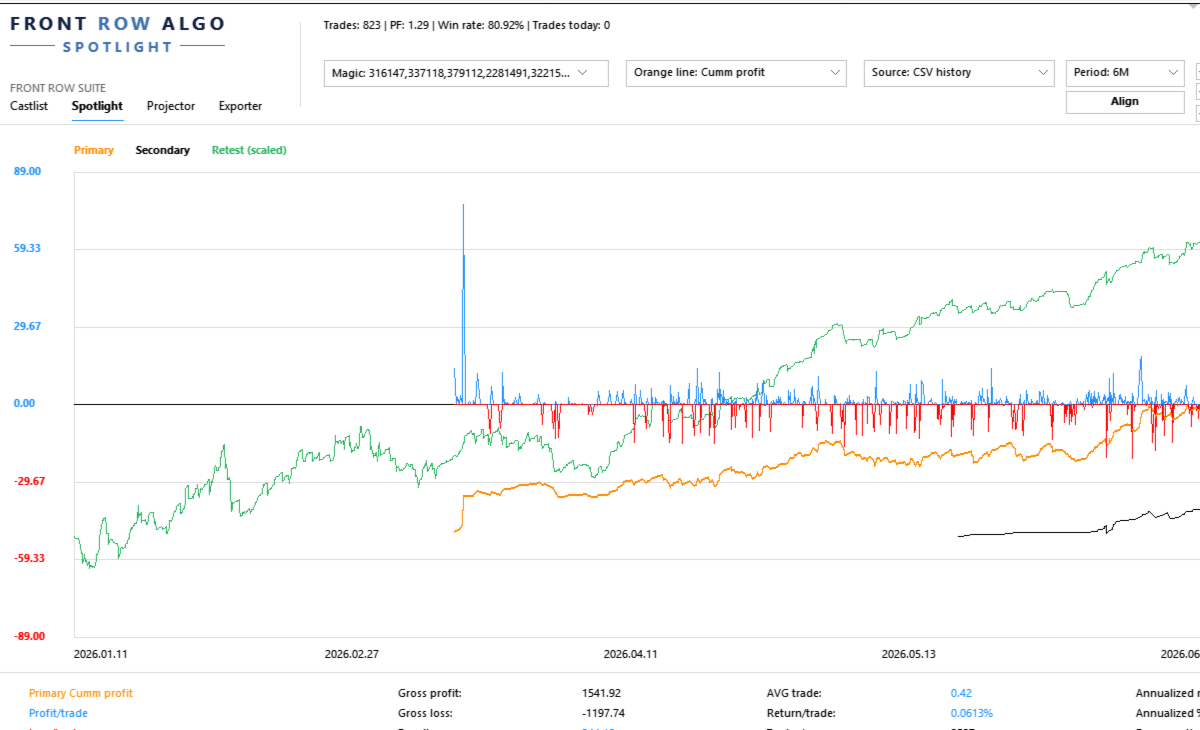
Spotlight turns trading history into a visual trade-by-trade comparison workspace. It helps the trader begin with one validated baseline, add one controlled comparison and record what the evidence does—and does not—show.
Documentation and Quick Start
- Spotlight Quick Start Manual — build one baseline, add one comparison and understand the trade axis.
- Front Row User Guide 1.0 — understand the complete Castlist, Spotlight and Backstage workflow.
- Support — see the Support section below for product questions and technical issues.
About the Automatic MQL5 Demo
MQL5 automatically provides a Strategy Tester demo for paid indicators and EA-type products. Spotlight is designed for interactive analysis using terminal history and local comparison files. The Strategy Tester uses an isolated test environment and therefore cannot reproduce the complete normal Spotlight workflow. Use the product video, screenshots and documentation for a representative overview.
Start with One Strategy and One Question
Select a known Magic#, choose the source and period, and begin with a metric that matches your question:
- Where did the current drawdown begin?
- Is recovery supported by several trades or one outlier?
- Does Live still resemble Demo or SQX Retest?
- Which strategy variant develops differently?
- What changes when one strategy is added to or removed from a portfolio?
Validate the first line before enabling additional sources, Align, VS or Portfolio Impact.
What You Can Do with Spotlight
- Analyse MT5 History directly or use persistent Demo and Live CSV sources maintained by Backstage.
- Compare account development with supported StrategyQuant X Retest exports.
- Follow core performance, Drawdown, Capital and analytical Margin after every trade and display individual Trade Lines.
- Read Result, trade efficiency, evidence speed, annualised scenarios and exposure together in the lower summary.
- Align sources deliberately, compare individual strategies with VS and test temporary additions, removals or swaps with Portfolio Impact.
- Create or update shared Notes and Reviews from a real trade point.
The Trade Axis
The horizontal axis represents consecutive trade slots, not evenly spaced calendar time. Trades remain ordered by their real close time, but long inactive periods do not create large empty areas.
Trades closing near each other may share a slot according to TradeMatchToleranceMinutes . This synchronises the visual comparison; it does not prove that the trades had equal direction, volume, entry or economic meaning.
A Practical First Comparison
- Attach Spotlight to one docked MT5 chart.
- Select one known Magic# and one source.
- Choose a period with enough trades.
- Confirm first trade, latest trade and trade count.
- Select one understandable metric.
- Describe the absolute baseline in plain language.
- Add one Secondary, SQX Retest or VS line.
- Record the observation and schedule a Review when useful.
Compare Sources Without Hiding Their Differences
Spotlight can bring MT5, Demo, Live and SQX Retest into one analytical view, but the trader remains responsible for verifying identity, period, costs, sizing and source freshness.
In the current version, Retest means the standard supported SQX trade-export format. The Retest Magic# is derived from all digits in the complete filename. Avoid unrelated digits such as duplicate-file suffixes.
Backstage is optional for MT5 History and SQX Retest. It becomes relevant when the same persistent CSV history should remain available across products, terminals or later analysis without relying only on broker-held history.
VS and Portfolio Impact
Use VS when individual strategies must remain separate. Use Portfolio Impact when you want to test a temporary addition, removal or swap against the current selected portfolio.
Neither function changes EAs, positions, files, Live markers or the Primary selection. Impact is an analytical session scenario, not a trading instruction or saved portfolio change.
Capital, Margin and Leverage
Capital and Margin depend on the selected source and configured assumptions. AccountCapitalOverride supplies a reproducible reference capital. MarginLeverageOverride supplies analytical leverage.
Calculated Margin is not automatically the historical margin reserved by a broker. SQX Retest does not reconstruct equivalent historical Capital or Margin.
Using Spotlight with a VPS
Spotlight works normally in your local MT5 terminal while the trading EAs continue running on MetaQuotes VPS. Connect the local terminal to the same trading account and allow MT5 history to synchronise. The trading EAs do not also need to run locally.
Use Spotlight locally with MT5 History, local Backstage CSV files and local SQX Retest files. MetaQuotes VPS has a separate file environment and does not synchronise files back to the local terminal, so it is not the normal interactive Spotlight workspace.
A Windows VPS supports the complete Spotlight workflow through Remote Desktop. Keep Spotlight, Backstage and any required Retest files in the same Windows/MT5 environment when they need to share data, and include those files in the VPS backup policy.
Important Operating Notes
- Keep the Spotlight chart docked inside MT5 for reliable Suite Selector operation.
- Read absolute lines before using Align.
- A shared trade slot is not proof of an identical trade.
- Annualised values are linear scenarios, not predictions or compounding promises.
- Saved settings and up to five VS selections can be restored after restart or reattachment.
Use Spotlight on Its Own or in the Connected Workflow
Spotlight can analyse MT5 History and SQX Retest without the other products. Add Backstage for persistent Demo/Live sources and Castlist for Status, Live, Archive and the daily review cycle.
Support
Have a question about what Spotlight does, how a feature works or whether it is suitable for a particular workflow? Post your question in the Comments section. The answer may also help other users.
Is something not working as expected in your installation? Hover over the seller name at the top of this page and click Send message.
Please use a private message for:
- Errors or unexpected behaviour
- Installation or configuration problems
- Questions about your specific setup
- Screenshots, log messages or data files
- Information involving an account, broker, terminal or trading history
When reporting a technical issue, please include:
- Spotlight version
- MetaTrader 5 build number
- What you were trying to do
- What you expected to happen
- What happened instead
- Steps to reproduce the issue
- Selected source, period and Magic#
- Whether Align or scaling was active
- Relevant settings, screenshots or log messages
Never publish account credentials or sensitive trading information in the Comments section.
If you are unsure which option to use, send a private message.
For questions concerning purchases, downloads, payments, activations or your MQL5 account, contact the MQL5 Service Desk.