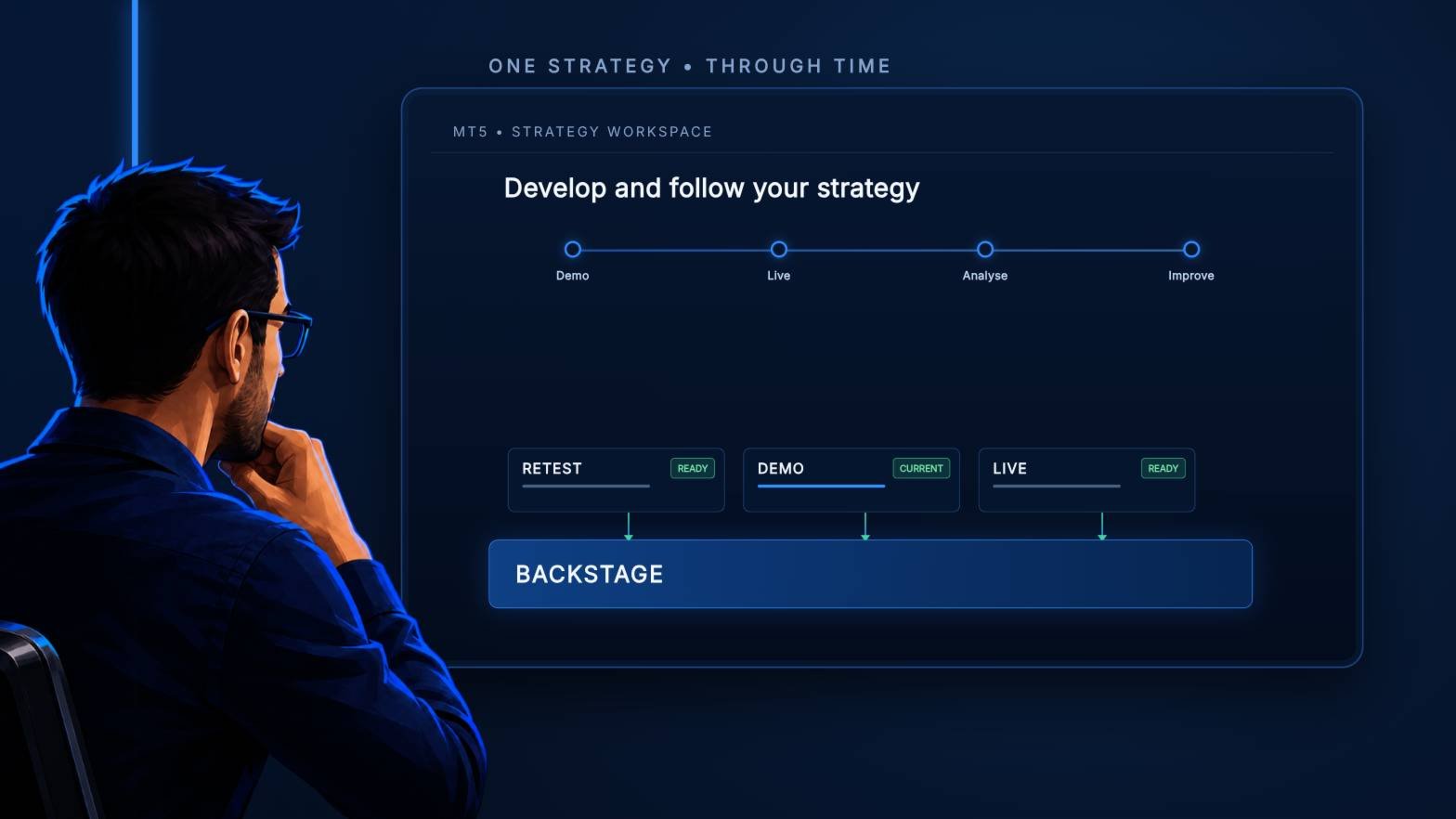
Front Row Backstage

Backstage — Preserve the History Behind Your Strategy Decisions

MT5 analysis depends on the account history still available from the terminal and broker. When older history disappears, it cannot be reconstructed later simply by choosing an earlier date.

Backstage turns the closed-trade history currently available in MT5 into a persistent local CSV source. It maintains the corresponding progress state and daily backup so Castlist, Spotlight and read-only analytical tools can reuse the same history.

Backstage does not trade. MT5 Algo Trading may remain off.

Documentation and Quick Start

  • Backstage Quick Start Manual — install one instance and verify the first persistent export.
  • Front Row User Guide 1.0 — understand the complete Castlist, Spotlight and Backstage workflow.
  • Support — see the Support section below for product questions and technical issues.

About the Automatic MQL5 Demo

The automatic MQL5 demo is restricted to the isolated Strategy Tester. This product is designed for use in a normally running MT5 terminal, so the tester demo is not a functional trial and should not be used to assess normal operation. Please use the product video and documentation for a representative overview.

Questions are always welcome. If the Comments section is available to you, please ask your question there. Otherwise, hover over the seller name and choose Send message. I am happy to help with any questions.

Start Early

Backstage can preserve history that is still available when it exports. It cannot restore trades the broker no longer supplies.

Starting early reduces dependence on broker-held history and gives later comparisons a more continuous source. Backstage backups are helpful, but you remain responsible for an independent disaster backup outside the active PC or VPS.

What You Can Do with Backstage

  • Export the closed positions available in MT5 to a structured Demo or Live CSV.
  • Keep the export current and track successful progress in a matching state file.
  • Catch up after normal terminal or VPS interruptions when the trades remain available in MT5.
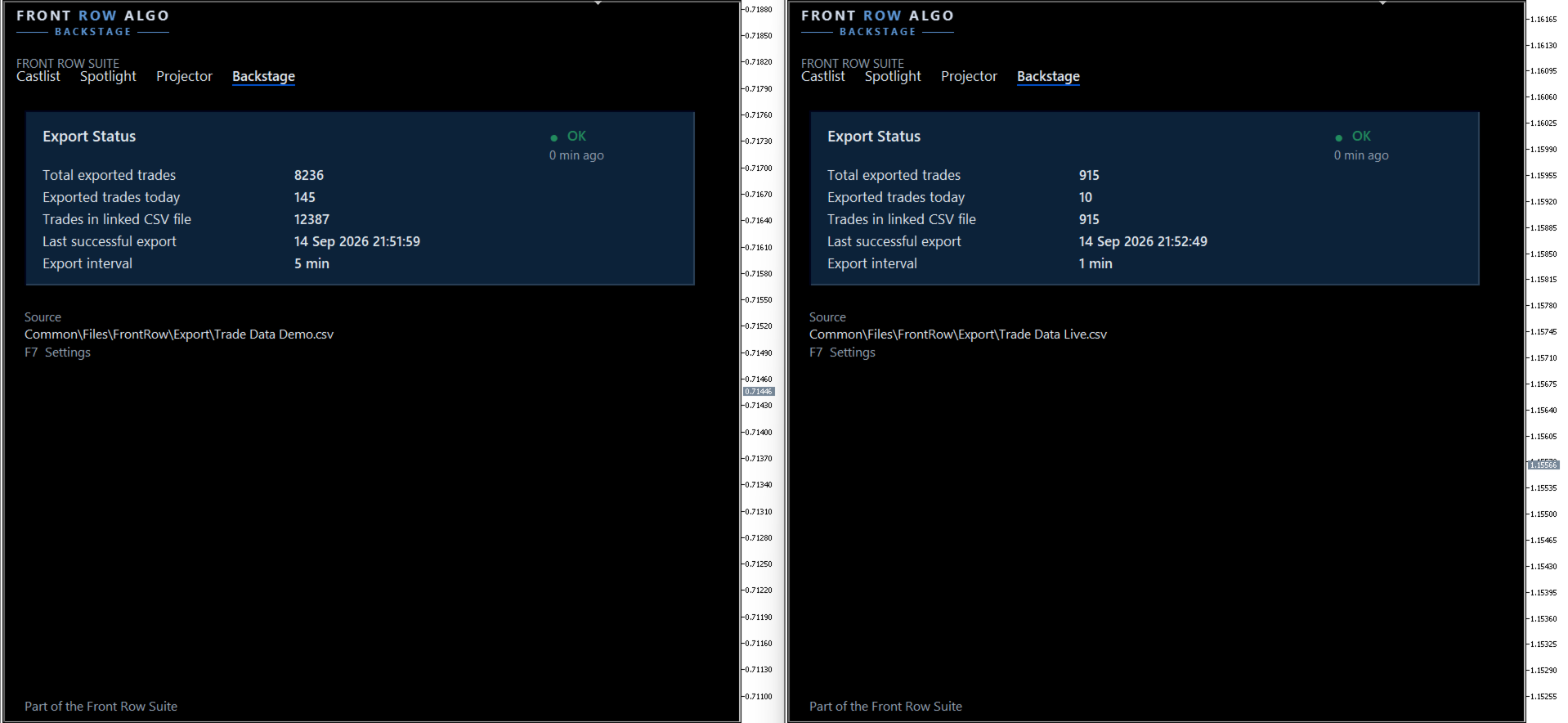
  • Create a daily backup and verify source, export time and trade counts on the dashboard.
  • Continue a deliberately maintained Demo history after an expired account is replaced.
  • Supply persistent history to Castlist, Spotlight and controlled read-only analysis with spreadsheets, databases, scripts or AI tools.

One Backstage per Terminal

Backstage has one terminal-wide task. Attach it to one chart in each intended MT5 terminal. The chart is only the control location; its symbol and timeframe do not limit the exported account history.

A second active instance is blocked. This protects one writer, one progress state and one clear managed CSV/state pair.

Demo terminal → maximum one Backstage → Demo CSV

Live terminal → maximum one Backstage → Live CSV

Your First Verified Export

  1. Confirm the intended account and visible MT5 closed-trade history.
  2. Attach Backstage to one chart.
  3. Keep FileName = AUTO and ForceFullRebuild = false initially.
  4. Allow the first historical build to finish.
  5. Verify source, export time, trade count and one known Magic#.
  6. After a new trade closes, confirm that it is appended without a full rebuild.

The first installation can take longer than a normal refresh because Backstage scans the available history, reconstructs closed positions, creates the CSV and initialises its progress state. Keep MT5 and the chart open until the dashboard reports a completed export.

CSV and State Belong Together

The CSV contains the reconstructed closed positions. The matching .state file records processed positions and successful scan progress.

Copy, rename and restore both together. Backstage is the only Front Row product that writes this active pair. Castlist and Spotlight deliberately read it.

Other applications must not open the active CSV or state file for writing. Read-only access or analysing a current copy with Excel, ChatGPT or another tool is compatible with normal Backstage operation.

Demo and Live Remain Traceable

Use separate terminals and exports for separate environments. This keeps Demo and Live history recognisable before Spotlight compares them.

When a Demo account expires, log the replacement Demo account into the same configured terminal and let Backstage continue the existing chain. Verify that older rows remain and that one newly closed trade appears once with the new account number. Do not automatically rebuild after an account change.

ForceFullRebuild Is a Recovery Action

ForceFullRebuild = true removes the active CSV/state pair and starts reconstruction from history MT5 currently supplies. Backstage automatically saves the switch back to false before rebuild success is guaranteed.

Always make an external copy first. A rebuild can shorten history when the broker no longer provides older trades. Do not use it as a normal refresh button or as a response to a temporary file lock.

Using Backstage with a VPS

Backstage works normally in your local MT5 terminal while the trading EAs continue running on MetaQuotes VPS. Connect the local terminal to the same trading account and allow MT5 history to synchronise. The trading EAs do not also need to run locally. While local MT5 is running, the local Backstage instance updates its own CSV/state pair from the closed-trade history still supplied by the broker.

Backstage can also run inside MetaQuotes VPS, but that virtual terminal has its own file environment. Its CSV and state files are not synchronised back to the local terminal. When local MT5 is opened again, local Backstage catches up from available broker history; it does not download the MetaQuotes VPS files. This is a practical operating mode, but history no longer supplied by the broker cannot be recovered this way.

On a Windows VPS, Backstage continuously updates the CSV/state pair on that VPS while MT5 is running. The files are accessible through Windows and can be included in an external backup. Run Castlist and Spotlight in the same Windows/MT5 environment when they must read that Backstage data.

Important Operating Notes

  • Algo Trading may remain off because Backstage does not place trades.
  • Hedging is preferred for clear multi-EA strategy attribution.
  • OK confirms a successful recent export; it does not prove the broker supplied every historical trade.
  • Saved terminal settings support continuity after restart, update or reattachment.
  • A new PC, VPS or terminal requires deliberate file restoration and verification.
  • Maintain an independent, multi-generation disaster backup.

The Data Foundation for Front Row

Use Backstage when the same persistent history should support Castlist management, Spotlight comparison or controlled external analysis. Castlist and Spotlight can start without it, but history that has already disappeared cannot be preserved afterward.

Support

Have a question about what Backstage does, how a feature works or whether it is suitable for a particular workflow? Post your question in the Comments section. The answer may also help other users.

Is something not working as expected in your installation? Hover over the seller name at the top of this page and click Send message.

Please use a private message for:

  • Errors or unexpected behaviour
  • Installation or configuration problems
  • Questions about your specific setup
  • Screenshots, log messages or data files
  • Information involving an account, broker, terminal or trading history

When reporting a technical issue, please include:

  • Backstage version
  • MetaTrader 5 build number
  • What you were trying to do
  • What you expected to happen
  • What happened instead
  • Steps to reproduce the issue
  • Detected account environment and active filename
  • Last successful export time and exported trade count
  • Whether ForceFullRebuild was used
  • Relevant settings, screenshots or Experts/Journal log messages

Never publish account credentials or sensitive trading information in the Comments section.

If you are unsure which option to use, send a private message.

For questions concerning purchases, downloads, payments, activations or your MQL5 account, contact the MQL5 Service Desk.

Produtos recomendados
This Expert Advisor monitors all open positions across all symbols in MetaTrader 5. Whenever a Stop Loss (SL) or Take Profit (TP) is manually set or adjusted on any position, the EA automatically applies that value to all other open positions , regardless of symbol or order type (Buy/Sell). This ensures consistent and synchronized SL and TP levels across your account. Perfect for mobile trading via tablet or smartphone!
Haven MT5 to Telegram 2.0 — Publique operações do MT5 no Telegram Haven MT5 to Telegram é uma utilidade para publicar automaticamente eventos de negociação do MetaTrader 5 no Telegram. Ele monitora aberturas e fechamentos de posições, alterações de Stop Loss e Take Profit, fechamentos parciais e eventos de ordens pendentes. As mensagens também podem incluir capturas do gráfico, Trade ID e o resultado da operação. Guia do usuário   |   Meus outros produtos ->  AQUI . Novidades no Haven MT5 to Te
Aizen Trade Manager Pro
Japhet Eisenhdorf Pascua Jabulin
Aizen Trade Manager Pro Professional Trade Management for Traders Running Multiple Positions Opening a trade is the easy part. Managing it correctly—especially when you have several positions open at the same time—is where consistency is won or lost. Aizen Trade Manager Pro is a professional button-driven trade management panel that runs directly on your MetaTrader 5 chart. It does not generate signals, predict market direction, or execute trading strategies. Instead, it simplifies every repetit
Quick trade report separately by symbols 5   The  Quick trade report separately by symbols  advisor will be useful for simultaneous trading on multiple instruments. It provides the ability to assess the effectiveness of trading on each symbol separately. It is possible to set a time period for making the reports. Frequency and time of automatic generation and sending of reports via FTP. The report visualizes the changes in the balance for deals on each symbol. Also, the following key trading par
Smart Risk Manager
Abderrahmane Benali
5 (1)
Smart Risk Manager – Master Your Trades with Precision and Confidence Take complete control of your manual trading with Smart Risk Manager , a professional all-in-one trade and risk management Expert Advisor for MetaTrader 5 . Designed for traders who value speed, precision, and capital protection, it simplifies every step of trade execution while ensuring your risk remains under control. Whether you trade Forex, Gold, Indices, or Cryptocurrencies , Smart Risk Manager helps you execute trades w
Trade Panel HotKey – MT5 Scalping Utility Fast Trade Panel HotKey is a lightweight MT5 trading utility designed for traders who need to open, manage, and close positions as quickly as possible . The main purpose of this tool is to reduce the time between a trading decision and execution. Instead of moving the mouse, opening order windows, or manually modifying multiple positions, most important actions can be performed instantly through customizable keyboard hotkeys or directly from the compact
Atlas Trade Desk
Bernhard Wurzlbauer
Atlas Trade Desk MT5 Atlas Trade Desk MT5 is a visual trade panel, risk manager and lot calculator for manual MetaTrader 5 traders. Plan market and pending orders directly on the chart, calculate position size from your selected risk, adjust Entry, Stop Loss and Take Profit visually, and manage open positions from one clean dashboard. The tool is built for discretionary traders who want faster order preparation, clearer risk control and safer position management without switching between multipl
DGem Trade Manager Panel
Damien Jean Michel Gremillet
Trade Manager Panel ## Short description  Manage your manual trades with one click: automatic break-even, trailing stop, two-level partial close and risk-based lot sizing — all from a single on-chart panel. --- ## Full description Trade Manager Panel is an on-chart utility that takes care of your open trades so you can focus on the market instead of the order ticket. Drop it on any chart and it manages every position on that symbol automatically, while an interactive panel lets you size new
Este produto é um EA de apoio ao fechamento automático que ajuda traders discricionários a executar as regras de fechamento que já decidiram. Você pode configurar condições de fechamento com base em um horário especificado, confirmação de candle ou cruzamento/aproximação de MA, e usar TIME, CANDLE e MA CROSS separadamente ou ao mesmo tempo. Também é possível exibir as MA de 1H, 4H, diário, semanal e mensal no gráfico atual. Não é um produto que automatiza decisões de negociação ou a abertura de
(Multiple Close All) for MT5 a lightweight and efficient utility designed to help traders close their open positions and pending orders directly from the chart. It provides a clean panel with interactive buttons, allowing quick closing of opened trades and deleting the Pending Orders with one click. Key Features: Close all BUY , SELL , or ALL positions with one click. Close only profitable trades or only losing trades . Close trades filtered by Magic Number or Ticket Number . Perform par
FREE
Um gráfico. Controle total. Pare de perder tempo gerenciando objetos, cores e configurações em cada gráfico separadamente. Com       Chart Sync Manager   , você pode       sincronize, copie e controle todos os seus gráficos MetaTrader       instantaneamente — usando apenas um painel e alguns atalhos. Desenhe uma vez, atualize em qualquer lugar. Abra e feche gráficos com um único clique. Mantenha seu espaço de trabalho limpo com       gerenciamento de objetos baseado em símbolos   . E nunca perca
Welcome to Smart Algo Trade Panel Manager MT5 - the ultimate   risk management tool designed to make trading more effective based on user needs.  It is a comprehensive solution for seamless trade planning, position management, and enhanced control over risk. It does not matter weather you a beginner or an advanced trader, or a scalper needing rapid executions, SmartAlgo Trade Panel  adapts to your needs offering flexibility across all markets of your choice. You can put SL, Lot and TP of choice

Trade Anomalo Telegram Report Trade Anomalo Telegram Report is a professional administrative utility designed for MetaTrader 5 that aggregates daily trading performance across multiple symbols and delivers a comprehensive summary report directly to your private Telegram channel, group, or a dedicated Forum Topic. Whether you run single-asset robots, multi-chart Expert Advisors, or manual strategies, this tool scans closed deal history, compiles net profits (including swaps and commissions), eval
SMT Trade Planner e um calculador de risco profissional e painel de execucao de operacoes diretamente no grafico do MetaTrader. Calcula o tamanho do lote com base nas configuracoes de risco, exibe linhas visuais de entrada, Stop Loss e Take Profit arrastáveis no grafico, valida a operacao contra regras de risco configuraveis e permite execucao com um clique.   Como funciona Anexe o Trade Planner a qualquer grafico. O painel exibe informacoes da conta e botoes de selecao rapida de risco. Tres lin
Assuma o controle de sua rotina de negociação sem esforço com o revolucionário Trades Time Manager. Essa ferramenta potente automatiza a execução de ordens em horários designados, transformando sua abordagem de negociação. Crie listas de tarefas personalizadas para diversas ações de negociação, desde a compra até a definição de pedidos, tudo sem intervenção manual. Guia de instalação e entradas do Trades Time Manager Se você deseja receber notificações sobre o EA, adicione nosso URL ao terminal
Apex StopLoss Manager
Muhammad Hassan Muhammad Ahmad Atiyah
Apex StopLoss Manager MT5 Script – Stop Loss Control Utility Overview Apex StopLoss Manager is a trade management script for MetaTrader 5 designed to provide precise, rule-based control over Stop Loss behavior on existing open positions . The script focuses on manual execution and accuracy. It does not use automated trading logic, does not open trades, and runs once per attachment . Core Functionality The script provides two independent Stop Loss control functions, both enabled only through exp
The utility is designed to display on the chart the margin zones built on the basis of margin requirements for futures of the Chicago Mercantile exchange (CME). These margin zones are good levels of resistance and support, as seen in the screenshots. How to use To trade on margin zones, use the following rules: buy after the day has closed above one of the zones to the next zone; sell after the day has closed below one of the zones to the next zone; after opening a sell trade, place limit sell
The new version of  MirrorSoftware 2021  has been completely rewriten and optimized.  This version requires to be loaded only on a single chart because  it can detect all actions on every symbol and not only the actions of symbol where it is loaded. Even the  graphics and the configuration mode  have been completely redesigned. The MirrorSoftware is composed of two components (all components are required to work):  MirrorController  (free indicator): This component must be loaded into the MASTER
Trade Dashboard MT5
Fatemeh Ameri
4.94 (135)
Trade Dashboard simplifies how you open, manage, and control your trades, with built-in lot size calculation. It allows you to execute trades, manage risk, and control positions directly on the chart, with tools such as partial close, breakeven, and trailing stop. Designed to reduce manual work and help you stay focused on your trading decisions. A demo version is available for testing. Detailed explanations of features are provided within the MQL5 platform. Installation instructions are include
### Take Control of Your Trading Edge with Manual Strategy Backtester Pro Do you want to achieve years of trading experience in just a few hours? Spending months testing strategies on live or demo accounts is slow, tedious, and expensive. **Strategy Backtester Pro** is a lightweight, ultra-fast manual charting simulator designed to let you backtest any mechanical or discretionary strategy with total control and speed. Whether it is the weekend or after hours, you can instantly spin up a simul
Equity Pulse MT5 Real-time equity, drawdown, and portfolio performance tracking in one clean trading panel. Equity Pulse MT5 is a practical account-monitoring indicator for MetaTrader 5. It helps traders see exactly where they stand across today, yesterday, recent days, the current week, month, and year. Instead of checking account history manually or relying only on the terminal’s floating profit number, Equity Pulse gives you a clear performance snapshot directly on the chart. It is designed
AutoJournal MT5
Sergio Marquez Uroz
Seu diário de trading, escrito para você. Cada operação fechada é registrada de forma automática — com screenshot do gráfico, estatísticas completas e um painel em calendário. 100% local, sem assinaturas. AutoJournal é um utilitário que funciona silenciosamente em segundo plano e transforma seu histórico de trading em um diário HTML profissional. Sem entrada manual de dados, sem planilhas, sem serviços externos: tudo é gerado e armazenado no seu próprio computador, e funciona da mesma forma tant
Signal Provider Utility Pro (Telegram & Discord) The Professional Solution for Signal Providers. Automated Broadcasting | Smart GUI Panel | Performance Reports Stop managing your signals manually. Signal Provider Utility Pro is the realiable bridge between your MetaTrader 5 terminal and your community on Telegram and Discord. Designed for high-performance signal services, this tool gives you instant control over your broadcasts without ever needing to open the settings window. From real-time tr
Xiao Dan Kuai Pao is a fast and clean one-click order panel for MetaTrader 5. Open and manage your trades instantly, with Stop Loss and Take Profit placed automatically — no more typing TP distances by hand. Key features: - One-click buttons: BUY, SELL, CLOSE, BREAK EVEN - Custom Stop Loss and Take Profit (in points) — set any distance you want - Flexible risk/reward — combine SL and TP freely to build any ratio, such as 1:1, 1:2, 1:3, 1:4 or 1:5 - Real-time price display (Bid) - Bar countdown t
Quick Simple Trade is a very simple order panel for MT5 to quickly open a trade specifyng Stop Loss and Take Profit calculating and showing the price values. The panel can be also minimized to not interfere with the chart. When the order is open you can instantly move SL and TP directly on the chart. It makes up for one of the shortcomings of MT5, which I find most annoying.
Prop Firm Trade Manager MT5  Managing risk and staying compliant with strict evaluation rules requires absolute precision. The Prop Firm Trade Manager MT5 is a professional trading panel MT5 designed to streamline your manual execution, automate complex calculations, and protect your funding account from rule violations. Featuring mt5 advanced dashboards, this tool displays real-time data directly on your main chart. It functions as an all-in-one trade manager for mt5, combining a position siz
ProTrading Panel — O assistente definitivo para trading manual Leve a sua experiência de trading manual para o próximo nível com o ProTrading Panel . Este Consultor Especialista (EA) foi desenvolvido para uma execução ultrarrápida de ordens e possui uma interface vertical elegante e visualmente confortável que se adapta perfeitamente aos seus gráficos, sem poluir o seu espaço de trabalho. Quer prefira clicar no ecrã ou executar operações à velocidade da luz através de atalhos de teclado, esta fe
Trade Control Panel
Jerry Jilun Anak Liban
Trade Control Panel Function Normal One Click Function Close All Close All Profit Close All Loss Close All Pending Order Close All Sell Close All Buy Advance One Click Function 1.  Close Partial Lot Sell by Percent It will help you partial close for all open position by desire percent you wanted. No longer partial close one by one for every open position Manual input for desire percent 2. Close Partial Lot Buy by Percent It will help you partial close for all open position by desire percent
TradingX Hotkeys
Johannes Stephanus Lombard
Inputs Available Lotsizes Partial Close % You can change lotsizes as you require On an open chart click once to select chart to be able to use hotkeys on specific chart. All Pairs can be used with this expert We created this expert to be able to still trade C300 with a 0.06 Lotsize If you enter a 0.6 lot and close 0.90% you can trade with 0.06 Lot Keys to be used: B -Buy S -Sell C -Close Profitable D -Breakeven (Note if stoploss is set it won't break even) P -Partial close X -Close all
Stop checking charts one by one to discover which markets deserve your attention. Multi Market Scanner monitors multiple symbols and timeframes from a single panel, compares their technical conditions, and organizes the results by signal, score, alignment, and freshness. This helps you focus your analysis on the most relevant instruments without wasting time reviewing markets with no clear conditions. It is a market analysis and decision-support tool. It does not open, modify, or close trades: t
Os compradores deste produto também adquirem
Trade Assistant MT5
Evgeniy Kravchenko
4.43 (216)
Ajuda a calcular o risco por comércio, a fácil instalação de uma nova encomenda, gestão de encomendas com funções de fecho parcial, trailing stop de 7 tipos e outras funções úteis. Materiais e instruções adicionais Instruções de instalação   -   Instruções para a aplicação   -   Versão de teste da aplicação para uma conta de demonstração Função de linha Mostra no gráfico a linha de Abertura, Stop Loss, Take Profit. Com esta função é fácil definir uma nova ordem e ver as suas características ad
Bem-vindo ao Trade Manager EA—uma ferramenta de gestão de risco criada para tornar o trading mais intuitivo, preciso e eficiente. Não é apenas uma ferramenta para executar ordens, mas uma solução abrangente para planejamento de operações, gerenciamento de posições e controle de risco. Seja você um iniciante, trader avançado ou scalper que precisa de execução rápida, o Trade Manager EA adapta-se às suas necessidades, oferecendo flexibilidade em todos os mercados, desde forex e índices até commodi
Local Trade Copier EA MT5
Juvenille Emperor Limited
4.94 (149)
Local Trade Copier EA MT5 é um copiador de operações rápido e flexível para copiar e gerenciar operações entre várias contas MetaTrader 5 no mesmo computador Windows ou Windows VPS. Ele combina a sincronização local de operações com controles no lado do Receiver para tamanho de lote, gerenciamento de risco, filtragem de operações, mapeamento de símbolos, gerenciamento de operações e proteção da conta. Configure seus terminais Transmitter e Receiver em aproximadamente 1 minuto e copie operações
O Telegram to MT5 Multi-Channel Copier copia automaticamente os sinais de trading dos seus canais de Telegram diretamente para o MetaTrader 5. Sem bots, sem extensões de navegador, sem copiar à mão. O sinal chega ao Telegram e o EA abre a operação no seu terminal em poucos segundos. E antes de copiar um canal, o backtester integrado mostra o que esse canal teria feito na sua conta. O produto inclui dois componentes: um aplicativo de Windows que escuta os seus canais de Telegram, e este Expert Ad
Strategy Ledger Pro
Abdullah Uygar Tuna
5 (7)
Agora disponível em português. Strategy Ledger Pro é um painel de análise de conta somente leitura para o MetaTrader 5. Ele separa os resultados da conta por Expert Advisor, estratégia, símbolo e número mágico, para que você veja o que cada um realmente contribui. O painel está disponível em 11 idiomas: English, Français, Deutsch, Español, Italiano, Português, Русский, Türkçe, 中文, 日本語 e 한국어. Antes de baixar a demo. O Market executa a demo de qualquer produto pago somente no Testador de Estratég
================================================================================ POC BREAKOUT - V20.72. Full Professional Grade Toolkit ================================================================================ POC Breakout is a full MetaTrader 5 trading dashboard for discretionary traders who want breakout signals, Point of Control (POC) context, volume profiles, order flow, market structure, news, alerts, and advanced trade planning in one professional workspace. Attached directly to you
TradePanel MT5
Alfiya Fazylova
4.88 (170)
Trade Panel é um assistente de negociação multifuncional. O aplicativo contém mais de 50 funções de negociação para trading manual e permite automatizar a maioria das tarefas de negociação. Instruções para o aplicativo: https://www.mql5.com/pt/blogs/post/762435 Versão de teste do aplicativo para conta demo: https://www.mql5.com/pt/blogs/post/762547 Como instalar o aplicativo: https://www.mql5.com/pt/blogs/post/762548 Como testar o aplicativo no modo visual: https://www.mql5.com/pt/blogs/post/770
Copie sinais do Telegram com suas próprias regras de negociação Telegram to MT5 Signal Trader copia automaticamente sinais de negociação em texto de canais e grupos públicos e privados do Telegram para o MetaTrader 5. Gerencie vários provedores e contas MT5 em um único aplicativo para desktop, com configurações individuais de risco e de negociação para cada provedor . Você não precisa de um bot do Telegram nem configurar uma API para copiar sinais. Basta entrar com sua própria conta do Telegram
Farmed Hedge Yield Farming | All Markets (Manual - Hybrid - Semi/Automated EA) VERIFIED TRADING RESULTS - Farmed Hedge Yield Axi Copy:  https://www.mql5.com/en/signals/2356376 - Farmed Hedge Yield Exn Copy:   https://www.mql5.com/en/signals/2356404 - Farmed Hedge Yield V Copy:  https://www.mql5.com/en/signals/2357156 IMPORTANT NOTICE: FarmedHedge is a MANUAL-FOCUSED TRADING UTILITY ,not a fully automated EA. Results shown on this Signal include manual trades and overall strategic management.
Exp COPYLOT CLIENT for MT5
Vladislav Andruschenko
3.97 (35)
Copiador profissional de operações para MetaTrader 5 Um copiador de operações rápido, profissional e confiável para MetaTrader . COPYLOT permite copiar operações de Forex entre terminais MT4 e MT5 com suporte para contas Hedge e Netting . A versão MT5 do COPYLOT oferece suporte a: - MT5 Hedge → MT5 Hedge - MT5 Hedge → MT5 Netting - MT5 Netting → MT5 Hedge - MT5 Netting → MT5 Netting - MT4 → MT5 Hedge - MT4 → MT5 Netting Versão MT4 Descrição completa + DEMO + PDF Como comprar Como instalar Como
Footprint Chart Pro — Professional OrderFlow EA for MetaTrader 5 Version 6.34 | Professional tool for real traders | Institutional-Grade Visualization DEMO USERS - PLEASE SELECT EVERY TICK / REAL TICK WHEN TESTING AND YOU HAVE DOWNLOADED HISTORICAL DATA. IF YOU SEE A WAITING SCREEN AND IT IS NOT DOWNLOADING, IT MEANS YOU HAVE LOW HISTORICAL DATA. TRY 1 MIN AND 5 MIN FIRST ON 1 DAY DATA. ONE DAY DATA SHOULD BE THE NEWEST AND MOST CURRENT DATE. PLEASE WAIT UNTIL THE MARKET HAS ROLLED OVER PERIOD.
Trade copier MT5
Alfiya Fazylova
4.61 (56)
Trade Copier é um utilitário profissional projetado para copiar e sincronizar negociações entre contas de negociação. A cópia ocorre da conta / terminal do fornecedor para a conta / terminal do destinatário, instalada no mesmo computador ou vps. Antes de comprar, você pode testar a versão demo em uma conta demo. Versão de demonstração aqui . Instruções completas aqui . Principais funcionalidades e benefícios: Suporta a cópia de MT5> MT5, MT4> MT5, MT5> MT4, incluindo contas "MT5 netting". Os mod
Power Candles Strategy Scanner - Localizador de configurações multissímbolo com auto-otimização O Power Candles Strategy Scanner utiliza o mesmo motor de auto-otimização que alimenta o indicador Power Candles — em todos os símbolos da sua lista de observação, lado a lado. Um painel indica-lhe quais os símbolos que são estatisticamente negociáveis neste momento, qual a estratégia vencedora para cada um, o par ideal de Stop Loss / Take Profit, e avisa-o assim que um novo sinal é emitido. Esta ferr
Grid Manual MT5
Alfiya Fazylova
4.73 (22)
"Grid Manual" é um painel comercial para trabalhar com uma grade de ordens. O utilitário é universal, possui configurações flexíveis e uma interface intuitiva. Ele trabalha com uma grade de ordens não apenas na direção da média das perdas, mas também na direção do aumento dos lucros. O trader não precisa criar e manter uma grade de ordens, tudo será feito pelo ""Grid Manual". Basta abrir um orden e o "Grid manual" criará automaticamente uma grade de ordens para ele e trabalhará com ele até que s
HINN MagicEntry Extra
ALGOFLOW OÜ
4.74 (19)
HINN MAGIC ENTRY – the ultimate tool for entry and position management! SIMPLE. FASTEST. INTUITIVE. MAX AUTOMATED. Place orders by selecting a level directly on the chart! full description   ::  demo-version  :: 60-sec-video-description Key features: - Market, limit, and pending orders - Automatic lot size calculation - Automatic spread and commission accounting - Unlimited partitial take-profits  - Breakeven and trailing stop-loss and take-profit  functions - Invalidation leves - Intuitive, a
Signal TradingView to MT5 Pro Automator Execução profissional instantânea entre TradingView e MetaTrader 5 Automatize a sua estratégia de trading com a ponte de comunicação mais robusta entre os alertas do TradingView e a execução real no MT5. Concebido para traders que exigem velocidade, flexibilidade e uma gestão de risco impecável, este Expert Advisor transforma qualquer mensagem de alerta numa ordem de mercado ou de limite precisa. PONTOS FORTES E VANTAGENS Motor de Parsing Universal (Propri
The News Filter MT5
Leolouiski Gan
4.78 (23)
Este produto filtra todos os consultores especializados e gráficos manuais durante o horário das notícias, para que você não precise se preocupar com picos de preços repentinos que possam destruir suas configurações de negociação manuais ou negociações realizadas por outros consultores especializados. Este produto também vem com um sistema de gerenciamento de pedidos completo que pode lidar com suas posições abertas e ordens pendentes antes do lançamento de qualquer notícia. Depois de comprar o
Copy your MT5 trades to Interactive Brokers You keep using MT5. Every order you open or close is sent to your IB account. In real time. No coding. No changes to your strategy or EA. Try it first Rent 1 month: $30. Test on a live or paper account. What it does Real-time copying: same direction, reverse, or one side only. Map any MT5 symbol to any IB symbol. Set a lot ratio for each. Forex, Futures, Stocks, CFDs, Metals and Crypto. Position sync: both accounts checked, any difference fixed. Optio
Welcome to ENTRY IN THE ZONE AND SMC MULTI TIMEFRAME  SPECIAL BENEFIT FOR OUR MQL5 CUSTOMERS  FREE ACCESS TO THE NEW TOOL —COMING SOON —   Learn More on Our Official Website : https://www.fableedge.net Entry In The Zone and SMC Multi Timeframe is a real-time market analysis tool based on Smart Money Concepts (SMC), designed to analyze market structure, price direction, and key trading zones. It supports both Single-Timeframe Analysis and Multi-Timeframe Analysis, providing a clearer view of the
Premium Trade Manager - O Painel de Operações com um Coach Integrado Premium Trade Manager coloca um coach de trading dentro do seu gráfico, com um motor de execução completo por baixo. Configure a operação da forma que sempre faz e deixe o Max, seu coach de trading com IA, ler exatamente esse setup em relação à sua conta ao vivo e dar um veredicto direto antes de confirmar: se o stop é disciplinado, se o risco faz sentido, se há um evento de alto impacto a minutos de distância, se você está pró
Anchor Trade Manager
Kalinskie Gilliam
5 (9)
Your EAs cannot see each other, but Anchor can. Anchor gives you one place to coordinate your EAs, manage risk, and decide when trading is allowed. It works alongside the trading bots you already use without any changes to them. The Problem One EA opens a trade. Then another starts trading. The next thing you know, you wake up to multiple grids built across your account. Each EA may be doing exactly what it was designed to do, but together they can place far more risk on your account than you in
Trade Indicator Assistant   is a powerful MT5 utility designed to turn indicators into automated trading systems. Its main feature is the ability to automatically detect an indicator’s   BUY and SELL signal buffers , without requiring you to know the buffer numbers, search through indicator settings, or modify the indicator source code. Bonus Indicator:   After purchasing Trade Indicator Assistant, contact me to receive   Trade Signal Pro   completely free as a bonus indicator. [Download Demo V
Telegram To MT5 Ultra
Mirel Daniel Gheonu
5 (5)
Telegram To MT5 — Copiador de sinais Transforme as chamadas de trading dos seus canais do Telegram em ordens reais no MT5 — automaticamente, em quantas contas quiser, com o risco e as regras totalmente sob o seu controlo. O Telegram To MT5 liga os canais VIP / de sinais que já segue no Telegram ao seu terminal MetaTrader 5. Um aplicativo de desktop complementar gratuito lê as mensagens (mesmo de canais que bloqueiam bots), e este Expert Advisor executa-as na sua conta — aplicando as suas própria
Trade Manager Panel Pro MT5
VividMind Digital Solutions
5 (6)
Envie-me uma mensagem após a compra para receber o kit completo do manual + teste de 3 dias da API da OpenAI para testar os recursos de IA + Outro presente bônus O preço atual é um desconto limitado para a atualização de relançamento de agosto — garanta sua edição agora antes que o preço aumente. Próximo preço: $340 Isso é completamente diferente de qualquer painel de trading que você já experimentou ou viu no mercado. É um dos painéis de trading com tecnologia de IA mais inovadores disponíveis
Quant Panel
Kevin Craig E Gittins
Quant Panel Pro O Painel Definitivo de Desempenho Multi-EA para Traders Quantitativos Pare de alternar entre múltiplos gráficos ou ferramentas externas para monitorar suas estratégias algorítmicas! O Quant Panel Pro oferece monitoramento de portfólio em nível institucional em uma interface profissional e elegante. Principais Recursos Análise Quantitativa ao Seu Alcance Agregação de lucros/perdas (P&L) em tempo real para todos seus Expert Advisors Análise estatística de taxa de acerto com métric
MT5 to Telegram Signal Provider é uma utilidade fácil de usar e totalmente personalizável que permite o envio de sinais especificados para o chat, canal ou grupo do Telegram, tornando sua conta um fornecedor de sinais . Ao contrário da maioria dos produtos concorrentes, ele não usa importações de DLL. [ Demonstração ] [ Manual ] [ Versão MT4 ] [ Versão Discord ] [ Canal do Telegram ]  New: [ Telegram To MT5 ] Configuração Um guia do usuário passo a passo está disponível. Não é necessário conhec
Telegram to MT5 Coppy
Sergey Batudayev
5 (10)
Telegram para MT5:   A solução definitiva para cópia de sinais Simplifique suas negociações com o Telegram para MT5, a ferramenta moderna que copia sinais de negociação diretamente dos canais e chats do Telegram para a sua plataforma MetaTrader 5, sem a necessidade de DLLs. Esta solução poderosa garante execução precisa dos sinais, amplas opções de personalização, economiza tempo e aumenta sua eficiência. [ Instructions and DEMO ] Principais características Integração direta da API do Telegram A
YuClusters
Yury Kulikov
4.93 (43)
Atenção: A versão demo para revisão e teste está aqui . YuClusters é um sistema profissional de análise de mercado. O trader tem oportunidades únicas para analisar o fluxo de pedidos, volumes de negociação, movimentos de preços usando vários gráficos, perfis, indicadores e objetos gráficos. O YuClusters opera com base em dados de Tempos e Negócios ou informações de ticks, dependendo do que está disponível nas cotações de um instrumento financeiro. O YuClusters permite que você crie gráficos com
DrawDown Limiter
Haidar Lionel Haj Ali
5 (23)
DrawDown Limiter v5.0 — Controlador Avançado de Proteção de Conta O DrawDown Limiter v5.0 é um controlador de proteção de conta executado no lado do cliente, desenvolvido para monitorar sua conta de trading e reagir automaticamente quando os limites configurados de risco, lucro, notícias, horário, rollover ou número de posições forem atingidos. Ele pode monitorar operações manuais, estratégias automatizadas, vários Expert Advisors, ordens pendentes e posições abertas a partir de um único gráfico
Painel de Trading para MetaTrader 5 — controle profissional de trading em um clique a partir do gráfico e do teclado Um painel de trading avançado para traders ativos, criado para abrir, gerenciar e fechar operações muito mais rápido do que com a interface padrão do MetaTrader. Esta solução foi desenvolvida para quem deseja controlar posições, ordens pendentes, lucro total e execução em um único espaço de trabalho profissional. Não se trata apenas de mais um utilitário. É um verdadeiro cockpit
Mais do autor
Castlist — Turn Your EA Portfolio into a Management Worklist Running several Expert Advisors creates a different challenge from running one EA: knowing which strategy needs attention and remembering what you decided about it. Castlist brings strategy identity, recent activity, performance and management context together in one MT5 workspace. It helps you move from a large portfolio to a short, practical worklist without changing or controlling the EAs themselves. Castlist is available free of ch
FREE
Spotlight — Compare Strategy Development Trade by Trade A final result tells you where a strategy ended. It does not show how the result developed, where behaviour started to change or whether Demo, Live and Retest still follow a comparable path. Spotlight turns trading history into a visual trade-by-trade comparison workspace. It helps the trader begin with one validated baseline, add one controlled comparison and record what the evidence does—and does not—show. Documentation and Quick Start Sp
Filtro:
Sem comentários
Responder ao comentário