RiskFrame Trade Manager MT5
- Utilità
- Versione: 1.1
- Aggiornato: 6 luglio 2026
- Attivazioni: 10

RiskFrame Trade Manager for MetaTrader 5
RiskFrame does not generate signals or choose trades. The trader decides on the setup; RiskFrame helps shape, size, check, send and manage it.
Manual: Open the full RiskFrame user manual
Shape the plan around the chart
- Flexible chart placement - move the plan, resize it horizontally or vertically, flip its direction and switch the side used by the information plaques.
- External price tags - exact Entry, SL and TP prices remain connected to their levels but sit outside the plan body, reducing clutter over the setup.
- Edge-mounted information plaques - the plaques stay attached to one side while the plan extends in the opposite direction, making it easier to place around candles and chart structures.
- Plan-side TP2 controls - add TP2 with the small + button, move its target on the chart and edit its volume directly from the TP2 plaque.
- Risk and RR interaction - change Risk% and RR from the panel or with hotkeys; when TP is linked to RR, the target updates with the plan.
- Risk and reward zones - review stop distance, lot size, required margin, planned risk and projected result before sending.
Shape the plan around the chart
- Flexible chart placement - move the plan, resize it horizontally or vertically, flip its direction and switch the side used by the information plaques.
- External price tags - exact Entry, SL and TP prices remain connected to their levels but sit outside the plan body, reducing clutter over the setup.
- Edge-mounted information plaques - the plaques stay attached to one side while the plan extends in the opposite direction, making it easier to place around candles and chart structures.
- Plan-side TP2 controls - add TP2 with the small + button, move its target on the chart and edit its volume directly from the TP2 plaque.
- Risk and RR interaction - change Risk% and RR from the panel or with hotkeys; when TP is linked to RR, the target updates with the plan.
- Risk and reward zones - review stop distance, lot size, required margin, planned risk and projected result before sending.
Validate before sending
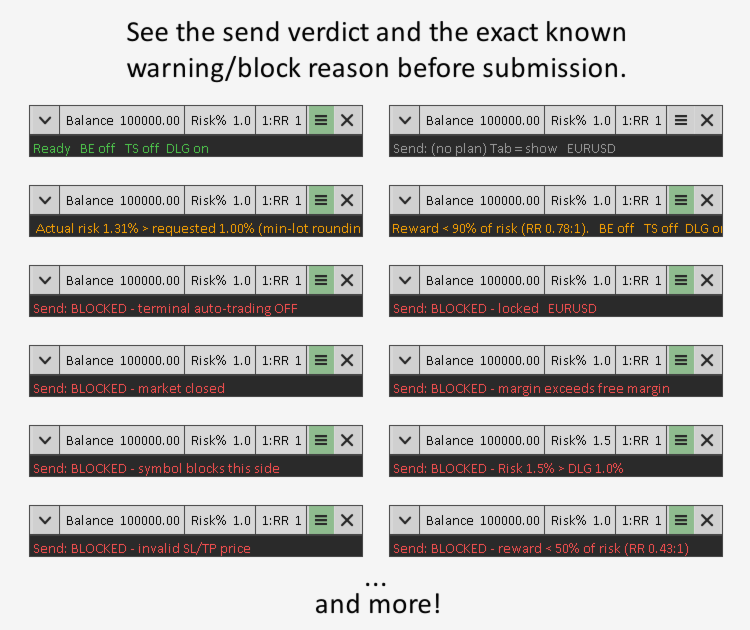
Before an order is submitted, RiskFrame checks whether the plan is technically ready for execution.
- Clear validation status - the validation strip shows whether the plan is ready, requires attention or is blocked, together with the exact reason.
- Broker-rule checks - volume limits, lot step, stop-distance restrictions and available margin are checked before submission.
- Lock protection - helps prevent accidental order sending while the plan is still being adjusted.
Control new risk before it is accepted
- Risk-based position sizing - lot size is calculated from Risk% and Stop Loss distance, then rounded to the broker's supported lot step.
- Open-position risk check - before sending a new order, RiskFrame adds the potential loss of existing RiskFrame positions at their current Stop Loss levels to the risk of the new trade.
- Daily Loss Guard - if the combined open-position risk and new-trade risk would exceed the configured daily limit, the new order is blocked before submission.
- Scoped emergency control - STOP NOW closes/cancels RiskFrame trades for the current symbol and magic number, then blocks new sends until cleared.
Manage the position after entry
- TP2 on both account models - hedging accounts use a separate TP2 order; netting accounts use one position with automatic partial close at TP2.
- Break-even automation - can move Stop Loss according to the configured BE conditions while the EA is running.
- Trailing Stop automation - can continue managing Stop Loss after entry while MetaTrader and AutoTrading remain active.
Typical workflow
- Attach RiskFrame to a chart.
- Select Risk% and RR from the panel or with hotkeys.
- Position Entry and SL, then move, resize or flip the Visual Trade Plan around the chart area you are analysing.
- Keep TP linked to RR or place it manually; add and size TP2 directly from the plan if needed.
- Review lot size, margin, planned risk, projected result and the validation strip.
- Send the order only when the plan is ready, then manage the resulting position from the same workspace.
Supported
- Platform: MetaTrader 5.
- Account types: netting and hedging.
- Markets: Forex, metals, crypto, energy and other CFDs with compatible contract specifications.
- Product type: utility / trade-management panel for manual trading.
Important notes
- RiskFrame is not a signal robot and not an automatic trading strategy.
- Full interactive testing is not available in the MetaTrader Strategy Tester because the tester does not process chart-object mouse interaction in the same way as a regular chart.
- Break-even and Trailing Stop automation work only while the EA is attached, AutoTrading is enabled and MetaTrader is running.
- On netting accounts, the automatic partial close at TP2 also requires the EA to remain attached, AutoTrading enabled and MetaTrader running.
- Daily Loss Guard blocks new trades; it does not automatically close existing positions.
- On unusual or exotic contract specifications, verify position sizing on a demo account before live trading.
- On some index symbols with whole-lot volume steps, TP may move in visible increments while SL is dragged with TP linked to RR. On those symbols, set TP manually.
Development: RiskFrame is actively maintained. Future updates may expand localization, sizing modes, index handling and position-management options.
Support
Use the product Comments section or private messages on MQL5. Diagnostic logging can be enabled if a support log is required.
Changelog
v1.1 - Added a multi-language interface in English, Russian, German, Spanish and Portuguese, selectable through the new "Language" input. The validation strip and send action now use the same pre-send result; a green "Ready" means that RiskFrame detected no known blocking condition at the time of validation. Added hard blocks for closed symbol sessions, broker-side trading restrictions (including long-only and close-only modes), and invalid Stop Loss / Take Profit prices. Improved risk feedback when lot-step rounding increases the resulting planned risk above the selected Risk%. STOP NOW now retries failed close operations and remains latched if a close fails. Fixed an issue where a zero or too-small TP2 could prevent the RR-linked Take Profit from moving.
v1.0 - Initial release.