MultiSymbol control Panel
- Utilità
- Haitao Zhou
- Versione: 2.0
- Attivazioni: 10
Stop switching charts! Monitor and manage all your open positions from a single dashboard.
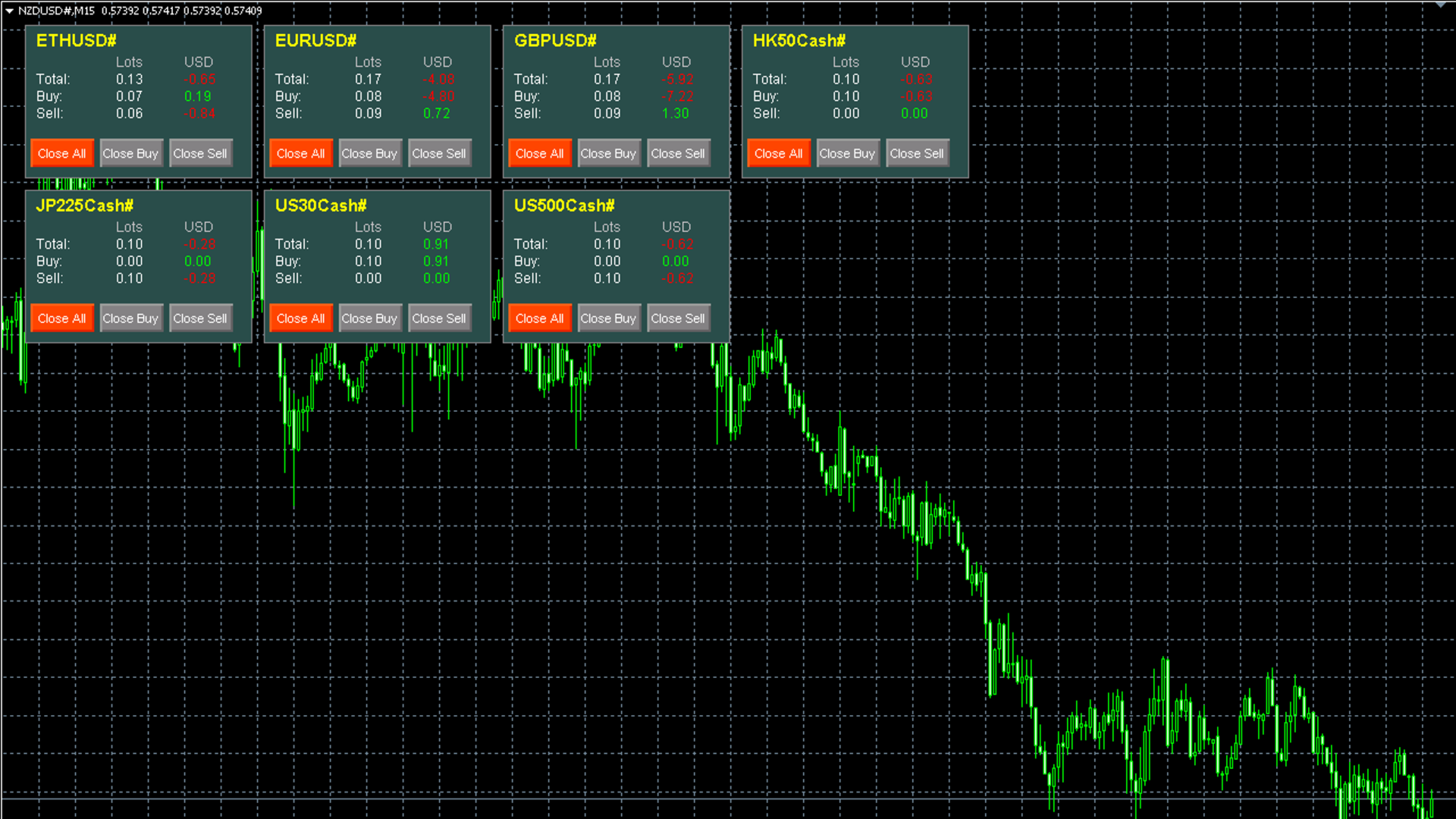
The Multi-Symbol Trade Manager is a professional utility tool designed for traders who trade multiple currency pairs or instruments simultaneously. Instead of flipping through dozens of charts to check your floating P/L, this tool automatically scans your entire account and displays every active symbol in a clean, dynamic grid layout on a single chart.
Key Features:
-
🚀 One-Chart Solution: Attach it to any single chart (e.g., EURUSD), and it will automatically find and display panels for ALL your open trades (Gold, Forex, Indices, etc.).
-
📊 Dynamic Grid Layout: The panels arrange themselves automatically. If you open a new symbol, a new panel appears. If you close a symbol, the panel disappears to save screen space.
-
💰 Detailed Statistics: See real-time Lot sizes and Profit/Loss for Total, Buy-only, and Sell-only positions for each symbol.
-
⚡ Fast Execution Buttons:
-
Close All: Close all positions for this specific symbol.
-
Close Buy: Close only Buy positions for this symbol.
-
Close Sell: Close only Sell positions for this symbol.
-
-
🎨 Fully Customizable: Change colors, panel size, grid columns, and font colors to match your template.
-
🔒 Magic Number Filter: Can monitor manual trades, specific EAs, or the entire account.
How to Use:
-
Open one clean chart (any symbol, any timeframe).
-
Drag and drop this EA onto the chart.
-
The dashboard will instantly visualize all your active trades.
Input Parameters:
-
MagicNumber : 0 to monitor all trades, or input a specific ID to monitor a specific EA.
-
Columns : How many panels to display per row (default is 4).
-
PanelWidth / PanelHeight : Adjust the size of the boxes.
-
Slippage : Maximum allowed slippage in points.
-
Colors : Customize background, text, profit, and loss colors.