Forex Factory Calendar Expert for MT5
- Utilità
- Mehnoosh Karimi
- Versione: 3.1
- Attivazioni: 10
Forex Factory Calendar Indicator for MetaTrader 5
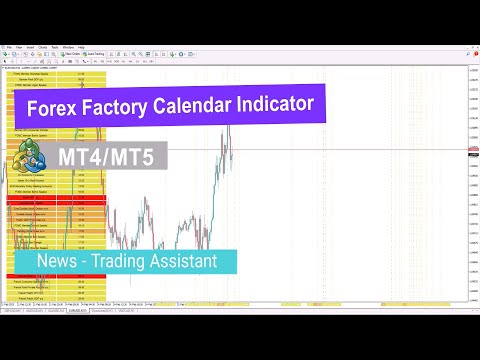
The Forex Factory Calendar Indicator MT5 brings real-time macroeconomic news directly onto MetaTrader 5 charts, allowing traders to stay informed without leaving their trading platform.
This advanced MT5 news indicator tracks high-impact economic events such as interest rate decisions, CPI releases, employment data, and jobless claims—all of which can trigger sharp market volatility. Using the Web Request function, the indicator automatically retrieves updated data from Forex Factory and displays it clearly on the chart.
How to Set Up the Forex Factory Calendar Indicator in MT5
To use the FF Calendar Indicator effectively, MetaTrader 5 must first be configured to receive economic news data.
Step 1: Access the Forex Factory Calendar
Visit the Forex Factory website and open the Calendar section. In the Weekly Export area, generate the CSV link for the weekly calendar. Copy this link for later use in MT5.
Step 2: Adjust MetaTrader 5 Settings
Open MetaTrader 5, go to the Tools menu, and select Options.
Step 3: Add the Calendar Link
Navigate to the Expert Advisors tab and enable “Allow Web Request for listed URL.”
Click Add New URL and paste the Forex Factory calendar CSV link. Once saved, the indicator will begin syncing data and displaying news events on your charts.
Forex Factory Calendar Indicator Specifications
| Feature | Details |
| Category | News – Trading Utility – Liquidity |
| Platform | MetaTrader 5 |
| Skill Level | Intermediate |
| Indicator Type | Reversal & Continuation |
| Timeframes | Multi-Timeframe |
| Trading Style | Intraday |
| Markets | Forex, Equities, Commodities |
Key Features of the FF Calendar Indicator MT5
The indicator presents economic news in a structured on-chart table, showing event names and scheduled times. Events are color-coded by importance:
- 🔴 Red: High impact
- 🟠 Orange: Medium impact
- 🟡 Yellow: Low impact
Vertical lines are plotted on the chart to mark the exact moment of each news release, helping traders visually assess market reactions.
Bullish Market Example
On the H1 timeframe of the EUR/CAD pair, the Forex Factory Calendar Indicator highlights news events that coincide with bullish price movements. Each announcement is marked precisely on the chart, making it easier to analyze post-news momentum.
Bearish Market Example
On a 30-minute XAG/USD (Silver) chart, the indicator clearly identifies news-driven volatility. Following certain economic releases, price action shifts downward, signaling bearish market sentiment.
Forex Factory Calendar Indicator Settings
The indicator includes multiple customization options:
- Alerts: Enable sound or push notifications
- Notifications: Receive alerts before news releases
- Alert Timing: Set advance notice duration
- High-Impact Events: Highlight major announcements
- Medium-Impact Events: Show moderate news
- Low-Impact Events: Include minor economic data
Conclusion
The Forex Factory Calendar Indicator MT5 enhances technical analysis by integrating fundamental news directly into MetaTrader 5 charts. By fetching live data from Forex Factory and displaying it in a time-based visual format, this indicator helps traders better understand market behavior around economic events.
Since each market reacts differently to macroeconomic news, combining technical setups with real-time fundamental insights allows traders to make more informed and strategic decisions.