 MetaTrader 5
 Experts
 Indicatori
 librerie
 Utilità
 Widget
 Regole
Guarda i video tutorial del Market su YouTube
Come acquistare un Robot di Trading o un indicatore
Esegui il tuo EA
hosting virtuale
hosting virtuale
Prova un indicatore/robot di trading prima di acquistarlo
Vuoi guadagnare nel Market?
Come presentare un prodotto per venderlo con successo
Utilità di trading per MetaTrader 5 - 15
 Di seguito sono riportati i programmi di trading che semplificano il trading in MetaTrader 5. Passa il mouse su un'utilità per leggerne la descrizione e la sua funzione.
no Trade operation, Robot Set auto SL to every manually Trade from a Phone Automatic Phone TradeManager Need just Set on 1 Symbol Auto BE Trigger is added that immediately sets a stop-loss for every () But does NOT calculate position size based on risk, allows the fixed SL to adjusted dynamically drag on Chart or Menu. It protects capital around the clock, reduces emotional mistakes, and ensures consistent risk management.
FREE
A simple script which will trigger a download of your broker's tick data for a specific trading instrument.
Simply add to your chart and it will start the process. You may add the script to multiple charts, enabling you to download tick data for more than one instrument at a time After a short period, the script will stop running and remove itself from your chart. Following this, it may take a few more minutes to finish downloading the tick data.
The Tick Data folder can be found via MetaTrad
FREE

# LLM Advisor
**A second opinion on every trade — from an AI that explains itself.**
LLM Advisor shows your chart to a modern AI model and asks it a simple question: *what do you see here, and what would you do?*
The answer comes back in plain English — a direction, a confidence score, and the reasoning behind it. You decide how much say it gets: from "just tell me what you think" all the way to "handle it for me."
---
## You choose how much control it has
| Mode | What happens | |---|---

Visual Trade Manager for MT5 is an interactive trade execution and position management tool designed for traders who want fast chart-based control over risk and execution.
The panel provides a visual trade box with entry, stop and target lines directly on the chart. Position size is calculated from the selected risk percentage, and the tool supports both market execution and pending order placement.
Main features
- BUY and SELL switching directly from chart buttons
- Draggable Entry, Stop and

Seconds Candle Trader Pro
Short description Manual seconds-candle chart and trade panel for MetaTrader 5 with S1-S30 candles, hotkeys, breakeven, zoom, and dark/light themes.
Overview Seconds Candle Trader Pro is a manual trading utility for MetaTrader 5. It draws custom seconds candles directly on the chart using broker tick data and adds a compact panel for discretionary order management.
The product supports S1, S2, S3, S4, S5, S6, S10, S12, S15, S20, and S30 candle views. It is designed

PropGuard is a risk-management utility. It opens no trades of its own. It watches your whole account — manual trading or any other EA — from a single chart, and steps in before a prop-firm rule ends your challenge.
Why traders lose funded accounts: rarely one bad trade — usually one bad day. A revenge sequence, a missed stop-loss, a news spike. Your firm's dashboard tells you after the breach. PropGuard warns you as you approach a limit, and if you hit it, it flattens the account and keeps it

Hedge Trimmer & Roll-Over EA Managing a hedged position means carrying two opposing trades simultaneously. Over time, the losing side grows while the profitable side offsets it. The standard problem is that closing the loser costs money you may not have sitting in cash — it has to come from somewhere. Hedge Trimmer EA solves this by using the floating profit on your winning trades as the funding source to progressively close down the losing side. It identifies which trades are in profit, uses a
The trading limiter that stops you from breaking your own daily loss and trade limits.
• Please test the product in the Strategy Tester before purchasing to understand how it works.
• If you face any issues, contact me via private message—I’m always available to help.
• After purchase, send me a screenshot of your order to receive a FREE EA as a gift. MT5 Drawdown Tracker — the Ultimate Tool for Monitoring and Managing Trading Drawdowns In trading, risk management is the key to long-term s

A script for opening a grid of orders If you need to quickly open several pending orders (Buy Limit, Sell Limit, Buy Stop, Sell Stop) on a certain distance from the current price, this script will do all the routine for you! Allow AutoTrading before running the script. Usage:
Run the script on a chart. Input Parameters: Language of messages displayed (EN, RU, DE, FR, ES) - language of the output messages (English, Russian, German, French, Spanish). Price for open - open price. If set to 0, the

Propfirm Metrics è una dashboard semplice e di sola lettura, progettata per aiutare i trader delle prop firm a monitorare le principali metriche del conto direttamente in MetaTrader 5.
Il pannello mostra chiaramente lo stato attuale del conto, inclusi saldo, equity, profitto/perdita flottante, risultato giornaliero, drawdown giornaliero e totale rimanente, regola di consistenza, giorni di trading e progresso verso l'obiettivo di profitto.
È sufficiente inserire le regole del proprio conto pro
FREE

FREE 7-DAY TRIAL After your trial ends, continue using this essential trading tool for only $30 one-time payment.
ECONOMIC CALENDAR Transform Your Trading with Real-Time Economic Intelligence on Your Chart Are you tired of being caught off-guard by major economic news releases? Stop scrambling between your trading platform and news websites. Economic Calendar Pro brings all critical market events directly to your MetaTrader charts with stunning visual clarity and real-time countdown timers.
P

In the current version this filter will only work with my night scalpers and the EA Profitection Filter or with other EAs that utilize the global variables set by this EA. An MT4 version is availalble here . Many scalpers these days have a "normal" news filter, which filters calendar news such as interest rate decisions or CPI releases. However, this breaking news filter is able to filter non-standard breaking news. It will check every minute for news and if it finds a news event, it will

OsasFXea Diamond RapidFire Panel osasFXea · MetaTrader 4 & 5 OsasFXea Diamond RapidFire Panel One-click rapid trade panel for fast discretionary basket trading on gold, crypto, forex, and more. MT4 & MT5 Utilities Category Hedging accounts XAUUSD · BTCUSD · Forex Overview What it does RapidFire Panel places you in complete control of your basket trading workflow. Every core action — open, manage, close — is one click away on a branded dashboard that sits on your chart. The panel foll

Welcome, we introduce the Manual Grid Assistant, which can be an excellent complement to your manual grid trading! The Manual Grid Assistant is an efficient and sophisticated trading tool that perfectly complements manual grid trading strategies. This tool allows you to manage manually opened positions on your behalf while ensuring maximum profit and controlling risk. One of its main advantages is that it automatically closes all open positions when a predefined total pip reach or a specified p

TradeForge Pro – Trade Management Dashboard TradeForge Pro is a trade management utility designed for traders who want precise control over stop loss/take profit handling, position grouping, and trade execution. It provides an on-chart interface that allows Stop Loss and Take Profit levels to be managed virtually rather than sent directly to the broker ("Ghost Levels"), along with tools for managing multiple positions and trailing logic. It is designed for both scalpers requiring fast manual exe

Smart Trade Manager Pro Live Smart Trade Manager Pro is a manual trade management Expert Advisor for MetaTrader 5. It does not open trades automatically. It is designed for traders who enter positions manually and want structured risk-based exit management after the trade is open. The EA manages manual trades using the initial stop loss as the risk reference. Once a position has a valid stop loss, the EA can calculate R-multiple progress and manage partial closes, break-even, stop-loss locking,

Close All Pro MT5 – Fast PnL Control is a powerful trade manager MT5 utility that gives you total control over your trades. With a single click, you can close all MT5 orders, monitor real-time profit and loss, and manage your floating PnL directly from a clean on-chart panel. The tool is lightweight, responsive, and built to help traders save time, reduce emotional stress, and maintain focus. Whether you trade manually or through an EA, this MT5 profit panel provides the visibility and precisio

Protect your capital and lock in profits automatically with Account Guard Pro . This indispensable account management Expert Advisor ensures strict adherence to your daily risk limits. Set a maximum daily loss and a daily profit target—once either is reached, Guardian Pro instantly closes all open positions and pending orders, and halts all trading activity until the start of the next day. Its integrated visual dashboard provides a clear, real-time view of your daily P/L and current status. A cr

Trade Assistant MT5 — Trade Manager for Prop Firms
Trade Manager for MT5 that calculates position size, manages risk, visualises your trade setup in real time and protects your account with built-in daily loss and trade limits — everything you need to trade with consistency and pass your prop firm challenge.
> Trade Tab — Position Sizing & Execution
**Automatic lot calculation** Enter your risk as a percentage of account balance or as a fixed dollar amount and the panel instantly calculates t

The Best 1 Star rated Seconds Chart - Check the reviews that don't update the stars MT5 stops at the 1-minute chart. Advanced Seconds Chart MT5 goes below it, building real sub-minute OHLC candlesticks directly inside MT5 with full access to every indicator and drawing tool you already use. No plugins. No external feeds. Attach it to a chart and go. This product is now free. Download it, use it, and message me if anything does not work as described. I respond to every message and fix genuine iss

This utility provides the ability to use hot keys in manual trading instantly responding to the current market situation. You can assign hot keys to open/close positions by their type, open/close all positions on the current chart and remove all orders on the current chart. You can also assign hot keys for five predefined trade volumes and switch between them if necessary with no need to change the volume manually from time to time. It is also possible to set the auto calculation of a trade volu

Risk Manager Custom Version for MetaTrader 5
Risk Manager is a professional risk-control utility for MT5. It does not open trades by itself and does not generate trading signals. The tool is designed to monitor already opened positions and help the trader control risk, position size, stop loss, take profit, and trading restrictions.
Main features:
Individual Max Lot for selected symbols — set a separate maximum lot for up to 5 instruments. For example: EURUSD = 1.2 lot, XAGUSD = 0.1 lot. All

This is a special program that provides extra protection for each of your positions. Symbol Filter: Filter by trading symbol. The default is to select the symbol on the current chart, or you can choose all symbols. Magic Filter: Filter by magic number. You can specify a magic number. The default value of 0 means processing all orders. TakeProfit Point: Set the take-profit level in points. 0 means this function is not used. StopLoss Point: Set the stop-loss level in points. 0 means this function

Keep your MetaTrader 5 charts alive, updated, and always in sync — automatically.
The MT5 Auto Refresh Utility is a smart, zero-lag chart updater designed for traders who want real-time accuracy across every open chart. Whether you use complex dashboards, multi-timeframe systems, or long-running analysis setups, this utility ensures your charts stay active and refreshed without manual clicks or chart reloading. Why You’ll Love It Automatic Chart Refresh
Refreshes your MT5 chart at a fixed int

HMR Detector EA Nota importante: Questo EA non può essere valutato nello Strategy Tester poiché gli ambienti di backtesting non simulano eventi di Alto Requisito di Margine (HMR) in tempo reale o modifiche impreviste del margine da parte del broker. HMR Detector si basa sulla lettura delle condizioni di margine dal vivo direttamente dal server del broker. Pertanto, le sue funzioni di protezione dovrebbero essere valutate su un conto di trading demo o reale. Panoramica: HMR Detector EA è un Exper

MT5 to MT5 Trade Copier – Fast and Reliable Trade Copying Solution The MT5 Trade Copier is a powerful tool designed to copy trades seamlessly between MetaTrader 5 accounts with minimal latency and high accuracy. Built for speed, flexibility, and ease of use, the copier works across different brokers, even when symbols use different prefixes or suffixes. This Expert Advisor is suitable for professional traders, signal providers, fund managers, and traders who manage multiple accounts. Key Featur
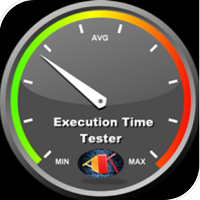
This Expert Advisor measures the broker execution time in milliseconds. Every 10 seconds (Refresh Seconds) , the EA opens a buy stop order far away from current price (1.5 x Ask), then modifies the (price, stop loss and take profit) of the created order by 5 pips then deletes it immediately.
Inputs Refresh Seconds: Number of seconds for each re-test, default 10 seconds.
Display Last: Last Execution time Min: Fastest execution time Max: Slowest Maximum execution time Avg: Average exec

Guardian Equity EA for MetaTrader 5 Guardian Equity EA is an Expert Advisor designed to automatically manage the closure of all open positions when predefined profit or drawdown levels are reached. It operates in real-time and is compatible with any broker or trading instrument supported by MetaTrader 5. Main Features Continuous monitoring of account balance and equity. Automatic closing of all trades if the maximum drawdown level is reached. Automatic closing if the configured profit target is

General Description Auto SL/TP Manager is a professional utility for MetaTrader 5 designed to automate the management of Stop Loss and Take Profit levels on open positions. The levels are calculated based on monetary risk values defined by the user, rather than fixed pip distances. This tool helps maintain consistent risk discipline without manual intervention. Main Functionality The EA continuously monitors all open positions and automatically applies Stop Loss and Take Profit levels when they

MSMO Lot Pilot è un calcolatore della dimensione della posizione e un pannello informativo pre-trade per MetaTrader 5. Aiuta a rispondere a una domanda pratica prima di un'operazione manuale: quale dimensione del lotto corrisponde al livello di rischio che hai scelto?
Imposta il Risk Percent, la distanza pianificata dello Stop Loss in punti del simbolo e l'Account Base. MSMO Lot Pilot calcola la dimensione del lotto utilizzando le specifiche del simbolo fornite dal broker e visualizza l'Actual
FREE

Prop Firm Risk Guardian MT5 — pass the risk rules, not just the profit target. Prop Firm Risk Guardian MT5 (click to download)
Application instructions Most prop-firm challenges are failed not because you can't trade — but because one bad day or a single oversized position breaches the daily or overall drawdown limit. Prop Firm Risk Guardian is a lightweight monitoring utility that enforces those limits for you, automatically , 24/5. It is a pure protection tool . It never opens trades, send
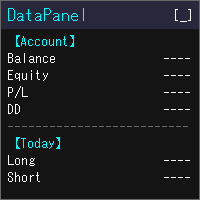
DataPanel mostra lo stato del tuo conto sul grafico, in un unico pannello. Non invia ordini e non usa DLL. L'ho creato inizialmente con Claude Code per vedere a colpo d'occhio come vanno i conti su cui girano i miei altri EA. Con le aggiunte ora mostra molte informazioni, ma puoi visualizzare solo ciò che ti serve: regolalo nelle impostazioni. Cosa mostra Saldo, equity, risultato fluttuante e livello di margine Drawdown di saldo ed equity, con il massimo e l'ora in cui si è verificato. Depositi,
FREE

VENIQOR Smart Trade Copier PRO is more than a simple MT5 trade copier.
It combines fast local trade synchronization with flexible risk management, Account Protection and optional News Protection for every Receiver account. As with our other VENIQOR products, we welcome useful customer feedback and are happy to implement meaningful improvements and new features whenever possible. The same EA works as both Master and Receiver . One Master can copy trades to multiple Receivers running on the same

Candle Time (MT5) The Candle Time indicator shows the remaining time for the current candle on the active chart timeframe. It adapts automatically to the chart period and updates on every tick. This is a charting utility; it does not provide trading signals and does not guarantee any profit. Main functions Display the time remaining for the current candle on any timeframe (M1 to MN). Color-coded state: green when price is above the open (up), gray when unchanged, and red when below the open (do
FREE

Trade Analyzer is an interactive charting utility designed to make trade planning and performance tracking easier directly inside MetaTrader 5. It allows you to quickly create and visualize trade setups on your chart, giving you a clear view of your Entry, Stop Loss, and Take Profit levels. Every trade setup you chart is automatically measured and analyzed, showing you the exact risk-to-reward ratio, risk in pips, potential reward, and outcome of the setup. As you chart more trades, RR Analytics
FREE

Read-only trade export tool for MT5 investor accounts NTS Investor Reader is a lightweight companion EA for NTS Local Copier . It runs on an read-only / investor login and writes your open positions to the shared file in the same format used by the NTS Local Copier Master. No trade execution. No OrderSend. No copying logic. It simply reads open positions and outputs them for the Slave EA to follow. What it does Reads all open MT5 positions safely from an investor account. Writes them to the shar
FREE

Краткое описание:
Индикатор для визуальной оценки стоимости ценового движения в валюте депозита с интерактивным вводом объема сделки прямо на графике. Описание:
PriceRiskRuler — новый инструмент для оценки финансового результата движения цены перед открытием позиции.
Индикатор отрисовывает вертикальный ценовой отрезок и рассчитывает его стоимость в зависимости от заданного объема и спецификаций торгового инструмента. Основные функции: Интерактивный ввод объема: Поле для ввода лота расположен
FREE

One Click Trade Manager for MT5 Trade Faster and Manage Your Positions with a Single Click Take full control of your trades with an intuitive one-click trading panel for MetaTrader 5. Whether you're entering new positions or managing multiple open trades, this EA helps you execute actions instantly without navigating multiple windows. No more manually closing orders one by one. Main Features Close All Positions Instantly close every open position on the current account. Close Profitable Pos

K-line Terminator - a countdown tool that accurately grasps every second Core Summary: Still anxious about not knowing when the current candlestick will end? 'Candlestick Terminator' is an indispensable tool in your trading toolbox! It utilizes a clear and intuitive countdown timer to display the precise time remaining for the currently active candlestick in real-time, helping you avoid making hasty decisions during the chaotic moments of candlestick transitions, thus allowing you to enter, exit
FREE

Gamma Edge Pro MT5 — GexBot Classic API Integration Gamma Edge Pro brings institutional-grade Gamma Exposure (GEX) data directly onto your MetaTrader 5 chart — the same data used by professional options traders to anticipate price magnets, hedging flows, and dealer positioning. Powered by the GexBot Classic API, this indicator automatically maps options market data from US-listed instruments onto any MT5 CFD instrument — Forex pairs, Gold, indices, and more — with intelligent price conversion bu

ATR Stop Loss and Take Profit Calculator. Know your risk before you take the trade! Click any candle and instantly see your stop loss, take profit, and correct lot size, all calculated from ATR, scaled to your account. A useful back-testing and live trading tool. If you find this indicator useful, please leave a review
How It Works
Click a candle. The indicator reads ATR at that bar, calculates SL and TP using your configured multipliers, and draws the levels on the chart. An info panel shows
FREE

RR TradePanel is a trade execution and management Expert Advisor for MetaTrader 5. It combines visual trade planning with automated risk management, allowing trades to be planned, executed, and managed directly from the chart. The panel includes an interactive Risk/Reward tool, automatic lot size calculation based on account risk, trade management automation, and manual management controls. It is suitable for traders who want consistent position sizing and faster trade execution. Trade Planning

Calcolatore della dimensione del lotto InnovaDash: Terminale di rischio in 1 clic Smetti di indovinare la dimensione dei tuoi lotti e di rischiare più di quanto intendi. Il calcolatore della dimensione del lotto InnovaDash è un'utility di trading precisa e compatta progettata per portare la gestione del rischio professionale e un'esecuzione rapida direttamente sui tuoi grafici MT5. Creato dal team di InnovaDash Analytics, stiamo rilasciando questo strumento in modo completamente GRATUITO per i t
FREE
MT5 Terminal Copy for Copying MT5 Terminals This Expert Advisor (EA) allows you to copy trading activities between different MT5 terminals. It provides a simple and efficient solution for traders who want to duplicate positions or strategies in real-time across different accounts or devices. The EA can run on a main terminal and automatically replicate trades on other connected accounts. Ideal for copy trading or testing strategies on multiple accounts simultaneously. Main Features: Real-time C
FREE

Click and Go Trade Manager: The Ultimate MT5 Execution Suite Precision Execution. Professional Performance Tracking. Total Control. In the world of Smart Money Concepts (SMC) , ICT, and high-frequency scalping, precision is your only edge. Most traders lose not because their analysis is wrong, but because their execution is slow and their psychology is undisciplined. The Hard Truth: If you are still manually calculating lot sizes or dragging lines while the price moves against you, you

The Pending Order Grid is a multi-symbol multi-timeframe script that enables multi-strategy implementation based on pending order grids. General Description
The Pending Order Grid allows the performing of a user-defined strategy through the creation of pending order grids. The script places pending orders of a given type (Buy Limit, Sell Limit, Buy Stop, or Sell Stop) at equidistant price levels to form each grid. The beginning and finish of every grid are defined by the Start Price and Sto

Boleta Prime Essential — one-click trading panel for MetaTrader 5 Open trades with the right lot size in one click. Boleta Prime Essential automatically calculates your position size from the risk percentage you choose and sends the order with stop loss and take profit already set. Features
• One-click market buy and sell
• Risk calculator: enter the account % and stop in points, and the panel calculates the lot
• Automatic stop loss and take profit, re-anchored to the actual fill price (exact
FREE

Your signals in Telegram, your trades in MetaTrader 5.**
Phoenix Telegram Copier reads trade signals from your Telegram channel or group and opens them on your account. It understands the usual signal layout: side, symbol, entry, stop loss and one or more take profits. Every take profit becomes its own position, so you can bank part of a trade early and let the rest run.
**How it works** 1. Create a Telegram bot (with @BotFather) and add it to your channel or group. 2. Put the bot token and t
FREE

Keep your stop loss and take profit hidden from the broker server. The utility closes the position at market when a hidden level is reached. How it works For every position that matches your filters, the utility creates a hidden stop loss and take profit from the open price (or the current price) using your point distances. Levels are stored per ticket as terminal global variables, so they survive a restart, and are checked on every tick and on a fast timer. A hidden break-even and a hidden trai
FREE

Trading Workspace Themes by Soecke is a free chart customization script for MetaTrader 5. Choose from eight color themes and apply your preferred appearance to the current chart or all open charts.
Included themes
DEEP_SPACE, MIDNIGHT_BLUE, VOLCANIC_AMBER, POLAR_DARK, SOFT_LITE, COASTLINE, AMETHYST_SOFT and SAKURA_MIST.
Each theme defines colors for the chart background, foreground, grid, bullish and bearish candles, bar outlines, chart line, price lines, stop levels and volume bars.
Feature
FREE

AI Advisor – Permetti all’AI di vedere davvero il tuo mondo di trading AI Advisor genera automaticamente prompt di alta qualità a partire dalle informazioni reali del tuo conto, pronti da incollare in qualsiasi chat AI.
Ti aiuta a riassumere velocemente lo stato del conto, capire la struttura attuale dei mercati, individuare i rischi e scoprire potenziali opportunità di profitto, così che l’AI ragioni sulla tua situazione reale e non su ipotesi vaghe. Link rapidi Download: AI Advisor v1.02.
FREE

Professional Trading Panel Professional Trading Panel (EA) Take your trading to the next level with a powerful execution and risk management panel directly on your chart. ️ Important:
This is an Expert Advisor (EA) — MetaTrader 5 allows only one EA per chart .
If you use other EAs, you must run them on separate charts. Panel Features (EA): Fast execution: Market & Limit orders (Buy/Sell) Automatic Stop Loss based on risk ($) Take Profit using RR presets (1:1, 1:2, 1:3, 1:5) Smart partia
FREE

Elevate your trading precision with the ultimate Multi-Timeframe (MTF) Candle Countdown Monitor . Built for professional traders, this indicator is not just a standard timer—it is a powerful, fully interactive dashboard featuring a dynamic mini-chart, custom alerts, and a cutting-edge DPI-Aware Scaling Engine. Whether you are trading on a compact laptop or a massive 4K multi-monitor setup, this indicator perfectly adapts to your screen, providing a flawless visual experience. "Simplify your tra
FREE

Prop Firm Smart Margin Calculator Know your lot size. Know your margin. Trade with precision. The Prop Firm Smart Margin Calculator is a practical MT5 trading tool designed to help you determine your position size and understand the estimated margin required before placing a trade . Simply enter your desired risk amount and stop-loss distance, and the calculator determines the appropriate trading volume based on your symbol's specifications. It also calculates the estimated margin required for

Tick History Loader is an essential auxiliary tool that downloads the full available tick history for any symbol in your MT5 terminal. The script performs a deep synchronization with the trading server, sequentially requesting and saving the entire tick history from the earliest available date. This is necessary for the correct operation of advanced analytical tools that require complete market data. The obtained tick history serves as the basis for building custom charts with a timeframe in sec
FREE
Script to load history of a symbol on determined timeframe (default M1).
It is extracted from the MQL5 documentation:
https://www.mql5.com/en/docs/series/timeseries_access
Adapted by Renato Fiche Junior #melhoresferramentas #renato #larissasihle #aguiatraders
Parâmetros de Entrada
- Start datetime : the initial datetime from the history will be loaded - Timeframe to be loaded: period that will be loaded
FREE

RADAH Dashboard is an advanced performance analytics utility for MetaTrader 5, designed to transform your account history into a clear, organized and interactive trading performance overview.
It does not open, modify or close trades. Its purpose is exclusively analytical, allowing you to review the performance of the entire account, a specific symbol, or a strategy identified by its Magic Number.
Chart View
Visualize your trading performance through an integrated balance/equity performance c
FREE

Nomad Trade Panel is a trade panel for MetaTrader 5 that works out the lot size from your stop loss and the risk you choose, then sends the order from the chart. It is for manual traders who decide the risk first and want to see what will be sent before they click.
It is a manual tool. It never opens, changes or closes anything by itself: every action starts with your click, a level you drag, or the close-all key (Ctrl+Shift+F, pressed twice).
To start: attach it to a chart, check the stop lo
FREE

FKG Trade Manager – Professional Risk & Order Management EA FKG Trade Manager is an advanced, multi-language trade management Expert Advisor designed to give traders full control over their positions, risk exposure, and order execution. Built with a clean, dark-themed movable UI panel directly on the chart, it eliminates emotional decision-making and automates routine trade management tasks. Key Features Quick Partial Close Buttons (10%, 20%, 50%): Instantly secure partial profits with a single
FREE

[Panoramica] Dynamic Price Countdown è un indicatore MT5 essenziale che mostra il tempo rimanente fino alla chiusura della candela attuale, proprio accanto al prezzo corrente. A differenza dei timer statici fissati negli angoli del grafico, questo indicatore segue dinamicamente il movimento del prezzo in tempo reale. Ciò consente ai trader di mantenere la loro attenzione interamente sulla parte più critica del grafico senza perdere il momento perfetto per l'ingresso. [Caratteristiche Principali
FREE

It is a panel that seems common, however, far beyond those of additional buttons for closing multiple orders, it is essential for those using the offline charts generators for Renko, Range, Ticks, and similars because in the Metatrader 5 does not allow the manual operation of orders in these charts that are generated synthetically. The "TRADE PANEL" makes it very easy to handle both orders executed to the market and the placing of pending orders, offering practically the same immediate action
FREE

Questo strumento offre due grandi vantaggi: migliora l'usabilità degli indicatori economici di MT5 e consente una condivisione fluida dei dati con MT4. Ad esempio, permette di utilizzare efficacemente i dati degli indicatori economici di oltre dieci anni fa per allenamento e backtesting. Inoltre, è compatibile con il PracticeSimulator di MT4, rendendolo uno strumento prezioso per tutto, dalla pratica con dati storici al trading in tempo reale su MT4. Per condividere gli indicatori economici con
FREE

**X-STOX News Command Center** turns MetaTrader 5's built-in Economic Calendar into a clean, always-visible command dashboard — and, uniquely, lets your Expert Advisors *read the same news data* so they can protect your account around high-impact events.
Built as a single lightweight indicator. No DLLs. No WebRequest. No external servers. Everything runs on the calendar data already inside your MT5 terminal.
**— What it does —**
• **Floating dashboard** — a compact, movable panel showing upco
FREE
You can use this tool to create as many pending orders (limit order) as you want in one button press. All inputs must be in points. You can use this useful tool when such as FED speech times. User Inputs:
MagicNumber = Magic number DeviationPoint = Deviation point number for limit orders Level = You can choise how many level do you want to create pending orders. BuyOrder = true/false SellOrder = true/false StartDistance = Distance between each level. StepDistance = Distance to be added increment
FREE
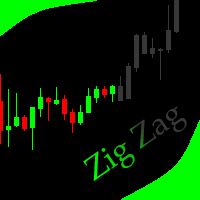
This indicator allows to hide ZigZag indicator (on all MT4 timeframes) from a date define by the user with the vertical line. This indicator can be use with other "Hidden Indicators". Indicator Inputs: Depth Deviation Backstep Information on "ZigZag" indicator is available here: https://www.mql5.com/en/articles/1537 ************************************************************* Hey traders!! Give me your feeds! We are a community here and we have the same objective.... make some money from th
FREE

Smart Sl Tp Manager For Mt5 is a lightweight and reliable trading utility designed to help you manage risk automatically.
It instantly sets Stop Loss and Take Profit levels for every manual trade you open, ensuring your positions are always protected. Perfect for traders who want more discipline, less stress, and consistent risk management. Key Advantages Automatic SL & TP for all manual trades Works with both Netting & Hedging accounts Re-applies SL/TP when you add new positions Simpl
FREE
The Equity Closer Bot is a custom MetaTrader 5 (MT5) Expert Advisor (EA) designed to help traders manage their account equity levels automatically. It monitors the account's equity in real-time and closes all open trades when the equity reaches user-defined thresholds. This bot is ideal for traders who want to enforce strict risk management rules, protect their account from excessive losses, or lock in profits at specific equity levels. Key Features Dual Equity Thresholds : Below Equity Clos
FREE

Buffer Finder MT5
Is a custom technical Utility for MetaTrader 5, designed to inspect and analyze buffers of other indicators for EA integration, signal detection, or debugging. Support and questions via MQL5 product comments. For questions, updates, and to connect with other traders, join my official MQL5 group ForexEAandMore Major update in Version 1.2 All update Infos in the first comment. You can check now the indicator directly without loading in the chart by filling the exact indicator
FREE

Automatic Position Size Calculator for MT5 Calculate your position size in seconds and trade with better risk control. It helps traders calculate lot sizes based on their selected risk and place market or pending orders directly from the chart. Designed with a clean, customizable interface, it combines position sizing, order placement, and visual trade management in one easy-to-use tool. Key Features Automatic Position Sizing Calculate lot sizes based on your selected risk percentage. Automatic
FREE

NeuronReplay — replay each of your closed trades one by one, bar-by-bar, and analyze exactly what happened Your trade history is just a list of numbers. NeuronReplay turns it into film. It lists every closed trade in a dashboard; click any one and it re-plays that single trade candle-by-candle on its own chart , exactly like stepping through the MetaTrader 5 Strategy Tester — but scoped to a real trade you already took. You see the entry, the stop, the target and the exit drawn in, a floating P&
Il MetaTrader Market è il posto migliore per vendere robot di trading e indicatori tecnici.
Basta solo sviluppare un'applicazione per la piattaforma MetaTrader con un design accattivante e una buona descrizione. Ti spiegheremo come pubblicare il tuo prodotto sul Market per metterlo a disposizione di milioni di utenti MetaTrader.

Ti stai perdendo delle opportunità di trading:
- App di trading gratuite
- Oltre 8.000 segnali per il copy trading
- Notizie economiche per esplorare i mercati finanziari
Registrazione
Accedi
Accetti la politica del sito e le condizioni d’uso
Se non hai un account, registrati