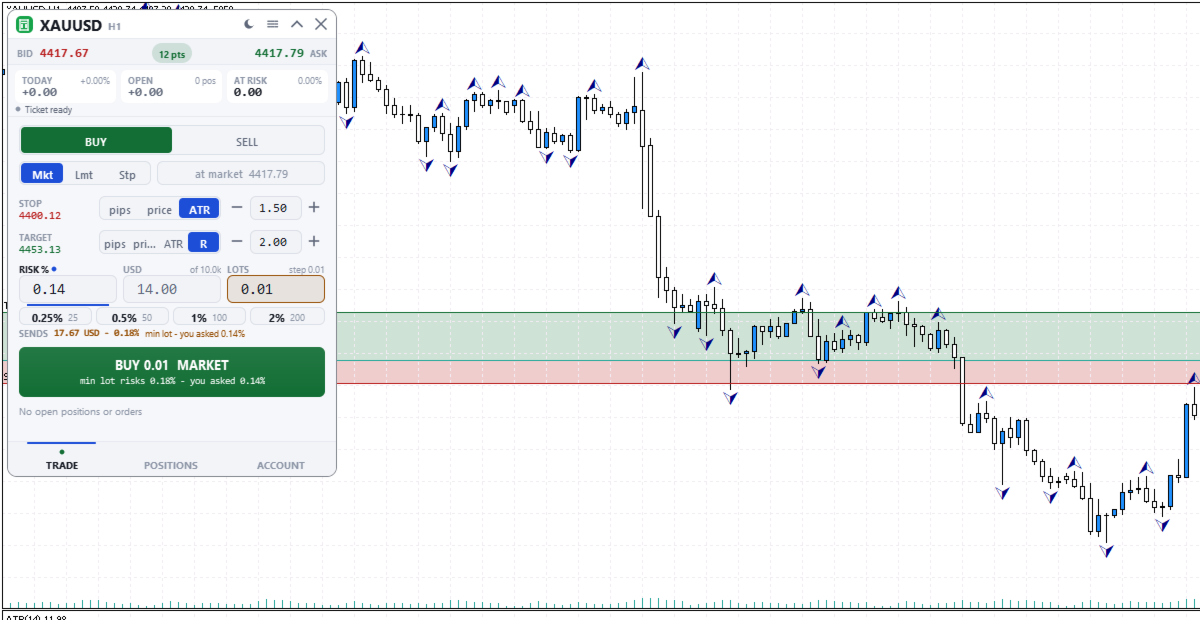
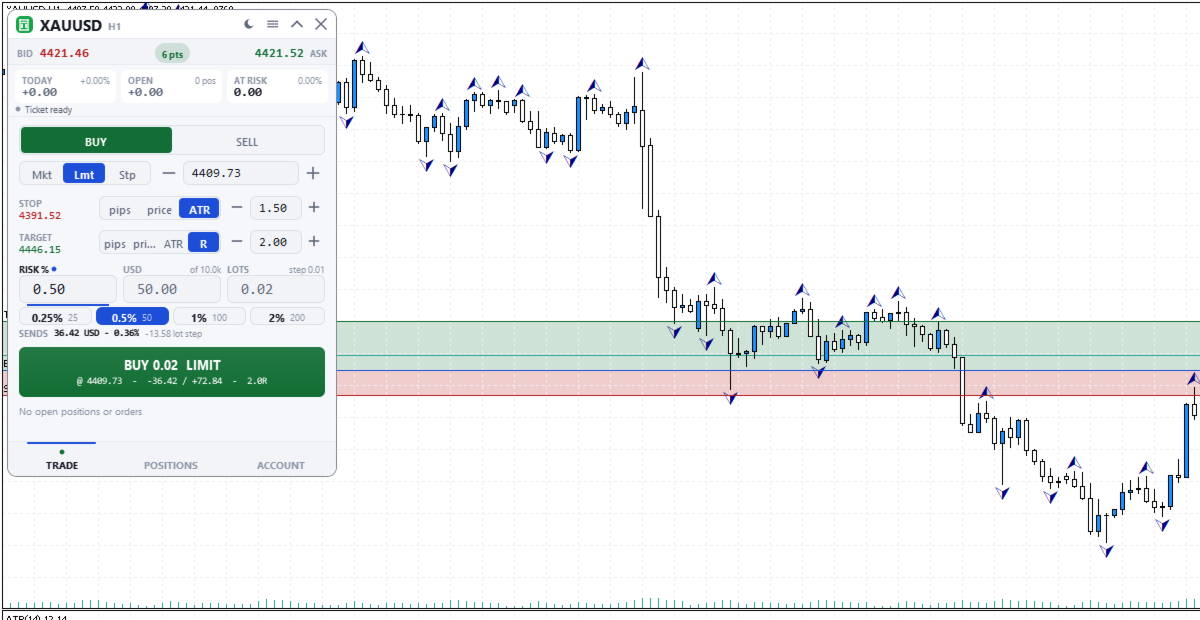
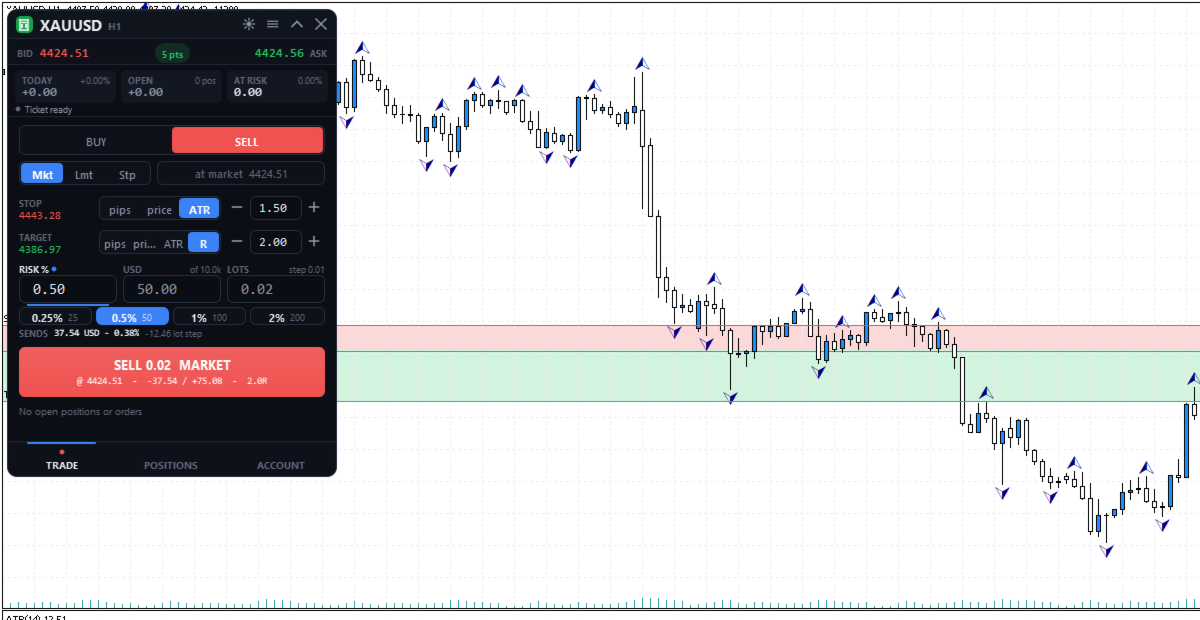
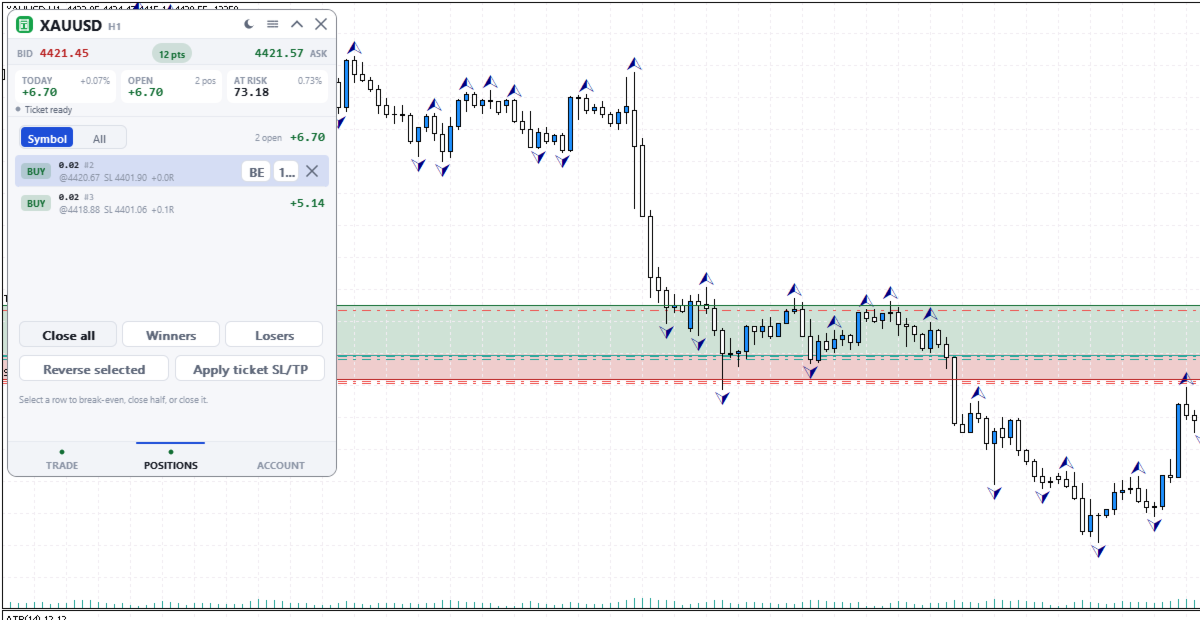
Nomad Trade Panel

Nomad Trade Panel is a trade panel for MetaTrader 5 that works out the lot size from your stop loss and the risk you choose, then sends the order from the chart. It is for manual traders who decide the risk first and want to see what will be sent before they click.

It is a manual tool. It never opens, changes or closes anything by itself: every action starts with your click, a level you drag, or the close-all key (Ctrl+Shift+F, pressed twice).

To start: attach it to a chart, check the stop loss, type your risk and click the order button twice.

LOT SIZE FROM YOUR RISK
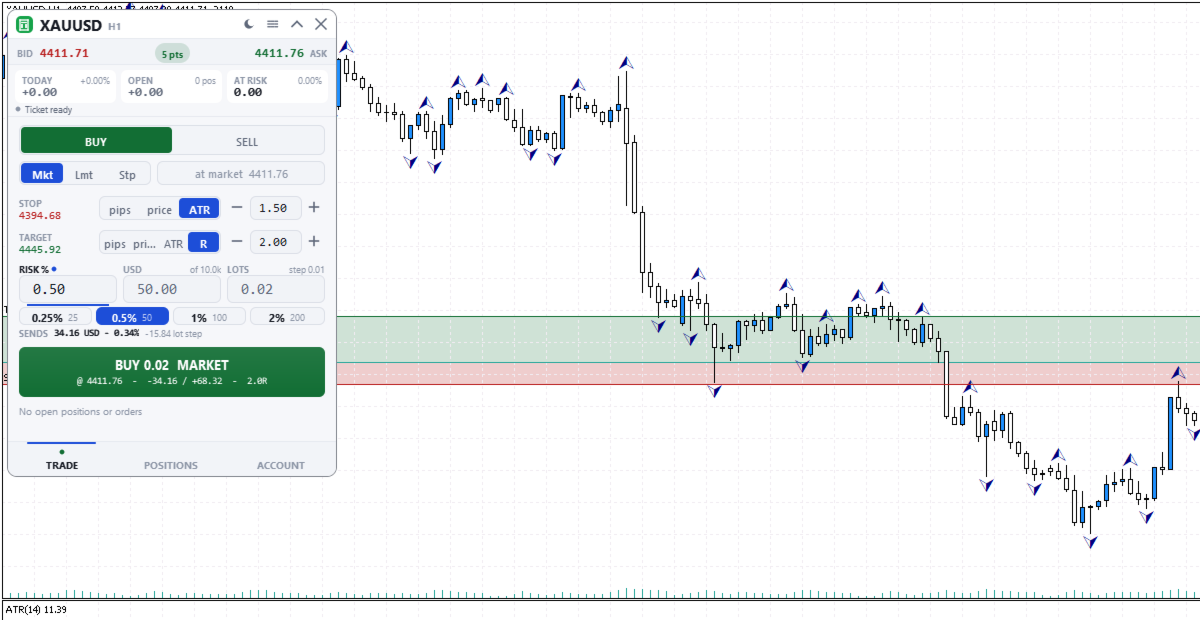
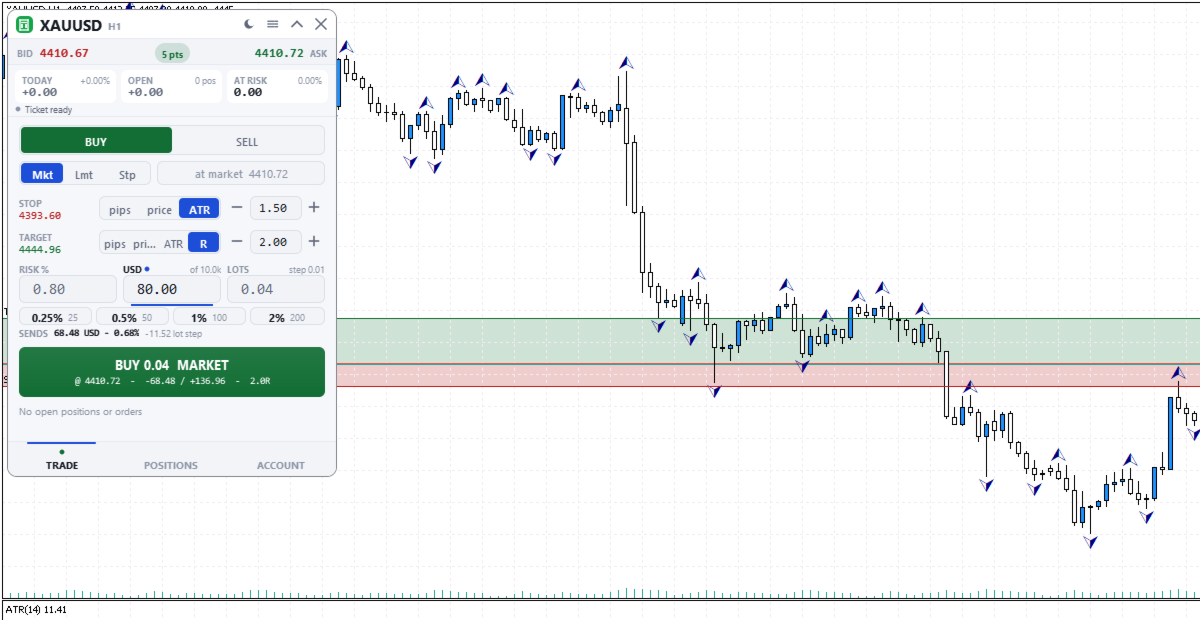
Three linked boxes: RISK %, money in your account currency, and LOTS. Type in any box: that one stays fixed (a dot marks it) and the other two follow. Lots are worked out from the stop distance and the symbol's loss tick value, rounded down to the volume step and checked against free margin. Percent is of the balance, not equity. The risk shown is the distance to the stop only, without commission, swap or slippage.
- The SENDS line shows what the rounded size really risks. If your risk is below one minimum lot, the order would go out as one minimum lot: SENDS turns amber (red above 1.5 times your risk) and the button shows the real risk before you click.
- Sizing by percent or money needs a stop. A fixed lot size can be sent without one, and SENDS then says the risk is open.
- Four quick-risk buttons, by default 0.25, 0.5, 1 and 2 percent. Hold one, or Ctrl+click it, to save the current risk.
- A typed unit is understood: 0.5%, 0.3 lot, or 50$ as money in your account currency. A bare number above 5 percent and above every quick-risk button needs its unit.

PLACING AN ORDER
- Market, limit or stop order. On a new symbol it starts at a 1.5 ATR stop, a 2R target and 0.5% risk.
- Stop loss in pips, price or ATR (Average True Range, 14 periods, chart timeframe). Take profit also in R, a multiple of the stop distance. A pip is 10 points on 3- and 5-digit quotes, otherwise 1 point.
- The button shows side, lots, price, risk and reward. The first click turns it into CONFIRM for 3 seconds, the second sends. Any change or Esc cancels. MetaTrader's order check runs first.

ON THE CHART
Stop and target lines with shaded risk and reward areas, plus an entry line for pending orders. Press a line on the chart's symbol and drag it.
- The order you are preparing: lots, risk and R update while you hold a line.
- Pending orders: stop and target follow the entry. Shift moves the entry alone, Ctrl pulls out a missing stop or target, and a stop-limit price can be dragged.
- Open positions, including trades from the phone or other programs: drag the stop loss or take profit, or pull a missing one out of the open price line.
- A level stops where the broker would refuse it and says why. Release sends one request, Esc or a right click cancels, Undo lasts 10 seconds.

POSITIONS AND ACCOUNT
- Positions and pending orders for this symbol or all symbols, five rows per page, positions without a stop first. A selected row offers break-even (stop to entry), close half and close, or delete for an order.
- Close all needs a second press within 2 seconds. Winners and Losers close all profitable or all losing positions in the list at once, with no confirm.
- Reverse selected closes the position and opens the same size the other way, with the same stop distance (none if it had none) and no target. It is checked with the broker before anything is closed.
- Apply ticket SL/TP copies the TRADE tab's stop and target to positions on the same symbol and side. A stop only moves closer to the price.
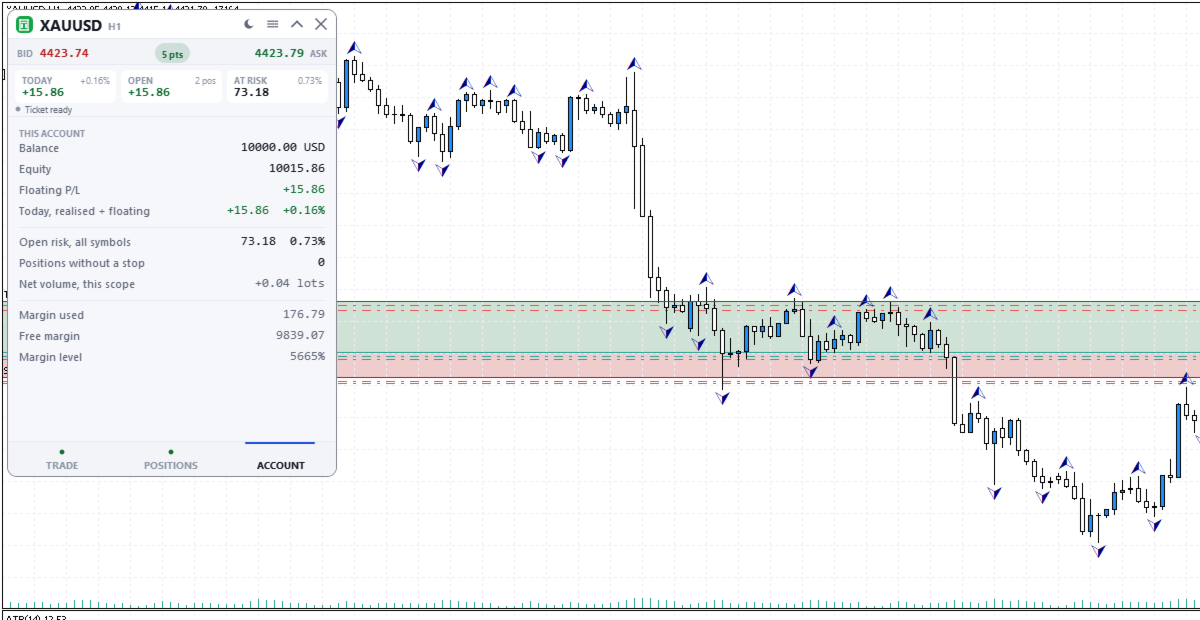
- ACCOUNT tab: balance, equity, floating and today's profit or loss, open risk on all symbols, positions without a stop, and margin.

THE PANEL
330 x 468 pixels at UI scale 1.0, three tabs: TRADE, POSITIONS and ACCOUNT. The header shows today's profit or loss in money and percent, the floating result, and the money from entry to stop of open positions, also when the panel is folded. That figure is measured from entry, so a stop moved past entry still counts; positions without a stop are counted apart. Dark, graphite and light themes, or Auto to follow the chart. Settings are saved per account and symbol.

GOOD TO KNOW
- Algo Trading must be enabled. Works on hedging and netting accounts. No DLLs, web requests or extra software.
- While it runs, MetaTrader's own dragging of trade levels and Chart on foreground are off on that chart. Both come back when the panel is removed.

INPUT PARAMETERS
- InpTheme, shown as "Colour theme (the sun/moon button overrides it; OK here resets)": default Auto. Dark, Graphite, Light, or Auto to follow the chart background. The sun and moon button overrides it; pressing OK in this dialog returns to this value.
- InpUiScale, shown as "UI scale (1.0 / 1.25 / 1.5 for hi-dpi)": default 1.0. Panel size multiplier from 0.75 to 2.0. Use 1.25 or 1.5 on high-resolution screens.
- InpMagic, shown as "Magic number": default 20250909. Written on every order sent from the panel.
- InpSlippage, shown as "Max slippage (points)": default 20. Maximum price deviation accepted for market orders and closes, in points. 20 points is 2 pips on a 5-digit forex quote.
- InpManageOwnOnly, shown as "Manage only this panel's trades": default false, so every position and order on the account is listed and can be managed, including trades opened from the phone or other programs. When true, the positions list, bulk closes, Apply ticket SL/TP, chart dragging, the open risk figures and the no-stop count use only trades with this magic number; other trades stay visible on the chart but cannot be dragged. Today's profit or loss and the floating figure always cover the whole account.
Prodotti consigliati
Trade assistant pro v8
Ahmed Mohammed Bakr Bakr
2 (1)
FREE FREE FREE Trade Assistant MT5 – Professional Trading & Risk Management Panel Trade Assistant MT5 is an advanced trading panel designed to help traders execute orders faster, safer, and more professionally . It simplifies manual trading by combining smart order management , precise risk control , and one-click execution , making it ideal for both beginners and advanced traders. This tool does not trade automatically . Instead, it empowers you with full control while applying professional-gra
FREE
POSITION EXIT MANAGER DEMO is the free demo of the Position Exit Manager, and it is the real thing with one difference. It is a trailing stop, a break-even stop, a take profit and a stop loss manager for MetaTrader 5: a panel over every open position where you can set a trailing stop, move every stop to break-even, set a take profit and stop loss on all of them at once, and close every position, the losers or the winners together. It shows the risk per trade and the R multiple of each position w
FREE
Descrizione breve Calcolatore di dimensionamento della posizione e del margine per MetaTrader 5 con calcoli BUY e SELL separati. Descrizione completa QRM Risk Calculator è un’utility per il dimensionamento della posizione e il calcolo del margine su MetaTrader 5. Calcola separatamente il volume BUY e SELL in base alla percentuale di rischio selezionata, alla distanza dello stop loss, ai dati del conto, alle specifiche del simbolo e ai prezzi correnti Bid e Ask. Il calcolatore mostra la perdita m
FREE
Boleta Easy Trade
Silvio Garcia Wohl
When executing an order, whether through the Metatrader ticket on a computer or the Metatrader app on a mobile device, either manual or pending, Easy Trade will automatically set the take profit and stop loss levels, as well as a limit order with its respective take profit and stop loss levels. It follows the trading strategy for market open (US30, US100, US500), but it can be applied to any market asset.
FREE
MT5 Trade Manager
Anthony Dewayne Wasome
MT5 Trade Manager is a MetaTrader 5 trade management panel designed to provide order execution, position monitoring, and risk control tools within a single interface. It operates as an on-chart dashboard with multiple pages for different trading functions. The tool is designed to support manual trading by centralizing trade operations and account monitoring in one place without requiring external applications. Interface Structure The dashboard is organized into six main sections: Dashboard Provi
FREE
Trade Assistant JJC Academy
Jhonathan Alexis Jaramillo Cortez
JJC Academy Trade Assistant — Calcolatore di Rischio e Pannello di Gestione della Posizione Basta calcolare il lotto a mano. Basta sforare il drawdown per un errore di calcolo. JJC Academy Trade Assistant è il pannello di trading che ho sviluppato e uso personalmente per gestire un portafoglio di conti finanziati (funded accounts) — progettato affinché ogni ingresso rispetti esattamente il rischio che hai definito, indipendentemente dallo strumento, dal broker o dalla prop firm con cui operi.
FREE
Spread Candle Clock Pro
Federico Ruben Vissio
5 (1)
Spread Candle Clock is a clock that displays the remaining time of the current candle along with the spread in real time directly on the chart. Features: Real-time candle countdown. Live spread (SP) display. Adjustable size. Customizable colors. Configurable position in all four corners. Compatible with all symbols and timeframes. Includes a button to minimize to a small panel.
FREE
Scopo: Apre automaticamente i grafici di tutti i simboli della Watchlist utilizzando il template default.tpl sul timeframe corrente (TF) , chiudendo tutti gli altri grafici (tranne quello attivo). Perfetto per analizzare rapidamente più strumenti senza sforzo manuale! Caratteristiche: Automazione: Apre decine di grafici con un clic. Sicurezza: Chiude i grafici superflui, mantenendo quello attivo. Flessibilità: Usa il tuo template default.tpl (configuralo in anticipo!). Timeframe c
FREE
Advanced Trade Manager MT5
Moustapha Boulouz
3 (2)
Rivoluziona il tuo trading con il nostro Advanced Trade Manager per MT4 e MT5 Mt4 Version : https://www.mql5.com/en/market/product/107249 Potenzia la tua strategia di trading con lo strumento definitivo per precisione e controllo: il nostro Advanced Trade Manager per MT4 e MT5. A differenza dei trade manager convenzionali, il nostro non solo si adatta dinamicamente alle condizioni di mercato, ma imposta anche automaticamente livelli di stop-loss e take-profit nel momento in cui entri in una po
FREE
================================================================ MATRIX CONDITION MONITOR Live Trade Condition Panel for MetaTrader 5 Fully Automatic -- Works with ALL Matrix EAs ================================================================ NEVER MISS A TRADE SETUP AGAIN Matrix Condition Monitor is a free utility that attaches to any chart and automatically checks all 10 trade conditions in real time -- showing you exactly why a trade will or will not open, and alerting you the moment ever
FREE
ModifyTPSL
Yun Fei Kang
批量止損止盈同步管理器 這是一款專為 MT5 多持倉交易者 設計的持倉管理工具。 當同一個商品、同一個方向同時有多張持倉時,只需要手動修改其中一張持倉的 Stop Loss(SL)或 Take Profit(TP) ,工具就會自動把該持倉目前完整的 SL / TP,同步到其他相同商品、相同方向的持倉。 例如: XAUUSD BUY #1 XAUUSD BUY #2 XAUUSD BUY #3 如果將 #1 修改為: SL = 3300 TP = 3500 其他 XAUUSD BUY 持倉會自動同步成相同設定。 主要功能 批量同步 Stop Loss 批量同步 Take Profit 可同時同步 SL + TP 支援將 SL 或 TP 設為 0,批量移除 BUY 與 SELL 分開管理 不同商品分開管理 新開持倉不會立即觸發整批同步 啟動時只記錄現有持倉,不會自動修改 平倉後自動移除內部紀錄 一個圖表即可管理帳戶中的多個商品 分組方式 工具以: 商品 + 交易方向 作為同步群組。 例如: XAUUSD BUY XAUUSD SELL EURUSD BUY EURUSD SELL 全部視
FREE
Title:   Smart Position Manager PRO - Advanced Risk & Position Manager Description: Smart Position Manager PRO is an all-in-one visual trade management and risk calculation tool designed for serious traders who prioritize iron discipline and strict risk management. Whether you are executing precise SMC or ICT setups on personal capital or managing large funded accounts on strict prop firms, this tool ensures you focus on counting percentages rather than emotional money swings. With a highly int
FREE
no Trade operation, Robot Set auto SL to every manually Trade from a Phone Automatic Phone TradeManager Need just Set on 1 Symbol Auto BE Trigger is added that immediately sets a stop-loss for every () But does NOT calculate position size based on risk, allows the fixed  SL to   adjusted dynamically drag on Chart or Menu. It protects capital around the clock, reduces emotional mistakes, and ensures consistent risk management.
FREE
Core function Intelligent transaction management one-click opening and closing operation, which supports user-defined lots to set multiple closing modes: all closing, closing by direction and closing by profit and loss status. Professional risk control, real-time risk monitoring and spread control to avoid high-cost trading environment. Visual control panel has an intuitive graphical interface, and all functions can be operated with one button to display position information, profit and loss sta
FREE
Equity monitor
Vasiliy Pritchin
Equity monitor This is a simple means change informer. I wrote it for myself, maybe someone will need it... 1. Displays the change in funds for the day. Every day, when the terminal is first launched, it remembers the current funds and monitors changes throughout the day. 2. The first day of the month, well remembers the money and, within months, to monitor changes. 3. Well, it displays the profit of the open position. To work, you need to create 4 global variables: gvarEqityDay , gvarEq
FREE
Overview Copy Trades Master is a high-performance local signal broadcaster for MetaTrader 5. It tracks active positions on your master account in real time and streams execution data directly to one or multiple SlaveCopier terminals running on the same PC or local network via ultra-fast local file IPC ( FILE_COMMON ). https://www.mql5.com/en/market/product/189485 Key Features Local Common-File IPC: Uses local file streaming ( MQL5\Files ) for near-zero latency execution without requiring externa
FREE
(New and experimental testing phase) M5S Automation EA is a free utility built to work together with the M5 Sniper Indicator. On its own it does nothing, it simply listens to the signals that M5 Sniper produces and opens the trades for you automatically, so you no longer have to sit and watch the chart to catch every entry. It reads the entry, stop loss and the four take profit levels straight from the indicator and places the trades exactly as they appear. You can choose to run one position th
FREE
SyncTrader Risk Manager SyncTrader Risk Manager è un’utilità per il trading manuale e la gestione del rischio in MetaTrader 5. Calcola il volume della posizione in base a un rischio monetario o a una percentuale del saldo e consente di preparare un piano operativo direttamente sul grafico. L’utilità non genera segnali e non apre operazioni autonomamente. L’utente sceglie direzione, tipo di ordine, Stop Loss e livelli di Take Profit. L’interfaccia del pannello è disponibile in inglese e russo. Fu
FREE
Click Trading
Jawad Tauheed
5 (2)
One Click Trading – Auto TP SL Developer TraderLinkz Version 1.00 Category Utility What it does Adds missing TP and SL to your manual trades and pending orders Sets them once per ticket Lets you move TP and SL afterward Works on hedging and netting accounts Scans on every tick and reacts on trade events Why you want it You place faster entries You get consistent risk and exit targets You reduce fat finger errors You keep full manual control Quick start Attach the EA to any chart Keep TP and SL e
FREE
ATC Alert Manager MT5
Kassim Abdela Banko
ATC Alert Manager ti permette di impostare allarmi di prezzo direttamente sul grafico e gestirli da un piccolo pannello. Ogni allarme è mostrato come una linea sul grafico che puoi trascinare su un nuovo prezzo. Un allarme scatta una volta, nel momento in cui il prezzo attraversa il tuo livello, con un avviso popup, un suono e una notifica push opzionale sul tuo telefono. Un prezzo già oltre il livello non lo attiva, quindi non ricevi mai avvisi ripetuti a ogni tick. Questo strumento fa anche
FREE
Custom Symbol Creator Overview Custom Symbol Creator is a utility for MetaTrader designed to create custom symbols based on historical market data. The utility prepares symbols that can be used for chart replay, manual backtesting, and market behavior analysis. This tool does not analyze price data, does not generate trading signals, and does not execute or manage trades. Purpose The purpose of this utility is to manage chart data by generating custom symbols that allow controlled historical pl
FREE
Quick Trade Panel Pro
Nicolas Olivier Menetrey
5 (1)
Pannello di trading one-click con gestione automatica del lotto e del rischio Quick Trade Panel Pro è un pannello di trading intuitivo progettato per i trader che vogliono eseguire ordini rapidamente mantenendo il pieno controllo sul rischio. Funzionalità principali Calcolo automatico della dimensione del lotto basato su una percentuale del margine disponibile Stop Loss configurabile in punti, applicato automaticamente a ogni trade Dimensione del lotto bloccata durante una serie di trade per ga
FREE
Breakeven Manager
Ibrahim Olalekan Ganiu
Ciao, campioni di trading! Spero che stiate andando bene. Vi è mai capitato di entrare in una posizione in cui il mercato inizialmente si muoveva a vostro favore o di avvicinarvi al vostro takeprofit per poi improvvisamente invertirsi? Beh, mi è successo numerose volte e oggi ho deciso di reagire. Vi presento un trade manager che vi aiuta a proteggere le vostre posizioni. Questo progetto vi aiuta a impostare le vostre posizioni al pareggio al raggiungimento di un certo numero di pip da voi spe
FREE
NAS100 Auto Sl And TP MT5
Moustapha Boulouz
5 (2)
Vi presentiamo NAS100 Auto SL e TP Maker per MT5: Non perdete mai più l'impostazione di StopLoss e TakeProfit con il nostro NAS100 Auto SL e TP Maker, un assistente indispensabile per i trader che navigano sul mercato del Nasdaq 100 su MetaTrader 5. Questo strumento è stato progettato per coloro che cercano una soluzione perfetta per automatizzare la gestione dei livelli di StopLoss e TakeProfit. Caratteristiche principali: Automazione senza sforzo: Monitora automaticamente le operazioni sul N
FREE
The PSM Trading Panel is a comprehensive, all-in-one trade management utility designed for both manual and automated traders. Whether you prefer executing precise manual entries, managing recovery with a Martingale system, or deploying a Grid strategy, this panel provides all the necessary tools directly on your chart. Built with advanced risk management and a highly intuitive interface, the panel minimizes the emotional stress of trading by automating complex calculations like Auto-Candle Stop
FREE
Lot by Risk MT5
Sergey Vasilev
4.88 (16)
Il pannello di trading Lot by Risk è progettato per il trading manuale. È un mezzo alternativo per inviare ordini. La prima caratteristica del pannello è la comoda emissione di ordini utilizzando linee di controllo. La seconda caratteristica è il calcolo del volume della transazione per un determinato rischio in presenza di una linea stop loss. Le linee di controllo sono impostate utilizzando i tasti di scelta rapida: take profit-tasto T predefinito; price-tasto P predefinito; stop loss-tasto
FREE
Smart SLTP ATR Trade Manager A trade management utility for MetaTrader 5 that automatically assigns Stop Loss and Take Profit levels to open positions, and trails Stop Loss as price moves in the trader's favor. Compatible with manual trades, Expert Advisors, and copy trading signals simultaneously. Overview The utility monitors all open positions on the chart and assigns SL/TP levels immediately upon trade entry, based on one of four configurable calculation modes. An optional step-based traili
FREE
VR Color Levels MT5
Vladimir Pastushak
VR Color Levels è uno strumento utile per coloro che applicano l'analisi tecnica utilizzando elementi come linea di tendenza, rettangolo e testo. È possibile aggiungere testo direttamente al grafico e acquisire screenshot. È possibile ottenere impostazioni, file di set, versioni demo, istruzioni e risoluzione dei problemi da [blog] Puoi leggere o scrivere recensioni su [collegamento] Versione per [MetaTrader 4] Il lavoro con l'indicatore viene eseguito in un clic . Per fare ciò, fare clic sul
FREE
NS Financas Automatic Clear All Chart Indicators Script Automatically remove all indicators from your chart offered for free by NS Financas! Don't waste any more time deleting the indicators one by one. With this script it is possible in one click to remove all indicators from the screen to adjust your new strategy while still using the settings of your graph, in addition to the possibility of configuring keyboard shortcuts for quick access to the script. Take the opportunity to visit our cha
FREE
LT Trade Panel Lite
Thiago Duarte
4.59 (54)
LT Trade Panel Lite - Esecuzione rapida e pannello ordini gratuito LT Trade Panel Lite è la pulsantiera di negoziazione più pratica e rapida per MetaTrader 5, progettata per i trader che cercano la massima agilità nell'esecuzione manuale. Ideale per il Day Trading su indici, azioni e forex. Questa versione gratuita offre gli strumenti essenziali per operare con precisione professionale a costo zero. Cosa trovi nella Versione LITE: Esecuzione Istantanea: Pulsanti di Acquisto (Buy), Vendita (
FREE
Gli utenti di questo prodotto hanno anche acquistato
Trade Assistant MT5
Evgeniy Kravchenko
4.43 (216)
It helps to calculate the risk per trade, the easy installation of a new order, order management with partial closing functions, trailing stop of 7 types and other useful functions. Additional materials and instructions Installation instructions - Application instructions Line function -   shows on the chart the Opening line, Stop Loss, Take Profit. With this function it is easy to set a new order and see its additional characteristics before opening.   Risk management  - The risk calculation
Forex Trade Manager MT5
InvestSoft
4.98 (689)
Benvenuto a Trade Manager EA, lo strumento definitivo per la gestione del rischio , progettato per rendere il trading più intuitivo, preciso ed efficiente. Non è solo uno strumento per l'esecuzione degli ordini, ma una soluzione completa per la pianificazione delle operazioni, la gestione delle posizioni e il controllo del rischio. Che tu sia un principiante, un trader avanzato o uno scalper che necessita di esecuzioni rapide, Trade Manager EA si adatta alle tue esigenze, offrendo flessibilità s
Telegram to MT5 MultiChannel Copier
Sergio Marquez Uroz
4.68 (22)
Telegram to MT5 Multi-Channel Copier   copia automaticamente i segnali di trading dai tuoi canali Telegram e Discord direttamente su MetaTrader 5. Niente bot, niente estensioni del browser, niente copia manuale. Il segnale arriva su Telegram o Discord e l'EA apre l'operazione nel tuo terminale in pochi secondi. E prima di copiare un canale, il backtester integrato ti mostra cosa avrebbe fatto quel canale sul tuo conto. Il prodotto include due componenti: un'applicazione Windows che ascolta i tuo
Local Trade Copier EA MT5
Juvenille Emperor Limited
4.94 (149)
Local Trade Copier EA MT5 è un trade copier rapido e flessibile per copiare e gestire operazioni tra più conti MetaTrader 5 sullo stesso computer Windows o Windows VPS. Combina la sincronizzazione locale delle operazioni con controlli lato Receiver per dimensione del lotto, gestione del rischio, filtraggio delle operazioni, mappatura dei simboli, gestione delle operazioni e protezione del conto. Configura i terminali Transmitter e Receiver in circa 1 minuto e copia operazioni manuali o aperte d
FarmedHedge Pair Trading Dashboard
Tanapisit Tepawarapruek
5 (7)
Farmed Hedge Yield Farming | All Markets (Manual - Hybrid - Semi/Automated EA) VERIFIED TRADING RESULTS - Farmed Hedge Yield Axi Copy:  https://www.mql5.com/en/signals/2356376 - Farmed Hedge Yield Exn Copy:   https://www.mql5.com/en/signals/2356404 - Farmed Hedge Yield V Copy:  https://www.mql5.com/en/signals/2357156 IMPORTANT NOTICE: FarmedHedge is a MANUAL-FOCUSED TRADING UTILITY ,not a fully automated EA. Results shown on this Signal include manual trades and overall strategic management.
Copia i segnali Telegram con le tue regole di trading Telegram to MT5 Signal Trader copia automaticamente i segnali di trading testuali dai canali e gruppi Telegram pubblici e privati in MetaTrader 5. Gestisci più fornitori e conti MT5 da un'unica applicazione desktop, con impostazioni di rischio e di trading specifiche per ogni fornitore . Per copiare i segnali non servono bot Telegram né configurazioni API. Accedi semplicemente con il tuo account Telegram tramite numero di telefono o codice QR
Strategy Ledger Pro
Abdullah Uygar Tuna
5 (14)
Ora disponibile in italiano. Strategy Ledger Pro è un pannello di analisi del conto in sola lettura per MetaTrader 5. Separa i risultati del conto per Expert Advisor, strategia, simbolo e numero magic, così puoi vedere quanto contribuisce davvero ciascuno. Il pannello è disponibile in 11 lingue: English, Français, Deutsch, Español, Italiano, Português, Русский, Türkçe, 中文, 日本語 e 한국어. Prima di scaricare la demo. Il Market esegue la demo di qualsiasi prodotto a pagamento solo nello Strategy Teste
TradePanel MT5
Alfiya Fazylova
4.88 (170)
Trade Panel è un assistente commerciale multifunzionale. L'applicazione contiene più di 50 funzioni di trading per il trading manuale e permette di automatizzare la maggior parte delle attività commerciali. Istruzioni per l'applicazione: https://www.mql5.com/it/blogs/post/762331 Versione di prova dell'applicazione per un conto demo: https://www.mql5.com/it/blogs/post/762419 Come installare l'applicazione: https://www.mql5.com/it/blogs/post/762362 Come testare l'applicazione in modalità visuale:
================================================================================ POC BREAKOUT - V20.72. Full Professional Grade Toolkit ================================================================================ POC Breakout is a full MetaTrader 5 trading dashboard for discretionary traders who want breakout signals, Point of Control (POC) context, volume profiles, order flow, market structure, news, alerts, and advanced trade planning in one professional workspace. Attached directly to you
MT5 to Telegram Signal Provider è un'utilità facile da usare e completamente personalizzabile che consente l'invio di segnali specificati a una chat, canale o gruppo Telegram, rendendo il tuo account un fornitore di segnali. A differenza della maggior parte dei prodotti concorrenti, non utilizza importazioni DLL. [ Dimostrativo ] [ Manuale ] [ Versione MT4 ] [ Versione Discord ] [ Canale Telegram ]  New: [ Telegram To MT5 ] Configurazione Una guida utente passo-passo è disponibile. Nessuna cono
Exp5 VirtualTradePad PRO SE for MT5
Vladislav Andruschenko
5 (1)
VirtualTradePad PRO SE MT5 — centro di controllo professionale per il trading su MetaTrader 5 VirtualTradePad PRO SE è un pannello di trading premium basato sul grafico e un ambiente di gestione delle operazioni per MetaTrader 5 . È progettato per i trader che desiderano esecuzione più rapida, controllo più chiaro delle posizioni, gestione strutturata delle operazioni, pianificazione visiva dei livelli e un workflow professionale direttamente dal grafico. Non è soltanto un semplice pannello BUY
Trade copier MT5
Alfiya Fazylova
4.61 (57)
Trade Copier è un'utilità professionale progettata per copiare e sincronizzare le transazioni tra conti di trading. La copiatura avviene dal conto/terminale del fornitore al conto/terminale del destinatario, che sono installati sullo stesso computer o vps. Prima di acquistare, puoi testare la versione demo su un account demo. Versione demo qui . Istruzioni complete qui . Funzionalità e vantaggi principali: Supporta la copia degli ordini: MT5> MT5, MT4> MT5, MT5> MT4, inclusi i conti di compensaz
Exp COPYLOT CLIENT for MT5
Vladislav Andruschenko
3.97 (35)
Copiatore professionale di trade per MetaTrader 5 Un copiatore di trade veloce, professionale e affidabile per MetaTrader . COPYLOT consente di copiare operazioni Forex tra terminali MT4 e MT5 con supporto per conti Hedge e Netting . La versione MT5 di COPYLOT supporta: - MT5 Hedge → MT5 Hedge - MT5 Hedge → MT5 Netting - MT5 Netting → MT5 Hedge - MT5 Netting → MT5 Netting - MT4 → MT5 Hedge - MT4 → MT5 Netting Versione MT4 Descrizione completa + DEMO + PDF Come acquistare Come installare Come ot
News Trade EA MT5
Konstantin Kulikov
4.55 (11)
Presento un utile robot che io stesso utilizzo da diversi anni. Questo robot può essere utilizzato sia in modalità semiautomatica che completamente automatica. >>> Chat <<< Il programma contiene le impostazioni flessibili per fare trading sulle notizie del calendario economico. Non può essere verificato nel tester delle strategie. Soltanto il vero lavoro. Nelle impostazioni del terminale è necessario aggiungere il sito delle notizie all’elenco degli URL consentiti. Fare clic su Strumenti > Opz
The Patch
Mian Rameez Ali
The Patch It never opens a trade. It walks behind the ones that did. Every open position, every pending order — checked twice a second for the one thing that's easy to forget: a stop, a target. Found bare, it doesn't ask. It writes the missing number in, measured in points from wherever the position began, and moves on to the next. No strategy, no opinion on direction. Just the quiet assumption that nothing should ever sit on the market unprotected — not because someone decided it shouldn't,
Telegram To MT5 Ultra
Mirel Daniel Gheonu
5 (5)
Telegram To MT5 — Copiatore di segnali Trasforma le indicazioni di trading dei tuoi canali Telegram in veri ordini MT5 — automaticamente, su quanti account vuoi, con rischio e regole totalmente sotto il tuo controllo. Telegram To MT5 collega i canali VIP / di segnali che già segui su Telegram al tuo terminale MetaTrader 5. Un'app desktop companion gratuita legge i messaggi (anche dai canali che bloccano i bot), e questo Expert Advisor li esegue sul tuo conto — applicando le tue impostazioni di r
Prossimo aggiornamento — Versione 2.52 in arrivo! [NOVITÀ] Preparati a 4 nuove funzionalità principali progettate per migliorare la tua analisi di mercato e il tuo flusso di lavoro nel trading Portiamo l’analisi di mercato a un livello superiore con 4 nuove funzionalità progettate per soddisfare le tue esigenze di trading. Ecco le novità: 1. TRADE OVERVIEW DASHBOARD 2. CONFLUENCE AT ZONE 3. STRONG & WEAK HIGH/LOW 4. OTE 1. TRADE OVERVIEW DASHBOARD Una dashboard che ti aiuta a comprendere più fa
Anchor Trade Manager
Kalinskie Gilliam
5 (8)
Your EAs cannot see each other, but Anchor can. Anchor gives you one place to coordinate your EAs, manage risk, and decide when trading is allowed. It works alongside the trading bots you already use without any changes to them. The Problem One EA opens a trade. Then another starts trading. The next thing you know, you wake up to multiple grids built across your account. Each EA may be doing exactly what it was designed to do, but together they can place far more risk on your account than you in

Trader Evolution
Siarhei Vashchylka
5 (7)
" Trader Evolution " - A utility designed for traders who use wave and technical analysis in their work. One tab of the utility is capable of money management and opening orders, and the other can help in making Elliott wave and technical analysis. Manual (Be sure to read before purchasing) | Version for MT4 Advantages 1. Trading in a few clicks. Immediate and pending orders are available in the panel 2. Money management. The program automatically selects the appropriate lot size 3. Simplifies
Grid Manual MT5
Alfiya Fazylova
4.73 (22)
Grid Manual è un pannello di trading per lavorare con una griglia di ordini. L'utilità è universale, ha impostazioni flessibili e un'interfaccia intuitiva. Funziona con una griglia di ordini non solo nella direzione delle perdite, ma anche nella direzione dell'aumento dei profitti. Il trader non ha bisogno di creare e mantenere una griglia di ordini, lo farà l'utilità. È sufficiente aprire un ordine e il manuale di Grid creerà automaticamente una griglia di ordini per esso e lo accompagnerà fino
HINN MagicEntry Extra
ALGOFLOW OÜ
4.74 (19)
HINN MAGIC ENTRY – the ultimate tool for entry and position management! SIMPLE. FASTEST. INTUITIVE. MAX AUTOMATED. Place orders by selecting a level directly on the chart! full description   ::  demo-version  :: 60-sec-video-description Key features: - Market, limit, and pending orders - Automatic lot size calculation - Automatic spread and commission accounting - Unlimited partitial take-profits  - Breakeven and trailing stop-loss and take-profit  functions - Invalidation leves - Intuitive, a
The product will copy all telegram signal to MT5 ( which you are member) , also it can work as remote copier.  Easy to set up, copy order instant, can work with almost signal formats, image signal,  s upport to translate other language to English Work with all type of channel or group, even channel have "Restrict Saving Content", work with  multi channel, multi MT5 Work as remote copier: with signal have ticket number, it will copy exactly via ticket number. Support to backtest signal. How to s
RETAILBERG FOOTPRINT CHART PRO — Order-Flow Workspace for MetaTrader 5 Version 7.00  |  Professional System  |  31 tools  |  One chart A full 150-page illustrated User Manual is included. Please read the full manual to understand this feature packed footprint chart elements and ui. https://www.mql5.com/en/blogs/post/777982 DEMO / STRATEGY TESTER — PLEASE READ FIRST
Timeless Charts
Samuel Manoel De Souza
5 (9)
Timeless Charts è un'utilità di trading completa progettata per trader professionisti. Combina tipi di grafici personalizzati come Grafici a Secondi e Renko con analisi avanzata del flusso ordini tramite Footprints , Clusters , Profili di Volume , studi VWAP e strumenti di analisi ancorata per una visione più approfondita del mercato. Il trading e la gestione delle posizioni vengono eseguiti direttamente dal grafico tramite un pannello integrato di gestione delle operazioni , mentre Market Repla
Floor Watch
Syed Tauqeer Hussain Shah
Floor Watch One number, watched every thirty seconds: how far equity has fallen since the day began — or since its highest point, if it's told to trail the peak instead of the open. Cross the line and it doesn't argue. Every open position closes, every pending order vanishes, and anything that slips through afterward gets shut the moment it appears. Not asked. Removed. The floor holds until the clock turns 5 AM Pakistan time — then, and only then, does the day start over. One rule. No except
RS Trade Copier - il local trade copier ultra-veloce con una vera interfaccia grafica. Smetti di inserire i numeri di conto manualmente. Addio alle interminabili liste di oltre 200 parametri nelle impostazioni. Uno strumento affidabile e flessibile per copiare operazioni di trading tra multipli terminali MT5 e MT4. È adatto sia a trader esperti e servizi di segnali, sia a investitori privati. Permette di sincronizzare il trading da uno o più Fornitori a uno o più Clienti con elevata precisione e
Seconds Chart MT5
Boris Sedov
4.61 (18)
Seconds Chart - uno strumento unico per creare grafici in secondi su MetaTrader 5 . Con Seconds Chart , puoi generare grafici con timeframe definiti in secondi, ottenendo una flessibilità e una precisione d'analisi ideali, non disponibili nei grafici standard in minuti o ore. Ad esempio, il timeframe S15 indica un grafico con candele di 15 secondi. Puoi utilizzare qualsiasi indicatore e Expert Advisor con supporto per simboli personalizzati. Lavorare con loro è comodo quanto operare sui grafici
Power Candles Strategy Scanner - Strumento di ricerca configurazioni multi-simbolo con ottimizzazione automatica Power Candles Strategy Scanner utilizza lo stesso motore di auto-ottimizzazione che alimenta l'indicatore Power Candles, applicandolo a tutti i simboli presenti nel tuo Market Watch, uno accanto all'altro. Un unico pannello ti indica quali simboli sono statisticamente negoziabili in questo momento, quale strategia è vincente su ciascuno di essi, la coppia ottimale di Stop Loss / Take
EA Auditor
Stephen J Martret
5 (6)
EA Auditor is an independent analysis tool for traders evaluating Expert Advisors and trading signals on MetaTrader 5. It audits backtest reports, reviews posted developer signals, and cross-verifies the two against each other to help traders assess strategies before committing capital. The MQL5 market offers a wide range of Expert Advisors from many developers, with varying approaches, quality, and transparency. EA Auditor provides a consistent, data-driven framework for reviewing them, answer
Astro Trade MT5
Indra Maulana
5 (8)
25% discount on the release of the tool: only for the next 3 buyers Send a message to receive a demo version. AstroTrade Trading Assistant AstroTrade is a comprehensive multi-functional trading utility developed for the MetaTrader 5 platform. It integrates essential tools for trade execution, risk management, and technical monitoring into a single unified interface. The application is designed to assist traders in managing their daily operations through a visual and structured environment. Vi
Altri dall’autore
SuperTrendNew
Tsog Erdene Borjigon Enkhkhudulmur
4.83 (6)
SuperTrendNew 2.0 is a clean, non-repainting SuperTrend indicator for MetaTrader 5. It draws one trend line you can actually trade from, marks every reversal with an arrow, tells you about it by popup, sound and mobile push, and keeps a live dashboard on the chart with the trend state, the line price, the distance to the line in points and in ATR, and the age of the current trend. Free, no time limit, no ad banner on your chart. What is new in 2.0 Version 1.1 has been on the Market since January
FREE
Supply and Demand Monster MT4
Tsog Erdene Borjigon Enkhkhudulmur
Supply and demand zones are at the heart of   supply and demand trading . These zones are areas that show  liquidity at a specific price.  The supply zone is also called the distribution zone, while the demand zone is called the accumulation zone.   Our indicator automatically draw supply and demand zones in Metatrader 5. It give opportunity to understand trading zone and avoiding risk.
Stoploss hunter
Tsog Erdene Borjigon Enkhkhudulmur
Stoploss hunter 2.00 is a correction release. The strategy is unchanged: a rejection-candle reversal, filtered by a 200-period DEMA trend, an RSI gate and a Bollinger extreme. What changed is everything around it. The short side works again. In the previous build, three lines created indicator handles and compared them to prices. The effect was that one condition was always true, and the expert returned before every sell order. Measured in the Strategy Tester on EURUSD H1 over three and a half
Supply and Demand Monster
Tsog Erdene Borjigon Enkhkhudulmur
Supply and demand zones are at the heart of   supply and demand trading . These zones are areas that show  liquidity at a specific price.  The supply zone is also called the distribution zone, while the demand zone is called the accumulation zone.   Our indicator automatically draw supply and demand zones in Metatrader 5. It give opportunity to understand trading zone and avoiding risk.
NomadAI
Tsog Erdene Borjigon Enkhkhudulmur
Nomad AI trades the three commodity crosses — AUDCAD, AUDNZD, NZDCAD — from a single M15 chart. It is a mean-reversion grid: an RSI extreme inside a measured volatility regime opens a position, further levels are spaced by ATR, and each symbol's basket is closed together at a take-profit measured net of swap and commission. Version 2.01 is a rewritten engine that has then been independently reviewed twice. The strategy is unchanged; every mechanism around it was audited and fixed — grid spacing
Nomad Grid
Tsog Erdene Borjigon Enkhkhudulmur
Nomad Grid — Volatility Adaptive Mean-Reversion Grid Version 9.62 · MetaTrader 5 · AUDCAD · NZDCAD · AUDNZD · M15 A bar closes outside the Bollinger envelope and Nomad Grid takes the other side. If price keeps going, it does not cut — it extends a ladder, spaced by the market's own 30-day daily range, and the whole basket shares one exit. One reversal closes the lot. That is a grid, and this page is not going to pretend otherwise. What 9.62 changed is everything around it. What is new in 9.62 Th
Gold Level Breakout
Tsog Erdene Borjigon Enkhkhudulmur
Gold Level Breakout is a patient XAUUSD expert advisor built on a single principle: most breakouts are noise, and the few that matter are worth waiting for. It does not chase price. It follows the structure gold is trading inside, stays flat while that structure holds, and only takes interest once price has genuinely left it. Even then it waits for the market to come back before committing. Many candidates never qualify. WHAT YOU GET A finished system that runs on its defaults. Version 6.48 take
Gold Block Breaker
Tsog Erdene Borjigon Enkhkhudulmur
Built for an account with a loss limit An evaluation account is rarely lost on one bad idea. It is lost when a floating loss crosses the daily limit while nobody is watching. Gold Block Breaker is an Expert Advisor for MetaTrader 5, developed on XAUUSD, and it watches that number itself. Pick a rule set: five percent daily with ten percent overall, a stricter four and eight, or your own two percentages. Both lines read equity, so an open losing position counts the moment it moves against you, wh
TWAP Institutional
Tsog Erdene Borjigon Enkhkhudulmur
TWAP Institutional A gold trend-pullback Expert Advisor. Every position it opens carries a hard, broker-side stop-loss and a dollar risk that is fixed BEFORE the order is sent. Developed and measured on XAUUSD H1. It is a gold strategy, not a generic one: on the same broker and window it returns a profit factor of 1.43 on XAUEUR and LOSES money on XAGUSD (PF 0.94, 35% drawdown). Re-test before running it on anything else. WHAT THE CURRENT BUILD MEASURES IC Markets XAUUSD H1, 2023.03.20 - 2026
Nomad SuperTrend Pro
Tsog Erdene Borjigon Enkhkhudulmur
Nomad SuperTrend Pro is a multi-timeframe SuperTrend indicator for MetaTrader 5. It draws any higher timeframe's trend on the chart you actually trade, shows six timeframes at once in a live on-chart dashboard, alerts you on reversals and on pullbacks to the line by popup, sound, mobile push and e-mail, and can restyle the whole chart with one input. It shares its calculation core with SuperTrendNew , the free version on the Market since January 2022: same maths, same input names, same buffer la
Nomad Trade Panel Pro
Tsog Erdene Borjigon Enkhkhudulmur
Nomad Trade Panel Pro is a manual trade panel for MetaTrader 5 that checks each order you send from it against limits you set, and refuses the ones that break them. It is built for an account with a daily loss limit. A daily limit is rarely broken by one trade. It is broken by the next one, sized as if the losses still open did not count. This panel counts them before it lets another order through. It does not close positions or delete pending orders, so a running loss, a gap or slippage can s
Nomad Zone
Tsog Erdene Borjigon Enkhkhudulmur
Every figure below comes from one backtest: XAUUSD, 121,924,747 real ticks, 2024.02.15 - 2026.09.26, history quality 100%. What it trades Yesterday's daily high and low are the two levels. Around each one sits a zone whose width is a percentage of price, so it adapts as the instrument moves - on gold that same setting meant $5.6 in 2024 and $11.2 in 2026 without being touched. Three independent patterns run on their own magic numbers and can be switched off separately: S1 - breaks the level,
Nomad Reaper
Tsog Erdene Borjigon Enkhkhudulmur
Nomad Reaper is a MetaTrader 5 expert advisor for gold (XAUUSD). It contains a portfolio of nine independent breakout strategies in three risk classes: three low, four medium and two high. Each strategy places pending stop orders and manages its own trades independently. In the default Auto mode, the number of strategies that trade follows your balance (see REQUIREMENTS). The name comes from the Mongolian steppe, where the nomad stays mobile and patient. Nomad Reaper works the same way: its pend
Filtro:
Nessuna recensione
Rispondi alla recensione