Trade Dashboard MT5

4.97

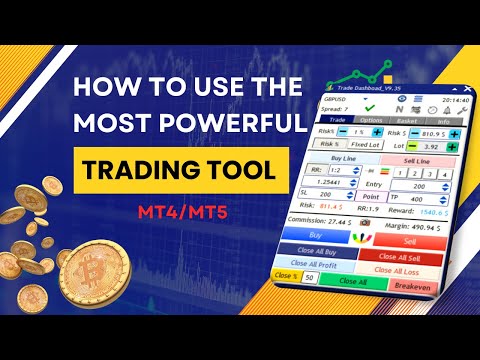
Tired of complex order placement and manual calculations? Trade Dashboard is your solution. With its user-friendly interface, placing orders becomes effortless, by a single click, you can open trades, set stop loss and take profit levels, manage trade lot size, and calculate risk to reward ratios, allowing you to only focus on your strategy. Say goodbye to manual calculations and streamline your trading experience with Trade Dashboard.

Download Demo Version right now.

You can find Details of Dashboard Functions and features here.

Watch Instructional Videos here.

Join Telegram Channel for tips, updates, and useful trading information,

Please Message Me after purchase for support. You can leave your ideas in the comment section of the product, if you need more features to be added, I am open to any suggestion and I want you to get the best experience from working with my products.

Purchase includes all future updates.

You can run the softwere on 10 different VPS/Computers with each purchase, 

Here is the MT4 version.

Risk Management: Set your risk as a percentage of your balance or equity with Trade Dashboard. Or set your risk as a total amount of money, Visually define your stop loss on the chart, and let the tool accurately calculate the appropriate lot size for each currency pair. The tool also can automatically set your take profit level based on your desired risk-to-reward ratio. It even covers commission and spread fees in lot size calculations. Additionally, Your stop loss and take profit can turn to a virtual levels to keep it hidden from your broker. Take control of your risk and protect your capital with Trade Dashboard's advanced risk management capabilities.

Trade Lines: The beauty of this tool is perfect and simple visualization, you can visually set stop loss and take profit and entry levels, you can visually set risk free options, you can visually set trail start line, you can visually set expiration time for orders and again you can visually modify all of that. You can pin(lock) your stop loss to a certain price, so that when price moves, your lot size will be adjust based on new stop loss size while your stop loss price remain at its price.

Partial Close: Elevate your trading precision with our innovative Partial Close feature. Easily set multiple levels of partial stop loss or take profits visually, allowing for precise trade management. Adjust closure volumes based on initial or current lot sizes, and define distances with precision using points, RR ratio, or TP percentage.

Breakeven: Enjoy the added flexibility of setting a risk-free (breakeven) start line, ensuring your position becomes automatically risk-free after reaching a certain level of profit. The tool can set your lock profit amount in a way to compensate commission fee.

Trailig Stop Loss: With 8 types of trailing stop loss options, Trade Dashboard dynamically adjusts your stop loss as the price moves, maximizing your profit potential. Take full control of your trades and optimize your profitability with Trade Dashboard's powerful functionality. You have the option to set Regular, RRBased, Candle HH/LL, Profit, Moving Average, PSAR, ATR and Fractal based trailing stop types.

SL To (Advanced Stop Movement): The "SL To" feature allows you to automatically move Stop Loss to predefined levels when price reaches each Partial TP stage. You can define SL movement using Auto, Points, RR, %TP, exact Price, or even move it to another Partial TP level. It works independently from Partial Close and supports up to 8 levels, acting as a multi-level breakeven or structured trailing stop system with visual chart control. This feature can act as multiple breakeven, or full manual trailing stop loss function.


Grid: Placing Grid of orders with specified amount of distance and lot size multiplier.

Basket Management: Whether you have multiple buy or sell trades or follow a grid strategy, Trade Dashboard provides valuable insights. Visualize the breakeven price of your buy and sell orders directly on the chart. Take control of your trade baskets by setting a unified stop loss or take profit for your buy or sell positions. Additionally, define a universal stop loss and take profit for the entire basket. With the ability to close all trades at a specific equity level, Trade Dashboard proves useful for traders working with FTMO or similar firms. Simplify your trading process and gain a competitive edge with Trade Dashboard's comprehensive functionality.

Take Control of Manual trades: Trade Dashboard can identify your manual trades or trades that are taken by other EAs, You can take manual trades by your phone and let the tool set SL and TP automatically, or set partial close, risk free or trail stop functions for those trades.


Alert Tab:
 Do you have any support or resistance line for which you need to get notified if price touches that? This tab will alert you when price cross the lines you set on the chart.

Trade Task Schedular: Do you need to set a specified time for opening or closing a trade for example before news? Or do you want to close all positions or take an screenshot at a specified time or regularly every friday at a certain time? You can set any task to perform at a predefined time using the trade task schedular tool.

Session Indicator: Effortlessly track forex market sessions, customize time zones, and enhance your market timing. Identify optimal entry points and periods of inactivity with precision, empowering you to make informed trading decisions. It can also shows the start and end of the each session for the current day, directly on the chart.

Economic Calendar: I am sure you want to be aware of the economic news before you make trading decision, with economic calendar feature you can check the news of the current week categorized by impact and currency, the tool can put a line on the chart where the news is about to come. You can set the tool to close trades, give alert on the chart or your phone or take screenshot before or after a news. Every trader needs this feature.

Auto SL/TP: This feature is a practical one, especailly if you are a scalper, it can set your stop loss automatically based on ATR or Candle higher high or lower low prices, it can set TP automatically as well. Of course it adjust the lot size based on the auto stop loss value.

Over Trading: This feature is designed to stop you from over trading, it can restrict taking trades when you exceed a number of trades in a month, week, day, hour, minute or when you exceed an amout of loss or profit. 

Notification: When significant events, such as hitting stop-loss or take-profit, opening or closing trades, occur, you may find it essential to receive notifications or capture screenshots for reference. That is what notification settings do.

Hotkeys: Easily customize your trading experience by setting hotkeys directly on the chart for various actions. Activate or deactivate hotkeys for individual or multiple actions, and enhance flexibility by combining hotkeys with the shift key for seamless control.

Save/load settings: With Trade Dashboard, there's no need to navigate through lengthy lists in the EA input settings. Set up everything directly on the chart and save your configurations effortlessly. Additionally, you can save a default setting that automatically loads every time you run the EA, eliminating the need for manual adjustments each time.

Support 15 languages: English, German, French, Spanish, Portuguese, Italian, Russian, Chinese, Japanese, Korean, Turkish, Persian, Arabic, Vietnamese, Indonesian.

Differet Theme Colors: 9 different themes colors, Light Blue, Dark Blue, Navy Blue, All Dark, Semi Dark, Cyan, Black & White, Green, Brown.

Explore a wealth of functionalities with Trade Dashboard, including the ability to take hedge trades, execute reverse trades, utilize the close-by function, implement OCO (One-Cancels-the-Other), and virtual pending orders.

Take charge of your trading with the Trade Dashboard. Stay informed about risks, maintain control over trades and accounts. Its intuitive interface ensures quick adaptation. Our support team is available for assistance. Equip yourself with powerful tools for a competitive edge in the market.

Note: Trade Dashboard support all type of assets, including forex currencies, indices, metals, commodities, cryptocurrencies, and more.

Author: "My name is Ameri, With 8 years of finance studies and experience as both a trader and developer, I strive to simplify the lives for fellow traders. I personally use and constantly update my own product for trading, ensuring ongoing support. I look forward to connecting with you and being a part of your trading journey."

#Tags: Trade management, Risk management, Order Management, Trade Panel, Lot Size Calculator,LotSize Calculator, Visualization tools, Simplified trading, Precise position sizing, Risk-to-reward ratio,Risk Reward Tool, Alert Notifications,  Screenshot, Universal stop loss, Universal take profit, Trailing stop options, Risk-free options,Breakeven, Grid strategy, Equity protection, Scalp, Scalping, Scalper, Hotkeys, Close All, Hedge, Close By, Fast Trading, Trade basket management, Trading Panel, Trade Manager, Trading Assistant, Trade Assistant, Break Even, Partial Close, Virtual Stop Loss, Virtual Take Profit, Invisible Stop Loss, Invisible Take Profit, virtual pending order, News Panel, News Filter, Economic Calendar, Market Session, Task Schedular, Trade Timer, Auto stop loss, Auto Take Profit, Trade Notification, OverTrading

Avis 133
minxiu
9
minxiu 2026.02.21 12:17 
 

This is exactly what I wanted. Great job, I'm really happy with it!

Simon
27
Simon 2026.02.15 14:00 
 

Awesome Tool. Thank you for your service!

Axel Conte
23
Axel Conte 2026.02.11 12:39 
 

An amazing tool that truly makes your life easier. Don’t hesitate, especially considering the price. It’s extremely functional and calculates everything instantly — no need to manually project potential gains or losses, everything updates in real time based on your settings. I’ve been using this tool exclusively for the past two years. I recently had a small issue after changing my computer, and Fatemeh Ameri replied within an hour — I honestly didn’t expect support to be that responsive! I strongly recommend it!

Produits recommandés
Sync In Many Ways MT5
Sa No Tsuyoshi Kokorozashi
Description This is a Utility tool for MT5 which will make our chart analysis task quite more efficient and save large amount of time. As for chart analysis, some are watching out several symbol simultaneously with single timeframe and others are trading only one single pair with   multi timeframe analysis. For both, a common troublesome issue is “scroll chart to look back” or “draw chart objects” in multi charts at the same time.  Especially for those who are trading with multi timeframe soluti
Introducing the "Auto Timed Close Operations", a useful utility for MetaTrader 5 traders! This utility has been developed to help traders of all levels automatically close their open positions at the exact moment they desire. With the "Auto Timed Close Operations", you gain the required control over your trades and can avoid unwanted surprises at the end of the day or at any other predefined time. We know how important it is to protect your profits and limit your losses, and that's exactly what
Danko DTC Panel
Ricardo Almeida Branco
Do not buy before seeing the Danko Trend Color product, as this panel is a way to view a summary of this indicator on various timeframes. The Danko DTC Panel utility allows you to look at the trend in up to 5 timeframes. When clicking on the timeframe texts, a new window will open with the indicator plotted on the screen so you can see the complete chart. The width of the panel, with the amount of candles you want to see, is customizable, see the images below. Ao clicar nos textos dos timeframe
TradingX Hotkeys
Johannes Stephanus Lombard
Inputs Available Lotsizes Partial Close % You can change lotsizes as you require On an open chart click once to select chart to be able to use hotkeys on specific chart. All Pairs can be used with this expert We created this expert to be able to still trade C300 with a 0.06 Lotsize If you enter a 0.6 lot and close 0.90% you can trade with 0.06 Lot Keys to be used: B -Buy S -Sell C -Close Profitable D -Breakeven (Note if stoploss is set it won't break even) P -Partial close X -Close all
Position Size Tool
Filipp Pavlov
5 (1)
Position Size Tool is an on-chart trading tool that lets you manage trades entirely with your mouse and hotkeys — switch between preset risk percentages, place orders with instant position sizing, see live SL/TP distances and risk/reward, and close positions partially with a click. Download Demo version  Demo is limited to EURUSD pair on demo account on 1 hour timeframe. Key Features: Market/pending orders by mouse & hotkeys with auto risk-based sizing. Change risk % with A/S hotkeys. Change aut
Operational Management MT5
Leonardo Gabriel Caceres
Operative Management Pro – Advanced Trading Utility Operative Management Pro is a smart visual tool for traders who want to analyze and simulate their trades before placing them on the market. This panel displays in real-time the most important parameters of the current symbol: Current price and minimum lot size Required margin Spread cost in USD and pips Take Profit and Stop Loss value in USD Automatic risk and reward calculation With just a click on the chart, you can simulate BUY or SELL t
Pending Orders Grid Complete System opens any combination of Buy Stop, Sell Stop, Buy Limit and Sell Limit pending orders and closes all existing pending orders. You will be able to Drag-and-Drop the Script on the chart and it will pick up the start price for the first position in the grid from the "Drop" point. Usually it should be in the area of Support/Resistance lines. Input Parameters Before placing all pending orders, the input window is opened allowing you to modify all input parameters:
AKCAP Hotkey Tool
AK Capital Markets Limited
5 (3)
Special offer for the next 10 copies Are you tired of manually navigating through menus and inputting data every time you want to execute a trade or open an order on Meta Trader? Our hotkey tool is here to make your life easier and boost your trading efficiency. Our tool is natively coded for lightning-fast performance and comes loaded with all the features you could possibly want. From pending orders and OCO orders to trailing and multiple buckets, it has everything a scalper could need. And
Un seul graphique. Un contrôle total. Ne perdez plus de temps à gérer les objets, les couleurs et les paramètres de chaque graphique séparément.       Gestionnaire de synchronisation de graphiques   , vous pouvez       synchronisez, copiez et contrôlez tous vos graphiques MetaTrader       instantanément, en utilisant un seul panneau et quelques raccourcis. Dessinez une fois, actualisez partout. Ouvrez et fermez vos graphiques d'un simple clic. Gardez votre espace de travail propre grâce à      
"Telegram Notification EA for MetaTrader 5 with ThreadID Mode" Description: Introducing our advanced Expert Advisor (EA) tailor-made for MetaTrader 5, delivering seamless notifications for trade openings and closures, along with comprehensive profit and drawdown tracking. Stay ahead of the market curve with timely updates, empowering you to make informed decisions and optimize your trading strategy effortlessly. Key Features: Instant Trade Notifications: Receive real-time updates directly from y
Session High Low Tracker MT5
AL MOOSAWI ABDULLAH JAFFER BAQER
Session High Low Tracker - Essential Multi-Session Price Analysis Tool Powerful Market Session Analysis for Serious Traders Price: $30 Product Overview Session High Low Tracker is an advanced MetaTrader utility that automatically identifies and displays the high and low price points across Asian, London, and New York trading sessions. This professional-grade tool helps traders recognize key market levels, identify potential breakouts, and develop precise session-based trading strategies. Key Fea
Synchronizer
PATRICK PAARSCH
This Expert Advisor monitors all open positions across all symbols in MetaTrader 5. Whenever a Stop Loss (SL) or Take Profit (TP) is manually set or adjusted on any position, the EA automatically applies that value to all other open positions , regardless of symbol or order type (Buy/Sell). This ensures consistent and synchronized SL and TP levels across your account. Perfect for mobile trading via tablet or smartphone!
MT5 for Telegram Signals
Sergey Batudayev
5 (10)
The utility is designed to send signals from MT4 to Telegram. It has several unique features, allowing not only the sending of trade signals but also the following functionalities: Send messages directly from the terminal to Telegram Send emojis along with custom text Send text and images from Telegram All of these features enable users to manage a signal channel while focusing on trading and finding quality signals. Customizable Signal Messages You can fully customize the signal message: Specif
ICT PD Arrays Trader
Aesen Noah Remolacio Perez
Attention All ICT Students! This indispensable tool is a must-have addition to your trading arsenal... Introducing the ICT PD Arrays Trader: Empower your trading with this innovative utility designed to enhance and simplify your ICT trading strategy and maximize your potential profits.  How does it work? It's simple yet highly effective. Begin by placing a rectangle on your trading chart and assigning it a name like 'ict' or any preferred identifier. This allows the system to accurately ident
Volume Flow Binance
Thalles Nascimento De Carvalho
Volume Flow Binance! Avez-vous déjà imaginé avoir accès aux times and trades de votre cryptomonnaie préférée, avec des détails sur les flux de volumes et l'analyse des mouvements de prix, même si votre courtier ne fournit pas un accès complet à l'historique des transactions ? Avec Volume Flow Binance , c'est désormais possible ! Ce script en MQL5 a été conçu pour les traders de cryptomonnaies qui recherchent une vue détaillée de la dynamique du marché en temps réel. Caractéristiqu
FREE
This EA help trader to manage his pending orders, when you place many Pending Orders this utility monitor them and when of them get filed (executed) the EA cancel and delete all rest of pending orders, to avoid  opening of all of pending orders at the same time , and lose your risk management. this utility is very useful for trader when he /she is not available on the desk.
Trade Control Panel
Jerry Jilun Anak Liban
Trade Control Panel Function Normal One Click Function Close All Close All Profit Close All Loss Close All Pending Order Close All Sell Close All Buy Advance One Click Function 1.  Close Partial Lot Sell by Percent It will help you partial close for all open position by desire percent you wanted. No longer partial close one by one for every open position Manual input for desire percent 2. Close Partial Lot Buy by Percent It will help you partial close for all open position by desire percent
Discover the MSG Method: Master the Major Session Gap for Consistent Forex Profits Unlock the power of the MSG Method – our proprietary Major Session Gap strategy designed to capture high-probability trades during key market session transitions. Developed by the T1 FX Team, this innovative approach leverages algorithmic precision to identify and exploit price gaps between major trading sessions (London, New York, and Tokyo). Why Choose the MSG Method? High-Probability Setups : Focuses on session
LotMaster AI
Oleksandr Kashyrnyi
LotMaster AI – Calcul Intelligent des Lots & Gestion des Risques ! Calcul automatique de la taille des lots et protection du capital pour un trading sécurisé et stable ! Qu'est-ce que LotMaster AI ? Cet expert advisor calcule automatiquement la taille du lot en fonction de votre capital et du pourcentage de risque sélectionné. Plus besoin de deviner combien de lots ouvrir – LotMaster AI le fait pour vous , en tenant compte du Stop Loss et des conditions du marché . Fonctionnalités pr
Strategy Manager is a  Multi-Time-Frame & Multi-Currency  Dashboard for  Metatrader 4 and 5. Thanks to a free, external graphical user interface, build your own strategy by combining any indicators and loading them into the dashboard to see the result ! In addition, you can precisely  set-up your Auto-trading & Notifications and use indicators for Stop-Loss, partial profit or limit. Filter your automatic trading & notifications with forex calendar and more. Open and Manage your orders directly w
One Click Breakeven Function: For multiple orders of the same currency but different order types (sell or buy), under the condition that the overall position is profitable, set the same stop-loss level or take-profit level. For example: there are currently 10 EURUSD orders, including 7 sell orders and 3 buy orders. When the overall position is profitable, if the overall take-profit for sell orders is set to 50 points: (1) When the total profit of the 7 sell orders is greater than the total loss
Order Block Real
Arnold Byarufu
1 (1)
Detailed Explanation of the Order Block Indicator What is an Order Block? An Order Block refers to a specific price zone where institutional traders (e.g., banks, hedge funds) have placed a large number of buy or sell orders. These zones are critical because they often mark areas of significant market reversals, continuations, or breakouts. In simpler terms, it's a region on the chart where the "big players" have left their footprints. Traders use these zones to predict price behavior—whether th
This Dashboard is very useful . That will help us analyzing graph. In this dashboard has some functions. such as  - Buy Stop - Sell Stop - Buy Limit Order - Sell Limit Order - Close All trade on this graph - Close All Profit - Delete Pending Order = Notify to enter an order - Percentage Calculation of chance to win an order On this strategy i calculated all Major EMA to find a higher chance and take more profits
.................................. This script is intended to help users to get information about ticks and spreads (e.g. ticks count, minimum/maximum/average spread). It can export reports in the CSV format with this information. Traders can see spread statistics in real time in the chart window It is useful for comparing spreads of different brokers. --------------------------------------------------------------------------
This script notifies a user about different events by playing sounds, sending emails and text messages to a mobile device. The following events are supported: New deals (in/in out/out). Expiration of Pending orders. The terminal disconnected. The terminal or the script closed. Please set a notification type for each event separately. If you need notifications via Email, please make sure that the settings on the Email tab are correct. If you need to receive notifications on a mobile device, pleas
Améliorez votre capacité à partager des signaux forex avec le Telegram Signal Sender MT5, un outil puissant conçu pour automatiser et simplifier le processus d’envoi de signaux de trading vers votre canal Telegram, parfait pour les fournisseurs de signaux débutants comme établis. Très apprécié dans les communautés de trading telles que Forex Factory et Reddit’s r/Forex, et mis en avant dans les discussions sur Investopedia et les forums MQL5 pour son efficacité dans la diffusion des signaux, cet
Tenha a boleta do ProfitChart no seu Metatrader! ........................ Agora é possível ter a boleta do profit no seu Metatrader. Envie ordens de compra e venda, acompanhe o mercado e simule estratégias em momentos de mobilidade, diretamente do seu Metatrader5. Gestão de riscos e otimização de lucros são dois princípios básicos de qualquer operação bem-sucedida. Nesse sentido, utilize as ferramentas de  STOPMOVEL, TRAILING STOP, STOPGAIN E ORDENS PARCIAIS DE SAÍDA.       Funcionalidades do
Signals for Telegram
Elidio Xavier Guimaraes
It is a utility that posts customized messages on Telegram based on account trading activity. Once the utility is on the chart, with each new position opened from the same chart symbol the utility is added, a customized message will be sent to the Telegram group defined in the input parameters. The utility will post to the Telegram group if a new position is opened and if it is the same symbol as the chart the utility is running on. If you are using an Expert Advisor for Buy and Sell and want to
Position Limit Monitor: Efficient Control of Your Trading Operations Have you ever worried about having too many open trades simultaneously? Would you like precise control over the maximum number of positions in your account? Position Limit Monitor is the solution you need. Main Features: • Real-time monitoring: Constantly supervises the number of open positions in your account. • Customizable limit: Easily set the maximum number of positions you want to keep open. • Automatic closure: When the
Les acheteurs de ce produit ont également acheté
Trade Assistant MT5
Evgeniy Kravchenko
4.42 (208)
It helps to calculate the risk per trade, the easy installation of a new order, order management with partial closing functions, trailing stop of 7 types and other useful functions. Additional materials and instructions Installation instructions - Application instructions - Trial version of the application for a demo account Line function -   shows on the chart the Opening line, Stop Loss, Take Profit. With this function it is easy to set a new order and see its additional characteristics bef
Bienvenue sur Trade Manager EA, l’outil ultime de gestion des risques conçu pour rendre le trading plus intuitif, précis et efficace. Ce n’est pas seulement un outil d’exécution d’ordres ; c’est une solution complète pour la planification des trades, la gestion des positions et le contrôle des risques. Que vous soyez débutant, trader expérimenté ou scalpeur ayant besoin d’une exécution rapide, Trade Manager EA s’adapte à vos besoins, offrant une flexibilité sur tous les marchés, des devises et i
TradePanel MT5
Alfiya Fazylova
4.86 (148)
Trade Panel est un assistant commercial multifonctionnel. L'application contient plus de 50 fonctions de trading pour le trading manuel et vous permet d'automatiser la plupart des opérations de trading. Attention, l'application ne fonctionne pas dans le testeur de stratégie. Avant d'acheter, vous pouvez tester la version démo sur un compte démo. Version démo ici . Instructions complètes ici . Commerce. Permet d'effectuer des opérations de trading en un clic : Ouvrez des ordres et des positions e
Version Bêta Le Telegram to MT5 Signal Trader est presque prêt pour la sortie officielle en version alpha. Certaines fonctionnalités sont encore en développement et vous pourriez rencontrer de petits bugs. Si vous rencontrez des problèmes, merci de les signaler, vos retours aident à améliorer le logiciel pour tout le monde. Le prix augmentera après 20 ventes. Copies restantes à $90:   2/20 . Telegram to MT5 Signal Trader est un outil puissant qui copie automatiquement les signaux de trading de
Farmed Hedge Yield Farming - Professional Pair Trading Dashboard (Manual - Hybrid - Semi/Automated EA) VERSION 3 - WILD HARVEST UPDATE Trading Approach: - Manual Trading: Primary focus - Auto Pilot: Optional supplementary feature - Full Automation: Not the main purpose Recommended Timeframe: H1-H4 DEMO VERSION Download the free demo to test functionality. Use Strategy Tester with Visual Mode to see how it works. VERIFIED TRADING RESULTS - Farmed Hedge Yield Axi Copy: https://www.mql5.com/en/si
MarketCoachPanel
Maria Makarchuk
4 (1)
MarketCoach Panel — инструмент дисциплины и контроля риска для трейдера MarketCoach Panel — это вспомогательная панель для MetaTrader 5, разработанная для повышения дисциплины в торговле, контроля риска и принятия более осознанных решений. Приложение не совершает сделки и не является торговым советником. Оно помогает трейдеру анализировать текущую ситуацию и соблюдать собственные правила стратегии. Основные возможности • Расчёт лота по риску Автоматический расчёт объёма позиции на основе: проце
Exp COPYLOT CLIENT for MT5
Vladislav Andruschenko
3.82 (34)
Le copieur commercial pour MT5 est un copieur commercial pour la plate-forme МetaТrader 5   . Il copie les transactions de change   entre       tous les comptes   MT5   -   MT5, MT4   -   MT5 pour la version COPYLOT MT5 (ou MT4   -   MT4 MT5   -   MT4 pour la version COPYLOT MT4) Copieur fiable ! Version MT4 Description complète   +DEMO +PDF Comment acheter Comment installer     Comment obtenir des fichiers journaux     Comment tester et optimiser     Tous les produits de Expforex Vous pouvez
PhantomBreak Radar — индикатор для MetaTrader 5, предназначенный для выявления ложных пробоев уровней (fake breakout) и рыночных ловушек. Инструмент помогает трейдерам находить моменты, когда цена прокалывает экстремум диапазона, но затем возвращается обратно — формируя потенциальную точку входа в противоположном направлении. Индикатор автоматически анализирует ценовой диапазон за выбранный период, отслеживает выход за его границы и фиксирует повторный вход цены внутрь диапазона. В таких ситуаци
Только сейчас вы можете приобрести  TradeOps Command Center с 10% скидкой всего за 630$. Акция действует до 01.04.2026 Для получение инструкции об использование утилиты обратитесь в личные сообщения! TradeOps Command Center — Профессиональный инструмент контроля риска и дисциплины в трейдинге TradeOps Command Center — это многофункциональная утилита для MetaTrader 5, разработанная для трейдеров, которые стремятся к системному и дисциплинированному подходу к торговле. Продукт объединяет в себе у
The product will copy all telegram signal to MT5 ( which you are member) , also it can work as remote copier.  Easy to set up, copy order instant, can work with almost signal formats, image signal,  s upport to translate other language to English Work with all type of channel or group, even channel have "Restrict Saving Content", work with  multi channel, multi MT5 Work as remote copier: with signal have ticket number, it will copy exactly via ticket number. Support to backtest signal. How to s
Copy Cat More Trade Copier MT5 (Chat Copieur MT5) est un copieur de trades local et un framework complet de gestion des risques et d'exécution conçu pour les défis commerciaux d'aujourd'hui. Des défis de prop firms à la gestion de portefeuille personnel, il s'adapte à chaque situation avec une combinaison d'exécution robuste, de protection du capital, de configuration flexible et de gestion avancée des trades. Le copieur fonctionne à la fois en mode Master (expéditeur) et Slave (récepteur), avec
Smart Stop Manager – Exécution automatique du stop-loss avec une précision professionnelle Présentation Smart Stop Manager est la couche d’exécution de la gamme Smart Stop, conçue pour les traders qui recherchent une gestion du stop-loss structurée, fiable et entièrement automatisée sur plusieurs positions ouvertes. Il surveille en continu toutes les opérations actives, calcule le niveau de stop optimal à l’aide de la logique de structure de marché Smart Stop, puis met à jour les stops automat
Smart Stop Scanner – Analyse multi-actifs des stop-loss basée sur la structure réelle du marché Vue d’ensemble Smart Stop Scanner offre une surveillance professionnelle des niveaux de stop-loss sur de nombreux marchés. Le système identifie automatiquement les zones de stop les plus pertinentes à partir de la structure réelle du marché, des ruptures importantes et de la logique du price action, puis affiche toutes les informations dans un panneau clair, cohérent et optimisé pour les écrans haut
Ultimate Extractor
Clifton Creath
5 (9)
Ultimate Extractor - Professional Trading Analytics for MT5 *****this is the local HTML version of Ultimate Extractor. Check out Ultimate Extractor Cloud on mql5 for the Cloud version****** Ultimate Extractor transforms your MetaTrader 5 trading history into actionable insights with comprehensive analytics, interactive charts, and real-time performance tracking. What It Does Automatically analyzes your MT5 trading history across all Expert Advisors and generates detailed HTML reports with inte
Panneau de trading pour trader en 1 clic.   Travailler avec des positions et des commandes!   Trading à partir du graphique ou du clavier. Avec notre panneau de trading, vous pouvez exécuter des transactions en un seul clic directement depuis le graphique et effectuer des opérations de trading 30 fois plus rapidement qu'avec le contrôle MetaTrader standard. Les calculs automatiques des paramètres et des fonctions rendent le trading plus rapide et plus pratique pour les traders. Des conseils grap
Telegram to MT5 Coppy
Sergey Batudayev
5 (8)
Télégramme vers MT5 :   la solution ultime pour copier des signaux Simplifiez votre trading avec Telegram vers MT5, l'outil moderne qui copie les signaux de trading directement des canaux et chats Telegram vers votre plateforme MetaTrader 5, sans DLL. Cette solution puissante garantit une exécution précise des signaux, de nombreuses options de personnalisation, un gain de temps et une efficacité accrue. [ Instructions and DEMO ] Caractéristiques principales Intégration directe de l'API Telegram
MT5 to Telegram Signal Provider est un utilitaire facile à utiliser et entièrement personnalisable qui permet l'envoi de signaux spécifiés vers un chat, un canal ou un groupe Telegram, transformant ainsi votre compte en fournisseur de signaux. Contrairement à la plupart des produits concurrents, il n'utilise pas d'importations DLL. [ Démonstration ] [ Manuel ] [ Version MT4 ] [ Version Discord ] [ Canal Telegram ]  New: [ Telegram To MT5 ] Configuration Un guide utilisateur étape par étape est
Trade Manager DashPlus
Henry Lyubomir Wallace
5 (13)
DashPlus est un outil de gestion de trading avancé conçu pour améliorer l'efficacité et la performance de vos transactions sur la plateforme MetaTrader 5. Il offre un ensemble complet de fonctionnalités, incluant le calcul des risques, la gestion des ordres, des systèmes de grilles avancés, des outils basés sur les graphiques et des analyses de performance. Fonctionnalités principales 1. Grille de récupération Implémente un système de grille flexible et de moyenne pour gérer les transactions dan
Anchor: The EA Manager A coordination system for traders running multiple EAs. Anchor ensures only one EA can trade at a time, preventing conflicting positions and keeping your portfolio safer. Attach Anchor to any chart. Configure your EAs and their magic numbers. Anchor handles the rest. Built for portfolios. Built for discipline. Built for prop firms. The Problem Running multiple EAs on the same account creates risk. Two gold EAs can open opposite positions on the same candle. Three EA
Le Local Trade Copier EA est une solution pour les commerçants individuels ou les gestionnaires de compte qui ont besoin d'exécuter des signaux commerciaux à partir de sources externes ou qui ont besoin de gérer plusieurs comptes en même temps, sans avoir besoin d'un compte MAM ou PAMM. Il copie jusqu'à 8 comptes maîtres vers un nombre illimité de comptes esclaves [ Guide d'installation | Guide de mise à jour | Dépannage | FAQ | Tous les produits ] 100% auto-hébergé Facile à installer et à util
Trade Manager DaneTrades
Levi Dane Benjamin
4.36 (28)
Trade Manager pour vous aider à entrer et sortir rapidement des transactions tout en calculant automatiquement votre risque. Y compris des fonctionnalités pour vous aider à éviter le sur-trading, le trading de vengeance et le trading émotionnel. Les transactions peuvent être gérées automatiquement et les mesures de performances du compte peuvent être visualisées dans un graphique. Ces fonctionnalités rendent ce panneau idéal pour tous les traders manuels et contribuent à améliorer la plateforme
YuClusters
Yury Kulikov
4.93 (43)
Attention: You can view the program operation in the free version  YuClusters DEMO .  YuClusters is a professional market analysis system. The trader has unique opportunities to analyze the flow of orders, trade volumes, price movements using various charts, profiles, indicators, and graphical objects. YuClusters operates on data based on Time&Sales or ticks information, depending on what is available in the quotes of a financial instrument. YuClusters allows you to build graphs by combining da
The Expert Advisor is a comprehensive risk manager helping users to control their trading activities. With this tool being a safeguard you can easily configure various risk parameters. When any limit is exceeded, the risk manager can force close opened positions, close other EAs, and even close the terminal to prevent emotional trading that doesn't correspond to your trading strategy. Risk Manager Settings Account Protection Check min equity limit to close all (account currency) - check the min
Entry In The Zone and SMC Multi Timeframe is a real-time market analysis tool developed based on Smart Money Concepts (SMC). It is designed to analyze market structure, price direction, reversal points, and key zones across multiple timeframes in a systematic way. The system displays Points of Interest (POI) and real-time No Repaint signals, with instant alerts when price reaches key zones or when signals occur within those zones. It functions as both an Indicator and a Signal System (2-in-1), c
AlgoRadar
Stephen J Martret
5 (2)
AlgoRadar - Real-Time Trade Analytics The most powerful on-chart performance analyzer for MetaTrader 5. One Chart. Every EA. Every Account. MT4 and MT5 Combined The only analyzer that displays all your EAs across multiple accounts, brokers, and VPS — including both MT4 and MT5 — on a single live MT5 chart. Your complete trading operation, visible at a glance. Why AlgoRadar? No external software. No digging through files. Live stats right on your chart. Unlike other portfolio analyzers that for
DrawDown Limiter
Haidar Lionel Haj Ali
5 (20)
Expert Advisor "Drawdown Limiter"  Vous êtes au bon endroit si vous recherchez un contrôle de drawdown, un limiteur de drawdown, une protection du solde, une protection de l'équité ou une limite quotidienne de drawdown en rapport avec les entreprises de gestion de capitaux (Prop Firm), FTMO, My Forex Fund, ou si vous souhaitez protéger votre compte de trading. Avez-vous déjà eu du mal à contrôler votre drawdown en tradant sur des comptes financés ? Cet EA est fait pour vous. Les entreprises de
Custom Alerts AIO : Surveillez tous les marchés à la fois — sans aucune configuration Présentation Custom Alerts AIO est une solution de surveillance du marché prête à l’emploi, sans configuration nécessaire. Tous les indicateurs requis — FX Power, FX Volume, FX Dynamic, FX Levels, IX Power — sont directement intégrés. Aucun graphique n’est affiché, ce qui rend cet outil idéal pour la génération d’alertes en temps réel. Il prend en charge toutes les classes d’actifs proposées par votre courtie
EmoGuardian
Samuel Bandi Roccatello
5 (6)
Évitez le surtrading, le FOMO et les comportements compulsifs, en imposant des limites de risque avancées à votre compte de trading à l'aide d'EmoGuardian. Ajoutez automatiquement   des Stop Loss aux positions, gérez les pertes d'EA, chargez/déchargez automatiquement les EA. Limitez le risque par position, par tradedd, par Time Range, par jour. Les options de gestion des risques ont été développées pour lutter spécifiquement contre les comportements compulsifs qui conduisent les traders à faire
VOLUME BUBBLES ORDERFLOW FOOTPRINT PROFESSIONAL Expert Advisor for MetaTrader 5 Complete Feature Documentation Introduction: Volume Bubbles OrderFlow Footprint Professional is an advanced order flow visualization tool designed for the MetaTrader 5 platform. It provides institutional-grade market analysis through real-time volume bubbles visualization, volume profiling, and sophisticated order flow analysis. This Expert Advisor transforms raw market data into actionable trading intelligence, hel
Take a Break MT5
Eric Emmrich
4.75 (24)
One tool to protect all your EAs — news filter, equity protection, time filter and more — free demo available Take a Break has evolved from a basic news filter into a comprehensive account protection solution. It pauses your other Expert Advisors during news events or based on custom filters. When trading resumes, it automatically restores your entire chart setup , including all EA settings. Typical use cases: One news filter for all your EAs. Pause trading during news or high volatility — and c
Plus de l'auteur
Trade Dashboard MT4
Fatemeh Ameri
4.96 (53)
Tired of complex order placement and manual calculations? Trade Dashboard is your solution. With its user-friendly interface, placing orders becomes effortless, by a single click, you can open trades, set stop loss and take profit levels, manage trade lot size, and calculate risk to reward ratios, allowing you to only focus on your strategy. Say goodbye to manual calculations and streamline your trading experience with Trade Dashboard. Download  Demo Version  right now. You can find  Details of
Pro MA Angle
Fatemeh Ameri
5 (1)
This indicator is a professional Trend identifier, it measures the angle or slope of moving averages with different methods. As this indicator calculate angles you can identify the strength of trend by magnitude of angle. It also shows if angle is increasing or decreasing which gives you the opportunity to make more information about current trend. You can combine this indicator with your strategy as a filter or you can use it alone to make your trading system. This is not a repainting indicator
FREE
Pro Close Panel
Fatemeh Ameri
3.75 (4)
This is a very simple yet useful tool to close positions with different conditions and methods. You can use panel buttons to close positions or set multiple rules to close all positions. Panel has two main tab, Active Order and Pending Orders: Active Tab: You can set profit or loss target to close all positions. You can set equity target to close all positions, You can set a special time to close all positions. Moreover, by panel buttons you can close only buy/sell positions or only negative/pos
FREE
Filtrer:
minxiu
9
minxiu 2026.02.21 12:17 
 

This is exactly what I wanted. Great job, I'm really happy with it!

FPS Ma]{er
24
FPS Ma]{er 2026.02.17 10:39 
 

L'utilisateur n'a laissé aucun commentaire sur la note

Simon
27
Simon 2026.02.15 14:00 
 

Awesome Tool. Thank you for your service!

Yik Hung Lai
927
Yik Hung Lai 2026.02.15 08:19 
 

L'utilisateur n'a laissé aucun commentaire sur la note

Axel Conte
23
Axel Conte 2026.02.11 12:39 
 

An amazing tool that truly makes your life easier. Don’t hesitate, especially considering the price. It’s extremely functional and calculates everything instantly — no need to manually project potential gains or losses, everything updates in real time based on your settings. I’ve been using this tool exclusively for the past two years. I recently had a small issue after changing my computer, and Fatemeh Ameri replied within an hour — I honestly didn’t expect support to be that responsive! I strongly recommend it!

Harumeda
19
Harumeda 2026.02.10 23:39 
 

This is a great tool. And I am very grateful for the kind support.

manasvi.sriram
1572
manasvi.sriram 2026.01.28 11:00 
 

My second purchase. Already have the MT4 version. Excellent tool! Worth every penny!

Neiythan
29
Neiythan 2026.01.20 14:57 
 

This is an outstanding expert advisor that has truly enhance my trading experience. The interface is intuitive and beautifully organized, putting all the tools you need right at your fingertips. Placing trades and managing risk has never been easier, with a ton of practical features — quick one-click order entry, automatic risk-to-reward and lot calculations, visual stop-loss/take-profit setup, partial close, trailing stops, basket management, alerts, news integration, and more. I’ve seen real improvements in my trading speed and confidence since using trade dashboard. The developer keeps it updated and responsive to user feedback, which makes it even better. Highly recommended for every MT5 trader who wants powerful functionality with a smooth workflow!

K T
93
K T 2026.01.18 11:38 
 

The "basket" option is very useful for accounts that have trades with multiple magic numbers. I run this tool in 3 charts(same terminal) to auto manage different magic numbers with different settings

Roger Gerndt
30
Roger Gerndt 2026.01.15 16:57 
 

It s a great and perfect Tool for position sizing. Incredible good Work !!! Handclap.

Oyeleye OluJireh
33
Oyeleye OluJireh 2026.01.07 08:19 
 

Awesome product! Great for a serious trader limiting emotional involvement!

Steve Sullivan
59
Steve Sullivan 2026.01.05 15:27 
 

Brilliantly useful! The developer has thought of everything, this utility is so useful! Very quick to respond to questions too.

timj
178
timj 2026.01.02 16:27 
 

Yep great product. Makes trade execution much easier. Definitely recommend this!!

Sipsm
432
Sipsm 2025.12.15 21:43 
 

A very good trade management tool. The developer provides clear directions, excellent guidance, and very responsive support. I’m extremely happy with the features and look forward to future updates

小窗口
47
小窗口 2025.12.15 08:07 
 

Great tool, all I need in one

famaTV
31
famaTV 2025.12.14 18:25 
 

This is a great and valuable tool for MT5 traders, which enables us to effectively manage our trades in a quick and reliable way. It has very helpful features like risk management, market sessions, positions and orders management, an economic calendar, a task scheduler, automated SL and TP based on candles or ATR and much more. Managing other EAs trades is so outstanding. There is still more room for improvements, yet Trade Dashboard has been evolving, and the developer is so supportive and listens to and implements ideas and QoL features in a timely manner. I highly recommend this add-on. With proper use of available features, the cost is very justifiable. Very well done to the seller, and all the very best to the users :)

4xonly
147
4xonly 2025.12.10 09:25 
 

I bought the MT4 version a few years ago, coming from a poor experience with another one, much more expensive. In time I have been bothering Ameri with quite a few requests and suggestions and he's always been prompt and supportive, managing to fix bugs and implementing new features with no fuss! In time it's become an extremely powerful weapon compared to the original version. Now I've moved on to MT5 and it was a no brainer for me to buy it again. Needless to say, in MT5 it still works like a charm. No hesitation to recommend it once again: worth a thousandfold its small price! 10 stars would be a more suitable score!

Vxnity FX
21
Vxnity FX 2025.12.08 03:37 
 

I’ve been using Trade Dashboard MT5 for a while now, and it has transformed my trading experience! The interface is user-friendly, with features that streamline trading, like closing parts of trades and setting alerts for market news. What I love most is that it seems to be designed by someone who understands trading. The developer, Fatemeh Ameri, is responsive and updates the dashboard consistently. The pricing is reasonable, making it accessible for traders of all sizes. If you trade manually and want to manage your trades with less stress, this tool is definitely worth the investment. It’s the best trade management tool I've ever used!

cassianodalmoro
68
cassianodalmoro 2025.12.04 21:52 
 

Very good indicator: Useful, Easy to use He is always looking to improve the indicator.

3865633
375
3865633 2025.11.27 19:21 
 

Congratulations to the Seller for such an amazing creation. Modest price. Very nice person offering support every time I have asked. Making some amazing developments to the tool every time. Have been using for couple of years. Sorry for late review. Thank you!

Répondre à l'avis