 MetaTrader 5
 Experts
 Indicateurs
 Bibliothèque
 Utilitaires
 Widgets
 Règles
Regardez les tutoriels vidéo de Market sur YouTube
Comment acheter un robot de trading ou un indicateur
Exécutez votre EA sur
hébergement virtuel
hébergement virtuel
Test un indicateur/robot de trading avant d'acheter
Vous voulez gagner de l'argent sur Market ?
Comment présenter un produit pour qu'il se vende bien
Utilitaires de trading pour MetaTrader 5 - 17
 Vous trouverez ci-dessous des programmes de trading simplifiant le trading dans MetaTrader 5. Passez la souris sur un utilitaire pour lire sa description et son objectif.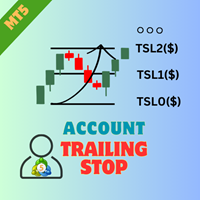
Présentation de la EA AccountTrailingStop MT5, un Expert Advisor avancé conçu pour améliorer votre stratégie de trading en gérant et sécurisant automatiquement vos profits sur MetaTrader 5. Cet outil est idéal pour les traders novices et professionnels, offrant une solution robuste pour le verrouillage dynamique des profits dans divers environnements de trading. Avec la EA AccountTrailingStop MT5, les utilisateurs bénéficient d'avantages significatifs tels qu'une meilleure rétention des profits
FREE

Instructions for Using Reverse Copier EA Attach EA to Charts Open MetaTrader and attach the EA to any chart on both accounts (master & slave). Make sure AutoTrading is enabled. Master Account (Signal Sender) Set Mode = Master in EA settings. This account will send trade signals. Slave Account (Signal Receiver) Set Mode = Slave in EA settings. This account will receive trades in reverse (opposite direction). Lot Multiplier In Slave EA settings, set Multiplier to control lot size. Example: 1.0
EA Portfolio Analytics Dashboard Pro - Advanced Multi-EA Performance Monitor EA Portfolio Analytics Dashboard Pro is a professional MetaTrader 5 tool designed for advanced portfolio management and real-time performance analytics. Monitor all your Expert Advisors simultaneously with institutional-grade metrics. Key Benefits: Multi-EA Performance Matrix: Track unlimited EAs and their statistics in a single view. Real-Time Risk Analytics: Monitor key metrics like Sharpe Ratio, Value at Risk (V

This is a utility panel to assist closing of open Deals. The panel has input filters to assist one select the right trades. The tool displays the number of trades to be closed as well as profits to be realized. One click close, Filter trades to be closed by: symbol, (Filter by a particular symbol in the trade terminal). magic number (If your orders are from particular EA with unique magic numbers). whether in profit, loss or All. (P/L=all trades, profiting = trades in profit, loosing = trades
FREE

This robot sends app notifications based on Platinum Candle Indicator rules. The Platinum Candle Indicator shows colored candles when prices are strongly distorted in relation to their averages. App message example to sell: [SPX][M15] PLATINUM TO SELL 11:45. App message example to buy: [EURUSD][M15] PLATINUM TO BUY 11:45. It also sends messages for multiple timeframes: [SPX][M15] PLATINUM TO BUY 11:45; [EURUSD][M1] PLATINUM TO SELL 11:45
QUESTIONS ABOUT THE PURCHASE AND INSTALLATION OF PRODUCT
FREE

Key Features Real-time P&L in $ Running P&L in Pips P&L converted to INR BUY / SELL direction Lot size Entry price Separate display for each open position Supports multiple open positions Works independently on multiple charts Follow Current Price mode Stay At Entry Price mode Adjustable vertical spacing in pixels Adjustable distance below the Bid price Adjustable candle offset Customizable text size and font Profit, loss and breakeven colors Automatic removal when a position is closed
FREE

Déplacer manuellement les stop-loss vers le seuil de rentabilité sur plusieurs positions ouvertes est un processus fastidieux lorsque le marché évolue rapidement, et il est facile de l'appliquer par inadvertance à une position qui est encore dans le rouge.
Le bouton « Phoenix Breakeven » déplace d’un simple clic le stop-loss de chaque position ouverte bénéficiaire vers le seuil de rentabilité, en ignorant automatiquement celles qui sont encore en perte.
Comment il protège vos bénéfices
- Un
FREE

Layer Smart Risk Trade Assistant – MT5 Trade Manager, Risk Management & Order Organizer Utility for MetaTrader 5 Are you looking for the most reliable trade assistant for MetaTrader 5 (MT5) ?
Layer Smart Risk Trade Assistant is the ultimate manual trading utility and trade panel , perfect for both beginner and advanced traders who want smarter risk management , order organization, and effortless multi-order management . Do you ever struggle with: Forgetting to update your stoploss or take profi

Arixis Trade Replay — Reconstruct and Understand Your Historical Campaigns
Arixis Trade Replay transforms historical MetaTrader 5 trading activity into an interactive visual reconstruction directly on the chart. Instead of examining hundreds of isolated deals in the account history, the application reconstructs observable trading campaigns and allows the trader to review the sequence in which positions were opened, expanded and eventually closed. During replay, entry and exit events can be disp
FREE

AI Telegram Trade Signal Sender automatically sends every trade opened or closed on the chart straight to your own Telegram bot/channel, in real time, using MetaTrader 5's native WebRequest function. Key features: Listens to OnTradeTransaction and instantly detects every deal (open, close, partial close) on the account Sends a clean formatted message to your Telegram chat: symbol, type, volume, price, SL/TP, and profit on close Works with your own Telegram Bot Token and Chat ID - you stay in ful
FREE

Native Account Stats détaille l'historique de vos transactions clôturées par symbole, par heure de la journée et par jour de la semaine, avec le profit factor, le taux de réussite, l'espérance mathématique et le drawdown de la courbe de capital des transactions clôturées. Les transactions sont reconstruites à partir des exécutions (deals) de MT5, ainsi les dépôts, crédits et corrections ne sont jamais comptabilisés comme des transactions gagnantes.
CE QU'IL AFFICHE
Un panneau sur le graphique
FREE
XXXX ATR (Average True Range) Position Manager: ATR StopLoss, ATR Target, ATR Breakeven, ATR Trailing StopLoss, with Risk % Calculation / Position. More about ATR: www.atr-trading.com
Key takeaways One click does it all: SELL and BUY button automatically places ATR stoploss, ATR target, ATR breakeven, ATR trailing stop and Risk % calculation of equity Entire position is calculated based on ATR No more manual position calculations = No more wasted time = No more late entries Position sizes c

One Click Breakeven Function: For multiple orders of the same currency but different order types (sell or buy), under the condition that the overall position is profitable, set the same stop-loss level or take-profit level. For example: there are currently 10 EURUSD orders, including 7 sell orders and 3 buy orders. When the overall position is profitable, if the overall take-profit for sell orders is set to 50 points: (1) When the total profit of the 7 sell orders is greater than the total loss

RSI Zeus — Indicator for MetaTrader 5 RSI Zeus is an indicator based on the standard RSI that incorporates volume data as an additional factor in its calculation, with the aim of reflecting not only price movement but also the trading activity behind that movement. What this indicator does It calculates a modified RSI value that weights price with the volume traded on each bar. The result is a line that behaves similarly to the traditional RSI but reacts differently in situations where price mov
FREE

Daily Telegram Market Briefing — Professional FX Session Briefing for MT5
Daily Telegram Market Briefing is a MetaTrader 5 Expert Advisor that compiles a clean, actionable morning brief for the instrument on your chart and delivers it to your Telegram group or channel at a time you choose. It combines previous day OHLC levels, an Asia session range computed in your local time, a directional bias and short outlook, and a curated list of today’s high-impact macro events (from the ForexFactory cal

A powerful and intuitive trade management tool designed for scalpers and intraday traders.
Created to complement the Nampim Samba Scalper strategy , it allows traders to open, manage, and close positions quickly without leaving the chart. Key Features: Customizable trading panel – choose position (left, right, center, top, bottom). One-click trading buttons – instantly open Buy/Sell trades with pre-set lot sizes. Close management – close last 1/2/3 trades or all Buy/Sell positions with one clic
FREE
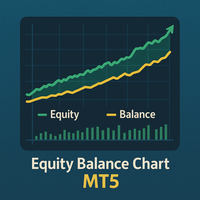
Equity Balance Chart (Indicator Description) This is an advanced MQL5 indicator designed to track and display an account's performance directly on the chart. It plots the account's Equity (in lime green) and Balance (in orange) as two separate lines in a sub-window. Its two primary features are: Persistent History: The indicator saves the equity and balance data from each bar to a history file. When you restart MetaTrader 5 or reload the indicator, it automatically loads this file to redraw the
FREE

Assets can behave based on repetitive patterns on specific times of the day, for example at the opens and closes of the sessions. Daily Vertical Lines helps us draw vertical lines at any given time of the day as many days as required, as simple as sliding a vertical line. This free version only draws vertical lines, while the paid version (to be published) collects and presents technical and statistical information regarding the price behavior at that time of the day.
FREE

SuperPositionTerminal is a manual trading terminal for MetaTrader 5, built for discretionary and prop-firm traders who work to fixed daily risk limits. Build, size and execute every trade from one control panel: position sizing by account percentage, fixed money risk or fixed lot, multi-level partial exits, automatic break-even, and daily limits that refuse a trade before the money is at risk. It is not an automated strategy. It does not predict, signal or trade for you. It is the control surfac

ClearAllObjects — Nettoyage instantané des graphiques MT5 Objectif
Suppression en un clic de TOUS les objets graphiques (lignes de tendance, Fibos, flèches, étiquettes, outils Gann) des graphiques encombrés après tests de stratégies, motifs de chandeliers ou dessins manuels. Utilisation
Glisser depuis Navigateur > Scripts sur n'importe quel graphique → confirmation optionnelle → nettoyage instantané. Caractéristiques clés
Graphique actuel uniquement (sécurisé multitab)
Foudre rapide, sa
FREE

• Please test the product in the Strategy Tester before purchasing to understand how it works.
• If you face any issues, contact me via private message—I’m always available to help.
• After purchase, send me a screenshot of your order to receive a FREE EA as a gift. Dual Hedge Trading Panel — Professional Trading & Risk Management for MetaTrader 5 Short Description Professional one-click BUY, SELL, and DUAL hedge execution panel featuring an advanced on-chart trade planner with draggable En

What is MTF Confluence Panel? A premium multi-timeframe analysis tool that scores 8 technical indicators across 4 timeframes simultaneously to give you a clear confluence score — so you can enter trades with confidence, not guesswork. How It Works Each timeframe gets scored by 8 independent indicators that vote BUY or SELL: EMA Cross (20/50) — Trend direction Price vs EMA 50 — Price position relative to trend RSI (14) — Momentum MACD Histogram — Momentum confirmation Stochastic (14,3,3) — Fast m
FREE

Liquidity Seeker EA
Why You MUST Have This EA Unlock the power of ICT (Inner Circle Trader) methodology with the most advanced Smart Money Concept trading system available. This EA transforms complex institutional trading concepts into automated precision, giving you the unfair advantage that professional traders use to consistently profit from liquidity manipulation and market structure shifts. START trading WITH market makers using their own playbook. You don't need to do much other than to
FREE

"Manage multiple positions as a single unit with hidden targets." The Virtual Basket TP SL Manager is a professional MetaTrader 5 utility designed to automate the closing of positions based on the total profit or loss of a group of orders (a "basket"). By utilizing Virtual Levels , all Take Profit (TP) and Stop Loss (SL) targets are stored locally within the EA's memory and are not sent to the broker's server, keeping your strategy safe from stop-hunting and price manipulation. Key Features Virt
FREE

# Trade Assistant Manager
Stop calculating lot sizes by hand. Trade Assistant Manager is an on-chart panel that turns your risk settings and chart lines into a precise, ready-to-fire order — automatically.
## Key Features
**Automatic Lot Sizing** Set your risk as a percentage of account balance or a fixed dollar amount. The panel reads the distance between your Entry and Stop Loss lines and instantly calculates the exact lot size for that risk — accounting for your broker's commission per lo
FREE

Overview:
The Drawdown Control Limiter MT5 is a robust and efficient tool designed for traders who aim to monitor and limit drawdown levels in their MetaTrader5 Live/Demo accounts. This Expert Advisor provides real-time tracking of drawdown percentages or amounts and automatically closes positions if the specified limits are exceeded, helping protect your capital. EA account drawdown protector is designed for normal trading Live and Demo accounts (not for Prop Firms) . Key Features: Customiza

Trade Launch est un panneau de trading intuitif conçu pour les traders qui apprécient la vitesse et le contrôle lors de l'ouverture manuelle des transactions. Il s'affiche directement sur le graphique et permet de gérer tous les paramètres principaux d'un ordre dans une seule fenêtre. Principales fonctionnalités : Passation instantanée d'ordres : Ouvrez des positions Buy et Sell en une seule pression sur un bouton. Les noms des boutons affichent dynamiquement les prix Ask et Bid actuels. Gesti
FREE

Full Automated Trading panel . it works on any trading instruments: Forex, Stocks, Futures, Indices, CFD, Bonds, Cryptocurrencies; interface minimization function; flexibility of use;
Join my channel and check video of it ===> https://t.me/Ash_TheTrader/4986
Features :
Auto SL and TP Auto Close partial Auto Trailing Session Time Alert Time of trading Alert Profit and Percentage and etc.
FREE

Kalman Forecast Helper is an advanced MQL5 Expert Advisor component designed to generate adaptive market forecasts, trend predictions, and trading signals for FX and other financial time series. Powered by a proprietary Kalman filtering engine, the helper continuously analyzes incoming market data and delivers actionable forecast information that can be integrated directly into Expert Advisors, indicators, or quantitative trading systems. After each update, the helper provides: Multi-horizon for
FREE

CSV News File Generator MT5 is a script specifically designed for the MQL5 platform. It enables the automated generation of CSV files containing economic calendar news, making it ideal for use in strategy simulators or as data for training artificial intelligence models. How Does It Work? The script gathers economic news directly from the MQL5 calendar, organizes the data into arrays, and converts it into CSV files for later use. Steps to Generate News Identify Event Codes:
Find the event code
FREE
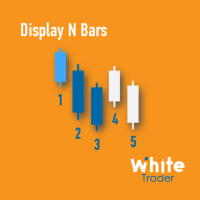
The Display N Bars utility is a simple tool designed to help identify candles.
If a trader tries to share knowledge with a colleague but it is difficult to pinpoint exactly the desired candle, just say the corresponding candle number.
The candle count is reset every day.
Seeking to offer a good customization the inputs are:
Display type -> Display only odd, only odd, or both candles?
Direction -> Horizontal or Vertical?
Display multiples of: (display frequency) -> Display all number
FREE

Утилита Горячие Клавиши. Работает только на неттинговых типах счетов. Позволяет совершать торговые операции без мыши. Удобно использовать для акций, фьючерсов, валютных пар, криптовалют. В совокупности со стаканом получается полноценный скальперский привод.
Реализованные команды : · покупка по рынку; · продажа по рынку; · выставление лимитного ордера на покупку с заданным отступом (может быть отрицательным) от цены Бид; · выставление лимитного ордера на прода
FREE

A lot of FX volume goes through a few benchmark fixes. Corporate and fund orders are filled at those prices every day, and on some days the orders are much bigger. Forex Fix Clock shows when each fix happens in your broker's server time. On a typical broker clock the London 4pm fix is at 18:00 for most of the year and at 19:00 for a few weeks each spring and autumn, and the Tokyo fix moves between 02:55 and 03:55. What it shows A small panel with the next Tokyo fix (09:55 Tokyo), Tokyo option cu
FREE

SmartRecoveryEA Ultimate: Revolutionizing Forex Gold Trading with Intelligent Recovery and Risk Mastery Introduction: Elevate Your Gold Trading Game in the Volatile Forex Arena In the fast-paced world of Forex trading, particularly on the gold market (XAUUSD), where volatility reigns supreme and price swings can make or break fortunes in minutes, having a robust Expert Advisor (EA) is not just an advantage—it's a necessity. Enter SmartRecoveryEA Ultimate v1.0 , a cutting-edge MT5 EA meticulously
FREE

Boleta Prime Essential — one-click trading panel for MetaTrader 5 Open trades with the right lot size in one click. Boleta Prime Essential automatically calculates your position size from the risk percentage you choose and sends the order with stop loss and take profit already set. Features
• One-click market buy and sell
• Risk calculator: enter the account % and stop in points, and the panel calculates the lot
• Automatic stop loss and take profit, re-anchored to the actual fill price (exact
FREE

Layer Trade Manager — Level trade & Scalping Assistant Layer Trade Manager is a simple yet powerful on-chart trade management panel for MetaTrader 5 designed to take the heavy lifting out of layered trade strategies. It operates in two modes: Standard Mode — a single click opens the first trade and queues up a basket of up to 5 staggered market entries if price reaches the preconfigured layers, each with its own configurable take profit, and the smart automation takes care of setting BE, etc.

TrumpFeed to Telegram – Lightweight News Forwarder especially for Gold-Trader This Expert Advisor reads the Trump Truth Social RSS (mirror feed) , classifies new posts via OpenAI , neatly shortens the quote, and forwards it to your Telegram group/topic – including a compact XAUUSD impact summary . Ideal if you want to be notified immediately of potentially market-moving statements. Key Features Fetch: EA reads the RSS feed https://trumpstruth.org/feed every 30 seconds. Parse & Clean: Removes HTM

Price Range Measure MQL5 Price Range Measure MQL5 is a visual measurement tool for MetaTrader 5. Measure price movements directly on your chart and display the signed price difference and percentage change between two points. Create and keep multiple ranges on the same chart to compare different market movements. Each range uses time and price coordinates, with adjustable endpoints
FREE

Blogs MQL5 : https://www.mql5.com/en/blogs/post/765148
Version MT4 : https://www.mql5.com/en/market/product/154458
Version MT5 : https://www.mql5.com/en/market/product/154459
Gratuit pour une durée limitée
Telegram Order [tambangEA] est un assistant de trading semi-manuel professionnel, conçu pour les traders recherchant un flux d'exécution plus rapide, plus fluide et plus précis.
Ce produit est destiné aux traders qui disposent déjà de leur propre analyse de marché et qui souhaitent simpl
FREE

A script for closing positions If you need to quickly close several positions, this script will make all the routine for you! The script does not have any input parameters. Allow AutoTrading before running the script. Usage:
Run the script on a chart. If you need to specify the maximal deviation and the number of attempts to close positions, use the script with input parameters https://www.mql5.com/en/market/product/625 You can download MetaTrader 4 version here: https://www.mql5.com/en/market/
FREE

GOLD RISK SIZER MT5 Calculateur de taille de position | Gestion du risque | XAUUSD | Forex | CFD | Taille de lot | Stop Loss | Risk Reward | Adapté au courtier Gold Risk Sizer MT5 est un utilitaire gratuit MetaTrader 5 conçu pour calculer automatiquement la taille d’une position selon la valeur du compte, le risque sélectionné et la distance du Stop Loss. Pas besoin de calculer manuellement la valeur du pip ou de supposer une taille de contrat fixe. Le calculateur utilise les véritables caractér
FREE

Helios Smart Position Manager Présentation Helios Smart Position Manager est un outil professionnel de synchronisation de trades pour MetaTrader 5. Lorsque vous modifiez le stop loss ou le take profit d'une position, l'EA détecte automatiquement le changement et l'applique à toutes les autres positions sur le même symbole. Cela élimine la nécessité de mettre à jour manuellement chaque position individuellement, en économisant du temps et en évitant les erreurs lors de la gestion de plusieurs tra
FREE

Version MT4 : https://www.mql5.com/en/market/product/91169
Version MT5 : https://www.mql5.com/en/market/product/110193 Signal en direct : https://www.mql5.com/en/signals/2345410
Découvrez « Smart Trader », l’assistant de trading expert advisor – l’outil de référence plébiscité par les traders professionnels du monde entier pour son adaptabilité inégalée et ses stratégies de gestion des risques de pointe.
Au cœur de « Smart Trader » se trouve son système révolutionnaire de gestion des risques

GOM Trade Manager helps you execute trades the way you want it. Works on all instruments Forex, Commodities, & Crypto.
It helps you with lot calculations, spread addition and balance calculations so you can just focus on actual trading.
For full automatic planned management, stackable triggers and spread widening protection >> check out GOM Trade Manager Pro .
------------------------------------------NOTABLE FEATURES------------------------------------------ You set everything based on bid
FREE

YuRaLytics Trade Analyzer reads the trade history of your account and breaks it down. You see which Expert Advisors and symbols make or lose money and how much commission and swap take out of the result. It also tests whether the average trade is large enough to tell apart from luck. The panel only reads history and never opens, changes or closes a trade, so you can run it next to live Expert Advisors. What it shows Summary: trades, win rate, profit factor, average trade, net result, gross resul
FREE

AutoPilot Trading Service for MetaTrader 5 is an advanced application designed to enhance the MT5 platform by automating and optimizing both manual and algorithmic trading activities. By integrating seamlessly into the (recommended but not mandatory) <terminal_directory>\MQL5\Services directory, this service not only supports the automation of trading strategies but also improves the execution of trades, whether they are initiated manually or through Expert Advisors (EAs). The AutoPilot Trading
FREE

The Quick Style utility is designed for facilitation and acceleration of working with the properties of graphical objects. Left-click a graphical object while holding the Shift key to open the quick access window for configuring the object properties. In the window, you can change the color, style and line width with one click, including those of other graphical objects. All changes are displayed immediately. To close the Quick Style , simply click the free space on the chart. The utility is eas
FREE

Expert Advisor that synchronizes positions between a Master and Slave account but with a twist: it reverses every trade . Master opens Buy → Slave opens Sell (same volume, SL/TP mirrored) Master opens Sell → Slave opens Buy (adjusted SL/TP) Continuous sync: positions closed on Master = closed on Slave, new positions are instantly reversed Perfect for hedging , contrary strategies , or testing directional bias across two accounts. For Support & Customization I’m here to ensure you get the most

Bring the TradingView Experience to Your MT5! Break free from the clunky, traditional default shapes of MT5. The 'True Color RR Manager' is a next-generation Risk/Reward management tool featuring a custom 'Transparency Illusion HEX Engine' that flawlessly replicates the modern TradingView style. It provides perfect visibility without obscuring your chart movements.
Key Features Perfect TradingView Colors: Equipped with a custom HEX decoder, allowing you to use original TV colors with transp

SMART MONEY SCALPER EA - ICT Scalping Strategy Description INTRODUCTION - WHY THIS ICT SCALPING EA IS ESSENTIAL FOR YOUR SUCCESS Dominate the markets with the most advanced ICT scalping system ever created. The Smart Money Scalper EA is specifically engineered for high-frequency ICT scalping, combining Inner Circle Trader concepts with lightning-fast execution to capture multiple quality trades throughout each trading session. This specialized scalping EA transforms ICT methodology into a pr
FREE

Ghost Trail Pro is an intelligent Expert Advisor for MetaTrader 5 that manages the complete lifecycle of a gold (XAUUSD) trade. From detecting the setup and alerting your phone, to opening the trade, protecting profits and closing positions in stages, Ghost Trail Pro does the heavy lifting so you don't have to.
Built for gold traders and scalpers who want disciplined trade management, partial closes and profit protection, whether you are at your screen or away from it. Let it enter automaticall
FREE

Always Know When the Candle Closes!The countdown is right there on the chart, updating every second. If you find this indicator useful, please leave a review
How It Works
The indicator displays up to three independent candle close countdowns on your chart, each set to any MT5 timeframe. Monitor your chart timeframe, a higher timeframe, and a lower timeframe simultaneously — all without switching charts. Slot 1 defaults to your current chart timeframe. Set slots 2 and 3 to any timeframe you want
FREE

AI Equity Drawdown Guardian is an account-wide protection utility for MetaTrader 5. It continuously monitors your account equity against a configurable daily and total drawdown limit, and automatically closes all open positions and blocks new trading the moment a limit is breached - across ALL symbols and ALL magic numbers, not just its own trades. Key features: Daily drawdown percent limit, calculated from the equity at the start of each trading day Total drawdown percent limit, calculated from
FREE

Trade Analyzer & SL TP Optimizer Real Trade Analysis and Stop Loss / Take Profit Optimization for MetaTrader 5 Trade Analyzer & SL TP Optimizer is a MetaTrader 5 tool designed to analyze your real trading history in detail. It does more than show whether a trade ended in profit or loss. It analyzes what actually happened to price after each entry, helping you understand how your trades behaved throughout their entire lifecycle. It can be used with manual trades, Expert Advisor trades and strateg
FREE

MQL CS Trade Assistance is not an automated strategy Expert Advisor designed to trade on its own. This utility is built specifically for manual traders who want a professional trade assistance panel with advanced trade management tools directly on the chart. The panel allows traders to execute and manage trades faster while assisting with stop loss management, take profit management, breakeven handling, trailing stop logic, pending orders, and adaptive trade protection.The goal of this product
FREE

U sing keyboard shortcuts to draw Fibonacci levels and rectangles quickly and efficiently.
Press F to create a Fibonacci retracement. Click with mouse (2x): -once on the chart to set the starting point and - again to set the ending point. The Fibonacci levels are drawn automatically using the configured ratios, colors, and styles.
Press T to instantly draw a pre defined rectangle at the closest highest or lowest price (based on trend).
All levels, colors, sizes, and styles ca
FREE
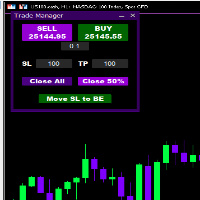
Introducing * *Trader Manager** for MetaTrader 5 - the most efficient tool for managing your trades and it's free! This smart assistant automatically sets **Stop Loss** and **Take Profit** immediately after opening a trade, saving you time and reducing the risk of errors.
With the ability to set a **Maximum Daily Loss** , you'll protect yourself from the dangers of **overtrading** and keep control of your finances.
Plus, you'll get a host of other features for easy position management: -
FREE

Trade Panel QuantumAlgo — Utilitaire Pro de Gestion de Risque pour MetaTrader 5 QuantumAlgo Trade Panel est un utilitaire de trading professionnel pour MetaTrader 5 qui combine gestion de risque institutionnelle et exécution rapide en un clic. Pourquoi choisir QuantumAlgo Trade Panel Exécution un clic avec calcul automatique du lot Calcul de lot par % de risque Lignes SL / TP drag-and-drop sur graphique R:R automatique Multi-TP (TP1, TP2, TP3) avec clôture partielle Automatisation Break-Even et
FREE

Mobile-EA is an Android-first trading companion for MetaTrader 5 , bringing market tools and connected account management together on your phone. This product is the companion MT5 Expert Advisor that links your terminal to the Mobile-EA Android app. The mobile app is available for Android; iPhone/iOS is not currently supported. The Android app is now available on Google Play , and new users receive a free 14-day Ultimate trial starting at registration . Watch the app introduction here: https://y
FREE
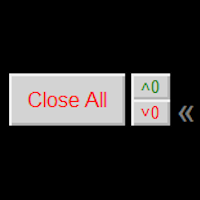
Close ALL button for simply closing your trades. +Close all BUYS in profit button, for closing your trades that are in profit. Leaving the trades in a loss untouched. +Close all SELLS in profit button, for closing your trades that are in profit. Leaving the trades in a loss untouched. +Hide and unhide buttons. Easy for when you don't need them
Configurable options Option: Close All trades OR for current Symbol/Pair only Option: close pending orders Option: Edit button text Option: Locate button
FREE

Welcome to my MMTrader Manager product. EA that allows You for simple managing trades and positions. Key Features: Position Opening – Open trades quickly with customizable Take Profit (TP), Stop Loss (SL), and lot size settings. Position Closing – Close trades with one click. Grid System – Automatically create a grid of orders. Recovery Mode – Loss recovery lot calculation. Trade History Data – Acces data to historical positions. User-Friendly Interface – A clear and simple panel designed. This
FREE

Trade Assistant Risk Calculator is an all-in-one floating trading panel Expert Advisor for MetaTrader 5, built for professional manual traders. It combines visual chart trading , automatic risk calculation , and advanced position management in one compact interface. Stop calculating lot sizes manually. Stop guessing your Risk:Reward ratio. Drag the planning lines on the chart and the EA calculates the exact lot size for your selected risk percentage, equity, fixed-money risk, or fixed-lot workfl

This is a demo version of a non-trading expert , which utilizes so called the custom symbols feature ( available in MQL as well ) to build renko charts based on historical quotes of selected standard symbol and to refresh renko in real-time according to new ticks. Also it translates real ticks to the renko charts, which allows other EAs and indicators to trade and analyze renko. Place the EA on a chart of a working instrument. The lesser timeframe of the source chart is, the more precise resulti
FREE

This Tool is designed to automate one of the most critical aspects of trade management — setting and managing Stop Loss, Take Profit , and Trailing Stop levels — directly on your MetaTrader 5 platform.
Key Features:
Automatic SL, TSL and TP Placement: Instantly sets initial Stop Loss and Take Profit levels on any new position based on customizable parameters, helping to enforce disciplined risk and reward management.
Dynamic Trailing Stop: Automatically moves the Stop Loss to lock in profits
FREE

Advanced Trade Mirror is a powerful Forex tool designed for traders who need instant, seamless trade replication across multiple terminals on the same machine. With lightning-fast execution, it ensures zero lag in copying trades, maintaining precision and efficiency in high-speed trading environments.
Get the Trade Mirror Follower here: https://www.mql5.com/en/market/product/133890 Specification:
Master ID: Identity value of master terminal, please use a unique value to prevent duplicated mas
FREE

Simple order is designed to make placing pending orders as easy and fast as possible. Setting a pending order takes just two steps. 1. Double-click on the price of placing an order, after that a panel with buttons for order names appears. 2. Click on the button of the required order That's it, the pending order is set. If necessary, we adjust the order by dragging, as well as change the sizes of stop loss and take profit. Don't forget to pre-set the size of the stop loss and take profit in the S
FREE
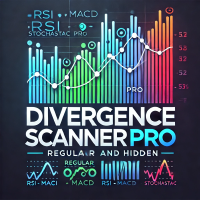
Divergence Scanner Pro is an advanced utility designed to detect both regular and hidden divergences across three powerful indicators: RSI , MACD , and Stochastic . With its robust algorithm and user-friendly interface, this tool is perfect for traders seeking an edge in the market. Key Features: Comprehensive Divergence Detection : Identifies regular and hidden divergences to highlight potential trend reversals or continuation opportunities. Multi-Indicator Support : Scans for divergences on RS
FREE

[Aperçu] Dynamic Price Countdown est un indicateur MT5 essentiel qui affiche le temps restant jusqu'à la clôture de la bougie actuelle, juste à côté du prix actuel. Contrairement aux minuteries statiques fixées dans les coins du graphique, cet indicateur suit dynamiquement le mouvement du prix en temps réel. Cela permet aux traders de rester entièrement concentrés sur la partie la plus critique du graphique sans manquer le moment d'entrée parfait. [Caractéristiques Principales] Suivi Dynamique
FREE

Planifiez le risque avant l'entrée et analysez les trades clôturés directement sur le graphique. Edgemory Trader OS est un calculateur de risque, planificateur de taille de position, journal de trading et exportateur CSV/JSON gratuit et hors ligne pour MetaTrader 5. Il fonctionne immédiatement, sans inscription, jeton, DLL, WebRequest ni serveur externe.
Le planificateur déterministe utilise le solde, le pourcentage de risque, l'entrée, le stop loss, le take profit, la taille et la valeur du ti
FREE

Ce que c'est
Execution Caliper est un instrument de mesure, pas un robot de trading. Il se place sur un seul graphique et mesure quel coût d'exécution votre compte facture sur ce symbole, puis divise ce coût par la largeur du stop de l'EA que vous envisagez de faire tourner. Le résultat est un seul rapport : le coût en proportion de votre stop. Il n'envoie aucun ordre, n'ouvre aucune position et ne touche à rien qui appartienne aux autres EA du terminal. Il ne prétend rien non plus sur le fait
FREE
Le MetaTrader Market est le meilleur endroit pour vendre des robots de trading et des indicateurs techniques.
Il vous suffit de développer une application pour la plateforme MetaTrader avec un design attrayant et une bonne description. Nous vous expliquerons comment publier votre produit sur Market pour le proposer à des millions d'utilisateurs de MetaTrader.

Vous manquez des opportunités de trading :
- Applications de trading gratuites
- Plus de 8 000 signaux à copier
- Actualités économiques pour explorer les marchés financiers
Inscription
Se connecter
Vous acceptez la politique du site Web et les conditions d'utilisation
Si vous n'avez pas de compte, veuillez vous inscrire