SuperPositionTerminal
- Utilitaires
-
Oguzhan Tas
 I have been trading for five years, focusing primarily on Gold and Nasdaq.
My execution is built around Gann pivots combined with trend-continuation
and reversal candlestick patterns - my decisions come strictly from where
those two meet. - Version: 1.0
- Activations: 10
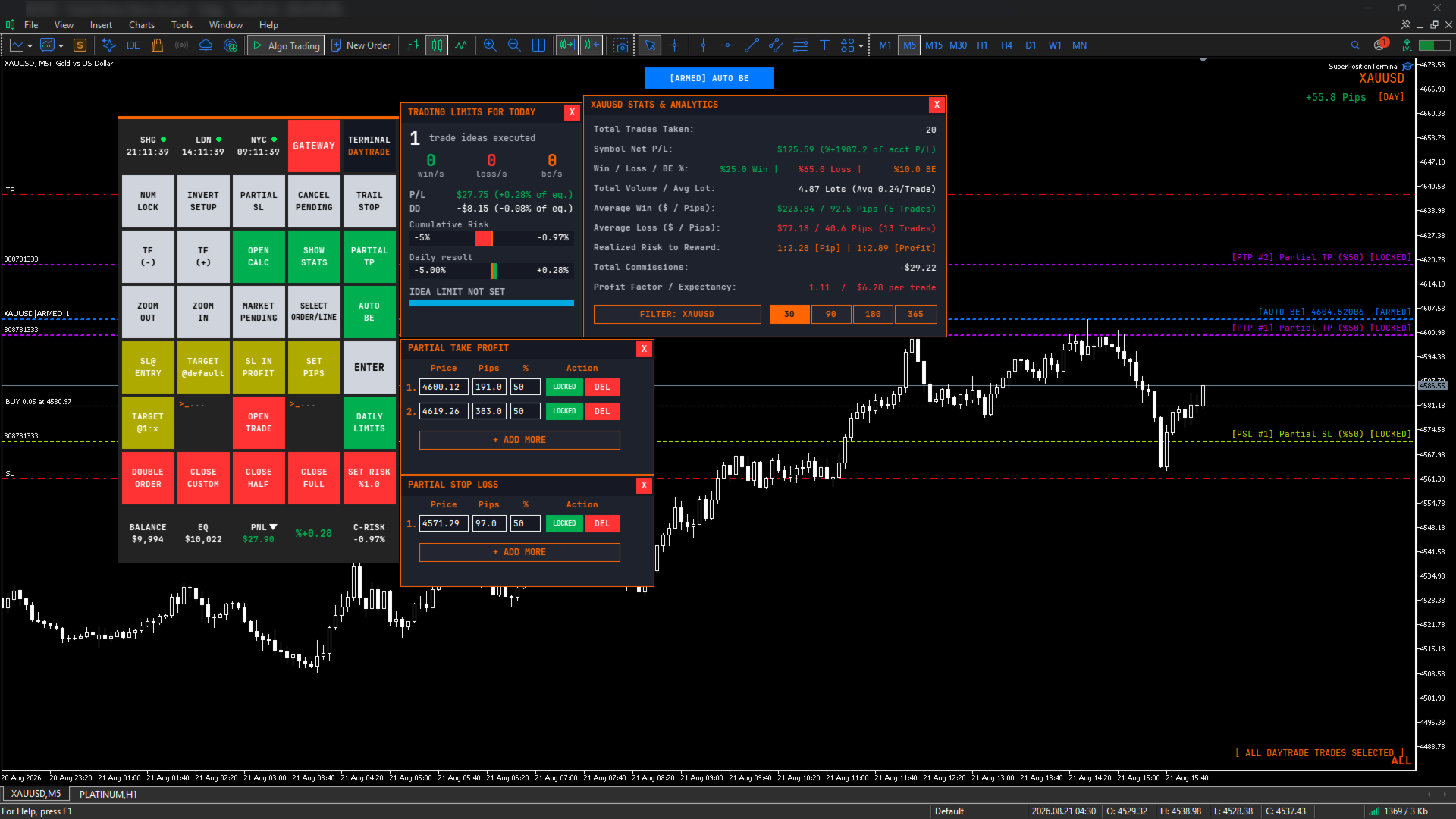
SuperPositionTerminal is a manual trading terminal for MetaTrader 5, built for discretionary and prop-firm traders who work to fixed daily risk limits. Build, size and execute every trade from one control panel: position sizing by account percentage, fixed money risk or fixed lot, multi-level partial exits, automatic break-even, and daily limits that refuse a trade before the money is at risk.
It is not an automated strategy. It does not predict, signal or trade for you. It is the control surface a discretionary trader uses to construct a position correctly, execute it in one click, and manage it without ever opening a dialog box or calculating a lot size by hand.
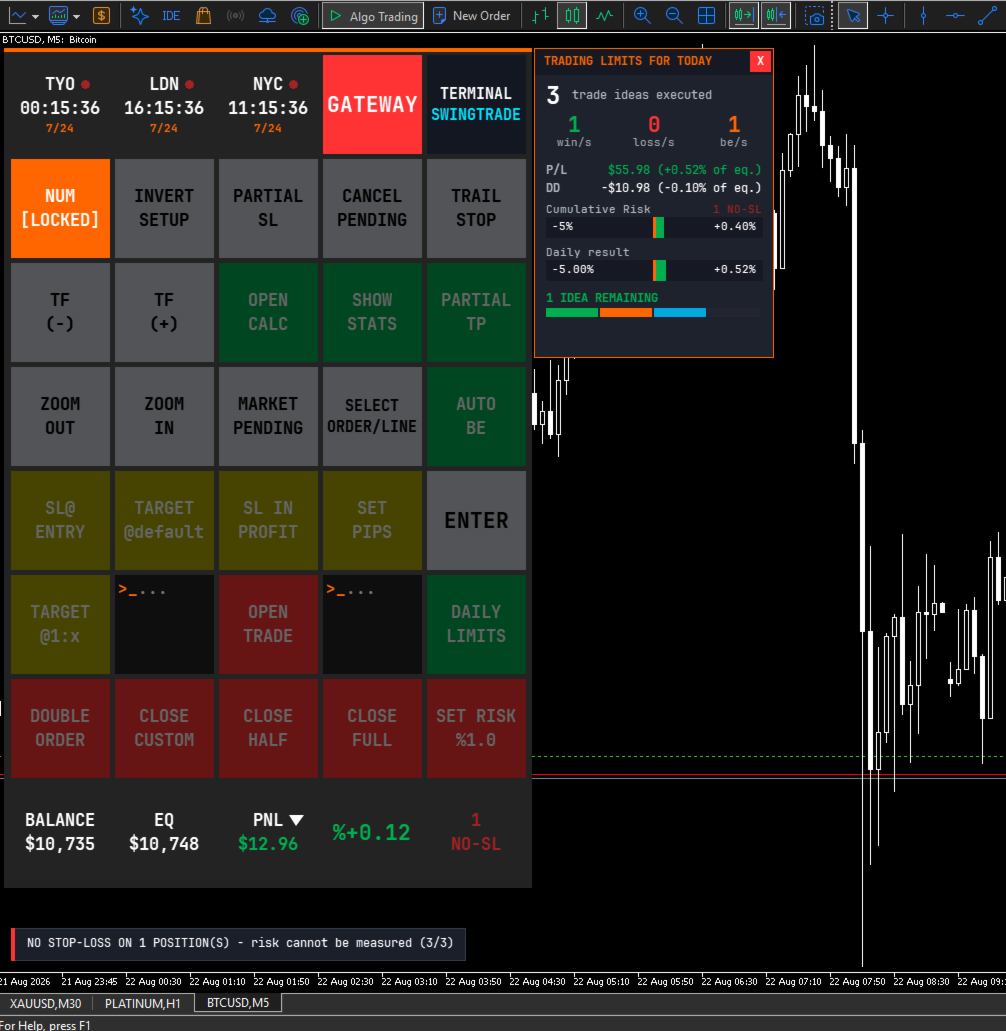
Every function you normally reach through MT5's menus – lot sizing, stop placement, partial closes, break-even moves, risk checks – is a single labelled button, laid out in a fixed grid you can learn once and use blind.
HOW IT WORKS
1. A purpose-built interface
SuperPositionTerminal is rendered on its own graphics layer with an embedded monospace typeface, anti-aliased vector icons, and proper window management – windows come to front when clicked, controls never leak clicks to whatever is underneath, and everything scales cleanly from compact laptop screens to 4K displays.
The layout is deliberately institutional: dense, monospaced, information first. It is designed to be read at a glance while you are watching price, not admired.
2. Risk architecture built for prop-firm rules
Drawdown is tracked continuously against your chosen basis (Balance or Equity), with a configurable daily reset hour and minute in server time. The default of 00:00 matches the daily candle open used by most brokers, so most traders never touch it – and if your firm resets at a different hour, you set that hour.
On top of that: a daily maximum loss, a daily maximum gain, a maximum number of trade ideas per day, and a total open lots ceiling. When a limit is reached, the terminal refuses the trade and tells you why.
The daily loss limit is the one that does the real work, and it does more than watch your realised losses. Before a trade opens, the terminal adds up the worst case of every position you already hold and asks whether this new trade would push the total past your limit. If it would, the trade is refused – before the money is at risk, not after. A separate early-warning threshold can tell you you are approaching that ceiling while you still have room to act.
Note: the trade-idea counter and the total-lot ceiling ship switched off, so the terminal never surprises a new user with a wall. Set a number when you want them.
3. Exposure alarm with enforced confirmation
Two configurable exposure thresholds monitor your total projected loss across every open position on every symbol – stop-loss distance where a stop exists, live floating loss where it does not.
When a threshold is crossed, a modal alert takes over the screen with a repeating audible alarm and blocks every other control. Dismissing it requires a deliberate four-step confirmation, not a reflex click. Each threshold is suppressed independently for the rest of the trading day once acknowledged.
It is designed to interrupt at the point where another position would be added on top of existing exposure.
4. Multi-level partial exits
Partial Take-Profit and Partial Stop-Loss each support multiple independent levels. Add a row, drag its line on the chart or type an exact pip distance, set the percentage to close, and lock it.
Locked levels are monitored continuously – even with the window hidden, and they survive timeframe and template changes. Remaining volume is tracked across all levels, so the terminal tells you when the broker's minimum lot makes another level impossible instead of silently creating one that can never fill.
5. Multi-position safety system
When more than one position is open on the same symbol and strategy, any action that could apply to the wrong one is refused until you explicitly select a position. This covers Partial Take-Profit lock, Partial Stop-Loss lock, Target @1:X, Target @default and Double Order.
Locked partial levels are pinned to a specific ticket, so a position opened later can never silently inherit a plan that was built for another one.
6. Session intelligence
Three world clocks sit at the top of the panel and follow the instrument you are actually trading. Load an index and you get its home exchange; load gold and the relevant metals session appears; load crypto and you get 24/7. Session open, closed and lunch-break states are shown, overlapping sessions are highlighted, and an optional warning marks the high-spread rollover window.
You can also pin three cities manually from eleven financial centres.
FEATURE SUMMARY
Trade construction
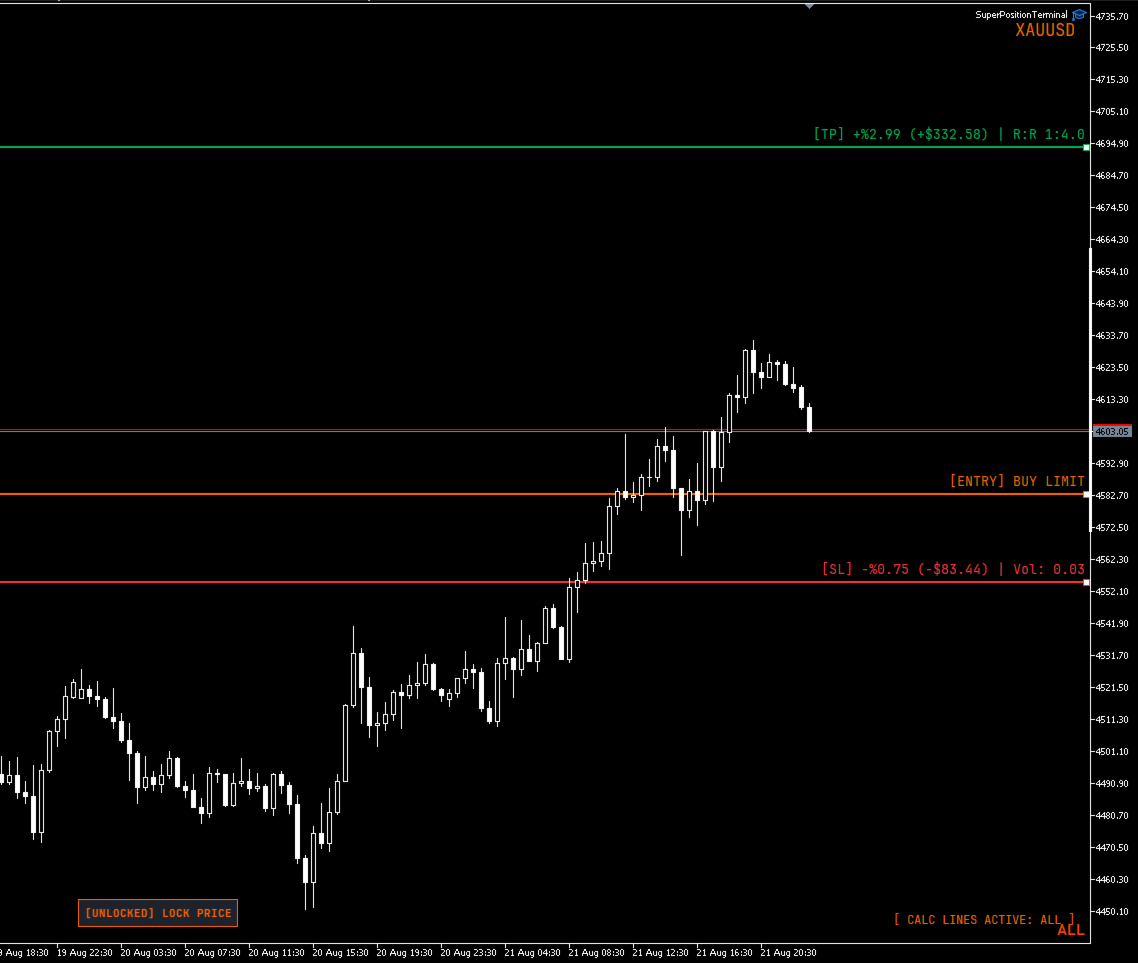
- Visual stop-loss, take-profit and entry lines, dragged directly on the chart
- Live lot, risk and reward recalculated on every pixel of movement
- Position sizing by account percentage, fixed money risk, or fixed lot
- Risk and reward shown in currency, percentage and risk-to-reward ratio simultaneously
- Optional commission-adjusted net figures
- Pending orders resolved automatically to Buy/Sell Stop or Limit
- Invalid geometry flagged on the chart before you can execute
- Multi-entry execution with optional risk splitting across entries
- Arrow-key adjustment mode for pip distance and risk percentage
- Price locking, and stop-loss / take-profit side mirroring
Position management
- One-click close: full, half, or a configurable custom percentage
- Stop to entry, with optional profit offset
- Stop into profit by fixed pips or previous candle high/low with buffer
- Target to a default pip distance, or to a Risk:Reward ratio
- Automatic break-even: drag the trigger line where you want it, then arm it with one button. Until it is armed the line is only a marker, so nothing can fire while you are still positioning it. Once armed the line locks in place and cannot be dragged by accident. It locks either the entry or a chosen R multiple, measured from the position's original stop
- Position duplication with optional lot recalculation
- Trailing stop to previous candle high/low
- Cancel all pending orders
- Cycle through open positions and lines to select one
- Volume-weighted average entry line when several positions are open
Risk and reporting
- Continuous drawdown tracking (Balance or Equity basis)
- Configurable daily reset hour and minute (server time)
- Daily loss, gain, trade-idea and total-lot limits
- Cumulative open-risk brake: a new trade is refused if the worst case of all open positions plus the new one would breach your daily loss limit
- Two-stage exposure alarm with enforced confirmation
- Account statistics window: performance and break-even classification
- Live balance, equity and floating profit or loss, in currency and percentage
- On-chart pip counter tagged by strategy mode
Platform
- Two strategy modes (Day / Swing) on separate magic numbers, so intraday and swing positions are managed as separate books on the same chart
- Timeframe and zoom controls
- Symbol drawer listing every symbol with an open position, with click-through chart switching
- Three panel sizes, DPI aware
- Broker server and latency readout
- Lot minimum, maximum and step overrides for misreporting brokers
- Order filling mode override
- Full colour customisation of every line and label
IMPORTANT – HOW TO EVALUATE THIS PRODUCT
Please read this before downloading the demo.
SuperPositionTerminal is a manual tool. Every function is driven by clicking buttons and dragging lines on a live chart.
The MetaTrader Strategy Tester does not deliver mouse interaction to an Expert Advisor. This is a platform limitation that affects every manual trading panel, not a fault in this product. In the Strategy Tester the panel will render correctly, but the buttons will not respond to clicks.
To evaluate it properly, please watch the demonstration video, or contact me and I will walk you through it.
A note on order execution. The maximum slippage input only has an effect on accounts that use Instant or Request execution. On Market and Exchange execution accounts – which is what most brokers now provide – the platform ignores the deviation value entirely. The input is still there for the accounts where it applies. Order filling mode is detected from the symbol and set automatically, so there is nothing to configure either way.
REQUIREMENTS
- MetaTrader 5
- Any broker and any symbol
- Hedging or netting accounts
- "Algo Trading" enabled
Designed for discretionary traders, prop-firm traders and anyone who manages risk manually and wants the mechanics to disappear.
A note on where this came from:I built this terminal for my own trading and used it daily for three years before publishing it. It was not designed as a product; it was designed to keep me inside my own risk rules.
SUPPORT
Questions, feature requests and bug reports are welcome. I answer every message.