 MetaTrader 5
 Experts
 Indicateurs
 Bibliothèque
 Utilitaires
 Widgets
 Règles
Regardez les tutoriels vidéo de Market sur YouTube
Comment acheter un robot de trading ou un indicateur
Exécutez votre EA sur
hébergement virtuel
hébergement virtuel
Test un indicateur/robot de trading avant d'acheter
Vous voulez gagner de l'argent sur Market ?
Comment présenter un produit pour qu'il se vende bien
Utilitaires de trading pour MetaTrader 5 - 18
 Vous trouverez ci-dessous des programmes de trading simplifiant le trading dans MetaTrader 5. Passez la souris sur un utilitaire pour lire sa description et son objectif.
Crypto Charts is a Service that connects to cryptocurrency exchanges and delivers three types of market data in a single package: historical and live OHLCV candles, real-time tick data, and Depth of Market (order book). All data is pushed into MT5 as custom symbols that behave like native instruments, accessible on charts, in indicators, Expert Advisors, and the Strategy Tester. Traders who prefer MT5's analysis environment can use Crypto Charts to work with cryptocurrency markets using the same

Indicator Test Report pour MetaTrader 5 - un vérificateur de repaint et un testeur d'indicateur qui montre comment n'importe quel indicateur se comporte réellement Vous ne pouvez pas voir l'intérieur d'un indicateur compilé. Le rapport de test d'indicateur charge n'importe quel indicateur (acheté, écrit ou intégré à MetaTrader) et répond à la question qu'une description ne peut pas : fait-il du repaint, de quelle quantité d'historique a-t-il besoin et que publie-t-il réellement ? Il rapporte le
FREE

This utility is designed to receive volumes from order books from larger crypto exchanges and transfer information to the indicator RealCryptoLevels . The RealCryptoLevels indicator by downloading the order book of crypt exchanges with maximum depth shows horizontal volumes of popular crypto currencies on the chart, so you can see not only the volumes, but also the levels and them strength (see screenshots), which is very important for successful trading in all strategies from scalping to m
FREE

Level Painter PRO — Professional Manual Chart Markup Tool Level Painter PRO is a powerful and stylish tool for manually drawing support and resistance levels, price zones, rectangles, and vertical areas on the MetaTrader 5 chart. The indicator is designed for traders who value visual analysis and prefer to mark up their charts manually while maintaining full control over the process. Key Features Manual Drawing of Levels and Zones Horizontal Lines — quickly mark key price levels Vertical Line
FREE

StopFirst Lot Calculator answers one question before every trade: how many lots, if this is where my stop goes?
You decide how much you are willing to lose and where the trade is wrong. The calculator turns those two decisions into a lot size, and shows you what that lot really puts at risk, what margin it needs and where the target sits. Drag the stop line and every figure follows.
It is an indicator. It cannot place an order, it needs no Algo Trading permission, and it runs on the same char
FREE

Trading Cockpit is a free, complete trading control panel for MetaTrader 5: watchlists, price & trend alerts, and automatic liquidity levels, all in one compact side panel without leaving your chart. Try everything at no cost.
WATCHLISTS & SYMBOL BASKETS - Unlimited symbols across several lists in one dropdown selector: a live mirror of your Market Watch, a Favorites list, and your own custom lists. - Predefined baskets by correlation cluster - US, Europe, Forex, Metals, Energy, Crypto - that w
FREE

Overview Trade Signal Manager Ultimate v7.0 connects MetaTrader 5 to Telegram, enabling you to share professionally formatted trading signals with your group or channel in seconds. The system auto-detects all open positions, displays them on a clean on-chart dashboard, and lets you select and send signals with a single click. No manual typing, formatting, or data transcription required. How It Works The dashboard displays all open positions with complete details including symbol, direction, lot
FREE

1. Move SL to BE On/Off: allow EA move SL to BE or not allow. 2. BE mode: BE Single order: move SL of single order when condition match. BE multi order: Move Sl of multiple orders base on BE of multiple orders. 3. Move SL to BE when profit >= (pips): set how many pips you want EA move SL to BE when profit. 4. Add value from BE: number of pips you want to add from BE (offset). 5. Audible Alert: Enable audible alert on/off. 6. Push notification: Enable Push notification on/off. 7. Three button hel
FREE

Version 7.04 Mise à jour majeure axée sur le renforcement de la discipline en day trading et la protection du compte. • Mode Post-Session Review avec une durée configurable de 0 à 60 minutes.
• Après avoir effectué le nombre d'opérations autorisé, le trader peut laisser MetaTrader 5 ouvert afin d'analyser les graphiques, prendre des captures d'écran et compléter son journal de trading.
• Toute tentative d'effectuer une nouvelle opération après avoir atteint la limite quotidienne déclenche la pro
FREE

Suivez en direct la limite de perte journalière, la limite de perte maximale et l'objectif de profit de votre compte, avec les règles des sociétés de financement, et recevez une alerte avant d'atteindre une limite.
Description : Risk Monitor Ultimate affiche sur le graphique la limite de perte journalière, la limite de perte maximale et l'objectif de profit de votre compte, y compris les règles des sociétés de financement, et vous prévient avant de les enfreindre. Il n'ouvre ni ne ferme aucune
FREE

"Risk Copilot" is a s imple and powerful tool to manage risk (in % or $), calculate position size, define target based on Risk-Reward and send orders to market automatically.
Input Parameters:
PositionType = Buy ou Sell // Position Type Risk = 0.3 // Risk (%) RiskMoney = 0.0 // Risk ($) RiskReward = 1.0 // Risk/Reward OrderSplit = 1 // Order split (only for HEDGE accounts) SLLineColor = clrGreen // Line Color (SL) SLLineWidth = 1// Line Width (SL) SLLineStyle = STYLE_SOLID // Line Style (SL) T
FREE

Easy Signal Multiplier MT5 Easy Signal Multiplier is a utility Expert Advisor designed to automatically scale up trade volumes from Trade Signals, external EAs, or manual trades. By continuously monitoring active account positions, it dynamically opens supplementary orders, synchronizes Stop Loss and Take Profit levels, and manages position exits in real time to achieve your exact target position size multiplier. Product Features Custom Exposure Multiplier: Specify your target total exposure fac
FREE

Copy trades between MetaTrader 5 terminals on the same computer, with no DLLs and no internet relay. How it works In Master mode the utility writes a snapshot of its open positions (ticket, symbol, direction, volume, SL, TP, magic) to a channel file in the shared Common\Files folder. The file is written under a temporary name, replaced in one step and closed with a checksum line, so a receiver never reads a half written file. In Slave mode it reads the snapshot on a timer, opens copies of new ma
FREE

Description: This utility automates Take Profit (TP) and Stop Loss (SL) levels for your trades, calculated in % of Balance. Example : if you type 1, it means 1% of your Balance . It ensures consistent risk management for all your positions. Crucial Note for Manual Traders: If you intend to use this utility on trades opened manually (without an Expert Advisor), you must change the 'Magic Number' setting to 0 (zero) . This allows the utility to correctly identify and manage your manual orders.
FREE

Shows the live spread, today's range against the daily ATR, the server time, GMT offset, the countdown and the open sessions. FEATURES Live spread in points and pips, colour coded tight, moderate or wide. Optional push alert. Today's range in pips, the daily ATR share, the server time, GMT offset, the countdown and the sessions. HOW TO USE IT 1. Attach it to any chart. 2. Set the spread limits for the symbol. 3. Choose the ATR period and corner. PARAMETERS InpCorner, InpOffsetX, InpOffsetY, InpS
FREE

EA Health Monitor is a free indicator for MetaTrader 5 that shows how each Expert Advisor on your account is doing. It groups the account history by magic number. Every EA gets its own row. Manual trades have a row of their own, and a total sits at the bottom. It only reads the account history and open positions. It never opens, changes or closes a trade. Standalone: Everything is built in. You do not need to buy or install any other product named on this page. Quick start Attach EA Health Monit
FREE

Prop Rules Monitor is a free indicator for MetaTrader 5 that shows how close a prop-firm account is to its daily loss limit and its max loss. It reads live equity, the way firms measure it. It warns you before a limit and when a limit is broken. It only watches. It never opens, closes or changes a trade, so it works without Algo Trading. Standalone: Everything is built in. You do not need to buy or install any other product named on this page. Quick start Attach the indicator to any chart. Enter
FREE

Trade Analyzer & SL TP Optimizer Real Trade Analysis and Stop Loss / Take Profit Optimization for MetaTrader 5 Trade Analyzer & SL TP Optimizer is a MetaTrader 5 tool designed to analyze your real trading history in detail. It does more than show whether a trade ended in profit or loss. It analyzes what actually happened to price after each entry, helping you understand how your trades behaved throughout their entire lifecycle. It can be used with manual trades, Expert Advisor trades and strateg
FREE

This Tool is designed to automate one of the most critical aspects of trade management — setting and managing Stop Loss, Take Profit , and Trailing Stop levels — directly on your MetaTrader 5 platform.
Key Features:
Automatic SL, TSL and TP Placement: Instantly sets initial Stop Loss and Take Profit levels on any new position based on customizable parameters, helping to enforce disciplined risk and reward management.
Dynamic Trailing Stop: Automatically moves the Stop Loss to lock in profits
FREE

Ultimate Candle Countdown – Ne manquez plus jamais la clôture d’une bougie ! Améliorez la précision de votre trading avec Ultimate Candle Countdown – le minuteur de compte à rebours simple, léger et puissant, conçu pour tous les horizons de temps et tous les instruments.
Que vous fassiez du scalping sur M1, du swing trading sur H1 ou que vous surveilliez les clôtures quotidiennes/hebdomadaires, cet outil vous indique toujours exactement combien de temps il reste avant l’ouverture de la proc
FREE
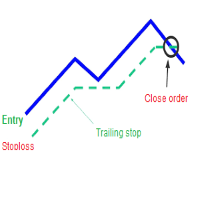
A trailing stop loss is a type of day-trading order that lets you set a maximum value or percentage of loss you can incur on a trade . If the security price rises or falls in your favor, the stop price moves with it. If the security price rises or falls against you, the stop stays in place. With this version, you can run trailing stoploss with currencies (ex start when profit more 1$, trailing stop with 2$...)
FREE

KChrono Timer is a four-mode timing utility for MetaTrader 5. It keeps candle, countdown and trading-session time information visible directly on the chart.
Timer modes
1. Candle Close Timer
Displays the remaining time and progress of the active candle. The current chart timeframe or another candle timeframe can be selected.
2. Custom Countdown
Runs a user-defined countdown with optional automatic restart or reset when a new candle begins. Pause, Resume and Reset controls are available dire
FREE

Settings Change Magic Number at The Top of the Setting to Zero for Manual Trade Profit threshold (pips) : this is the threshold (in pips) an order has to hit, before the SL is set and the SL starts trailing. Before the threshold is hit, the module will have no effect. Example: if this value is set to 30, then the SL will be set (and the trailing will start) when the order has a profit of 30 pips. Trail start value (pips) : the amount of pips where the SL starts trailing. The SL is set at: Open
FREE

YuRaLytics Trade Analyzer reads the trade history of your account and breaks it down. You see which Expert Advisors and symbols make or lose money and how much commission and swap take out of the result. It also tests whether the average trade is large enough to tell apart from luck. The panel only reads history and never opens, changes or closes a trade, so you can run it next to live Expert Advisors. What it shows Summary: trades, win rate, profit factor, average trade, net result, gross resul
FREE

Trade History to Excel turns saved Strategy Tester reports, or the trading history of your account, into a real Excel workbook (.xlsx). Every report goes into the same file: one summary row per report, every closed trade with its entry and exit price, every deal, and the results of each day and month with the balance. Dates are Excel dates, numbers are numbers, the header row is frozen and every sheet has filters, so you can sort, filter, build pivot tables and charts right away. How To Use Back
FREE

MT5 Time Zone Highlighter A simple and practical MetaTrader 5 tool designed to visually highlight up to three customizable trading time zones directly on the chart. Key Features: • Supports up to 3 independent time zones. • Set the start and end time for each zone according to your MT5 broker/server time. • Choose different colors for each time zone. • Adjustable transparency for better chart visibility. • Works directly on the MT5 chart without opening additional windows. • Helps traders quickl
FREE

The utility draws pivot levels based on a selection from day week month The previous candlestick of the selected timeframe is taken and the values for the levels are calculated using the following formulas:
Pivot = (high + close + low) / 3 R1 = ( 2 * Pivot) - low S1 = ( 2 * Pivot) - high R2 = Pivot + (R1 -S1) R3 = high + ( 2 * (Pivot - low)) S2 = Pivot - (R1 - S1) S3 = low - ( 2 * (high - Pivot));
The style and thickness for all lines are adjusted.
The colors for the R, Pivot and S lines ar
FREE

## Version 2.50
I created this EA with the intention of making it free for everyone to use. It serves as a tool to assist in trading with money management, entering order lots according to a percentage of the account balance, and automatically setting TP/SL based on high/low prices.
In Version 2.50, The Auto TP/SL feature adjusts from the Line In (entry point), and Auto price in this version only shifts the entry line to the current price. Input settings: Ato update SL/TP Line >>> In version
FREE

The "Smart Partial TP & Daily Loss Limit Manager" is a versatile and powerful MQL5 indicator designed to help traders manage their trades more effectively. It combines two essential features that improve trading discipline and profitability: partial take-profit (TP) closing based on risk-reward ratios and a fixed daily loss limit to protect your capital. Key Features: Partial Take-Profit (TP) Close: This feature allows traders to set a percentage for partial TP closure (e.g., 50%). Once the pric
FREE

NEW : integration with Ofir Signals to send personalized alerts
Ofir Notify is a tool which send alerts on trades to Telegram Alert on any event concerning a position : Opening, Closing, modification (SL, TP) Send alerts to Chats, Groups and Channel Alert on Equity change Display Risk, Reward and progress of profit/lost for each position Customization of alerts Sending charts screenshots with alerts Send signals from your indicators or experts Multi-lingual NEW : version 2 brings integration
FREE

Program Features 1. Calculation of Margin Call and Liquidation Prices Monitoring all open positions: The program continuously analyzes all open positions on the trading account. Determining critical price levels: Margin Call Price: The price at which additional funds must be deposited to keep positions open. If this does not occur, liquidation follows. Liquidation Price: The price at which positions are automatically closed by the broker to prevent further losses. 2. Display of Prices on the Ch
FREE

THE LOT FROM YOUR STOP. FREE. Picking a lot size by feel is how a normal loss becomes a bad day. ATS Lot Sizer puts two lines on your chart, a stop and a target. Drag them, and the panel tells you the lot size that fits your risk and the money that lot really puts on the line. One click sends the trade with the stop and target attached. HOW IT WORKS Pick LONG or SHORT. A stop line and a target line appear on the chart. Drag them. Lots = your risk (percent of balance, percent of equity, or a fixe
FREE

Hotkey Trader EA is an Expert Advisor for manual and semi-automatic trading in MetaTrader 5, designed for fast trade execution using hotkeys, automatic risk calculation, and convenient position management directly on the chart. The EA helps reduce manual actions during trading, automatically calculates Stop Loss and Take Profit levels, and supports both fixed lot trading and position sizing based on risk percentage. Main Features BUY and SELL order execution with hotkeys; instant market entries;
FREE

Tick Data HTTP Exporter NZDUSD This free version exports NZDUSD only; the full version, Tick Data HTTP Exporter , exports any symbol. Description The EA turns your terminal into a historical/realtime tick data provider for your application.
There are many market data providers on the internet, but in practice, the data provided is not always of good quality. Moreover, these services are often more expensive and typically require monthly subscription fees per each symbol.
With this EA, you can fe
FREE

Limit Order Trailing Et — is a utility for trailing limit orders (Buy Limit and Sell Limit) in MetaTrader 5.
It automatically adjusts limit order prices following the market while maintaining a defined offset, allowing entries on pullbacks after price movement.
This tool is designed for working with limit orders in MT5 and can be used in both manual trading and semi-automated trading systems.
Unlike stop orders, limit orders are designed for price retracements (pullbacks) rather than brea
FREE

L'utilitaire Close All Charts est conçu pour fermer rapidement et facilement tous les graphiques ouverts dans la plateforme MetaTrader 5 (MT5). Il sera particulièrement utile pour les traders qui travaillent avec un grand nombre d'instruments et de graphiques simultanément, ainsi que pour ceux qui préfèrent maintenir l'ordre dans leur espace de travail. Lors du test de conseillers dans le testeur de stratégies avec différents paramètres, de nombreux graphiques sont souvent ouverts. L'utilitaire
FREE

Ce qui tue les challenges, c'est la perte journalière — pas l'objectif de profit. Une nuit de levier excessif, un ordre en attente oublié, un gap.
PropFirm Shield Essential est le garde gratuit qui surveille LA règle la plus importante — et verrouille avant la violation.
Sur N'IMPORTE QUEL graphique. Surveille tout le compte — symboles, magics, manuels, copieurs, autres EAs.
- DAILY LOSS GUARD — ta limite et ton heure de reset. - LOCKDOWN — ferme les positions, supprime les pendings, bloque
FREE

Sam's Automatic SL-TP System
Take your gold trading to the next level with Sam's Automatic SLTP System! This Expert Advisor (EA) is designed to simplify your trading by automatically applying your predefined Stop Loss (SL) and Take Profit (TP) levels to every trade you place on gold (XAUUSD) – effortlessly and without manual intervention. No more worrying about setting SL and TP for each trade! Once you configure your desired SL and TP values in the EA’s settings, the system takes care of the
FREE

COT Dashboard Basic — voyez ce que fait le smart money, directement sur votre graphique MT5. Donnees CFTC en direct sans travail manuel.
Cette version inclut 3 instruments (EUR, Indice Dollar, Or) avec 4 semaines d'historique. Parfait pour tester avant la mise a niveau.
CE QUI EST INCLUS - Donnees en direct de l'API officielle CFTC — mise a jour automatique - 3 instruments : EUR, DXY (Indice Dollar), Or - 4 semaines de donnees historiques par instrument - Longs, Shorts, NET, variation
FREE

Actions rapides quand chaque seconde compte Ce panneau de trading a été conçu dès le départ pour fonctionner avec des graphiques personnalisés , y compris des unités de temps en secondes .
Il identifie automatiquement le symbole de trading réel sur lequel repose le graphique personnalisé et exécute les opérations directement sur ce symbole — sans association manuelle ni étapes supplémentaires . Ce panneau répond à un objectif essentiel :
réduire la distance entre la décision et l’exécution. Sans
FREE

This EA generates custom Line Break charts on a separate symbol using the following input settings: 1. LineBreak input int LineBreak = 3; Use: Defines the number of lines required for a reversal (e.g., 3-line break chart). Set to 1: For 1-line break charts (more responsive). Higher values: Create smoother, trend-following charts. 2. StartDate input datetime StartDate = D'2025.03.01';s Use: Specifies the date from which historical data should be loaded and processed. 3. LineBreakTime input bool L
FREE

Kalman Forecast Helper is an advanced MQL5 Expert Advisor component designed to generate adaptive market forecasts, trend predictions, and trading signals for FX and other financial time series. Powered by a proprietary Kalman filtering engine, the helper continuously analyzes incoming market data and delivers actionable forecast information that can be integrated directly into Expert Advisors, indicators, or quantitative trading systems. After each update, the helper provides: Multi-horizon for
FREE

Manual Trading Assistant is a professional EA designed for manual traders who want institutional-level trade management without losing control. This tool does NOT open trades automatically - you remain in full control of your entries. Once you open a position manually, the EA takes over with advanced features: automatic TP/SL placement based on ATR or fixed pips, dynamic trailing stop that adapts to volatility, break even protection to eliminate risk after initial profit , partial close
FREE

English Description Title: Chart Cleaner (Eye Tool) Subtitle: Clean your charts instantly with 1 click while preserving your technical analysis. Inspired by TradingView's eye tool. Description: Have you ever wanted to look at clean price action without cluttering your chart with trendlines, support/resistance levels, and Fibonacci studies? Deleting and redrawing everything takes too much time. Chart Cleaner (Eye Tool) is designed to solve this exact problem. Featuring a minimalist design—a small
FREE

Drawdown Terminator – Account-wide Equity Guardian for MT5
Protect your capital. Lock your profits. Sleep without watching every tick. ️
1. What is Drawdown Terminator? Drawdown Terminator is an MT5 utility (non-trading Expert Advisor) designed to protect your entire account equity – not just a single EA or symbol. It continuously monitors your total account equity / capital , and when your Equity Profit Target or Equity Loss Limit is reached, it can automatically: Close all open position

ABJ EA DASHBOARD turns your account history into a clean, full-window dashboard on your chart. You can see which Expert Advisors or strategies make money and which lose, without opening the History tab or using spreadsheets. The tool is display-only. It never opens, closes or modifies a trade. Main features Fills the whole chart window. The layout, fonts and buttons scale automatically when you resize or maximize the chart. The A-, Auto and A+ buttons let you adjust the size by hand. Automatic g
FREE

Welcome to my MMTrader Manager product. EA that allows You for simple managing trades and positions. Key Features: Position Opening – Open trades quickly with customizable Take Profit (TP), Stop Loss (SL), and lot size settings. Position Closing – Close trades with one click. Grid System – Automatically create a grid of orders. Recovery Mode – Loss recovery lot calculation. Trade History Data – Acces data to historical positions. User-Friendly Interface – A clear and simple panel designed. This
FREE

History by Magic Number MT5 is a utility that filters trading history based on a selected Magic Number . It’s especially useful on accounts where multiple EA strategies run simultaneously and you need to isolate the performance of a single strategy . This tool is a non‑trading analytical Expert Advisor for MetaTrader 5, designed to provide precise evaluation of trading performance associated with a specific Magic Number within a user‑defined time range . It does not interfere with live trading,
FREE

Mentoria Individual — Manual Trade Execution and Risk Management Mentoria Individual is a free manual trade execution and risk management tool for MetaTrader 5, developed by Gean Patrick. It combines lot size calculation, order preparation, visual Stop Loss and Take Profit adjustment, and position management in an interactive panel directly on the chart. The tool is designed for traders who want to maintain full control over their trading decisions. It does not provide trading signals or execut
FREE
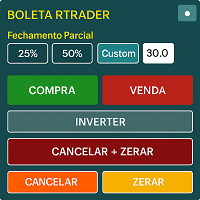
Boleta RTrader - A Boleta Mais Completa para MetaTrader 5 A ferramenta definitiva para traders que buscam precisão, agilidade e controle total sobre suas operações no MetaTrader 5.
**IMPORTANTE**: É aconselhável desabilitar no gráfico do MT5 o histórico de negociações somente quando for usar saídas parcias e precisar movimentar a ordem parcial para evitar delay. --- PRINCIPAIS FUNCIONALIDADES: EXECUÇÃO DE ORDENS **Compra e Venda Instantâneas**: Execute ordens a mercado com um único clique **

is an exit manager for trades you open yourself. It does not open positions and it does not send signals. After a manual buy or sell, it gives that trade a stop and up to six exit stages based on volatility. Three stages come from Average True Range, each with its own timeframe. Three come from completed range: daily (ADR), weekly (AWR), and monthly (AMR). Each stage can be switched on or off. Enabled stages are sorted by distance. Nearer stages trail the stop. The furthest is posted as the take
FREE

AutoTarget Guardian is a trade management utility for MetaTrader 5 that automatically sets Take Profit and Stop Loss levels for newly opened positions. Instead of calculating point distances manually or dragging order lines on the chart, the utility can set target levels based on a specified monetary amount in the account deposit currency, or by fixed points. The target levels are calculated and applied immediately when a position opens. Key Features The utility monitors positions and applies ri
FREE

Bastion Daily Guard protège votre compte de la mauvaise journée. Vous fixez deux limites, le nombre maximal de trades par jour et le drawdown journalier maximal, et Daily Guard veille à ce que vous les respectiez sur tout le compte jusqu'à la prochaine réinitialisation journalière. Fonctionnement Fixez le nombre maximal de trades par jour et le drawdown journalier maximal en %, puis appuyez sur OK pour armer la défense Le drawdown journalier comprend les trades clôturés et le profit ou la perte
FREE

CHOIX DE PROP FIRM
Prêt à révéler votre potentiel financier ? Achetez Gold Digger dès aujourd'hui et devenez un véritable chercheur d'or ! Description de Gold Digger EA : Utilisation d'un système de grille bien analysé pour atteindre des rendements mensuels de 4-8%. Vue d'ensemble
Gold Digger est un Expert Advisor (EA) sophistiqué qui utilise un système de trading en grille avancé spécifiquement conçu pour le trading de XAUUSD (or). L'objectif de cet EA est de fournir des rendements mensuels con
FREE

This is a demo version of a non-trading expert , which utilizes so called the custom symbols feature ( available in MQL as well ) to build renko charts based on historical quotes of selected standard symbol and to refresh renko in real-time according to new ticks. Also it translates real ticks to the renko charts, which allows other EAs and indicators to trade and analyze renko. Place the EA on a chart of a working instrument. The lesser timeframe of the source chart is, the more precise resulti
FREE

This is a utility panel to assist closing of open Deals. The panel has input filters to assist one select the right trades. The tool displays the number of trades to be closed as well as profits to be realized. One click close, Filter trades to be closed by: symbol, (Filter by a particular symbol in the trade terminal). magic number (If your orders are from particular EA with unique magic numbers). whether in profit, loss or All. (P/L=all trades, profiting = trades in profit, loosing = trades
FREE

### Panneau Telegram FTBP - Votre Centre de Notification sur le Graphique
Le **Panneau Telegram FTBP** n'est pas seulement un Expert Advisor, mais un outil complet pour les traders qui souhaitent recevoir des notifications instantanées de leurs transactions sur Telegram et gérer le style visuel de leur terminal. Le produit est entièrement gratuit !
### Caractéristiques Principales
* **Notifications instantanées sur Telegram :** Recevez des alertes pour chaque transaction ouverte et fermée, y
FREE

ChartControl est un indicateur utilitaire léger pour une navigation manuelle rapide sur les graphiques. Il permet de changer le symbole et l’ unité de temps du graphique actuel via des raccourcis clavier — idéal pour analyser rapidement le marché sans utiliser la souris. Ce produit est distribué uniquement au format EX5 (compilé) . Fonctionnalités clés Changement rapide de symbole via la liste Market Watch Changement rapide d’unité de temps via un ensemble prédéfini (M1…MN1) Utilisation CPU mini
FREE

Opening EA - Start Edition
Is a tool to trade the OpeningStrategy! The Opening EA is a semi-automated EA for MetaTrader 5! This means that the trader must actively start the EA using the Start button and stop it using the Stop button.
This EA pursues an opening strategy which, at the start of trading, e.g. on the DAX or Nasdaq, etc., opens a trading channel with predefined TP's (TakeProfit). Two pending orders with the same lot size are set at the beginning. As soon as one of the pending order
FREE

This powerful tool ensures you never miss important trading signals by providing instant Alerts whenever specific indicators generate signals. With its sleek and user-friendly interface, you can effortlessly stay on top of market opportunities. Once an alert is received, you have the flexibility to decide your next move, putting you in full control of your trading decisions.
Does not work in the Strategy Tester!
Indicator Alert Features Automatically get alerted when a chosen indicator produce
FREE
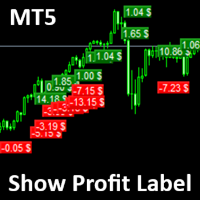
Show Label
Show your profit or loss next to the candle. This is a helpful tool if an EA don't have this feature build in. Support and questions via MQL5 product comments. For questions, updates, and to connect with other traders, join my official MQL5 group ForexEAandMore
Settings: Font color Background color for profits Background color for losses Font size Horizontal shift from candle (pixels) Vertical shift from candle high/low (pixels) Magic number filter (0 = all trades) Comment filter
FREE

SI Connect est un utilitaire qui établit la connexion à nos serveurs pour utiliser FX Volume.
Instructions techniques pour préparer votre terminal à l'utilisation de SI Connect Autorisez les requêtes web et insérez https://stein.investments dans la liste des URLs autorisées dans votre Terminal Options -> Subcategory Expert Advisors . Vous n'avez besoin que d'une seule instance d'EA par terminal, mais elle doit fonctionner constamment en arrière-plan pour récupérer les dernières données de notre
FREE

AIX Notifier — Telegram and Discord alerts for AIX Analyst
AIX Notifier is a free companion utility for the AIX Analyst indicator. MetaTrader 5 indicators cannot access the internet by themselves, so AIX Notifier does it for them: it delivers AIX Analyst alerts, reports and the morning overview to Telegram and Discord, with a screenshot of the chart. It does not open, modify or close trades.
What it does • Sends AIX Analyst alerts to Telegram and Discord: price in a scenario zone, objective r
FREE

visual trade planner for MetaTrader 5. It draws multi-timeframe ATR reward and stop zones on the chart so you can judge distance and payoff before you place the trade yourself. It does not send, modify, or close orders. Motive A single ATR on the chart timeframe often hides the larger and smaller ranges a trade is actually working against. This EA stacks three take-profit slices, each from its own timeframe, period, and multiplier, then places an ATR stop and an optional fixed stop beside them.
FREE

GRInvest Breakeven Manager is an MT5 trade-management Expert Advisor designed to manage existing open positions after entry. Its purpose is to automate breakeven protection, staged partial closes, trailing stops and position management while still giving the trader full manual control over individual trades. The EA does not need to open trades itself . It can manage manual trades and trades opened by other Expert Advisors according to the selected symbol, direction and magic-number filters. The
FREE

Dingji Risk Manager MT5
Formal Version V2.00
Author: Dingji [Download and Installation]
Download and install the current version from this product's MQL5 Market page or the MetaTrader 5 terminal. If the Market download is temporarily unavailable, retry from the terminal later. Do not obtain executable files from unofficial links. [Product Description]
Dingji Risk Manager MT5 is a MetaTrader 5 EA for trade planning, risk-based position sizing, order management and visual chart assistance. Enter
FREE

This tool will allow you to export the Historical data (Open, High, Low, Close, Volume) for any financial instrument present in your MetaTrader 5. You can download multiple Symbols and TimeFrames in the same csv file. Also, you can schedule the frequency of download (every 5 minutes, 60 minutes, etc.). No need to open a lot of charts in order to get the last data, the tool will download the data directly. The CSV File will be stored in the folder: \MQL5\Files .
How it works Select the Symbols t
FREE

Trade in the opposite directions with HedgeTerminal HedgeTerminal is a full-featured trading terminal inside MetaTrader 5. This is a graphic panel resembling MetaTrader 4 terminal. It allows you to track oppositely directed positions in the manner it is possible in MetaTrader 4. In other words, we can open unlimited number of positions on a single symbol even if positions are in complete or partial hedge (lock). Thus, you can maintain long and short positions simultaneously, which is impossible
FREE

Product Title: MT5 GoldSilver Trade Panel Lite Short Description:
Free manual trading panel for gold and silver. Market order execution, SL/TP setting, one-click close all, and basic daily statistics. Advanced features are available in the full paid version. Description: MT5 GoldSilver Trade Panel Lite is a free, easy-to-use manual trading panel designed for gold and silver traders. It automatically detects your broker’s gold and silver symbols and lets you place market orders quickly with
FREE

Close All 1 Sec. for MT5 Close All 1 Sec. is a professional trade management Expert Advisor for MetaTrader 5 designed to help traders manage positions quickly and efficiently. The EA provides real-time visualization of important trading levels, including Break-Even and Margin Call estimates, directly on the chart. It also features a powerful Close All button that allows traders to instantly close open positions and remove pending orders with a single click. Whether you are a scalper, day trader
FREE
Découvrez comment acheter un robot de trading sur le MetaTrader Market, le magasin d'applications de la plateforme MetaTrader.
e système de paiement de MQL5.community prend en charge les transactions via PayPal, les cartes bancaires et les systèmes de paiement populaires. Nous vous recommandons vivement de tester le robot de trading avant de l'acheter, pour une meilleure expérience client.

Vous manquez des opportunités de trading :
- Applications de trading gratuites
- Plus de 8 000 signaux à copier
- Actualités économiques pour explorer les marchés financiers
Inscription
Se connecter
Vous acceptez la politique du site Web et les conditions d'utilisation
Si vous n'avez pas de compte, veuillez vous inscrire