Trade Blocker

[ My Channel ] , [ My Products ] , [ ABOUT ME ] 

Trade Blocker — Stop Impulsive Trading

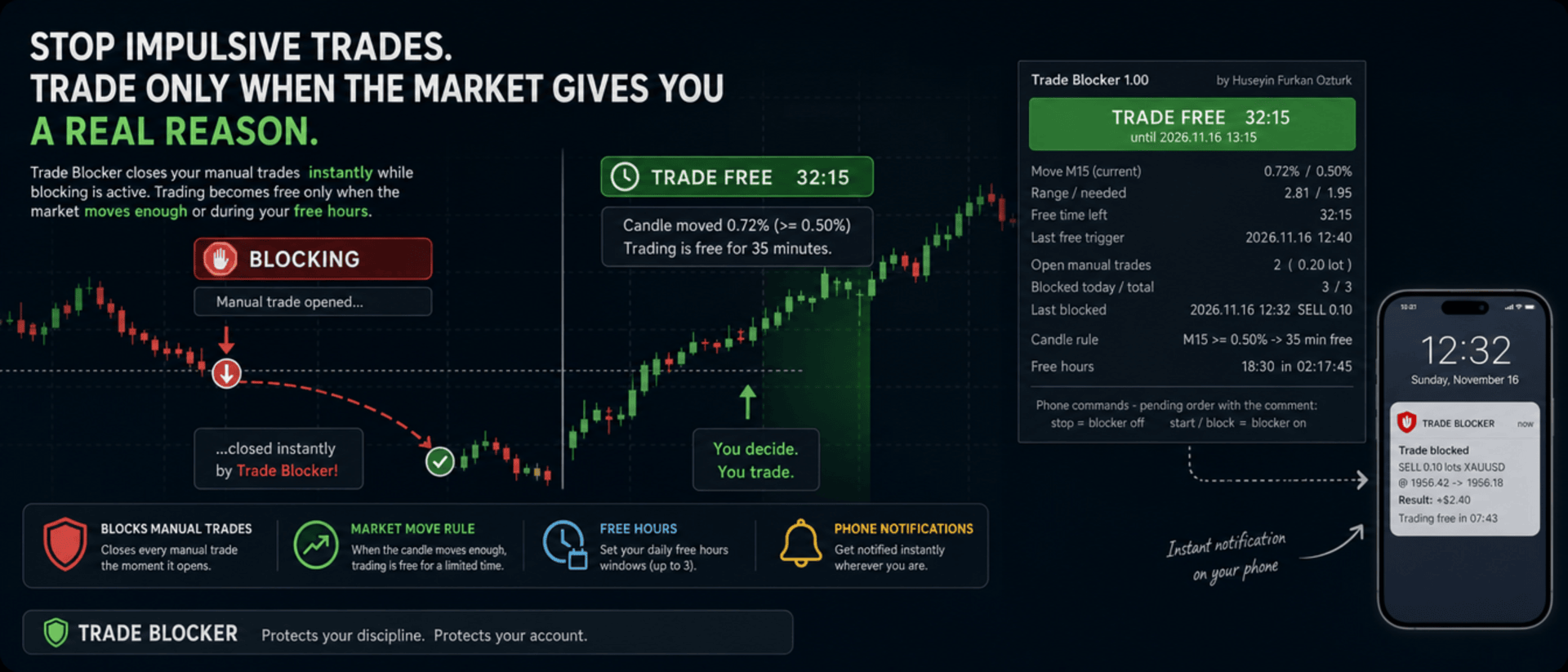
We built Trade Blocker for traders who know that their worst trades are the ones they open out of boredom, revenge or impatience. It watches your chart's symbol and closes every manual trade the moment it opens, unless the market has given you a real reason to trade. A notification on your phone tells you right away that the trade was blocked.

Trading becomes free only when the market moves enough, or during the hours you choose, and then only for a limited time. Trade Blocker never opens a trade: it only closes your own manual trades, and trades of other Expert Advisors are never touched.

How does it work?

Attach Trade Blocker to the chart of the symbol you want to protect. While it is blocking, every manual position on that symbol is closed at once, and manual pending orders are deleted so they cannot open a trade later. It does not matter where the trade comes from: the desktop terminal, one-click trading or the MetaTrader mobile app. A trade without a magic number is a manual trade.

Trading becomes free in two ways, and each of them can be turned on or off:

  • Candle move: when a candle of the timeframe you choose (M1 to D1, default M15) has moved at least the chosen percent (default 0.5%, measured as the candle's high-low range divided by its open), trading is free for the chosen number of minutes (default 35). Each candle frees trading only once. If a new candle reaches the move while trading is still free, the countdown starts again and you get a notification with the new end time.
  • Free hours: up to three daily windows in server time, for example 15:00 for 90 minutes, 18:30 for 60 minutes and 22:00 for 90 minutes. Each window can be switched on or off on its own. This rule is off by default.

While one of your manual trades is open, nothing is blocked, so you can manage your position, add to it or hedge it. When the free time ends with trades still open, blocking starts again as soon as they are closed.

Control it from your phone

You don't have to be at your computer to turn the blocker off. Place a pending order on the symbol with the comment stop and the blocker turns off; the comment start or block turns it back on. The command order is deleted immediately and a notification confirms the new state. There is deliberately no button on the panel to turn it off: a little effort before breaking your own rules is the whole idea.

Notifications

Trade Blocker sends a push notification to your phone when a trade is blocked (with its entry, close price, approximate result and what frees trading next), when trading becomes free and until when, when the free time is extended, when free hours begin and when the free time is over. Turning the blocker on or off and deleted pending orders are reported too. Notifications are queued to respect MetaTrader's sending limit.

If a trade cannot be closed, for example because Algo Trading is off, you get one notification that it was opened in blocking time. It is not tried again: the trade stays open and counts as an open trade.

What you see on the chart

A compact panel with a large status banner shows the state at a glance: BLOCKING, TRADE FREE with a live countdown and its start and end time, NOT BLOCKING while your manual trades are open, BLOCKER OFF or ALGO TRADING OFF. Below it you see the move of the current candle against the move needed, the free time left, the last free trigger, your open manual trades with lots and profit, the trades blocked today and in total, the last blocked trade, the candle rule, and the current or next free hours window with a countdown. The panel can be dragged anywhere on the chart and keeps its place.

It does not forget

The state is kept in the terminal's global variables: on or off, the free time with its start and end, and the counters. If you restart Trade Blocker or the terminal while trading is free, it stays free until the same end time. When you attach it for the first time, trades that are already open are left alone. A manual trade opened while Trade Blocker was not running is closed as soon as it starts again, if blocking is active at that moment.

Inputs

  • Use the candle move rule: default true
  • Candle timeframe: 1M, 5M, 15M, 30M, 1H, 4H or 1D; default 15M
  • Move that frees trading: the candle's high-low range in % of its open; default 0.5
  • Candle shift: default 0, the current candle
  • Minutes trading stays free after the move: default 35
  • Use the free hours: default false
  • Free hours 1, 2 and 3: on / off, start time (hh:mm, server time) and minutes free; defaults 15:00 for 90, 18:30 for 60 and 22:00 for 90 minutes
  • Max slippage when closing: default 50 points
  • Phone notifications: default true
  • Also notify when the free time ends: default true
  • Show panel, Panel X / Y: default true, 10 and 30 pixels

Good to know

Trade Blocker works on the symbol of its chart; attach it to one chart for each symbol you want to protect. Algo Trading must be on, otherwise trades cannot be closed and the panel shows ALGO TRADING OFF. Free hours use the trade server's time, the same time the chart shows.

It can only act while the terminal is running. To block trades you open on your phone while your computer is off, run it on a VPS. Phone notifications need your MetaQuotes ID in Tools → Options → Notifications. In the Strategy Tester it works on ticks and writes the notifications to the journal.


About the Developer

A software engineer with more than 10 years of experience, the developer has focused on building algorithmic trading robots for over 3 years, driven by a passion for finance and mathematics.
The algorithms and strategies are designed not with a "vibe coder" approach based on ready-made solutions, but from the perspective of a professional software engineer — prioritizing performance, reliability and sustainability.
All material and non-material gains are reinvested into new R&D to continuously improve the products.
Rather than offering the robots purely for commercial gain, the developer believes that sharing them as freely as possible reaches a wider audience — and that the feedback gathered this way makes the products evolve much faster.
Every piece of user feedback and every suggestion is treated as the most valuable part of the product development process.

If you like my robots and want to stay informed about new features, join my channel: ALGO By H. Furkan OZTURK
More from author
VolumeHedger
OMG FZE LLC
4.81 (52)
VolumeHedger EA [ My Channel ]   ,  [ Set Files ]  ,   [ Blog ]  , [ AI Usage ]  , [ PDF Guide ] Recommended accounts: High leverage Standard, ECN, Raw; Cent; Propfirm (FTMO etc.) Applicable strategies: Hedging algorithm, HFT (High-Frequency Trading), level trading, neural trading, Martingale, single-position trend trading. Default settings are not the best settings. Please get in touch. With Volume Hedger EA  Thanks to the ability to define an entry strategy using a Custom Indicator, you will n
HFT Spike EA
OMG FZE LLC
5 (3)
[ My Channel ] HFT Spike EA Recommended accounts: High leverage Standard, ECN, Raw; Cent; Propfirm (FTMO FundedNext etc.) Strategies: Quantum Physics Principles, HFT Spike (High-Frequency Trading), level trading, neural trading, No Martingale, No Grid, single-position trend trading. A fully automated, risk-managed EA designed on XAUUSD tick data. You don't need to select a Time-Frame. Default values match the tested configuration. Designed for Gold. It detects sudden volatility bursts ("sp
Diagonal Resistance EA
OMG FZE LLC
4.76 (21)
[ LIVE SIGNALS ]  ,  [ My Channel ]  ,  [ ABOUT ME ]  ,  [ My Products ] Recommended accounts: High leverage and Standard, ECN, Raw, Cent, Propfirm (FTMO etc.) A new EA developed by Huseyin Furkan Ozturk — easy to use, plug & play. Make sure your balance and leverage are sufficient. Running a backtest before use is recommended. Diagonal Resistance EA I tried to explain the working logic in the slider images. The core logic of the EA can be summarized in three steps: Catch the sharp move, ente
FREE
HedgingMartingale
OMG FZE LLC
4.72 (137)
HedgingMartingale EA [ My Channel ]  , [ My Products ]  , [ Blog ]     ,  [ Public Chat ] Recommended accounts: High leverage Standard, ECN, Raw; Cent; Propfirm This EA is a trading algorithm that combines hedging and intelligent risk management with the Martingale strategy. It is designed to provide stable performance in strong market conditions where you cannot predict trend direction. When using an appropriate set file, it can work on any instrument. Optimization results have provided succes
FREE
SwapSlap
OMG FZE LLC
5 (7)
[ LIVE SIGNALS ]  ,  [ My Channel ]  , [ BLOG ]  ,  [ Public Chat ] SWAPSLAP EA Recommended accounts: Any, Standard, ECN, Raw; Cent; Propfirm (FTMO etc.) A new EA developed by Huseyin Furkan Öztürk, very easy to use with a plug-and-play structure, creative yet very powerful. The working principle of SwapSlap EA is briefly based on generating profit using the carry trade method.  This method is a trading opportunity that arises because investors tend to switch sides during swap time due to inte
GridTeam EA
OMG FZE LLC
5 (19)
GridTeam EA - Create your own grid robot [ Set File ]   ,  [ My Channel ]  , [ LIVE SIGNAL ]  ,  [ Public Chat ] All indicators in a single EA — choose what you want, optimize and run on multiple pairs simultaneously. Take full control. Set up your risk management yourself. As default values, RSI indicator is used and was adjusted according to optimization results. It is not the best value. I believe you can find a better one. One of the features that makes this EA beautiful is that when equity
FREE
[ My Channel ]   ,   [ My Products ]  ,  [ ABOUT ME ]   OMG Market Heat — Multi-Symbol Volatility & Breakout Scanner OMG Market Heat is a dashboard indicator that scans up to 50 symbols at once and shows how "hot" each market is right now on the M15, H1, H4 or D1 timeframe. At a glance you see which symbols are moving strongly, which ones are waking up after a quiet period and which ones are asleep — so you spend your time only on markets that are worth trading. It works with Forex, Gold, indic
[ My Channel ] , [ My Products ] The Lorentzian Distance Classifier is a machine-learning-based trading indicator that uses Lorentz distance as its core metric within the Approximate Nearest Neighbors (ANN) framework. Instead of relying on traditional Euclidean distance, it treats financial price action as if it occurs in a “distorted” price–time space (similar to how massive objects bend spacetime in relativity). This approach makes the classifier significantly more robust to market noise, outl
[ LIVE SIGNALS ]  ,  [ My Channel ]  ,  [ ABOUT ME ]  ,  [ My Products ] Recommended accounts: High leverage and Standard, ECN, Raw, Cent, Propfirm A new EA developed by Huseyin Furkan Ozturk — easy to use, plug & play. Make sure your balance and leverage are sufficient. Running a backtest before use is recommended.  Warning: This is an aggressive EA. Diagonal Resistance EA I tried to explain the working logic in the slider images. The core logic of the EA can be summarized in three steps: Ca
FREE
HedgingMartingale MT4
OMG FZE LLC
4.57 (21)
HedgingMartingale EA [ Set Files ]   ,   [ My Channel ]  ,   [ My Products ]  ,   [ Blog ] Recommended accounts: High leverage Standard, ECN, Raw; Cent; Propfirm This EA is a trading algorithm that combines hedging and intelligent risk management with the Martingale strategy. It is designed to provide stable performance in strong market conditions where you cannot predict trend direction. When using an appropriate set file, it can work on any instrument. Optimization results have provided succe
FREE
[ My Channel ]   ,   [ My Products ]  ,  [ ABOUT ME ]   DiagonalResistanceIndi — Counter-Trend Signal Indicator DiagonalResistanceIndi was developed specifically for the VolumeHedger EA . It is used on Gold with the M1 timeframe. It is also suitable for manual trading without the EA. It is a signal indicator that detects unusually large percentage price moves within a short time window and marks potential reversal points against that move on the chart. How does it work? The indicator continuou
FREE
MyTradingSkills
OMG FZE LLC
5 (1)
[ My Channel ]   ,   [ My Products ]  ,  [ ABOUT ME ]   My Trading Skills — Train Yourself We built My Trading Skills so you can test and improve your manual trading skills on historical market data. It replays the history of your chart's symbol candle by candle from a start date you choose, and everything after the replay position stays hidden. Just like on a live chart, you never know what the next candle will bring. You open virtual Buy and Sell trades with take profit and stop loss, and the
FREE
[ My Channel ] , [ My Products ] This indicator shows the points where the bar’s trend changes due to an instant pressure while the overall trend is moving upward or downward. The arrow displayed by the indicator is drawn if the previous bar meets certain criteria. When building your strategy, you can interpret 3-4 consecutive arrows as a potential breakout signal. For example, when you see the 4th arrow, you may consider opening a trade. This provides a reliable tool to anticipate significant
FREE
OMG Trading
OMG FZE LLC
5 (3)
[ My Products ] , [ My Channel ] OMG Trading Panel Now you can control your trading panel directly from your phone. Install OMG Trading Tool on your MQL VPS and trade comfortably from the mobile MetaTrader 5 app while the panel runs 24/7. I've also added two useful strategies: Smart Margin Protection and Grid Strategy. You can also set an alert that triggers when the price drops. Key Features Remote Control via Mobile MT5 Control your trading tool from anywhere using your smartphone! Simply
FREE
[ My Channel ]   ,   [ My Products ]  ,  [ ABOUT ME ]   DiagonalResistanceIndi — Counter-Trend Signal Indicator DiagonalResistanceIndi was developed specifically for the VolumeHedger EA . It is used on Gold with the M1 timeframe. It is also suitable for manual trading without the EA. It is a signal indicator that detects unusually large percentage price moves within a short time window and marks potential reversal points against that move on the chart. How does it work? The indicator continuou
FREE
Filter:
No reviews
Reply to review