Trade Blocker

[ My Channel ] , [ My Products ] , [ ABOUT ME ] 

Trade Blocker — Stop Impulsive Trading

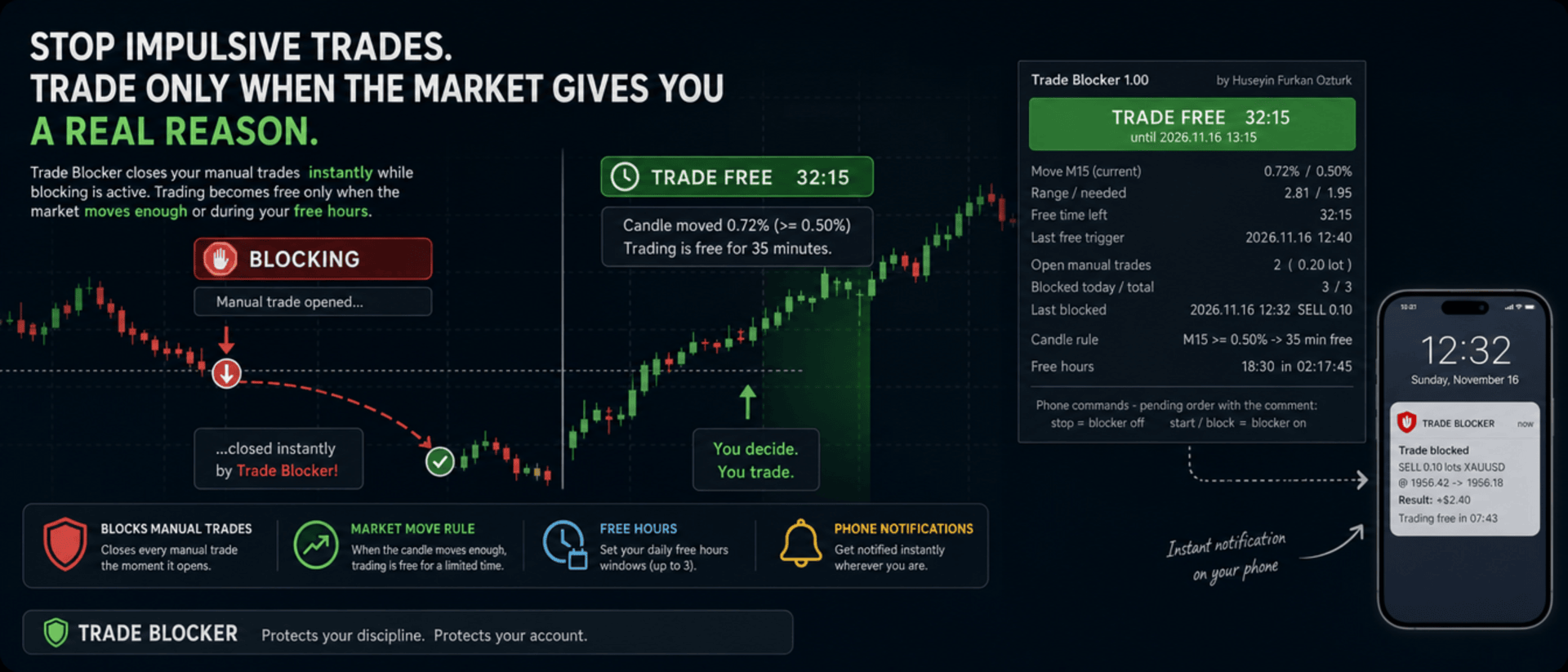
We built Trade Blocker for traders who know that their worst trades are the ones they open out of boredom, revenge or impatience. It watches your chart's symbol and closes every manual trade the moment it opens, unless the market has given you a real reason to trade. A notification on your phone tells you right away that the trade was blocked.

Trading becomes free only when the market moves enough, or during the hours you choose, and then only for a limited time. Trade Blocker never opens a trade: it only closes your own manual trades, and trades of other Expert Advisors are never touched.

How does it work?

Attach Trade Blocker to the chart of the symbol you want to protect. While it is blocking, every manual position on that symbol is closed at once, and manual pending orders are deleted so they cannot open a trade later. It does not matter where the trade comes from: the desktop terminal, one-click trading or the MetaTrader mobile app. A trade without a magic number is a manual trade.

Trading becomes free in two ways, and each of them can be turned on or off:

  • Candle move: when a candle of the timeframe you choose (M1 to D1, default M15) has moved at least the chosen percent (default 0.5%, measured as the candle's high-low range divided by its open), trading is free for the chosen number of minutes (default 35). Each candle frees trading only once. If a new candle reaches the move while trading is still free, the countdown starts again and you get a notification with the new end time.
  • Free hours: up to three daily windows in server time, for example 15:00 for 90 minutes, 18:30 for 60 minutes and 22:00 for 90 minutes. Each window can be switched on or off on its own. This rule is off by default.

While one of your manual trades is open, nothing is blocked, so you can manage your position, add to it or hedge it. When the free time ends with trades still open, blocking starts again as soon as they are closed.

Control it from your phone

You don't have to be at your computer to turn the blocker off. Place a pending order on the symbol with the comment stop and the blocker turns off; the comment start or block turns it back on. The command order is deleted immediately and a notification confirms the new state. There is deliberately no button on the panel to turn it off: a little effort before breaking your own rules is the whole idea.

Notifications

Trade Blocker sends a push notification to your phone when a trade is blocked (with its entry, close price, approximate result and what frees trading next), when trading becomes free and until when, when the free time is extended, when free hours begin and when the free time is over. Turning the blocker on or off and deleted pending orders are reported too. Notifications are queued to respect MetaTrader's sending limit.

If a trade cannot be closed, for example because Algo Trading is off, you get one notification that it was opened in blocking time. It is not tried again: the trade stays open and counts as an open trade.

What you see on the chart

A compact panel with a large status banner shows the state at a glance: BLOCKING, TRADE FREE with a live countdown and its start and end time, NOT BLOCKING while your manual trades are open, BLOCKER OFF or ALGO TRADING OFF. Below it you see the move of the current candle against the move needed, the free time left, the last free trigger, your open manual trades with lots and profit, the trades blocked today and in total, the last blocked trade, the candle rule, and the current or next free hours window with a countdown. The panel can be dragged anywhere on the chart and keeps its place.

It does not forget

The state is kept in the terminal's global variables: on or off, the free time with its start and end, and the counters. If you restart Trade Blocker or the terminal while trading is free, it stays free until the same end time. When you attach it for the first time, trades that are already open are left alone. A manual trade opened while Trade Blocker was not running is closed as soon as it starts again, if blocking is active at that moment.

Inputs

  • Use the candle move rule: default true
  • Candle timeframe: 1M, 5M, 15M, 30M, 1H, 4H or 1D; default 15M
  • Move that frees trading: the candle's high-low range in % of its open; default 0.5
  • Candle shift: default 0, the current candle
  • Minutes trading stays free after the move: default 35
  • Use the free hours: default false
  • Free hours 1, 2 and 3: on / off, start time (hh:mm, server time) and minutes free; defaults 15:00 for 90, 18:30 for 60 and 22:00 for 90 minutes
  • Max slippage when closing: default 50 points
  • Phone notifications: default true
  • Also notify when the free time ends: default true
  • Show panel, Panel X / Y: default true, 10 and 30 pixels

Good to know

Trade Blocker works on the symbol of its chart; attach it to one chart for each symbol you want to protect. Algo Trading must be on, otherwise trades cannot be closed and the panel shows ALGO TRADING OFF. Free hours use the trade server's time, the same time the chart shows.

It can only act while the terminal is running. To block trades you open on your phone while your computer is off, run it on a VPS. Phone notifications need your MetaQuotes ID in Tools → Options → Notifications. In the Strategy Tester it works on ticks and writes the notifications to the journal.


About the Developer

A software engineer with more than 10 years of experience, the developer has focused on building algorithmic trading robots for over 3 years, driven by a passion for finance and mathematics.
The algorithms and strategies are designed not with a "vibe coder" approach based on ready-made solutions, but from the perspective of a professional software engineer — prioritizing performance, reliability and sustainability.
All material and non-material gains are reinvested into new R&D to continuously improve the products.
Rather than offering the robots purely for commercial gain, the developer believes that sharing them as freely as possible reaches a wider audience — and that the feedback gathered this way makes the products evolve much faster.
Every piece of user feedback and every suggestion is treated as the most valuable part of the product development process.

If you like my robots and want to stay informed about new features, join my channel: ALGO By H. Furkan OZTURK
제작자의 제품 더 보기
VolumeHedger
OMG FZE LLC
4.81 (52)
VolumeHedger EA [ 내 채널 ]   ,  [ 세트 파일 ]  ,   [ 블로그 ]   , [ AI 사용 ]  ,  [ PDF Guide ] 권장 계좌: 고레버리지 스탠다드, ECN, Raw; 센트 계좌; 프랍펌(FTMO 등) 이 EA의 개발자는 다른 로봇들의 품질을 통해 이미 그의 전문성을 입증했습니다. Volume Hedger EA와 함께 커스텀 인디케이터를 사용하여 진입 전략을 정의할 수 있기 때문에, 더 이상 추가 EA를 구매할 필요가 없습니다! 이 EA는 마틴게일 전략에 헤징과 스마트 리스크 관리를 결합한 고급 트레이딩 알고리즘으로, 변동성이 큰 시장에 최적화되어 있습니다. 추세 방향을 예측하려 하지 않고, 거래량을 분석하여 지능적인 전략으로 진입합니다. 적절한 세트 파일을 사용하면 Forex, Gold, 주식, Crypto와 같은 상품에서 효과적인 성과를 낼 수 있습니다. 급격한 변동이나 안정적인 추세가 있는 종목에서 더욱 뛰어난 성능을 보입니다. 거래 프로세
HFT Spike EA
OMG FZE LLC
5 (3)
[ My Channel ] HFT Spike EA 권장 계좌: 고레버리지 Standard, ECN, Raw; Cent; Propfirm (FTMO FundedNext 등) 전략: 양자물리학 원리, HFT Spike (고빈도 거래), 레벨 트레이딩, 뉴럴 트레이딩, 마틴게일 없음, 그리드 없음, 단일 포지션 추세 거래. XAUUSD 틱 데이터를 기반으로 설계된 완전 자동화 및 리스크 관리형 EA입니다. Time-Frame을 선택할 필요 없습니다. 기본값은 테스트된 구성과 동일합니다. 금(Gold)을 위해 설계되었습니다. 갑작스러운 변동성 폭발("spike")을 감지하고, 스파이크 이후 가격 움직임이 필터를 통과할 때 정확한 타이밍에 포지션을 엽니다. 평균 포지션 보유 시간이 짧기 때문에 Scalping Trading으로 두드러집니다.  Symbol : GOLD/XAUUSD Digits : 2 digits & 3 digits Leverage : Any Broker : Any
Diagonal Resistance EA
OMG FZE LLC
4.76 (21)
[ LIVE SIGNALS ]  ,  [ My Channel ]  ,  [ ABOUT ME ]  ,  [ My Products ] 권장 계좌: High leverage 및 Standard, ECN, Raw, Cent, Propfirm Huseyin Furkan Ozturk가 개발한 새로운 EA — 사용하기 쉽고 플러그 앤 플레이 방식으로 작동합니다. 잔고와 레버리지가 충분한지 확인하세요. 사용 전 backtest를 권장합니다. Diagonal Resistance EA 작동 원리는 슬라이더 이미지에서 설명하려고 노력했습니다. EA의 핵심 로직은 세 단계로 요약할 수 있습니다: 급격한 움직임을 포착하고 역방향 진입: 가격이 최근 40분 또는 80분(변동성에 따라) 동안 1% 이상 움직였다면 — 예를 들어 금이 급등했다면 — EA는 그 움직임의 반대 방향 으로 거래를 엽니다: 상승 시 SELL, 하락 시 BUY. 핵심 가정은 이렇습니다: 짧은 시간에 일어난 급격한 움직임은 대개 "
FREE
HedgingMartingale
OMG FZE LLC
4.72 (137)
HedgingMartingale EA [ My Channel ]  ,   [ My Products ]  ,  [ Blog ]     ,  [ Public Chat ] 권장 계좌: 고레버리지 스탠다드, ECN, Raw; 센트; 프롭펌 이 EA는 마틴게일 전략과 헤징 및 지능적 위험 관리를 결합한 거래 알고리즘입니다. 트렌드 방향을 예측할 수 없는 강한 시장 상황에서 안정적인 성능을 제공하도록 설계되었습니다. 적절한 세트 파일을 사용하면 모든 금융상품에서 작동할 수 있습니다. 최적화 결과는 Fx, 골드, 주식 및 암호화폐와 같은 금융상품에서 성공적인 성능을 제공했습니다. 횡보하는 경향이 있는 금융상품은 악몽입니다. 사이클로 거래를 시작합니다. 사이클을 시작할 첫 번째 거래를 올바른 위치에서 여는 것은 위험을 제거할 수 있습니다. 따라서 다양한 사이클 시작 진입 전략이 개발되었고 계속 개발되고 있습니다. 매수와 매도 양방향에서 체계적으로 포지션을 엽니다. 손실 후 미리 정의된 시퀀스에
FREE
SwapSlap
OMG FZE LLC
5 (7)
[ LIVE SIGNALS ]  ,  [ My Channel ]  , [ BLOG ]  ,  [ Public Chat ] SWAPSLAP EA 권장 계좌: 모든 계좌, Standard, ECN, Raw; Cent; Propfirm (FTMO 등) Huseyin Furkan Öztürk 가 개발한 새로운 EA로, 플러그 앤 플레이 구조 덕분에 사용이 매우 쉽고, 창의적이면서도 매우 강력합니다. SwapSlap EA의 작동 원리는 간단히 말해 캐리 트레이드 방식을 이용해 수익을 창출하는 데 기반합니다.  이 방식은 상품 간 금리 차이로 인해 투자자들이 스왑 시간에 포지션 방향을 바꾸는 경향이 있기 때문에 생기는 거래 기회입니다. 보통 금리가 더 높은 쪽이 선호됩니다. 해당 통화에 비정상적인 가격 변동이 예상되지 않으면, 투자자들은 대부분 금리가 더 높은 쪽으로 거래합니다. 이 시간 동안 짧은 기간에 싸게 사서 비싸게 파는 방식으로 수익을 낼 기회가 생깁니다. EA 내부에는 몇 가지
GridTeam EA
OMG FZE LLC
5 (19)
GridTeam EA - 나만의 그리드 로봇 만들기 [ Set File ]  ,  [ My Channel ]   ,   [ LIVE SIGNAL ]     ,  [ Public Chat ] 모든 지표를 하나의 EA에 — 원하는 것을 선택하고 최적화하여 여러 쌍에서 동시에 실행하세요. 완전한 통제를 하세요. 위험 관리를 직접 설정하세요. 기본값으로 RSI 지표가 사용되며 최적화 결과에 따라 조정되었습니다. 최고의 값은 아닙니다. 더 나은 것을 찾을 수 있다고 믿습니다. 이 EA를 아름답게 만드는 특징 중 하나는 equity drawdown이 떨어졌을 때 1개월 내에 회복된다는 것입니다. 또 다른 사용자 친화적인 기능이 추가되었습니다. 출금을 위해 몇 달을 기다릴 필요가 없습니다. 출금을 위해 equity drawdown이 개선되기를 기다리는 동안 화면을 계속 확인하지 않도록 알림을 보냅니다. 예를 들어 equity drawdown이 30%까지 올라가서 출금할 수 없을 때, 다시 10
FREE
[ My Channel ]   ,   [ My Products ]  ,  [ ABOUT ME ]   OMG Market Heat — 멀티 심볼 변동성 및 돌파 스캐너 OMG Market Heat는 최대 50개 심볼 을 동시에 스캔하여 M15, H1, H4 또는 D1 타임프레임에서 각 시장이 지금 얼마나 “뜨거운지” 보여 주는 대시보드형 지표입니다. 어떤 심볼이 강하게 움직이고 있는지, 어떤 심볼이 조용한 기간을 지나 깨어나고 있는지 , 어떤 심볼이 잠들어 있는지 한눈에 확인할 수 있으므로 거래할 가치가 있는 시장에만 시간을 쓸 수 있습니다. 외환, 금, 지수, 암호화폐에서 작동하며 수동 거래를 위해 설계되었습니다. 어떻게 작동하나요? 지표는 각 심볼에 대해 선택한 타임프레임에서 최근 변동성(최근 5개 캔들의 평균 실제 범위)을 평소 수준(최근 100개 캔들의 평균 실제 범위)과 비교합니다. 결과는 변동성 % 로 표시됩니다. 0%는 심볼이 평소 속도로 움직이고 있다는 뜻이고, +50
[ 내 채널 ] , [ 내 제품 ] Lorentzian Distance Classifier는 머신러닝 기반 트레이딩 지표로, 근사 최근접 이웃(ANN) 프레임워크 내에서 로렌츠 거리(Lorentz distance)를 핵심 지표로 사용합니다. 기존의 유클리드 거리 대신, 금융 가격 움직임을 “왜곡된” 가격-시간 공간에서 발생하는 것처럼 처리합니다(상대성이론에서 거대한 물체가 시공간을 휘게 만드는 것과 유사). 이러한 접근 방식은 시장 노이즈, 이상치, 이벤트로 인한 왜곡(FOMC, 지정학적 충격 등)에 훨씬 더 강하며, 유클리드 거리 기반 방법들이 시간에 따라 포착하지 못하는 과거의 유사한 가격 움직임을 인식할 수 있도록 합니다. 이 지표는 종가 기준 캔들에서 명확한 **리페인트 없음(non-repainting)** 신호를 제공하며, 바로 사용할 수 있는 버퍼를 제공합니다. 기능 RSI, WaveTrend, CCI20, ADX를 조합할 수 있습니다. 총 다섯 개의 슬롯이 제공되며 —
[ LIVE SIGNALS ]  ,  [ My Channel ]  ,  [ ABOUT ME ]  ,  [ My Products ] 권장 계좌: High leverage 및 Standard, ECN, Raw, Cent, Propfirm Huseyin Furkan Ozturk가 개발한 새로운 EA — 사용하기 쉽고 플러그 앤 플레이 방식으로 작동합니다. 잔고와 레버리지가 충분한지 확인하세요. 사용 전 backtest를 권장합니다. Diagonal Resistance EA 작동 원리는 슬라이더 이미지에서 설명하려고 노력했습니다. EA의 핵심 로직은 세 단계로 요약할 수 있습니다: 급격한 움직임을 포착하고 역방향 진입: 가격이 최근 40분 또는 80분(변동성에 따라) 동안 1% 이상 움직였다면 — 예를 들어 금이 급등했다면 — EA는 그 움직임의 반대 방향 으로 거래를 엽니다: 상승 시 SELL, 하락 시 BUY. 핵심 가정은 이렇습니다: 짧은 시간에 일어난 급격한 움직임은 대개 "
FREE
HedgingMartingale MT4
OMG FZE LLC
4.57 (21)
HedgingMartingale EA [ Set Files ]   ,   [ My Channel ]  ,   [ My Products ]  ,   [ Blog ] 권장 계좌: 고레버리지 스탠다드, ECN, Raw; 센트; 프롭펌 이 EA는 마틴게일 전략과 헤징 및 지능적 위험 관리를 결합한 거래 알고리즘입니다. 트렌드 방향을 예측할 수 없는 강한 시장 상황에서 안정적인 성능을 제공하도록 설계되었습니다. 적절한 세트 파일을 사용하면 모든 금융상품에서 작동할 수 있습니다. 최적화 결과는 Fx, 골드, 주식 및 암호화폐와 같은 금융상품에서 성공적인 성능을 제공했습니다. 횡보하는 경향이 있는 금융상품은 악몽입니다. 사이클로 거래를 시작합니다. 사이클을 시작할 첫 번째 거래를 올바른 위치에서 여는 것은 위험을 제거할 수 있습니다. 따라서 다양한 사이클 시작 진입 전략이 개발되었고 계속 개발되고 있습니다. 매수와 매도 양방향에서 체계적으로 포지션을 엽니다. 손실 후 미리 정의된 시퀀스에 따라
FREE
[ My Channel ]   ,   [ My Products ]  ,  [ ABOUT ME ]   DiagonalResistanceIndi — 역추세 시그널 인디케이터 DiagonalResistanceIndi는 VolumeHedger EA 를 위해 특별히 개발되었습니다. Gold의 M1 타임프레임에서 사용됩니다. EA 없이 수동 트레이딩에도 적합합니다. 짧은 시간 윈도우 내에서 비정상적으로 큰 가격 변동률을 감지하고, 그 움직임에 반하는 잠재적 반전 지점을 차트에 표시하는 시그널 인디케이터입니다. 작동 방식 이 인디케이터는 M1 차트에서 과거 방향의 시간 윈도우를 지속적으로 스캔합니다. 이 윈도우의 길이는 고정되어 있지 않으며, 시장 변동성(H1 ATR 기반)에 따라 자동으로 조정됩니다. 조용한 시장에서는 윈도우가 넓어지고, 활발한 시장에서는 좁아집니다. 가격이 윈도우 내 극값 수준에서 측정한 지정된 퍼센트 임계값을 초과하면, 인디케이터는 해당 움직임을 "과도하게 확장된" 것으
FREE
[ My Channel ]   ,   [ My Products ]  ,  [ ABOUT ME ]   My Trading Skills — Train Yourself 과거 시장 데이터로 수동 매매 실력을 시험하고 키울 수 있도록 My Trading Skills 를 만들었습니다. 원하는 시작일부터 차트 심볼의 히스토리를 캔들 하나씩 리플레이하며, 리플레이 위치 이후는 모두 숨겨진 상태로 유지됩니다. 실시간 차트에서처럼 다음 캔들이 어떻게 나올지 알 수 없습니다. 익절과 손절을 설정해 가상 매수·매도 거래를 열면, 패널에 매매 성과(승률, 수익 팩터, 드로다운)가 표시됩니다. 브로커로 주문이 전송되는 일은 절대 없습니다. 트레이딩 로봇이 아닌 훈련용 도구입니다. 어떻게 작동하나요? 인디케이터를 차트에 적용합니다(별도의 차트를 사용하는 것이 가장 좋습니다). 리플레이 차트가 차트 창 전체를 덮고, 시작일 이전의 캔들 500개를 참고용으로 보여 줍니다. 패널의 초록색 START 버튼(또는 S
FREE
Lydians Indicator
OMG FZE LLC
5 (6)
[ 내 채널 ] , [ 내 제품 ] 이 인디케이터는 전체 추세가 상승 또는 하락하는 동안 순간적인 압력으로 인해 캔들의 추세가 변하는 지점을 보여줍니다. 인디케이터에 표시되는 화살표는 이전 캔들이 특정 조건을 충족할 때 그려집니다. 전략을 설계할 때, 연속된 3~4개의 화살표를 잠재적인 돌파 신호로 해석할 수 있습니다. 예를 들어, 네 번째 화살표가 나타날 때 진입을 고려할 수 있습니다. 이는 주요 시장 움직임을 예측하고 거래 결정을 최적화하는 데 신뢰할 수 있는 도구입니다. 요약하면, 이 인디케이터는 캔들 패턴을 기반으로 신호를 생성합니다: 캔들이 bearish이지만, 윗꼬리가 이전 캔들을 초과함. 캔들이 bullish이지만, 아랫꼬리가 이전 캔들보다 낮음. 강력한 신호, 신호가 강할 때를 인식할 수 있습니다. 진입 전에 "Data Window"에서 이를 확인하면 승률을 높일 수 있습니다.  이 인디케이터를 VolumeHedger EA 와 함께 사용하면 매우 좋은 결과를 얻을
FREE
OMG Trading
OMG FZE LLC
5 (3)
[ My Products ]   ,   [ My Channel ] OMG Trading Panel 이제 스마트폰에서 직접 트레이딩 패널을 제어할 수 있습니다. MQL VPS에 OMG Trading Tool을 설치하면 패널이 24시간 내내 작동하는 동안 모바일 MetaTrader 5 앱에서 편안하게 거래할 수 있습니다. 또한 두 가지 유용한 전략인 스마트 마진 보호(Smart Margin Protection)와 그리드 전략(Grid Strategy)을 추가했습니다. 가격이 하락할 때 트리거되는 알람을 설정할 수도 있습니다. 주요 기능 모바일 MT5를 통한 원격 제어 스마트폰을 사용하여 어디서나 트레이딩 툴을 제어하세요! 주문의 커멘트(Comment) 필드에 특수 명령어가 포함된 대기 주문을 넣기만 하면 툴이 자동으로 지침을 실행합니다. 유연성과 이동성이 필요한 트레이더에게 적합합니다. 명령어 예시: `omg auto`- 자동 모드 ON/OFF 전환 `omg auto on` - 자동
FREE
[ My Channel ]   ,   [ My Products ]  ,  [ ABOUT ME ]   DiagonalResistanceIndi — 역추세 시그널 인디케이터 DiagonalResistanceIndi는 VolumeHedger EA 를 위해 특별히 개발되었습니다. Gold의 M1 타임프레임에서 사용됩니다. EA 없이 수동 트레이딩에도 적합합니다. 짧은 시간 윈도우 내에서 비정상적으로 큰 가격 변동률을 감지하고, 그 움직임에 반하는 잠재적 반전 지점을 차트에 표시하는 시그널 인디케이터입니다. 작동 방식 이 인디케이터는 M1 차트에서 과거 방향의 시간 윈도우를 지속적으로 스캔합니다. 이 윈도우의 길이는 고정되어 있지 않으며, 시장 변동성(H1 ATR 기반)에 따라 자동으로 조정됩니다. 조용한 시장에서는 윈도우가 넓어지고, 활발한 시장에서는 좁아집니다. 가격이 윈도우 내 극값 수준에서 측정한 지정된 퍼센트 임계값을 초과하면, 인디케이터는 해당 움직임을 "과도하게 확장된" 것으
FREE
필터:
리뷰 없음
리뷰 답변