Trade Blocker

[ My Channel ] , [ My Products ] , [ ABOUT ME ] 

Trade Blocker — Stop Impulsive Trading

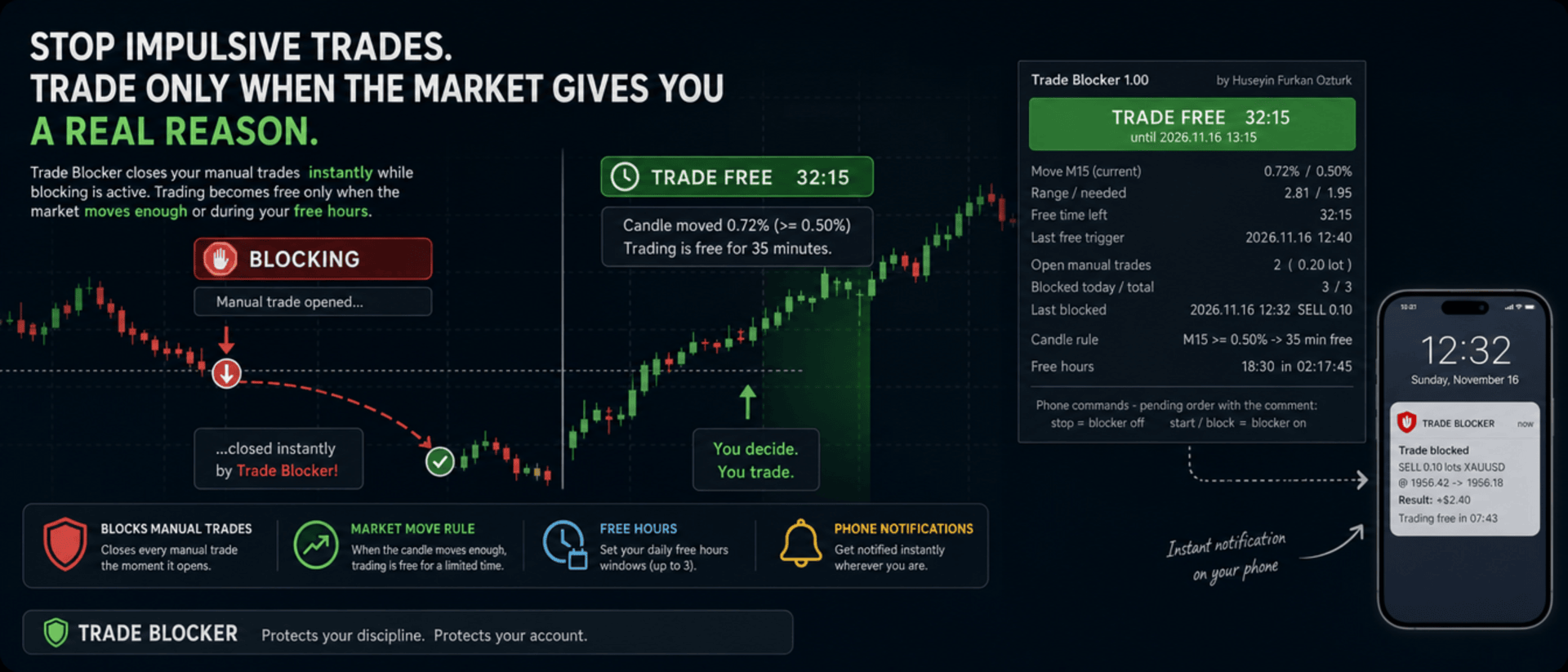
We built Trade Blocker for traders who know that their worst trades are the ones they open out of boredom, revenge or impatience. It watches your chart's symbol and closes every manual trade the moment it opens, unless the market has given you a real reason to trade. A notification on your phone tells you right away that the trade was blocked.

Trading becomes free only when the market moves enough, or during the hours you choose, and then only for a limited time. Trade Blocker never opens a trade: it only closes your own manual trades, and trades of other Expert Advisors are never touched.

How does it work?

Attach Trade Blocker to the chart of the symbol you want to protect. While it is blocking, every manual position on that symbol is closed at once, and manual pending orders are deleted so they cannot open a trade later. It does not matter where the trade comes from: the desktop terminal, one-click trading or the MetaTrader mobile app. A trade without a magic number is a manual trade.

Trading becomes free in two ways, and each of them can be turned on or off:

  • Candle move: when a candle of the timeframe you choose (M1 to D1, default M15) has moved at least the chosen percent (default 0.5%, measured as the candle's high-low range divided by its open), trading is free for the chosen number of minutes (default 35). Each candle frees trading only once. If a new candle reaches the move while trading is still free, the countdown starts again and you get a notification with the new end time.
  • Free hours: up to three daily windows in server time, for example 15:00 for 90 minutes, 18:30 for 60 minutes and 22:00 for 90 minutes. Each window can be switched on or off on its own. This rule is off by default.

While one of your manual trades is open, nothing is blocked, so you can manage your position, add to it or hedge it. When the free time ends with trades still open, blocking starts again as soon as they are closed.

Control it from your phone

You don't have to be at your computer to turn the blocker off. Place a pending order on the symbol with the comment stop and the blocker turns off; the comment start or block turns it back on. The command order is deleted immediately and a notification confirms the new state. There is deliberately no button on the panel to turn it off: a little effort before breaking your own rules is the whole idea.

Notifications

Trade Blocker sends a push notification to your phone when a trade is blocked (with its entry, close price, approximate result and what frees trading next), when trading becomes free and until when, when the free time is extended, when free hours begin and when the free time is over. Turning the blocker on or off and deleted pending orders are reported too. Notifications are queued to respect MetaTrader's sending limit.

If a trade cannot be closed, for example because Algo Trading is off, you get one notification that it was opened in blocking time. It is not tried again: the trade stays open and counts as an open trade.

What you see on the chart

A compact panel with a large status banner shows the state at a glance: BLOCKING, TRADE FREE with a live countdown and its start and end time, NOT BLOCKING while your manual trades are open, BLOCKER OFF or ALGO TRADING OFF. Below it you see the move of the current candle against the move needed, the free time left, the last free trigger, your open manual trades with lots and profit, the trades blocked today and in total, the last blocked trade, the candle rule, and the current or next free hours window with a countdown. The panel can be dragged anywhere on the chart and keeps its place.

It does not forget

The state is kept in the terminal's global variables: on or off, the free time with its start and end, and the counters. If you restart Trade Blocker or the terminal while trading is free, it stays free until the same end time. When you attach it for the first time, trades that are already open are left alone. A manual trade opened while Trade Blocker was not running is closed as soon as it starts again, if blocking is active at that moment.

Inputs

  • Use the candle move rule: default true
  • Candle timeframe: 1M, 5M, 15M, 30M, 1H, 4H or 1D; default 15M
  • Move that frees trading: the candle's high-low range in % of its open; default 0.5
  • Candle shift: default 0, the current candle
  • Minutes trading stays free after the move: default 35
  • Use the free hours: default false
  • Free hours 1, 2 and 3: on / off, start time (hh:mm, server time) and minutes free; defaults 15:00 for 90, 18:30 for 60 and 22:00 for 90 minutes
  • Max slippage when closing: default 50 points
  • Phone notifications: default true
  • Also notify when the free time ends: default true
  • Show panel, Panel X / Y: default true, 10 and 30 pixels

Good to know

Trade Blocker works on the symbol of its chart; attach it to one chart for each symbol you want to protect. Algo Trading must be on, otherwise trades cannot be closed and the panel shows ALGO TRADING OFF. Free hours use the trade server's time, the same time the chart shows.

It can only act while the terminal is running. To block trades you open on your phone while your computer is off, run it on a VPS. Phone notifications need your MetaQuotes ID in Tools → Options → Notifications. In the Strategy Tester it works on ticks and writes the notifications to the journal.


About the Developer

A software engineer with more than 10 years of experience, the developer has focused on building algorithmic trading robots for over 3 years, driven by a passion for finance and mathematics.
The algorithms and strategies are designed not with a "vibe coder" approach based on ready-made solutions, but from the perspective of a professional software engineer — prioritizing performance, reliability and sustainability.
All material and non-material gains are reinvested into new R&D to continuously improve the products.
Rather than offering the robots purely for commercial gain, the developer believes that sharing them as freely as possible reaches a wider audience — and that the feedback gathered this way makes the products evolve much faster.
Every piece of user feedback and every suggestion is treated as the most valuable part of the product development process.

If you like my robots and want to stay informed about new features, join my channel: ALGO By H. Furkan OZTURK
Yazarın diğer ürünleri
VolumeHedger
OMG FZE LLC
4.81 (52)
VolumeHedger EA [ My Channel ]   ,  [ Set Files ]   ,   [ Blog ]   , [ AI Usage ]  ,  [ PDF Guide ] Önerilen hesaplar: Yüksek kaldıraçlı Standart, ECN, Raw; Cent; Propfirm (FTMO etc.) Bu EA’nın geliştiricisi, diğer robotlarının kalitesiyle kendi profesyonelliğini kanıtlamıştır. Volume Hedger EA ile  Custom Indicator ile giriş statejisi belirleme özelliği sayesinde daha fazla EA satın almana ihtiyacın kalmayacak! Bu EA, yüksek volatiliteye sahip piyasalarda Martingale stratejisi ile hedging ve
HFT Spike EA
OMG FZE LLC
5 (3)
[ My Channel ] HFT Spike EA Recommended accounts: High leverage Standard, ECN, Raw; Cent; Propfirm (FTMO FundedNext etc.) Strategies: Quantum Physics Principles, HFT Spike (High-Frequency Trading), level trading, neural trading, No Martingale, No Grid, single-position trend trading. XAUUSD tick data üzerine tasarlanmış, tam otomatik ve risk-yönetimli bir EAdır. Time-Frame seçmeniz gerekmez. Default değerler test edilmiş konfigürasyonla aynı. Gold için tasarlanmıştır. Ani volatilite patlama
Diagonal Resistance EA
OMG FZE LLC
4.76 (21)
[ LIVE SIGNALS ]  ,  [ My Channel ]   , [ ABOUT ME ]  ,   [ My Products ]   Recommended accounts: High leverage and Standard, ECN, Raw, Cent, Propfirm Huseyin Furkan Öztürk tarafından geliştirilen yeni bir EA, kullanımı kolay, tak çalıştır şeklinde çalışır. Bakiyenizin ve kaldıracın yeterli olduğuna emin olun. Kullanmadan önce backtest yapmanız önerilir.  Diagonal Resistance EA Çalışma mantığını sliders resimlerinde anlatmaya çalıştım.  EA'nın temel mantığı üç adımda özetlenebilir: Sert hare
FREE
HedgingMartingale
OMG FZE LLC
4.72 (137)
HedgingMartingale EA [ My Channel ]  ,   [ My Products ]  ,  [ Blog ]     ,  [ Public Chat ] Önerilen hesaplar: Yüksek kaldıraçlı Standart, ECN, Raw; Cent; Propfirm Bu EA, Martingale stratejisi ile hedging ve akıllı risk yönetimini birleştiren bir işlem algoritmasıdır. Trend yönünü tahmin edemediğiniz güçlü piyasa koşullarında istikrarlı performans gösterecek şekilde tasarlanmıştır. Uygun bir set dosyası kullanıldığında, her enstrümanda çalışabilir. Optimizasyon sonuçları, Fx, Gold, Stock ve Cr
FREE
SwapSlap
OMG FZE LLC
5 (7)
[ LIVE SIGNALS ]  ,  [ My Channel ]  , [ BLOG ]  ,  [ Public Chat ] SWAPSLAP EA Önerilen hesaplar: Herhangi biri, Standart, ECN, Raw; Cent; Propfirm (FTMO vb.) Huseyin Furkan Öztürk tarafından geliştirilen yeni bir EA; tak-çalıştır yapısıyla kullanımı çok kolay, yaratıcı ama bir o kadar da güçlü. SwapSlap EA'nın çalışma prensibi kısaca carry trade yöntemiyle kâr elde etmeye dayanır.  Bu yöntem, enstrümanlar arasındaki faiz farkları nedeniyle yatırımcıların swap zamanında taraf değiştirme eğili
GridTeam EA
OMG FZE LLC
5 (19)
GridTeam EA - Kendi grid robot'unu yarat [ Set File ]  ,  [ My Channel ]   ,   [ LIVE SIGNAL ]     ,  [ Public Chat ] Tüm indikatörler tek bir EA'de — istediğinizi seçin, optimize edin ve aynı anda birden fazla paritede çalıştırın. Tüm kontrolü ele alın. Risk yönetiminizi kendiniz ayarlayın. Default değerler olarak RSI indicatoru kullanılıyor ve optimizasyon sonuçlarına göre ayarlandı. En iyi değer değildir. Daha iyisini bulabileceğinize inanıyorum. Bu EA'yı güzel yapan özelliklerden birisi ise
FREE
[ My Channel ]   ,   [ My Products ]  ,  [ ABOUT ME ]   OMG Market Heat — Çoklu Sembol Volatilite ve Kırılım Tarayıcısı OMG Market Heat, aynı anda 50 sembole kadar tarama yapan ve her piyasanın şu anda M15, H1, H4 veya D1 zaman diliminde ne kadar "sıcak" olduğunu gösteren bir panel göstergesidir. Hangi sembollerin güçlü hareket ettiğini, hangilerinin sakin bir dönemin ardından uyandığını ve hangilerinin uykuda olduğunu tek bakışta görürsünüz; böylece zamanınızı yalnızca işlem yapmaya değer piya
[ Kanalım ] , [ Ürünlerim ] Lorentzian Distance Classifier, Approximate Nearest Neighbors (ANN) çerçevesi içinde temel metrik olarak Lorentz mesafesini kullanan, makine öğrenimi tabanlı bir trading indikatörüdür. Geleneksel Öklid mesafesine dayanmak yerine, finansal fiyat hareketini “bozulmuş” bir fiyat-zaman uzayında gerçekleşiyormuş gibi ele alır (tıpkı görelilik teorisinde büyük kütlelerin uzay-zamanı bükmesi gibi). Bu yaklaşım, indikatörü piyasa gürültüsüne, aykırı değerlere ve olay kaynaklı
[ LIVE SIGNALS ]  ,  [ My Channel ]   , [ ABOUT ME ]  ,   [ My Products ]   Recommended accounts: High leverage and Standard, ECN, Raw, Cent, Propfirm Huseyin Furkan Öztürk tarafından geliştirilen yeni bir EA, kullanımı kolay, tak çalıştır şeklinde çalışır. Bakiyenizin ve kaldıracın yeterli olduğuna emin olun. Kullanmadan önce backtest yapmanız önerilir.  Diagonal Resistance EA Çalışma mantığını sliders resimlerinde anlatmaya çalıştım.  EA'nın temel mantığı üç adımda özetlenebilir: Sert hare
FREE
HedgingMartingale MT4
OMG FZE LLC
4.57 (21)
HedgingMartingale EA [ Set Files ]   ,   [ My Channel ]  ,   [ My Products ]  ,   [ Blog ] Önerilen hesaplar: Yüksek kaldıraçlı Standart, ECN, Raw; Cent; Propfirm Bu EA, Martingale stratejisi ile hedging ve akıllı risk yönetimini birleştiren bir işlem algoritmasıdır. Trend yönünü tahmin edemediğiniz güçlü piyasa koşullarında istikrarlı performans gösterecek şekilde tasarlanmıştır. Uygun bir set dosyası kullanıldığında, her enstrümanda çalışabilir. Optimizasyon sonuçları, Fx, Gold, Stock ve Cryp
FREE
[ My Channel ]   ,   [ My Products ]  ,  [ ABOUT ME ]   DiagonalResistanceIndi — Ters Yön Sinyal İndikatörü DiagonalResistanceIndi, VolumeHedger EA için özel olarak geliştirilmiştir. Gold üzerinde M1 timeframe ile kullanılmaktadır. EA dışında manual trading için kullanıma uygundur. Fiyatın kısa bir zaman penceresi içinde olağan dışı büyüklükte yüzdesel bir hareket yapmasını tespit eden ve bu hareketin tersine olası dönüş noktalarını grafik üzerinde işaretleyen bir sinyal indikatörüdür. Nasıl ç
FREE
[ My Channel ]   ,   [ My Products ]  ,  [ ABOUT ME ]   My Trading Skills — Train Yourself My Trading Skills 'i, manuel işlem becerilerinizi geçmiş piyasa verileri üzerinde test edip geliştirebilmeniz için hazırladık. Gösterge, grafiğinizdeki sembolün geçmişini seçtiğiniz başlangıç tarihinden itibaren mum mum yeniden oynatır ve replay'in geldiği noktadan sonrası gizli kalır. Tıpkı canlı bir grafikte olduğu gibi, bir sonraki mumun ne getireceğini asla bilemezsiniz. Kâr al ve zarar durdur seviyel
FREE
[ My Channel ] , [ My Products ] Bu indikatör, genel trend yukarı ya da aşağı hareket ederken, anlık bir baskı sonucu barın trendinin değiştiği noktaları gösterir. İndikatörün gösterdiği ok, bir önceki barın belirli kriterleri karşılaması durumunda çizilir. Stratejinizi oluştururken, arka arkaya gelen 3-4 oku potansiyel bir kırılma sinyali olarak yorumlayabilirsiniz. Örneğin, 4. okun geldiğini gördüğünüzde işlem açmayı düşünebilirsiniz. Bu, piyasadaki önemli hareketleri öngörmek ve ticaret kar
FREE
[ My Products ]   ,   [ My Channel ] OMG Trading Panel Artık işlem panelinizi doğrudan telefonunuzdan kontrol edebilirsiniz. OMG Trading Tool'u MQL VPS'nize yükleyin ve panel 7/24 çalışırken siz mobil MetaTrader 5 uygulaması üzerinden konforlu bir şekilde işlem yapın. Ayrıca iki kullanışlı strateji ekledim: Akıllı Teminat Koruması (Smart Margin Protection) ve Grid Stratejisi. Fiyat düştüğünde tetiklenen bir alarm da ayarlayabilirsiniz. Temel Özellikler Mobil MT5 Üzerinden Uzaktan Kontrol Akıllı
FREE
[ My Channel ]   ,   [ My Products ]  ,  [ ABOUT ME ]   DiagonalResistanceIndi — Ters Yön Sinyal İndikatörü DiagonalResistanceIndi, VolumeHedger EA için özel olarak geliştirilmiştir. Gold üzerinde M1 timeframe ile kullanılmaktadır. EA dışında manual trading için kullanıma uygundur. Fiyatın kısa bir zaman penceresi içinde olağan dışı büyüklükte yüzdesel bir hareket yapmasını tespit eden ve bu hareketin tersine olası dönüş noktalarını grafik üzerinde işaretleyen bir sinyal indikatörüdür. Nasıl ç
FREE
Filtrele:
Değerlendirme yok
Değerlendirmeye yanıt