Trade Blocker

[ My Channel ] , [ My Products ] , [ ABOUT ME ] 

Trade Blocker — Stop Impulsive Trading

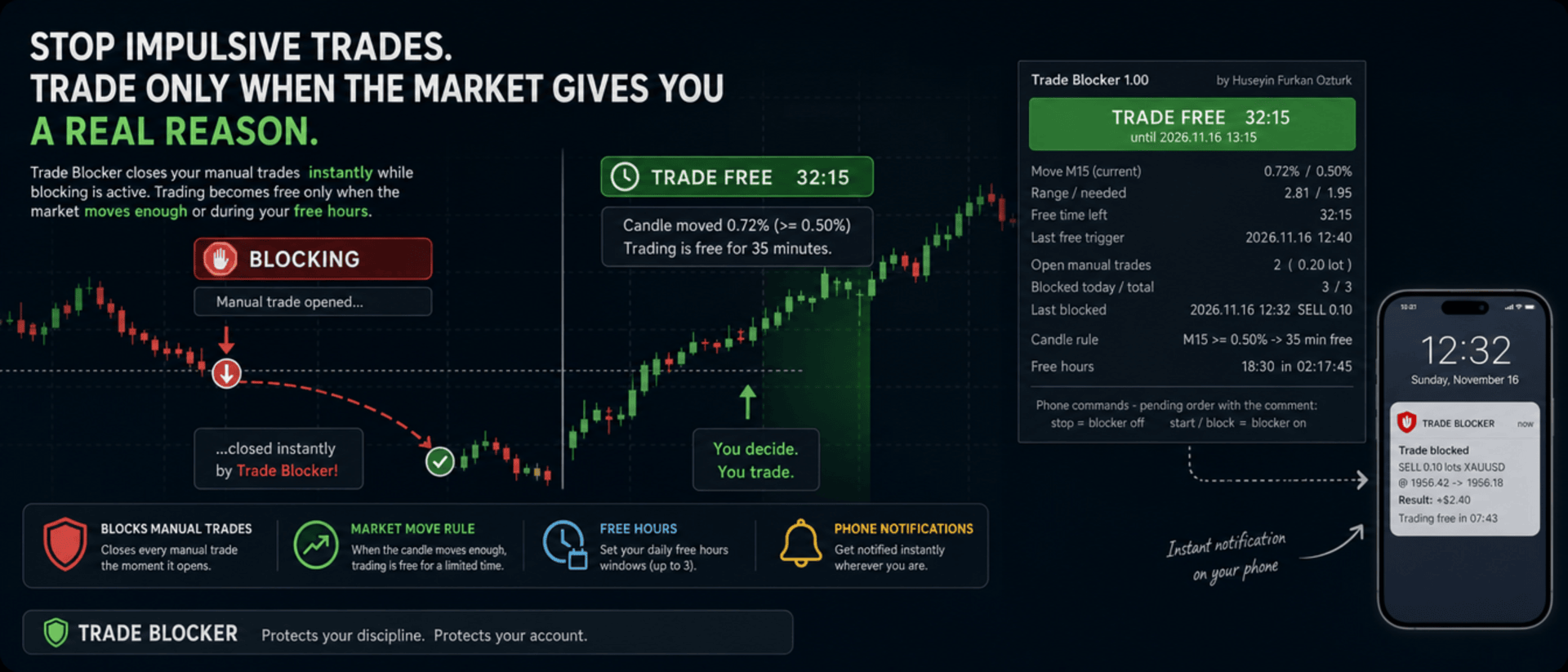
We built Trade Blocker for traders who know that their worst trades are the ones they open out of boredom, revenge or impatience. It watches your chart's symbol and closes every manual trade the moment it opens, unless the market has given you a real reason to trade. A notification on your phone tells you right away that the trade was blocked.

Trading becomes free only when the market moves enough, or during the hours you choose, and then only for a limited time. Trade Blocker never opens a trade: it only closes your own manual trades, and trades of other Expert Advisors are never touched.

How does it work?

Attach Trade Blocker to the chart of the symbol you want to protect. While it is blocking, every manual position on that symbol is closed at once, and manual pending orders are deleted so they cannot open a trade later. It does not matter where the trade comes from: the desktop terminal, one-click trading or the MetaTrader mobile app. A trade without a magic number is a manual trade.

Trading becomes free in two ways, and each of them can be turned on or off:

  • Candle move: when a candle of the timeframe you choose (M1 to D1, default M15) has moved at least the chosen percent (default 0.5%, measured as the candle's high-low range divided by its open), trading is free for the chosen number of minutes (default 35). Each candle frees trading only once. If a new candle reaches the move while trading is still free, the countdown starts again and you get a notification with the new end time.
  • Free hours: up to three daily windows in server time, for example 15:00 for 90 minutes, 18:30 for 60 minutes and 22:00 for 90 minutes. Each window can be switched on or off on its own. This rule is off by default.

While one of your manual trades is open, nothing is blocked, so you can manage your position, add to it or hedge it. When the free time ends with trades still open, blocking starts again as soon as they are closed.

Control it from your phone

You don't have to be at your computer to turn the blocker off. Place a pending order on the symbol with the comment stop and the blocker turns off; the comment start or block turns it back on. The command order is deleted immediately and a notification confirms the new state. There is deliberately no button on the panel to turn it off: a little effort before breaking your own rules is the whole idea.

Notifications

Trade Blocker sends a push notification to your phone when a trade is blocked (with its entry, close price, approximate result and what frees trading next), when trading becomes free and until when, when the free time is extended, when free hours begin and when the free time is over. Turning the blocker on or off and deleted pending orders are reported too. Notifications are queued to respect MetaTrader's sending limit.

If a trade cannot be closed, for example because Algo Trading is off, you get one notification that it was opened in blocking time. It is not tried again: the trade stays open and counts as an open trade.

What you see on the chart

A compact panel with a large status banner shows the state at a glance: BLOCKING, TRADE FREE with a live countdown and its start and end time, NOT BLOCKING while your manual trades are open, BLOCKER OFF or ALGO TRADING OFF. Below it you see the move of the current candle against the move needed, the free time left, the last free trigger, your open manual trades with lots and profit, the trades blocked today and in total, the last blocked trade, the candle rule, and the current or next free hours window with a countdown. The panel can be dragged anywhere on the chart and keeps its place.

It does not forget

The state is kept in the terminal's global variables: on or off, the free time with its start and end, and the counters. If you restart Trade Blocker or the terminal while trading is free, it stays free until the same end time. When you attach it for the first time, trades that are already open are left alone. A manual trade opened while Trade Blocker was not running is closed as soon as it starts again, if blocking is active at that moment.

Inputs

  • Use the candle move rule: default true
  • Candle timeframe: 1M, 5M, 15M, 30M, 1H, 4H or 1D; default 15M
  • Move that frees trading: the candle's high-low range in % of its open; default 0.5
  • Candle shift: default 0, the current candle
  • Minutes trading stays free after the move: default 35
  • Use the free hours: default false
  • Free hours 1, 2 and 3: on / off, start time (hh:mm, server time) and minutes free; defaults 15:00 for 90, 18:30 for 60 and 22:00 for 90 minutes
  • Max slippage when closing: default 50 points
  • Phone notifications: default true
  • Also notify when the free time ends: default true
  • Show panel, Panel X / Y: default true, 10 and 30 pixels

Good to know

Trade Blocker works on the symbol of its chart; attach it to one chart for each symbol you want to protect. Algo Trading must be on, otherwise trades cannot be closed and the panel shows ALGO TRADING OFF. Free hours use the trade server's time, the same time the chart shows.

It can only act while the terminal is running. To block trades you open on your phone while your computer is off, run it on a VPS. Phone notifications need your MetaQuotes ID in Tools → Options → Notifications. In the Strategy Tester it works on ticks and writes the notifications to the journal.


About the Developer

A software engineer with more than 10 years of experience, the developer has focused on building algorithmic trading robots for over 3 years, driven by a passion for finance and mathematics.
The algorithms and strategies are designed not with a "vibe coder" approach based on ready-made solutions, but from the perspective of a professional software engineer — prioritizing performance, reliability and sustainability.
All material and non-material gains are reinvested into new R&D to continuously improve the products.
Rather than offering the robots purely for commercial gain, the developer believes that sharing them as freely as possible reaches a wider audience — and that the feedback gathered this way makes the products evolve much faster.
Every piece of user feedback and every suggestion is treated as the most valuable part of the product development process.

If you like my robots and want to stay informed about new features, join my channel: ALGO By H. Furkan OZTURK
Mais do autor
VolumeHedger
OMG FZE LLC
4.81 (52)
VolumeHedger EA [ Meu Canal ]   ,  [ Arquivos Set ]  ,   [ Blog ]   , [ Uso de IA ]  ,  [ PDF Guide ] Contas recomendadas: Alta alavancagem Standard, ECN, Raw; Cent; Prop firm (FTMO etc.) O desenvolvedor deste EA comprovou seu profissionalismo pela qualidade de seus outros robôs. Com o Volume Hedger EA  Graças à capacidade de definir uma estratégia de entrada usando um Indicador Personalizado, você não precisará mais comprar EAs adicionais! Este EA é um algoritmo de trading avançado que combina
HFT Spike EA
OMG FZE LLC
5 (3)
[ My Channel ] HFT Spike EA Contas recomendadas: Standard de alta alavancagem, ECN, Raw; Cent; Propfirm (FTMO FundedNext etc.) Estratégias: Princípios de Física Quântica, HFT Spike (Trading de Alta Frequência), trading por níveis, trading neural, sem Martingale, sem Grid, trading de tendência com posição única. Um EA totalmente automático e com gestão de risco, projetado sobre os dados tick de XAUUSD. Não precisa selecionar um Time-Frame. Os valores padrão coincidem com a configuração test
Diagonal Resistance EA
OMG FZE LLC
4.76 (21)
[ LIVE SIGNALS ]  ,  [ My Channel ]  ,  [ ABOUT ME ]  ,  [ My Products ] Contas recomendadas: High leverage e Standard, ECN, Raw, Cent, Propfirm Um novo EA desenvolvido por Huseyin Furkan Ozturk — fácil de usar, plug & play. Certifique-se de que o seu saldo e alavancagem são suficientes. Recomenda-se fazer um backtest antes de usar. Diagonal Resistance EA Tentei explicar a lógica de funcionamento nas imagens do slider. A lógica central do EA pode ser resumida em três passos: Capte o movimento
FREE
HedgingMartingale
OMG FZE LLC
4.72 (137)
HedgingMartingale EA [ My Channel ]  ,   [ My Products ]  ,  [ Blog ]     ,  [ Public Chat ] Contas recomendadas: Padrão de alta alavancagem, ECN, Raw; Cent; Propfirm Este EA é um algoritmo de trading que combina hedge e gestão inteligente de risco com a estratégia Martingale. Foi projetado para fornecer desempenho estável em condições de mercado fortes onde você não consegue prever a direção da tendência. Ao usar um arquivo de configuração apropriado, pode funcionar em qualquer instrumento. Os
FREE
SwapSlap
OMG FZE LLC
5 (7)
[ LIVE SIGNALS ]  ,  [ My Channel ]  , [ BLOG ]  ,  [ EA Channel ] SWAPSLAP EA Contas recomendadas: Qualquer, Standard, ECN, Raw; Cent; Propfirm (FTMO etc.) Um novo EA desenvolvido por Huseyin Furkan Öztürk, muito fácil de usar graças à sua estrutura plug-and-play, criativo e ao mesmo tempo muito poderoso. O princípio de funcionamento do SwapSlap EA baseia-se, em resumo, em gerar lucro usando o método de carry trade.  Esse método é uma oportunidade de negociação que surge porque os investidore
GridTeam EA
OMG FZE LLC
5 (19)
GridTeam EA - Crie seu próprio robô grid [ Set File ]  ,   [ My Channel ]   ,   [ LIVE SIGNAL ]     ,  [ Public Chat ] Todos os indicadores em um único EA — escolha o que quiser, otimize e execute em múltiplos pares simultaneamente. Assuma o controle total. Configure seu gerenciamento de risco você mesmo. Como valores padrão, o indicador RSI é usado e foi ajustado de acordo com os resultados de otimização. Não é o melhor valor. Acredito que você pode encontrar um melhor. Uma das características
FREE
[ My Channel ]   ,   [ My Products ]  ,  [ ABOUT ME ]   OMG Market Heat — Scanner multissímbolo de volatilidade e rompimentos O OMG Market Heat é um indicador em formato de painel que analisa até 50 símbolos ao mesmo tempo e mostra o quão "quente" cada mercado está neste momento no timeframe M15, H1, H4 ou D1 . Com um olhar você vê quais símbolos estão se movendo com força, quais estão despertando após um período de calma e quais estão adormecidos, para que você dedique seu tempo apenas aos mer
[ Meu canal ] , [ Meus produtos ] Lorentzian Distance Classifier é um indicador de trading baseado em machine learning que utiliza a distância de Lorentz como métrica principal dentro do framework de Vizinhos Mais Próximos Aproximados (ANN). Em vez de depender da distância euclidiana tradicional, ele trata a ação do preço financeiro como se ocorresse em um espaço “distorcido” de preço-tempo (semelhante à forma como objetos massivos curvam o espaço-tempo na relatividade). Essa abordagem torna o c
[ LIVE SIGNALS ]  ,  [ My Channel ]  ,  [ ABOUT ME ]  ,  [ My Products ] Contas recomendadas: High leverage e Standard, ECN, Raw, Cent, Propfirm Um novo EA desenvolvido por Huseyin Furkan Ozturk — fácil de usar, plug & play. Certifique-se de que o seu saldo e alavancagem são suficientes. Recomenda-se fazer um backtest antes de usar. Diagonal Resistance EA Tentei explicar a lógica de funcionamento nas imagens do slider. A lógica central do EA pode ser resumida em três passos: Capte o movimento
FREE
HedgingMartingale MT4
OMG FZE LLC
4.57 (21)
HedgingMartingale EA [ Set Files ]   ,   [ My Channel ]  ,   [ My Products ]  ,   [ Blog ] Contas recomendadas: Padrão de alta alavancagem, ECN, Raw; Cent; Propfirm Este EA é um algoritmo de trading que combina hedge e gestão inteligente de risco com a estratégia Martingale. Foi projetado para fornecer desempenho estável em condições de mercado fortes onde você não consegue prever a direção da tendência. Ao usar um arquivo de configuração apropriado, pode funcionar em qualquer instrumento. Os r
FREE
[ My Channel ]   ,   [ My Products ]  ,  [ ABOUT ME ]   DiagonalResistanceIndi — Indicador de sinais contra a tendência O DiagonalResistanceIndi foi desenvolvido especificamente para o VolumeHedger EA . É utilizado em Gold no timeframe M1. Também é adequado para trading manual sem o EA. É um indicador de sinais que detecta movimentos percentuais de preço incomumente grandes dentro de uma janela de tempo curta e marca no gráfico os possíveis pontos de reversão contra esse movimento. Como funcio
FREE
[ My Channel ]   ,   [ My Products ]  ,  [ ABOUT ME ]   My Trading Skills — Train Yourself Criamos o My Trading Skills para que você possa testar e aprimorar suas habilidades de trading manual com dados históricos do mercado. Ele reproduz o histórico do ativo do seu gráfico candle a candle a partir da data inicial que você escolher, e tudo o que vem depois do ponto do replay fica oculto. Assim como em um gráfico ao vivo, você nunca sabe o que o próximo candle vai trazer. Você abre operações vir
FREE
[ Meu canal ] , [ Meus produtos ] Este indicador mostra os pontos onde a tendência da vela muda devido a uma pressão instantânea, enquanto a tendência geral se move para cima ou para baixo. A seta exibida pelo indicador é desenhada se a vela anterior atender a determinados critérios. Ao criar sua estratégia, você pode interpretar 3-4 setas consecutivas como um sinal potencial de rompimento. Por exemplo, ao ver a quarta seta, você pode considerar abrir uma operação. Isso fornece uma ferramenta
FREE
OMG Trading
OMG FZE LLC
5 (3)
[ Meus Produtos ] , [ Meu Canal ] OMG Trading Panel Agora você pode controlar seu painel de trading diretamente pelo telefone. Instale o OMG Trading Tool no seu MQL VPS e negocie confortavelmente pelo aplicativo móvel MetaTrader 5 enquanto o painel funciona 24/7. Também adicionei duas estratégias úteis: Smart Margin Protection e Grid Strategy. Você também pode configurar um alerta quando o preço cair. Principais recursos Controle remoto via MT5 móvel Controle sua ferramenta de trading de qua
FREE
[ My Channel ]   ,   [ My Products ]  ,  [ ABOUT ME ]   DiagonalResistanceIndi — Indicador de sinais contra a tendência O DiagonalResistanceIndi foi desenvolvido especificamente para o VolumeHedger EA . É utilizado em Gold no timeframe M1. Também é adequado para trading manual sem o EA. É um indicador de sinais que detecta movimentos percentuais de preço incomumente grandes dentro de uma janela de tempo curta e marca no gráfico os possíveis pontos de reversão contra esse movimento. Como funcio
FREE
Filtro:
Sem comentários
Responder ao comentário