Trade Blocker

[ My Channel ] , [ My Products ] , [ ABOUT ME ] 

Trade Blocker — Stop Impulsive Trading

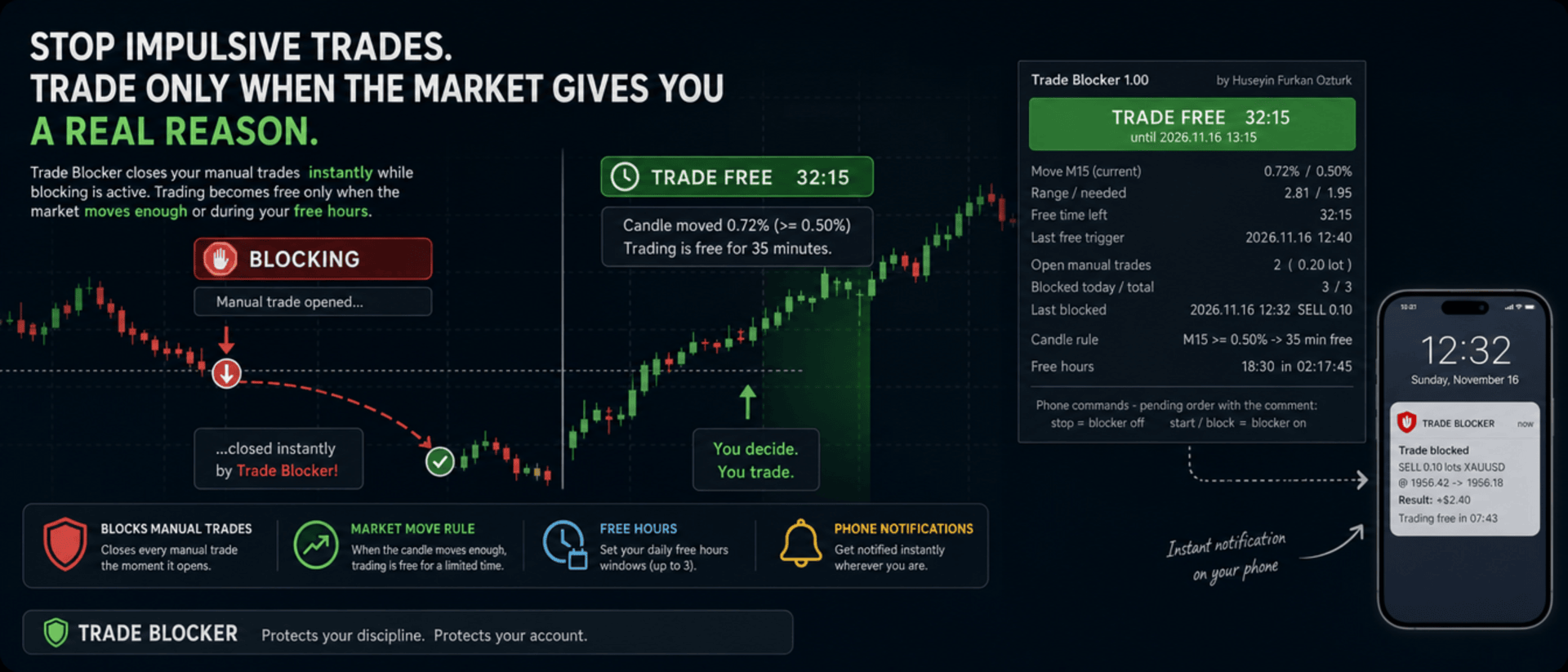
We built Trade Blocker for traders who know that their worst trades are the ones they open out of boredom, revenge or impatience. It watches your chart's symbol and closes every manual trade the moment it opens, unless the market has given you a real reason to trade. A notification on your phone tells you right away that the trade was blocked.

Trading becomes free only when the market moves enough, or during the hours you choose, and then only for a limited time. Trade Blocker never opens a trade: it only closes your own manual trades, and trades of other Expert Advisors are never touched.

How does it work?

Attach Trade Blocker to the chart of the symbol you want to protect. While it is blocking, every manual position on that symbol is closed at once, and manual pending orders are deleted so they cannot open a trade later. It does not matter where the trade comes from: the desktop terminal, one-click trading or the MetaTrader mobile app. A trade without a magic number is a manual trade.

Trading becomes free in two ways, and each of them can be turned on or off:

  • Candle move: when a candle of the timeframe you choose (M1 to D1, default M15) has moved at least the chosen percent (default 0.5%, measured as the candle's high-low range divided by its open), trading is free for the chosen number of minutes (default 35). Each candle frees trading only once. If a new candle reaches the move while trading is still free, the countdown starts again and you get a notification with the new end time.
  • Free hours: up to three daily windows in server time, for example 15:00 for 90 minutes, 18:30 for 60 minutes and 22:00 for 90 minutes. Each window can be switched on or off on its own. This rule is off by default.

While one of your manual trades is open, nothing is blocked, so you can manage your position, add to it or hedge it. When the free time ends with trades still open, blocking starts again as soon as they are closed.

Control it from your phone

You don't have to be at your computer to turn the blocker off. Place a pending order on the symbol with the comment stop and the blocker turns off; the comment start or block turns it back on. The command order is deleted immediately and a notification confirms the new state. There is deliberately no button on the panel to turn it off: a little effort before breaking your own rules is the whole idea.

Notifications

Trade Blocker sends a push notification to your phone when a trade is blocked (with its entry, close price, approximate result and what frees trading next), when trading becomes free and until when, when the free time is extended, when free hours begin and when the free time is over. Turning the blocker on or off and deleted pending orders are reported too. Notifications are queued to respect MetaTrader's sending limit.

If a trade cannot be closed, for example because Algo Trading is off, you get one notification that it was opened in blocking time. It is not tried again: the trade stays open and counts as an open trade.

What you see on the chart

A compact panel with a large status banner shows the state at a glance: BLOCKING, TRADE FREE with a live countdown and its start and end time, NOT BLOCKING while your manual trades are open, BLOCKER OFF or ALGO TRADING OFF. Below it you see the move of the current candle against the move needed, the free time left, the last free trigger, your open manual trades with lots and profit, the trades blocked today and in total, the last blocked trade, the candle rule, and the current or next free hours window with a countdown. The panel can be dragged anywhere on the chart and keeps its place.

It does not forget

The state is kept in the terminal's global variables: on or off, the free time with its start and end, and the counters. If you restart Trade Blocker or the terminal while trading is free, it stays free until the same end time. When you attach it for the first time, trades that are already open are left alone. A manual trade opened while Trade Blocker was not running is closed as soon as it starts again, if blocking is active at that moment.

Inputs

  • Use the candle move rule: default true
  • Candle timeframe: 1M, 5M, 15M, 30M, 1H, 4H or 1D; default 15M
  • Move that frees trading: the candle's high-low range in % of its open; default 0.5
  • Candle shift: default 0, the current candle
  • Minutes trading stays free after the move: default 35
  • Use the free hours: default false
  • Free hours 1, 2 and 3: on / off, start time (hh:mm, server time) and minutes free; defaults 15:00 for 90, 18:30 for 60 and 22:00 for 90 minutes
  • Max slippage when closing: default 50 points
  • Phone notifications: default true
  • Also notify when the free time ends: default true
  • Show panel, Panel X / Y: default true, 10 and 30 pixels

Good to know

Trade Blocker works on the symbol of its chart; attach it to one chart for each symbol you want to protect. Algo Trading must be on, otherwise trades cannot be closed and the panel shows ALGO TRADING OFF. Free hours use the trade server's time, the same time the chart shows.

It can only act while the terminal is running. To block trades you open on your phone while your computer is off, run it on a VPS. Phone notifications need your MetaQuotes ID in Tools → Options → Notifications. In the Strategy Tester it works on ticks and writes the notifications to the journal.


About the Developer

A software engineer with more than 10 years of experience, the developer has focused on building algorithmic trading robots for over 3 years, driven by a passion for finance and mathematics.
The algorithms and strategies are designed not with a "vibe coder" approach based on ready-made solutions, but from the perspective of a professional software engineer — prioritizing performance, reliability and sustainability.
All material and non-material gains are reinvested into new R&D to continuously improve the products.
Rather than offering the robots purely for commercial gain, the developer believes that sharing them as freely as possible reaches a wider audience — and that the feedback gathered this way makes the products evolve much faster.
Every piece of user feedback and every suggestion is treated as the most valuable part of the product development process.

If you like my robots and want to stay informed about new features, join my channel: ALGO By H. Furkan OZTURK
作者のその他のプロダクト
VolumeHedger
OMG FZE LLC
4.81 (52)
VolumeHedger EA [ 私のチャンネル ]   ,  [ セットファイル ]  ,   [ ブログ ]   , [ AI利用 ]  ,  [ PDF Guide ] 推奨口座タイプ: 高レバレッジ Standard、ECN、Raw;Cent;プロップファーム(FTMO など) このEAの開発者は、他のロボットの品質を通じてそのプロフェッショナリズムを証明しています。 Volume Hedger EA により  カスタムインジケーターを使用してエントリー戦略を定義できるため、追加のEAを購入する必要はありません! このEAは、マーチンゲール戦略、ヘッジ、スマートリスク管理を組み合わせた高度なトレーディングアルゴリズムです。トレンド方向を予測するのではなく、出来高を分析し、インテリジェントな戦略でエントリーします。適切なセットファイルを使用することで、FX、ゴールド、株式、暗号資産などで効果的な結果を得ることができます。急激な値動きや安定したトレンドを持つ銘柄で特に高いパフォーマンスを発揮します。取引プロセスは、一定の出来高しきい値でトリガーされる双方向ループによって実行され
[ My Channel ] HFT Spike EA 推奨口座:ハイレバレッジの Standard、ECN、Raw;Cent;Propfirm(FTMO FundedNext 等) 戦略:量子物理学の原理、HFT Spike(高頻度取引)、レベル取引、ニューラル取引、マルチンゲールなし、グリッドなし、単一ポジションのトレンド取引。 XAUUSD のティックデータをもとに設計された、完全自動かつリスク管理付きの EA です。Time-Frame を選択する必要はありません。デフォルト値はテスト済みの構成と同じです。 ゴールド向けに設計されています。突発的なボラティリティの爆発("spike")を検出し、スパイク後の値動きがフィルターを通過したときに精密なタイミングでポジションを開きます。 平均ポジション保有時間は短く、そのため Scalping Trading として際立っています。  Symbol : GOLD/XAUUSD Digits : 2 digits & 3 digits Leverage : Any Broker : Any Min Balance : 25$
[ LIVE SIGNALS ]  ,  [ My Channel ]  ,  [ ABOUT ME ]  ,  [ My Products ] 推奨口座: High leverage および Standard、ECN、Raw、Cent、Propfirm Huseyin Furkan Ozturk が開発した新しい EA — 使いやすく、プラグ&プレイで動作します。残高とレバレッジが十分であることをご確認ください。使用前に backtest を行うことをお勧めします。 Diagonal Resistance EA 動作ロジックはスライダー画像で説明するよう努めました。 EA の基本ロジックは 3 つのステップに要約できます: 急激な動きを捉え、逆方向にエントリー: 直近 40 分または 80 分(ボラティリティに応じて)の間に価格が 1% 以上動いた場合 — 例えばゴールドが急騰した場合 — EA はその動きの 逆方向 に取引を開きます: 上昇なら SELL、下落なら BUY。基本的な前提はこうです: 短時間で起きた急激な動きは通常「過度に伸びすぎて」おり、一部が戻されます。つ
FREE
HedgingMartingale EA [ My Channel ]  ,   [ My Products ]  ,  [ Blog ]     ,  [ Public Chat ] 推奨口座:高レバレッジスタンダード、ECN、Raw;セント;プロップファーム このEAは、マルチンゲール戦略とヘッジングおよびインテリジェントリスク管理を組み合わせた取引アルゴリズムです。トレンド方向を予測できない強い市場状況で安定したパフォーマンスを提供するように設計されています。適切なセットファイルを使用すると、任意の金融商品で動作できます。最適化結果は、Fx、ゴールド、株式、暗号通貨などの金融商品で成功したパフォーマンスを提供しました。横ばいに動く傾向のある金融商品は悪夢です。サイクルで取引を開始します。サイクルを開始する最初の取引を正しいポジションで開くことで、リスクを排除できます。そのため、さまざまなサイクル開始エントリー戦略が開発され、開発が続けられています。 買いと売り両方向で系統的にポジションを開きます。 損失後、事前定義されたシーケンスに従ってロットサイズを増やします。 反対方向のポ
FREE
SwapSlap
OMG FZE LLC
5 (7)
[ LIVE SIGNALS ]  ,  [ My Channel ]  , [ BLOG ]  ,  [ Public Chat ] SWAPSLAP EA 推奨口座:すべて、Standard、ECN、Raw;Cent;Propfirm(FTMOなど) Huseyin Furkan Öztürk によって開発された新しいEAです。プラグアンドプレイ構造で非常に使いやすく、独創的でありながら非常に強力です。 SwapSlap EA の動作原理は、簡単に言えばキャリートレード手法を用いて利益を生み出すことに基づいています。  この手法は、銘柄間の金利差により、投資家がスワップの時間帯にポジションの方向を切り替える傾向があることから生まれる取引機会です。通常、金利の高い側が選ばれます。 通貨に異常な価格変動が予想されない場合、投資家はほとんどの場合、金利の高い側に向けて取引します。この間、短期間で安く買って高く売ることで利益を得る機会が生じます。EA内にはいくつかのフィルターが存在しますが、シンプルさを保つために設定として追加していません。  通貨ペア:EURJPY 必要残高 最低
GridTeam EA - 独自のグリッドロボットを作成 [ Set File ]  ,  [ My Channel ]   ,   [ LIVE SIGNAL ]     ,  [ Public Chat ] すべてのインジケーターを1つのEAに — 好きなものを選択し、最適化して複数のペアで同時に実行。完全にコントロールを取る。リスク管理を自分で設定する。 デフォルト値としてRSIインジケーターが使用され、最適化結果に従って調整されました。これは最良の値ではありません。あなたはもっと良いものを見つけることができると信じています。 このEAを美しくする特徴の一つは、equity drawdownが下がったとき、1か月以内に回復することです。 もう一つのユーザーフレンドリーな機能が追加されました。出金のために何か月も待つ必要がありません。出金のためにequity drawdownの改善を待っている間、画面を常にチェックしないように、通知を送信します。例えば、equity drawdownが30%まで上昇し、出金できない場合、再び10%を下回ったときに出金できることを推奨する通知を送信
FREE
[ My Channel ]   ,   [ My Products ]  ,  [ ABOUT ME ]   OMG Market Heat — マルチシンボル対応 ボラティリティ&ブレイクアウトスキャナー OMG Market Heat は、最大 50 銘柄 を同時にスキャンし、 M15、H1、H4、D1 の時間足で各市場が今どれだけ「熱い」かを表示するダッシュボード型インジケーターです。どの銘柄が強く動いているのか、どの銘柄が 静かな期間を経て目覚めつつある のか、どの銘柄が眠っているのかがひと目でわかるため、取引する価値のある市場だけに時間を使えます。 FX、ゴールド、株価指数、暗号資産に対応し、裁量トレード向けに設計されています。 どのように機能するのか? インジケーターは銘柄ごとに、選択した時間足で直近のボラティリティ(直近 5 本のローソク足の平均真の値幅)と通常の水準(直近 100 本のローソク足の平均真の値幅)を比較します。結果は ボラティリティ % として表示されます。0% は銘柄がいつも通りのペースで動いていること、+50% は通常の 1.5 倍の速さで動いてい
[ 私のチャンネル ] , [ 私の製品 ] Lorentzian Distance Classifier は、機械学習に基づいたトレーディング指標で、近似最近傍法(ANN)フレームワークにおいてローレンツ距離を中核指標として使用します。従来のユークリッド距離に依存するのではなく、金融価格の動きを「歪んだ」価格・時間空間で発生しているかのように扱います(相対性理論において巨大な物体が時空を曲げるのと同様)。このアプローチにより、市場ノイズ、外れ値、イベント主導の歪み(FOMC、地政学的ショックなど)に対して非常に高い耐性を持ち、ユークリッド距離ベースの手法では捉えにくい過去の類似した価格変動を認識できるようになります。 本インジケーターは、確定足において明確な **リペイントなし** のシグナルを提供し、すぐに使用可能なバッファも備えています。 機能 RSI、WaveTrend、CCI20、ADX を組み合わせて使用できます。 5つのスロットが用意されており、デフォルトの組み合わせ(RSI + WT + CCI + ADX + RSI)はほとんどの市場向けに最適化されています。 フィ
[ LIVE SIGNALS ]  ,  [ My Channel ]  ,  [ ABOUT ME ]  ,  [ My Products ] 推奨口座: High leverage および Standard、ECN、Raw、Cent、Propfirm Huseyin Furkan Ozturk が開発した新しい EA — 使いやすく、プラグ&プレイで動作します。残高とレバレッジが十分であることをご確認ください。使用前に backtest を行うことをお勧めします。 Diagonal Resistance EA 動作ロジックはスライダー画像で説明するよう努めました。 EA の基本ロジックは 3 つのステップに要約できます: 急激な動きを捉え、逆方向にエントリー: 直近 40 分または 80 分(ボラティリティに応じて)の間に価格が 1% 以上動いた場合 — 例えばゴールドが急騰した場合 — EA はその動きの 逆方向 に取引を開きます: 上昇なら SELL、下落なら BUY。基本的な前提はこうです: 短時間で起きた急激な動きは通常「過度に伸びすぎて」おり、一部が戻されます。つ
FREE
HedgingMartingale EA [ Set Files ]   ,   [ My Channel ]  ,   [ My Products ]  ,   [ Blog ] 推奨口座:高レバレッジスタンダード、ECN、Raw;セント;プロップファーム このEAは、マルチンゲール戦略とヘッジングおよびインテリジェントリスク管理を組み合わせた取引アルゴリズムです。トレンド方向を予測できない強い市場状況で安定したパフォーマンスを提供するように設計されています。適切なセットファイルを使用すると、任意の金融商品で動作できます。最適化結果は、Fx、ゴールド、株式、暗号通貨などの金融商品で成功したパフォーマンスを提供しました。横ばいに動く傾向のある金融商品は悪夢です。サイクルで取引を開始します。サイクルを開始する最初の取引を正しいポジションで開くことで、リスクを排除できます。そのため、さまざまなサイクル開始エントリー戦略が開発され、開発が続けられています。 買いと売り両方向で系統的にポジションを開きます。 損失後、事前定義されたシーケンスに従ってロットサイズを増やします。 反対方向のポジシ
FREE
[ My Channel ]   ,   [ My Products ]  ,  [ ABOUT ME ]   DiagonalResistanceIndi — 逆張りシグナルインジケーター DiagonalResistanceIndi は VolumeHedger EA のために特別に開発されました。Gold の M1 タイムフレームで使用されています。EA なしでの裁量トレードにも適しています。 短い時間ウィンドウ内で発生した異常に大きな価格の変動率を検出し、その動きに対する反転の可能性があるポイントをチャート上にマークするシグナルインジケーターです。 仕組み 本インジケーターは M1 チャート上で過去方向の時間ウィンドウを常時スキャンします。このウィンドウの長さは固定ではなく、市場のボラティリティ(H1 ATR ベース)に応じて自動的に調整されます。静かな市場ではウィンドウが広がり、活発な市場では狭まります。価格がウィンドウ内の極値から測定した所定のパーセンテージしきい値を超えると、インジケーターはその動きを「行き過ぎ」と判断し、逆方向のシグナルを生成します: 赤い下向き矢印
FREE
[ My Channel ]   ,   [ My Products ]  ,  [ ABOUT ME ]   My Trading Skills — Train Yourself 裁量トレードのスキルを過去の相場データで試し、磨いていただけるよう、 My Trading Skills を開発しました。チャートの銘柄の履歴を、お好きな開始日からローソク足1本ずつ再生します。再生位置より先はすべて隠されたままです。ライブチャートと同じように、次のローソク足がどうなるかはわかりません。利確と損切りを設定して仮想の買い・売りトレードを行うと、パネルにトレードの成績(勝率、プロフィットファクター、ドローダウン)が表示されます。 ブローカーに注文が送信されることは一切ありません。これはトレーニングツールであり、自動売買ロボットではありません。 使い方 インジケーターをチャートに追加します(専用のチャートを用意するのがおすすめです)。リプレイ用のチャートがチャートウィンドウ全体を覆い、開始日より前のローソク足500本が判断材料として表示されます。パネルの緑色の START ボタン(または Spa
FREE
[ マイチャンネル ] , [ マイプロダクト ] このインジケーターは、全体的なトレンドが上昇または下降している間に、一時的な圧力によってローソク足のトレンドが変化するポイントを示します。 インジケーターに表示される矢印は、前のローソク足が特定の条件を満たすと描画されます。 戦略を構築する際、3〜4本連続の矢印を潜在的なブレイクアウトシグナルとして解釈できます。 例えば、4本目の矢印が表示された時に取引を開始することを検討できます。 これは、市場の重要な動きを予測し、取引判断を最適化するための信頼できるツールです。 簡単に言えば、このインジケーターはローソク足パターンに基づいてシグナルを生成します: ローソク足は bearish だが、上ヒゲが前のローソク足を超える。 ローソク足は bullish だが、下ヒゲが前のローソク足を下回る。 強いシグナル, シグナルが強いことを確認できます。 取引に入る前に「Data Window」でこれを確認すると、勝率が向上します。  このインジケーターを VolumeHedger EA と一緒に使用すると、非常に良い結果が得られ、場合によっては
FREE
[ マイプロダクト ] , [ マイチャンネル ] OMG Trading Panel スマートフォンからトレードパネルを直接操作できるようになりました。MQL VPSにOMG Trading Toolをインストールすれば、パネルを24時間稼働させながら、モバイル版MetaTrader 5アプリで快適にトレードできます。 また、2つの便利な戦略「スマート・マージン・プロテクション(証拠金保護)」と「グリッド戦略」も追加しました。価格下落時に作動するアラートを設定することも可能です。 主な機能 モバイル版MT5によるリモートコントロール スマートフォンを使って、どこからでもトレードツールの操作が可能です!注文のコメント欄に特別なコマンドを入力して待機注文(予約注文)を出すだけで、ツールが自動的に指示を実行します。柔軟性と機動力を求めるトレーダーに最適です。 コマンド例: omg auto- オートモードのON/OFF切り替え omg auto on - オートモードを有効化 omg auto off - オートモードを無効化 omg profit X - 利確(TP)金額をXドルに設定
FREE
[ My Channel ]   ,   [ My Products ]  ,  [ ABOUT ME ]   DiagonalResistanceIndi — 逆張りシグナルインジケーター DiagonalResistanceIndi は VolumeHedger EA のために特別に開発されました。Gold の M1 タイムフレームで使用されています。EA なしでの裁量トレードにも適しています。 短い時間ウィンドウ内で発生した異常に大きな価格の変動率を検出し、その動きに対する反転の可能性があるポイントをチャート上にマークするシグナルインジケーターです。 仕組み 本インジケーターは M1 チャート上で過去方向の時間ウィンドウを常時スキャンします。このウィンドウの長さは固定ではなく、市場のボラティリティ(H1 ATR ベース)に応じて自動的に調整されます。静かな市場ではウィンドウが広がり、活発な市場では狭まります。価格がウィンドウ内の極値から測定した所定のパーセンテージしきい値を超えると、インジケーターはその動きを「行き過ぎ」と判断し、逆方向のシグナルを生成します: 赤い下向き矢印
FREE
フィルタ:
レビューなし
レビューに返信