Trade Blocker

[ My Channel ] , [ My Products ] , [ ABOUT ME ] 

Trade Blocker — Stop Impulsive Trading

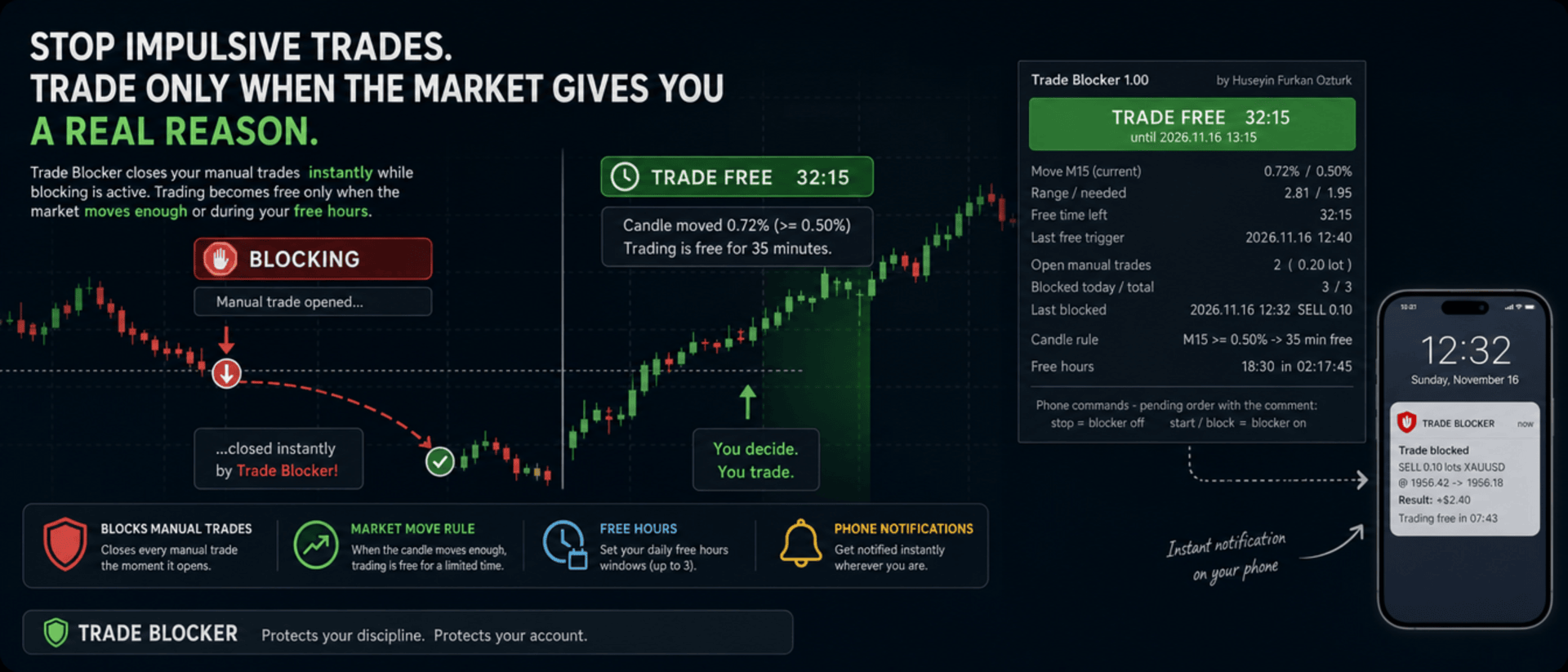
We built Trade Blocker for traders who know that their worst trades are the ones they open out of boredom, revenge or impatience. It watches your chart's symbol and closes every manual trade the moment it opens, unless the market has given you a real reason to trade. A notification on your phone tells you right away that the trade was blocked.

Trading becomes free only when the market moves enough, or during the hours you choose, and then only for a limited time. Trade Blocker never opens a trade: it only closes your own manual trades, and trades of other Expert Advisors are never touched.

How does it work?

Attach Trade Blocker to the chart of the symbol you want to protect. While it is blocking, every manual position on that symbol is closed at once, and manual pending orders are deleted so they cannot open a trade later. It does not matter where the trade comes from: the desktop terminal, one-click trading or the MetaTrader mobile app. A trade without a magic number is a manual trade.

Trading becomes free in two ways, and each of them can be turned on or off:

  • Candle move: when a candle of the timeframe you choose (M1 to D1, default M15) has moved at least the chosen percent (default 0.5%, measured as the candle's high-low range divided by its open), trading is free for the chosen number of minutes (default 35). Each candle frees trading only once. If a new candle reaches the move while trading is still free, the countdown starts again and you get a notification with the new end time.
  • Free hours: up to three daily windows in server time, for example 15:00 for 90 minutes, 18:30 for 60 minutes and 22:00 for 90 minutes. Each window can be switched on or off on its own. This rule is off by default.

While one of your manual trades is open, nothing is blocked, so you can manage your position, add to it or hedge it. When the free time ends with trades still open, blocking starts again as soon as they are closed.

Control it from your phone

You don't have to be at your computer to turn the blocker off. Place a pending order on the symbol with the comment stop and the blocker turns off; the comment start or block turns it back on. The command order is deleted immediately and a notification confirms the new state. There is deliberately no button on the panel to turn it off: a little effort before breaking your own rules is the whole idea.

Notifications

Trade Blocker sends a push notification to your phone when a trade is blocked (with its entry, close price, approximate result and what frees trading next), when trading becomes free and until when, when the free time is extended, when free hours begin and when the free time is over. Turning the blocker on or off and deleted pending orders are reported too. Notifications are queued to respect MetaTrader's sending limit.

If a trade cannot be closed, for example because Algo Trading is off, you get one notification that it was opened in blocking time. It is not tried again: the trade stays open and counts as an open trade.

What you see on the chart

A compact panel with a large status banner shows the state at a glance: BLOCKING, TRADE FREE with a live countdown and its start and end time, NOT BLOCKING while your manual trades are open, BLOCKER OFF or ALGO TRADING OFF. Below it you see the move of the current candle against the move needed, the free time left, the last free trigger, your open manual trades with lots and profit, the trades blocked today and in total, the last blocked trade, the candle rule, and the current or next free hours window with a countdown. The panel can be dragged anywhere on the chart and keeps its place.

It does not forget

The state is kept in the terminal's global variables: on or off, the free time with its start and end, and the counters. If you restart Trade Blocker or the terminal while trading is free, it stays free until the same end time. When you attach it for the first time, trades that are already open are left alone. A manual trade opened while Trade Blocker was not running is closed as soon as it starts again, if blocking is active at that moment.

Inputs

  • Use the candle move rule: default true
  • Candle timeframe: 1M, 5M, 15M, 30M, 1H, 4H or 1D; default 15M
  • Move that frees trading: the candle's high-low range in % of its open; default 0.5
  • Candle shift: default 0, the current candle
  • Minutes trading stays free after the move: default 35
  • Use the free hours: default false
  • Free hours 1, 2 and 3: on / off, start time (hh:mm, server time) and minutes free; defaults 15:00 for 90, 18:30 for 60 and 22:00 for 90 minutes
  • Max slippage when closing: default 50 points
  • Phone notifications: default true
  • Also notify when the free time ends: default true
  • Show panel, Panel X / Y: default true, 10 and 30 pixels

Good to know

Trade Blocker works on the symbol of its chart; attach it to one chart for each symbol you want to protect. Algo Trading must be on, otherwise trades cannot be closed and the panel shows ALGO TRADING OFF. Free hours use the trade server's time, the same time the chart shows.

It can only act while the terminal is running. To block trades you open on your phone while your computer is off, run it on a VPS. Phone notifications need your MetaQuotes ID in Tools → Options → Notifications. In the Strategy Tester it works on ticks and writes the notifications to the journal.


About the Developer

A software engineer with more than 10 years of experience, the developer has focused on building algorithmic trading robots for over 3 years, driven by a passion for finance and mathematics.
The algorithms and strategies are designed not with a "vibe coder" approach based on ready-made solutions, but from the perspective of a professional software engineer — prioritizing performance, reliability and sustainability.
All material and non-material gains are reinvested into new R&D to continuously improve the products.
Rather than offering the robots purely for commercial gain, the developer believes that sharing them as freely as possible reaches a wider audience — and that the feedback gathered this way makes the products evolve much faster.
Every piece of user feedback and every suggestion is treated as the most valuable part of the product development process.

If you like my robots and want to stay informed about new features, join my channel: ALGO By H. Furkan OZTURK
Altri dall’autore
VolumeHedger
OMG FZE LLC
4.81 (52)
VolumeHedger EA [ Il Mio Canale ]   ,  [ File Set ]  ,   [ Blog ]   , [ Uso IA ]  ,  [ PDF Guide ] Account consigliati: Standard ad alta leva, ECN, Raw; Cent; Prop firm (FTMO ecc.) Lo sviluppatore di questo EA ha dimostrato la sua professionalità attraverso la qualità dei suoi altri robot. Con Volume Hedger EA  Grazie alla possibilità di definire una strategia di ingresso utilizzando un Indicatore Personalizzato, non avrai più bisogno di acquistare EA aggiuntivi! Questo EA è un algoritmo di tra
HFT Spike EA
OMG FZE LLC
5 (3)
[ My Channel ] HFT Spike EA Conti consigliati: Standard ad alta leva, ECN, Raw; Cent; Propfirm (FTMO FundedNext ecc.) Strategie: Principi di Fisica Quantistica, HFT Spike (Trading ad Alta Frequenza), trading sui livelli, trading neurale, niente Martingala, niente Grid, trading di tendenza con singola posizione. Un EA completamente automatico e con gestione del rischio, progettato sui dati tick di XAUUSD. Non è necessario selezionare un Time-Frame. I valori predefiniti corrispondono alla co
Diagonal Resistance EA
OMG FZE LLC
4.76 (21)
[ LIVE SIGNALS ]  ,  [ My Channel ]  ,  [ ABOUT ME ]  ,  [ My Products ] Conti consigliati: High leverage e Standard, ECN, Raw, Cent, Propfirm Un nuovo EA sviluppato da Huseyin Furkan Ozturk — facile da usare, plug & play. Assicuratevi che saldo e leva siano sufficienti. Si consiglia di eseguire un backtest prima dell'uso. Diagonal Resistance EA Ho cercato di spiegare la logica di funzionamento nelle immagini dello slider. La logica di base dell'EA si può riassumere in tre passi: Cogli il mov
FREE
HedgingMartingale
OMG FZE LLC
4.72 (137)
HedgingMartingale EA [ My Channel ]  ,   [ My Products ]  ,  [ Blog ]     ,  [ Public Chat ] Conti raccomandati: Standard ad alta leva, ECN, Raw; Cent; Propfirm Questo EA è un algoritmo di trading che combina hedging e gestione intelligente del rischio con la strategia Martingale. È progettato per fornire prestazioni stabili in condizioni di mercato forti dove non è possibile prevedere la direzione del trend. Quando si utilizza un file set appropriato, può funzionare su qualsiasi strumento. I r
FREE
SwapSlap
OMG FZE LLC
5 (7)
[ LIVE SIGNALS ]  ,  [ My Channel ]  , [ BLOG ]  ,  [ Public Chat ] SWAPSLAP EA Conti consigliati: Qualsiasi, Standard, ECN, Raw; Cent; Propfirm (FTMO ecc.) Un nuovo EA sviluppato da Huseyin Furkan Öztürk, molto facile da usare grazie alla struttura plug-and-play, creativo eppure molto potente. Il principio di funzionamento di SwapSlap EA si basa, in breve, sulla generazione di profitti tramite il metodo del carry trade.  Questo metodo è un'opportunità di trading che nasce dal fatto che gli in
GridTeam EA
OMG FZE LLC
5 (19)
GridTeam EA - Crea il tuo robot grid [ Set File ]  ,  [ My Channel ]   ,   [ LIVE SIGNAL ]     ,  [ Public Chat ] Tutti gli indicatori in un singolo EA — scegli quello che vuoi, ottimizza ed esegui su più coppie simultaneamente. Prendi il controllo totale. Imposta tu stesso la tua gestione del rischio. Come valori predefiniti viene utilizzato l'indicatore RSI ed è stato regolato secondo i risultati di ottimizzazione. Non è il valore migliore. Credo che tu possa trovarne uno migliore. Una delle
FREE
[ My Channel ]   ,   [ My Products ]  ,  [ ABOUT ME ]   OMG Market Heat — Scanner multi-simbolo di volatilità e breakout OMG Market Heat è un indicatore a pannello che analizza fino a 50 simboli contemporaneamente e mostra quanto è "caldo" ogni mercato in questo momento sul timeframe M15, H1, H4 o D1 . A colpo d'occhio vedi quali simboli si muovono con forza, quali si stanno risvegliando dopo un periodo di calma e quali dormono, così dedichi il tuo tempo solo ai mercati che vale davvero la pena
[ Il mio canale ] , [ I miei prodotti ] Il Lorentzian Distance Classifier è un indicatore di trading basato sul machine learning che utilizza la distanza di Lorentz come metrica principale all’interno del framework degli Approximate Nearest Neighbors (ANN). Invece di fare affidamento sulla tradizionale distanza euclidea, tratta l’azione dei prezzi finanziari come se avvenisse in uno spazio “distorto” prezzo-tempo (simile al modo in cui gli oggetti massicci curvano lo spazio-tempo nella relativit
[ LIVE SIGNALS ]  ,  [ My Channel ]  ,  [ ABOUT ME ]  ,  [ My Products ] Conti consigliati: High leverage e Standard, ECN, Raw, Cent, Propfirm Un nuovo EA sviluppato da Huseyin Furkan Ozturk — facile da usare, plug & play. Assicuratevi che saldo e leva siano sufficienti. Si consiglia di eseguire un backtest prima dell'uso. Diagonal Resistance EA Ho cercato di spiegare la logica di funzionamento nelle immagini dello slider. La logica di base dell'EA si può riassumere in tre passi: Cogli il mov
FREE
HedgingMartingale MT4
OMG FZE LLC
4.57 (21)
HedgingMartingale EA [ Set Files ]   ,   [ My Channel ]  ,   [ My Products ]  ,   [ Blog ] Conti raccomandati: Standard ad alta leva, ECN, Raw; Cent; Propfirm Questo EA è un algoritmo di trading che combina hedging e gestione intelligente del rischio con la strategia Martingale. È progettato per fornire prestazioni stabili in condizioni di mercato forti dove non è possibile prevedere la direzione del trend. Quando si utilizza un file set appropriato, può funzionare su qualsiasi strumento. I ris
FREE
[ My Channel ]   ,   [ My Products ]  ,  [ ABOUT ME ]   DiagonalResistanceIndi — Indicatore di segnali contro tendenza DiagonalResistanceIndi è stato sviluppato appositamente per il VolumeHedger EA . Viene utilizzato su Gold con timeframe M1. È adatto anche al trading manuale senza l'EA. È un indicatore di segnali che rileva movimenti percentuali di prezzo insolitamente ampi all'interno di una breve finestra temporale e contrassegna sul grafico i potenziali punti di inversione contro quel movi
FREE
MyTradingSkills
OMG FZE LLC
5 (1)
[ My Channel ]   ,   [ My Products ]  ,  [ ABOUT ME ]   My Trading Skills — Train Yourself Abbiamo creato My Trading Skills per permetterti di mettere alla prova e migliorare le tue capacità di trading manuale sui dati storici del mercato. L'indicatore riproduce candela per candela lo storico del simbolo del tuo grafico a partire dalla data di inizio che scegli tu, e tutto ciò che viene dopo la posizione del replay resta nascosto. Proprio come su un grafico live, non sai mai cosa porterà la pro
FREE
[ Il mio canale ] , [ I miei prodotti ] Questo indicatore mostra i punti in cui la tendenza della candela cambia a causa di una pressione istantanea, mentre la tendenza generale si muove verso l’alto o verso il basso. La freccia visualizzata dall’indicatore viene disegnata se la candela precedente soddisfa determinati criteri. Quando crei la tua strategia, puoi interpretare 3-4 frecce consecutive come un potenziale segnale di breakout. Ad esempio, quando compare la quarta freccia, puoi conside
FREE
OMG Trading
OMG FZE LLC
5 (3)
[ My Products ]   ,   [ My Channel ] OMG Trading Panel Ora puoi controllare il tuo pannello di trading direttamente dal tuo telefono. Installa OMG Trading Tool sul tuo VPS MQL e fai trading comodamente dall'app mobile MetaTrader 5 mentre il pannello è in funzione 24/7. Ho anche aggiunto due strategie utili: Smart Margin Protection e Grid Strategy. È inoltre possibile impostare un avviso che si attiva quando il prezzo scende. Caratteristiche Principali Controllo Remoto via Mobile MT5 Controlla i
FREE
[ My Channel ]   ,   [ My Products ]  ,  [ ABOUT ME ]   DiagonalResistanceIndi — Indicatore di segnali contro tendenza DiagonalResistanceIndi è stato sviluppato appositamente per il VolumeHedger EA . Viene utilizzato su Gold con timeframe M1. È adatto anche al trading manuale senza l'EA. È un indicatore di segnali che rileva movimenti percentuali di prezzo insolitamente ampi all'interno di una breve finestra temporale e contrassegna sul grafico i potenziali punti di inversione contro quel movi
FREE
Filtro:
Nessuna recensione
Rispondi alla recensione