Trade Blocker

[ My Channel ] , [ My Products ] , [ ABOUT ME ] 

Trade Blocker — Stop Impulsive Trading

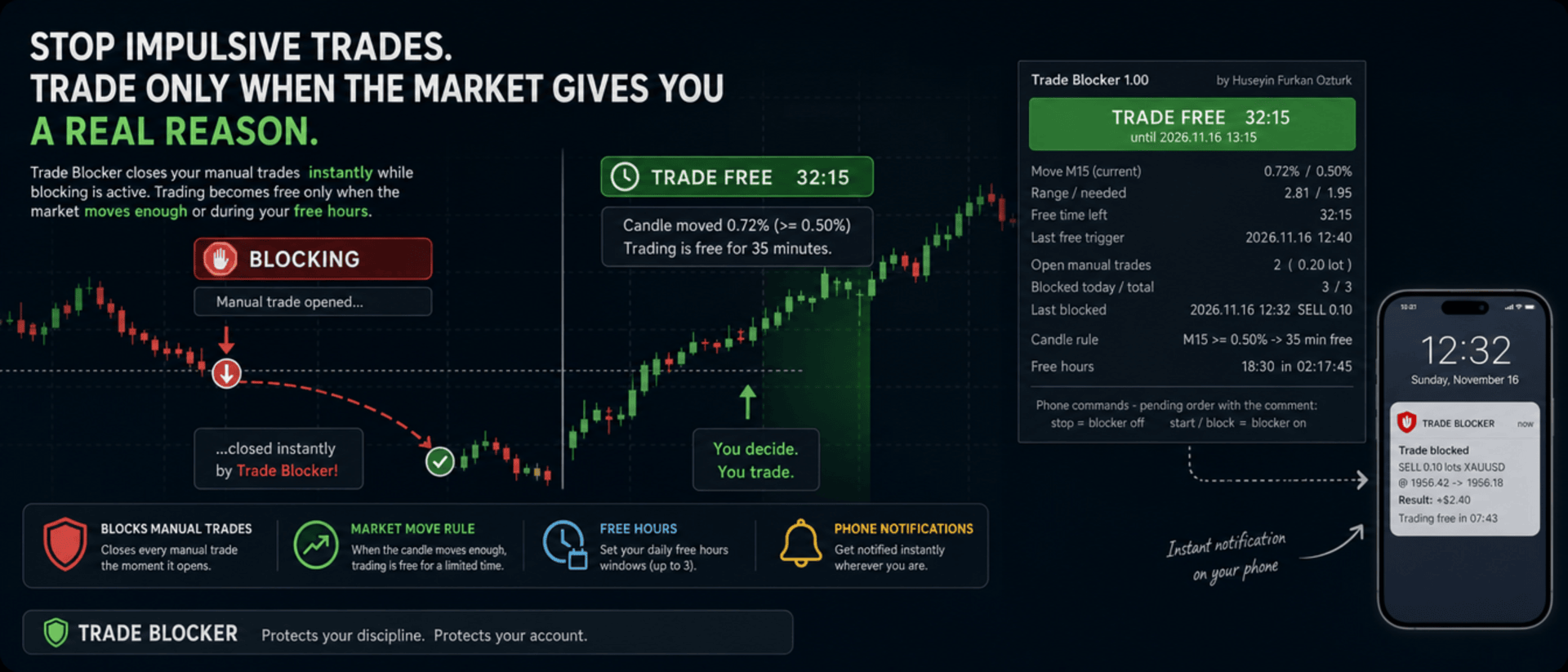
We built Trade Blocker for traders who know that their worst trades are the ones they open out of boredom, revenge or impatience. It watches your chart's symbol and closes every manual trade the moment it opens, unless the market has given you a real reason to trade. A notification on your phone tells you right away that the trade was blocked.

Trading becomes free only when the market moves enough, or during the hours you choose, and then only for a limited time. Trade Blocker never opens a trade: it only closes your own manual trades, and trades of other Expert Advisors are never touched.

How does it work?

Attach Trade Blocker to the chart of the symbol you want to protect. While it is blocking, every manual position on that symbol is closed at once, and manual pending orders are deleted so they cannot open a trade later. It does not matter where the trade comes from: the desktop terminal, one-click trading or the MetaTrader mobile app. A trade without a magic number is a manual trade.

Trading becomes free in two ways, and each of them can be turned on or off:

  • Candle move: when a candle of the timeframe you choose (M1 to D1, default M15) has moved at least the chosen percent (default 0.5%, measured as the candle's high-low range divided by its open), trading is free for the chosen number of minutes (default 35). Each candle frees trading only once. If a new candle reaches the move while trading is still free, the countdown starts again and you get a notification with the new end time.
  • Free hours: up to three daily windows in server time, for example 15:00 for 90 minutes, 18:30 for 60 minutes and 22:00 for 90 minutes. Each window can be switched on or off on its own. This rule is off by default.

While one of your manual trades is open, nothing is blocked, so you can manage your position, add to it or hedge it. When the free time ends with trades still open, blocking starts again as soon as they are closed.

Control it from your phone

You don't have to be at your computer to turn the blocker off. Place a pending order on the symbol with the comment stop and the blocker turns off; the comment start or block turns it back on. The command order is deleted immediately and a notification confirms the new state. There is deliberately no button on the panel to turn it off: a little effort before breaking your own rules is the whole idea.

Notifications

Trade Blocker sends a push notification to your phone when a trade is blocked (with its entry, close price, approximate result and what frees trading next), when trading becomes free and until when, when the free time is extended, when free hours begin and when the free time is over. Turning the blocker on or off and deleted pending orders are reported too. Notifications are queued to respect MetaTrader's sending limit.

If a trade cannot be closed, for example because Algo Trading is off, you get one notification that it was opened in blocking time. It is not tried again: the trade stays open and counts as an open trade.

What you see on the chart

A compact panel with a large status banner shows the state at a glance: BLOCKING, TRADE FREE with a live countdown and its start and end time, NOT BLOCKING while your manual trades are open, BLOCKER OFF or ALGO TRADING OFF. Below it you see the move of the current candle against the move needed, the free time left, the last free trigger, your open manual trades with lots and profit, the trades blocked today and in total, the last blocked trade, the candle rule, and the current or next free hours window with a countdown. The panel can be dragged anywhere on the chart and keeps its place.

It does not forget

The state is kept in the terminal's global variables: on or off, the free time with its start and end, and the counters. If you restart Trade Blocker or the terminal while trading is free, it stays free until the same end time. When you attach it for the first time, trades that are already open are left alone. A manual trade opened while Trade Blocker was not running is closed as soon as it starts again, if blocking is active at that moment.

Inputs

  • Use the candle move rule: default true
  • Candle timeframe: 1M, 5M, 15M, 30M, 1H, 4H or 1D; default 15M
  • Move that frees trading: the candle's high-low range in % of its open; default 0.5
  • Candle shift: default 0, the current candle
  • Minutes trading stays free after the move: default 35
  • Use the free hours: default false
  • Free hours 1, 2 and 3: on / off, start time (hh:mm, server time) and minutes free; defaults 15:00 for 90, 18:30 for 60 and 22:00 for 90 minutes
  • Max slippage when closing: default 50 points
  • Phone notifications: default true
  • Also notify when the free time ends: default true
  • Show panel, Panel X / Y: default true, 10 and 30 pixels

Good to know

Trade Blocker works on the symbol of its chart; attach it to one chart for each symbol you want to protect. Algo Trading must be on, otherwise trades cannot be closed and the panel shows ALGO TRADING OFF. Free hours use the trade server's time, the same time the chart shows.

It can only act while the terminal is running. To block trades you open on your phone while your computer is off, run it on a VPS. Phone notifications need your MetaQuotes ID in Tools → Options → Notifications. In the Strategy Tester it works on ticks and writes the notifications to the journal.


About the Developer

A software engineer with more than 10 years of experience, the developer has focused on building algorithmic trading robots for over 3 years, driven by a passion for finance and mathematics.
The algorithms and strategies are designed not with a "vibe coder" approach based on ready-made solutions, but from the perspective of a professional software engineer — prioritizing performance, reliability and sustainability.
All material and non-material gains are reinvested into new R&D to continuously improve the products.
Rather than offering the robots purely for commercial gain, the developer believes that sharing them as freely as possible reaches a wider audience — and that the feedback gathered this way makes the products evolve much faster.
Every piece of user feedback and every suggestion is treated as the most valuable part of the product development process.

If you like my robots and want to stay informed about new features, join my channel: ALGO By H. Furkan OZTURK
Plus de l'auteur
VolumeHedger
OMG FZE LLC
4.81 (52)
VolumeHedger EA [ Mon canal ]   ,  [ Fichiers Set ]  ,   [ Blog ]   , [ Usage IA ]  ,  [ PDF Guide ] Comptes recommandés : Standard à fort levier, ECN, Raw ; Cent ; Prop firm (FTMO etc.) Le développeur de cet EA a prouvé son professionnalisme grâce à la qualité de ses autres robots. Avec Volume Hedger EA  Grâce à la possibilité de définir une stratégie d’entrée via un indicateur personnalisé, vous n’aurez plus besoin d’acheter d’autres EA ! Cet EA est un algorithme de trading avancé qui combine
HFT Spike EA
OMG FZE LLC
5 (3)
[ My Channel ] HFT Spike EA Comptes recommandés : Standard à fort effet de levier, ECN, Raw ; Cent ; Propfirm (FTMO FundedNext etc.) Stratégies : Principes de Physique Quantique, HFT Spike (Trading Haute Fréquence), trading sur niveaux, trading neuronal, sans Martingale, sans Grid, trading de tendance à position unique. Un EA entièrement automatique et géré en risque, conçu sur les données tick de XAUUSD. Vous n'avez pas besoin de choisir un Time-Frame. Les valeurs par défaut correspondent
Diagonal Resistance EA
OMG FZE LLC
4.76 (21)
[ LIVE SIGNALS ]  ,  [ My Channel ]  ,  [ ABOUT ME ]  ,  [ My Products ] Comptes recommandés : High leverage et Standard, ECN, Raw, Cent, Propfirm Un nouvel EA développé par Huseyin Furkan Ozturk — simple à utiliser, plug & play. Assurez-vous que votre solde et votre levier sont suffisants. Un backtest avant utilisation est recommandé. Diagonal Resistance EA J'ai essayé d'expliquer la logique de fonctionnement dans les images du slider. La logique de base de l'EA peut se résumer en trois étap
FREE
HedgingMartingale
OMG FZE LLC
4.72 (137)
HedgingMartingale EA   [ My Channel ]  ,   [ My Products ]  ,  [ Blog ]     ,  [ Public Chat ] Comptes recommandés: Standard à fort effet de levier, ECN, Raw; Cent; Propfirm Cet EA est un algorithme de trading qui combine la couverture et la gestion intelligente des risques avec la stratégie Martingale. Il est conçu pour fournir des performances stables dans des conditions de marché fortes où vous ne pouvez pas prédire la direction de la tendance. Lors de l'utilisation d'un fichier de configura
FREE
SwapSlap
OMG FZE LLC
5 (7)
[ LIVE SIGNALS ]  ,  [ My Channel ]  , [ BLOG ]  ,  [ Public Chat ] SWAPSLAP EA Comptes recommandés : Tous, Standard, ECN, Raw ; Cent ; Propfirm (FTMO, etc.) Un nouvel EA développé par Huseyin Furkan Öztürk, très facile à utiliser grâce à sa structure plug-and-play, créatif tout en étant très puissant. Le principe de fonctionnement de SwapSlap EA repose en bref sur la génération de profits via la méthode du carry trade.  Cette méthode est une opportunité de trading qui naît du fait que les inv
GridTeam EA
OMG FZE LLC
5 (19)
GridTeam EA - Crée ton propre robot grid [ Set File ]  ,  [ My Channel ]   ,   [ LIVE SIGNAL ]     ,  [ Public Chat ] Tous les indicateurs dans un seul EA — choisis ce que tu veux, optimise et exécute sur plusieurs paires simultanément. Prends le contrôle total. Configure ta gestion des risques toi-même. Comme valeurs par défaut, l'indicateur RSI est utilisé et a été ajusté selon les résultats d'optimisation. Ce n'est pas la meilleure valeur. Je crois que tu peux en trouver une meilleure. Une d
FREE
[ My Channel ]   ,   [ My Products ]  ,  [ ABOUT ME ]   OMG Market Heat — Scanner multi-symboles de volatilité et de cassures OMG Market Heat est un indicateur de type tableau de bord qui analyse jusqu'à 50 symboles à la fois et montre à quel point chaque marché est « chaud » en ce moment sur l'unité de temps M15, H1, H4 ou D1 . En un coup d'œil, vous voyez quels symboles bougent fortement, lesquels se réveillent après une période calme et lesquels dorment — vous ne consacrez ainsi votre temps
[ Mon canal ] , [ Mes produits ] Le Lorentzian Distance Classifier est un indicateur de trading basé sur le machine learning qui utilise la distance de Lorentz comme métrique principale dans le cadre des plus proches voisins approximatifs (ANN). Au lieu de s’appuyer sur la distance euclidienne traditionnelle, il considère l’action des prix financiers comme si elle se produisait dans un espace « déformé » prix-temps (similaire à la manière dont les objets massifs courbent l’espace-temps en relati
[ LIVE SIGNALS ]  ,  [ My Channel ]  ,  [ ABOUT ME ]  ,  [ My Products ] Comptes recommandés : High leverage et Standard, ECN, Raw, Cent, Propfirm Un nouvel EA développé par Huseyin Furkan Ozturk — simple à utiliser, plug & play. Assurez-vous que votre solde et votre levier sont suffisants. Un backtest avant utilisation est recommandé. Diagonal Resistance EA J'ai essayé d'expliquer la logique de fonctionnement dans les images du slider. La logique de base de l'EA peut se résumer en trois étap
FREE
HedgingMartingale MT4
OMG FZE LLC
4.57 (21)
HedgingMartingale EA [ Set Files ]   ,   [ My Channel ]  ,   [ My Products ]  ,   [ Blog ] Comptes recommandés: Standard à fort effet de levier, ECN, Raw; Cent; Propfirm Cet EA est un algorithme de trading qui combine la couverture et la gestion intelligente des risques avec la stratégie Martingale. Il est conçu pour fournir des performances stables dans des conditions de marché fortes où vous ne pouvez pas prédire la direction de la tendance. Lors de l'utilisation d'un fichier de configuration
FREE
[ My Channel ]   ,   [ My Products ]  ,  [ ABOUT ME ]   DiagonalResistanceIndi — Indicateur de signaux à contre-tendance DiagonalResistanceIndi a été développé spécialement pour le VolumeHedger EA . Il est utilisé sur Gold en timeframe M1. Il convient également au trading manuel sans l'EA. C'est un indicateur de signaux qui détecte des mouvements de prix en pourcentage inhabituellement importants dans une courte fenêtre de temps et marque sur le graphique les points de retournement potentiels
FREE
MyTradingSkills
OMG FZE LLC
5 (1)
[ My Channel ]   ,   [ My Products ]  ,  [ ABOUT ME ]   My Trading Skills — Train Yourself Nous avons créé My Trading Skills pour que vous puissiez tester et améliorer vos compétences en trading manuel sur des données de marché historiques. L'outil rejoue l'historique du symbole de votre graphique bougie par bougie à partir d'une date de départ de votre choix, et tout ce qui suit la position de relecture reste masqué. Comme sur un graphique en direct, vous ne savez jamais ce que la prochaine bo
FREE
[ Ma chaîne ] , [ Mes produits ] Cet indicateur montre les points où la tendance d’une bougie change en raison d’une pression instantanée, tandis que la tendance générale monte ou descend. La flèche affichée par l’indicateur est dessinée si la bougie précédente répond à certains critères. En créant votre stratégie, vous pouvez interpréter 3-4 flèches consécutives comme un signal potentiel de rupture. Par exemple, lorsque la quatrième flèche apparaît, vous pouvez envisager d’ouvrir une position
FREE
OMG Trading
OMG FZE LLC
5 (3)
[ Mes Produits ] , [ Ma Chaîne ] OMG Trading Panel Désormais, vous pouvez contrôler votre panneau de trading directement depuis votre téléphone. Installez OMG Trading Tool sur votre VPS MQL et tradez confortablement depuis l'application mobile MetaTrader 5 pendant que le panneau fonctionne 24h/24 et 7j/7. J'ai également ajouté deux stratégies utiles : Smart Margin Protection et Grid Strategy. Vous pouvez aussi configurer une alerte qui se déclenche lorsque le prix baisse. Caractéristiques Clés C
FREE
[ My Channel ]   ,   [ My Products ]  ,  [ ABOUT ME ]   DiagonalResistanceIndi — Indicateur de signaux à contre-tendance DiagonalResistanceIndi a été développé spécialement pour le VolumeHedger EA . Il est utilisé sur Gold en timeframe M1. Il convient également au trading manuel sans l'EA. C'est un indicateur de signaux qui détecte des mouvements de prix en pourcentage inhabituellement importants dans une courte fenêtre de temps et marque sur le graphique les points de retournement potentiels
FREE
Filtrer:
Aucun avis
Répondre à l'avis