Telegram Reporter
- Utilities
- Version: 3.40
- Updated: 10 November 2026
- Activations: 5

Telegram Reporter Pro is an advanced, automated account tracking and telemetry EA engineered for MetaTrader 5 traders, portfolio managers, and signal providers. It automatically calculates your starting daily equity, monitors real-time account performance, and delivers beautifully formatted performance reports straight to your Telegram groups or private channels.
🌟 Why Choose Telegram Reporter Pro? (Key Benefits)
- Absolute Transparency & Control: Keep a close eye on your trading performance 24/7 without having to stare at the screen all day. Perfect for managing personal accounts or building investor trust.
- Boost Investor Confidence: If you sell signals, manage copy-trading networks, or run a prop firm account, sending automated, verified daily/weekly profit updates directly to your Telegram channel establishes instant credibility and professionalism.
- Zero Stress, Fully Automated: Set your schedule once (Morning, Midday, Evening, Weekly, or Monthly), and let the EA handle the rest seamlessly in the background on your VPS.
- Smart Timezone Support: Automatically aligns server time with your local timezone (e.g., UTC+7), ensuring reports arrive precisely when you expect them.
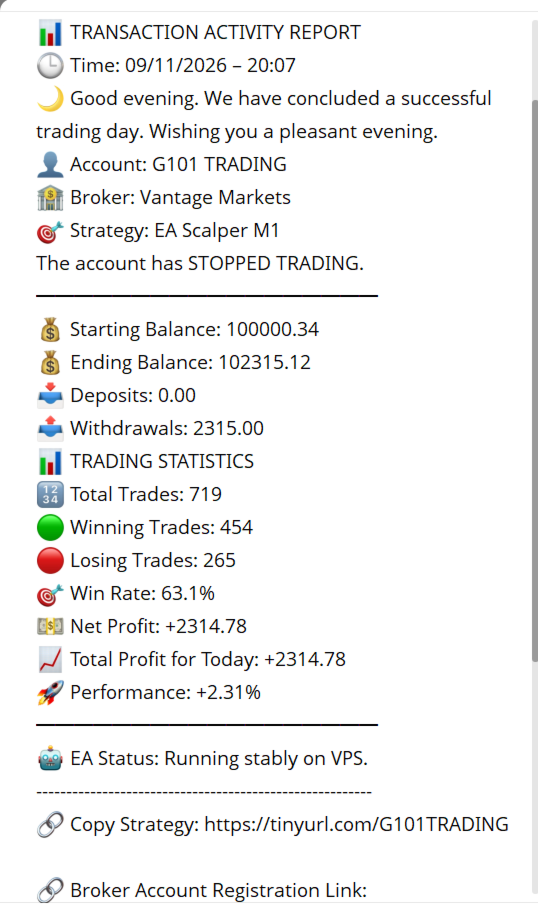
- Complete Trade Analytics: Beyond just balance updates, it tracks Win Rates, Winning/Losing trade counts, Deposits, Withdrawals, and Net Profit percentages automatically.
- Instant Connection Verification: Features a built-in automated test message sent right upon deployment to ensure your Telegram link is working perfectly before trading starts.
⚙️ Step-by-Step Telegram Setup Guide (Easy for Beginners)
If you are new to Telegram bots, follow these simple steps to get your Bot Token and Chat ID within 2 minutes:
Step 1: Create Your Telegram Bot (Get Bot Token)
- Open your Telegram app and search for the official bot creator: @BotFather .
- Click Start and send the command: /newbot
- BotFather will ask you to name your bot (e.g., My Trading Reporter Bot ).
- Next, choose a username for your bot (it must end with bot , for example: MyTradingAlert_Bot ).
- Once created, BotFather will give you an HTTP API Token (a long string like 123456789:ABCdefGhIJKlmNoPQRsTUVwxyZ ). Copy and save this token for the InpBotToken field in the EA.
Step 2: Create a Telegram Group & Add Your Bot (Get Chat ID)
- Create a new Group on Telegram and add your newly created bot into the group.
- Promote your bot to Administrator status so it has permission to send messages in the group.
- To find your Group Chat ID, add another helper bot like @userinfobot or @getmyid_bot temporarily into your group, or forward a message from your group to @getmyid_bot .
- The bot will return your Group ID, which typically starts with a minus sign (for example: -1002819078947 ). Copy this number for the InpChatId field in the EA. (Note: You can remove the helper bot from the group afterwards).
🚀 Installation & Configuration Instructions in MT5
- Allow WebRequest (Crucial Step):
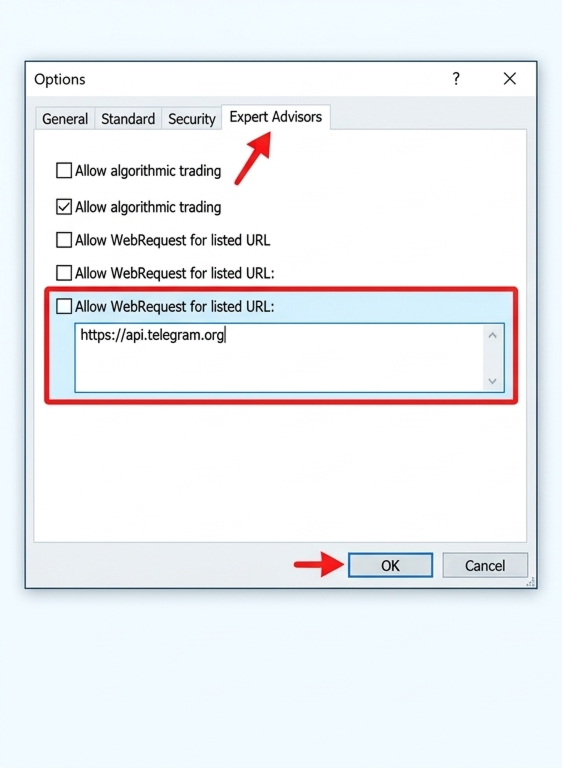
- In MetaTrader 5, go to Tools > Options (or press Ctrl + O ).
- Navigate to the Expert Advisors tab.
- Check the box: Allow WebRequest for listed URL .
- Add the following exact URL to the list: [https://api.telegram.org](https://api.telegram.org) and click OK.
- Attach EA to Chart:
- Drag and drop Telegram_Reporter onto any live chart (e.g., XAUUSD, M1).
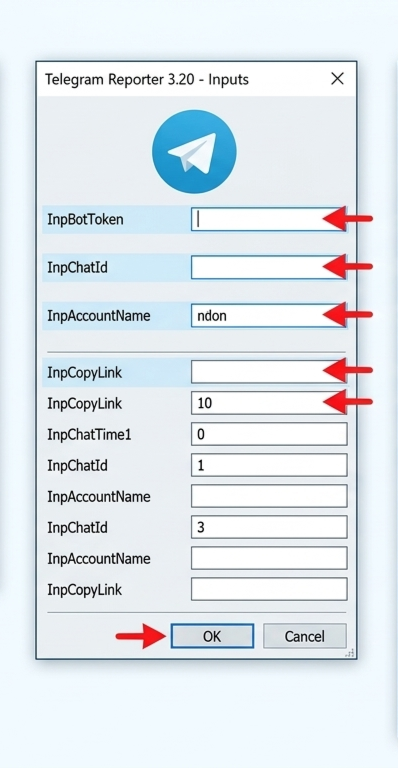
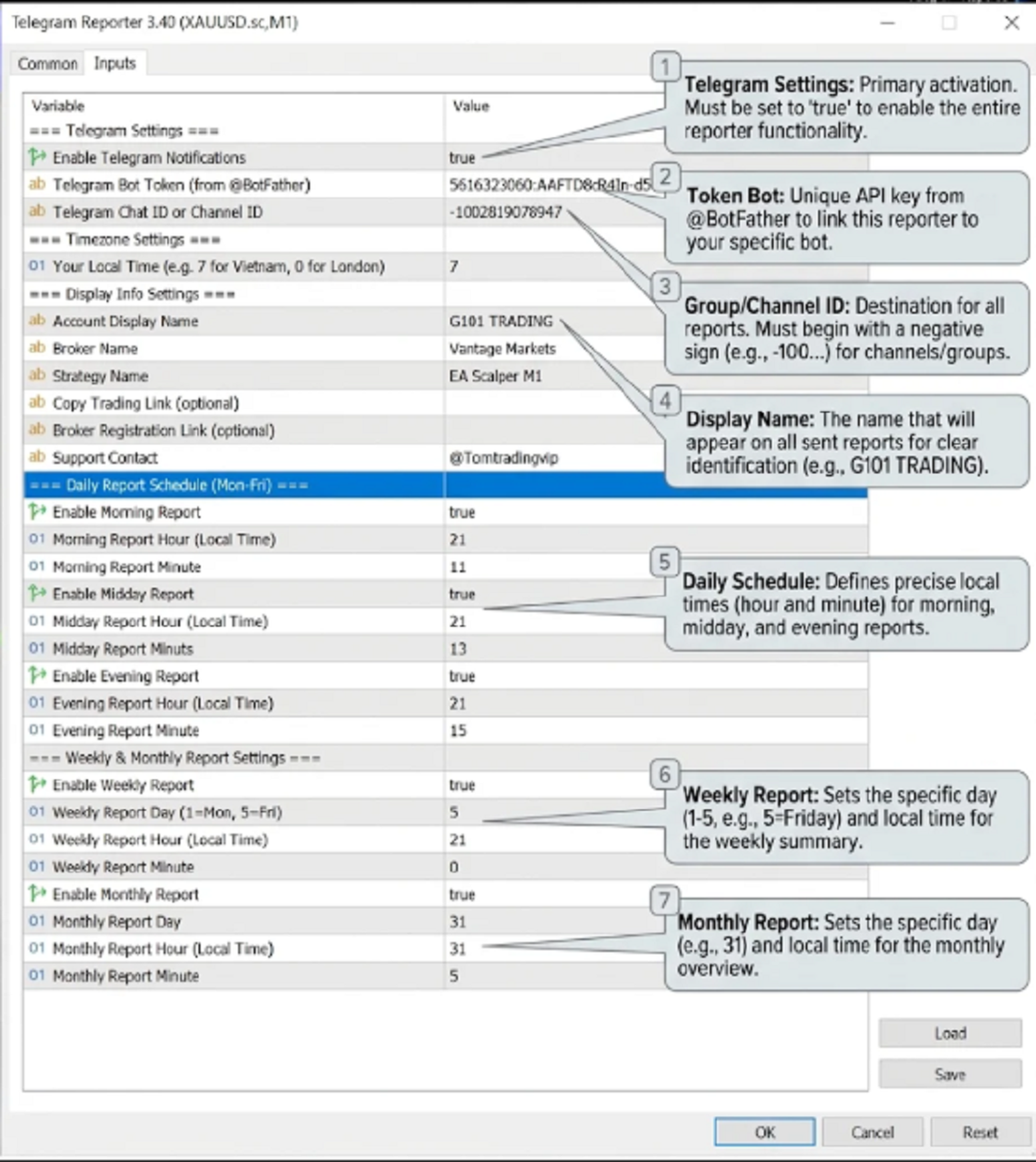
- In the Inputs tab, configure your parameters:
- InpEnableTelegram : Set to true .
- InpBotToken : Paste your token from @BotFather .
- InpChatId : Paste your group ID (e.g., -100... ).
- InpUserTimeZone : Set your local GMT offset (e.g., 7 for Vietnam).
- Account Name , Broker Name , Strategy Name : Customize your display names.
- Verify: Click OK. The EA will instantly send a Connection Test Successful! message to your Telegram group to confirm everything is working smoothly!
Telegram Reporter Pro is an advanced, automated account tracking and telemetry EA engineered for MetaTrader 5 traders, portfolio managers, and signal providers. It automatically calculates your starting daily equity, monitors real-time account performance, and delivers beautifully formatted performance reports straight to your Telegram groups or private channels.
🌟 Why Choose Telegram Reporter Pro? (Key Benefits)
- Absolute Transparency & Control: Keep a close eye on your trading performance 24/7 without having to stare at the screen all day. Perfect for managing personal accounts or building investor trust.
- Boost Investor Confidence: If you sell signals, manage copy-trading networks, or run a prop firm account, sending automated, verified daily/weekly profit updates directly to your Telegram channel establishes instant credibility and professionalism.
- Zero Stress, Fully Automated: Set your schedule once (Morning, Midday, Evening, Weekly, or Monthly), and let the EA handle the rest seamlessly in the background on your VPS.
- Smart Timezone Support: Automatically aligns server time with your local timezone (e.g., UTC+7), ensuring reports arrive precisely when you expect them.
- Complete Trade Analytics: Beyond just balance updates, it tracks Win Rates, Winning/Losing trade counts, Deposits, Withdrawals, and Net Profit percentages automatically.
- Instant Connection Verification: Features a built-in automated test message sent right upon deployment to ensure your Telegram link is working perfectly before trading starts.
⚙️ Step-by-Step Telegram Setup Guide (Easy for Beginners)
If you are new to Telegram bots, follow these simple steps to get your Bot Token and Chat ID within 2 minutes:
Step 1: Create Your Telegram Bot (Get Bot Token)
- Open your Telegram app and search for the official bot creator: @BotFather .
- Click Start and send the command: /newbot
- BotFather will ask you to name your bot (e.g., My Trading Reporter Bot ).
- Next, choose a username for your bot (it must end with bot , for example: MyTradingAlert_Bot ).
- Once created, BotFather will give you an HTTP API Token (a long string like 123456789:ABCdefGhIJKlmNoPQRsTUVwxyZ ). Copy and save this token for the InpBotToken field in the EA.
Step 2: Create a Telegram Group & Add Your Bot (Get Chat ID)
- Create a new Group on Telegram and add your newly created bot into the group.
- Promote your bot to Administrator status so it has permission to send messages in the group.
- To find your Group Chat ID, add another helper bot like @userinfobot or @getmyid_bot temporarily into your group, or forward a message from your group to @getmyid_bot .
- The bot will return your Group ID, which typically starts with a minus sign (for example: -1002819078947 ). Copy this number for the InpChatId field in the EA. (Note: You can remove the helper bot from the group afterwards).
🚀 Installation & Configuration Instructions in MT5
- Allow WebRequest (Crucial Step):
- In MetaTrader 5, go to Tools > Options (or press Ctrl + O ).
- Navigate to the Expert Advisors tab.
- Check the box: Allow WebRequest for listed URL .
- Add the following exact URL to the list: [https://api.telegram.org](https://api.telegram.org) and click OK.
- Attach EA to Chart:
- Drag and drop Telegram_Reporter onto any live chart (e.g., XAUUSD, M1).
- In the Inputs tab, configure your parameters:
- InpEnableTelegram : Set to true .
- InpBotToken : Paste your token from @BotFather .
- InpChatId : Paste your group ID (e.g., -100... ).
- InpUserTimeZone : Set your local GMT offset (e.g., 7 for Vietnam).
- Account Name , Broker Name , Strategy Name : Customize your display names.
- Verify: Click OK. The EA will instantly send a Connection Test Successful! message to your Telegram group to confirm everything is working smoothly!
=> Kênh Telegram thử nghiệm : https://t.me/g101tradingpro