How to Start with Metatrader 5 - page 124

You are missing trading opportunities:
- Free trading apps
- Over 8,000 signals for copying
- Economic news for exploring financial markets
Registration
Log in
You agree to website policy and terms of use
If you do not have an account, please register
hi all . i updated my mt5 toaday , after updating i cant see market app place for indicators . how to add it again?
Market tab?
I think - it depends on the version of Windows,
For example, I have Market tab on Windows 8.1 (but I do not have it on Windows Server 2008) ...
It may be depends on the version of Windows and the version of Internet Explorer.
Market tab?
I think - it depends on the version of Windows,
For example, I have Market tab on Windows 8.1 (but I do not have it on Windows Server 2008) ...
It may be depends on the version of Windows and the version of Internet Explorer.
i had this market tab till yesterday but today i got update notice and i updated my mt5 after that market tab vanished , m using win 7
i had this market tab till yesterday but today i got update notice and i updated my mt5 after that market tab vanished , m using win 7
I might remember it was announced win 7 will not be supported anymore in future.
Forum on trading, automated trading systems and testing trading strategies
New version of the MetaTrader 5 build 2170 platform: Scopes in MQL5, a global update of the strategy tester and integrated hosting
Renat Fatkhullin , 2019/10/06 15:53
Briefly:
Its task is to make the code more secure and deeper analyze problem areas. Therefore, with each version more and more "dirty" code is caught and not skipped.
Remember the last years - there were always complaints "my code stopped compiling, why warnings come out." As a result, the robots code only got better.
This gave us the opportunity to tighten the nuts and enable more stringent control of signatures and overlaps of names.
Who uses generic naming - it just hurts itself. And no ideas “let the compilers rake the garbage in a fabulous way” do not work. Compilers (primarily C ++) with each version work more and more with Cerberus to show and prevent a maximum of garbage and frankly erroneous designs.
For the next 6 months we will distribute the 32-bit build of the 2170 build in installers, and then stop it.
This will give us the opportunity to implement an accurate x64 profiler with minimal distortion, as well as a native x64 debugger.
MetaQuotes ID in MetaTrader Mobile Terminal
hi all . i updated my mt5 toaday , after updating i cant see market app place for indicators . how to add it again?
I just discovered about how to fix it:
go to the Journal in Metatrader to see the recommendation:
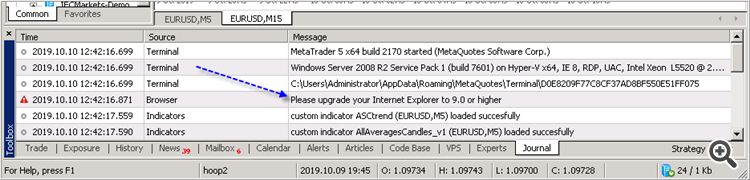
And I use this link to install the latest Internet Explorer:
https://www.microsoft.com/en-us/download/internet-explorer-11-for-windows-7-details.aspx
and I got the Market tab -
----------------
So, if you do not see the Market tab on the latest build of Metatrader (or if you are having the error with this Market tab for example) - install (or re-install) Internet Explorer to the latest version (to the version 11 for example).
please i am new to MQ5 how do i start going please???
please i am new to MQ5 how do i start going please???
Forum on trading, automated trading systems and testing trading strategies
What is 100% Algo Trader? I want to be Algo trader, how it possible?
Sergey Golubev, 2019.10.14 13:17
https://www.mql5.com/en/forum/212020
https://www.mql5.com/en/forum/193510
https://www.mql5.com/en/forum/9950/page76#comment_2743406
Forum on trading, automated trading systems and testing trading strategies
New MetaTrader 5 Platform Build 2190
MetaQuotes Software Corp., 2019.10.17 09:40
The MetaTrader 5 platform update will be released on Friday, October the 18th, 2019. The update provides improvements and fixes implemented based on the feedback that we received after the previous MetaTrader 5 build 2170 major update:
The update will be available through the Live Update system.