 MetaTrader 5
 Experts
 Indicators
 Scripts
 Libraries
 Storage
Join our fan page

MultiBullsBearsEyesTrend_x10 - indicator for MetaTrader 5

- Views:
- 4769
- Rating:
- Published:
- Updated:
-
 You are missing trading opportunities:
- Free trading apps
- Over 8,000 signals for copying
- Economic news for exploring financial markets
Registration Log inYou agree to website policy and terms of use
If you do not have an account, please register -
 Need a robot or indicator based on this code? Order it on Freelance
Go to Freelance
Need a robot or indicator based on this code? Order it on Freelance
Go to Freelance
The MultiBullsBearsEyesTrend_x10 indicator shows information on current trends using the BullsBearsEyes oscillator position from ten different timeframes.
Each of the ten indicator lines corresponds to a separate indicator. If the oscillator is positioned lower than the oversold level, the lines are painted in pink, if it's higher than the overbought level, the lines are painted in light blue. Otherwise, the lines are gray. Colored dots on lines appear when the bar of the corresponding timeframe changes.
This indicator requires BullsBearsEyes.mq5 indicator file. Place it in <terminal_data_folder>\MQL5\Indicators.
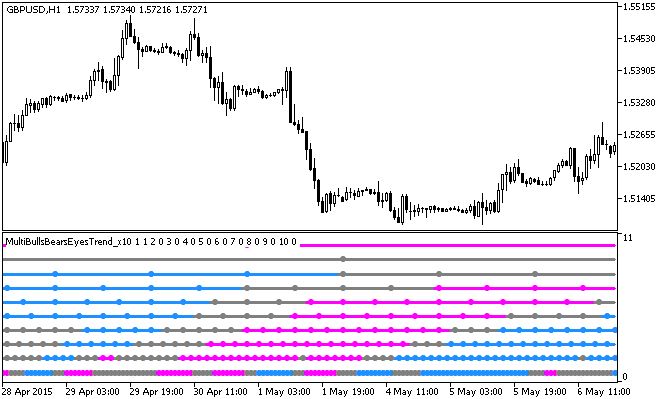
Fig.1. The MultiBullsBearsEyesTrend_x10 indicator
Translated from Russian by MetaQuotes Ltd.
Original code: https://www.mql5.com/ru/code/13026
BullsBearsEyesTrend_x10
The BullsBearsEyesTrend_x10 indicator shows the BullsBearsEyes oscillator position from ten different timeframes.
Attention Level
The indicator places a horizontal non-trade level on a chart that helps intraday traders to evaluate trend change within a day.
BullsBearsEyes_HTF
The BullsBearsEyes indicator with the timeframe selection option available in the input parameters.
ChandelExit_HTF
The ChandelExit indicator with the timeframe selection option available in the input parameters.