Local Trade Copier Pro v2.0 - Download the Free Demo Version

Are you managing multiple Forex accounts, passing prop firm challenges, or running funds for clients? Then you already know how hard it is to execute the same trades on several accounts at the same time. Manual execution is too slow, and web-based copiers often add delay and slippage.
Meet EA Local Trade Copier Pro by TradingLabs ID, a fast and DLL-free Expert Advisor that copies your trades locally between MetaTrader terminals on the same PC or VPS. Version 2.0 is now available with pending order copying, partial close, a built-in risk guard and many more professional features.
In this post I explain what is new in version 2.0, and I share the free demo files so you can test the copier right away.
What Is New in Version 2.0
-
Pending Orders Copy: Buy Limit, Sell Limit, Buy Stop and Sell Stop are copied, modified and deleted together with the Master.
-
Partial Close Copy: When the Master closes part of a position, the Client closes the same proportion.
-
Master Offline Detection: If the Master terminal stops, the Client automatically pauses new entries.
-
Built-in Risk Guard: Minimum equity, maximum drawdown and maximum daily loss protection, ideal for prop firm rules.
-
Symbol Mapping and Filters: Map any symbol manually (for example XAUUSD=GOLD.m) and choose which symbols to copy or skip.
-
Multi-Master: One Client can follow several Masters at the same time.
-
CLOSE ALL Button and Notifications: Close every copied trade with one confirmed click, and receive push notifications on your phone.
-
Restart-Safe Tracking: No duplicate or lost trades after a terminal or VPS restart.
The Complete Cross-Platform Solution
Brokers offer different platforms, and multi-account managers often need to work with MetaTrader 4 and MetaTrader 5 at the same time. With EA Local Trade Copier Pro, the MT4 and MT5 versions use the same communication format, so you can build any copying route on the same PC or VPS:
-
MT4 to MT4
-
MT5 to MT5
-
MT4 to MT5
-
MT5 to MT4
Attach the EA as Master on your main account and as Client on your receiver accounts. Trades are copied locally within a fraction of a second.
Key Features of Local Trade Copier Pro
1. Interactive Pro Dashboard
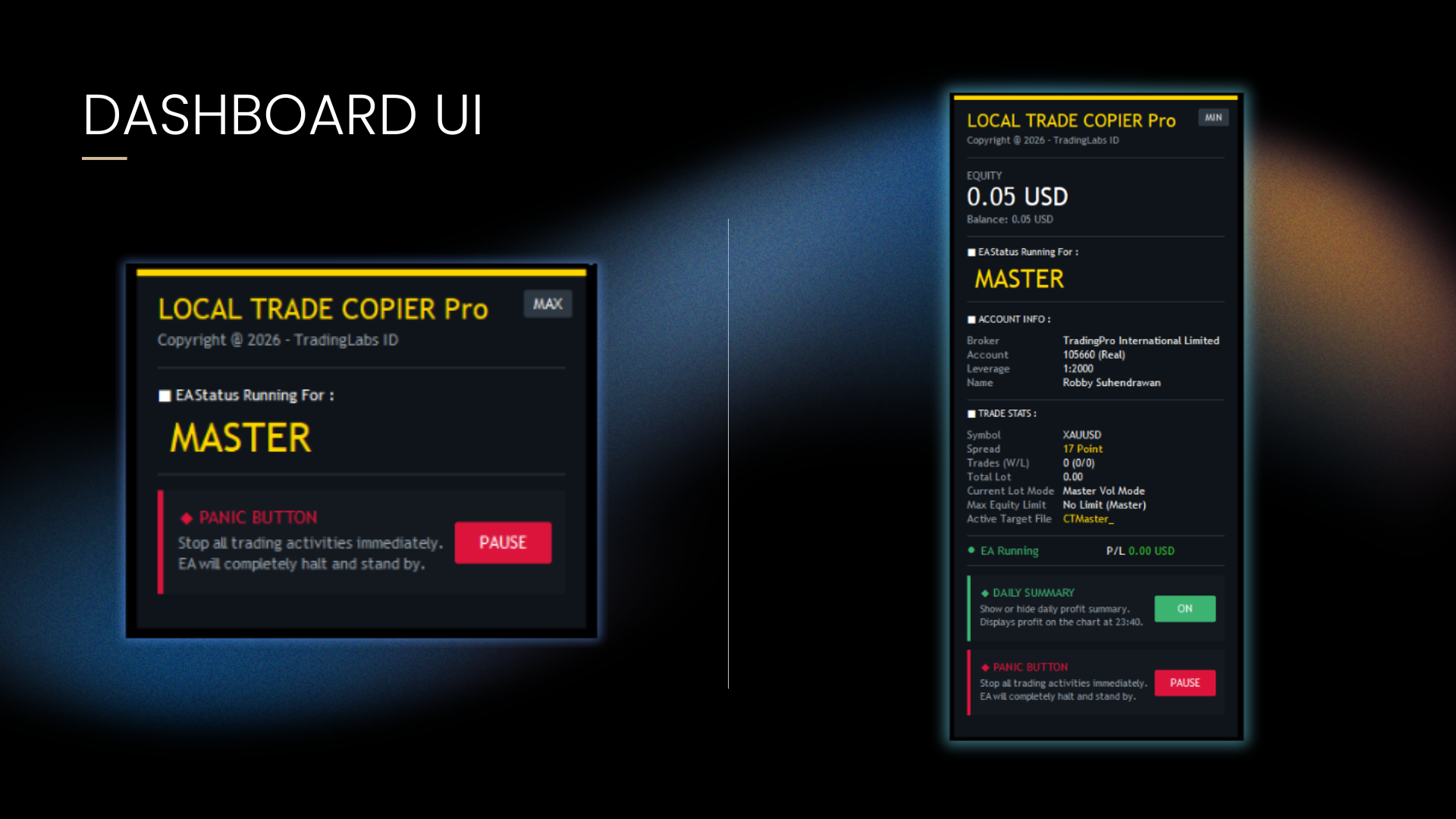
Monitor equity, balance, account info, spread, win and loss statistics, total lots and floating profit in real time. The new Copier Monitor panel shows the Master status, active copies, drawdown, daily result and the latest activity. Click MIN to collapse the dashboard for a cleaner chart.
2. PAUSE and CLOSE ALL Buttons
Click PAUSE to stop new entries while copied trades still follow the Master close, or set it to a full stop. Click CLOSE ALL twice to instantly close every copied trade.
3. Six Lot Sizing Modes
-
Follow Master Lot: Copy the Master lot with an adjustable multiplier.
-
Fixed Lot: Use the same lot size for every copied trade.
-
Auto Lot by Balance Divider: Grow your lot size together with your balance.
-
Proportional by Balance: Lot based on the ratio between Master and Client balance.
-
Proportional by Equity: Lot based on the ratio between Master and Client equity.
-
Risk Percent: Lot calculated from your risk percent and the Master Stop Loss distance.
4. Smart Trade Protection
Skip late orders, skip trades when the price is too far from the Master entry, limit the maximum lot, total lots and number of positions, and choose whether to skip trades that are smaller than the broker minimum lot.
5. Reverse Trading and Equity Target
Turn on Reverse Trade Direction to open the opposite direction of the Master, with pending orders and SL/TP reversed correctly. The Equity Target closes all copied trades and stops the copier once your target is reached.
6. Daily Profit Summary
Display your daily copied trade result directly on the chart.
Download the Free Demo Version
Experience the speed and the dashboard of this copier yourself with the free demo version 2.0. It includes all the features of the full version.
The Demo Version has the following limits:
-
The EA runs only when attached to an XAUUSD chart (any prefix or suffix is supported, for example XAUUSD.m or GOLD).
-
It has an 8-Hour Trial Limit per PC or VPS. Once activated, you have 8 hours to test all features before the demo locks itself. A countdown is shown on the dashboard.
Important: Master and Client must both use version 2.0. Older versions cannot read the new version 2.0 Master files.
Download Demo Links:
-
Download EA Local Trade Copier Pro MT4 Demo v2.0 [Click Here]
-
Download EA Local Trade Copier Pro MT5 Demo v2.0 [Click Here]
Quick Setup:
-
Copy the demo file to the MQL4\Experts or MQL5\Experts folder of each terminal, then restart the terminal or refresh the Navigator.
-
On the Master terminal, attach the EA to an XAUUSD chart and set Copier Role to Master.
-
On the Client terminal (same PC or VPS), attach the EA to an XAUUSD chart and set Copier Role to Client.
-
Enable Algo Trading on both terminals. Copying starts automatically.
Ready to Scale? Get the Full Version
If you are serious about managing multiple accounts, 8 hours will not be enough. The full version works on any chart, has no time limit, and receives all future updates.
Get the Full Version Here:
-
EA Local Trade Copier Pro MT4 (Full Version): https://www.mql5.com/en/market/product/175102
-
EA Local Trade Copier Pro MT5 (Full Version): https://www.mql5.com/en/market/product/175099
Stop wasting time with manual execution and delayed signals. Take control of your accounts and your risk, and copy your trades reliably with EA Local Trade Copier Pro.
Questions or feedback? Send me a private message or join the TradingLabs ID channel: https://www.mql5.com/en/channels/tradinglabsid