From Stop Loss to Position Size: A Practical Risk Management Example in MetaTrader 5

In practice, position sizing usually starts with the trade setup, not with the lot size.
You identify the level where the trade is no longer valid, place the Stop Loss there, and only then decide how much volume is consistent with your risk limit.
This article shows that process with a real EURUSD example tested in MetaTrader 5 on a Pepperstone demo account.
The purpose is not to discuss a trading strategy or a particular EURUSD entry. The focus is the relationship between:
Stop Loss distance → position size → monetary risk → account-level risk constraints
1. Starting from the risk limit
For this test, the account balance was:
50,000 EUR
The selected trade risk was:
1.00%
That gives a target monetary risk of approximately:
500 EUR
The initial setup used:
Stop Loss: 30 pips
Reward-to-Risk: 2.00
Take Profit: 60 pips
If you want a quick refresher on the difference between pips and MetaTrader 5 points, see Pips vs Points in MetaTrader 5: How They Affect Position Sizing.
The important point is that the lot size was not selected in advance.
The risk was defined first.
The position size had to adapt to it.
2. The first calculation
With a 30-pip Stop Loss and 1% account risk, QRM Risk Calculator returned:
BUY: 1.93 lots
SELL: 1.93 lots
The estimated monetary loss was:
BUY risk: 499.86 EUR
SELL risk: 497.29 EUR
The estimated reward was:
BUY reward: 992.02 EUR
SELL reward: 1002.34 EUR
The effective reward-to-risk remained very close to the selected 2:1 target.
The key point is simple.
The trader did not start from:
“I want to trade 1.93 lots.”
The starting point was:
“I want to risk approximately 1% on this setup.”
The lot size was the result of that decision.
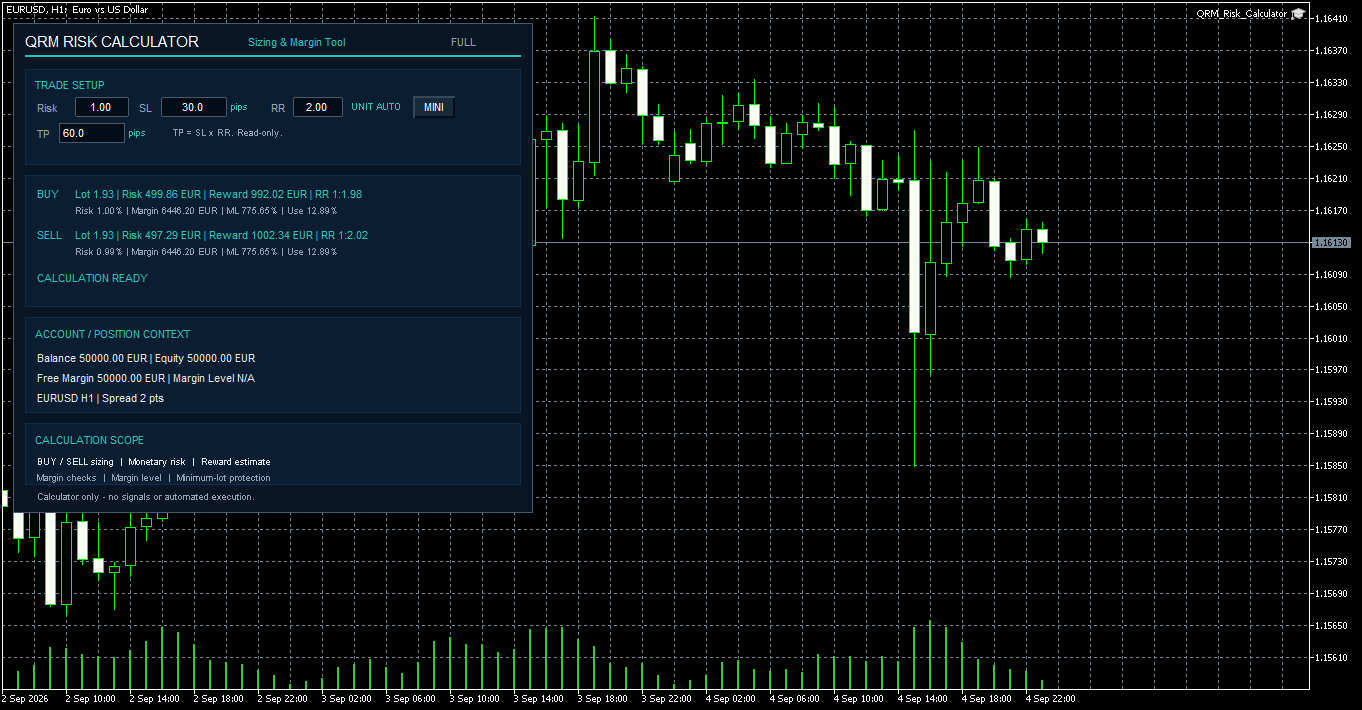
Fig. 1. QRM Risk Calculator on EURUSD H1 with 1% account risk, a 30-pip Stop Loss and a 2:1 target. Position size and monetary risk are calculated from the current symbol and account conditions.
3. What happens if the Stop Loss becomes wider?
The next test changed only one parameter.
The Stop Loss was increased from:
30 pips to 60 pips
The selected risk remained:
1.00%
The reward-to-risk remained:
2.00
The Take Profit therefore increased automatically to:
120 pips
The new result was:
BUY: 0.96 lots
SELL: 0.97 lots
Estimated monetary risk:
BUY: 498.56 EUR
SELL: 498.59 EUR
The Stop Loss doubled.
The position size was reduced by roughly half.
The monetary risk stayed almost unchanged.
That is exactly what risk-based position sizing is supposed to do.
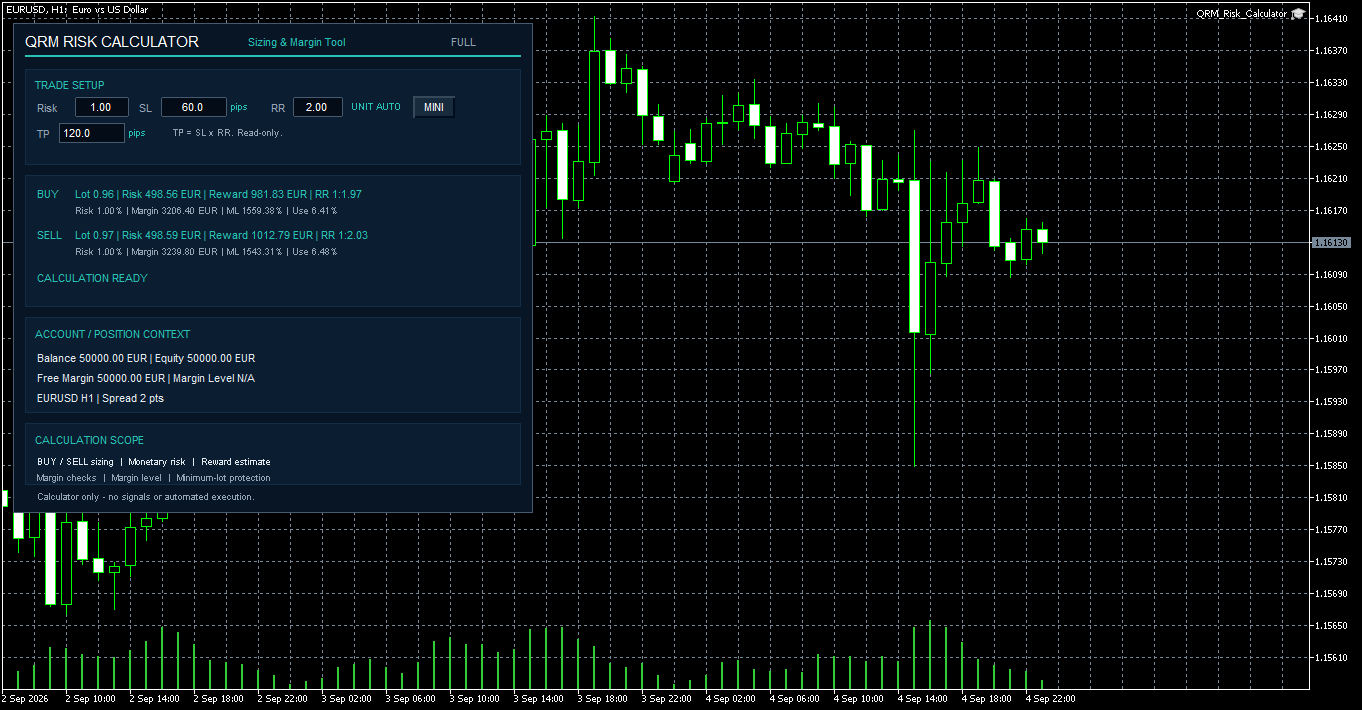
Fig. 2. With the Stop Loss widened from 30 to 60 pips, the calculated position size falls from about 1.93 lots to about 0.96–0.97 lots, while the intended monetary risk remains close to 500 EUR.
4. The relationship is simple, but important
The previous two tests make the relationship very clear.
| Stop Loss | Approx. position size | Monetary risk |
|---|---|---|
| 30 pips | 1.93 lots | ~500 EUR |
| 60 pips | 0.96–0.97 lots | ~500 EUR |
A wider Stop Loss does not have to mean higher monetary risk.
It simply means that the position size must be reduced accordingly.
This is why using the same fixed lot size for every trade can produce very different exposure from one setup to another.
Two trades may use the same volume, but if one has a 15-pip Stop Loss and the other a 60-pip Stop Loss, the monetary risk is clearly not the same.
5. What happens if the Stop Loss becomes tighter?
The third test was intended to show the opposite case.
The Stop Loss was reduced from 30 pips to:
15 pips
With a 1% risk target, the required position size would have to increase significantly.
But this is where the test became more interesting.
QRM Risk Calculator did not simply return a larger lot size.
Instead, it returned:
BLOCKED: MARGIN_USAGE
with the message:
Reduce risk, increase SL distance, or review the margin safety.
In other words, the proposed sizing would have pushed margin usage beyond the configured safety condition.
This is an important distinction.
A mathematically valid lot size is not automatically an acceptable lot size.
The account still has other constraints.
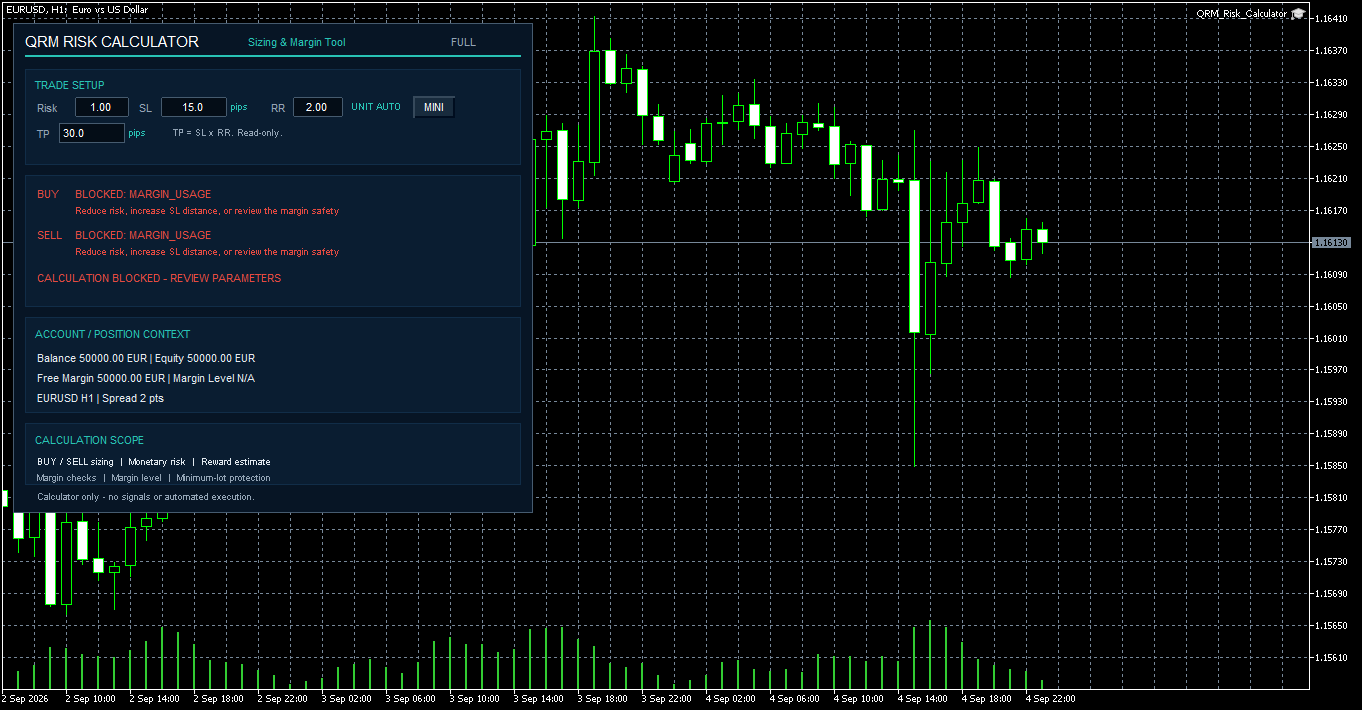
Fig. 3. Reducing the Stop Loss to 15 pips would require a substantially larger position to maintain 1% risk. In this test, QRM Risk Calculator blocks the calculation because the resulting margin usage exceeds the configured safety condition.
6. Why this matters in real trading
A simple position-size formula usually answers one question:
What lot size corresponds to my selected risk and Stop Loss distance?
That is useful.
But it is not always enough.
A trade can be correctly sized in monetary terms and still be problematic because of:
- margin usage,
- total open risk,
- number of open positions,
- account drawdown,
- exposure concentration,
- existing positions without Stop Loss protection.
At this point, the sizing problem is solved.
The next question is whether the trade still fits within the broader risk limits of the account.
That is where the distinction between position sizing and risk governance becomes relevant.
7. Checking the same trade with QRM PRO
The same EURUSD setup was then loaded into Quantum Risk Manager Pro.
The parameters remained:
Risk: 1.00%
Stop Loss: 30 pips
Take Profit: 60 pips
Reward-to-Risk: 2.00
QRM PRO showed approximately:
Lot B/S: 1.93 / 1.94
Estimated Stop Loss:
499.87 EUR
Estimated Take Profit:
992.02 / 1007.53 EUR
At the same time, the panel showed the account context:
Open Risk: 0.00%
Positions: 0 / 6
Regime: NORMAL
Concentration: OK
The trade was then checked using the pre-trade audit.
The result was:
DECISION: APPROVED
with:
Risk rules passed
and:
CHECK OK
This is where the workflow moves beyond simple sizing.
The trade is not only being measured.
It is being checked against the current account-level risk policy.
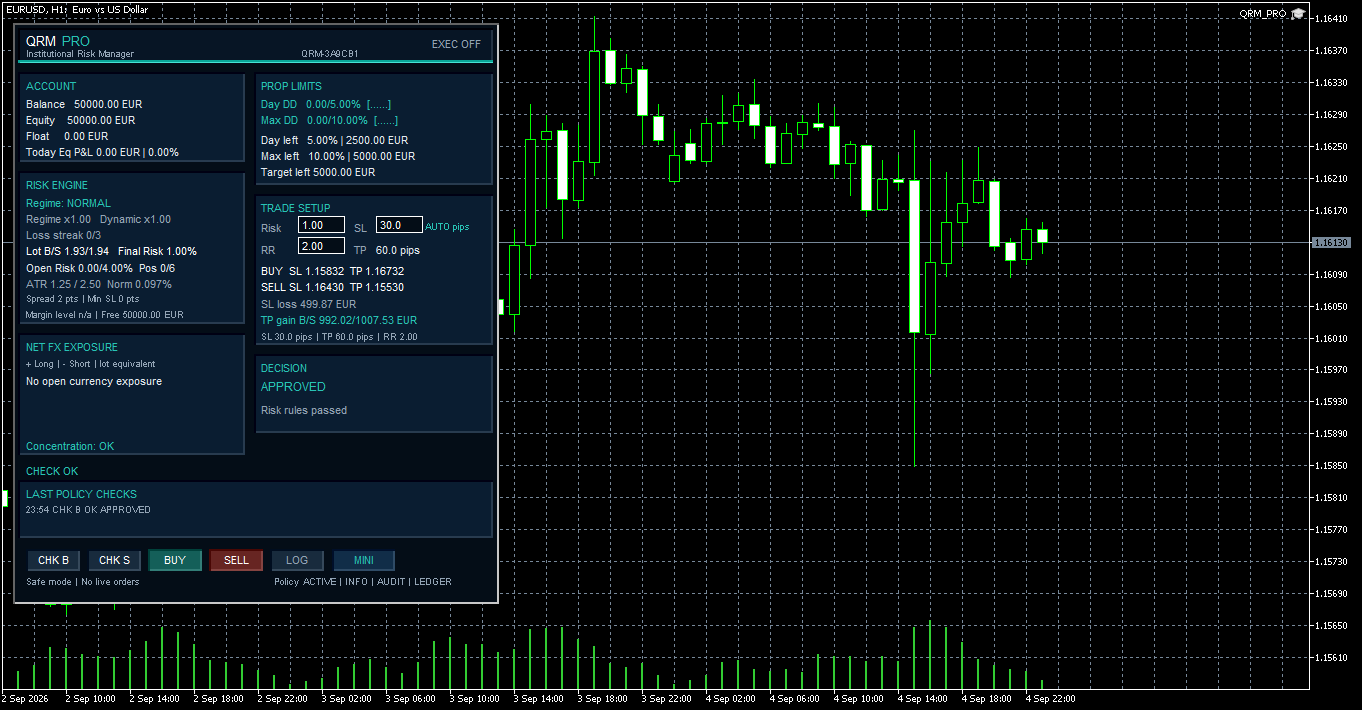
Fig. 4. The same EURUSD setup checked with Quantum Risk Manager Pro. The position remains within the configured account-level risk constraints, so the audited pre-trade check returns APPROVED.
8. Same trade, different risk policy
The final test used exactly the same trade setup.
Nothing changed in:
- risk percentage,
- Stop Loss,
- Take Profit,
- reward-to-risk,
- symbol.
The only change was the maximum allowed portfolio risk.
The portfolio risk cap was reduced from:
4.00%
to:
0.50%
The proposed trade still required:
1.00%
With no open risk already present on the account, a new 1% trade would immediately push the proposed total risk above the 0.50% cap.
After running the same pre-trade check, QRM PRO returned:
DECISION: BLOCKED
with the reason:
Portfolio risk cap exceeded
The trade itself had not changed.
The sizing logic had not changed.
What changed was the risk policy.
This is the central idea behind risk governance.
A trade may be perfectly valid from the point of view of position sizing and still be rejected because it violates a broader account rule.
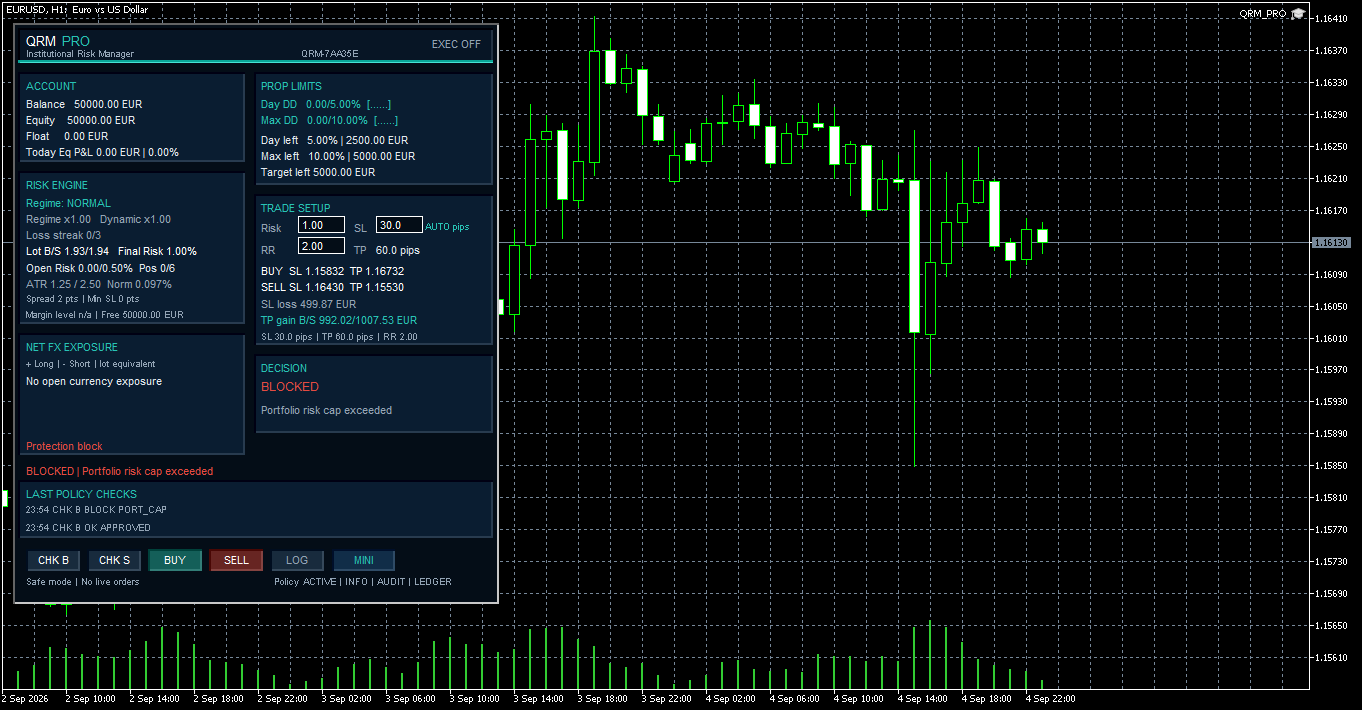
Fig. 5. The same EURUSD setup is rejected after the portfolio risk cap is reduced below the proposed 1% trade risk. QRM PRO returns BLOCKED: Portfolio risk cap exceeded.
9. Position sizing and risk governance are different layers
The tests above make it easier to separate two different tasks.
Position sizing
This answers:
How much should I trade?
It depends mainly on:
- selected monetary risk,
- Stop Loss distance,
- symbol specifications,
- broker volume constraints.
Risk governance
This answers a different question:
Should this trade be accepted under the current account conditions?
That can depend on:
- total open risk,
- portfolio risk cap,
- drawdown,
- margin,
- position limits,
- account exposure,
- protective Stop Loss conditions.
Both layers are useful, but they solve different problems.
10. Where an Expert Advisor fits into this
The current example is manual, but the same separation of responsibilities is useful when designing automated systems.
An Expert Advisor normally deals with strategy logic.
It identifies a market condition and decides whether a trade setup exists.
Risk management can be treated as a separate layer.
Conceptually, the workflow becomes:
Strategy → Proposed Trade → Risk Validation → Execution
The strategy answers:
Is there a trade?
The risk layer answers:
If there is, how much can be traded and does the resulting exposure remain acceptable?
Keeping these responsibilities separate can make automated systems easier to test, maintain and audit.
This does not mean that a graphical risk tool automatically exposes an interface to an Expert Advisor.
Programmatic integration requires a dedicated architecture.
But the principle is the same:
the signal decision and the risk decision do not have to be handled by the same component.
11. A practical pre-trade workflow
The complete process can therefore be reduced to a simple sequence:
- Identify the setup.
- Decide where the trade becomes invalid.
- Place the Stop Loss according to the trade logic.
- Define the maximum acceptable monetary risk.
- Calculate the required position size.
- Check expected loss and reward.
- Verify that the trade remains compatible with broader account-level risk limits.
Only after these steps should the trade be considered ready for execution.
In the EURUSD example shown here:
50,000 EUR account
1.00% risk
30-pip Stop Loss
produced a position size of approximately:
1.93 lots
with an expected loss close to:
500 EUR
When the Stop Loss was widened to 60 pips, the position size fell to approximately:
0.96–0.97 lots
while the monetary risk remained close to the same level.
When the Stop Loss was reduced to 15 pips, the resulting position size was not accepted because of margin safety.
And when the portfolio risk cap was reduced below the proposed trade risk, QRM PRO rejected the trade even though the sizing calculation itself remained valid.
That is the difference between calculating a position size and evaluating whether a trade fits within a defined risk framework.
Conclusion
Position size should not be the starting point of a trade.
It should be the result of a risk decision.
The trader decides where the setup is invalid, how much capital can be risked, and whether the expected reward is acceptable.
The position size comes afterwards.
And even then, the calculation is only one part of the process.
Position sizing tells you how much you can trade. Risk governance tells you whether that trade still fits within the rules of the account.
Both matter before execution.




