Pips vs Points in MetaTrader 5: How They Affect Position Sizing

When traders define a Stop Loss, expressions such as “30 pips” and “300 points” are often used as if they meant the same thing.
On some Forex symbols, they can represent the same price distance. On other instruments, they may not.
For position sizing based on monetary risk, this distinction matters. If the distance is interpreted using the wrong unit, the calculated trading volume can change significantly, and so can the actual amount at risk.
This article explains the difference between pips and MetaTrader 5 points, and how QRM Risk Calculator handles distance through its AUTO, PIPS and POINTS modes.
1. Points and pips are not the same unit
In MetaTrader 5, a point is the price unit represented by the symbol's SYMBOL_POINT property.
This should not be confused with the minimum price change allowed for the instrument, which MetaTrader 5 exposes separately through the trade tick size ( SYMBOL_TRADE_TICK_SIZE).
For example, on a typical five-digit EURUSD quotation:
1.08500 → 1.08501 = 1 MT5 point
Therefore:
1 point = 0.00001
A pip, on the other hand, is a conventional Forex unit.
It is not a native MetaTrader 5 symbol unit. Its value has to be interpreted according to the quotation format of the currency pair.
For most non-JPY currency pairs:
1 pip = 0.0001
On a typical five-digit Forex quotation:
1 pip = 10 MT5 points
Therefore:
30 pips = 300 points
On a four-digit Forex quotation, however, one pip may correspond to one MT5 point rather than ten.
For many JPY pairs, one pip is conventionally 0.01. On a typical three-digit JPY quotation, this again corresponds to 10 MT5 points.
The relationship between pips and points therefore depends on the way the symbol is quoted.
The key distinction is simple:
pips are a Forex market convention, while MT5 points come directly from the symbol specification.
2. Why the distinction matters for position sizing
Risk percentage alone does not determine position size.
The effective monetary risk also depends on:
- Stop Loss distance
- trading volume
- symbol specifications
- tick size and tick value
- account currency
- broker calculation rules
The initial risk budget can be expressed as:
Requested monetary risk = Balance × Risk %
The calculator must then find a trading volume whose estimated loss at the theoretical Stop Loss remains compatible with that amount.
Consider a trader who intends to use a Stop Loss of 30 pips.
If the software interprets that value as 30 points, the resulting price distance on a typical five-digit Forex symbol is ten times smaller than intended.
The position size required to risk the same monetary amount will therefore be very different.
This is why the selected distance unit is part of the risk calculation itself. It is not simply a display preference.
3. AUTO, PIPS and POINTS in QRM Risk Calculator
QRM Risk Calculator provides three distance modes.
AUTO
In AUTO mode:
- Forex symbols use pips
- other instruments use MetaTrader 5 points
The purpose is to use the unit normally expected by Forex traders while relying on the broker-native point unit for other instrument categories.
AUTO only determines how the entered distance is interpreted.
It does not modify the broker's underlying symbol specification.
PIPS
PIPS mode forces the entered Stop Loss distance to be interpreted in pips.
Example:
SL = 30 pips
RR = 2.00
TP = 60 pips
POINTS
POINTS mode forces the entered distance to be interpreted in MT5 points.
Example:
SL = 300 points
RR = 2.00
TP = 600 points
On a typical five-digit EURUSD symbol, 30 pips and 300 points can represent the same physical price distance.
That equivalence should not be assumed for every instrument.

Fig. 1 — AUTO mode on SpotBrent: QRM Risk Calculator uses MT5 points for SL and TP distances on a non-Forex instrument.
4. Why this matters even more outside Forex
MetaTrader 5 is not limited to currency pairs.
Depending on the broker, it can also be used for instruments such as:
- metals
- stock indices
- energy products
- cryptocurrencies
- CFDs
For these instruments, the term pip may be ambiguous or simply inappropriate.
A broker can define different specifications for each symbol, including:
- number of digits
- point size
- tick size
- tick value
- contract size
- volume limits
A movement of 300 points on EURUSD therefore cannot be assumed to have the same price or monetary significance as 300 points on gold, an index or an oil CFD.
QRM Risk Calculator uses the symbol and broker information available through MetaTrader 5 when calculating the effective result for BUY and SELL.
The two directions are evaluated separately because Bid and Ask prices, currency conversion and broker calculations can produce slightly different results.
5. A correct distance does not always produce a tradable lot size
Even when the distance unit is interpreted correctly, the theoretical volume must still respect the broker's trading constraints.
Each symbol can define:
- minimum volume
- maximum volume
- volume step
Suppose the selected risk percentage and Stop Loss distance produce a theoretical volume below the broker's minimum tradable lot.
Simply rounding that value upward could expose the account to a larger monetary loss than the trader requested.
QRM Risk Calculator does not automatically force the minimum lot in this situation.
Instead, it can return:
RISK_BELOW_MIN_LOT
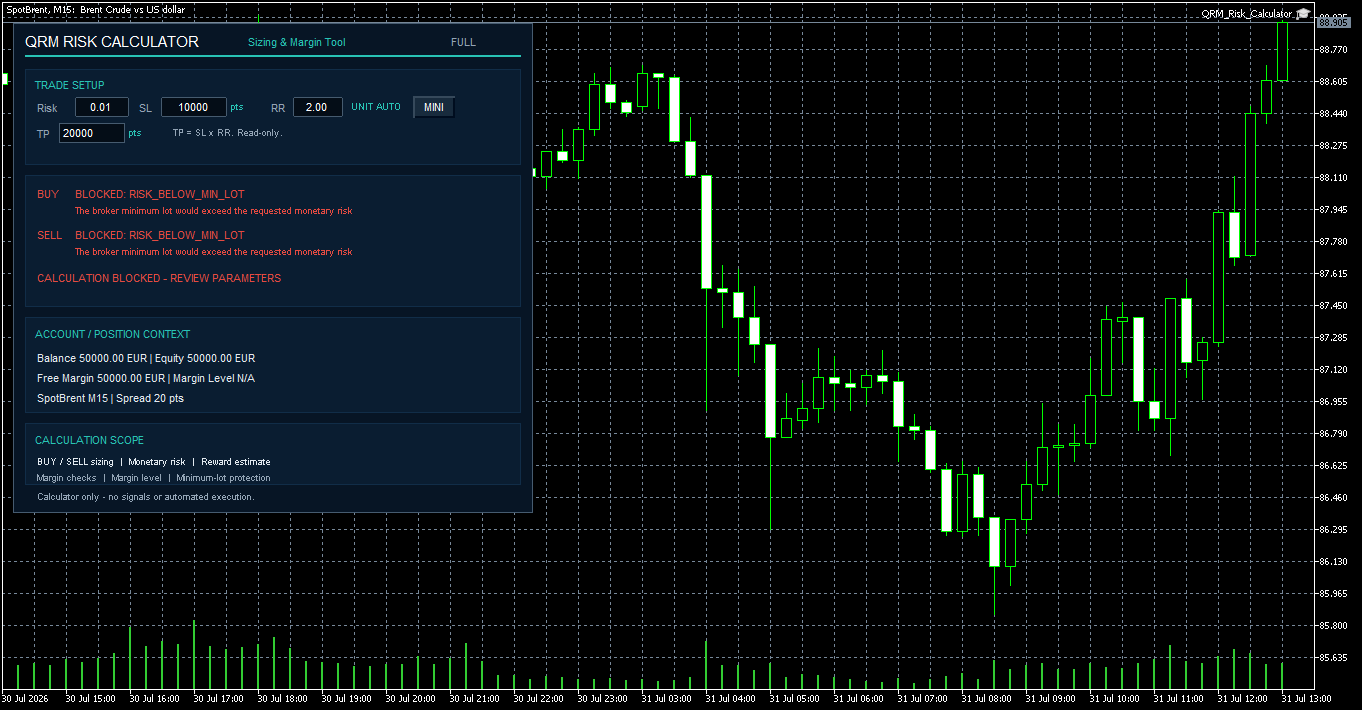
Fig. 2 — RISK_BELOW_MIN_LOT: the broker minimum tradable volume would exceed the monetary risk requested by the user.
This reflects an important principle:
the objective is not to produce a lot size at any cost, but to keep the proposed volume compatible with the requested risk and the broker's actual constraints.
6. Stop Loss and Take Profit use the same effective unit
QRM Risk Calculator derives the theoretical Take Profit distance from the selected Risk/Reward ratio:
TP distance = SL distance × RR
For example:
SL = 30 pips
RR = 2.00
TP = 60 pips
or:
SL = 300 points
RR = 2.00
TP = 600 points
The TP field is read-only and follows the same effective distance unit used for the Stop Loss.
This avoids mixing pips and points within the same trade setup.
7. What to check before using the calculated volume
Before transferring a calculated lot size into an order, verify:
- the instrument being traded
- the selected distance mode
- the effective unit chosen by AUTO
- the entered Stop Loss distance
- the Risk/Reward ratio and resulting Take Profit
- the effective monetary risk for the selected BUY or SELL direction
- the broker's minimum lot and volume step
- available margin and projected margin conditions
The percentage entered at the top of the panel is only the starting point.
What ultimately matters is the effective monetary Risk calculated for the selected trade direction.
When using a broker or symbol for the first time, the calculated result should be checked on a demo account before being used in live trading.
Conclusion
On a typical five-digit Forex symbol:
1 pip = 10 MT5 points
and therefore:
30 pips = 300 points
But this relationship should not be generalized across all MetaTrader 5 instruments.
Reliable position sizing requires the distance unit, symbol specifications, monetary risk and broker volume constraints to be considered together.
QRM Risk Calculator makes the effective distance unit explicit and combines it with monetary position sizing and margin calculations before the trader manually enters an order.
It does not generate trading signals and it does not execute trades.
Its purpose is specific:
calculate the proposed position before the trader decides whether to use it.
QRM Risk Calculator for MetaTrader 5
QRM Risk Calculator — Sizing & Margin Tool
QRM Risk Calculator on MQL5 Market
Risk warning
QRM Risk Calculator is a calculation and operational-support tool.
It does not constitute financial advice, does not generate trading signals, does not guarantee profits and does not eliminate trading risk.
Results depend on information supplied by MetaTrader 5 and the broker, including prices, symbol specifications, tick values, margin rules and tradable volume limits.
Every trading decision and every manually entered order remain the responsibility of the user.




