Risk First: A Practical Way to Size and Review a Trade Before Execution

Many trade plans begin with a chart setup but skip a decision that should come before the order:
How much money am I prepared to lose if this trade is wrong?
Choosing a familiar lot size first reverses the process. The same volume can represent very different monetary risk on two trades because the symbol, contract specification, account currency and distance to Stop Loss may all be different.
A risk-first workflow starts with the amount at risk, defines where the trade idea is invalidated, and calculates position size from those inputs.
Two ways to define the risk budget
The risk budget is commonly expressed in one of two ways.
Percentage risk
Percentage risk scales with the selected account basis. If the account value changes, the monetary amount represented by the percentage changes with it.
For example, 0.5% risk does not mean 0.5 lots. It means that the intended monetary risk is 0.5% of the selected account basis. The position size still depends on the trade's Entry-to-Stop-Loss distance and the symbol's trading specification.
Percentage risk can be useful when the trader wants the risk budget to remain proportional to the account.
Fixed-cash risk
Fixed-cash risk sets an amount directly in the account currency. If the risk budget is 100 USD, the calculation works backwards from that amount to determine a suitable volume for the planned Stop Loss.
Fixed cash is not fixed lot size. A 100 USD risk budget can produce different volumes on different symbols or on the same symbol with different Stop Loss distances.
Neither method guarantees the final loss. Both define an input to the plan.
Stop Loss distance changes position size
Once the risk budget is defined, the distance between Entry and Stop Loss becomes central to the calculation.
If the Stop Loss is close to Entry, each unit of volume has a smaller planned loss at the stop, so the calculated volume may be larger. If the Stop Loss is farther away, each unit of volume carries more planned loss, so the calculated volume must normally be smaller to stay near the same monetary risk.
In simplified form:
Position size = risk budget / estimated loss per unit of volume at the Stop Loss
The actual calculation is symbol-aware. It needs the platform and broker data that describe price increments, tick value, contract size, account currency and permitted volume.
This is why copying a lot size from a previous trade is not a reliable risk-sizing method. A volume that fitted one setup may be unsuitable for another.
The theoretical size still has to be tradable
A calculation may produce a raw volume such as 0.137 lots, but the broker may accept only increments of 0.01. Another symbol may have a minimum of 0.10 lots, a larger step, or a defined maximum.
The raw result therefore has to be normalized to the symbol's permitted:
- minimum volume;
- maximum volume;
- volume step;
- applicable platform or broker limits.
The displayed normalized volume and resulting monetary risk should be reviewed together. The normalized result may differ from the theoretical target.
There is also a deliberate difference between the Axivor MetaTrader editions when a positive calculated size is below the broker minimum. The MT4 edition raises the size to the broker minimum and displays the resulting actual risk. The MT5 edition rejects the result and displays zero/error instead of increasing the trade. In either case, the displayed risk must be reviewed before execution.
Plan from the chart, not from an isolated number
Risk sizing is easier to review when Entry, Stop Loss and Take Profit remain part of the visible setup.
A practical sequence is:
- Choose Buy or Sell.
- Choose a market or pending-order workflow.
- Place Entry, Stop Loss and Take Profit around the market structure.
- Define percentage or fixed-cash risk.
- Review the normalized volume and planned monetary risk.
- Review the reward-to-risk relationship.
- Confirm all order details before execution.
Moving Stop Loss changes the risk distance and should trigger a new size calculation. Moving Take Profit changes the planned reward and therefore the R multiple. Moving a chart line should update the plan; it should not submit an order.
What the R multiple tells you
R describes planned reward relative to planned risk distance.
If the distance from Entry to Take Profit is twice the distance from Entry to Stop Loss, the setup is approximately 2R. If the two distances are equal, it is approximately 1R.
R is useful for reviewing the geometry of a setup, but it is not a probability estimate and does not predict whether the trade will succeed. A 2R target does not mean that the market is likely to reach it.
It is also important to distinguish planned R from the realized result. Spread, slippage, gaps, partial closes and management actions can all change the final outcome.
Keep planning separate from execution
A calculation is not an order.
That distinction creates a useful checkpoint. Before submitting, the trader can verify:
- symbol;
- Buy or Sell direction;
- market or pending order type;
- Entry;
- Stop Loss;
- Take Profit;
- normalized volume;
- planned monetary risk.
For pending trades, the order type also depends on direction and the Entry price relative to the current market. The resulting Buy Limit, Buy Stop, Sell Limit or Sell Stop should be checked before submission.
Even a carefully calculated plan can produce a different realized result. Spread, slippage, gaps, liquidity, connectivity and broker execution rules remain part of live trading.
One implementation of this workflow
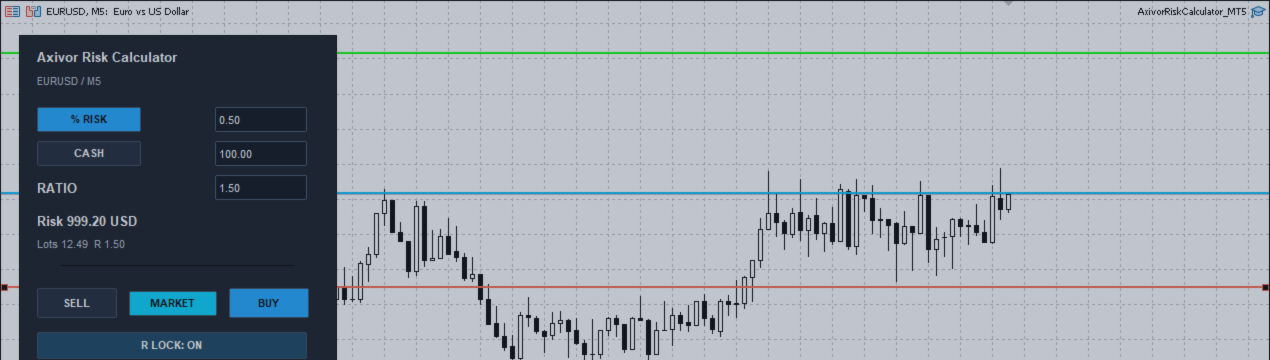
Axivor Risk Calculator applies this risk-first process directly in MetaTrader 4 and MetaTrader 5.
The trader chooses the direction, places Entry, Stop Loss and Take Profit on the chart, selects percentage or fixed-cash risk, and reviews the broker-normalized volume, monetary risk and R multiple. Changing a value or moving a line recalculates the plan but does not place a trade. Order submission requires the Send Order action and a separate confirmation step.
For a selected open position, the editions also provide partial close, move to break even and pip-based trailing-stop controls, subject to platform and broker rules.
The product does not generate signals, select market direction or operate as an autonomous strategy. The trader remains responsible for the setup and every order.
Axivor Risk Calculator is available on MQL5 Market:
MetaTrader 5:
https://www.mql5.com/en/market/product/192616
MetaTrader 4:
https://www.mql5.com/en/market/product/192619
Test the complete workflow on a demo account with the intended broker, account type and symbols before considering live use.
Risk notice
Trading involves substantial risk. A risk calculator assists planning but cannot guarantee execution price, maximum loss, profitability or any investment outcome. Actual results can differ from planned values because of spread, slippage, market gaps, liquidity, broker rules, symbol specifications, connectivity and platform behavior.