Lot size is not a fixed answer for a currency pair. It depends on three things: how much money you are prepared to lose, where the stop goes, and what one tick is worth on the symbol your broker supplies.
That is why an MT5 lot size calculator should start with the stop loss. A 0.50 lot trade with a tight stop and a 0.50 lot trade with a wide stop do not carry the same risk. The volume only means something when it is tied to a price distance.
The position size formula
First turn the chosen percentage into money:
Risk money = account balance × risk percentage
Then convert the distance from the entry to the stop into ticks and divide the money by the loss for one lot:
Stop distance in ticks = absolute entry-to-stop distance ÷ tick size
Lots = risk money ÷ (stop distance in ticks × tick value per lot)
Use 0.01 for 1%, 0.005 for 0.5%, and so on. Some traders use equity instead of balance so open profit and loss changes the next calculation. Either is a defined basis; this example uses balance.
A full EURUSD example
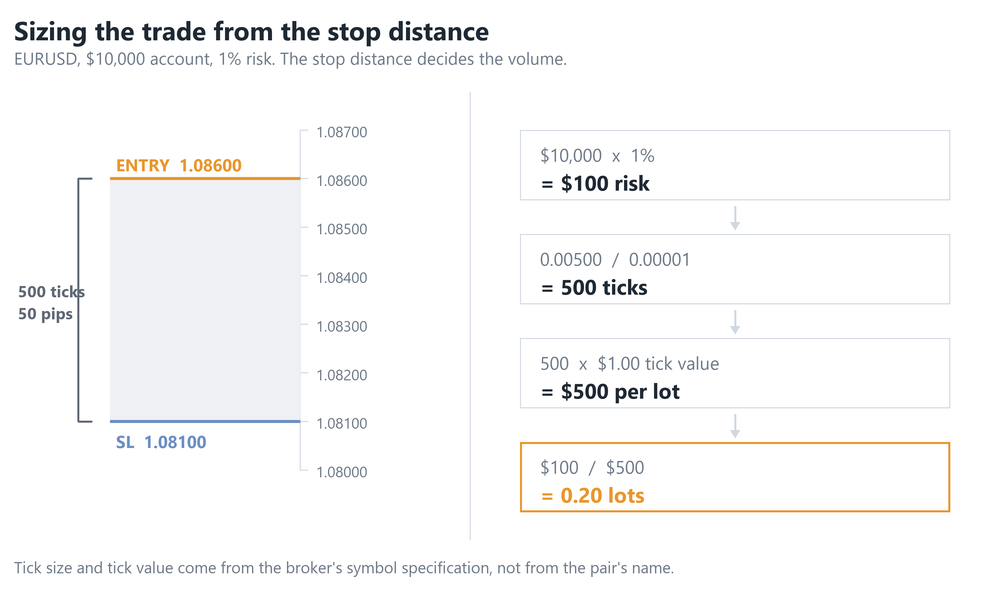
Take a USD account with a balance of $10,000. You want to risk 1%, so the money available for the trade is:
$10,000 × 0.01 = $100
Suppose the planned EURUSD entry is 1.08600 and the stop is 1.08100. The price distance is 0.00500, which is 50 pips. On a typical five-decimal EURUSD feed, the trade tick size is 0.00001. The stop therefore covers:
0.00500 ÷ 0.00001 = 500 ticks
For one standard lot of EURUSD on this USD account, one 0.00001 tick is worth $1.00. A full lot would therefore lose:
500 × $1.00 = $500
Now divide the $100 risk budget by that one-lot loss:
$100 ÷ $500 = 0.20 lots
If the broker accepts volume in steps of 0.01 lots, 0.20 is already valid. At the planned stop price, the price movement accounts for $100 of loss before commission and any difference between the requested stop and the actual fill.
Why the $10-per-pip shortcut breaks
You will often read that one pip is worth $10 per standard lot. That is true for a 100,000-unit forex contract when the quote currency is USD and the account is also in USD. EURUSD and GBPUSD are familiar examples.
It is not a universal property of a lot. A lot is the broker's contract unit, and that contract changes by symbol.
- A JPY cross: on EURJPY, the profit currency is JPY. Its value has to be converted into the account currency, and that conversion moves with the relevant exchange rate.
- XAUUSD: one lot commonly represents 100 troy ounces, but the broker defines the contract size, tick size and volume rules. A $0.01 price tick can have a different cash value from a forex point.
- US30: brokers offer different CFD contracts under similar names. One lot may represent a different cash amount per index point on each account type.
The symbol name is not enough information. Even two brokers both calling a symbol XAUUSD can publish different contract specifications. This is why a calculator built around pips and hard-coded contract sizes fails as soon as it leaves the small set of forex pairs it expected.
Where MT5 keeps the real numbers
MetaTrader receives each symbol's specification from the broker. In the terminal, right-click the symbol in Market Watch and choose Specification. In MQL5, the corresponding values are read with SymbolInfoDouble().
- SYMBOL_TRADE_TICK_SIZE is the symbol’s minimum price change. Do not assume it is the same thing as a pip or even the displayed point.
- SYMBOL_TRADE_TICK_VALUE is the cash value of one trade tick for one lot, calculated by the platform. It is intended to arrive in the account currency, so the cross-currency conversion is normally already represented — though broker metadata can be inconsistent on unusual instruments, which is why OrderCalcProfit() between your exact entry and stop is the firmer check. MQL5 also exposes separate profit and loss tick-value properties where the calculation is direction-sensitive.
- SYMBOL_VOLUME_STEP is the permitted increment between trade volumes, such as 0.01 or 0.10 lot.
- SYMBOL_VOLUME_MIN and SYMBOL_VOLUME_MAX are the smallest and largest volume the broker accepts for one deal.
Tick value can move when the conversion into the account currency moves. Read the live specification for the actual symbol and account rather than copying a value from a table. For programmatic calculations across unusual CFDs and futures, MT5's OrderCalcProfit() can also estimate the one-lot loss between the exact entry and stop using the broker's calculation mode.
Round down, not to the nearest lot
Suppose the formula returns 0.237 lots and the volume step is 0.01. The permitted sizes around it are 0.23 and 0.24. Using 0.24 puts the planned price risk above the chosen amount, so use 0.23 lots. Risk sizing rounds down to the next valid step.
Then check the minimum and maximum. If the result is above the maximum for one deal, the requested order will be rejected unless the volume is reduced or handled within the broker's rules. If the result is below the minimum, do not round it up: the minimum lot would risk more money than you allowed.
Widening the stop makes the calculated lot smaller, so it cannot solve a below-minimum result. A closer stop raises the calculated volume, but the chart must justify that stop placement. If it does not, skip the trade. The risk limit comes before the broker's minimum ticket size.
What the clean formula leaves out
The formula prices the movement from the planned entry to the stop. The final account loss can also include commission, spread and execution.
- Commission is charged separately on many accounts. Include both the opening and closing side where the broker quotes commission per side.
- Spread matters when the entry or stop was planned from the chart's other price. A buy opens at Ask and its stop is triggered against Bid; a sell opens at Bid and its stop is triggered against Ask. A wider spread can therefore change the effective distance.
- Slippage means a stop order can fill beyond its trigger during a fast move or a gap.
Size from the worst realistic entry-to-exit distance, including a sensible allowance for wider spread and slippage, then account for commission. If $100 is the full loss ceiling, the pure price move should use less than the whole $100.
The same 1% can feel completely different
A 1% risk on EURUSD with a 20-pip stop and a 1% risk on an index with a 200-point stop are the same amount of account money once the volumes are sized correctly. They are still different trades.
The index may move faster, gap around its cash-session open, carry a wider spread at certain hours and require a much smaller numerical lot. The forex trade may spend longer near the entry and accrue swap if held overnight. Percentage risk equalises the planned money loss; it does not equalise volatility, holding time, execution quality or the chance of reaching the stop.
Doing it on the chart
The calculation is simple, but repeatedly copying prices and symbol specifications is where mistakes enter. BrioQuant Assistant Panel is a free MT5 utility that calculates the lot size from your chosen risk and the distance between draggable entry and stop lines. Move the stop line and the size updates on the chart, using the symbol you are actually trading.