How to Trade Demand and Supply Zones with Apex Institutional Indicator

The Apex Institutional Edge Supply & Demand Indicator is a professional trading tool designed to automatically detect high-probability Supply and Demand zones on your chart.
It uses a combination of:
- Fractal market structure detection
- ATR-based volatility calculation
- Zone merging and filtering logic
The main goal is to help traders identify areas where price is likely to:
- Reverse
- Continue after a pullback
- Pause before continuing trend
For best performance, the indicator works best in trending markets (strong bullish or bearish conditions). In sideways markets, more zones may appear, so proper filtering is important.
Inputs Overview
Below is a clear explanation of each setting shown.
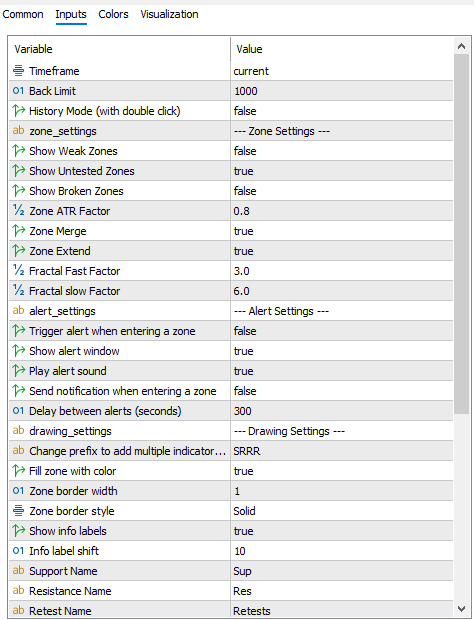
1. General Settings
Timeframe = Current
The indicator calculates zones based on the active chart timeframe.
- Use M15 / M30 / H1 for intraday trading
- Use H4 / D1 for swing trading
👉 Best practice: Always match your trading timeframe.
Back Limit = 1000
Controls how much historical data the indicator analyzes.
- Higher value = more historical zones
- Lower value = faster performance but fewer zones
👉 Recommended: 1000
History Mode = False
Allows viewing past zone behavior.
- False = normal live trading mode
- True = allows historical zone inspection (double-click feature)
2. Zone Settings (Core Logic)
Show Weak Zones = False
Weak zones are low-quality areas with limited confirmation.
👉 Recommended: OFF
Keeps chart clean and focused on high-quality setups.
Show Untested Zones = True
Shows Fresh Supply and Demand zones that have never been touched.
These are:
- High-probability reaction zones
- Often produce strong first reactions
👉 Recommended: ON
Show Broken Zones = False
Displays zones that were previously broken by price.
These zones:
- Reflect market structure shifts
- Can act as future support/resistance
👉 Recommended: OFF (for cleaner trading)
Zone ATR Factor = 0.8
Controls the size (width) of zones based on market volatility.
- Lower value = tighter, more precise zones
- Higher value = wider zones
👉 Recommended: 0.8
Good balance between precision and visibility.
Zone Merge = True
Automatically combines nearby zones into one stronger zone.
Benefits:
- Reduces chart clutter
- Creates stronger institutional levels
- Improves clarity
👉 Recommended: ON
Zone Extend = True
Extends zones to the right side of the chart.
This helps traders:
- See future reaction areas
- Plan entries in advance
- Identify support/resistance clearly
👉 Recommended: ON
3. Fractal Settings (Market Structure Detection)
Fractal Fast Factor = 3.0
Detects smaller market swings.
- Lower values = more sensitive (more zones)
- Higher values = fewer but stronger zones
👉 Recommended: 3.0
Fractal Slow Factor = 6.0
Detects major swings and confirms strong zones.
- Filters weak market structure
- Focuses on institutional-level zones
👉 Recommended: 6.0
4. Drawing Settings
Fill Zone with Color = True
Displays zones visually on the chart.
Helps traders:
- Quickly identify supply/demand areas
- Improve chart readability
Zone Border Width = 1
Controls thickness of zone outline.
- 1 = clean and minimal look
Zone Border Style = Solid
Uses solid lines for clear visibility.
Show Info Labels = True
Displays zone type labels such as:
- Supply
- Demand
- Retests
Info Label Shift = 10
Controls label positioning for better chart readability.
Zone Naming Prefix
- Supply = “Sup”
- Resistance = “Res”
- Retests = “Retests”
Used for labeling multiple indicator instances.
5. Alert Settings
Trigger Alert = False
Enables alerts when price enters a zone.
Show Alert Window = True
Displays popup notification on entry.
Play Alert Sound = True
Plays sound when zone is touched.
Send Mobile Notification = False
Sends push notifications to mobile device.
Delay Between Alerts = 300 seconds
Prevents repeated alerts too frequently.
How the Indicator Works (Simple Explanation)
Demand Zone
A Demand Zone is created when:
- Buyers previously pushed price strongly upward
- Price may react again when it returns
👉 Used for BUY opportunities
Supply Zone
A Supply Zone is created when:
- Sellers previously pushed price strongly downward
- Price may drop again when revisiting
👉 Used for SELL opportunities
Trading Strategy (Institutional Approach)
Uptrend Trading
- Identify bullish trend
- Wait for price to return to Demand Zone
- Look for confirmation (price action / candle pattern)
- Enter BUY
- Stop loss below zone
- Target next Supply Zone
Downtrend Trading
- Identify bearish trend
- Wait for retracement into Supply Zone
- Confirm rejection
- Enter SELL
- Stop loss above zone
- Target next Demand Zone
Zone Quality Classification
Strong Zones
- Multiple reactions
- High probability setups
Confirmed Zones
- Already tested and respected
- Reliable trading areas
Fresh Zones
- Untested zones
- Highest reaction probability
Broken Zones
- Previously invalidated zones
- Can act as weak S/R
Weak Zones
- Low-quality zones
- Recommended to hide




