TradePilot Pro — Position Sizer, Multi-TP Execution & Trade Management Cockpit for MT5
15 June 2026, 09:46

0
261
TradePilot Pro is a professional trading cockpit for MetaTrader 5
that combines precision position sizing, multi-target execution,
a prop firm risk dashboard, and automated trade management — all
in one compact tabbed panel. This guide walks through every
feature with screenshots and examples.
━━━━━━━━━━━━━━━━━━━━━━━━━━━━━━━━━━━━━━
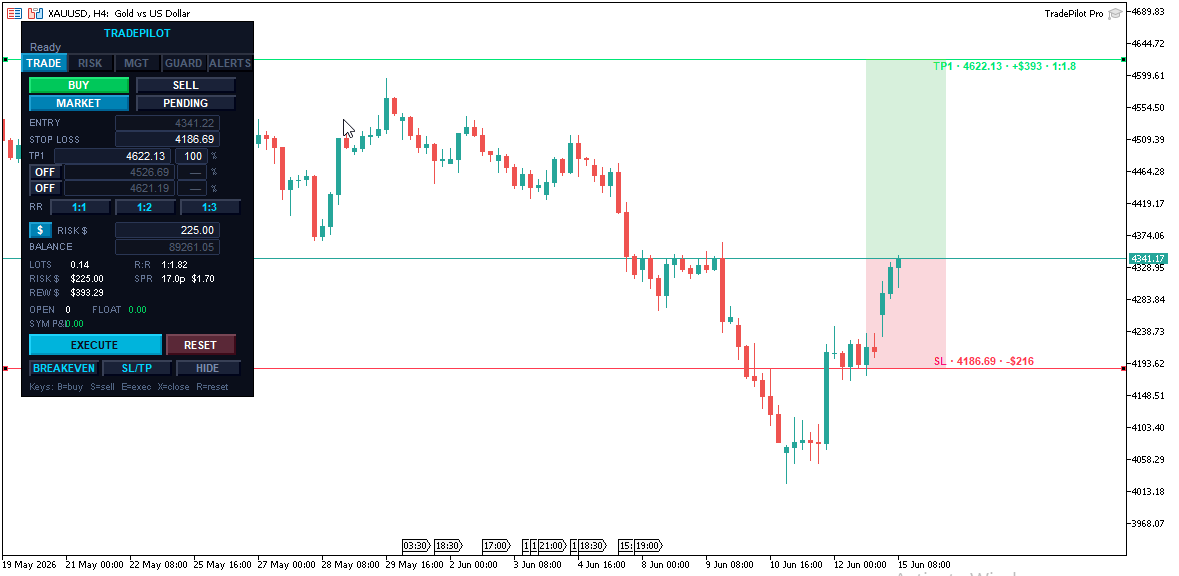
🎯 MULTI-TARGET EXECUTION WITH AUTOMATIC PARTIAL CLOSES
TradePilot Pro is built around the way professional traders
actually exit — in stages, not all at once.
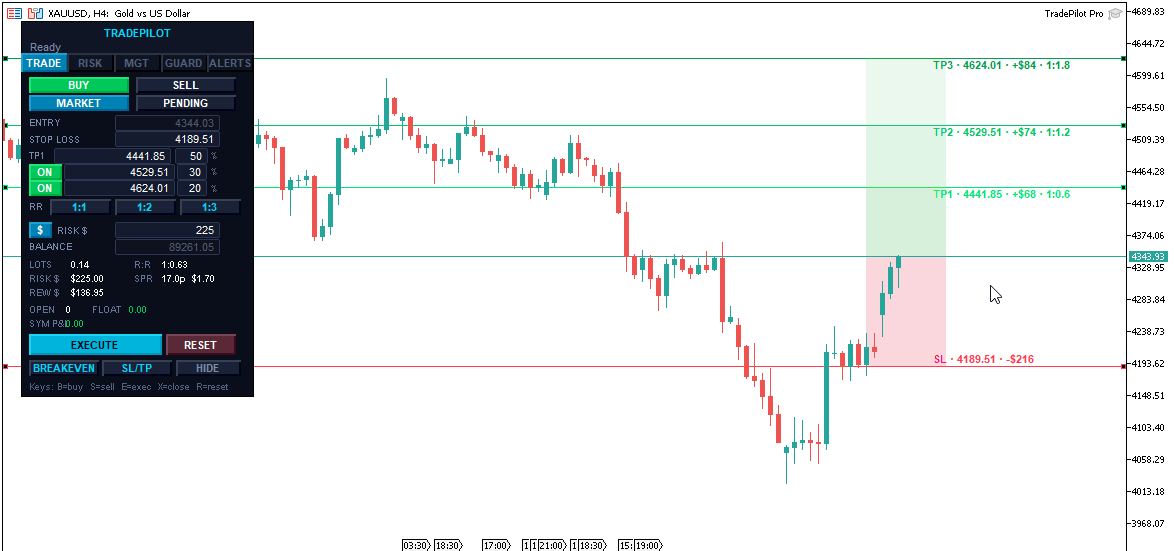
- Set up to 3 independent take-profit levels
- Editable % split per level directly on the panel
(example: 50% at TP1, 30% at TP2, 20% at TP3)
- When TP1 is hit → automatically partial closes that portion
- When TP2 is hit → partial closes again, runner continues to TP3
- After execution, each TP level is drawn on the chart as its
own dotted line — drag any of them to modify a live position
- Broker TP always set to the final level as a hard safety net
- If a partial close falls below minimum lot, the runner is held
and the level is marked done — no crashes, no ghost orders
- Quick RR buttons (1:1 / 1:2 / 1:3) set TP1 in one click
━━━━━━━━━━━━━━━━━━━━━━━━━━━━━━━━━━━━━━
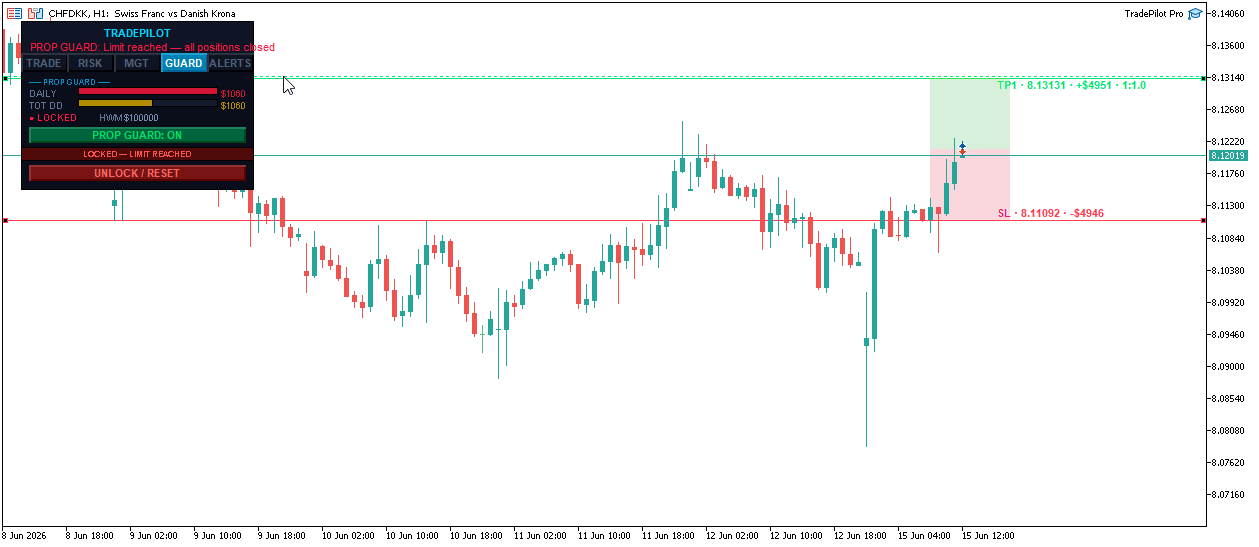
🛡️ PROP FIRM RISK DASHBOARD
Built for funded-account and challenge traders who must respect
strict daily and total drawdown limits.
- Live graphical bars showing daily loss and total drawdown
used against your configured limits
- Color-coded status: SAFE → CAUTION → DANGER → LOCKED
- High-water-mark tracking preserved across MT5 restarts
- Warning alert fires before you approach the hard limit
- Automatic position close when the limit is reached
- One-click UNLOCK / RESET to clear the lock and continue
Configure in EA inputs:
- PropAccountSize — your funded account size (0 = live balance)
- PropDailyLossPct — max daily loss %
- PropTotalDDPct — max total drawdown %
- PropWarnPct — warning threshold (default 75%)
- PropClosePct — hard close threshold (default 90%)
━━━━━━━━━━━━━━━━━━━━━━━━━━━━━━━━━━━━━━
📐 DRAGGABLE LINES WITH LIVE VISUAL ZONES
Every price level is a draggable horizontal line on the chart.
Drag your SL, TP1, TP2, or TP3 to exactly where you want it —
all calculations update in real time.
- SL zone shaded between entry and stop
- TP zones shaded between each target level
- 5 color schemes: Pale Light, Muted Dark, Neon Dark,
Monochrome Soft, Classic
- In Market mode, lines glide with price automatically
preserving all distances and risk calculations
- In Pending mode, the Entry line is also draggable
- SL line turns orange when geometry is invalid — you see
the problem before you can click Execute
- Show/Hide lines with one button on the main TRADE tab

━━━━━━━━━━━━━━━━━━━━━━━━━━━━━━━━━━━━━━
🛡️ RISK SAFETY SYSTEM
Automatic position sizing
Enter your risk as % of balance or fixed $ amount. TradePilot
calculates the exact lot size from your SL distance, tick value,
and account balance. Switch modes with one button.
Commission-aware sizing
Auto-detects your broker's per-lot commission from recent trade
history and factors it into the lot calculation — so your real
risk matches your intended risk. No configuration needed.
Margin pre-check
Before every execution, TradePilot confirms you have enough free
margin. If the trade would exceed 95% of available margin it's
blocked with a clear message before it reaches the broker.
Geometry validation
The Execute button turns red and shows the exact problem if your
setup is invalid. You cannot send a broken trade.
Daily loss kill switch
Set a maximum daily loss % of starting equity. When hit, all
positions close and the panel locks until you manually reset.
Confirm-before-execute
Optional double-click confirmation on Execute and Close All.
Turn it on for protection or off for one-click speed —
configurable in the EA inputs.
━━━━━━━━━━━━━━━━━━━━━━━━━━━━━━━━━━━━━━
⚙️ TRADE MANAGEMENT SUITE
- ATR trailing stop — trail distance adapts to live volatility
using ATR × multiplier. Shown live in pips on the MGT tab.
- Auto Breakeven — moves SL to entry after TP1 hits, with a
configurable pip buffer
- Manage external trades — apply breakeven, trail, and close
all to positions opened outside TradePilot (phone, signals,
other EAs)
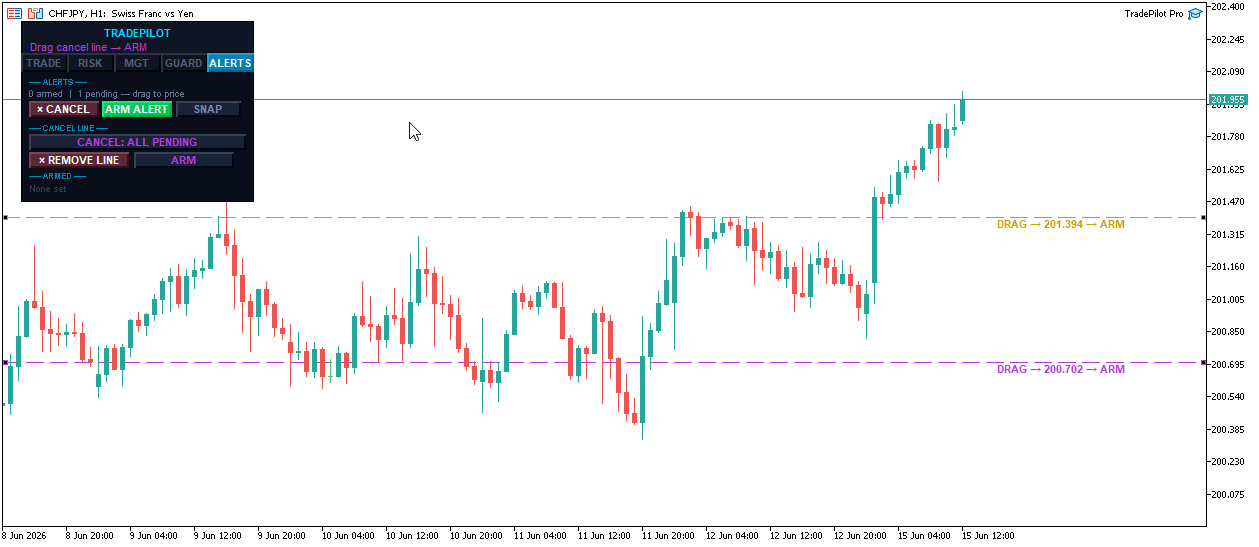
- Order cancellation line — drop a purple line on the chart.
When price touches it, selected pending orders cancel
automatically and the line removes itself
- Apply SL/TP — push updated levels from the panel to all
open positions in one click
- Close All — closes everything with optional double-confirm

━━━━━━━━━━━━━━━━━━━━━━━━━━━━━━━━━━━━━━
🔔 PRICE ALERTS & CANCEL LINE
Price Alerts
- Click + ALERT to drop a line at current price
- Drag it to your target level
- Click ARM ALERT to activate — line changes color to confirm
- When price crosses, push notification and/or popup fires
- Auto-removes after firing
- Place as many as you need
Order Cancellation Line
- Toggle: ALL pending orders vs magic-only
- Click + CANCEL LINE, drag to target, click ARM
- When price touches it, pending orders cancel automatically
- Line removes itself after firing
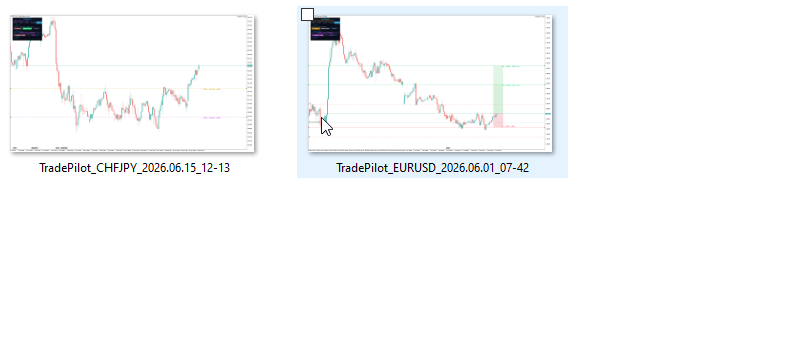
Click SNAP on the ALERTS tab — saves a 1920×1080 chart
screenshot to MQL5/Files/Screenshots/ instantly.
━━━━━━━━━━━━━━━━━━━━━━━━━━━━━━━━━━━━━━
⌨️ KEYBOARD SHORTCUTS
All shortcuts can be disabled via the EnableKeyboard input.
B → Switch to Buy
S → Switch to Sell
E → Execute trade
X → Close all positions
R → Reset panel to defaults
When ConfirmExecute is on, E and X require a second press —
you always get one chance to cancel.
━━━━━━━━━━━━━━━━━━━━━━━━━━━━━━━━━━━━━━
📊 TABBED PANEL & LIVE STATISTICS
Five-tab layout: TRADE / RISK / MGT / GUARD / ALERTS
The panel auto-calibrates to your screen DPI so it stays
crisp on any monitor and any resolution.
Live stats on every tick:
- Lots — exact calculated lot size
- Risk $ — exact dollar risk
- Reward $ — projected profit at TP1
- R:R — live risk-to-reward ratio
- Spread — in pips plus dollar cost, with commission shown
- Open / Float — position count and floating P&L
- Symbol P&L — today's realized P&L for this symbol

━━━━━━━━━━━━━━━━━━━━━━━━━━━━━━━━━━━━━━
MULTI-LANGUAGE SUPPORT
English / Spanish / Portuguese / French / Chinese
All buttons, labels, and status messages switch automatically.
Set via the Language input — no manual editing required.
━━━━━━━━━━━━━━━━━━━━━━━━━━━━━━━━━━━━━━
KEY INPUTS REFERENCE
RiskPercent 1.0 Default risk % per trade
Magic 990011 Magic number for tracking
EnableKeyboard true Enable keyboard shortcuts
ConfirmExecute true Double-click to execute
AutoBE false Auto breakeven after TP1
BEBuffer 0.0 Breakeven pip buffer
Trailing false Enable ATR trailing
TrailATRPeriod 14 ATR period
TrailATRMult 1.5 Trail = ATR × this
DailyLoss false Enable daily loss limit
DailyLossPct 2.0 Max daily loss %
PropGuard false Enable prop dashboard
PropDailyLossPct 5.0 Prop daily loss limit %
PropTotalDDPct 10.0 Prop total DD limit %
PropWarnPct 75.0 Warning threshold %
PropClosePct 90.0 Hard close threshold %
Language EN Panel language
ZoneScheme Pale Zone color scheme
━━━━━━━━━━━━━━━━━━━━━━━━━━━━━━━━━━━━━━
⚠️ IMPORTANT NOTE
Multi-TP partial closes are managed client-side by the EA.
MT5 must remain open with TradePilot attached for staged
partial closes to execute. A single broker-side stop loss
and take profit are always placed as safety nets — your
position is never left fully unprotected if the terminal
goes offline.
━━━━━━━━━━━━━━━━━━━━━━━━━━━━━━━━━━━━━━
COMPATIBILITY
- MetaTrader 5 only
- All symbols: forex, gold, indices, crypto
- All MT5 brokers — standard, ECN, raw spread
- Multiple instances supported via magic number isolation
- Tested on live demo accounts before release
━━━━━━━━━━━━━━━━━━━━━━━━━━━━━━━━━━━━━━
Questions or feature requests? Leave a comment below.
TradePilot Pro is actively developed — updates are
free for all buyers.