

They struggle because they have too many indicators, too many signals, and no clean way to decide which signal deserves attention.
One trader may use an indicator for signals, another for trend, another for momentum, another for volatility, another for choppy market conditions, another for ATR, and another for confirmation. After some time, the chart becomes crowded, slow to read, and difficult to manage.
Atropos X was built to simplify that process.
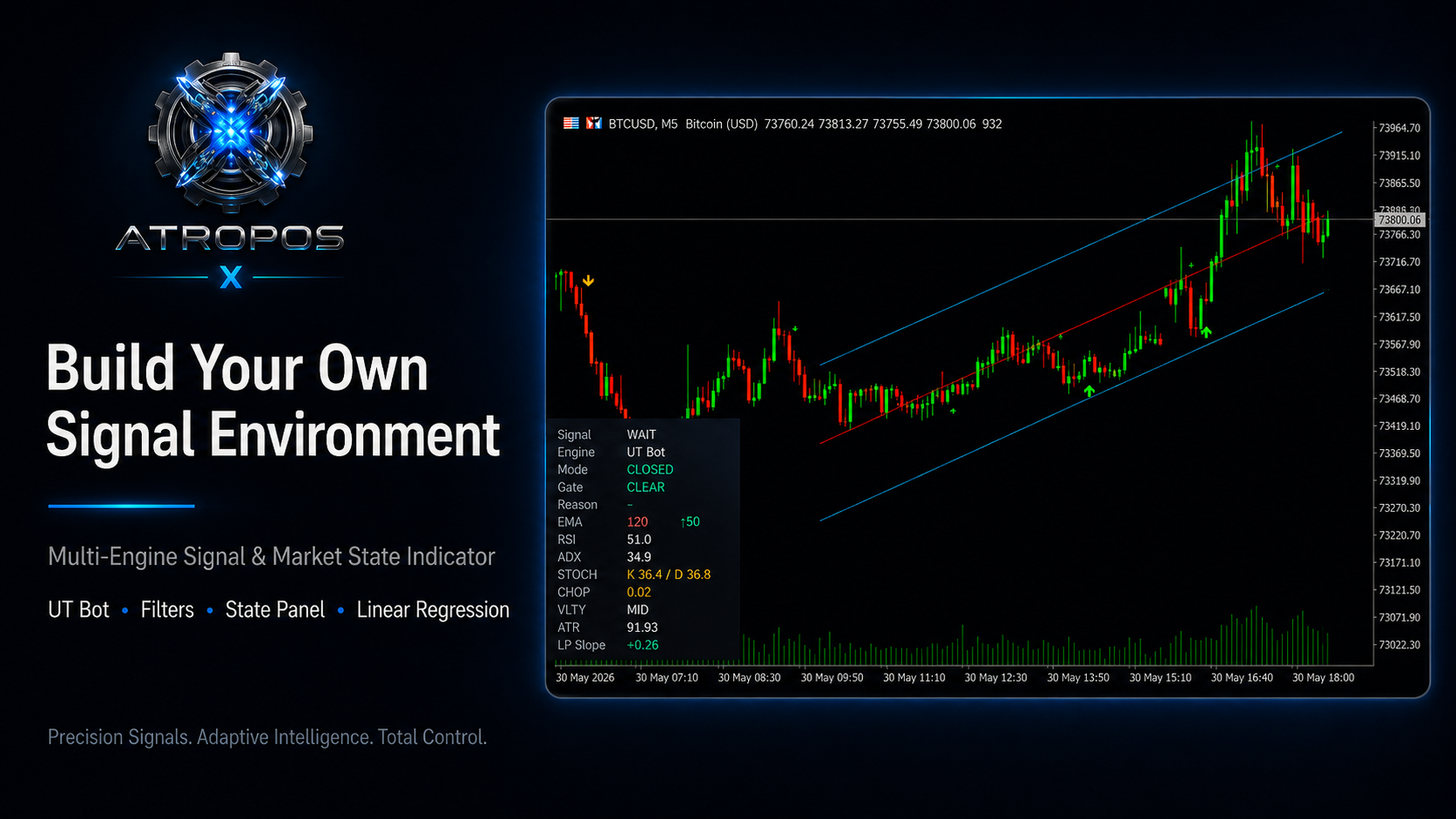
It is a multi-engine signal and market-state indicator for MetaTrader 5. It combines signal engines, filters, Linear Regression context, alerts, and a live state panel into one flexible trading workspace.
The idea is not to force one fixed strategy on every trader.
The idea is to give traders the tools to build their own signal environment based on the instrument, timeframe, and market conditions they trade.
What is Atropos X?
Atropos X is not just another buy and sell arrow indicator.
It is a flexible trading asset that can be used in different ways:
-
As a direct signal indicator
-
As a filtered signal indicator
-
As a confirmation tool
-
As a market-state dashboard
-
As a cleaner replacement for multiple separate indicators
-
As a visual research tool for comparing engines and filters
The indicator includes two signal engines, multiple optional filters, a Linear Regression visual tool, blocked-signal markers, alerts, and a live state panel that displays important market readings directly on the chart.
This allows the trader to work from one cleaner workspace instead of stacking many separate indicators.
The Main Concept: Start Simple, Then Build
Atropos X gives you many tools, but that does not mean you should enable everything at once.
This is very important.
The best way to use Atropos X is to start simple:
-
Choose the signal engine.
-
Keep most filters OFF at first.
-
Watch the raw signals.
-
Add one filter at a time.
-
Compare the difference visually.
-
Use the state panel to understand what is happening.
-
Save the setup that works best for your symbol and timeframe.
Different instruments behave differently.
Gold may respond better to one type of filter.
Indices may respond better to another.
Crypto may need more attention to ATR and volatility.
Forex pairs may need a smoother setup depending on the session and timeframe.
The goal is not to copy one fixed setup blindly.
The goal is to build a setup that makes sense for your market.
Two Signal Engines
Atropos X includes two signal engines:
UT Bot Engine
The UT Bot engine is usually more active and responsive. It can be useful when the trader wants faster directional signal behavior and more active chart feedback.
This engine may be preferred by traders who like quicker signals and want to combine them with filters such as EMA, RSI, MACD, ADX, Choppiness, or ATR conditions.
Range Filter Engine
The Range Filter engine is usually smoother and more filtered. It can help reduce some market noise and give a different signal rhythm compared with UT Bot.
This engine may be useful when the trader wants a calmer signal flow or wants to test a smoother behavior on forex, indices, crypto, or other CFD instruments.
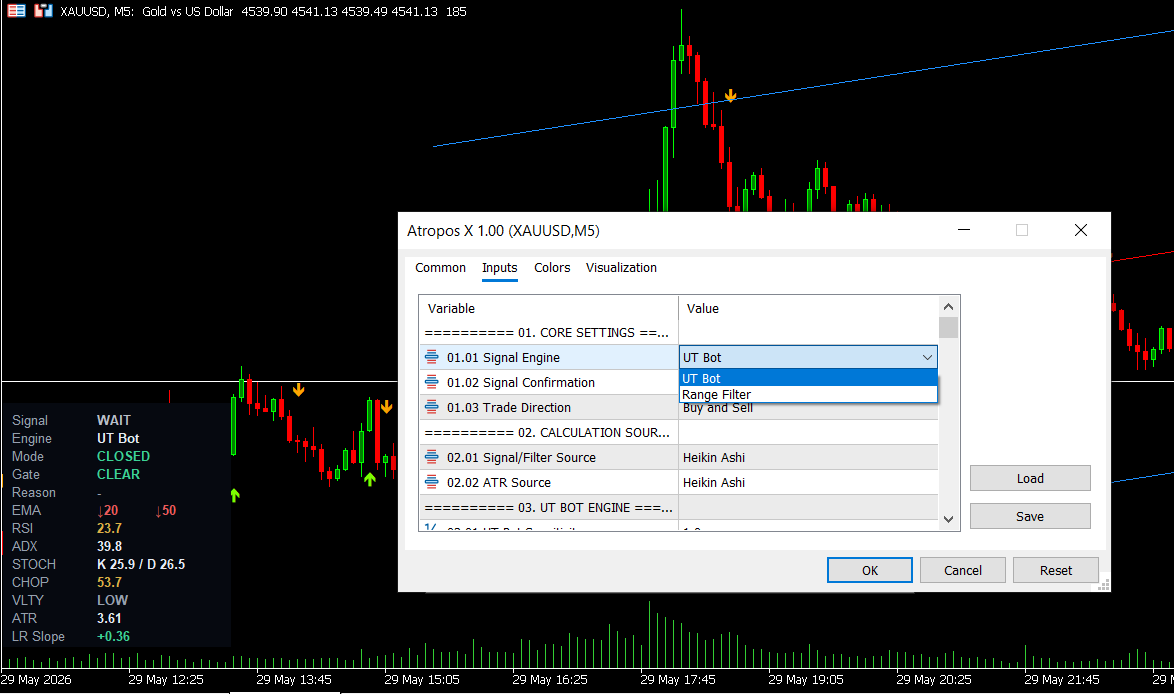
Neither engine is automatically better than the other.
The best engine depends on the instrument, timeframe, session, volatility, and the trader’s style.
Filters: Build Your Own Confirmation Stack
The strength of Atropos X is not only the signal engines.
The real flexibility comes from the filters.
Filters allow the trader to decide which signals should be accepted and which signals should be blocked.
You can keep the setup light, or you can make it more selective.
The important point is this:
Do not enable every filter blindly.
In many cases, one or two filters may be enough.
EMA Filter
The EMA filter helps align signals with trend structure.
Atropos X can use EMA logic to help decide whether a signal should be accepted or blocked. Depending on the selected mode, the trader can use a single EMA approach or an EMA cross relationship.
This can be useful when the trader wants to reduce signals that go against the current trend structure.
However, a very strict EMA filter may reduce the number of signals, so it should be tested carefully on each instrument and timeframe.
MACD Filter
The MACD filter is used for momentum confirmation.
It can help the trader check whether the signal agrees with the current momentum condition. Atropos X can use MACD line-versus-signal behavior or histogram-based behavior depending on the selected mode.
MACD can be useful when the trader wants signals to be supported by momentum rather than relying only on the raw engine signal.
RSI Filter
The RSI filter can be used to read momentum and possible overextension.
In some modes, RSI can help confirm direction around the midline. In other modes, it can help avoid entries when RSI is already too stretched.
This can be useful for traders who want to avoid buying when the market is already too hot or selling when the market is already too weak.
ADX Strength Filter
ADX is used to measure trend strength.
One important thing to understand:
ADX measures strength, not direction.
This means ADX does not tell you whether the market is bullish or bearish by itself. It helps show whether the market has enough strength based on the selected threshold.
This can be useful when the trader wants to avoid weak or unclear market conditions.
Stochastic Filter
The Stochastic filter can help with pullback and momentum behavior.
It can be used as another confirmation layer when the trader wants signals to match a certain stochastic condition.
This does not mean every trader needs to use it. Like all filters, it should be tested by symbol and timeframe.
Choppy Market Filter
The Choppy Market filter is designed to help reduce signals during sideways or noisy market conditions.
Many strategies perform worse when the market is not moving clearly. Choppiness filtering can help the trader avoid some of those conditions.
This can be useful for markets or timeframes where sideways movement creates too many weak signals.
High ATR Risk Block
The High ATR Risk Block is designed to help avoid signals during aggressive or unstable ATR expansion.
When the market becomes too hot, spreads, volatility, and sudden reversals can become more dangerous. ATR-based risk blocking can help the trader avoid some of those conditions.
However, strong movement can also create opportunity, so this filter should be tested carefully. It is not something that should be enabled blindly on every symbol.
Volatility Filter
The Volatility Filter works with volatility regimes such as LOW, MID, HIGH, or EXTREME.
In Atropos X, VLTY means volatility, not volume.
Some instruments may perform better when volatility is high. Others may become noisy or risky during high or extreme volatility. Some strategies may work better in lower volatility, while others need expansion.
This is why Atropos X allows the trader to test volatility conditions as part of the signal process.
Time Control
Time Control allows the trader to block signals during selected time windows.
This can be useful when the trader wants to avoid:
-
Low-liquidity periods
-
Unwanted sessions
-
Session transitions
-
Times around news
-
Hours when the trader does not want to receive signals
This feature gives the trader more control over when Atropos X should be active.
Blocked Signals: Why the Green X Matters
One of the most useful parts of Atropos X is the blocked signal logic.
A blocked signal means the engine detected a possible signal, but one or more enabled filters rejected it.
This is important because it shows the trader that a signal was considered, but the current filter setup did not allow it.
For example, the signal engine may detect a buy signal, but the EMA filter may block it. In that case, the chart can show a blocked marker, and the state panel can show the reason.
This helps the trader understand the system instead of guessing.
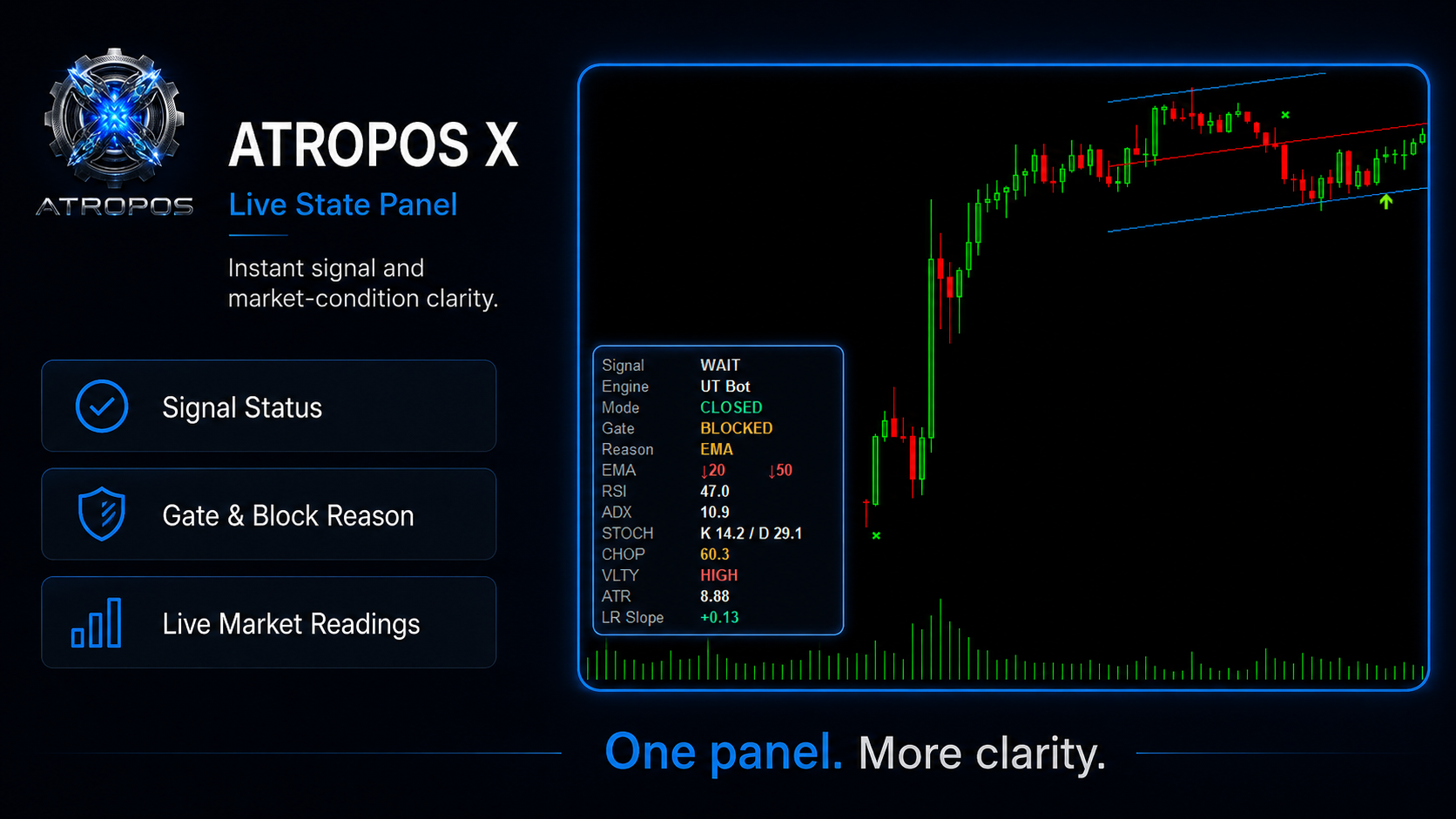
The blocked marker is not a bug.
It is feedback.
It helps you see how your filters are working.
Live State Panel
The state panel is one of the most practical parts of Atropos X.
Instead of loading many separate indicators on the chart, the panel summarizes key readings in one place.
The panel can show:
-
Current signal state
-
Active engine
-
Signal mode
-
Gate status
-
Block reason
-
EMA direction
-
RSI
-
ADX
-
Stochastic K/D
-
Choppiness
-
VLTY volatility state
-
ATR
-
Linear Regression slope
This helps the trader read the current market condition faster.
For example:
If Gate shows CLEAR, the current signal conditions are allowed.
If Gate shows BLOCKED, the Reason row tells which filter blocked the signal.
This gives the trader more transparency and helps reduce confusion when testing different setups.
Linear Regression Context
Atropos X also includes Linear Regression visual context.
Linear Regression can help show:
-
Market slope
-
Channel structure
-
Price location
-
General trend behavior around the signal area
It should not be treated as a guarantee of direction. It is a visual context tool.
The benefit is that the trader can see the signal inside a bigger structure instead of looking at arrows alone.
Visual Display and Alerts
Atropos X also includes practical visual and alert controls.
The trader can control what appears on the chart, including signals, blocked markers, Linear Regression visuals, and the state panel.
The state panel can be placed at the bottom-left or bottom-right depending on chart preference.
Alerts can also be enabled or disabled depending on how the trader wants to use the indicator.
This makes Atropos X flexible for different workflows:
-
active chart watching
-
signal monitoring
-
visual analysis
-
cleaner chart setup
-
multi-symbol testing
Practical Setup Ideas
These are not fixed presets or guaranteed settings.
They are only starting ideas.
Gold
Gold often moves with strong volatility and aggressive session behavior. A trader may start by testing UT Bot with EMA filtering, Choppiness filtering, or ATR awareness.
Indices
Indices may respond well to momentum-based confirmation. A trader may test MACD, RSI, or ADX strength filtering depending on the timeframe.
Crypto
Crypto can move aggressively and volatility can expand quickly. A trader may pay more attention to ATR and volatility conditions.
Forex
Forex pairs may sometimes benefit from smoother behavior. A trader may test Range Filter with simple confirmation filters instead of loading too many conditions.
Again, these are only starting points.
Every symbol and timeframe should be tested separately.
Simple Workflow
Here is a simple way to start using Atropos X:
-
Choose UT Bot or Range Filter.
-
Keep most filters OFF.
-
Watch the raw signals.
-
Add one filter.
-
Check how many signals become blocked.
-
Read the state panel.
-
Compare the result visually.
-
Adjust the settings only if the filter improves the signal quality.
-
Save different setups for different instruments if needed.
This method is much better than enabling everything at once.
A clean setup is usually easier to understand and easier to trust.
Full User Guide
Atropos X includes many settings because it is designed to be flexible.
For that reason, I prepared a full step-by-step user guide that explains the input sections from the beginning to the end.
The guide covers:
-
Engine selection
-
Calculation source
-
Linear Regression
-
EMA filter
-
ADX filter
-
MACD filter
-
RSI filter
-
Stochastic filter
-
Choppy Market filter
-
High ATR Risk Block
-
Volatility Filter
-
Time Control
-
Visual Display
-
Alerts and State Panel
Final Thoughts
Atropos X was built as a professional trading asset, not just another arrow indicator.
It combines signal engines, filters, market readings, blocked-signal feedback, Linear Regression context, and a live state panel into one practical MT5 workspace.
The main purpose is to help traders reduce chart clutter, read market conditions faster, and build a signal process with more structure.
It does not guarantee profits. It does not replace risk management. It does not remove the need for testing.
But it gives the trader a flexible workspace to study signals, filter market conditions, and build a setup that fits the instrument and timeframe being traded.
You can find Atropos X on the MQL5 Market here:
https://www.mql5.com/en/market/product/179261


