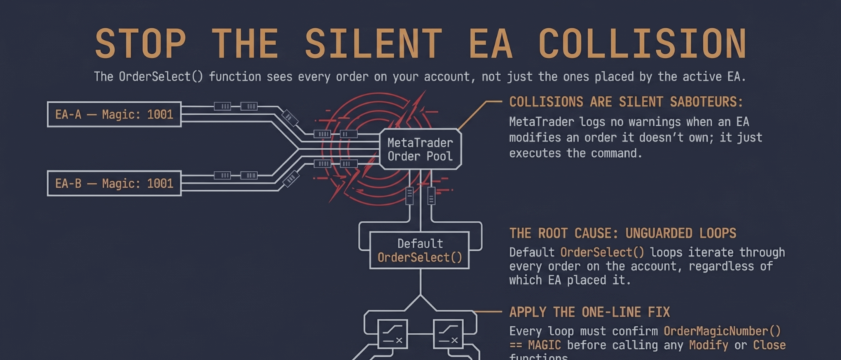

The Silent Failure Mode
Running two or more expert advisors on the same MetaTrader account exposes a structural gap that single-EA backtesting never reveals. The platform logs no warning when one EA modifies or closes an order it doesn't own. The terminal accepts every valid modification call and complies silently.
The root cause is `OrderSelect()`. When you loop through `OrdersTotal()`, you iterate every open order on the account — including every order placed by every other EA running in the same terminal, on any chart. The loop has no concept of which EA is calling it. Without an explicit ownership filter, it operates with account-wide scope.
How It Surfaces in Practice
Three patterns recur in portfolio accounts.
Pattern 1: Trailing-stop interference
// DANGEROUS: Modifies SLs on ALL orders for this symbol — not just this EA's
for(int i = OrdersTotal() - 1; i >= 0; i--)
{
   if(OrderSelect(i, SELECT_BY_POS) && OrderSymbol() == Symbol())
      OrderModify(OrderTicket(), OrderOpenPrice(), newSL, OrderTakeProfit(), 0);
}
This loop modifies the stop-loss on every open position for the current symbol. It returns no error. The EA that placed the original order has no way to detect the interference until it appears in the trade history.
Pattern 2: Breakeven scope contamination
A breakeven EA fires its close-at-breakeven logic based on total position count rather than its own position count. In a three-EA portfolio with six open trades, the breakeven EA's counter sees six positions. Its entry condition triggers at the wrong moment — closing positions from other strategies when its own rule hasn't been met.
Pattern 3: Basket-close account-wide override
End-of-day close-all logic that filters by symbol rather than magic number becomes an account-wide sweep. Every position on that symbol gets flattened regardless of which strategy placed them.
The Required Fix
All three failures share the same solution: one additional condition in every loop that modifies, closes, or counts orders.
// CORRECT: Ownership verification before acting
for(int i = OrdersTotal() - 1; i >= 0; i--)
{
   if(OrderSelect(i, SELECT_BY_POS)
      && OrderSymbol()      == Symbol()
      && OrderMagicNumber() == MAGIC_NUMBER)
      OrderModify(OrderTicket(), OrderOpenPrice(), newSL, OrderTakeProfit(), 0);
}
The ownership check must appear in three specific locations:
- Before every `OrderModify()` and `OrderClose()` call — the most common omission, and the one that causes the interference described above
- Inside position-count loops — if the counter includes other EAs' positions, your risk-management logic is working with the wrong number and may block new entries when the account appears fully deployed but your EA has zero open positions
- In basket-level operations — trailing sweeps, end-of-day flattening, basket-profit managers that iterate the full order pool by symbol
Magic Number Assignment
The ownership check is meaningless if two EAs share the same magic number. Three practical assignment schemes:
| Scheme | Example | Best For |
|---|---|---|
| Range allocation | EA-A: 1000–1999, EA-B: 2000–2999 | Fixed portfolio, simple to audit |
| EA-ID × 1000 + variant | EA-1 on EURUSD: 1001, GBPUSD: 1002 | Same EA on multiple charts |
| Hash-from-symbol | Derived from symbol name at `OnInit()` | Dynamic or large symbol sets |
Range allocation is the simplest to audit manually. The hash-from-symbol approach suits portfolio managers where the symbol list isn't fixed at compile time — but requires a collision check across your specific symbol list before live deployment.
If you're using AI-generated EAs, always check the magic number explicitly. Code generation tools produce working MQL4 code, but the default magic number value is arbitrary — and it's never checked against whatever else is already running on the account.
Audit Protocol for Existing Portfolios
Three checks to run on any portfolio before adding a new EA:
- List all magic numbers — If any two EAs share the same value, you have a confirmed collision. If any EA uses `0`, it will match orders that were also placed with no magic number — a category that includes some third-party tools that omit the field entirely.
- Search source files for `OrderSelect` loops — For every loop you find, check whether it includes `OrderMagicNumber()` before any `OrderModify()` or `OrderClose()` call. A loop filtering only by `OrderSymbol()` or `OrderType()` is a live collision risk.
- Check position-count functions — Verify counters increment only when `OrderMagicNumber() == MAGIC`, not for all orders. This is the second-most-common omission after the modification loop gap.
When source code isn't available — compiled `.ex4` files, purchased EAs — the audit shifts to execution logs: correlating order IDs and timestamps across each EA's journal to identify which EA was responsible for each modification or close event.
After Applying the Fix
Verify in demo with at least two EAs running simultaneously. In the terminal Journal, confirm that `OrderModify()` events appear only for orders whose magic number matches each EA's assigned value. Any modification to an order with a different magic number indicates a remaining unguarded loop.
The check costs one line per loop. Its absence silently corrupts a portfolio — no error, no warning, no audit trail in the terminal log.
At barmenteros FX, magic number collisions are one of the first things a portfolio EA code review checks. Full diagnostic framework, code comparison, and namespace strategy table: https://barmenteros.com/expert-advisor-magic-number-collision/


![[EURUSD]: Weekly Liquidity Activation Points (LAP), October 12-16, 2026](https://c.mql5.com/6/1035/splash-preview-777305.png "[EURUSD]: Weekly Liquidity Activation Points (LAP), October 12-16, 2026")