

Remington is an advanced multi-filter scalping indicator specifically engineered for MetaTrader 5, built around the proven Supertrend core and reinforced by 25 independent confirmation filters. The system is optimized for the EURUSD M1 timeframe and designed to operate reliably across varying market conditions by dynamically adapting filter weights to volatility, momentum and market structure.
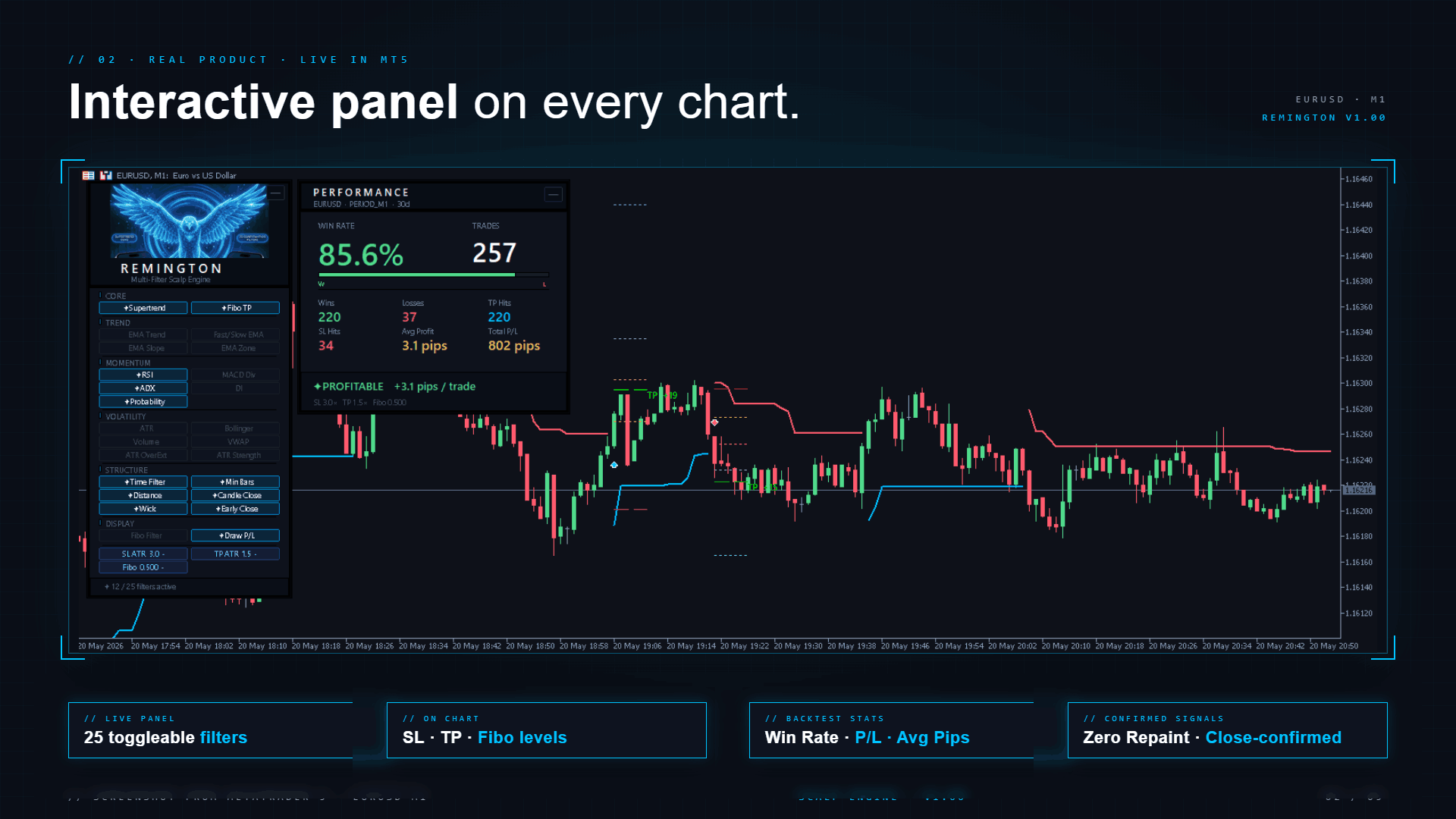
The indicator integrates ATR-based dynamic Stop Loss and Take Profit, Fibonacci-projected exits, interactive on-chart filter controls, and live performance statistics to ensure consistent signal quality and transparent decision-making. All calculations are performed strictly on closed candles — no repainting, no lag, no signal manipulation.
Remington is recommended for traders who want a precision scalping framework with full configurability, suitable for both beginners using the optimized default setup and advanced traders building custom filter combinations.
Learn More About Remington and download the Indicator here:
https://www.mql5.com/en/market/product/177921

KEY SYSTEM COMPONENTS
1. Supertrend Core Engine
-
Trend identification using ATR-based volatility bands
-
Dynamic adaptation to changing market conditions
-
Clear visual confirmation of bullish and bearish trends
-
Forms the primary directional bias for every signal
2. Multi-Filter Confirmation System (25 Filters)
-
Momentum filters: RSI, ADX, DI, MACD Divergence, Probability Engine
-
Trend filters: EMA Trend, Fast/Slow EMA, EMA Slope, EMA Zone
-
Volatility filters: ATR, ATR OverExt, ATR Strength, Bollinger Bands, Volume, VWAP
-
Structure filters: Candle Close, Wick Filter, Min Bars, Distance, Fibonacci Filter
-
Time and management filters: Session Filter, Early Close, Min Bars Between Trades
3. ATR-Based Risk Management
-
Dynamic Stop Loss calculated from ATR multiplier
-
Take Profit projected onto nearest Fibonacci retracement
-
Runtime adjustable SL multiplier (1.5× to 5.0×)
-
Runtime adjustable TP multiplier (0.5× to 3.0×)
-
Designed to scale risk with market volatility
4. Fibonacci Take Profit Module
-
Automatically detects recent swing highs and lows
-
Projects Fibonacci levels: 0.236, 0.382, 0.5, 0.618, 0.786
-
Targets structurally significant exit zones
-
Improves win rate by exiting before major retracements
5. Interactive Chart Panel
-
Toggle any of the 25 filters with a single click
-
Cycle SL, TP and Fibonacci multipliers in real time
-
Minimize and expand panel for chart space management
-
No need to detach and reattach the indicator to change settings
6. Live Performance Dashboard
-
Real-time win rate calculation
-
Total trades, wins / losses breakdown
-
TP hits, SL hits, average profit per trade
-
Cumulative profit/loss in pips
-
Provides instant feedback on filter combination effectiveness
SIGNAL QUALITY FEATURES
Probability Confluence Engine
-
Tests 10 independent market conditions per signal
-
Calculates a confluence percentage score
-
Blocks signals below configurable threshold (default 55%)
-
Eliminates low-probability setups before they reach the chart
Candle Close Filter
-
Requires the signal candle to close in the trade direction
-
Filters out false breakouts and indecisive bars
-
Essential confirmation for M1 scalping
Wick Filter
-
Rejects candles with excessive wicks (default ratio 0.4)
-
Avoids signals on indecisive doji-like candles
-
Improves entry quality in volatile sessions
Min Bars Between Trades
-
Enforces minimum spacing between consecutive signals
-
Prevents overtrading in choppy ranges
-
Configurable from 1 to 50 bars
Session Time Filter
-
Restricts signal generation to liquid hours (default 07:00 – 21:00)
-
Avoids low-volume Asian session noise
-
Optional Friday and Monday exclusion
TRADING STRATEGY LOGIC
Entry Signals
-
Supertrend directional bias confirmed
-
Active filters validate trade direction
-
Probability Engine confluence above threshold
-
Candle closes in the signal direction
-
Signal painted only after the originating bar fully closes
Stop Loss & Take Profit
ATR-Based Mode (Default):
-
SL = Entry ± (ATR × 3.0)
-
TP = Entry ± (ATR × 1.5 × Fibonacci 0.5)
-
Effective TP distance: ~0.75× ATR for tight scalping exits
-
All multipliers adjustable directly from the chart panel
Fibonacci TP Module:
-
Locks profit at the nearest Fibonacci retracement
-
Improves win rate vs. raw ATR-only targets
-
Disable in panel to use pure ATR mode
Early Close Logic
-
Closes virtual trades that exceed maximum bars in trade (default 100)
-
Captures partial profit on stalled setups
-
Reduces drawdown in ranging markets
Multi-Channel Alert System
-
On-screen popup alerts
-
Push notifications to MT5 mobile app
-
Optional email alerts
-
Triggered on signal generation, TP hit, SL hit and timeout
VISUAL INTERFACE & DASHBOARD
Filter Control Panel
Organized into intuitive sections:
-
Core (Supertrend, Fibo TP)
-
Trend (4 EMA filters)
-
Momentum (5 oscillators)
-
Volatility (6 ATR & price filters)
-
Structure (5 structural filters)
-
Display (P/L visualization, Fibonacci levels)
Performance Statistics Panel
Real-time display of:
-
Symbol and timeframe
-
Win rate percentage with visual gauge
-
Total trades count
-
Wins, losses, TP hits, SL hits
-
Average profit and total cumulative P/L in pips
-
Current SL, TP and Fibonacci multipliers
Design
-
Minimalist professional interface
-
Cyan accent color scheme on dark navy background
-
Golden eagle/phoenix emblem in panel header
-
Designed for fast monitoring without visual clutter
NO REPAINT - NO BACKPAINT
Signal Integrity Guarantee
-
Never uses the current candle (i == 0) for signal generation
-
Only uses confirmed closed data (i ≥ 1)
-
Once an arrow is painted, it remains permanently fixed
-
No retroactive signal insertion in historical data
-
Historical performance reflects exactly what would have been traded live
How to Verify
-
Open the MetaTrader 5 Strategy Tester in visual mode
-
Step through candles one by one
-
Confirm arrows appear only at candle close
-
Verify no arrows shift, disappear or get inserted retroactively
RECOMMENDED USAGE
-
Symbol: EURUSD – fully optimized configuration
-
Timeframe: M1 (recommended) – also supports M5, M15, H1, H4
-
Broker Type: ECN / STP with low spreads (1.0 pip or below)
-
Best Sessions: London & New York overlap (07:00 – 21:00 GMT)
-
Default Filters: 12 of 25 pre-enabled, ready to use immediately
While Remington is compatible with all major Forex pairs and most timeframes, EURUSD M1 delivers the best balance between signal frequency and accuracy.
INSTALLATION & QUICK START
Step 1 — Install
-
Download Remington from the MQL5 Marketplace
-
The indicator appears automatically in MT5 Navigator under Indicators
-
Drag onto your chart or double-click to attach
Step 2 — Configure
-
Default configuration is pre-optimized — no setup required
-
Adjust filters via the on-chart panel as needed
-
Enable / disable alerts from the input parameters
Step 3 — Trade
-
Wait for the arrow signal to print at candle close
-
Enter at the indicated entry price
-
Place SL and TP on the printed lines
-
Monitor the live statistics panel for ongoing performance
FUTURE ENHANCEMENTS (ROADMAP)
Upcoming versions of Remington will integrate Machine Learning enhancements via ONNX (Open Neural Network Exchange) for adaptive signal validation.
Planned Features:
-
Neural network confirmation layer on top of existing filters
-
Adaptive learning from historical signal performance
-
Auto-tuning of filter weights per symbol and session
-
Symbol presets for XAUUSD, GBPUSD, USDJPY and major pairs
-
Companion Expert Advisor for full automation
The ONNX layer will not replace the current strategy — it will enhance signal confidence by adding a data-driven validation step alongside the existing 25-filter framework.
IMPORTANT NOTES
Pre-Live Testing
-
Always backtest Remington on your broker's historical data before live use
-
Run on a demo account for at least 1 week to verify execution quality
-
Verify spreads are within recommended limits (≤ 1.0 pip for EURUSD M1)
-
Confirm alert delivery (popup, push, email) works as expected
Money Management
-
Never risk more than 1–2% of account equity per trade
-
Adjust position sizing based on SL distance (which is dynamic with ATR)
-
Avoid trading during major news events when spreads widen
-
Monitor cumulative daily P/L and set personal stop-loss limits
Filter Customization
-
Start with the default 12-filter configuration
-
Add filters one at a time and observe win rate impact
-
More filters = fewer but higher-quality signals
-
Fewer filters = more frequent signals with higher variance
-
Find the balance that matches your trading style
Disclaimer
Results may vary depending on market conditions, broker execution, spread levels and configuration settings. Past performance does not guarantee future results. Trading involves substantial risk of loss and is not suitable for every investor. Always trade responsibly and only with capital you can afford to lose.
CONTACT & SUPPORT
For configuration guidance, filter selection advice or general questions about Remington, contact me directly through the MQL5 messaging system. Buyers receive personalized support to help optimize the indicator for their specific trading style and broker setup.
Trade with precision. Trade with Remington.



![[iVISTscalp5]: XAUUSD. Forecast First. Market Reaction Afterwards](https://c.mql5.com/6/1035/splash-preview-777232.png "[iVISTscalp5]: XAUUSD. Forecast First. Market Reaction Afterwards")