

Product URL: https://www.mql5.com/en/market/product/169584
Grid trading can be powerful, but many grid EAs feel either too complicated, too messy on the chart, or too difficult for first-time users to set up properly. That is exactly the problem Safari Grid Pro was built to solve.
Safari Grid Pro is a professional MetaTrader 5 grid Expert Advisor designed for traders who want a structured grid system, a clean premium chart panel, and simplified settings that are easier to understand. It is built to open and manage grid positions in both directions, expand the basket as price moves through defined grid levels, and close the basket automatically once the target profit is reached.
Instead of trying to overload the user with confusing options, Safari Grid Pro focuses on the most important controls: lot size, grid distance, multiplier, basket target, maximum trades per side, and safety settings. On top of that, it gives traders a live panel directly on the chart so they can monitor floating profit, drawdown, exposure, and basket status at a glance.

Safari Grid Pro full panel mode displayed on a live MT5 chart.
What Safari Grid Pro does
Safari Grid Pro is a real grid Expert Advisor for MT5. It is not just a visual panel and it is not a one-trade robot pretending to be a full system. It is designed to build a grid basket using price movement.
When a new cycle starts, the EA can open a buy and a sell position. From there, it watches price movement and adds more positions according to the grid rules you set.
If price moves down by the selected grid distance, it can open another buy trade. If price moves up by the selected grid distance, it can open another sell trade. Each new trade can increase in size using the multiplier setting. Once the total floating basket profit reaches the profit target, the EA closes the full basket and waits for the next cycle.
This makes Safari Grid Pro suitable for traders who want a basket-based approach to managing multiple grid entries rather than relying on a single position.
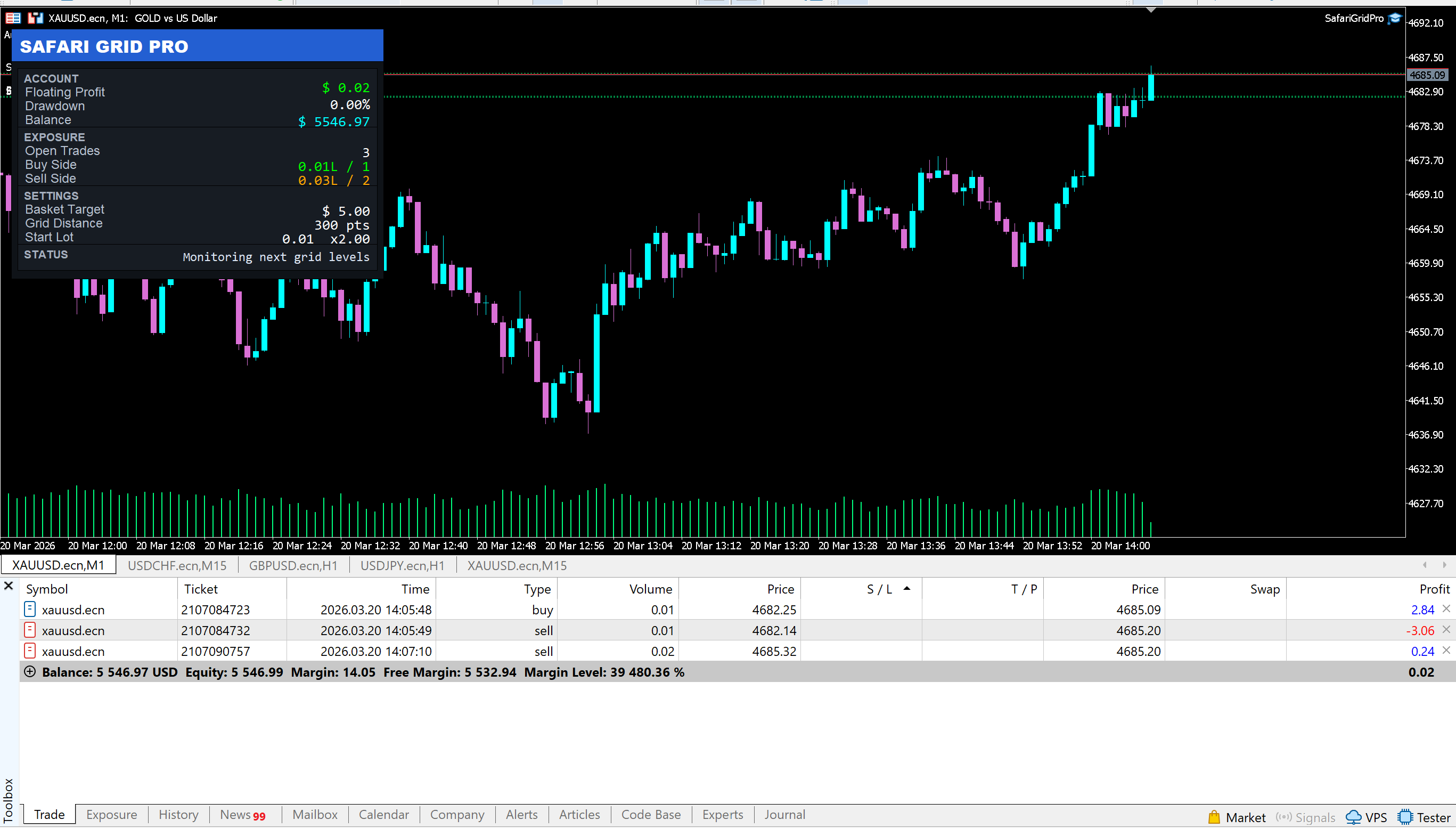
Example of a grid cycle with buy and sell positions expanding as price moves.
Main features
Real two-sided grid logic
Safari Grid Pro uses a real buy-side and sell-side grid structure. It can build positions on both sides depending on how price moves through the market.
Basket profit closure
Instead of closing trades one by one, the EA monitors the total basket profit. Once the basket reaches the target amount, it closes all trades in that cycle.
Adjustable lot multiplier
The user can control how aggressively the grid grows. Lower multipliers are more conservative, while higher multipliers increase exposure faster.
Adjustable grid distance
The space between one grid entry and the next can be customized. This lets the user control how tight or wide the grid is.
Maximum trades per side
The EA allows the user to limit how many buy trades and how many sell trades can be opened in one cycle.
Drawdown protection
Safari Grid Pro includes emergency drawdown control. If drawdown reaches the maximum percentage set by the user, the EA closes all trades.
Smart lot reduction
If enabled, the EA tries to reduce the requested lot size automatically when available free margin is too low.
Premium chart panel
The EA includes a clean panel that displays:
-
floating profit
-
drawdown
-
account balance
-
open trades
-
buy-side exposure
-
sell-side exposure
-
basket target
-
grid distance
-
status information
How the trading logic works
Safari Grid Pro follows a straightforward grid process.
At the beginning of a new cycle, the EA can open its initial positions. After that, it waits for price to move far enough to trigger the next grid level. If the distance condition is met, and the maximum number of trades for that side has not yet been reached, the EA opens the next trade.
This process continues until one of the following happens:
-
the basket reaches the target profit and the cycle closes
-
the maximum trades per side is reached
-
the maximum drawdown protection is triggered
-
margin conditions do not allow further expansion
The result is a structured grid system that reacts to price distance rather than random entries.
This makes the behavior easier to understand, easier to monitor, and easier to explain than many overcomplicated grid robots.
Why the panel matters
A big part of Safari Grid Pro is not only the strategy, but also how clearly the trader can monitor it.
Many EAs give very little visual feedback once they are attached to the chart. Safari Grid Pro was built with a chart panel so that the trader can quickly see what is happening without digging into multiple MT5 windows.
With the panel, the user can instantly see:
-
how much the current basket is making or losing
-
how much drawdown the basket is using
-
how many trades are open
-
how much exposure is on the buy side
-
how much exposure is on the sell side
-
what the basket target is
-
whether the EA is waiting, expanding, or closing
This is especially useful for grid trading, because grid systems can become difficult to follow if exposure builds over time.
Input settings explained
Safari Grid Pro was designed with simpler settings so first-time users can understand the EA faster.
Quick Start
Start Lot
This is the lot size used for the first trade in the grid cycle.
Lot Multiplier
This setting defines how much larger each next trade can become. For example, if the starting lot is 0.01 and the multiplier is 1.30, each new trade may increase progressively.
Grid Distance Points
This controls the distance between one grid entry and the next. A smaller value creates a tighter grid. A larger value creates a wider grid.
Basket Profit Target
This is the total floating basket profit required before the EA closes all trades in the cycle.
Max Trades Per Side
This limits how many buy trades and how many sell trades the EA can open.
Safety
Max Drawdown Percent
This is the emergency protection level. If the account drawdown reaches this percentage, the EA closes the basket.
Use Smart Lot Reduction
When enabled, the EA reduces lot size automatically if the requested volume is too large for the available free margin.
Cooldown Seconds
This is the minimum waiting time before opening another trade on the same side.
Validation Safety
Validation Bars Hold
This is used for validation-safe behavior during testing.
Trading
Magic Number
A unique number used by the EA to identify and manage its own trades.
Slippage Points
This defines the maximum allowed deviation during order execution.
Panel
Panel X / Panel Y
These control the position of the panel on the chart.
Panel Width
This controls the width of the panel in full mode.
Compact Mode
This switches between the full panel and the compact panel.
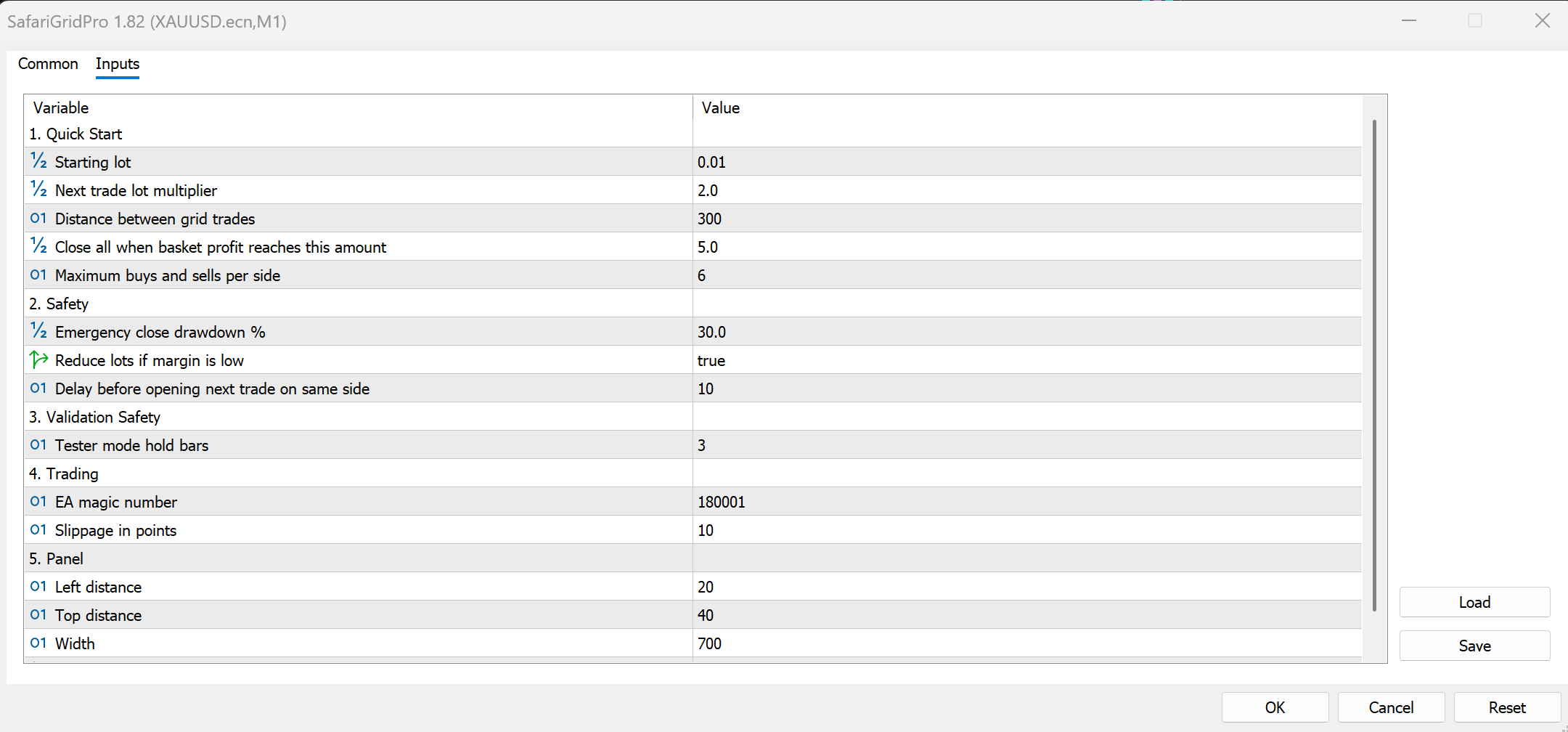
Safari Grid Pro input settings are grouped for easier setup and first-time use.
Suggested starting settings for conservative use
Every trader has a different risk tolerance, but for a more conservative starting point, these settings are a reasonable place to begin:
-
Start Lot: 0.01
-
Lot Multiplier: 1.20 to 1.30
-
Grid Distance Points: 300 or higher
-
Basket Profit Target: small and realistic
-
Max Trades Per Side: 3
-
Max Drawdown Percent: 15 to 20
-
Smart Lot Reduction: enabled
These settings help keep the system more controlled while the user gets familiar with how the EA behaves.
Who Safari Grid Pro is for
Safari Grid Pro is designed for traders who want:
-
a real MT5 grid EA
-
a cleaner and more professional chart interface
-
simple settings that are easier to understand
-
basket-based position management
-
exposure monitoring directly on the chart
-
a more polished grid trading experience
It can be especially useful for traders who already understand grid concepts but want a more readable and structured product.
Important risk warning
Safari Grid Pro includes useful safety tools, but it is still a grid trading system.
Grid trading can build significant exposure during strong directional market movement. That means it should never be treated as risk-free. Even with drawdown protection and smart lot reduction, the user must still choose sensible lot sizes, realistic profit targets, and acceptable trade limits.
Like any grid strategy, account size, leverage, margin conditions, and broker execution all matter.
This EA is designed to provide tools for better structure and monitoring, but it does not remove the risk that naturally comes with grid trading.
What makes Safari Grid Pro different
The main strength of Safari Grid Pro is the combination of functionality and usability.
Some EAs focus only on trading logic and completely ignore the user experience. Others look attractive but have weak logic or confusing settings. Safari Grid Pro aims to balance both sides.
It gives the trader:
-
real grid logic
-
basket management
-
live exposure feedback
-
simpler inputs
-
safety tools
-
full and compact panel modes
-
a cleaner MT5 experience
That combination makes it feel more like a finished trading product rather than just a rough code project.
FAQ
Does Safari Grid Pro use indicators?
No. Its logic is based on grid spacing and basket management rather than indicator signals.
Can I change how fast the lots grow?
Yes. The Lot Multiplier input gives full control over how aggressively the grid expands.
Can I limit how many trades it opens?
Yes. Max Trades Per Side lets you define the limit for buy trades and sell trades.
Does it close all trades together?
Yes. The EA uses basket profit closure and closes the cycle once the basket target is reached.
Is there a compact panel option?
Yes. Compact Mode gives a smaller display for traders who want to use less chart space.
Is it beginner-friendly?
The settings were simplified to make it easier to start, but the user should still understand the risks of grid trading before using it.
Does it include safety protection?
Yes. It includes drawdown protection and optional smart lot reduction, but grid strategies still carry significant risk.
Final thoughts
Safari Grid Pro was built to offer a cleaner, more professional way to run a grid strategy on MetaTrader 5.
It combines real grid execution with a readable chart panel, simplified settings, and practical safety features. For traders who already like basket-style trading but want something easier to monitor and easier to configure, Safari Grid Pro is designed to be a strong option.
If you want a grid EA that does not feel messy or overloaded, Safari Grid Pro was built with exactly that goal in mind.




