
GoldZILLA AI is a multi-strategy algorithm detecting market regimes to dynamically select from five distinct strategies, optimizing returns while minimizing drawdown on XAUUSD.
[ Live Signal ] - [ MQL5 dedicated group | Version MT5 - MT4 ]
Early Birds Price $149 NOW CLOSED
-------------------------------
👉 Take profit from current price $229 (ending soon) then $299.
🔹 Check the Product page
👉 https://www.mql5.com/en/market/product/155855
📌 GoldZILLA Live Performances
Last Update: 19/08/2026
◾ +186% Return in 7 months
◾ Max DD: -12%
◾ Win rate: 62.5%
[ Live Signal ]

Backtest SetUp
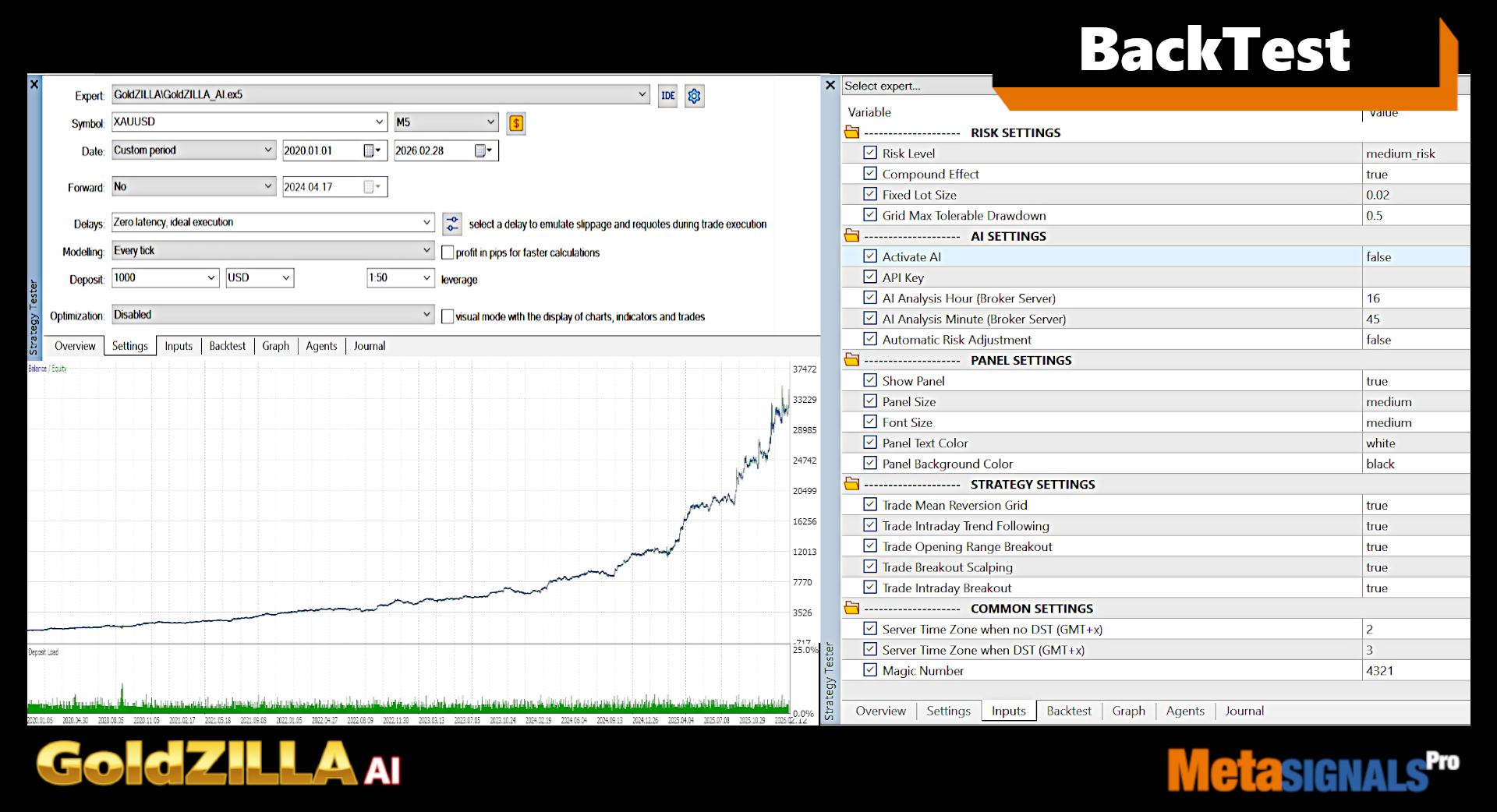
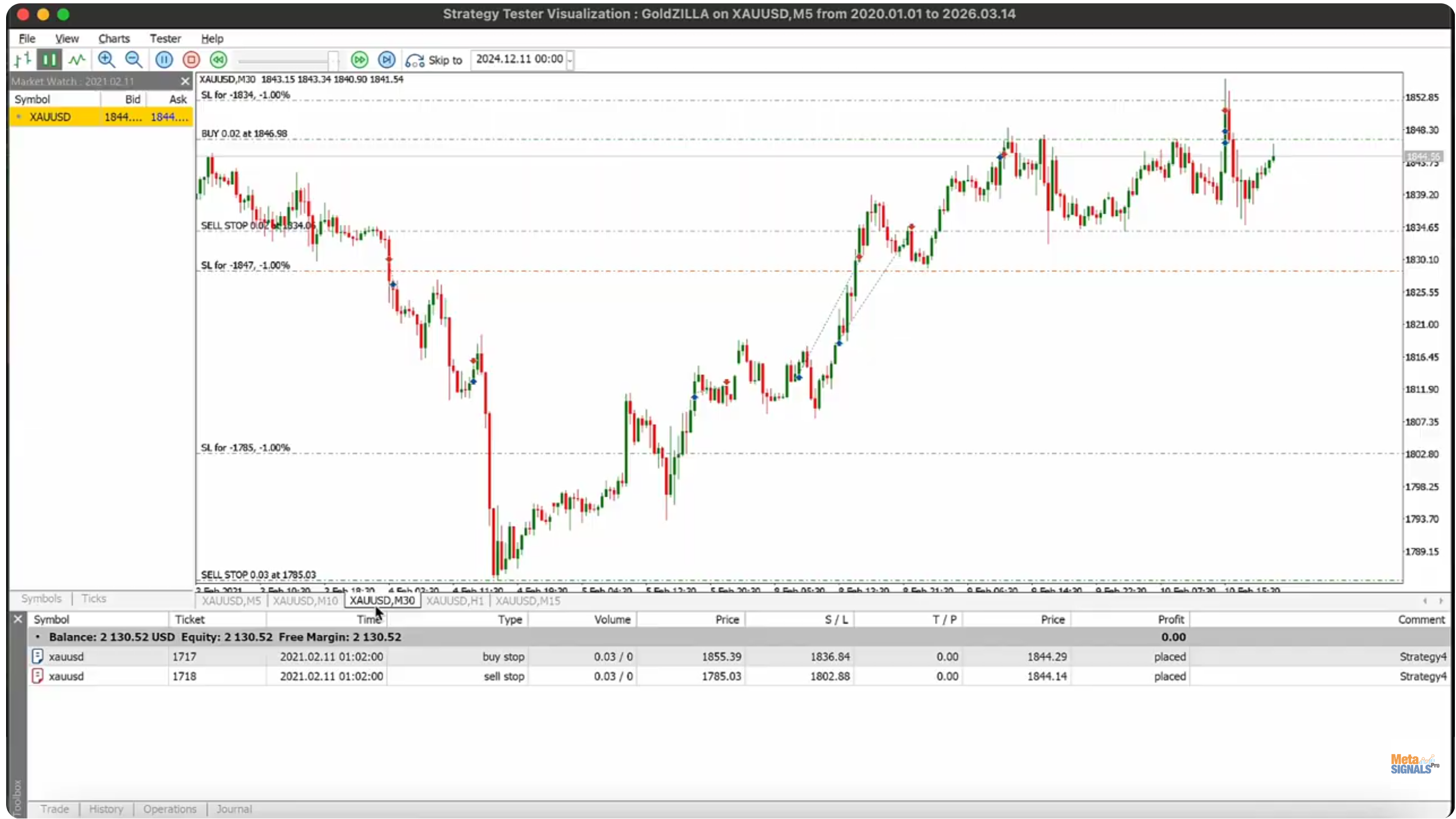
📌 The Concept & Live Backtest
📌 Backtest & Setup Guide
- EA launching asset and Time frame: XAUUSD | M5
- Strategy Timeframes: M5, M10, M15, M30, H1
- Backtest History: High-quality tick data
- Tested period: 2017-2026, Every Tick
- Out of Sample: since 2023
- Minimum / Recommended deposit: $500 / $2000
- Preferred Broker: ICMarkets

📌 Dynamic multi-strategy approach
- Advanced market regime detection for optimal strategy selection
- Five distinct trading strategies tailored for these market regimes
- Symmetric algorithmic rules for both buy and sell signals
Here are the 5 strategies
-
Mean Reversion Grid - Strategy1
-
Intraday Trend Following - Strategy2
-
Opening Range Breakout - Strategy3
-
Breakout Scalping - Strategy4
-
Intraday Breakout - Strategy5

📌 Risk diversification
- Multiple timeframe analysis (M5 to H1)
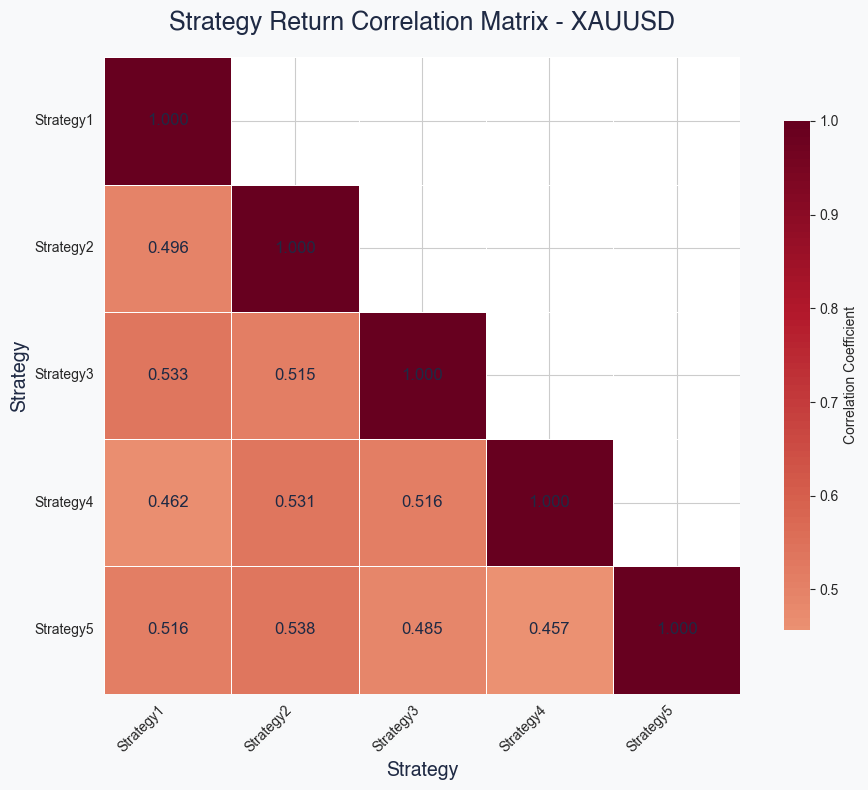
- Five uncorrelated strategies reducing overall portfolio risk
- Dynamic risk adjustment based on market conditions
- Stop-loss protection on all positions
🔹 Strategy Correlation
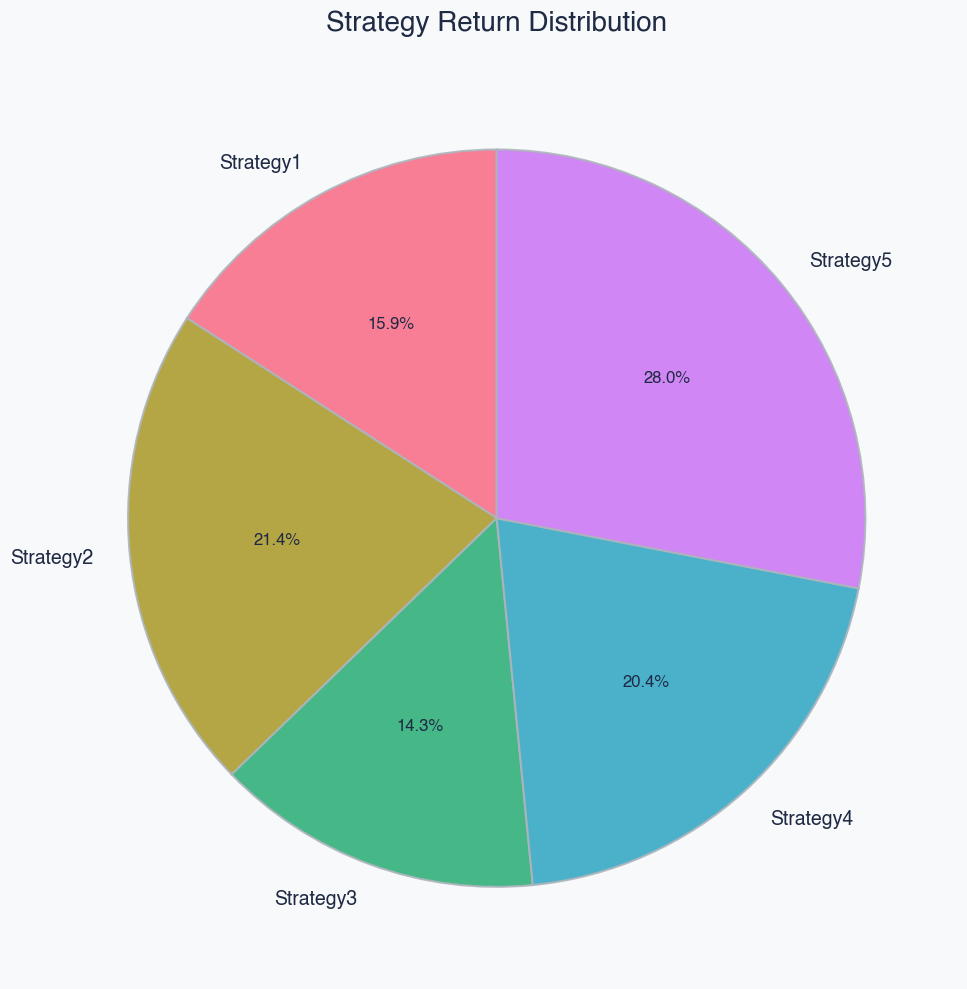
🔹 Optimised weight of the uncorrelated strategies
📌 Advanced AI Risk Management
- Powered by Grok Large Language Model with live web search
- Real-time macro analysis and news event monitoring
- Daily trend forecasts with detailed reasoning

📌 Gold-optimized performance
- Specifically designed for XAUUSD CFD trading
- Capitalizes on Gold's unique volatility characteristics
- Multiple strategies tailored for Gold's price behavior
📌 Proximate and constant support
- Whatever your expertise, we are backing you to immediately go to market with our EA
- Join the GoldZILLA Public group
📌 Prop Firm Support
Before purchasing, verify your Prop Firm rules and challenge limitations, which could include:
- Holding positions overnight
- Simultaneous trades
- Trading during the news
- High Frequency Trading
- ...
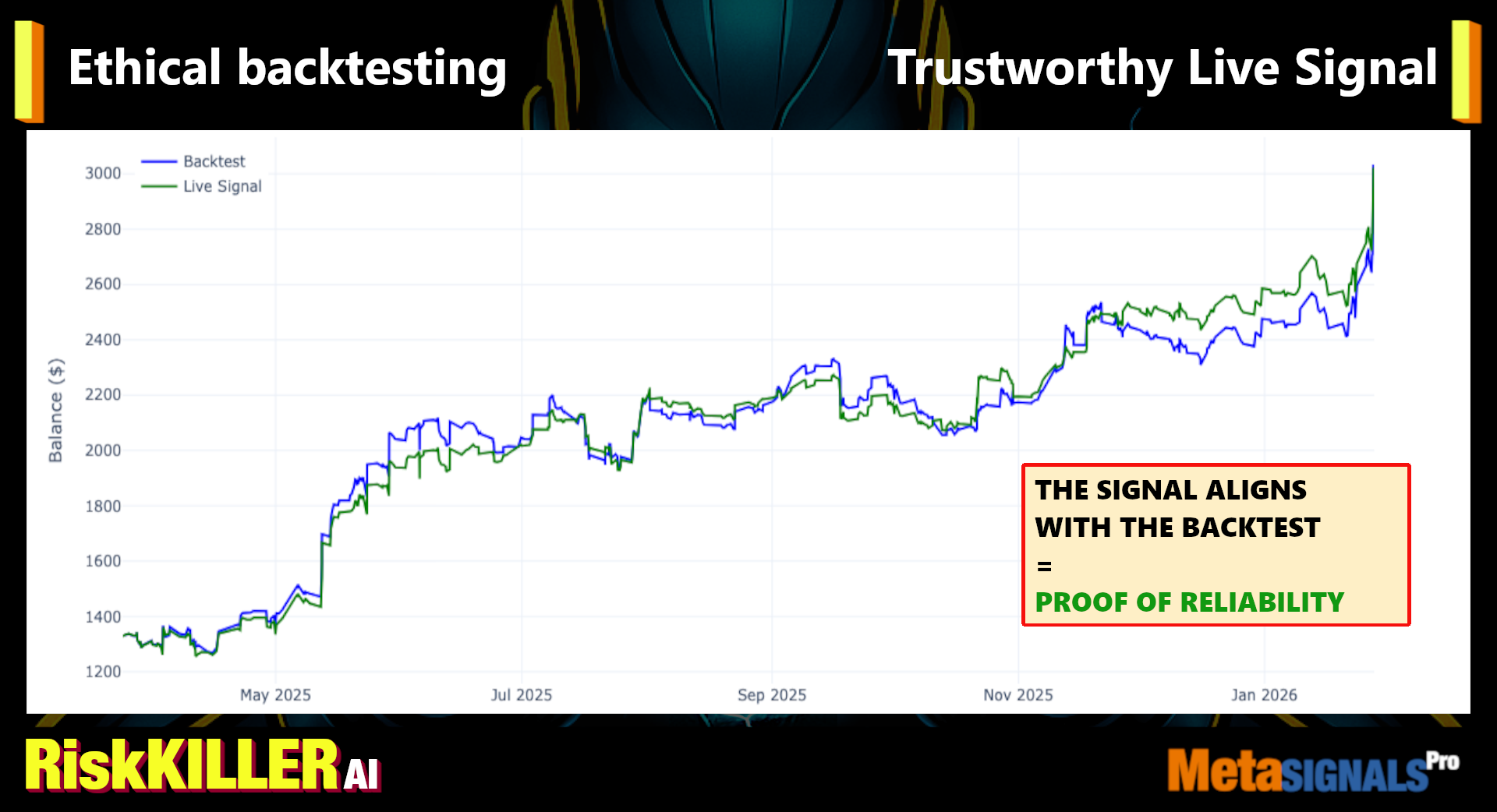
📌 Highest ethical backtesting & Trustworthy live performance
- 100% qualitative data with no omissions
- Zero manipulation of historical stop losses or take profits
- No overfitting
- Regular comparison of the Live Signal with the Backtests to check their alignment
Comparison for GoldZILLA coming soon (here is that of RiskKILLER AI)
📌 Parameters panel
-
Risk Settings
Customize how the EA manages risk with the following options:
-
Risk Level: Choose from three levels based on historical backtest max drawdowns:
-
Low: 10%
-
Medium: 20%
-
High: 30%
-
Compound Effect: Enabling this would allow the EA to adjust risk dynamically
-
Increases lot size as your account balance grows.
-
Decreases lot size as your balance shrinks.
-
If disabled, lot size would be fixed at “Fixed Lot Size"
-
Fixed Lot Size:
-
When “Compound Effect” is set to True:
The Fixed lot size will only affect the Grid Strategy (Strategy1), and the lot size for the other strategies will be set dynamically by “Risk Level”. In this case, 0.02 Fixed Lot Size is the recommended setting for initial balance of $1000. -
When “Compound Effect” is set to False:
The Fixed lot size will be the lot size of all the strategies. This will make the EA trade at this fixed lot size regardless of the current account balance.
-
Max Tolerable Drawdown (For Mean Reversion Grid (strategy1) specifically:
-
E.g.,0.5 means all strategy1 trades will close when equity drawdown is more than 50% of current balance. And so on and so forth.
-
This is the safety mechanism designed to protect your account from the potential risk of grid related strategies. If it’s not suitable for your personal risk management plan, we recommend you to turn off Mean Reversion Grid strategy (strategy1).
-
AI Settings
Configure the AI-powered risk management feature:
-
Activate AI: Toggle AI analysis on or off:
-
On: Displays daily risk management suggestions in the UI.
-
Off: Disables suggestions without affecting trades.
-
API Key: Input the provided key after your purchase
-
AI Analysis Hour: Set the hour for daily AI analysis (broker server time).
-
AI Analysis Minute: Set the minute for daily AI analysis (broker server time) (see user manual for precise setup with your broker).
-
Automatic Risk Adjustment:
Enable this feature to allow the system to automatically adjust your risk based on AI-driven recommendations.
When the trade direction matches the AI forecast direction, the lot size will double and it’ll cut by half if the trade direction is against the forecasted trend direction.
When disabled, AI suggestions will not alter your initially chosen risk mode.
-
Recommendation: Schedule AI analysis for 9:30 a.m. Eastern Time, aligning with the stock market open when volatility peaks. This timing maximizes the data available for risk decisions.
-
Panel Settings
Adjust the EA’s user interface (UI) for optimal visibility:
-
Show Panel: Toggle the UI panel on or off.
-
Panel Size: Select from small, medium, or large to suit your monitor.
-
Font Size: Choose small, medium, or large for readability.
-
Panel Text Color: Pick a color that enhances visibility on your screen.
-
Panel Background Color: Select a background color for the best contrast.
-
Common Settings
Manage trade tracking:
-
Server Time Zone when no DST: The broker's server time zone, excluding periods of daylight savings time (DST), is referenced to GMT. For example, if the broker specifies a time zone of GMT +2/3, this means GMT +2 applies when no DST is in effect, and GMT +3 applies during DST periods (vice versa). For detailed information, please visit your broker's website.
-
Server Time Zone when DST: The broker's server time zone during periods of daylight savings time (DST), is referenced to GMT. If your broker doesn’t distinguish between DST, simply set it the same as no DST input.
-
Magic Number: Assign a unique number to each trade order for tracking with multiple EAs.
-
Strategy Settings
Set to "true" for each strategy you want the EA to trade.
Of course we recommend you use the full spectrum in order to get the same results as us.
The position comment for each trade will match the order of the options from top to bottom.
-
Mean Reversion Grid - Strategy1
-
Intraday Trend Following - Strategy2
-
Opening Range Breakout - Strategy3
-
Breakout Scalping - Strategy4
-
Intraday Breakout - Strategy5
-
Prop Firm Settings
-
News Filter: When enabled, the EA will remove all pending orders 11 minutes before high impact news according to MQL5’s calendar. Then, it will not open/close any active trading positions until 11 minutes after the high impact news is announced.
-
Overnight Filter: When enabled, the EA will automatically close all positions and pending orders at 19:55 GMT/UTC(+0) time, and will only open new trading positions after 22:05 GMT/UTC(+0).
-
Weekend Filter: When enabled, the EA will automatically close all positions and pending orders at 18:55 GMT/UTC(+0) time on Friday, and will only open new trading positions after 22:05 GMT/UTC(+0) on Sunday.
-
Max Daily Drawdown (%): The max drawdown allowed for the EA each day (e.g. 50 means 50%). The EA will automatically close all positions/pending orders once the equity drawdown exceeds this percentage (with 0.5% buffer, so it will trigger 0.5% before this percentage). Then, the EA will not open new orders until the next day’s reset time. (Reset time is set at 22:00 GMT/UTC(+0) per most prop firms’ standards.) If you wish to not have max daily drawdown turned on, simply set this number to any number higher than 50.
Recommendations:
A. Test on the strategy tester first to make sure the EA is profitable for your prop firm's settings, since they usually have more spreads and lower leverage than normal CFD brokers.
B. We suggest using the most trust-worthy and EA-friendly prop firms. You may obtain more information here: https://www.mql5.com/en/blogs/post/768986
📌 Risk Warning
- Be aware of the risks before purchasing this Expert Advisor
- Past performance is not a guarantee of future profitability
- No trading system can win 100% of the time
- Check our educational posts below How not to be fooled when you buy an algo ...
Early Birds Price OPENED | Limited Copies
-------------------------------
👉 Take profit from early birds price ($149 then $299).
🔹 Check the Product page
🔹 At MetaSignalsPro, we commit to deliver high quality Experts Advisors
Trading is a long and beautiful journey but with a lot of traps. Trade safe.📍 Verified Live Signals: we will provide third-party signal, on Myfxbook or Mql5 Live Signals where clients can see performance and equity curves with transparency.
📍 Verified Backtests: we check that the Live signals are aligned with the backtests in order to keep their metrics reliable for monitoring.
📍 Walk-Forward Tests: we will demonstrate how our EA performs not only on historical data but in future market conditions.
📍 Full Transparency: we will be transparent about any potential weaknesses of the system, such as known periods of underperformance, drawdowns, or specific market conditions that can cause losses.
📍 Include Real Costs: we have ensured that our backtests account for slippage, spreads, commissions, and other real-world trading costs.
MetaSignalsPro Team
Trading easier, faster and safer
---------------------------
📚 Continue Your Learning
Setting new standards of Ethics and Robustness in algo trading
A Modern Framework for Risk Diversification in Automated Trading
How to evaluate an algo before you buy it
How to identify unauthorized seller scam sites
How to become profitable in Manual Trading: a step-by-step guide
💪 Join Our Community
💪 Join our MQL5 Public Group
💪 Join our MQL5 Public Group on algos:
🤔 You don't have a MQL5 account?
• Creating one takes only 5 minutes
• If not ready, no probs 👇
💪 Join our Telegram Group