Stay Connected
Join MQL5 Channel 👉 https://www.mql5.com/en/channels/issam_kassas
Must-Read PSTS Guide 👉 https://www.mql5.com/en/blogs/post/766038
Free Online Course 👉 https://www.mql5.com/en/blogs/post/766525
Free Pro Trading Ebook 👉 https://www.mql5.com/en/blogs/post/766038

Trading Sessions Time Indicator — Structure for Intraday Traders
The Trading Sessions Time Indicator is designed for forex traders who depend on timing, volatility cycles, and session behavior.
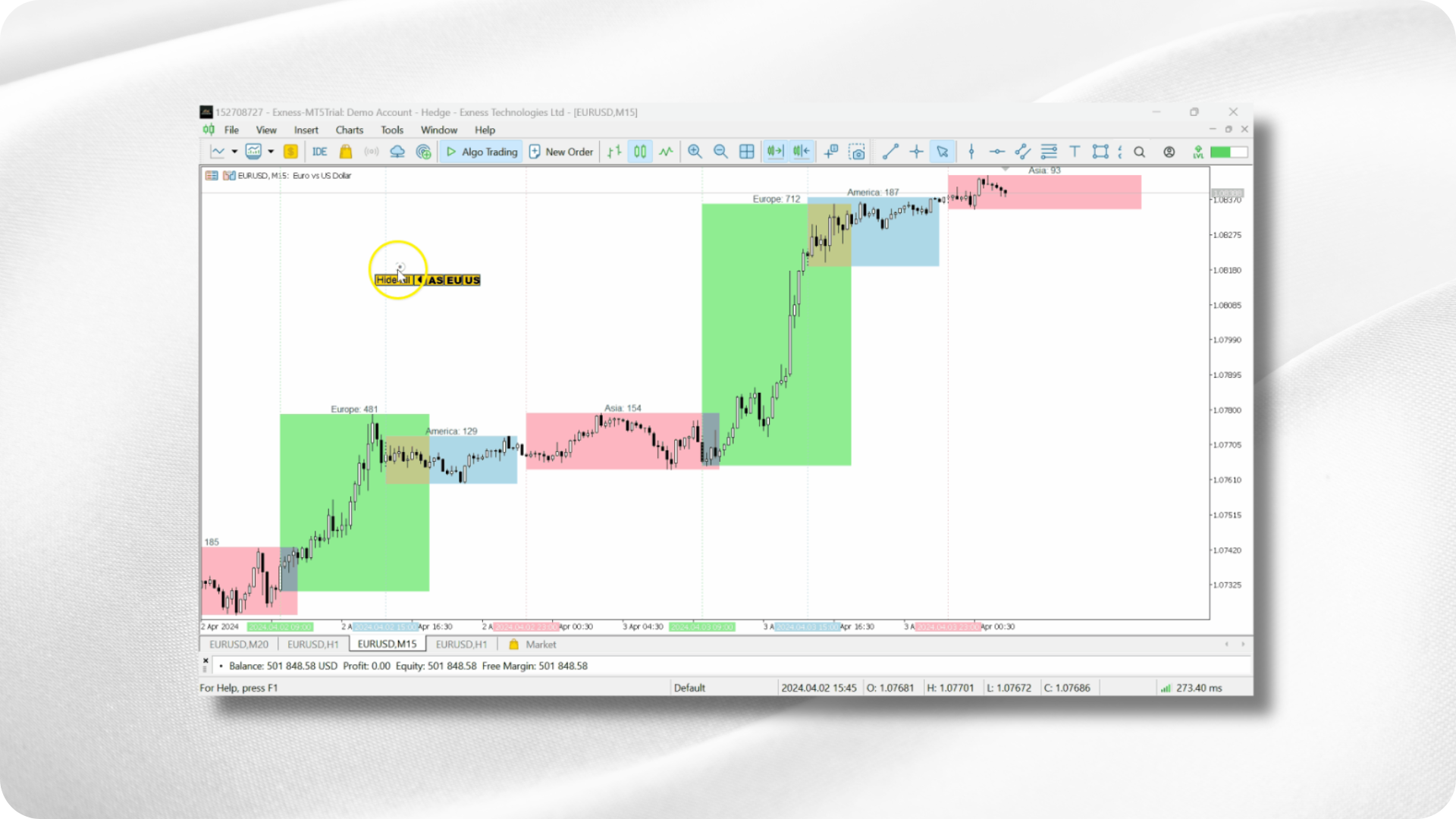
It gives a precise visual map of the global trading day, showing when the Tokyo, London, and New York sessions open and close, and automatically adjusts to your local timezone.
This provides immediate clarity on when liquidity increases, when overlaps occur, and when the market typically slows down.
It is a tool for traders who want structured timing, cleaner planning, and better intraday decision-making.

How to Download, Set Up, and Use
-
Install the indicator and apply it to any chart.
-
The session blocks will automatically adapt to your timezone.
-
Configure alerts for session openings or kill zones if needed.
-
Customize colors and display preferences to fit your workflow.
-
Use the indicator to align your strategy with the most active market periods.
Why This Indicator Exists
Most intraday traders fail because they trade during low-liquidity periods without realizing it.
This indicator solves that problem by clearly showing:
-
When volatility increases
-
When sessions overlap
-
When liquidity drops
-
When kill zones form for ICT-style execution
-
When the market is more likely to produce clean trends
One glance at the chart tells you if conditions are worth trading or if you should wait.
What the Indicator Displays
Once attached to a chart, the indicator provides:
-
Tokyo, London, and New York session zones
-
Automatic timezone adjustment
-
Kill zone blocks for advanced timing
-
Alerts for session open
-
Overlap periods (London–New York, Tokyo–London)
-
Visual volatility expectations
-
Customizable layouts
This makes intraday planning far more structured and predictable.
Key Features
Optimized Schedule
Displays the exact open and close times of major global sessions, helping traders work only in high-liquidity windows.
Alerts
Receive phone or email alerts when sessions begin or when a kill zone starts.
Kill Zones for ICT Traders
Define morning or afternoon kill zones and receive alerts when ideal execution windows begin.
Session Overlap Analysis
Identifies the moments when two sessions overlap—historically the most volatile and liquid periods.
Customization
Customize colors, visibility, and layout to make the display match your trading style.
Smart Trading Plans
Use the indicator as a foundation for structured intraday routines, reducing randomness and increasing productivity.
Avoid Overtrading
Clear visibility of low-activity times helps traders avoid unnecessary trades and focus only on high-probability periods.
Global Time Zone Adaptation
Automatically adjusts sessions to your local broker time, making it accurate everywhere.
How Traders Use This Tool
The indicator helps traders:
-
Build daily routines
-
Time entries during volatile periods
-
Avoid dead zones
-
Align strategies with session behavior
-
Prepare for high-impact moments
-
Improve overall precision
It supports scalpers, day traders, ICT-style traders, and even swing traders who want awareness of the intraday cycle.
Professional Usage Tips
-
Avoid trading during Tokyo-only hours unless your strategy is built for low volatility.
-
Focus on London open, New York open, and London–New York overlap for the cleanest structure.
-
Use kill zones for ICT-style setups.
-
Let alerts tell you when the market becomes active instead of staring at the screen.
-
Combine session awareness with structure for more accurate timing.
Final Thoughts
The Trading Sessions Time Indicator provides structure where most intraday traders lack it.
By mapping volatility cycles and session behavior directly onto your chart, it allows you to trade with timing, discipline, and clarity.
It removes confusion about when to trade and helps you focus on the most efficient hours of the trading day.
Disclaimer
Trading in financial markets involves significant risk.
Tools and indicators — including the Trading Sessions Time Indicator — do not guarantee profits or prevent losses.
Always test on a demo account before live use and apply proper risk management.