A- UNDERSTANDING THE MAIN MECHANISM
B- UNDERSTANDING THE INPUT PARAMETERS
C-APPROPRIATE BOT USAGE PRACTICES
--------------------------------------------------------------------------------------
A- UNDERSTANDING THE MAIN MECHANISM
1- How Sentinel Algorithm Trades
Sentinel is a Mean-Reversion Structural Trading System designed to identify high-probability turning points by analyzing weekly price action relative to statistical extremes. Instead of scalping noise on lower timeframes, Sentinel identifies when an instrument is statistically overextended on a macro (weekly) level and positions itself for the inevitable reversion to the mean.
2- The Core Trading Strategy
Phase 1: Structural Extremum Detection (Weekly Bollinger Analysis)
The algorithm continuously monitors price action on the Weekly Timeframe. It looks for specific statistical anomalies where price deviates significantly from its average value:
-
Oversold Reversal (Long Setup): Triggered when the Weekly Close price pierces back inside the Lower Bollinger Band after being extended. This confirms that selling pressure has exhausted and buyers are stepping back in at value levels.
-
Overbought Reversal (Short Setup): Triggered when the Weekly Close price pierces back inside the Upper Bollinger Band. This indicates exhaustion of the bullish trend and a high probability of a structural correction.
Phase 2: Sequence Confirmation
To filter out false signals during strong trends, Sentinel employs a "Sequence Check" on historical closes. It verifies that a local trough (for buys) or peak (for sells) has actually formed by comparing recent weekly closes. This ensures the EA doesn't try to catch a falling knife but waits for the first sign of a structural shift.
Phase 3: Dynamic Risk & Volatility Management
Once a trade is entered, the EA adapts to current market volatility:
-
ATR-Based Stop Loss & Take Profit: Initial targets are never arbitrary fixed points. They are calculated dynamically using the Average True Range (ATR), ensuring stops are wide enough to breathe during high volatility but tight enough to protect capital during calm periods.
-
Breakeven Protection: As the trade moves in favor, an intelligent "No Green to Red" function locks in risk by moving the Stop Loss to breakeven after a defined ATR distance.
3- Intelligent Position Management
The Adaptive Recovery Protocol (Grid Mode)
Sentinel acknowledges that even high-probability setups can face temporary drawdowns. Instead of accepting a full stop-loss, the system activates a controlled recovery mode (if enabled):
-
Smart Grid Logic: If the market moves against the initial entry, Sentinel adds secondary positions at calculated intervals ( Grid Step ).
-
Martingale Scaling: Position sizes are adjusted using a multiplier ( Factor ) to lower the average entry price, allowing the basket of trades to exit at a profit with a smaller market reversal.
4- OVERLAP FEATURE: Advanced Drawdown Reduction
The Overlap Feature is Sentinel's signature risk management tool, designed to "burn off" bad positions without waiting for a full market reversal.
-
How it works: When a grid basket grows to a specified size (e.g., 3+ trades), the EA uses the floating profit from the latest (and largest) trade to subsidize the closure of the earliest (and most negative) trade.
-
The Benefit: By closing the losing anchor trade using current profits, the system dramatically reduces margin exposure and "unwinds" the basket from both ends. This lowers the break-even point for the remaining trades, allowing the EA to escape prolonged drawdowns faster than traditional grid systems.
5- Universal Instrument Compatibility
Because Sentinel relies on volatility (ATR) and statistical deviation (Standard Deviation/Bollinger Bands) rather than fixed price levels, it is mathematically universal.
-
Forex, Crypto, Indices, & Metals: The logic automatically calibrates to the asset's price scale. Whether trading EURUSD (0.0001 ticks) or Bitcoin (1.00 ticks), the percentage-based and volatility-based math remains valid without manual code changes.
6- Customization Options
Users retain full control over the strategy's aggression:
-
Risk Profile: Choose between strict Stop Loss trading or Grid-based recovery.
-
Entry Precision: Adjust Bollinger Band deviations to trade only extreme outliers (fewer, higher quality trades) or standard deviations (more active trading).
-
Recovery Aggression: Fine-tune the Grid Step and Overlap percentages to match your account's margin capabilities.
7- Optimized for Low Margin Pressure & High Probability
Sentinel EA is engineered with a strict focus on capital preservation and low margin exposure. To achieve this, the algorithm prioritizes a high-quality directional bias, requiring confirmation from higher timeframes (specifically Weekly Price Action) before executing any trade. This rigorous filtering process ensures that Sentinel only participates in the most probable market moves, naturally resulting in a lower frequency of trades but significantly higher trade quality.
Scalability for Active Traders
For users seeking more frequent trading opportunities, Sentinel EA is fully adaptable to lower timeframes, such as M1 or M5. Even when operating on these faster charts, the EA retains its core safety mechanism: it continues to derive its directional bias from the Weekly timeframe. This hybrid approach allows active traders to capture shorter-term volatility while still filtering out "noise" and avoiding counter-trend entries that plague typical scalping systems.
Proven Set Files Included
To get you started immediately with verified strategies, Sentinel EA comes with 7 optimized set files:
4 Conservative Sets (H1 Timeframe): Designed for steady growth and maximum stability.
3 Active Sets (M5 Timeframe): Tailored for higher frequency trading without compromising the structural bias
All provided sets have been rigorously stress-tested using 10 years of high-quality tick data, followed by a comprehensive 2.5-year forward test to ensure robustness in current market conditions. Furthermore, the algorithm has been validated through live trading performance, proving its reliability in real-time execution.
Collaborative Optimization
We encourage advanced users to explore and customize Sentinel EA's parameters. If you develop your own set files and would like expert feedback, please send me a Direct Message (DM). I am happy to analyze your settings, highlighting potential benefits and risks to help you fine-tune your strategy for optimal performance.
-----------------------------------------------------------------------------------------------------------------------------------------------------
----------------------------------------------------------------------------------------------------------------------------------------------------
B- UNDERSTANDING THE INPUT VARIABLES
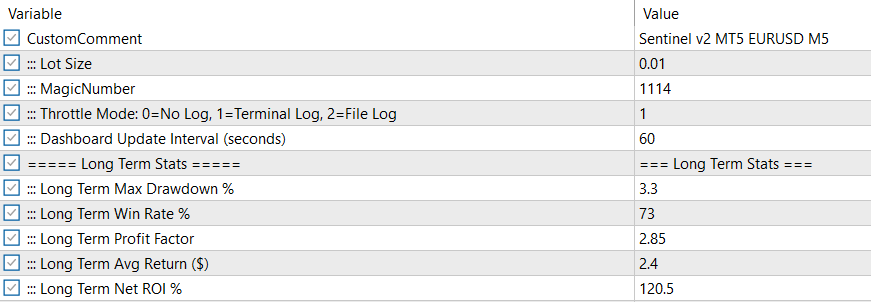
CustomComment: Enter any comment you wish to display.
Lot Size and Magic Number: These are standard input variables for trade management.
Throttle Model: This parameter optimizes the speed of backtests and optimizations. Extensive logging can significantly reduce EA performance, so when running backtests or optimizations, select "0=No Log" to dramatically improve processing speed.
Dashboard Update: Sentinel EA displays key performance statistics on its dashboard. However, continuously updating these metrics can impact MetaTrader terminal performance, particularly when running multiple EAs or set files across various instruments. This becomes especially problematic on low-powered VPS systems where resource constraints are a concern.
Dashboard updates also slow down backtesting and optimization processes. To address this, we've included an adjustable update interval parameter:
-
During optimization/backtesting: Set the interval to 3000 seconds (or higher) to prevent computational overhead from degrading performance.
-
During live trading: We recommend a 60-second (one-minute) update interval, though you can reduce this to as low as 1 second if your system resources allow.
Long Term Stats: These values are entered manually from your long term results. The purpose of this section is to compare the live trading results with those from backtests. You can take these statstistics from your Meta trader's backtest results or other external applications like Quant Analyser.
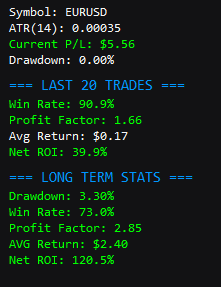
In the Dashboard you will see these statistics:
Comparing Live Performance with Backtest Results
When monitoring the statistics displayed on the Sentinel EA dashboard (see image above), it's crucial to compare your live drawdown against the long-term drawdown from your backtests. If optimization and backtesting procedures have been applied correctly, the live drawdown should ideally remain below the long-term drawdown at all times. When live drawdown exceeds the long-term drawdown, this is a strong indicator that your current set file is underperforming and requires re-optimization.
Key Metrics to Monitor:
The dashboard displays a side-by-side comparison of your current trading session versus historical backtest performance:
-
Win Rate: Compare your live win rate percentage against the long-term win rate. Significant deviations (more than 10-15%) may indicate changing market conditions.
-
Profit Factor: Your live profit factor should ideally match or exceed the long-term profit factor. A declining profit factor suggests your strategy may be losing its edge.
-
Average Return: Monitor whether your average return per trade aligns with backtest expectations.
-
Net ROI: This is your ultimate performance indicator. If live ROI is consistently lower than long-term ROI, re-optimization is likely needed.
-
Drawdown: This is the most critical metric. Live drawdown exceeding long-term drawdown is a red flag.
When to Consider Re-Optimization:
You should reconsider re-optimization under the following circumstances:
-
Drawdown Threshold Breach: When live drawdown exceeds long-term drawdown by more than 20-30% of the original value (e.g., if long-term DD is 5%, live DD exceeding 6.5% warrants attention).
-
Sustained Performance Degradation: If your live win rate, profit factor, or ROI consistently underperform backtest results for more than 2-3 weeks, market conditions may have shifted.
-
Market Regime Change: Major economic events, policy changes, or shifts in market volatility can invalidate previously optimized parameters.
-
Multiple Consecutive Losing Periods: If the EA experiences losing streaks that exceed those observed during backtesting, the strategy may no longer be aligned with current market behavior.
Best Practices:
-
Monitor these statistics at least daily during the first month of live trading
-
Keep detailed records comparing live versus backtest performance over time
-
Consider running fresh optimizations quarterly or after major market events
-
Always test newly optimized set files on a demo account for at least 1-2 weeks before deploying to live trading
By maintaining disciplined performance monitoring and knowing when to re-optimize, you can ensure Sentinel EA continues to perform optimally as market conditions evolve.
SECTION 2:
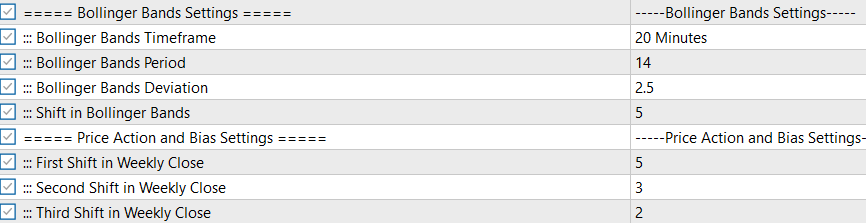
Bollinger Bands Settings:
This section allows for flexible customization of the Bollinger Bands indicator. Users can select any timeframe for the indicator, independent of the chart's timeframe. We generally recommend testing timeframes two levels higher than your trading chart. For instance, if you are trading on a 5-minute chart, it is advisable to optimize the Bollinger Bands settings using a timeframe up to 30 minutes to capture broader market trends.
Price Action and Bias Settings:
A standout feature of Sentinel EA is its ability to establish a directional trading bias. Rather than relying solely on lagging indicators, Sentinel EA analyzes weekly price alignment to determine the optimal trade direction.
-
Weekly Bias Logic: The EA evaluates weekly closes to gauge market sentiment. A value of "0" represents the current week.
-
Optimization Guidance: We recommend setting the lookback period between 0 and 8 weeks. Using values larger than 10 is discouraged, as market conditions from 10+ weeks ago are often less relevant to current price action.
SECTION 3:
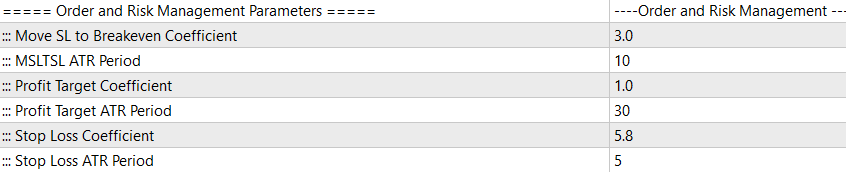
Order and Risk Management Parameters: Sentinel EA employs a strict risk management framework designed to protect capital while maximizing trade efficiency.
-
Immediate Risk Controls: Every trade is executed with hard Stop Loss (SL) and Take Profit (TP) levels calculated dynamically using ATR (Average True Range) coefficients. This ensures that risk is defined the moment an order enters the market.
-
"No Green to Red" Policy: The EA includes a breakeven function to secure profits. Once a position moves into positive territory by a defined threshold, the Stop Loss is automatically adjusted to the breakeven point, eliminating risk on that trade.
-
Dynamic Loss Recovery: The system's behavior adapts based on the "Grid Mode" status:
-
Grid Mode OFF: If the trade moves against the initial entry, the position will simply hit its initial Stop Loss, strictly limiting the loss.
-
Grid Mode ON: Instead of accepting a standard stop-out, the EA activates its grid recovery mechanism (configurable in separate settings) to manage and recover the drawdown.
-
-
Breakeven & Stop Loss: Adjustable ATR-based coefficients ( Move SL to Breakeven Coefficient , Stop Loss Coefficient ) allow you to tune how aggressively the EA secures profit or limits loss based on market volatility.
-
Profit Targeting: The Profit Target Coefficient and ATR Period enable the EA to set realistic targets that adapt to current market conditions.
SECTION 4:
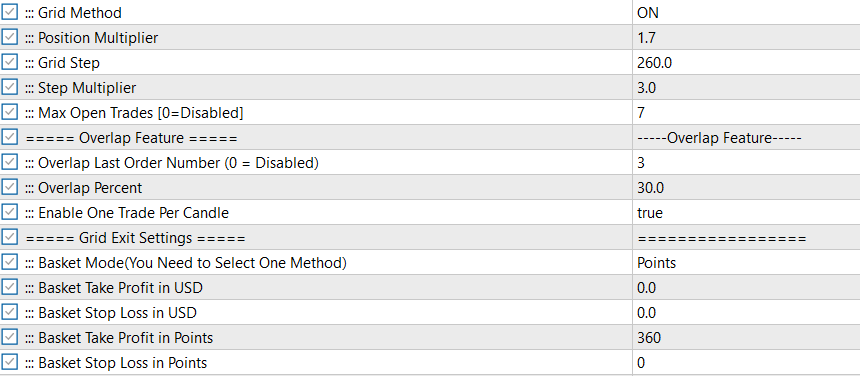
Grid Order Management:
These settings control how the EA manages trades when the market moves against the initial position.
-
Grid Method: Enables or disables the grid recovery system ( ON / OFF ).
-
Position Multiplier: Determines the lot size of subsequent grid trades. For example, a value of 1.7 means each new order will be 1.7 times larger than the previous one (Martingale progression).
-
Grid Step: The minimum distance (in points) the price must move against the position before a new grid order is opened.
-
Step Multiplier: Expands the grid distance for subsequent orders. A value of 1.5 means if the first step is 200 points, the next will be 300 (200 * 1.5), then 450, etc. This helps spread out trades during strong trends.
-
Max Open Trades: Limits the maximum number of open positions in a basket to prevent over-leveraging.
Overlap Feature (Smart Drawdown Reduction):
This function is designed to decrease margin pressure and eliminate "bad" entries without waiting for a full basket reversal.
-
Overlap Last Order Number: Defines when the overlap logic activates. If set to 3 , the feature will only start working when there are at least 3 open trades in the basket.
-
Overlap Percent: The percentage of profit from the last (most profitable) trade used to close the first (most negative) trade.
-
How it works: When a new grid trade is in profit, the EA calculates a portion of that profit (based on Overlap Percent). It then checks if this amount is enough to cover the loss of the very first trade in the basket. If yes, it closes both the last trade and the first trade.
-
Result: You reduce the total number of open trades and free up margin, "trimming" the basket from both ends while banking a small net profit or breaking even on those specific trades.
-
Grid Exit Settings:
Controls how the entire basket of trades is closed.
-
Basket Mode: Choose between USD (currency) or Points as the target unit.
-
Basket Take Profit/Stop Loss: Sets the collective target for all open trades. When the total profit/loss of the basket reaches this value, all trades are closed simultaneously.
SECTION 5:
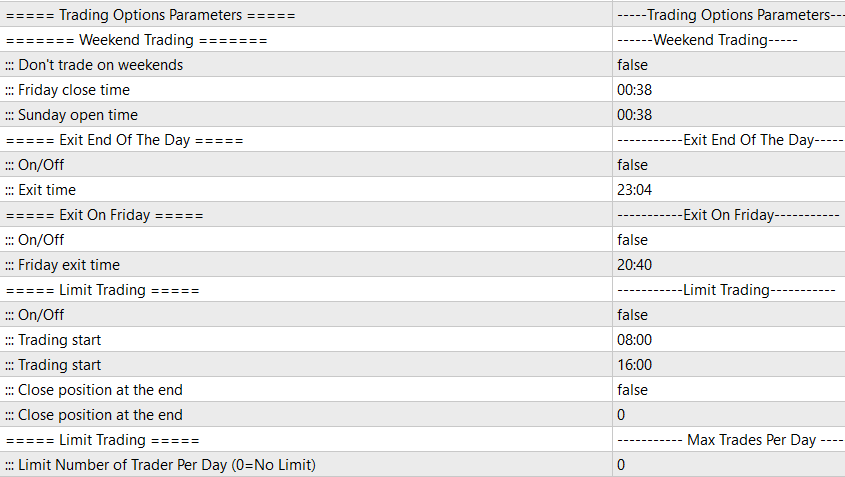
Weekend Trading
These settings control how the EA handles the transition between trading weeks.
-
Don't trade on weekends:
-
true : The EA will not open new trades on Saturdays and Sundays.
-
false : The EA will trade on weekends (useful for crypto or markets that remain open).
-
-
Friday close time: The specific time (Server Time) on Friday when the EA should stop opening new trades to avoid holding positions over the weekend.
-
Sunday open time: The specific time (Server Time) on Sunday when the EA is allowed to resume trading.
Exit End Of The Day
This function forces the EA to be flat (no open trades) by a specific time each day.
-
On/Off:
-
true : Enables the daily exit feature.
-
false : Disables it (trades can roll over to the next day).
-
-
Exit time: The specific hour and minute (e.g., 23:04 ) when the EA will automatically close all open positions and pending orders for the day.
Exit On Friday
Designed specifically to prevent holding trades over the weekend, which is often a requirement for prop firms or a risk management preference.
-
On/Off:
-
true : Enables the Friday hard exit.
-
false : Disables it.
-
-
Friday exit time: The exact time (e.g., 20:40 ) on Friday when the EA will forcefully close all active positions and delete pending orders.
Limit Trading
Defines a specific time window during which the EA is allowed to look for entry signals.
-
On/Off: Enables or disables the time window filter.
-
Trading start: The time of day when the EA starts looking for trades (e.g., 08:00 for London Open).
-
Trading end: The time of day when the EA stops looking for new entries (e.g., 16:00 for NY Close).
-
Close position at the end:
-
true : If this is enabled, the EA will forcefully close any open trades when the "Trading end" time is reached.
-
false : The EA will stop opening new trades after the end time but will allow existing trades to run until they hit their TP or SL.
-
Max Trades Per Day
-
Limit Number of Trades Per Day: Sets a hard cap on the number of trades the EA can take within 24 hours.
-
0 : No limit (the EA will take every valid signal).
-
Value > 0 (e.g., 5 ): The EA will stop trading after taking 5 trades that day, regardless of further signals.
-
SECTION 6:
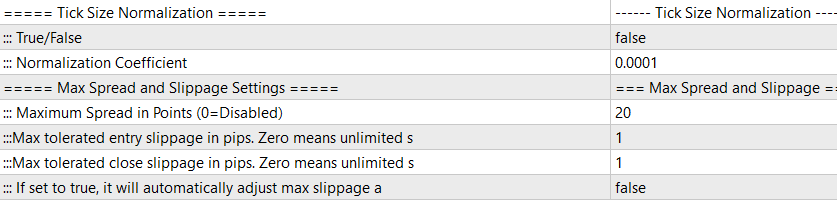
Tick Size Normalization
This is a critical compatibility feature designed to ensure Sentinel EA functions correctly across different asset classes (Forex, Indices, Crypto, Metals) where pricing formats vary significantly.
-
True/False:
-
true : Activates the normalization logic.
-
false : Uses the raw pricing data from the broker.
-
-
Normalization Coefficient:
-
How it works: Some non-Forex assets (like DAX40, US30, or Bitcoin) may have non-standard tick values or digit precisions that can confuse standard pip calculations. This coefficient manually "standardizes" the tick value for internal calculations.
-
When to use it: You generally leave this false for major Forex pairs (EURUSD, GBPUSD). You should only set this to true and adjust the coefficient (e.g., 0.01 , 1.0 , or 0.0001 ) if you notice the EA is calculating Stop Loss, Take Profit, or Grid distances incorrectly on indices or crypto. It effectively tells the EA "what one point is worth" for that specific symbol.
-
Max Spread and Slippage Settings
These safety filters protect you from executing trades during poor market conditions, such as news events or low liquidity sessions (rollover).
-
Maximum Spread in Points (0=Disabled):
-
Defines the maximum allowable spread for opening a new trade.
-
Example: If set to 20 (2 pips), the EA will simply wait and not trade if the current market spread is 2.5 pips. This prevents you from entering a trade with an immediate, large disadvantage.
-
-
Max tolerated entry slippage in pips:
-
Slippage occurs when the execution price differs from the requested price. This setting caps the negative slip you are willing to accept on trade entry.
-
If the broker fills you worse than this limit, the trade logic attempts to reject or re-quote (depending on execution type). 0 effectively means "fill me at my price or not at all" (which may result in missed trades).
-
-
Max tolerated close slippage in pips:
-
Similar to entry slippage, but applies when closing trades. This is vital for protecting profits.
-
-
If set to true, it will automatically adjust max slippage:
-
This is an intelligent adaptation feature. If true , the EA ignores the fixed slippage numbers above and dynamically calculates a "reasonable" slippage based on current market volatility (ATR). This is highly recommended for volatile pairs where a fixed slippage might cause too many rejections.
-
----------------------------------------------------------------------------------------------------------------------
C- APPROPRIATE BOT USAGE PRACTICES
Crucial Best Practices for Sentinel Usage
1- The Reality of Algorithmic Trading: Supervision is Key
First, it is vital to understand that no Expert Advisor in the world is 100% "set-and-forget." An algorithm is a powerful tool, but it operates on logic, while the market is often driven by emotion and unexpected events. To be truly successful, you must act as the "risk manager" for your bot. You don't need to stare at the screen all day, but you must be aware of the macroeconomic environment.
Managing Headline Risks & Market Gaps
There are times when technical analysis—which Sentinel relies on—is overridden by sudden geopolitical news.
-
Real-World Example: Right now, markets are closed for the weekend, but Donald Trump has just made a major announcement regarding new tariffs.
-
The Risk: When the market opens on Sunday evening, liquidity is thin. A headline like this can cause massive price gaps (slippage) and erratic volatility that no algorithm can predict.
-
The Solution: In scenarios like this, it is highly advisable to pause EAs before the market opens. Let the initial volatility settle for a few hours (or even until the London Open), and turn the EA back on once the market structure normalizes.
Controlling Exposure: The "Max 3" Rule
Sentinel is optimized for 8 different instruments (7 Forex pairs + Gold). However, just because you can trade all of them doesn't mean you should trade them all at once.
Trading all 8 simultaneously exposes your account to correlation risk. If the USD moves sharply, it could trigger trades on all pairs at once, putting massive stress on your margin.
-
The Golden Rule: Ideally, you should never have more than 3 instruments active at the same time.
-
How to manage this: If you see that Sentinel has opened trades on 3 different charts, you should temporarily pause the EA on the other empty charts. Wait for one of the active trades to close before allowing a new instrument to trade.
-
Adjusting for Account Balance
Your risk appetite must align with your capital.
-
For Standard Accounts: Stick to the "Max 3" rule above.
-
For Limited Balances: If you are trading with a smaller capital base, you must be stricter. Allow a maximum of 2 instruments to hold open positions at the same time. This ensures you always have enough free margin to handle drawdown without stress.