Precision risk-based entries, intelligent volatility-adaptive exits — and everything in between.
The Exit Problem
Every trader has been there. You spot a great setup, enter at the perfect moment, and watch the price move in your favor. 50 points of profit. Then 80. Then 120.
And then the market reverses. Your profit evaporates. You close at break-even — or worse, at a loss. The entry was right. The exit wasn't.
The truth is: most traders don't lose because of bad entries. They lose because they don't have a systematic plan for when and how to get out. Emotions take over. Stops are too tight, or not there at all. Winners turn into losers.
SmartTrail PRO was built to solve exactly this problem.
What Is SmartTrail PRO?
SmartTrail PRO is a trade management utility for MetaTrader 5. It's not a signal generator or an auto-trading robot — it's the tool that manages your exits, protects your capital, and locks in your profits.
You trade. SmartTrail handles the rest.
It works with:
- Your manual trades — entered directly on the chart
- Trades from other Expert Advisors — via Magic Number filtering
- Any instrument — Forex, Gold, Indices, Crypto, Stocks
- Any account type — Hedging, Netting, FIFO-compliant brokers
How It Works: The Panel at a Glance
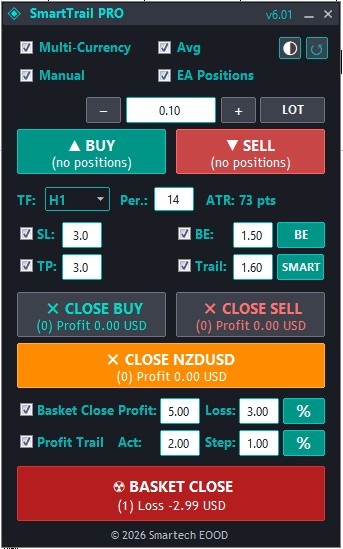
When you attach SmartTrail PRO to a chart, an interactive control panel appears with everything you need:
The Top Section — Trade Entry
- Buy / Sell buttons with real-time spread display
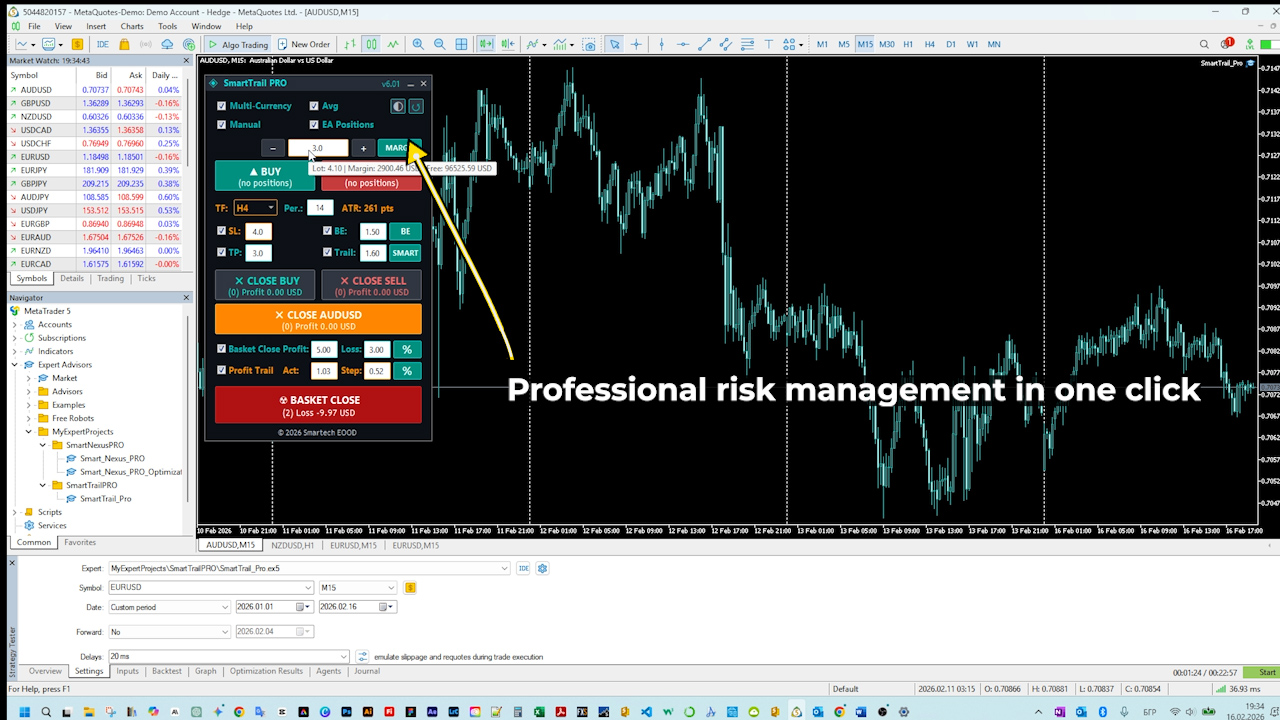
- Lot sizing with three modes: Fixed Lot (LOT), Risk Percent (%), and Margin Percent (M%) — switch with a single click
- +/- buttons for quick adjustment
The Middle Section — Risk Parameters
All values are expressed as ATR multipliers, meaning they adapt automatically to each instrument's volatility:
- SL — Stop Loss distance
- BE — Break-Even trigger level (+ Instant BE button for immediate execution)
- TP — Take Profit distance
- Trail — Trailing stop distance
- Smart/Fixed toggle — Switch between Smart (adaptive) and Fixed trailing
- ATR Timeframe & Period — Configurable on the panel
Every field shows a dynamic tooltip on hover — for example: "SL: 3.0 x 0.00352 = ~106 points" — so you always know exactly what the multiplier means in real terms.
The Bottom Section — Basket & Portfolio
- Basket TP / SL — Set portfolio-level Take Profit and Stop Loss in % or $
- Profit Trailing — Trail your total portfolio profit with configurable activation and step — in % or $
- Close buttons — Close Buy / Close Sell / Close All / Exit All (positions + pending orders)
- Live P/L display — Real-time profit for Buy basket, Sell basket, and total account
Panel Controls
- Theme button — Switch between Dark Cyan and Light Rose with one click
- Reset button — Restore all panel values to input defaults
- Saveable settings — All values you change on the panel are preserved between sessions
Feature Deep Dive
1. ATR-Based Volatility Adaptation
Most trailing stop tools use fixed pip values. The problem? 50 pips means something completely different on EURUSD vs XAUUSD vs US30.
SmartTrail PRO uses the Average True Range (ATR) — a measure of actual market volatility — to calculate all distances dynamically. This means:
- On a calm market day, your stops are tighter
- On a volatile day, your stops give more breathing room
- The same multiplier values work across all instruments — no manual recalculation needed
You choose the ATR timeframe (M5 to D1) and period directly on the panel. Lower timeframes mean earlier, tighter trailing activation. Higher timeframes provide wider, more patient stops.
2. Smart Trailing — Adaptive Protection
This is SmartTrail's signature feature.
In Fixed trailing mode, the trailing distance stays constant at your ATR multiplier. Simple and predictable.
In Smart mode, the trailing stop uses a proprietary adaptive algorithm that behaves in two distinct phases:
Phase 1 — Comfort Zone: While the trade is building profit, the trailing distance remains identical to Fixed mode. The stop follows the price normally, giving the trade full breathing room to develop without being killed by noise or consolidation.
Phase 2 — Aggressive Protection: Once profit exceeds a significant threshold, the algorithm switches to a rapid tightening curve that accelerates over time. The deeper in profit, the faster the stop closes in — because a large winner is worth protecting aggressively.
This two-phase approach solves the classic trailing stop dilemma:
- Too tight = stopped out on noise before the move develops
- Too loose = gives back too much profit on reversals
Smart Trailing gives you the best of both worlds: patience during the build-up phase, and aggressive profit locking once the move has proven itself.
Additionally, if the price stalls for an extended period after a significant move, the algorithm gradually tightens the stop — because a stalling market often precedes a reversal.
The result? You ride the big moves fully, capture more profit on reversals, and never give back more than you should.
3. Instant Break-Even
Sometimes you don't want to wait for the automatic BE trigger. Maybe news is coming, or you just want to eliminate risk immediately.
The BE button on the panel moves all qualifying positions to break-even with one click. No confirmation dialogs, no delay — instant execution.
4. Precision Risk Calculation — Three Lot Sizing Modes
- LOT — Fixed lot size. Simple and direct.
- % — Risk Percent. This is where SmartTrail's risk engine truly shines.
- M% — Margin Percent. Target a specific margin usage percentage of your balance.
Switch between all three with a single button click on the panel.
Why the Risk Calculation Matters
Many EAs and utilities use simplified lot calculations that work fine on EURUSD — but break on cross-pairs like GBPJPY, exotics like USDTRY, or instruments like XAUUSD and US30. The math for converting stop-loss distance into dollar risk is different for every instrument, and getting it wrong means your actual risk per trade is unpredictable.
SmartTrail PRO solves this by using the broker's own profit calculation functions — the same engine MetaTrader uses internally. This means:
- Correct on every instrument — Forex majors, crosses, exotics, Gold, Indices, Crypto, Stocks. No exceptions.
- ATR-linked — Your stop-loss distance is derived from ATR, so lot size automatically adapts to volatility. In a calm market, you get a larger position. In a volatile market, a smaller one. Your dollar risk stays exactly the same.
- Broker-compliant — The calculated lot is rounded to your broker's exact volume step and clamped within min/max limits. You'll never get a rejected order due to an invalid lot size.
- Fallback protection — If the primary calculation fails for any reason, a secondary method kicks in automatically.
The result: You set your risk percentage once (e.g., 1% of balance) and SmartTrail ensures that every trade — on any instrument — risks exactly that amount. No manual calculations. No spreadsheets. No guessing.
5. Basket Management
When you have multiple open positions, managing them individually becomes overwhelming. SmartTrail PRO offers portfolio-level protection:
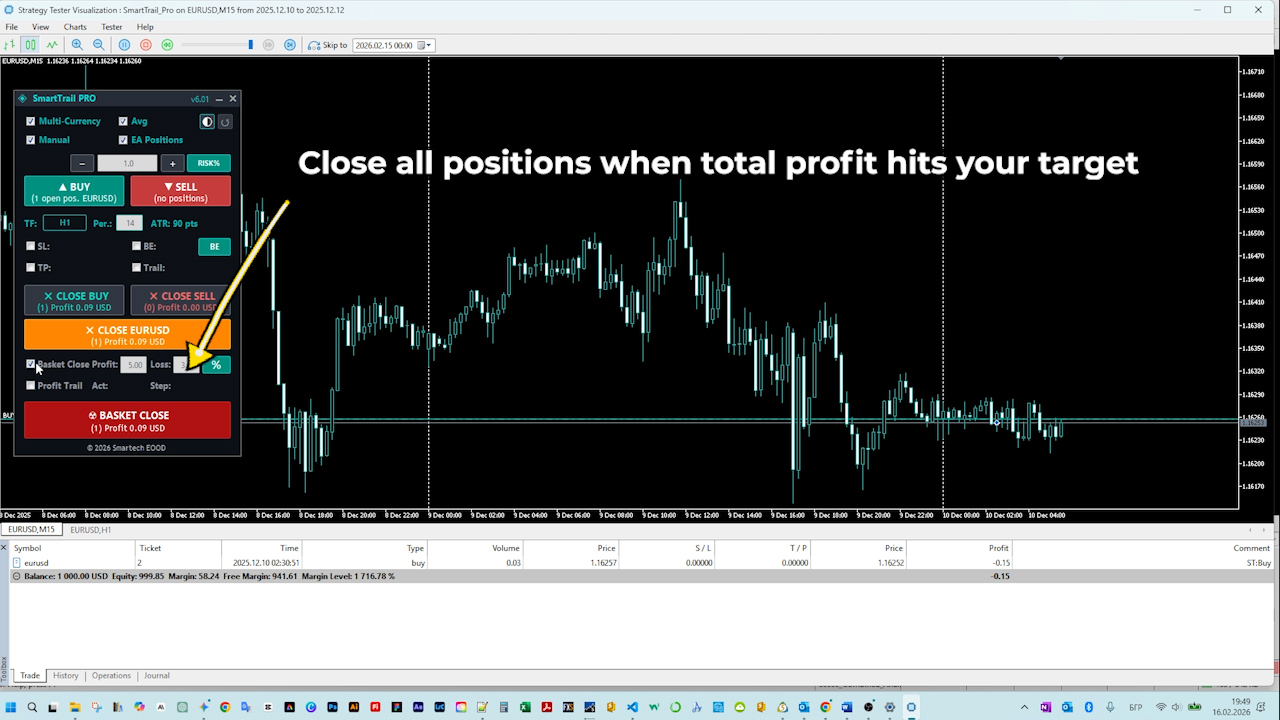
- Basket Take Profit — Close all positions when total profit reaches your target
- Basket Stop Loss — Close all positions when total loss hits your limit
- Basket Profit Trailing — Once your portfolio profit exceeds an activation threshold, a trailing mechanism locks in gains with each step
All basket values can be configured in % of balance or fixed $ amount — toggle with the % / $ button on the panel.
6. Symbol Averaging
When you have multiple positions on the same symbol in the same direction, SmartTrail groups them and calculates a weighted average entry price. This average is displayed as a line on the chart, giving you clear visual reference for your actual position.
All trailing and break-even calculations are then applied to this averaged position — ensuring coherent risk management even with scaled entries.
7. Emergency Drawdown Protection
Your last line of defense. Set a maximum account drawdown percentage — if your account equity drops below this threshold, SmartTrail closes everything immediately.
This is a safety net that works independently of all other features. Even if your basket limits aren't set, the emergency protection is always watching.
8. Position Filtering
SmartTrail PRO gives you surgical control over which positions it manages:
- Include manual positions — trades you place by hand (Magic Number = 0)
- Include EA positions — trades from other Expert Advisors
- Magic Number filter — specify exactly which EAs' trades to manage (comma-separated list)
This makes SmartTrail the perfect companion for any trading setup. Run it alongside your signal EA and let SmartTrail handle the exit strategy.
Bonus: Manual Backtesting in Visual Tester
This is one of SmartTrail PRO's most unique capabilities — and it comes as a completely free bonus that many traders don't even realize is possible.
What is it?
MetaTrader 5's Strategy Tester has a Visual Mode that replays historical price action in real time. SmartTrail PRO's full interactive panel works inside this mode — which means you can practice manual trading on historical data.
Why is this powerful?
- Risk-free practice — Test your strategy on real historical data without risking a single cent. No demo account needed.
- Accelerated learning — Replay months of market data in minutes. Speed up or slow down as needed.
- Strategy validation — Think your support/resistance strategy works? Prove it on 6 months of data before going live.
- Full functionality — Buy, Sell, adjust lots, set stops, use trailing — everything works exactly like on a live chart.
How to use it
- Open MetaTrader 5's Strategy Tester (Ctrl+R)
- Select SmartTrail PRO as the Expert Advisor
- Choose your symbol and date range
- Check "Visual mode"
- Click Start
- The chart replays historical data with SmartTrail's full panel — trade manually, watch how your exits perform, refine your approach
This is essentially a trading simulator built right into MetaTrader 5. Perfect for beginners learning the ropes and experienced traders developing new strategies.
Universal Compatibility
SmartTrail PRO works on every MetaTrader 5 account type:
| Account Type | Support |
|---|---|
| Hedging | Full support with Symbol Averaging |
| Netting | Auto-detected, averaging disabled |
| FIFO | Positions closed in opening order |
Multi-Currency: Attach to a single chart and SmartTrail manages positions across all active symbols automatically.
The Panel in Detail
Visual Themes
SmartTrail PRO ships with two carefully designed themes:
- Dark Cyan — Easy on the eyes during long sessions. Cyan accents on a dark background.
- Light Rose — Clean, bright interface with rose/purple accents for well-lit environments.
Switch anytime with a single click. Your preference is saved automatically.
DPI Awareness
The panel automatically scales for your monitor resolution. Whether you're on a 1080p laptop or a 4K monitor, controls remain crisp and properly sized.
Settings Persistence
Every value you change on the panel — lot size, ATR multipliers, checkboxes, modes — is saved to a GlobalVariable. When you restart the terminal, switch timeframes, or reattach the EA, your settings are right where you left them.
Use the Reset button to restore everything to input defaults if needed.
Getting Started
- Attach SmartTrail PRO to any chart
- Enable "Algo Trading" in the terminal toolbar
- Configure your risk parameters on the panel
- Trade — manually or with another EA — and let SmartTrail manage your exits
Get SmartTrail PRO from the MQL5 Market.
Frequently Asked Questions
Q: Does SmartTrail PRO open trades automatically?
A: No. SmartTrail PRO is a management tool. You open trades manually (or your other EA does). SmartTrail manages the stops, trailing, break-even, and basket exits.
Q: Can I use it alongside another Expert Advisor?
A: Absolutely. Use the Magic Number filter to specify which EA's trades SmartTrail should manage. It's designed to work alongside other EAs without interference.
Q: Does it work on Gold/Indices/Crypto?
A: Yes. Because all calculations are ATR-based, the same logic works on any instrument. No need to adjust pip values per symbol.
Q: What happens if I restart MetaTrader?
A: All your panel settings are preserved via GlobalVariables. SmartTrail picks up right where it left off.
Q: Can I run it on multiple charts?
A: SmartTrail PRO uses an instance lock — only one instance runs at a time when Multi-Currency mode is enabled. This prevents conflicting operations. In single-symbol mode, you can run multiple instances on different charts.
Q: Does it work with netting accounts?
A: Yes. SmartTrail automatically detects netting mode and adjusts accordingly. Symbol Averaging is disabled on netting accounts to prevent conflicts.
Q: Is it FIFO-compliant?
A: Yes. For US brokers and other FIFO-required accounts, positions are automatically closed in the order they were opened.
Links & Support
If you have questions, feel free to leave a comment or send a private message. If SmartTrail PRO helps your trading — a rating or review is always appreciated!
Trading financial instruments involves significant risk. SmartTrail PRO is a trade management assistant and does not guarantee profits. Past performance is not indicative of future results. Always test thoroughly in the Strategy Tester or on a demo account before live application.