Stay Connected
Join MQL5 Channel 👉 https://www.mql5.com/en/channels/issam_kassas
Must-Read PSTS Guide 👉 https://www.mql5.com/en/blogs/post/766038
Free Online Course 👉 https://www.mql5.com/en/blogs/post/766525
Free Pro Trading Ebook 👉 https://www.mql5.com/en/blogs/post/766038

Risk Reward Ratio Tool
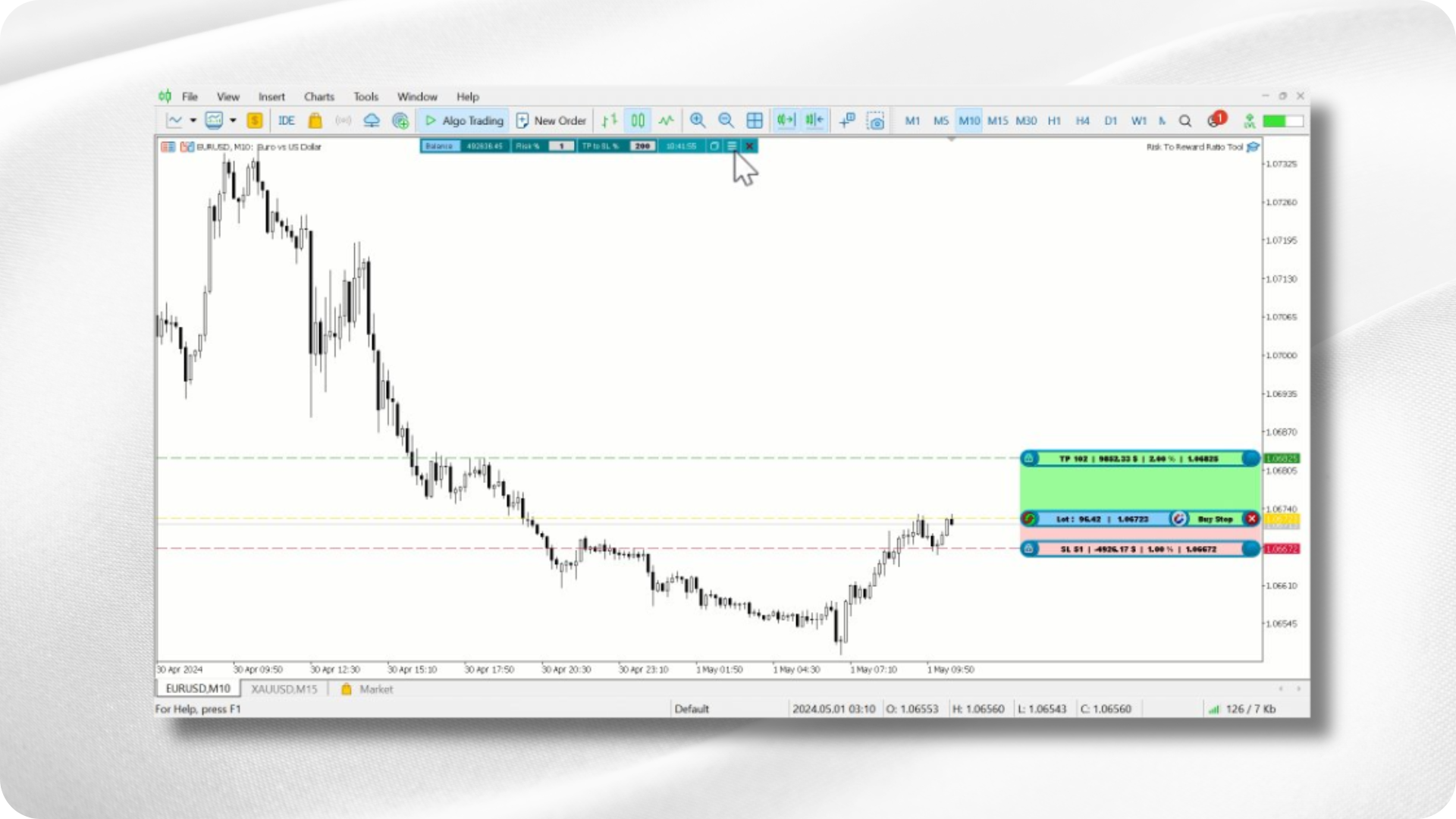
The Trade Position and Back-Testing Tool is designed to give traders clarity before executing any trade. It allows you to visually preview entries, stop-loss, take-profit, lot size, risk, and reward directly on the chart.
This tool is useful for beginners learning proper execution and for advanced traders who want to test ideas with precision.

How to Download, Set Up, and Use
-
Install the tool from your terminal.
-
Attach it to any chart.
-
Use the on-chart panel to adjust SL/TP and instantly compute risk and lot size.
-
Activate back-testing mode to evaluate setups on historical data.
The interface is clean and responsive, allowing you to plan trades in seconds.
The Purpose Behind This Tool
Most traders fail not because their strategy is weak, but because their risk management is inconsistent.
This tool solves that problem by offering a structured visual workflow:
-
Clear entry/exit previews
-
Accurate SL, TP, and risk calculation
-
Adjustable risk-to-reward structure
-
On-chart back-testing capability
It reinforces discipline and reduces emotional decision-making.
What You Will See on the Chart
The tool provides a complete pre-trade overview:
-
Entry price
-
Stop-loss
-
Take-profit levels
-
Risk-to-reward ratio
-
Lot size required
-
Order type
Moving SL or TP automatically updates risk calculations, making planning straightforward and accurate.
Key Features
Trading Panel
-
Automatic and manual balance input
-
Automatic lot and risk calculation
Trade Preview Types
-
Market Buy / Market Sell
-
Buy Stop / Sell Stop
Advanced Risk-to-Reward Tool
Move the R:R framework freely on the chart to plan setups visually.
Smart Information Display
Shows lot size, SL/TP levels, and order details in real time.
Comfort and Workflow Tools
-
Auto-adjust risk when moving SL/TP
-
One-click magnet to current price
-
Hotkey to show/hide the panel
Back-Testing Capability
Allows traders to quickly test ideas and understand behavior across market conditions.
Why Traders Use This Tool
It simplifies the most important part of trading: risk management.
With one tool, traders can:
-
Plan trades with complete clarity
-
Maintain consistent risk parameters
-
Build rules around precise R:R logic
-
Strengthen execution discipline
It trains proper decision-making by making risk visual and structured.
Professional Usage Tips
-
Always define risk before defining reward
-
Aim for balanced R:R structures such as 1:2
-
Back-test rules visually before applying them live
-
Use the R:R framework to build your personal trading system
-
Keep the tool active while refining your strategy
Final Thoughts
The Trade Position and Back-Testing Tool is more than a utility—it is a complete risk-management framework.
It helps new traders develop proper habits and allows advanced traders to refine precision and consistency.
Trading professionally starts with risk, and this tool provides the foundation needed for disciplined execution.
Disclaimer
Trading financial markets carries significant risk.
Indicators, utilities, or tools—including the Trade Position and Back-Testing Tool—do not guarantee profit or prevent loss.
Always test any configuration on a demo account before trading real funds.