Practical Modules from Other Languages in MQL5 (Part 10): The configparser module from Python
 73
 0

Contents
- Introduction
- What is the configparser module?
- Understanding INI files
- The configparser class in MQL5
- Reading INI files using MQL5
- Obtaining values from a configuration file
- Writing to a config file
- The configparser module in Python vs in MQL5
- Conclusion
Introduction
It is common for software applications to rely on external files for instructions, settings, and other configuration parameters rather than hardcoding every value directly into the program. Separating configuration from application logic makes software easier to customize, maintain, and deploy, while also allowing users to modify its behavior without changing or recompiling the underlying source code.
Configuration files serve many purposes; they can store application settings, user preferences, connection details, paths to external resources, feature flags, and other parameters that may change between different environments or use cases. This separation is particularly useful when the same program needs to operate with different configurations without requiring changes to the program itself.
Throughout various programming languages, there are many formats and approaches for storing configuration data, ranging from simple key-value files to more structured formats such as JSON, YAML, and TOML. One of the traditional and relatively simple formats is the INI-style configuration file, which organizes settings into sections containing key-value pairs.
When it comes to the MQL5 programming language, configurations can be passed to the program using the program's inputs, which can be saved and loaded from a.SET file. The Python programming language, on the other hand, provides the configparser module as part of its standard library, for working with INI-style configuration files. It provides a convenient interface for reading, modifying, and writing configuration data while supporting features such as sections, default values, interpolation, and type conversion.
In the previous article, we built the notorious matplotlib framework. In this one, we will explore the Python-configparser module and develop a similar configuration interface for MQL5. The goal is to mimic Python's implementation and provide a Python-like MQL5-friendly API that brings the same general concepts and convenience to MQL5 applications.
What is the configparser Module?
According to the documentation:
This module provides the ConfigParser class that implements a basic configuration language, which provides a structure similar to what’s found in Microsoft Windows INI files. You can use this to write Python programs that can be customized by end users easily.
To understand what the module does, we have to understand the structure of a so-called INI file.
Understanding INI Files
An INI file is a configuration file for computer software that consists of plain text with a structure and syntax comprising key–value pairs organized in sections.
The name of these configuration files comes from the filename extension INI, short for initialization, used in the MS-DOS operating system, which popularized this method of software configuration. The format has become an informal standard in many contexts of configuration, but many applications on other operating systems use different filename extensions, such as conf and cfg.
Example.ini
; last modified 1 April 2001 by John Doe
[account]
login = 12345678
broker = SomeBroker
currency = USD

[strategy]
name = Moving Average Crossover
timeframe = H1
symbol = EURUSD
01: Sections
Key-value pairs inside the INI file may be grouped under a section. Some INI dialects require every key-value pair to be in a section; some allow so-called global properties. When key-value pairs are grouped, the section name appears on a line by itself, enclosed in square brackets ( [ and ] ), and applies to all key-value pairs on subsequent lines until another section is declared.
There is no explicit "end of section" delimiter (e.g. XML's </tag>). Thus, sections syntactically cannot be arbitrarily nested. When required, nesting can be implemented through flattening one's hierarchy and concatenating with a custom delimiter character inside the section name (often.). One level of nesting is often supported, called subsections.
Example INI document employing nested subsections:
[account]
login = 12345678
broker = SomeBroker
currency = USD

[strategy]
name = Moving Average Crossover
timeframe = H1
symbol = EURUSD

[strategy.risk]
max_risk = 2.0
max_daily_loss = 5.0
max_positions = 10

[strategy.indicators]
fast_period = 20
slow_period = 50
02: Case sensitivity
Section and property names in Windows are case-insensitive.
03: Comments
Comments can be used in an INI configuration file to document settings or temporarily disable configuration options. A comment begins with a semicolon (;) or, in some INI dialects, a number sign (#).
A line beginning with either of these characters is treated as a comment and is therefore ignored when the configuration is parsed.
# This is a comment
; This is also a comment

# var = a
; var = b

var = a
foo = bar
However, the use of inline comments should be avoided. Although some INI implementations support comments appearing after a value, this behavior is not consistent across all INI parsers and can cause the comment text to be interpreted as part of the value.
For example:
var = a       ; This is an inline comment
foo = bar     # This is another inline comment
04: Order of section and properties
The order of properties in a section and the order of sections in a file is irrelevant.
05: Duplicate names
Most implementations only support having one property with a given name in a section. The second occurrence of a property name may cause an abort; it may be ignored (and the value discarded), or it may override the first occurrence (with the first value discarded). Some programs use duplicate property names to implement multi-valued properties.
In some implementations, duplicate sections simply merge their properties, as if they occurred contiguously.
06: Quoted values
Some implementations allow values to be quoted, typically using double quotes and/or apostrophes ( ' ). This allows for explicit declaration of whitespace and/or for quoting of special characters (equals, semicolon, etc.).
The configparser Class in MQL5
The next step is implementing an equivalent configuration parser in MQL5.
Firstly, the data structures below will be used to represent options and sections data, respectively.
struct OptionSt
  {
   string            key, value;
  };

struct SectionSt
  {
   string            name;
   OptionSt          options[];
  }
An array called m_configs[] inside the CConfigParser class instance is responsible for storing data obtained from every section of a configuration file.
#ifndef PYTHON_CONFIGPARSER_CLASS
class CConfigParser
  {
protected:
   SectionSt         m_configs[];
   string            m_inline_comment_prefixes[];

public:
                     CConfigParser(string inline_comment_prefixes = ";,#"); #default inline comments
                    ~CConfigParser(void);
Internal configuration storage
The configuration data is organized using a hierarchical array-based structure. Each configuration section is represented by a SectionSt structure containing its name and a dynamic array of OptionSt elements. Each option stores its corresponding key and value as strings.
The main class maintains an array of these section structures through the array m_configs[], effectively representing the relationship between sections and their associated configuration options.
This approach keeps the implementation relatively simple while taking advantage of MQL5's support for structures and dynamic arrays. It also allows the parser to preserve the order in which sections and options are encountered during file processing and makes it straightforward to append new options, update existing values, merge duplicate sections, and remove configuration entries without introducing additional storage abstractions.
Reading INI Files Using MQL5
Inside the function read() is where the majority of work takes place.
//+------------------------------------------------------------------+
//|                                                                  |
//| Reads a configuration file and stores the parsed configuration   |
//| sections and options in the m_configs[] array.                   |
//|                                                                  |
//| Parameters:                                                      |
//|    filename  - Name of the configuration file to read.           |
//|    is_common - If true, reads the file from the terminal's       |
//|                common directory; otherwise, reads it from the    |
//|                standard MQL5 files directory.                    |
//|                                                                  |
//| Returns:                                                         |
//|    true  - If the file was successfully opened and read.         |
//|    false - If the file could not be opened.                      |
//|                                                                  |
//+------------------------------------------------------------------+
bool CConfigParser::read(const string filename, const bool is_common = false)
  {
   CFile f = CFileIO::open(filename, "rt+", CP_UTF8, is_common);
   if(f.getHandle() == INVALID_HANDLE)
      return false;

   uint f_buffer = 1000;
   ArrayResize(m_configs, f_buffer);

//---
   string line;
   uint count = 0;

   while(f.readline(line)) // read every line of a given file
     {
        ...
     }
};
To read the file, we use a Python-like File-IO module we implemented in part 6 of this article series,
CFile f = CFileIO::open(filename, "rt+", CP_UTF8, is_common);
When is_common=false, the file belongs in the terminal's MQL5\Files directory; when is_common=true, it belongs in the shared Terminal\Common\Files directory.
Filtering the comments
The method readline() gives us a string containing information obtained from the current line in a file; for every line, the code identifies the contents and extracts sections or properties/options if found.
   while(f.readline(line)) // read every line of a given file
     {
      //--- Filter inline & other comments
      int idxs[];
      uint ps = m_inline_comment_prefixes.Size(); //prefix's array size
      ArrayResize(idxs, ps);

      for(uint i = 0; i < ps; i++)
        {
         string prefix = m_inline_comment_prefixes[i];
         int idx = StringFind(line, prefix);
         idxs[i] = idx < 0 ? INT_MAX : idx;
        }

      //--- in a case of multiple comment prefixes #; onn the same line we prefer the first prefix
      if(ps > 0)
        {
         int min_prefix_idx = ArrayMinimum(idxs);
         int comment_idx = idxs[min_prefix_idx];

         if(comment_idx != INT_MAX)  // A comment is found
            line = StringSubstr(line, 0, comment_idx); //extract a comment free text
The above code filters comments regarding prefixes provided in the class constructor, similarly to how the configparser class in Python operates.
| Python | MQL5 |
|---|---|
cfg = configparser.ConfigParser(inline_comment_prefixes=None) | CConfigParser::CConfigParser(string inline_comment_prefixes= ";,#") |
One notable difference between our implementation and Python's configparser module concerns inline comments. Python's ConfigParser class disables inline comments by default inline_comment_prefixes=None, meaning comment characters appearing after a configuration value are treated as part of that value unless explicitly configured otherwise.
Our MQL5 implementation allows inline comment prefixes to be supplied through the class constructor. By default, the implementation recognizes the configured prefixes and removes everything appearing after their first occurrence on a line.
To reproduce Python's default behavior, inline comment processing can be disabled by providing an empty set of prefixes (' ").
Extracting a section
A section name is anything wrapped in square brackets ( [ ] ), only if the first bracket is the first letter of a line in a configuration file.
//+------------------------------------------------------------------+
//|                                                                  |
//| Parses a configuration line as either a section declaration or   |
//| an option and stores the option in the supplied array.           |
//|                                                                  |
//| If the line contains a valid section declaration, the section    |
//| name is extracted. Otherwise, the line is treated as a           |
//| key-value option and appended to the option array.               |
//|                                                                  |
//| Parameters:                                                      |
//|    line   - Configuration line containing a section or option.   |
//|    name   - Output variable receiving the section name.          |
//|    option - Array receiving the parsed configuration options.    |
//|                                                                  |
//| Returns:                                                         |
//|    true - After processing the configuration line.               |
//|                                                                  |
//+------------------------------------------------------------------+
bool CConfigParser::parse_section(const string line, string &name, OptionSt &options[])
  {
   uint s = options.Size();
   if(!parse_section(line, name))
     {
      ArrayResize(options, s + 1);
      parse_option(line, options[s].key, options[s].value);
     }

   return true;
  }
//+------------------------------------------------------------------+
//|                                                                  |
//+------------------------------------------------------------------+
bool CConfigParser::parse_section(const string line, string &name)
  {
   int start = StringFind(line, "[");
   int end   = StringFind(line, "]");

   if(start != 0 || end <= start)
      return false;

   name = StringSubstr(line, start + 1, end - start - 1);
   StringTrim(name);

   return true;
  }
Sections are stored inside arrays m_configs[] and sections[], at the end of a function read().
//--- Remove unused section capacity

   ArrayResize(m_configs, count);
   ArrayResize(sections, count);
   for(uint i = 0; i < count; i++)
      sections[i] = m_configs[i].name;

//---
   return true;
  }
Extracting options from a section
Once a section has been identified, its key-value options can be extracted using parse_option().
//+------------------------------------------------------------------+
//| Parses a configuration option from a line in key-value format.   |
//|                                                                  |
//| The function expects the line to contain an equals sign (=)      |
//| separating the option key from its value. Leading and trailing   |
//| whitespace is removed from both the key and value.               |
//|                                                                  |
//| Parameters:                                                      |
//|    line  - Configuration line containing a key-value pair.       |
//|    key   - Output variable receiving the option key.             |
//|    value - Output variable receiving the option value.           |
//|                                                                  |
//| Returns:                                                         |
//|    true  - If a key-value pair was successfully detected.        |
//|    false - If the line does not contain a valid separator.       |
//+------------------------------------------------------------------+
bool CConfigParser::parse_option(const string line, string &key, string &value)
  {
   int start = -1;
   string linearr[];

   int sep = StringFind(line, "=");
   if(sep >= 0)
     {
      key = StringSubstr(line, 0, sep);
      value = StringSubstr(line, sep + 1);

      //--- Remove trailing spaces

      StringTrim(key);
      StringTrim(value);

      return true;
     }

//---

   printf("Failed to detect key & value pairs for line: %s", line);
   return false;
  }
Inside read():
   while(f.readline(line)) // read every line of a given file
     {
      //--- Filter inline & other comments
      int idxs[];
      uint ps = m_inline_comment_prefixes.Size(); //prefix's array size
      ArrayResize(idxs, ps);

      for(uint i = 0; i < ps; i++)
        {
         string prefix = m_inline_comment_prefixes[i];
         int idx = StringFind(line, prefix);
         idxs[i] = idx < 0 ? INT_MAX : idx;
        }

      //--- in a case of multiple comment prefixes #; onn the same line we prefer the first prefix
      if(ps > 0)
        {
         int min_prefix_idx = ArrayMinimum(idxs);
         int comment_idx = idxs[min_prefix_idx];

         if(comment_idx != INT_MAX)  // A comment is found
            line = StringSubstr(line, 0, comment_idx); //extract a comment free text
        }

      //--- Remove leading/trailing whitespace
      StringTrim(line);

      //--- Ignore empty lines
      if(line == "")
         continue;

      //--- Detect section name
      string sname;

      if(parse_section(line, sname))
        {
         section_idx = find_section(sname); //Check if a section of such name was detected earlier

         if(section_idx < 0)  //--- create a new section if it doesn't exist
           {
            //--- Make sure there is space for the new section
            if(count >= (int)m_configs.Size())
               ArrayResize(m_configs, m_configs.Size() + f_buffer);

            section_idx = count;
            m_configs[section_idx].name = sname;

            //--- Reset option for the new section
            ArrayResize(m_configs[section_idx].options, 0);

            count++;
           }

         if(is_debug)
            PrintFormat("[%s]", sname);

         continue;
        }

      //--- There must be a section before option can be added
      if(section_idx < 0)
        {
         if(is_debug)
            PrintFormat("Ignoring line outside section: %s", line);

         continue;
        }

      //--- Detect option
      string key, value;

      if(parse_option(line, key, value))
        {
         int option_idx = find_option(section_idx, key);

         //--- Add a new option, if it doesn't exist
         if(option_idx < 0)
           {
            int option_count = ArraySize(m_configs[section_idx].options);

            ArrayResize(m_configs[section_idx].options, option_count + 1);

            m_configs[section_idx].options[option_count].key   = key;
            m_configs[section_idx].options[option_count].value = value;
           }
         else
           {
            m_configs[section_idx].options[option_idx].value = value;
           }

         if(is_debug)
            PrintFormat("[%s] %s = %s", m_configs[section_idx].name, key, value);
        }
     }
Handling duplicates
The read() function also handles duplicate sections and options whilst reading a configuration file. When a section declaration is encountered, the parser first searches the previously parsed sections for a section with the same name. If the section exists, it is reused instead of creating a new section.
      if(parse_section(line, sname))
        {
         section_idx = find_section(sname); //Check if a section of such name was detected earlier

         if(section_idx < 0)  //--- create a new section if it doesn't exist
           {
            //--- Make sure there is space for the new section
            if(count >= (int)m_configs.Size())
               ArrayResize(m_configs, m_configs.Size() + f_buffer);

            section_idx = count;
            m_configs[section_idx].name = sname;

            //--- Reset option for the new section
            ArrayResize(m_configs[section_idx].options, 0);

            count++;
This effectively merges multiple occurrences of the same section into a single section.
When an option is encountered, the parser similarly checks whether an option with the same key already exists in the current section. If the option does not exist, a new option is added. If it already exists, its value is updated with the value from the most recently encountered definition.
      //--- Detect option
      string key, value;

      if(parse_option(line, key, value))
        {
         int option_idx = find_option(section_idx, key);

         //--- Add a new option, if it doesn't exist
         if(option_idx < 0)
           {
            int option_count = ArraySize(m_configs[section_idx].options);

            ArrayResize(m_configs[section_idx].options, option_count + 1);

            m_configs[section_idx].options[option_count].key   = key;
            m_configs[section_idx].options[option_count].value = value;
           }
         else
           {
            m_configs[section_idx].options[option_idx].value = value;
           }

         if(is_debug)
            PrintFormat("[%s] %s = %s", m_configs[section_idx].name, key, value);
        }
For example:
[account]
login = 12345678
broker = SomeBroker
currency = USD

[strategy.indicators]
fast_period = 20 # fast moving average period
slow_period = 50 # slow moving average period

[account]
name = John Doe # Additional account property (will be appended) to the original [account] section
currency = EUR # The option exists; the first occurrence will be modified with this latest value
Example usage | configparser test.mq5:
#include <PyMQL5\\configparser.mqh>
//+------------------------------------------------------------------+
//| Script program start function                                    |
//+------------------------------------------------------------------+
void OnStart()
  {
//---
   CConfigParser cfg;
   cfg.read("example.ini");

   Print("sections:");
   ArrayPrint(cfg.sections);
  }
Results after running the script in debug mode:
QS      0       10:05:09.576    configparser test (XAUUSD,M15)  [account]
CE      0       10:05:09.576    configparser test (XAUUSD,M15)  [account] login = 12345678
LL      0       10:05:09.576    configparser test (XAUUSD,M15)  [account] broker = SomeBroker
KK      0       10:05:09.576    configparser test (XAUUSD,M15)  [account] currency = USD
OP      0       10:05:09.576    configparser test (XAUUSD,M15)  [strategy]
JK      0       10:05:09.576    configparser test (XAUUSD,M15)  [strategy] name = Moving Average Crossover
OD      0       10:05:09.576    configparser test (XAUUSD,M15)  [strategy] timeframe = H1
FR      0       10:05:09.576    configparser test (XAUUSD,M15)  [strategy] symbol = EURUSD
NK      0       10:05:09.576    configparser test (XAUUSD,M15)  [strategy.risk]
QR      0       10:05:09.576    configparser test (XAUUSD,M15)  [strategy.risk] max_risk = 2.0
PN      0       10:05:09.576    configparser test (XAUUSD,M15)  [strategy.risk] max_daily_loss = 5.0
MK      0       10:05:09.576    configparser test (XAUUSD,M15)  [strategy.risk] max_positions = 10
OR      0       10:05:09.576    configparser test (XAUUSD,M15)  [strategy.indicators]
LG      0       10:05:09.576    configparser test (XAUUSD,M15)  [strategy.indicators] fast_period = 20
RJ      0       10:05:09.576    configparser test (XAUUSD,M15)  [strategy.indicators] slow_period = 50
LQ      0       10:05:09.576    configparser test (XAUUSD,M15)  sections:
MD      0       10:05:09.576    configparser test (XAUUSD,M15)  "account"             "strategy"            "strategy.risk"       "strategy.indicators"
Configuration file:
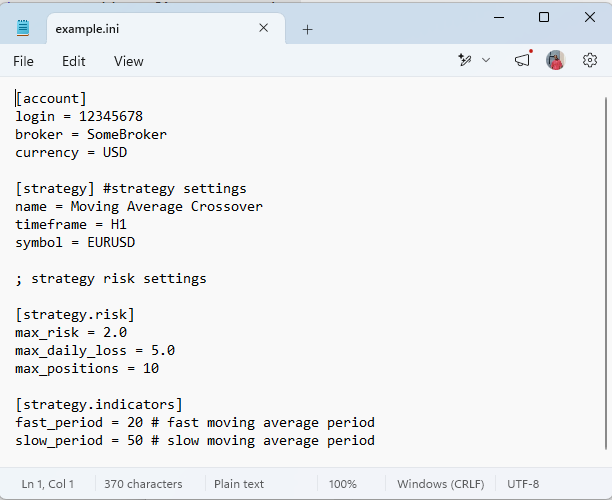
Note that configparser module is not limited to files with the .ini extension. It can also work with other configuration files, such as.cfg and.conf. The file extension itself does not determine whether a file can be parsed; what matters is whether its contents follow the INI-style configuration format expected by configparser.
Obtaining Values From a Configuration File
In Python, configparser provides a straightforward way to access values stored in a configuration file. Two common approaches are indexing and using the get() method.
01: Using section and option names as indexes
cfg = configparser.ConfigParser(inline_comment_prefixes=None)
cfg.read("example.ini")

print(cfg["account"]["login"])
02: Using the get() method
print(cfg.get("account", "login"))
Both approaches retrieve the same value:
(.env) C:\>python main.py
12345678
12345678
We can implement this in our MQL5 equivalent of configparser as follows.
The indexing approach, for sections only.
SectionSt operator[](const string name) { return get_section(name); }
Since we cannot use more than a single index for the operator, e.g. ["account"]["login"], the single index square bracket is responsible for returning a section structure only.
SectionSt CConfigParser::get_section(const string &name)
  {
   SectionSt section;
   for(uint i = 0; i < this.m_configs.Size(); i++)
      if(this.m_configs[i].name == name)
        {
         section = this.m_configs[i];
         break;
        }

   return section;
  }
We can delegate this further by introducing functions for getting variables of specific types inside the structure SectionSt.
struct SectionSt
  {
   string            name;
   OptionSt          options[];

   int               getint(const string option_key)
     {
      int value = 0;
      for(uint i = 0; i < options.Size(); i++)
        {
         string k = options[i].key;
         if(StringCompare(option_key, k, false) != 0)
            continue;

         value = int(options[i].value);
        }

      return value;
     }
   double            getfloat(const string option_key)
   ...
   string            getstr(const string option_key)
   ...
   datetime          getdatetime(const string option_key)
   ...
   bool              getboolean(const string option_key)
   ...
  };
With this, we can get simpler interfaces, as in Python, when accessing values from a configuration file.
For example:
#include <PyMQL5\\configparser.mqh>
//+------------------------------------------------------------------+
//| Script program start function                                    |
//+------------------------------------------------------------------+
void OnStart()
  {
//---
   CConfigParser cfg;
   cfg.read("example.ini");

   Print(cfg["account"].getint("login"));
  }
In the example above, the file example.ini is assumed to be located in the terminal's MQL5\Files directory.
Outputs:
2026.10.08 13:34:12.493 configparser test (XAUUSD,M15) 12345678
Accessing Values Using the get() Method
Unlike the get() method offered by Python's configparser, which returns the value, our MQL5 equivalent returns a boolean value (true for success or false for failure). The obtained value will be referred to as the last variable in a function's argument.
//+------------------------------------------------------------------+
//| Retrieves and converts an option value from a specified section. |
//|                                                                  |
//| The value is internally stored as a string and is converted to   |
//| the data type specified by the result parameter.                 |
//|                                                                  |
//| Parameters:                                                      |
//|    section - Name of the section containing the option.          |
//|    option  - Name of the option to retrieve.                     |
//|    result  - Output variable receiving the converted value.      |
//|                                                                  |
//| Returns:                                                         |
//|    true  - If the section and option were found and the value    |
//|            was successfully assigned to result.                  |
//|    false - If the specified section or option does not exist.    |
//+------------------------------------------------------------------+
template <typename T>
bool CConfigParser::get(const string section, const string option, T &result)
  {
   int section_idx = find_section(section);

//--- Section doesn't exist
   if(section_idx < 0)
      return false;

   int option_idx = find_option(section_idx, option);

//--- Option doesn't exist
   if(option_idx < 0)
      return false;

   string value = m_configs[section_idx].options[option_idx].value;

   result = (T)value;

   return true;
  }
Example usage:
#include <PyMQL5\\configparser.mqh>
//+------------------------------------------------------------------+
//| Script program start function                                    |
//+------------------------------------------------------------------+
void OnStart()
  {
//---
   CConfigParser cfg;
   cfg.read("example.ini");

   int login = 0;
   if (cfg.get("account", "login", login))
      Print(login);
  }
Outputs:
2026.10.08 13:34:12.493 configparser test (XAUUSD,M15) 12345678
Similar to the class inside configparser in Python, our class also has several variations of the get() method that return a variable of a specific type:
class CConfigParser
  {
   ...
public:
   int               getint(const string section, const string option); // Returns an integer variable
   double            getfloat(const string section, const string option); // Returns a double variable
   bool              getboolean(const string section, const string option); // Returns a boolean variable
   datetime          getdatetime(const string section, const string option); // Returns a datetime variable
   string            getstr(const string section, const string option); // Returns a string variable
Writing to a Config File
When it comes to writing some settings to a configuration file. Firstly, we have to populate the CConfigParser object with some information.
Functions add_section() and set() are handy for such a task; they add a section and its properties to the object, respectively.
void OnStart()
  {
   //--- Writing configs

      CConfigParser cfg2;

      cfg2.add_section("account"); //Creates a section called account

      //--- Adding account properties

      cfg2.set("account", "login", 12345);
      cfg2.set("account", "name", "Omega");

      cfg2.add_section("strategy"); // Creates a section called strategy
      cfg2.set("strategy", "name", "Grid"); //Adds the name = Grid to a strategy section
      ...

  }
With the object populated, we call the method write(), giving it a CFile object with an active handle.
void OnStart()
  {
   //--- Writing configs

      CConfigParser cfg2;

      cfg2.add_section("account"); //Creates a section called account

      //--- Adding account properties

      cfg2.set("account", "login", 12345);
      cfg2.set("account", "name", "Omega");

      cfg2.add_section("strategy"); // Creates a section called strategy
      cfg2.set("strategy", "name", "Grid"); //Adds the name = Grid to a strategy section

      CFile f = CFileIO::open("example2.ini", "wt"); //Opening a file (w=write, t=text file) -> https://www.mql5.com/en/articles/20695#automatically_selecting_file_flags
      cfg2.write(f);
      f.close();
  }
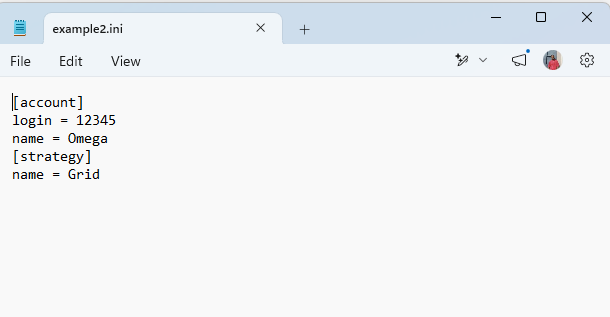
Results:
The configparser Module in Python vs. MQL5
The table below shows similarities and differences between the Python module and our newly created MQL5 library. | Python Module | MQL5 Implementation | Similarities/Differences |
|---|---|---|
defaults() | Not implemented. | Returns a dictionary containing the instance-wide default values in Python. No corresponding method is currently provided. |
sections() | sections[] | Both provide access to the available section names. Python provides them through a method, while the MQL5 implementation stores the section names in an array. |
add_section(section) | add_section(section) | Both are used to add a section. Python receives the section name as an argument and raises an error if the section already exists. |
has_section(section) | Not implemented. | Checks whether a named section exists in Python. The MQL5 implementation has the internal find_section() function, but no corresponding public has_section() method. |
options(section) | options(section, options_res[]) | Both return the options available in a specified section. Python returns a list, while the MQL5 implementation stores the options in the supplied output array. |
has_option(section, option) | has_option(section, option) | Both determine whether a specified option exists in a section. The functionality is essentially equivalent. |
read(filenames, encoding=None) | read(filename, is_common=false) | Both read and parse configuration files. Python accepts a filename or an iterable of filenames and supports an optional encoding. The MQL5 implementation reads one file and provides the is_common parameter for selecting the terminal's common files directory. |
read_file(f, source=None) | Not implemented. | Reads configuration data from an iterable of Unicode strings in Python. No corresponding method is currently provided. |
read_string(string, source='<string>') | read_string(str) | Both parse configuration data directly from a string. Python additionally accepts an optional source argument for identifying the origin of the configuration data. |
read_dict(dictionary, source='<dict>') | Not implemented. | Loads configuration data from a dictionary-like object in Python. Values are automatically converted to strings. No corresponding method is currently provided. |
get(section, option, ...) | get(section) get(section, option, T& result) get(section, option) | Both retrieve an option value from a specified section. The MQL5 implementation uses templates to support different data types. Python additionally supports interpolation, raw, vars, and fallback parameters. |
getint(section, option, ...) | getint(section, option) | Both retrieve an option and convert its value to an integer. |
getfloat(section, option, ...) | getfloat(section, option) | Both retrieve an option and convert its value to a floating-point number. |
getboolean(section, option, ...) | getboolean(section, option) | Both retrieve an option and convert its value to a Boolean value. They both accept 1, yes, true, on, 0, no, false, and off, case-insensitively. |
items(raw=false, vars=None) items(section, raw=false, vars=None) | Not implemented. | Returns configuration items as section-name/section-proxy pairs or option name/value pairs in Python. No corresponding method is currently provided. |
set(section, option, value) | set(section, option, T value) | Both assign a value to an option in an existing section. Python requires the option and value to be strings, while the MQL5 implementation uses a template to accept different data types. |
write(fileobject, space_around_delimiters=true) | write(CFile &fileobject) | Both write the configuration to a file object. Python provides an additional parameter controlling whether spaces are placed around delimiters. |
remove_option(section, option) | remove_option(section, option) | Both remove a specified option from a section and indicate whether the option existed. |
remove_section(section) | remove_section(section) | Both remove a specified section and indicate whether the section existed. |
optionxform(option) | find_option() | Python uses optionxform() to transform option names before storing and accessing them; the default behavior converts option names to lowercase. The MQL5 implementation performs option lookup through find_option(). |
configparser.UNNAMED_SECTION | Not implemented. | Represents an unnamed section in Python. No corresponding functionality is currently provided. |
configparser.MAX_INTERPOLATION_DEPTH | Not implemented. | Defines the maximum recursion depth for interpolation in Python. No corresponding interpolation-depth setting is currently provided. |
Final Thoughts
Configuration files are an important part of modern software development, providing a convenient way to separate application settings from program logic. They allow programs to be configured, customized, and reused without requiring changes to the underlying source code. In MetaTrader 5, configuration files are not an entirely new concept either, as INI files can already be used to configure and automate the Strategy Tester from the command line. These files can be useful in MQL5 applications when configuration needs to be shared between programs or maintained separately from the source code.
In this article, we explored the Python configparser module and its approach to working with INI-style configuration files. Based on these concepts, we implemented the CConfigParser class in MQL5, providing an interface for reading, accessing, modifying, and writing configuration data.
With the class CConfigParser, MQL5 programs can now work with these configuration files through a clean and reusable API, bringing another useful concept from Python's standard library into the MQL5 ecosystem.
Although MQL5 already provides program inputs and .set files for many configuration needs, an INI-based configuration system can be useful when configuration data needs to be managed independently of MetaTrader's input system or exchanged with external applications.
Attachments Table
| File name | Description & Usage |
|---|---|
| Include\PyMQL5\fileIO.mqh | Python-like file IO module — for reading all kinds of files in MQL5. |
| Include\PyMQL5\configparser.mqh | Contains the CConfigParser class. The class responsible for reading, writing, and storing software configurations in INI-style, as discussed above. |
| Include\PyMQL5\configparser test.mq5 | The script for testing functions and code implemented in this article. |
References:
- INI file (https://en.wikipedia.org/wiki/INI_file)
- configparser documentation (https://docs.python.org/3/library/configparser.html#quick-start)
- Python-Like File IO operations in MQL5 (https://www.mql5.com/en/articles/20695)
Warning: All rights to these materials are reserved by MetaQuotes Ltd. Copying or reprinting of these materials in whole or in part is prohibited.
This article was written by a user of the site and reflects their personal views. MetaQuotes Ltd is not responsible for the accuracy of the information presented, nor for any consequences resulting from the use of the solutions, strategies or recommendations described.