

Embedding a WebSocket Server in an MQL5 Expert Advisor: Live Push to Browsers and Scripts Without a Middleman
 56
 0

Contents
- Introduction
- Two Windows imports, and why
- The handshake
- Reading frames from a byte stream
- Failing a connection without losing the close frame
- One server pass per timer event
- Wiring the server into the EA
- Starting and stopping cleanly
- What can be tested offline, and what cannot
- Setting it up
- Live test results
- Limitations
- Conclusion
Introduction
An EA knows things the rest of your desk wants to see immediately: the last processed tick, an opened position, or equity after a fill. Getting that information out of MetaTrader 5 usually means polling a file, pushing to a web server with WebRequest, or loading a messaging DLL and a broker. Each route adds a delay or a moving part to install and watch.
This article takes a fourth route: it puts the server inside the EA. A browser tab or a Python script opens a WebSocket connection to the terminal and receives ticks and deals in real time, plus periodic account and position snapshots, over a single persistent connection. WebSocket suits the job because every modern browser speaks it natively, so a dashboard needs no plugin and no build step, and Python, Node.js and C# all have clients for it.
The protocol layer, RFC 6455, is plain MQL5: the HTTP upgrade handshake, the frame parser, masking, fragmentation, ping and pong, and the close codes. The TCP socket layer comes from Winsock, because MQL5 cannot accept incoming connections by itself. Along the way you will see how to prevent the server from blocking the EA thread, how to handle clients that stop reading, and how to close a connection so the peer reliably receives the close frame.
Everything was measured live on one laptop with a demo account. A tick reached a local client in a median of 327 µs, all 19 targeted protocol probes passed, and a 30-minute soak showed no gap in the EA's message sequence. The Strategy Tester cannot test the network part, and a later section explains what is tested offline instead.
Two Windows imports, and why
MQL5 sockets are client-only. SocketCreate and SocketConnect open outgoing TCP connections, and there is no bind, listen or accept. A server has to borrow those from Winsock:
//+------------------------------------------------------------------+
//| Winsock imports (MQL5 has no listening-socket API)               |
//+------------------------------------------------------------------+
#import "ws2_32.dll"
int    WSAStartup(ushort version,uchar &wsa_data[]);
int    WSACleanup(void);
ulong  socket(int af,int type,int protocol);
int    bind(ulong s,uchar &name[],int name_len);
int    listen(ulong s,int backlog);
ulong  accept(ulong s,uchar &addr[],int &addr_len);
int    recv(ulong s,uchar &buf[],int len,int flags);
int    send(ulong s,uchar &buf[],int len,int flags);
int    closesocket(ulong s);
int    shutdown(ulong s,int how);
int    ioctlsocket(ulong s,uint cmd,uint &arg);
int    setsockopt(ulong s,int level,int opt_name,int &opt_val,int opt_len);
int    WSAGetLastError(void);
#import
Along with one kernel32 import described below, this list is the entire Windows dependency. WSAStartup loads Winsock version 2.2 and fills an information block the code never reads, so a 512-byte buffer is enough. socket, bind and listen create the listening socket with a queue of 16 pending connections, and accept takes connections off that queue. recv, send, shutdown and closesocket move and end data, ioctlsocket and setsockopt set socket options, and WSAGetLastError says why a call failed.
Two details matter on 64-bit Windows. A SOCKET is an 8-byte, pointer-sized handle, so it should be stored in ulong. INVALID_SOCKET maps to ULONG_MAX. Declaring it as int compiles without a warning and then fails in odd ways. The address passed to bind is a 16-byte sockaddr_in that Start fills by hand: the address family in the first two bytes, the port in network byte order (high byte first) in the next two, then the IPv4 address. For the default address the four bytes are 127, 0, 0 and 1, which is why the server cannot be reached from another machine unless you ask for all interfaces.
Every socket, the listener included, is switched to non-blocking mode with ioctlsocket(FIONBIO). From then on accept, recv and send return at once, and WSAEWOULDBLOCK simply means "nothing to do yet". That single rule keeps the EA thread from ever waiting on a slow client. Accepted sockets also get TCP_NODELAY, because Nagle's algorithm combined with delayed acknowledgements can hold a small message back for tens of milliseconds.
The price is real: "Allow DLL imports" must be ticked, the Market does not accept such programs, and cloud agents will not run them. Everything above the socket layer compiles without any import when WS_PROTOCOL_ONLY is defined, which is how the offline self-test runs. A second, smaller import reads the Windows performance counter. It is used only to stamp messages for the latency tests.
The handshake
A WebSocket connection begins as an ordinary HTTP GET request. The client asks to switch protocols with the headers Upgrade: websocket and Connection: Upgrade, names the protocol version in Sec-WebSocket-Version, and sends a random 16-byte nonce, Base64-encoded, in Sec-WebSocket-Key. The server shows that it understood by hashing that key together with a constant GUID from the RFC and returning the result in Sec-WebSocket-Accept. Nothing secret is involved; the exchange only prevents an accidental upgrade.
ProcessHandshake first waits for the blank line that ends the headers. If the headers exceed 8 KB, it answers 431 and gives up, so a client cannot make the EA buffer an endless header. The checks then run from the request line down. A method other than GET gets 405. Missing upgrade headers, or a key that does not decode to 16 bytes, get 400. A version other than 13 gets 426 together with a header that tells the client which version to use. Header names are compared without regard to case, as HTTP allows.
Two optional policy checks follow. With InpAllowedOrigin set, a browser page served from any other origin gets 403, which stops an unrelated web page open in the same browser from talking to your terminal. With InpToken set, the request path must carry ?token= with the same value, or the answer is 401. Every refusal is a complete HTTP response, and the server closes the connection once those bytes have gone out. Only when every check passes does the server reply 101 Switching Protocols with the accept key:
//+------------------------------------------------------------------+
//| Compute Sec-WebSocket-Accept = Base64(SHA1(key + GUID))          |
//+------------------------------------------------------------------+
string WsComputeAcceptKey(const string client_key)
  {
//--- hash the concatenation exactly as RFC 6455 section 4.2.2 says
   uchar source[],hash[],encoded[],empty_key[];
   WsStringToBytes(client_key+WS_GUID,source);
   if(CryptEncode(CRYPT_HASH_SHA1,source,empty_key,hash)!=20)
      return("");
//--- a 20-byte digest always encodes to 28 Base64 characters
   if(CryptEncode(CRYPT_BASE64,hash,empty_key,encoded)<=0)
      return("");
   return(CharArrayToString(encoded,0,WHOLE_ARRAY,CP_ACP));
  }
CryptEncode does both the SHA-1 and the Base64 step, so the function needs no hashing code of its own. The self-test checks it against the worked example in RFC 6455: the key dGhlIHNhbXBsZSBub25jZQ== must give s3pPLMBiTxaQ9kYGzzhZRbK+xOo=. Any bytes that follow the blank line already belong to the first frame(s), which is why Process runs the frame parser on the same buffer straight after a successful handshake.
Reading frames from a byte stream
After the handshake, everything travels in frames. The first byte holds the FIN bit, which marks the last frame of a message, three reserved bits that must stay zero unless an extension was agreed, and a 4-bit opcode: continuation, text, binary, close, ping or pong. The second byte holds the mask bit and a 7-bit length. Lengths up to 125 fit in those 7 bits. The value 126 means the real length follows in 2 bytes, and 127 means it follows in 8 bytes. Every frame a client sends must be masked with a 4-byte key placed after the length, and every frame a server sends must not be masked. Masking protects proxies from crafted browser traffic, so a server must reject unmasked client frames.
TCP delivers a byte stream, not messages. A frame can arrive in three pieces, and three frames can arrive in one recv call. The parser therefore works on a growing buffer, m_rx, and returns the moment a frame is incomplete, ready to continue on the next timer pass:
//+------------------------------------------------------------------+
//| CWsConnection: parse every complete frame currently in m_rx      |
//+------------------------------------------------------------------+
void CWsConnection::ProcessFrames(void)
  {
//--- loop until the buffer holds only a partial frame (or nothing)
   while(!m_close_after_flush && !m_discard && m_rx_len>=2)
     {
      int b0=m_rx[0];
      int b1=m_rx[1];
      bool fin=((b0&0x80)!=0);
      int opcode=b0&0x0F;
      int len7=b1&0x7F;
      //--- fail fast on header bits before waiting for the payload
      if((b0&0x70)!=0)
        {
         Fail(WS_CLOSE_PROTOCOL);
         return;
        }
      if(opcode!=WS_OP_CONT && opcode!=WS_OP_TEXT && opcode!=WS_OP_BINARY &&
         opcode!=WS_OP_CLOSE && opcode!=WS_OP_PING && opcode!=WS_OP_PONG)
        {
         Fail(WS_CLOSE_PROTOCOL);
         return;
        }
      if((b1&0x80)==0)
        {
         Fail(WS_CLOSE_PROTOCOL);
         return;
        }
      if(opcode>=WS_OP_CLOSE && (!fin || len7>125))
        {
         Fail(WS_CLOSE_PROTOCOL);
         return;
        }
      //--- decode the 7, 16 or 64-bit payload length
      long plen=len7;
      int pos=2;
      if(len7==126)
        {
         if(m_rx_len<4)
            return;
         plen=((long)m_rx[2]<<8)|(long)m_rx[3];
         pos=4;
         if(plen<126)
           {
            Fail(WS_CLOSE_PROTOCOL);
            return;
           }
        }
      else
         if(len7==127)
           {
            if(m_rx_len<10)
               return;
            if((m_rx[2]&0x80)!=0)
              {
               Fail(WS_CLOSE_PROTOCOL);
               return;
              }
            plen=0;
            for(int k=0; k<8; k++)
               plen=(plen<<8)|(long)m_rx[2+k];
            pos=10;
            if(plen<65536)
              {
               Fail(WS_CLOSE_PROTOCOL);
               return;
              }
           }
      //--- enforce limits before buffering a huge payload
      if(plen>m_max_frame)
        {
         Fail(WS_CLOSE_TOO_BIG);
         return;
        }
      int len=(int)plen;
      if(m_rx_len<pos+4+len)
         return;
      //--- unmask: payload[i] = masked[i] XOR mask[i mod 4]
      uchar payload[];
      ArrayResize(payload,len);
      for(int i=0; i<len; i++)
         payload[i]=(uchar)(m_rx[pos+4+i]^m_rx[pos+(i&3)]);
      ConsumeRx(pos+4+len);
      m_frames_in++;
      HandleFrame(fin,opcode,payload,len);
     }
  }
The order of the checks matters. Every rule that can be judged from the first bytes runs before the parser waits for the payload: reserved bits, unknown opcodes, a client frame without the mask bit, a control frame that is fragmented or longer than 125 bytes, a length written in a longer form than it needs, and the size limit. A client that announces a frame of several gigabytes is closed with 1009 after at most 10 header bytes, and its payload is never buffered. The limit comes from InpMaxFrameKB, 64 KB by default, and a reassembled message may be four times that size. Unmasking is one XOR per byte, with i&3 picking the key byte, and ConsumeRx then moves any following bytes to the front of the buffer.
Each complete frame goes to HandleFrame, a small state machine. A text or binary frame with FIN set is a whole message. Without FIN it opens a fragmented message, and continuation frames are appended until one arrives with FIN set. A new data frame while a message is still open is a protocol error, and so is a continuation with nothing to continue. Control frames may arrive between fragments, so a ping is answered at once with a pong that carries the same payload, even in the middle of a message.
UTF-8 is checked on the complete text message, because a multi-byte character may be split across two fragments. The validator rejects overlong encodings, UTF-16 surrogate halves and code points above the Unicode range. Binary messages are counted and dropped, since every request this server accepts is JSON text. Close frames get their own checks in HandleClose. The body is either empty or a 2-byte status code with an optional UTF-8 reason. A 1-byte body, a reserved code such as 1005 or 1006, or an invalid reason fails the connection; a valid close is echoed with the same code.
Failing a connection without losing the close frame
RFC 6455 calls a broken connection "failed": send a close frame with a status code and stop processing. The obvious implementation queues the close frame and calls closesocket at once. On Windows that loses the very frame you wanted to deliver. When a socket is closed while unread data still waits in its receive buffer, the TCP stack does not end the connection with a normal FIN. It sends a reset, and a peer that receives a reset may discard data it has already received but not yet read, the close frame included. A misbehaving client is just the kind that keeps sending, so that unread data is almost always there. Fail therefore stops parsing but keeps the socket open:
//+------------------------------------------------------------------+
//| CWsConnection: protocol error, send close and stop parsing       |
//| The socket stays open (input drained and ignored) until the peer |
//| closes or the server's close timeout fires. Closing at once with |
//| unread input would make Windows send RST, which can destroy the  |
//| close frame before the peer reads it.                            |
//+------------------------------------------------------------------+
void CWsConnection::Fail(const int code)
  {
//--- RFC 6455 section 7.1.7: fail the connection
   if(!m_close_sent)
     {
      uchar body[2];
      body[0]=(uchar)((code>>8)&0xFF);
      body[1]=(uchar)(code&0xFF);
      QueueFrame(WS_OP_CLOSE,body,2);
      m_close_sent=true;
     }
   m_close_code=code;
   m_state=WS_STATE_CLOSING;
   m_discard=true;
   m_rx_len=0;
  }
With m_discard set, Feed ignores new input and the parser does nothing, while the server keeps reading the socket and flushing the queue. The slot is freed when the client hangs up after reading the close frame, or after 3 seconds if it never does. The probes in the test section rely on this behaviour: each of the 9 malformed inputs got the expected close code, and none of them ended in a reset.
One server pass per timer event
CWsServer holds a set number of slots, set by InpMaxClients (16 by default). Each slot keeps a socket, a protocol engine, the client's topic bits and four timestamps: when the connection was accepted, when its last byte arrived, when the last ping went out and when closing started. One call to Service does all the network work for every slot:
//+------------------------------------------------------------------+
//| CWsServer: one full I/O pass (call from OnTimer)                 |
//+------------------------------------------------------------------+
void CWsServer::Service(void)
  {
//--- time the whole pass so its cost can be reported
   if(m_listen==WS_INVALID_SOCKET)
      return;
   ulong t0=GetMicrosecondCount();
   AcceptNew();
   ulong now=GetMicrosecondCount();
   for(int i=0; i<m_capacity; i++)
     {
      if(m_conn[i]==NULL)
         continue;
      CWsConnection *c=m_conn[i];
      //--- read, then run the protocol engine on the new bytes
      bool alive=ReadSlot(i,now);
      c.Process();
      //--- raise a one-time OPEN event once the handshake succeeds
      if(c.State()==WS_STATE_OPEN && !m_announced[i])
        {
         m_announced[i]=true;
         ArrayResize(m_open_ids,m_open_count+1,16);
         m_open_ids[m_open_count]=m_id[i];
         m_open_count++;
        }
      string text;
      while(c.PopMessage(text))
        {
         ArrayResize(m_queue_id,m_queue_count+1,64);
         ArrayResize(m_queue_text,m_queue_count+1,64);
         m_queue_id[m_queue_count]=m_id[i];
         m_queue_text[m_queue_count]=text;
         m_queue_count++;
         m_msgs_in++;
        }
      if(!alive)
        {
         DropSlot(i);
         continue;
        }
      //--- timeouts: handshake 5 s, close reply 3 s, idle m_idle_sec
      ENUM_WS_STATE st=c.State();
      if(st==WS_STATE_HANDSHAKE && now-m_opened_us[i]>5000000)
        {
         DropSlot(i);
         continue;
        }
      if(c.CloseSent() && m_closing_us[i]==0)
         m_closing_us[i]=now;
      if(m_closing_us[i]>0 && now-m_closing_us[i]>3000000)
        {
         DropSlot(i);
         continue;
        }
      if(st==WS_STATE_OPEN)
        {
         if(m_idle_sec>0 && now-m_last_rx_us[i]>(ulong)m_idle_sec*1000000)
            c.Close(WS_CLOSE_GOING_AWAY);
         else
            if(m_ping_sec>0 && now-m_last_ping_us[i]>(ulong)m_ping_sec*1000000)
              {
               c.SendPing(now);
               m_last_ping_us[i]=now;
              }
        }
     }
//--- write side: push queued bytes, then reap finished connections
   FlushAll();
   m_service_us.Add((double)(GetMicrosecondCount()-t0));
  }
The pass starts by accepting every waiting connection. A connection that finds no free slot is closed at once and counted as refused. For each occupied slot the server then reads, runs the protocol engine on the new bytes, moves complete text messages to a server-wide queue and raises a one-time open event after a successful handshake. Each client gets at most 16 reads of 16 KB per pass, so a busy one cannot starve the others.
Four timers keep dead connections from holding slots. A handshake must finish within 5 seconds and a close exchange within 3. A client that sends nothing for InpIdleSec (45 seconds by default) gets a 1001 close. Every InpPingSec (15 seconds) the server sends a ping whose payload is the current GetMicrosecondCount value in 8 bytes, which the pong returns, giving a round-trip time per client. Finally FlushAll pushes queued bytes to every socket and frees the slots whose close exchange is complete. The duration of each pass goes into a ring of 4096 samples, which is where the server-cost figures in the test section come from.
Broadcasting goes through Publish, which encodes the frame once and copies the same bytes into each subscriber's queue:
//+------------------------------------------------------------------+
//| CWsServer: broadcast a text message to subscribers of a topic    |
//| Returns the number of clients the frame was queued for           |
//+------------------------------------------------------------------+
int CWsServer::Publish(const uint topic,const string text)
  {
//--- encode once, then copy the same frame bytes to each subscriber
   uchar payload[],frame[];
   int plen=WsStringToBytes(text,payload);
   int flen=WsBuildFrame(WS_OP_TEXT,payload,plen,frame);
   int delivered=0;
   for(int i=0; i<m_capacity; i++)
     {
      if(m_conn[i]==NULL || (m_topics[i]&topic)==0)
         continue;
      //--- backpressure: a client that cannot keep up is evicted
      if(m_conn[i].TxLength()+flen>m_max_tx)
        {
         m_evicted++;
         DropSlot(i);
         continue;
        }
      if(m_conn[i].QueueEncoded(frame,flen))
        {
         delivered++;
         m_msgs_out++;
        }
     }
   return(delivered);
  }
Encoding once matters when many clients share a topic: the JSON is converted to UTF-8 and wrapped in a frame header a single time, whatever the number of subscribers. The size check is the backpressure rule. A browser tab in the background, a frozen script or a client on a bad link stops draining its socket, and without a ceiling its queue would grow until the terminal ran out of memory. Once a client's pending bytes would pass InpMaxTxKB (1024 KB by default), the client is dropped and the others carry on. With 16 slots, the outgoing queues can never hold more than 16 MB in total. SendTo applies the same rule to one-to-one replies.
The other buffers have their own limits. A handshake may not exceed 8 KB. Input is read at most 16 times 16 KB per client per pass, and every complete frame is parsed in the same pass, so what stays in the input buffer is at most one incomplete frame, itself capped by InpMaxFrameKB. A fragmented message is capped at four times that size. Complete messages move to the server-wide queue, and OnTimer empties it on every pass, so it never holds more than one pass of input.
Wiring the server into the EA
The EA calls the server from three places: OnTick, OnTimer and OnTradeTransaction. OnTick runs the trading logic first and publishes second, so streaming cannot delay the trade decision made on that tick:
//+------------------------------------------------------------------+
//| Expert tick function                                             |
//+------------------------------------------------------------------+
void OnTick()
  {
//--- trading logic first; streaming must never delay it
   RunStrategy();
   if(!g_server_on)
      return;
//--- optional throttle for very active symbols
   ulong now=GetMicrosecondCount();
   if(InpTickMinMs>0 && now-g_last_tick_us<(ulong)InpTickMinMs*1000)
      return;
   g_last_tick_us=now;
   MqlTick tick;
   if(!SymbolInfoTick(_Symbol,tick))
      return;
   g_tick_seq++;
   string json=StringFormat("{\"type\":\"tick\",\"sym\":\"%s\",\"bid\":%s,\"ask\":%s,\"time_msc\":%I64d,\"seq\":%I64u,\"qpc\":%I64d}",
                            _Symbol,DoubleToString(tick.bid,_Digits),DoubleToString(tick.ask,_Digits),
                            tick.time_msc,g_tick_seq,WsQpcNow());
//--- publish, then (optionally) push the bytes out right away
   ulong t0=GetMicrosecondCount();
   if(g_server.Publish(WS_TOPIC_TICK,json)==0)
      return;
   if(InpFlushOnPublish)
      g_server.FlushAll();
   if(g_server.TotalTxPending()==0)
      g_dwell.Add((double)(GetMicrosecondCount()-t0));
   else
      if(g_dwell_pending_us==0)
         g_dwell_pending_us=t0;
  }
The tick message is a small JSON object with the symbol, bid, ask, the tick time in milliseconds, a sequence number and a qpc field. The sequence number lets a client detect a lost or reordered message, and every test below counts gaps with it. The qpc field is the Windows performance counter, which a client on the same machine can read too. With InpFlushOnPublish enabled, the frame leaves in the same OnTick through FlushAll. Without it, the bytes wait in the queue until the next timer pass, and the tests below show what that costs. InpTickMinMs can thin the stream on very active symbols. It is 0 by default, so every tick that reaches OnTick is sent. Publish and FlushAll still run on the EA thread after RunStrategy, so a slow flush can delay the next event the EA handles. Client requests, snapshots and housekeeping run on the timer:
//+------------------------------------------------------------------+
//| Timer function: all socket reads and housekeeping happen here    |
//+------------------------------------------------------------------+
void OnTimer()
  {
//--- accept, read, parse, keep-alive, flush
   g_server.Service();
   ulong now=GetMicrosecondCount();
   if(g_dwell_pending_us>0 && g_server.TotalTxPending()==0)
     {
      g_dwell.Add((double)(now-g_dwell_pending_us));
      g_dwell_pending_us=0;
     }
//--- greet new clients, then answer whatever they sent
   int id;
   while(g_server.NextOpened(id))
      g_server.SendTo(id,BuildHelloJson(id));
   string text;
   while(g_server.NextMessage(id,text))
      HandleClientMessage(id,text);
//--- benchmark generators (no-ops unless a client started one)
   ServiceBursts();
   ServiceFanout();
//--- periodic snapshots
   if(InpAccountMs>0 && now-g_last_account_us>=(ulong)InpAccountMs*1000)
     {
      g_last_account_us=now;
      g_server.Publish(WS_TOPIC_ACCOUNT,BuildAccountJson());
      g_server.Publish(WS_TOPIC_POSITIONS,BuildPositionsJson());
     }
   if(InpStatsLogSec>0 && now-g_last_stats_us>=(ulong)InpStatsLogSec*1000000)
     {
      g_last_stats_us=now;
      WriteStatsRow();
     }
   g_server.FlushAll();
   if(now-g_last_comment_us>=1000000)
     {
      g_last_comment_us=now;
      UpdateComment();
     }
  }
Each pass calls Service, greets new clients with a hello message, answers queued requests, feeds the two benchmark generators, publishes account and position snapshots every InpAccountMs (1000 ms by default), writes a row to the stats file every 10 seconds and refreshes the chart comment once a second. Deal confirmations do not wait for the timer: OnTradeTransaction publishes each deal as soon as it is added, followed by a fresh positions snapshot. Between deals, the account and position values a client sees can be up to InpAccountMs old. That suits a dashboard, but it is not a stream of every change.
Client requests are small JSON objects with an op field. They are handled by HandleClientMessage. sub and unsub take a list of topics (tick, positions, deals, account), and a new subscriber to account or positions receives the current state at once, so a dashboard is never blank while it waits for the next snapshot. ping echoes a client stamp, and stats returns the server counters. The test operations echo, burst and fanout answer only when InpBenchOps is true, so they stay off on a production chart. Requests are answered only on the timer, which limits interactive use, and the test section measures what that costs.
There is no trading command at all, which limits the damage a stray client can do, but a read-only server still exposes balance, equity, positions and deals. Binding to 127.0.0.1 keeps out the external network, not other programs on the same computer. Without InpToken any local process can connect, and a web page from any origin open in a local browser can try ws://127.0.0.1:8765 too, so the EA prints a warning when the token is empty. For real use, set InpToken, and set InpAllowedOrigin when a browser page is the client. Browsers cannot add custom headers to a WebSocket request. The token therefore travels in the URL and may end up in browser history, proxy logs, or access logs. Treat it as a local secret and change it if it leaks. The server refuses to bind to all interfaces without a token.
Starting and stopping cleanly
Changing an EA's inputs runs OnDeinit and OnInit again, but the program is not reloaded, so global objects are not constructed again. A counter set only in a constructor keeps counting from the last run. The stats file shows this directly: with counters set only in the constructor, accepted climbed from 16 in the first run to 88 in the 9th, across 8 input changes. Start therefore calls ResetCounters, which zeroes every counter, both message queues and the timing ring, and the EA resets its own globals (the tick sequence, the timers and the benchmark state) in ResetRunState. After two input changes, a stats request reported accepted = 1, which is the stats request itself.
Leaving needs the same care as failing. A Stop that sends 1001 and closes at once made the browser dashboard show code 1006, abnormal closure, as the EA was removed. The dashboard's pings had not been read yet, and the reset destroyed the close frame. The shutdown below is a TCP half-close with a drain:
//+------------------------------------------------------------------+
//| CWsServer: graceful shutdown of clients, listener and Winsock    |
//| Each client gets a 1001 close frame. FIN (shutdown SD_SEND) is   |
//| sent only after the whole queue has been handed to TCP, then the |
//| server drains input until the peer hangs up or the grace period  |
//| ends. closesocket() with unread input makes Windows send RST,    |
//| which can destroy the close frame and show up as 1006.           |
//+------------------------------------------------------------------+
void CWsServer::Stop(void)
  {
//--- step 1: queue a 1001 close for every client
   int  open=0;
   bool half[];
   ArrayResize(half,MathMax(m_capacity,1));
   ArrayInitialize(half,false);
   for(int i=0; i<m_capacity; i++)
     {
      if(m_conn[i]==NULL)
         continue;
      m_conn[i].Close(WS_CLOSE_GOING_AWAY);
      open++;
     }
//--- step 2: flush, half-close once a queue is empty, drain input
   ulong deadline=GetMicrosecondCount()+(ulong)WS_STOP_WAIT_MS*1000;
   while(open>0 && GetMicrosecondCount()<deadline)
     {
      for(int i=0; i<m_capacity; i++)
        {
         if(m_conn[i]==NULL)
            continue;
         //--- FIN only after every queued byte has reached TCP
         if(!half[i])
           {
            if(!FlushSlot(i))
              {
               DropSlot(i);
               open--;
               continue;
              }
            if(m_conn[i].TxLength()==0)
              {
               shutdown(m_sock[i],WS_SD_SEND);
               half[i]=true;
              }
           }
         //--- read and discard input; 0 means the peer closed its side
         int got=recv(m_sock[i],m_io,WS_IO_CHUNK,0);
         if(got>0)
            continue;
         if(got<0 && WSAGetLastError()==WS_WSAEWOULDBLOCK)
            continue;
         DropSlot(i);
         open--;
        }
      if(open>0)
         Sleep(5);
     }
//--- step 3: whatever is left after the grace period is closed hard
   for(int i=0; i<m_capacity; i++)
      if(m_conn[i]!=NULL)
         DropSlot(i);
   if(m_listen!=WS_INVALID_SOCKET)
     {
      closesocket(m_listen);
      m_listen=WS_INVALID_SOCKET;
     }
   if(m_wsa_up)
     {
      WSACleanup();
      m_wsa_up=false;
     }
  }
Step one queues 1001 for every client. Step two runs until every client is done or the 300 ms grace period ends. It keeps flushing each client's queue, because a non-blocking send may take only part of it, and calls shutdown with SD_SEND only once every queued byte has reached TCP. FIN then follows the close frame, and the server will send nothing more but can still read. It reads and discards whatever each client sends until that client closes its side. Only then does closesocket run, on sockets with nothing left unread. A client that never answers is closed hard when the time is up. With three clients each sending a ping every 250 ms, all three received close code 1001 when the EA was removed from the chart.
What can be tested offline, and what cannot
The protocol layer does not need a network at all. WsSelfTest compiles the engine with WS_PROTOCOL_ONLY and checks the handshake, framing, fragmentation and close handling without a socket or a DLL call.
The network server is another matter, and the Strategy Tester cannot test it. The tester has no network peers to connect, its timer runs on simulated time instead of the clock a client would see, and a program that imports DLLs runs only on local agents. In OnInit the EA checks MQL_TESTER and MQL_OPTIMIZATION and leaves the server off, printing why in the journal. A backtest therefore runs the demo strategy without a server. It shows how the strategy trades and says nothing about how a running server affects the EA live. Handshakes, latency, throughput, eviction and shutdown exist only on a live terminal, so every socket-level result in this article comes from one.
Setting it up- Unpack the attached archive into the terminal's data folder (File > Open Data Folder) and compile WsBridge_EA.mq5 and WsSelfTest.mq5 in MetaEditor.
- Run the WsSelfTest script on any chart. It needs no DLL permission and prints one line per check, followed by a summary.
- Attach WsBridge_EA to a chart of a demo account, tick "Allow DLL imports" on the Common tab, and wait for WsBridge: listening on ws://127.0.0.1:8765/ in the Experts log.
- Open MQL5\Files\WsBridge\client.html in a browser and click Connect.
- For the measurements, install Python 3 and run ws_bench.py from the same folder, for example python ws_bench.py conformance. It uses the standard library only.
Live test results
All runs used one Windows 11 laptop, MetaTrader 5 on a MetaQuotes-Demo account, the EA on an EURUSD chart and ws_bench.py on the same machine through 127.0.0.1, on one evening in October 2026. The EA ran with default inputs except where a table says otherwise.
Self-test and conformance.
| Group | Checks | Covers |
|---|---|---|
| Handshake | 14 | accept key, 101, split reads, each refusal status |
| Encoder | 4 | 7-, 16- and 64-bit lengths |
| Decoder | 8 | masking, byte-at-a-time input, fragments, UTF-8 |
| Violations | 12 | close codes 1002, 1007, 1009 |
| Close | 8 | echoed and invalid close frames, server close |
| Ping | 1 | round-trip time from the pong |
| Helpers | 13 | UTF-8, close codes, JSON, percentiles |
All 60 checks passed. The script builds client frames byte by byte, including the masked example from the RFC, feeds them straight into CWsConnection and compares what comes out, so it covers the protocol engine only: no sockets, timer or load. Writing it also exposed two MQL5 traps worth knowing. StringToInteger does not parse hexadecimal text such as "0x80", so the hex helper decodes each digit itself, and GetMicrosecondCount starts at zero with the program, so subtracting a few milliseconds from it in a fresh script wraps around.
The socket-level probes in ws_bench.py conformance cover what the script cannot. They open real connections through Winsock and send deliberately broken input, then check the close code or HTTP status that comes back. All 19 passed, including the 9 malformed inputs (an unmasked frame, RSV1 set, a reserved opcode, a fragmented ping, an oversized ping, a stray continuation, invalid UTF-8, an oversized frame and a reserved close code on the wire), a ping round-trip, the clean close and an echo of a message sent in three fragments with a ping in between. One probe needs a token, so this count comes from the run with InpToken set. The probes show that the server handles these particular cases. They are a targeted set, not a full suite such as Autobahn, so they do not establish full conformance with RFC 6455.
Tick latency
Each tick message carries the performance counter value read in OnTick. The Python client reads the same counter as soon as it has received and parsed the message, so the difference is the end-to-end delay from the EA to a usable message in this Python client, not the latency of the server alone. Two runs of 10 minutes each used the same EA, first with InpFlushOnPublish on, then off.
One-way tick latency
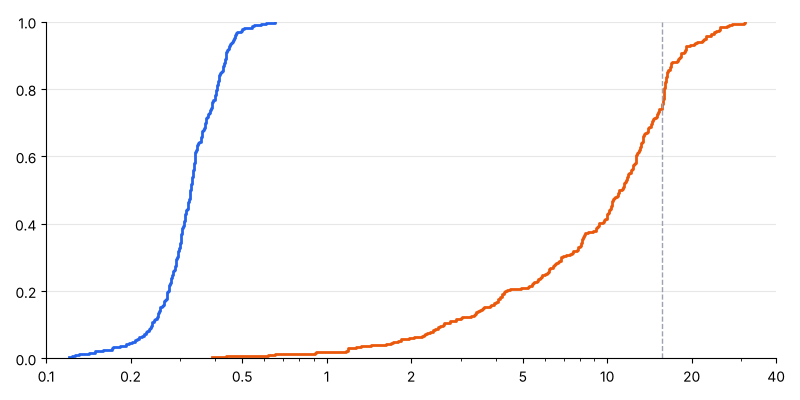
1. Cumulative share of ticks against one-way latency in ms (log scale), from the stamp in OnTick to the parsed message in Python. Blue: flush on, 289 ticks. Orange: flush off, 300 ticks. Each run lasted 10 minutes. Dashed line: 15.625 ms.
| Flush | Ticks | p50 | p95 | p99 | Max | Gaps |
|---|---|---|---|---|---|---|
| On | 289 | 327 µs | 469 µs | 556 µs | 653 µs | 0 |
| Off | 300 | 11.2 ms | 22.2 ms | 27.1 ms | 30.9 ms | 0 |
Sending from OnTick cut the median about 34-fold. Neither run showed a gap or a reordering in the EA's sequence numbers. Those numbers count the messages the EA published. They do not show that every terminal tick reached OnTick, because the terminal skips ticks that arrive while the EA is busy, and nothing here compares the stream with an independent tick record. The EA's own log puts the median time from Publish to the end of FlushAll at 197 µs (p99 398 µs) over the same 289 ticks. That interval covers MQL5 code, Winsock and the operating system together, the client adds Python's receive and JSON parsing, and these measurements do not separate the parts. With flush off, the delay spread from 389 µs to 30.9 ms, since a tick can arrive at any point between two timer passes. The market was quiet, so the samples are small, and each p99 rests on about three ticks.
Request round-trip
The echo test sends a 64-byte message, waits for the reply and repeats. Each run sent 10,200 echoes and dropped the first 200 as warm-up, leaving 10,000 per timer setting.
Echo round-trip at three timer settings
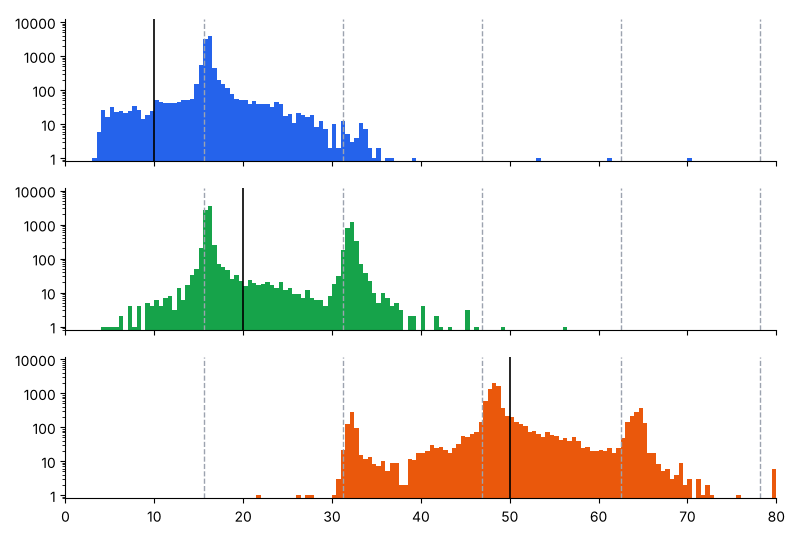
2. 10,000 round-trips per panel, 0.5 ms bins, count on a log scale. Top to bottom: InpTimerMs 10, 20, 50 (solid line). Dashed: multiples of 15.625 ms. 5 samples above 80 ms (max 220.9 ms) sit in the last bin.
| Timer | p50 | p95 | Mean | 0 steps | 1 step | 2 steps | 3 steps | 4 steps | 5+ steps |
|---|---|---|---|---|---|---|---|---|---|
| 10 ms | 16.0 | 21.0 | 16.2 | 1.9% | 95.0% | 3.0% | 0.0% | 0.0% | 0.0% |
| 20 ms | 16.2 | 32.5 | 20.7 | 0.1% | 70.9% | 28.8% | 0.1% | 0.0% | 0.0% |
| 50 ms | 48.5 | 64.6 | 50.0 | 0.0% | 0.0% | 6.4% | 75.7% | 17.7% | 0.2% |
Times are in ms. Each round-trip is rounded to the nearest multiple of 15.625 ms (one step), and the shares in a row add up to 100% within rounding. A request waits in the socket until the next OnTimer, so each round-trip is close to one timer interval. At 10 ms the mean was 16.2 ms, not 10, and 95.0% of samples took one step. At 20 ms the samples split between one and two steps and averaged 20.7 ms. At 50 ms most fell at three steps, some at four, and the mean came to 50.0 ms. The small group at zero steps in the 10 ms run, 1.9% of samples, is requests that arrived just before a timer pass.
The pattern is consistent with a timer that keeps the requested period on average but fires on the Windows timer grid and cannot run faster than one step. The round-trip also contains the Python client, socket I/O, JSON handling and the scheduler, and this test does not isolate the timer from them. Other software can change the system timer resolution, so expect other numbers elsewhere. Because requests are processed only in OnTimer, every interactive request pays this step; for answers faster than about 16 ms, reply from OnTick.
Throughput and eviction
In the burst test each client connects, asks for 20,000 messages of 256 bytes and counts what arrives. The EA keeps that client's queue below 256 KB, so a burst is paced by the client's own reading speed and never trips the eviction rule. The test ran with 1, 5 and 20 clients at once.
Messages per second by number of clients
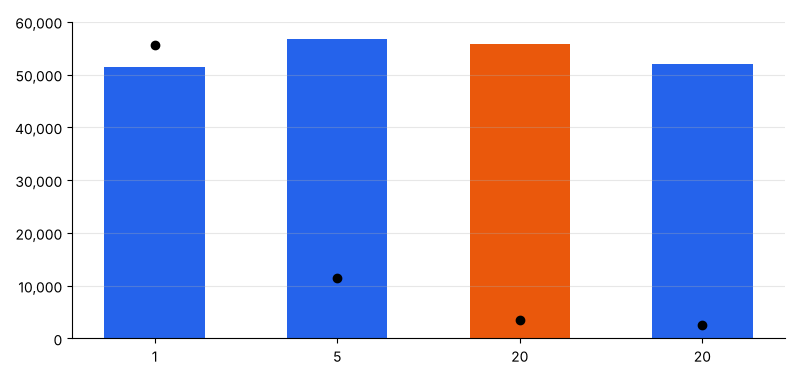
3. Bars: total rate. Dots: slowest client. 1, 5 and 20 clients with 16 slots (orange: four refused), then 20 with 32 slots. The single-client rate excludes connect time.
| Clients | Slots | Received | Msg/s | MB/s | Gaps | Refused |
|---|---|---|---|---|---|---|
| 1 | 16 | 20,000 | 51,331 | 13.2 | 0 | 0 |
| 5 | 16 | 100,000 | 56,743 | 14.6 | 0 | 0 |
| 20 | 16 | 320,000 | 55,709 | 14.3 | 0 | 4 |
| 20 | 32 | 400,000 | 51,941 | 13.3 | 0 | 0 |
The total stayed between 51,331 and 56,743 messages per second whatever the number of clients, with no gap in any sequence. A flat total fits a single-threaded server pass that shares one budget among all readers, and it equally fits a single Python process whose threads share one interpreter. These rates describe the whole setup of EA, Python client and localhost, and they are not the server's maximum. With the default 16 slots, 4 of 20 clients were refused at connect and the other 16 received 320,000 messages. With 32 slots all 20 received their share, 400,000 in total at 51,941 msg/s.
The fan-out test checks the backpressure rule. 5 readers and one client that never reads subscribed to the bench topic, and the EA published 50,000 messages of 512 bytes, 200 per timer pass. Each reader received all 50,000 at 12,452 to 12,557 msg/s, the server finished in 3.98 s, and the stalled client was evicted, which the server counted as one eviction. Under that flood the median one-way latency per reader rose to 33 to 64 ms. Queueing in the EA and Python threads both play a part, and the test does not separate them.
Soak
One client subscribed to all four topics for 30 minutes, reconnected every 10 minutes and sent an application-level ping every 5 seconds, while the browser dashboard stayed connected the whole time.
Thirty-minute soak
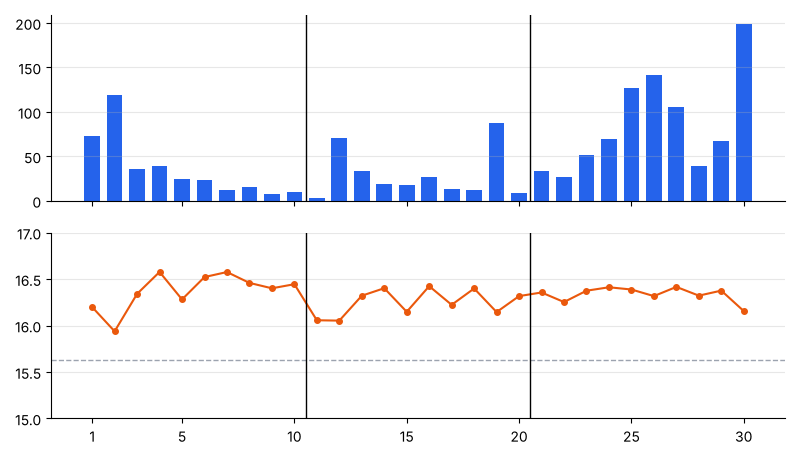
4. One row per minute. Top: ticks received. Bottom: median application ping in ms. Solid lines: planned reconnects. Dashed: 15.625 ms.
The client received 1,512 ticks (3 to 199 a minute), 1,785 account and 1,784 positions snapshots, with no sequence gap and no unplanned disconnect. The ping median stayed between 15.9 and 16.6 ms, one timer step again, with no drift. The demo strategy opened no trade during the session, so the deals stream carried nothing, and its live behaviour is untested here. Thirty minutes shows short-term behaviour under these conditions only.
Across the 9 EA runs in the stats file, one server pass took a median of 37 to 43 µs and a p99 of 126 to 175 µs, against a timer period of 10 ms or more. Polling costs the EA very little when there is nothing to do.
Browser dashboard
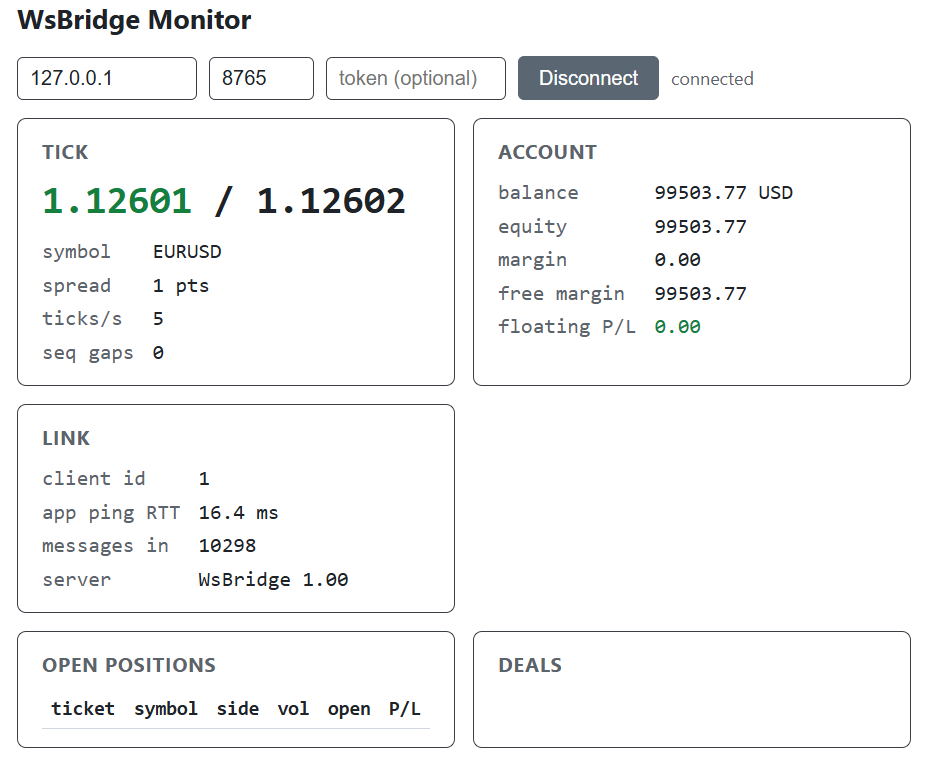
5. client.html in its light theme, connected live to the EA. Every value in the Tick, Account and Link panels, the streaming bid and ask, the account snapshot, and the client's own link id and ping round-trip, arrived over the socket during this session; none of it is typed in by hand. Received values are written with textContent, never parsed as HTML.
Limitations
One machine, localhost. Every client ran on the same laptop through 127.0.0.1, on one demo account, one symbol and one evening. Nothing here measures a real network, a VPS, packet loss or a remote browser, and the latency numbers will not carry over.
No TLS. The server speaks ws:// only. Beyond the local machine it needs a TLS reverse proxy or an SSH tunnel in front, which is one more component to run, and that weakens the "no middleman" advantage for remote use.
Local exposure. Without a token and an Origin pin, local programs and browser pages can read account data, and a token in the URL can leak into history and logs.
DLL dependency. The Winsock imports rule out the Market and cloud agents, and the EA needs "Allow DLL imports".
Timer-bound replies and periodic snapshots. Requests are answered on the timer, so on this machine a reply costs about one Windows timer step. Account and position snapshots are periodic, so between deals they can be up to InpAccountMs old.
Short and quiet tests. The soak lasted 30 minutes, which says nothing about memory or handle growth over days. The tick samples were small, the deals stream saw no traffic, and all latency and throughput figures are end-to-end results with one Python client.
Protocol scope. There is no compression extension and no subprotocol negotiation, binary messages are ignored, and the conformance probes are a targeted set.
Conclusion
A WebSocket server fits inside an EA with two short import lists and plain MQL5 for everything else. The care goes into the plumbing around the protocol: never block, judge the header before buffering the payload, cap every queue, close a socket only after the peer has heard you, and reset state in OnInit.
On this laptop a tick reached a local Python client end to end in about a third of a millisecond when sent from OnTick, while timer-driven replies moved in steps of about 16 ms. That is one Windows machine on localhost, not evidence about remote networks. Before relying on it, run the self-test, the conformance probes and a soak of your own on the machine that will host the EA.
| File | Type | Description |
|---|---|---|
| MQL5\Include\WsBridge\WsServerCore.mqh | Include | Winsock imports, RFC 6455 protocol engine (CWsConnection), non-blocking multi-client server (CWsServer). |
| MQL5\Experts\WsBridge\WsBridge_EA.mq5 | Expert Advisor | Hosts the server, streams ticks, positions, deals and account state, writes the stats file, runs a demo strategy. |
| MQL5\Scripts\WsBridge\WsSelfTest.mq5 | Script | Offline protocol self-test, 60 checks, no DLL. |
| MQL5\Files\WsBridge\client.html | Web page | Browser dashboard using the native WebSocket API. |
| MQL5\Files\WsBridge\ws_bench.py | Python script | Conformance probes, latency, throughput, fan-out, soak, shutdown and stats tests. |
Warning: All rights to these materials are reserved by MetaQuotes Ltd. Copying or reprinting of these materials in whole or in part is prohibited.
This article was written by a user of the site and reflects their personal views. MetaQuotes Ltd is not responsible for the accuracy of the information presented, nor for any consequences resulting from the use of the solutions, strategies or recommendations described.


