

Where your backtest stops being real: Measuring the depth of your broker's tick history
 163
163
 0
0

Introduction
I ran one Expert Advisor twice in the "Every tick based on real ticks" mode, on the same gold symbol (XAUUSD) and the same demo server: first over four weeks of August 2025, then over September 2026. The first report gave History Quality as 0% real ticks, and the tester's journal said that real ticks begin from 4 May 2026 and that every tick generation was used. The second report gave 100% real ticks. So when the chosen dates had no real ticks, MetaTrader 5 said so twice, in the report and in the journal.
The case that took me longer to read was the one in between, a run over 25 May to 9 July 2026 on the same server. Its report read 100% real ticks, and its journal reported real ticks discarded for 33,584 of the run's 46,252 minutes, with every tick generation used for them. The two do not contradict each other. History Quality is not a measure of the share of minutes executed on broker real ticks: the Help defines it through the one-minute data used for testing. The journal provides that per-run, minute-level breakdown; the report does not.
This article follows the lines the Strategy Tester writes about its ticks, measures how far back the tick history goes on two demo servers and how much of it the tester used in the ranges tested, and checks the result from inside an Expert Advisor. Everything in it was measured on 13 and 14 October 2026 with MetaTrader 5 build 6230, and the limits of that are set out near the end.
Contents
- What the tester does when real ticks are missing
- Where the tester says it
- Files on disk and ticks in the test
- How far back the ticks go
- Checking the ticks from inside an Expert Advisor
- Same dates in both modes
- What this means for a test range
- What these measurements do not show
- One thing I could not settle
- Conclusion
- Programs used in the article
What the tester does when real ticks are missing
This part is documented. The MetaTrader 5 Help page Real and Generated Ticks says that when a symbol's history has a minute bar with no tick data for it, the tester generates ticks for that minute in the "Every tick" mode, so that a test can still run over a period for which the broker's tick data is insufficient. The page How the Tester Downloads Historical Data adds that in the real-tick mode the M1 bars are used to verify and correct the tick history. The MetaQuotes article Testing trading strategies on real ticks describes the same behaviour for intervals without real ticks.
The Help covers minutes without ticks. The journal lines in the next section show the other case: minutes whose real ticks were discarded, for which the journal says that every tick generation was used. In the cases the Help documents and the journal reports, the tested period behaves as a minute-level mix: minutes with accepted real ticks use broker ticks, while absent or discarded minutes are run with generated ticks. To keep the rest of the article unambiguous, I use four terms, each in one sense only:
- real-tick mode is the tester setting "Every tick based on real ticks";
- real ticks are the broker's ticks that the tester accepted, in minutes its journal does not report as absent or discarded;
- generated ticks are ticks the tester built from an M1 bar, as in the "Every tick" mode;
- real-tick share is the part of a run's minutes that ran on real ticks, counted from the journal. It is a minute-based share, not a tick-based one: one minute counted as real may contain many more or many fewer ticks than another, so a share of generated minutes is not a share of generated ticks.
None of these terms says anything about whether a strategy's result is good; they describe where the ticks came from.
Where the tester says it
The tester writes its account of the ticks to the journal. The Journal tab of the Strategy Tester shows the tester's own lines and, marked with the agent's name (Core 1 for the first local agent), the lines the testing agent sends back. The same text is kept in the data folder, under Tester\logs and Tester\Agent-127.0.0.1-3000\logs. The report has one line of its own about the price data, History Quality, which the Help defines through the one-minute data used for testing.
I ran three tests on gold on the demo server of the first broker, which I will call broker A. All three used real-tick mode and the Expert Advisor described further down, which places no trades. Table 1 gives the History Quality of each report, which is computed from the one-minute data, and what the journal said about real ticks:
| Test dates | History Quality | What the journal said about real ticks |
|---|---|---|
| 4 to 29 August 2025 | 0% real ticks | real ticks begin from 4 May 2026; every tick generation used |
| 1 to 29 September 2026 | 100% real ticks | real ticks begin from 4 May 2026 |
| 25 May to 9 July 2026 | 100% real ticks | 62 minutes absent and 33,584 discarded, of 46,252 minutes; every tick generation used |
Table 1. Three real-tick tests on gold at broker A
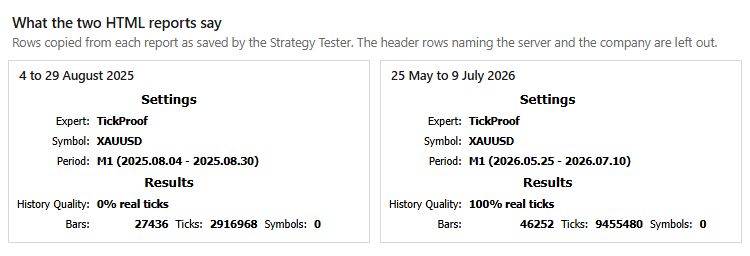
Fig. 1. History Quality in the HTML reports of two real-tick tests on gold at broker A. Left: 4 to 29 August 2025. Right: 25 May to 9 July 2026.
In these tests the end date was the first day not tested, so 2025.08.30 in the settings and in Fig. 1 means that the first test ran to 29 August. That test needs no interpretation. Two lines from its journal:
Core 1  XAUUSD : real ticks begin from 2026.05.04 00:00:00, every tick generation used
Core 1  XAUUSD,M1: 2916968 ticks, 27436 bars generated. Test passed in 0:00:01.281 (including ticks preprocessing 0:00:00.266).
"Test passed" reports that the test ran to its end. Where the ticks came from is in the line above it. To check that line from the other side, I ran the same dates in the "Every tick" mode. Both runs received 2,916,968 ticks over 27,436 bars, and every count the Expert Advisor keeps came out the same in both (Table 4).
The third test shows what the journal adds. Its journal printed a line for every day with discarded or absent minutes and, on each day with discarded minutes, a second line with the running total of tick prices that did not match next to that day's count of discarded minute bars. A summary closes the list. An excerpt:
Core 1  XAUUSD : 2026.05.25 23:59 - real ticks discarded for 1197 minutes out of 1230 total minute bars within a day
Core 1  XAUUSD : 2026.05.25 23:59 - 182597 tick prices mismatch for 1197 minute bars
...
Core 1  XAUUSD : 2026.06.26 23:59 - real ticks discarded for 1371 minutes out of 1377 total minute bars within a day
Core 1  XAUUSD : 2026.06.26 23:59 - 7263531 tick prices mismatch for 1371 minute bars
Core 1  XAUUSD : 2026.05.25 00:00 - 2026.07.10 00:00  real ticks absent for 62 minutes of 46252 total minute bars, every tick generation used
Core 1  XAUUSD : 2026.05.25 00:00 - 2026.07.10 00:00  real ticks discarded for 33584 minutes of 46252 total minute bars, every tick generation used
Core 1  XAUUSD : 2026.05.25 00:00 - 2026.07.10 00:00  tick volumes not matched for 30174 minute bars
Core 1  XAUUSD : 2026.05.25 00:00 - 2026.07.10 00:00  tick prices of 7263531 ticks not matched for 33584 minute bars
So by the journal's count 33,646 of the 46,252 minutes, 72.7%, were run on generated ticks, and the other 12,606 on accepted real ticks. The daily lines add up to the two totals, and after 26 June 2026 the journal printed no more of them. The share of minutes that ran on real ticks is counted in the journal, so that is where I read it.
Files on disk and ticks in the test
Downloaded tick history is stored by month, in TKC files under bases\<server>\ticks\<symbol>\. The folder shows which monthly tick files the terminal has downloaded, but not which minutes the tester will later accept for a particular run.
The demo server of a second broker, broker B, shows the difference. For its gold symbol this terminal holds a file for every month from January to October 2026. A real-tick test over 17 to 28 August 2026 reported, for 17 to 21 August and for the short session dated the 23rd, that all the real ticks were discarded within the day. On 24 August, 730 of 1,378 minutes were discarded, and after that there were no more daily lines. An excerpt, with broker B's symbol name replaced:
Core 1  <symbol> : 2026.08.17 23:59 - all the real ticks discarded within a day
Core 1  <symbol> : 2026.08.17 23:59 - 452555 tick prices mismatch for 1378 minute bars
...
Core 1  <symbol> : 2026.08.24 23:59 - real ticks discarded for 730 minutes out of 1378 total minute bars within a day
Core 1  <symbol> : 2026.08.17 00:00 - 2026.08.29 00:00  real ticks discarded for 7615 minutes of 13655 total minute bars, every tick generation used
The August file was on disk the whole time, and for those days the journal reported that the tick prices did not match the M1 bars; the second line of each day carries the running total of mismatched tick prices against that day's discarded minutes. So a month's file shows that a download happened, and the journal of a test shows how many of the minutes tested were discarded or absent.
How far back the ticks go
Before a real-tick test starts, the tester downloads the symbol's tick history, and the Help page Journal of Testing shows the lines it writes while doing so. They are the most direct measurement of depth I have found, and the method takes a few minutes: real-tick mode, any Expert Advisor, a range of a few days well before the history you expect, and Start. Here is the part of the tester's journal that covers the download for USDJPY on broker A's server, a symbol with no tick files on disk before this run. The test was dated January 2024, and the server name is replaced with <server>:
Tester  USDJPY: preliminary downloading of history ticks started, it may take quite a long time
Tester  USDJPY: "bases\<server>\ticks\USDJPY\202610.tkc" download
Tester  USDJPY: "bases\<server>\ticks\USDJPY\202609.tkc" download (870.48 Kb/sec)
Tester  USDJPY: "bases\<server>\ticks\USDJPY\202608.tkc" download (1421.17 Kb/sec)
Tester  USDJPY: "bases\<server>\ticks\USDJPY\202607.tkc" download (1071.76 Kb/sec)
Tester  USDJPY: 11% ticks downloaded (901.61 Kb/sec)
Tester  USDJPY: "bases\<server>\ticks\USDJPY\202606.tkc" download (532.09 Kb/sec)
Tester  USDJPY: "bases\<server>\ticks\USDJPY\202605.tkc" download (643.23 Kb/sec)
Tester  USDJPY: preliminary downloading of history ticks completed, 40.72 Mb in 0:00:50.453 (826.56 Kb/sec)
Tester  USDJPY: ticks data begins from 2026.05.22 00:00
USDJPY gave 22 May 2026 on its first run and on the two runs after it. Gold on the same server, which already had months on disk from earlier tests, behaved differently. Each run after the first in Table 2 was dated before the date the previous one had reported, and the date moved three times before it settled. Two tests, run between the first and second rows and dated inside the downloaded history, repeated 14 May without moving it:
| Run started (local time) | Test dates in the settings | Downloaded before the test (MB) | ticks data begins from |
|---|---|---|---|
| 22:25 | 2025.08.04 to 2025.08.30 | 84.82 | 2026.05.14 |
| 22:41 | 2026.05.04 to 2026.05.30 | 40.58 | 2026.05.04 |
| 22:43 | 2026.03.02 to 2026.03.07 | 85.83 | 2026.04.09 |
| 22:49 | 2025.01.06 to 2025.01.10 | 38.03 | 2026.03.30 |
| 22:51 | 2025.01.06 to 2025.01.10 | 3.86 | 2026.03.30 |
Table 2. The tester's "ticks data begins from" line for gold at broker A, run after run
GBPUSD, which had four months on disk from an earlier session, reached 30 March 2026 on its first run, downloading 32.14 MB, and repeated it on the second. The rule I take from all of it is to date the test before the date last reported and to repeat it until two such runs in a row report the same date. The same journal also gives the start of the M1 history, 15 June 2010 for gold on this server. These are the dates that stopped moving, each reported by at least two tests dated before it, next to the last day within each range tested on which the tester still discarded minutes:
| Symbol, server | Tick data begins from | Last day with discarded minutes in the range tested | Range tested | Minutes generated in that range |
|---|---|---|---|---|
| Gold, broker A | 30 March 2026 | 26 June 2026 | 30 March to 9 July 2026 | 86.7% |
| Gold, broker A | 30 March 2026 | none in this range | 29 June to 9 October 2026 | 0.0% |
| EURUSD, broker A | 30 March 2026 | 25 June 2026 | 30 March to 14 August 2026 | 9.7% |
| USDJPY, broker A | 22 May 2026 | 25 June 2026 | 22 May to 14 August 2026 | 17.3% |
| Gold, broker B | 1 January 2026 | 24 August 2026 | 17 to 28 August 2026 | 55.8% |
Table 3. How far back the tick history goes, and the last day with discarded minutes in each range tested. The dates are empirical for the tested ranges and do not prove what happened on untested earlier intervals.
The two date columns answer different questions. The first is how far back this terminal got tick history from the server. The second is the last day, within the range tested, on which the tester still discarded minutes. On broker A, gold and EURUSD both have tick data from 30 March 2026, and the tester discarded minutes of both on almost every weekday until late June: gold until 26 June 2026, EURUSD until 25 June 2026 (Fig. 2). A further test on gold from 29 June to 9 October 2026 printed no daily line and no summary line. The Help page Journal of Testing says these statistics are printed only when the downloaded ticks do not match the minute bars, so the journal reported none of its 103,024 minutes as discarded or absent, and the Expert Advisor described below counted a spread change inside 99.59% of them. On broker B the files go back to January; of the August days I tested, every minute of 17 to 21 and 23 August was discarded, and 730 minutes of the 24th. I did not run January to mid-August on that server, so I cannot say what happened there.
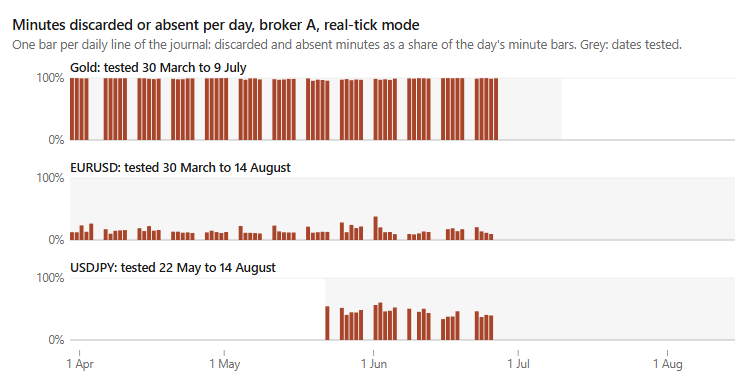
Fig. 2. Minutes the tester discarded or found absent per day in real-tick tests on broker A between 30 March and 14 August 2026, over the dates shown in grey, as printed in the journal. A day with no bar had no daily line.
Neither column is a property of a broker in general. Each describes one demo server and one terminal in October 2026, and a live server, another symbol or another month can give other dates, so they have to be measured on the server and symbol in question.
Checking the ticks from inside an Expert Advisor
The journal is the tester's own statement. I also wanted a view that does not depend on reading it, so the Expert Advisor (EA) attached to this article counts what OnTick receives. It places no trades and prints its totals once, in OnDeinit.
Three of its counts separated the two kinds of ticks on every pair of runs in the next section that had real ticks on one side. The first follows from the Help: when ticks are generated within a minute, the spread of that minute's bar is used for all of them, so the spread cannot change inside a generated minute. The EA records the lowest and the highest spread of every minute. The other two are about timing. In the minute shown in Fig. 3 the generated ticks were spaced evenly, so the EA keeps the gap between consecutive ticks in milliseconds and counts the ticks that fall exactly on a whole second.
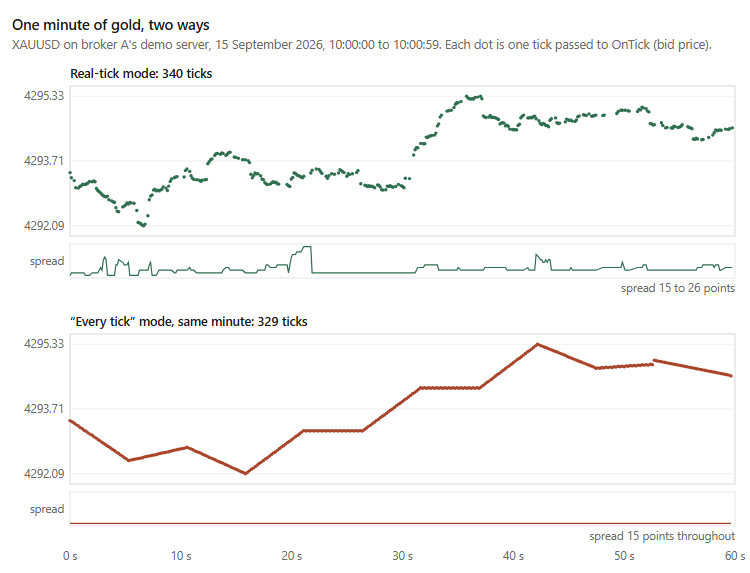
Fig. 3. One minute of gold at broker A, 15 September 2026 10:00. Top: the 340 ticks of the real-tick mode. Bottom: the 329 ticks the "Every tick" mode generated for the same minute.
The counters, the single input and OnInit:
//+------------------------------------------------------------------+
//| Input parameters                                                 |
//+------------------------------------------------------------------+
input datetime InpDumpMinute = 0;             // Print every tick of this minute (0 = off)
//+------------------------------------------------------------------+
//| Global variables                                                 |
//+------------------------------------------------------------------+
long     g_ticks      = 0;                    // Ticks passed to OnTick
long     g_whole      = 0;                    // Ticks whose time_msc is a whole second
long     g_firstMsc   = 0;                    // First tick, milliseconds
long     g_lastMsc    = 0;                    // Last tick, milliseconds
long     g_prevMsc    = 0;                    // Previous tick, milliseconds
long     g_gap[7];                            // Gap histogram, rows as in GapRow()
//+------------------------------------------------------------------+
//| The bar being counted                                            |
//+------------------------------------------------------------------+
datetime g_barOpen    = 0;                    // Open time of the current M1 bar
int      g_barTicks   = 0;                    // Ticks in it so far
int      g_barLo      = 0;                    // Lowest spread in it, points
int      g_barHi      = 0;                    // Highest spread in it, points
//+------------------------------------------------------------------+
//| Finished bars                                                    |
//+------------------------------------------------------------------+
int      g_perBar[];                          // Tick count of every finished bar
int      g_nBars      = 0;                    // Bars stored in g_perBar
long     g_spreadBars = 0;                    // Bars whose spread changed inside the minute
datetime g_firstBar   = 0;                    // First bar that received a tick
//+------------------------------------------------------------------+
//| Expert initialization function                                   |
//+------------------------------------------------------------------+
int OnInit()
  {
   ArrayInitialize(g_gap, 0);
   ArrayResize(g_perBar, 0, 65536);           // Grows by 65536 bars at a time
   return(INIT_SUCCEEDED);
  }
The tick handler:
//+------------------------------------------------------------------+
//| Expert tick function                                             |
//+------------------------------------------------------------------+
void OnTick()
  {
   MqlTick t;
   if(!SymbolInfoTick(_Symbol, t))
      return;

   g_ticks++;
   if(g_firstMsc == 0)
      g_firstMsc = t.time_msc;
   g_lastMsc = t.time_msc;
   if(t.time_msc % 1000 == 0)
      g_whole++;

//--- gap to the previous tick, from time_msc so bursts inside a second stay visible
   if(g_prevMsc > 0)
      g_gap[GapRow(t.time_msc - g_prevMsc)]++;
   g_prevMsc = t.time_msc;

//--- the M1 bar this tick belongs to
   datetime open   = t.time - t.time % 60;
   int      spread = (int)MathRound((t.ask - t.bid) / _Point);
   if(open != g_barOpen)
     {
      CloseBar();
      g_barOpen  = open;
      g_barTicks = 0;
      g_barLo    = spread;
      g_barHi    = spread;
      if(g_firstBar == 0)
         g_firstBar = open;
     }
   g_barTicks++;
   if(spread < g_barLo) g_barLo = spread;
   if(spread > g_barHi) g_barHi = spread;

//--- one minute printed tick by tick, for looking at it directly
   if(InpDumpMinute > 0 && open == InpDumpMinute - InpDumpMinute % 60)
      PrintFormat("  tick %s  bid %s  ask %s  spread %d", MscToString(t.time_msc),
                  DoubleToString(t.bid, _Digits), DoubleToString(t.ask, _Digits), spread);
  }
The gap is taken from time_msc. The time field has a resolution of one second, so it cannot show how ticks are spread inside a second. The bar a tick belongs to is taken from the tick's own time, so the count reflects the ticks that arrived rather than the bars that exist. The helpers it calls:
//+------------------------------------------------------------------+
//| Row of the gap histogram for a gap in milliseconds               |
//+------------------------------------------------------------------+
int GapRow(const long ms)
  {
   if(ms < 0)       return(0);                // Earlier than the previous tick
   if(ms == 0)      return(1);                // Same millisecond
   if(ms < 1000)    return(2);                // 1 to 999 ms
   if(ms == 1000)   return(3);                // Exactly one second
   if(ms <= 10000)  return(4);                // Over 1 s, up to 10 s
   if(ms <= 60000)  return(5);                // Over 10 s, up to 60 s
   return(6);                                 // Over a minute
  }
//+------------------------------------------------------------------+
//| Store the bar that has just ended                                |
//+------------------------------------------------------------------+
void CloseBar()
  {
   if(g_barTicks == 0)
      return;
   ArrayResize(g_perBar, g_nBars + 1, 65536);
   g_perBar[g_nBars++] = g_barTicks;
   if(g_barHi > g_barLo)
      g_spreadBars++;
  }
//+------------------------------------------------------------------+
//| Time with milliseconds                                           |
//+------------------------------------------------------------------+
string MscToString(const long msc)
  {
   return(TimeToString((datetime)(msc / 1000), TIME_DATE | TIME_SECONDS) +
          StringFormat(".%03d", (int)(msc % 1000)));
  }
OnDeinit prints the totals. It also asks the M1 history how many bars lie between the first and the last bar that received a tick, and what their tick volume adds up to, so the output carries two bar counts that can be set against each other and against the tester's own last line:
//+------------------------------------------------------------------+
//| Share of a total, in percent                                     |
//+------------------------------------------------------------------+
double Pct(const long part, const long total)
  {
   return(total > 0 ? 100.0 * (double)part / (double)total : 0.0);
  }
//+------------------------------------------------------------------+
//| Expert deinitialization function                                 |
//+------------------------------------------------------------------+
void OnDeinit(const int reason)
  {
   CloseBar();                                // The last bar is still open
   if(g_nBars == 0)
     {
      Print("TickProof: no ticks were passed to OnTick");
      return;
     }

//--- what the M1 history itself holds between the first and the last bar
   datetime lastBar = (datetime)(g_lastMsc / 1000);
   lastBar -= lastBar % 60;
   MqlRates r[];
   int  inHistory = CopyRates(_Symbol, PERIOD_M1, g_firstBar, lastBar, r);
   long volume    = 0;
   for(int i = 0; i < inHistory; i++)
      volume += r[i].tick_volume;

//--- ticks per bar, from the smallest to the largest
   ArraySort(g_perBar);
   int  p10  = g_perBar[(int)(0.1 * (g_nBars - 1))];
   int  p50  = g_perBar[(int)(0.5 * (g_nBars - 1))];
   int  p90  = g_perBar[(int)(0.9 * (g_nBars - 1))];
   long gaps = g_ticks - 1;
   bool flt  = (bool)SymbolInfoInteger(_Symbol, SYMBOL_SPREAD_FLOAT);

   Print("=================== TickProof 1.10 ===================");
   PrintFormat("  symbol                     %s, %s spread", _Symbol, flt ? "floating" : "fixed");
   PrintFormat("  first tick                 %s", MscToString(g_firstMsc));
   PrintFormat("  last tick                  %s", MscToString(g_lastMsc));
   PrintFormat("  ticks passed to OnTick     %I64d", g_ticks);
   PrintFormat("  M1 bars that got ticks     %d", g_nBars);
   PrintFormat("  M1 bars in history         %d", inHistory);
   PrintFormat("  tick volume of those bars  %I64d (%.2f per bar)", volume,
               inHistory > 0 ? (double)volume / inHistory : 0.0);
   PrintFormat("  ticks per bar              mean %.2f  p10 %d  median %d  p90 %d  max %d",
               (double)g_ticks / g_nBars, p10, p50, p90, g_perBar[g_nBars - 1]);
   PrintFormat("  ticks on a whole second    %I64d (%.2f%%)", g_whole, Pct(g_whole, g_ticks));
   PrintFormat("  bars with a spread change  %I64d (%.2f%%)", g_spreadBars, Pct(g_spreadBars, (long)g_nBars));
   Print("  --- gap to the previous tick, from time_msc ---");
   PrintFormat("  earlier than the previous  %I64d (%.2f%%)", g_gap[0], Pct(g_gap[0], gaps));
   PrintFormat("  same millisecond           %I64d (%.2f%%)", g_gap[1], Pct(g_gap[1], gaps));
   PrintFormat("  1 to 999 ms                %I64d (%.2f%%)", g_gap[2], Pct(g_gap[2], gaps));
   PrintFormat("  exactly 1000 ms            %I64d (%.2f%%)", g_gap[3], Pct(g_gap[3], gaps));
   PrintFormat("  over 1 s, up to 10 s       %I64d (%.2f%%)", g_gap[4], Pct(g_gap[4], gaps));
   PrintFormat("  over 10 s, up to 60 s      %I64d (%.2f%%)", g_gap[5], Pct(g_gap[5], gaps));
   PrintFormat("  over 60 s                  %I64d (%.2f%%)", g_gap[6], Pct(g_gap[6], gaps));
   Print("======================================================");
  }
//+------------------------------------------------------------------+
Same dates in both modes
Two different months differ in more than their ticks: sessions, volatility, news and holidays all change between them. So every comparison here uses the same dates twice, once in real-tick mode and once in the "Every tick" mode, in which every tick is generated from the bars.
| Run | History Quality | Ticks | Tick volume of the bars | Bars with a spread change | Ticks on a whole second | Gaps of exactly 1000 ms |
|---|---|---|---|---|---|---|
| Gold, broker A, 4 to 29 August 2025, real-tick mode | 0% real ticks | 2,916,968 | 2,917,892 | 0.00% | 12.12% | 6.18% |
| Gold, broker A, 4 to 29 August 2025, "Every tick" mode | 100% | 2,916,968 | 2,917,892 | 0.00% | 12.12% | 6.18% |
| Gold, broker A, 1 to 29 September 2026, real-tick mode | 100% real ticks | 6,233,148 | 5,997,382 | 99.53% | 0.09% | 0.01% |
| Gold, broker A, 1 to 29 September 2026, "Every tick" mode | 100% | 5,996,896 | 5,997,382 | 0.00% | 2.35% | 0.45% |
| EURUSD, broker A, 1 to 29 September 2026, real-tick mode | 100% real ticks | 1,096,813 | 1,089,914 | 15.64% | 0.05% | 0.06% |
| EURUSD, broker A, 1 to 29 September 2026, "Every tick" mode | 100% | 1,083,910 | 1,089,914 | 0.00% | 65.19% | 27.54% |
| Gold, broker B, 1 to 29 September 2026, real-tick mode | 100% real ticks | 6,325,525 | 6,325,472 | 19.37% | 0.09% | 0.15% |
| Gold, broker B, 1 to 29 September 2026, "Every tick" mode | 100% | 6,325,449 | 6,325,473 | 0.00% | 2.46% | 0.62% |
Table 4. The same dates in real-tick mode and in "Every tick" mode
In every "Every tick" run no bar changed its spread inside the minute, as the Help says it cannot. In the three real-tick runs whose journals reported no absent or discarded minutes, the share of bars with a spread change was 99.53% on gold at broker A, 19.37% on gold at broker B and 15.64% on EURUSD at broker A, so it varied widely between symbols and servers, and the check works in one direction only. If the spread changed inside a minute, that minute was not generated. A run in which it never changed was either generated or ran on a symbol whose spread rarely moves, and the journal decides which. Ticks on a whole second and gaps of exactly one second were rare in those three runs (0.05% to 0.09% of ticks and 0.01% to 0.15% of gaps) and more frequent in every generated one (2.35% to 65.19% and 0.45% to 27.54%). That held on all three pairs, but it is an observation rather than something I can derive, so I treat it as supporting evidence only.
The number of ticks per bar separated nothing here, and this is where I went wrong before I held the dates equal. Comparing two different months on gold, I took the much smaller tick count of the older month for a mark of generated ticks. With the dates the same, the generated run on gold at broker A received 5,996,896 ticks against a tick volume of 5,997,382, and the real one 6,233,148. On every generated run here the tick count stayed within 0.6% of the bars' tick volume, so in these runs a low count meant only that the bars had a low tick volume. A real-tick run can carry more ticks than its bars' tick volume, as on gold at broker A; the comparison does not depend on that, because each generated run is set against the tick volume of its own bars.
The bar counts agree as well. In every run in Table 4 the EA's count of bars that received ticks equals the number of bars in the history over the same span and the tester's own "bars generated" figure, 28,807 for gold at broker A in September, for example.
What this means for a test range
The journal gives counts of minutes, and from them the real-tick share, and I judge a test range by that share. If a five-year real-tick test finds usable real ticks only for its last six months, about nine tenths of its minutes ran on generated ticks. Whether that matters depends on how much the strategy reacts to what happens inside a minute. A generated minute keeps one spread, and the one in Fig. 3 moved in straight segments on evenly spaced ticks, so a strategy whose entries or exits depend on the spread changing, or on the order of ticks in a fast move, is tested on something different in those minutes.
The same applies to splitting the data. If the in-sample window runs on real ticks and the out-of-sample window falls before the usable history, the out-of-sample test still exists, but it runs on a different kind of data. A difference between the two results then mixes two causes, new market data and a change from real to generated ticks, and the test cannot tell them apart. In a walk-forward test the same holds for every window that crosses the boundary.
What I do now before choosing a range: the depth check described above on the server and symbol in question, then one real-tick test over the intended range with an Expert Advisor that places no trades, and the summary lines of its journal. If the real-tick share is low and the strategy depends on what happens inside a minute, I shorten the range or move to a server with more usable history. If neither is possible, I treat the generated part as a rough check rather than as evidence.
What these measurements do not show
All of this comes from two demo servers, five symbols (gold on both servers), one build of the terminal (6230) and one night. A live server, another build or another month may report other dates and other shares, and I expect the dates at least to move with time. I have not checked whether other builds word the journal lines the same way.
The checks inside the Expert Advisor separated real from generated ticks on the pairs of runs above, and that is all I claim for them. The spread check rests on the documented fixed spread of generated minutes and works in one direction only. The timing counts are an observation on gold at two servers and EURUSD at one. I did not measure symbols with a fixed spread, exchange instruments built from Last prices, or custom symbols.
The Help defines History Quality through the one-minute data, so a 100% reading is consistent with that definition. It is not a measure of the share of minutes executed on broker real ticks, and this article does not use it as one; the per-minute source of the ticks is what the journal counts.
One thing I could not settle
I cannot explain why gold's history on broker A arrived in steps while the others arrived in a single run. Gold needed four runs dated before the reported date to reach 30 March. USDJPY, with nothing on disk before its first run, and GBPUSD, with four months on disk, each reached its date on the first run. I have not found what decides the size of each step, and I would rather leave that open than guess. If you see the same pattern on another server, I would like to hear about it in the comments.
A related line is easy to misread, and I misread it for a while: the agent's "real ticks begin from" is not the start of the broker's tick history. For the same August 2025 test on gold it gave 8 June 2026 at 22:28 and 4 May 2026 at 22:57. Across the evening the date moved back only after a test started inside the downloaded history, and then it moved to that test's first day: 25 May after a test from 25 May; 4 May after a test from 4 May; 13 April after a test from 13 April. Tests that started earlier than the downloaded history left it where it was. To check that reading I predicted the next value before running a test from 13 April 2026. The line then gave 13 April 2026, the agent's synchronization line in the same journal read "XAUUSD: history ticks synchronized from 2026.04.13 to 2026.10.09", and a September test afterwards gave the same date. So in these runs the line followed the ticks the testing agent had synchronized during this and earlier tests.
Conclusion
In the cases the Help documents and the journal reports, a test in the real-tick mode behaves as a minute-level mix: minutes with accepted real ticks use broker ticks, while absent or discarded minutes are run with generated ticks. The journal printed how many minutes were absent or discarded, for each day and for the whole run, with summary lines saying that every tick generation was used for them; that per-run, minute-level breakdown is not in the report. If you need the share of tested minutes actually executed on accepted broker ticks rather than generated ticks, the journal summary lines are the relevant source; History Quality measures something else, since the Help defines it through the one-minute data used for testing. On two of the runs here those lines counted 72.7% and 55.8% of the minutes as generated.
How far back the tick history goes can be read from the same journal: a short real-tick test dated before the history, repeated until the reported date stops moving, then one test over the range you plan to use, to see which of its minutes are discarded or absent. The Expert Advisor attached here adds a view from inside the test. One of its checks follows from the Help: the spread never changes inside a generated minute. The other two are observations that held on every pair of runs above.
Programs used in the article
| Name | Type | Description |
|---|---|---|
| TickProof.mq5 | Expert Advisor | Counts the ticks the Strategy Tester passes to OnTick and the M1 bars they fall in, the gap between consecutive ticks in milliseconds, the ticks on a whole second and the bars whose spread changed inside the minute, and prints them in OnDeinit. Places no trades. The input InpDumpMinute prints every tick of one chosen minute. |
Warning: All rights to these materials are reserved by MetaQuotes Ltd. Copying or reprinting of these materials in whole or in part is prohibited.
This article was written by a user of the site and reflects their personal views. MetaQuotes Ltd is not responsible for the accuracy of the information presented, nor for any consequences resulting from the use of the solutions, strategies or recommendations described.

 Chart Synchronization in MQL5 (Part 1): From a Simple Script to an Interactive Indicator
 Building a PDF Creation Library in MQL5 (Part 2): Why PDFs Break
 How to Set Up an AI Hedge Fund in MetaTrader 5
 Controlling MetaTrader 5 from Telegram with Hermes and MCP

- Free trading apps
- Over 8,000 signals for copying
- Economic news for exploring financial markets
You agree to website policy and terms of use