

Chart Synchronization in MQL5 (Part 1): From a Simple Script to an Interactive Indicator
 312
312
 0
0

Introduction: The Multi-Timeframe Analysis Problem
Multi-timeframe (MTF) analysis is a common approach in technical trading. Traders often use higher timeframes to understand the broader market structure and lower timeframes to examine price action in greater detail.
A common workflow is to use a single chart and switch between timeframes whenever a different perspective is needed. Although this approach requires no additional tools, it can become repetitive during detailed analysis. The trader must repeatedly change the timeframe, navigate through the chart, and locate the corresponding historical period.
The problem becomes more noticeable when analyzing historical price action. Displaying a wider historical period on a lower-timeframe chart may require considerable zooming out. As a result, individual candles become smaller, making important price-action details more difficult to examine.
Using several charts side by side provides a more convenient alternative. For example, a trader can keep M1, M5, M15, and H1 charts visible simultaneously. This arrangement is particularly useful on wide or ultrawide monitors, where multiple charts can remain accessible without constantly switching between timeframes.
However, displaying several charts does not automatically keep them aligned. When a trader navigates to a historical moment on one chart, the corresponding market time may not be visible on the others. Manually navigating each chart to approximately the same period can interrupt the analytical workflow, especially when comparing price action across multiple timeframes.
The objective of this first part is therefore to explore a practical way to synchronize the horizontal time position of open charts belonging to the same symbol in MetaTrader 5. Price-level synchronization and interactive control through chart objects are outside the scope of the current implementation.
To keep the development process clear, we will begin with a simple, one-time synchronization script. We will then examine how its basic logic can be adapted into an indicator that responds to a keyboard shortcut and uses a vertical line as a visual time marker. The resulting implementation is a working prototype, not a complete synchronization framework. Its limitations will help establish the requirements for further development.
Let us begin with the first working prototype.
The First Working Solution
Before building an interactive indicator, it is useful to approach the synchronization problem with the simplest possible implementation.
At this stage, we do not need buttons, graphical controls, keyboard shortcuts, or event-driven communication. Our initial objective is to establish a basic mechanism for navigating multiple charts according to a common time reference.
When the script is executed, it identifies a reference time on the current chart and processes all open charts belonging to the same symbol, including the chart from which the script was launched. For each chart, it determines the corresponding bar position and uses that information to navigate the chart.
This gives us a practical starting point. We can examine the essential operations involved in chart synchronization before introducing a persistent visual reference and interactive behavior.
What the First Prototype Needs to Do
The script needs to perform the following operations:
- Determine a reference time using the visible position of the current chart.
- Find all currently open charts.
- Select charts belonging to the same symbol.
- Map the reference time to a bar index on each target chart's timeframe.
- Calculate a navigation displacement using the target chart's visible bar count.
- Navigate each chart and redraw it.
The important point is that bar indexes are specific to individual timeframes. The same index does not represent the same market period on M1, M5, M15, or H1.
For example, a historical period may correspond to bar 500 on an M1 chart and approximately bar 100 on an M5 chart. These indexes cannot be used interchangeably.
For the first prototype, we therefore use a time value as the common reference. Each target chart then maps that time to its own bar structure.
This approach provides a practical basis for time-based navigation, although the corresponding bars do not necessarily represent an identical instant on every timeframe.
The Complete Script
The following script implements the first version of the synchronization mechanism.
//+------------------------------------------------------------------+
//| RM Sync Master - Simple Synchronization Script                   |
//| Copyright 2026, RM Trading Lab                                   |
//| https://www.mql5.com/en/users/rmtradinglab                       |
//+------------------------------------------------------------------+
#property copyright "© 2026 RM Trading Lab"
#property link      "https://www.mql5.com/en/users/rmtradinglab"
#property version   "1.00"

//+------------------------------------------------------------------+
//| Simple one-time synchronization                                  |
//+------------------------------------------------------------------+
void OnStart()
  {
//--- Get the first visible bar on the reference chart
   long first_visible = ChartGetInteger(0, CHART_FIRST_VISIBLE_BAR);
   datetime syncTime = iTime(_Symbol, PERIOD_CURRENT, (int)first_visible-1);

//--- Start iterating through all open charts
   long chart_id = ChartFirst();
   while(chart_id >= 0)
     {
      //--- Synchronize charts of the same symbol
      if(ChartSymbol(chart_id) == _Symbol)
        {
         string symbol = ChartSymbol(chart_id);

         //--- Disable automatic scrolling before manual navigation
         ChartSetInteger(chart_id, CHART_AUTOSCROLL, false);
         ChartNavigate(chart_id, CHART_END, 0);
         ChartRedraw(chart_id);

         //--- Get the target chart timeframe
         ENUM_TIMEFRAMES timeframe = (ENUM_TIMEFRAMES)ChartPeriod(chart_id);

         //--- Convert the reference time to a bar index on the target chart
         long shift = iBarShift(symbol, timeframe, syncTime, false);

         //--- Calculate the navigation position using the visible bar count
         long visible_bars = ChartGetInteger(chart_id, CHART_VISIBLE_BARS);
         long desired_bar = -(shift - visible_bars + 1);

         //--- Navigate the target chart to the corresponding market time
         ChartNavigate(chart_id, CHART_END, (int)desired_bar-1);
         ChartRedraw(chart_id);
        }

      //--- Move to the next open chart
      chart_id = ChartNext(chart_id);
     }
  }
//+------------------------------------------------------------------+
Although the script is short, it contains the principal operations needed for basic multi-chart navigation: identifying a reference time, iterating through charts, mapping time to a bar index, and calculating a navigation displacement.
The following sections examine these operations individually.
Determining the Reference Time
The first task is to determine the time that will serve as the synchronization reference.
The script begins by retrieving the index of the first visible bar on the current chart:
long first_visible = ChartGetInteger(0, CHART_FIRST_VISIBLE_BAR);
The CHART_FIRST_VISIBLE_BAR property provides the bar index associated with the first visible bar. In MQL5, bar indexes increase as we move further into the past, so an index one unit lower refers to the adjacent bar on the newer side.
The script uses that adjacent bar to obtain the reference time:
datetime syncTime = iTime(_Symbol, PERIOD_CURRENT, (int)first_visible-1);
The resulting timestamp is stored in syncTime.
This distinction is important: the script does not use the index returned by CHART_FIRST_VISIBLE_BAR directly. It uses that index minus one to obtain the time reference.
A timestamp provides a common temporal coordinate that can be mapped to different chart timeframes. However, it does not guarantee that the same exact instant will correspond to an identical visible point on every timeframe. A higher-timeframe candle represents an interval, and mapping a timestamp to that timeframe identifies a corresponding bar rather than creating a new candle at the exact timestamp.
Finding the Open Charts
Once the reference time has been determined, the script must find the charts to process.
MetaTrader 5 provides functions for iterating through the collection of currently open charts. The first chart is obtained using:
long chart_id = ChartFirst();
The script then processes charts one by one:
while(chart_id >= 0)
  {
     ...
     chart_id = ChartNext(chart_id);
  }
ChartNext() returns the identifier of the next open chart. When no further chart is available, the returned identifier is negative and the loop ends.
The general sequence is therefore:
ChartFirst() → Process chart → ChartNext() → Process next chart
This approach does not require us to know the number of open charts in advance.
It is also important to note that the loop includes the reference chart itself. The script processes every open chart that satisfies the symbol condition, rather than excluding the chart from which it was launched.
Selecting the Target Charts
Not every open chart necessarily displays the same market. For this prototype, synchronization is restricted to charts belonging to the same symbol as the reference chart.
The condition is:
if(ChartSymbol(chart_id) == _Symbol)
Here, _Symbol identifies the symbol of the chart from which the script is executed. ChartSymbol(chart_id) returns the symbol associated with the chart currently being processed.
If the symbols match, the script continues with that chart.
It then obtains the chart's symbol and timeframe:
string symbol = ChartSymbol(chart_id);
ENUM_TIMEFRAMES timeframe = (ENUM_TIMEFRAMES)ChartPeriod(chart_id);
The timeframe is essential because the reference time must be mapped to the bar structure of each chart individually.
Cross-symbol synchronization is deliberately excluded from this implementation. The objective is to explore time-based navigation among open charts of one symbol without introducing additional requirements associated with different instruments.
Mapping the Reference Time to Another Timeframe
The next step is to convert the reference timestamp into a bar index for the target chart.
The script performs this mapping with iBarShift():
long shift = iBarShift(symbol, timeframe, syncTime, false);
The function searches for the bar associated with syncTime on the specified symbol and timeframe. The final argument, false, allows the function to return the bar covering the specified time when there is no bar whose opening time exactly matches the timestamp.
For example, suppose the reference time is 10:35.
On an M1 chart, the corresponding bar will normally be the M1 candle covering that minute. On an M5 chart, the timestamp falls within a five-minute interval. On an H1 chart, it falls within an hourly interval.
Consequently, mapping the same timestamp to different timeframes does not produce identical bar indexes or guarantee an identical temporal position within each candle.
The basic mapping process is:
Reference time → iBarShift() → Target timeframe's bar index
This separation between the common time reference and the timeframe-specific bar index is fundamental to the synchronization mechanism.
The current prototype assumes that the required bar data is available and does not yet implement comprehensive handling for missing history or unsuccessful lookups. These cases are important considerations for a more robust implementation.
Preparing the Target Chart for Navigation
Finding the corresponding bar is not sufficient. The script must also navigate the chart so that the relevant historical period becomes visible.
Before navigating, it disables automatic scrolling:
ChartSetInteger(chart_id, CHART_AUTOSCROLL, false);
This prevents the chart's automatic scrolling behavior from interfering with manual navigation toward a historical position.
Disabling automatic scrolling also changes the chart's viewing behavior: the chart will no longer automatically follow the latest market data in the usual way. This is a side effect of the current implementation, not an essential requirement of time synchronization itself.
The script then moves the chart to its end:
ChartNavigate(chart_id, CHART_END, 0);
This establishes the chart's end position as the reference for the subsequent navigation operation.
The chart is then redrawn:
ChartRedraw(chart_id); ChartRedraw() requests a chart redraw so that changes can be reflected visually. It does not, by itself, guarantee that every chart property or history request has completed successfully.
Together, these operations prepare the chart for the navigation calculation that follows.
Calculating the Navigation Position
The script obtains the number of bars currently visible on the target chart:
long visible_bars = ChartGetInteger(chart_id, CHART_VISIBLE_BARS);
It already has the bar index returned by iBarShift(). The visible bar count is then used to calculate the navigation displacement:
long desired_bar = -(shift - visible_bars + 1);
The calculation takes into account both the historical position of the target bar and the number of bars that can be displayed within the chart's current visible area.
The script passes the calculated displacement to ChartNavigate(), with an additional one-bar adjustment:
ChartNavigate(chart_id, CHART_END, (int)desired_bar-1);
ChartRedraw(chart_id);
The final - 1 is part of the current navigation logic. It should not be confused with the earlier first_visible - 1 adjustment, which is used to obtain the reference timestamp.
The two adjustments serve different purposes:
- first_visible - 1 determines the bar index used to obtain the reference time.
- desired_bar - 1 adjusts the displacement passed to ChartNavigate().
In practical testing, this calculation has been used to bring the corresponding historical period into view across charts of the same symbol. Its behavior can nevertheless depend on the chart's current state, available history, timeframe, and visible bar count. The prototype should therefore be understood as a practical navigation method rather than a universal guarantee of exact alignment under every possible condition.
The Complete Flow
Currently, the entire prototype can be summarized as follows:
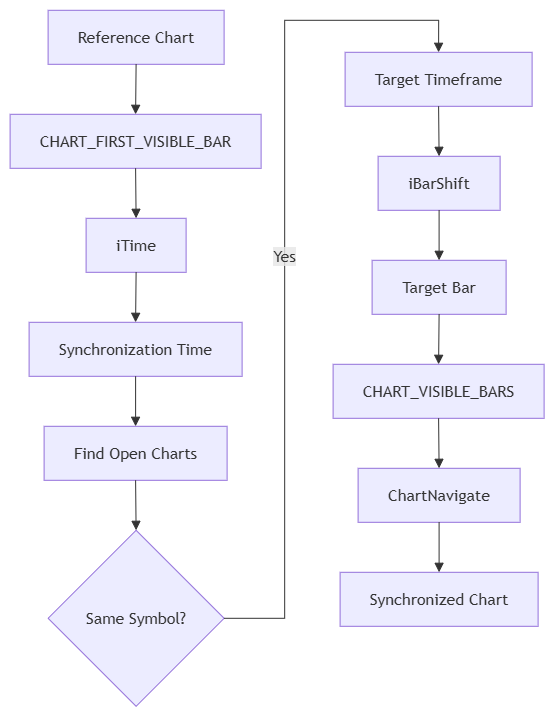
The important result is that a timestamp can serve as a shared reference for navigating charts with different timeframes. The prototype demonstrates this basic principle without requiring graphical objects or event handling.
It does not, however, resolve every issue associated with multi-timeframe synchronization. In particular, a timestamp may map to different candle intervals across timeframes, and the implementation does not yet provide comprehensive error handling or special treatment for unavailable historical data.
Choosing the Synchronization Architecture
Once the basic navigation mechanism is established, an architectural question arises: how should the source chart communicate the reference time and coordinate the other charts?
There are two possible approaches worth distinguishing.
Direct Chart-to-Chart SynchronizationIn the direct approach, the source chart is responsible for finding the target charts and modifying them directly.
The basic flow is:
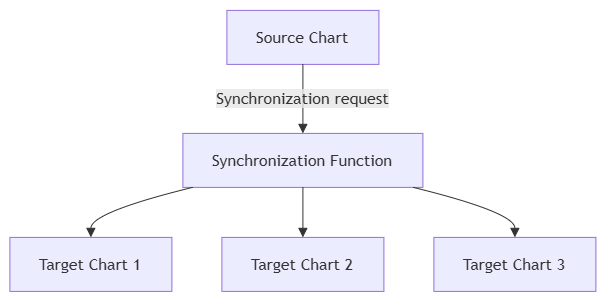
This approach offers several advantages for a small prototype:
- The implementation is straightforward.
- No additional communication layer is required.
- The execution flow is easy to follow.
- The navigation logic can be examined independently of event handling.
The initiating script is responsible for the complete operation. It obtains the reference time, identifies the relevant charts, and applies the navigation commands.
This makes direct synchronization a suitable starting point for demonstrating the basic mechanism.
Event-Based CommunicationMetaTrader 5 also provides another possibility: charts can communicate through custom chart events.
In that architecture, the source chart creates a synchronization message and sends it using EventChartCustom().
The target charts receive that message through their own OnChartEvent() handlers.
The conceptual flow becomes:
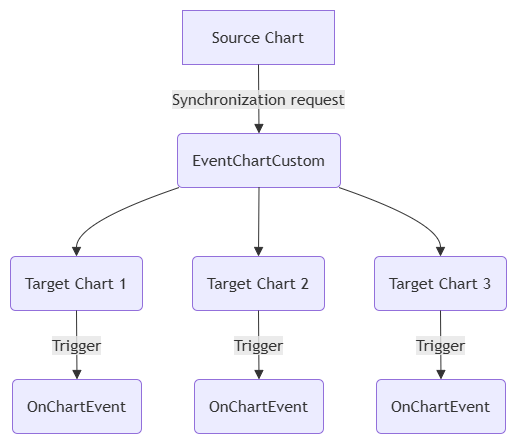
This approach introduces an additional communication layer, but it can provide better separation between the source and target charts.
Depending on the design, that separation can be useful when building a more modular system with additional interactions or more complex coordination requirements.
However, custom events do not automatically make synchronization more accurate. The time-mapping and navigation logic still need to be implemented correctly, and the target components must be configured to receive and process the messages.
The Choice for the First PrototypeBoth approaches are valid, but they address different architectural needs.
For the first prototype, direct chart-to-chart synchronization keeps the implementation small and allows us to focus on time-based navigation. Introducing custom-event communication at this stage would add concepts that are not required to demonstrate the basic mechanism.
We will therefore retain the direct approach for this initial script. Alternative communication architectures can be considered later if the system's requirements justify them.
What the Prototype Has Achieved
The first script demonstrates a practical sequence for navigating open charts of the same symbol according to a shared time reference. It identifies a reference timestamp, maps that time to each chart's timeframe, and uses the resulting bar positions to calculate chart navigation.
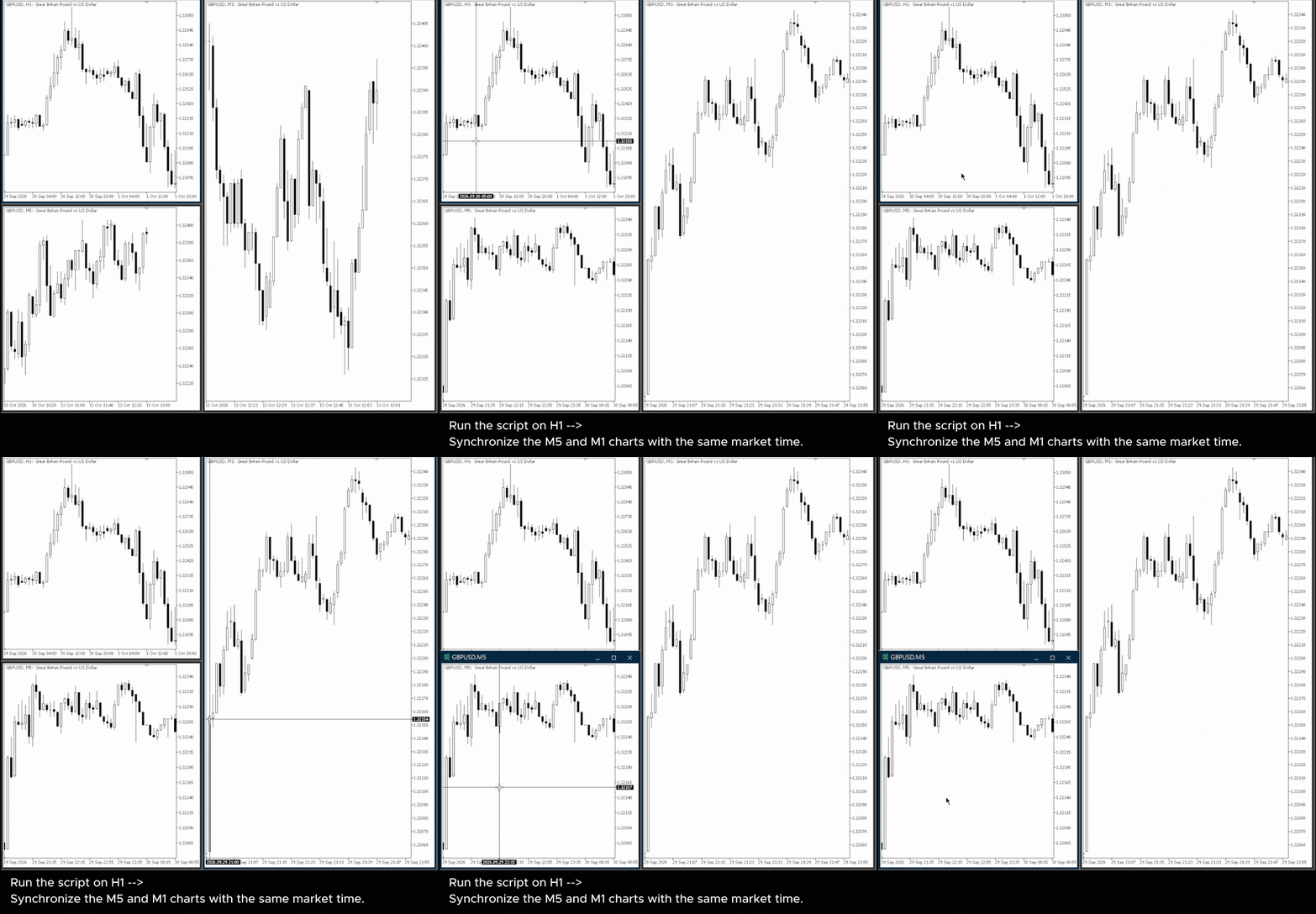
The following GIF demonstrates the script in action: running it on the H1 chart synchronizes the M5 and M1 charts to the corresponding market time.
This is a useful starting point, but the implementation remains limited in scope. It does not guarantee exact moment alignment across different timeframes, comprehensively handle missing history or failed operations, or provide a persistent visual indication of the reference time.
There is also a practical limitation in the one-time execution model: the reference timestamp exists as a variable during the script's execution, and no synchronization marker is left on the chart by the script itself.
If the trader wants to synchronize the charts again from another historical position, the script must be executed again.
This leads to the next design requirement: a persistent visual reference that remains available on the chart and can be used to initiate another synchronization operation.
A vertical line is a natural candidate because it represents a specific time on the chart.
In the next stage, we will adapt the basic navigation mechanism into an indicator that creates or updates a vertical time marker and responds to a keyboard shortcut. This will introduce a persistent visual reference while keeping the current scope limited to time-based navigation of charts belonging to the same symbol.
From a One-Time Script to an Interactive Indicator
The script from the previous section demonstrates a practical way to navigate open charts of the same symbol using a common time reference. However, the synchronization action is initiated only when the script is executed.
Once the script finishes, it leaves no persistent visual reference on the chart. To synchronize the charts again from another historical position, the trader must execute the script again.
The next step is to make the synchronization mechanism available while the chart is being used and provide a simple way to trigger it directly from the chart.
For this purpose, we will adapt the prototype into an indicator.
There is no need to discuss the general differences between scripts and indicators here. The relevant design change is that the indicator remains attached to its chart and can respond to chart events while the trader is working.
The first interaction will be deliberately simple: Press 'V' to synchronize the charts. This gives us a persistent indicator that can be activated on demand, without introducing unnecessary interface components.
Adding Keyboard Interaction
Instead of repeatedly executing a script, we want synchronization to be triggered by a keyboard shortcut.
MetaTrader 5 provides keyboard events through OnChartEvent(). We can handle CHARTEVENT_KEYDOWN and examine the virtual-key code reported through the lparam argument.
The relevant part of the event handler is:
void OnChartEvent(const int id,
                  const long &lparam,
                  const double &dparam,
                  const string &sparam)
  {
   if(id == CHARTEVENT_KEYDOWN)
     {
      int key = (int)lparam;
      if(key == 'V' || key == 'v')
        {
         // Synchronization will be triggered here
        }
     }
  }
The comparison uses 'V', whose character code is 86. The important design change is not the event handler itself, but the execution model. Previously, synchronization began when the script was executed. Now, the indicator is already attached to the chart, and synchronization begins when the user requests it.
The resulting flow is:
User presses 'V' → OnChartEvent() → Detect the key → Determine the reference time → Synchronize the charts
The shortcut is handled by the chart hosting the indicator. The current implementation does not support initiating synchronization from an arbitrary chart without the indicator attached.
Determining the Reference Time
The script from the previous section already established a method for determining the reference time. We retain that approach when adapting the code to the indicator.
The index of the first visible bar is obtained with:
long first_visible = ChartGetInteger(0, CHART_FIRST_VISIBLE_BAR);
The reference timestamp is then obtained using the adjacent bar whose index is one unit lower:
datetime syncTime = iTime(_Symbol, PERIOD_CURRENT, (int)first_visible - 1);
The resulting syncTime is passed to the synchronization function.
This preserves the basic time-based navigation approach, while the code is adapted to the indicator's event-driven execution model. The reference is not taken directly from the first visible bar's opening time; it is obtained from the bar at first_visible - 1.
The timestamp serves as the common reference for the charts being processed. As explained in the previous section, mapping that timestamp to a higher timeframe identifies a corresponding candle interval rather than guaranteeing an identical point within every timeframe.
The event handler now contains the following logic:
//+------------------------------------------------------------------+
//| Handle chart events                                              |
//+------------------------------------------------------------------+
void OnChartEvent(const int id,
                  const long &lparam,
                  const double &dparam,
                  const string &sparam)
  {
//--- Check for a keyboard event
   if(id == CHARTEVENT_KEYDOWN)
     {
      int key = (int)lparam;

      //--- Synchronize charts when the 'V' key is pressed
      if(key == 'V' || key == 'v')
        {
         //--- Get the market time at the first visible bar
         long first_visible = ChartGetInteger(0, CHART_FIRST_VISIBLE_BAR);
         datetime syncTime = iTime(_Symbol, PERIOD_CURRENT, (int)first_visible - 1);

         SyncCharts_V(syncTime);
        }
     }
  }
Pressing 'V' now triggers the synchronization process. However, the reference time still exists only as a variable inside the program. The trader has no persistent visual marker showing which time was used.
This leads to the next design decision.
Representing the Reference Time with a Chart Object
A synchronization tool benefits from a visible indication of its reference time. A vertical line is a natural representation because it marks a specific time coordinate on a price chart.
MetaTrader 5 provides the OBJ_VLINE object type for this purpose.
The indicator uses the following call to create the line:
ObjectCreate(chart_id, SyncLineName, OBJ_VLINE, 0, lineTime, 0);
The line can then be given a consistent visual style:
ObjectSetInteger(chart_id, SyncLineName, OBJPROP_COLOR, clrRed);
ObjectSetInteger(chart_id, SyncLineName, OBJPROP_STYLE, STYLE_DOT);
ObjectSetInteger(chart_id, SyncLineName, OBJPROP_BACK, false);
ObjectSetInteger(chart_id, SyncLineName, OBJPROP_SELECTABLE, true);
With OBJPROP_BACK set to false, the line is displayed in the foreground, making it easier to see against the chart. The object is also made selectable, but the code does not automatically select it. This avoids forcing a selection state when the synchronization operation is performed.
At this stage, the line is a persistent visual marker, not yet a fully interactive synchronization control. Although the object can be selected, dragging it does not currently trigger synchronization of the other charts.
That behavior is intentionally left for a later development stage.
Separating Synchronization from Event Handling
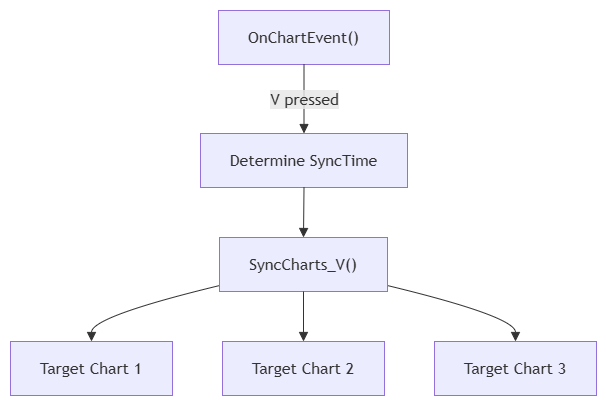
The keyboard event handler should not contain the entire chart synchronization algorithm. Instead, OnChartEvent() determines when synchronization should occur and obtains the reference time. A separate function, SyncCharts_V(), applies that reference to the matching charts.
The separation is straightforward:
Keyboard event → Determine reference time → SyncCharts_V() → Process matching charts
The event handler is responsible for detecting the user's action, while the synchronization function is responsible for updating the chart objects and initiating navigation. This separation keeps the event-handling code compact and makes the synchronization function reusable as additional interaction is introduced later.
The following diagram illustrates this structure:
Synchronizing the Target Charts
The synchronization function iterates through the open charts using the same general approach as the original script. It processes charts belonging to the same symbol as the chart hosting the indicator. For each matching chart, it checks whether the synchronization line already exists.
If the object does not exist, the indicator creates it:
if(ObjectFind(chart_id, SyncLineName) < 0)
  {
   ObjectCreate(chart_id, SyncLineName, OBJ_VLINE, 0, lineTime, 0);
   ...
  }
If the line already exists, its time is simply updated:
else
  {
   ObjectSetInteger(chart_id, SyncLineName, OBJPROP_TIME, (long)lineTime);
  }
This allows repeated presses of 'V' to reposition the existing synchronization line instead of creating a new line on every activation.
The object name is currently fixed as SyncTimeLine. This keeps the example simple, but it also means that another object using the same name on a chart could conflict with the indicator's line. Object naming and collision management are additional considerations for a more robust implementation.
After creating or updating the line, the function calls:
SetChartOnTime(chart_id, lineTime);
This delegates chart navigation to a separate function. The line provides a visible time reference, while SetChartOnTime() performs the navigation calculation.
Keeping the Navigation Logic Separate
The navigation itself is kept in a dedicated function:
//+------------------------------------------------------------------+
//| Navigate a chart to the specified market time                    |
//+------------------------------------------------------------------+
void SetChartOnTime(long chart_id, datetime syncTime)
  {
//--- Process only charts with the same symbol
   if(ChartSymbol(chart_id) == _Symbol)
     {
      string symbol = ChartSymbol(chart_id);

      //--- Disable automatic scrolling before manual navigation
      ChartSetInteger(chart_id, CHART_AUTOSCROLL, false);
      ChartNavigate(chart_id, CHART_END, 0);
      ChartRedraw(chart_id);

      //--- Get the target chart timeframe
      ENUM_TIMEFRAMES timeframe = (ENUM_TIMEFRAMES)ChartPeriod(chart_id);

      //--- Convert the synchronization time to a bar index
      long shift = iBarShift(symbol, timeframe, syncTime, false);

      //--- Calculate the navigation position using the visible bar count
      long visible_bars = ChartGetInteger(chart_id, CHART_VISIBLE_BARS);
      long desired_bar = -(shift - visible_bars + 1);

      //--- Navigate the chart to the corresponding market position
      ChartNavigate(chart_id, CHART_END, (int)desired_bar - 1);
      ChartRedraw(chart_id);
     }
  }
The navigation sequence remains based on the same general mechanism used by the original script:
Reference time → iBarShift() → Target bar index → CHART_VISIBLE_BARS → ChartNavigate()
The transition to an indicator does not introduce a fundamentally different time-mapping algorithm. Instead, the existing navigation logic is incorporated into a persistent component that responds to a keyboard event and maintains a visible reference line.
As in the script, automatic scrolling is disabled before navigation. This changes the chart's behavior after synchronization because the chart will no longer automatically follow the latest market data in the usual way.
The current implementation also assumes that the relevant historical data is available and that the navigation calculations succeed. Comprehensive return-value checks, handling of missing history, and additional navigation edge cases are outside the scope of this first interactive version.
The Complete Indicator
We have now introduced the main elements of the first interactive version:
- The synchronization mechanism is hosted in an indicator.
- The user triggers synchronization by pressing 'V' on the chart where the indicator is attached.
- The visible chart position is used to determine a reference time.
- A vertical line represents that reference time.
- The line is created or updated on matching charts.
- Each matching chart is navigated using its own timeframe and visible bar count.
The complete implementation is shown below:
//+------------------------------------------------------------------+
//| RM Sync Master - Chart Synchronization                           |
//| Copyright 2026, RM Trading Lab                                   |
//| https://www.mql5.com/en/users/rmtradinglab                       |
//+------------------------------------------------------------------+
#property copyright "© 2026 RM Trading Lab"
#property link      "https://www.mql5.com/en/users/rmtradinglab"
#property version   "1.00"

#property strict
#property indicator_chart_window
#property indicator_plots 0

//--- Synchronization line object name
string SyncLineName = "SyncTimeLine";

//+------------------------------------------------------------------+
//| Indicator calculation                                            |
//+------------------------------------------------------------------+
int OnCalculate(const int rates_total,
                const int prev_calculated,
                const datetime &time[],
                const double &open[],
                const double &high[],
                const double &low[],
                const double &close[],
                const long &tick_volume[],
                const long &volume[],
                const int &spread[])
  {
//--- No buffer calculation is required for this indicator
   return(rates_total);
  }

//+------------------------------------------------------------------+
//| Handle chart events                                              |
//+------------------------------------------------------------------+
void OnChartEvent(const int id,
                  const long &lparam,
                  const double &dparam,
                  const string &sparam)
  {
//--- Check for a keyboard event
   if(id == CHARTEVENT_KEYDOWN)
     {
      int key = (int)lparam;
      //--- Synchronize charts when the 'V' key is pressed
      if(key == 'V' || key == 'v')
        {
         //--- Get the market time at the first visible bar
         long first_visible = ChartGetInteger(0, CHART_FIRST_VISIBLE_BAR);
         datetime syncTime = iTime(_Symbol, PERIOD_CURRENT, (int)first_visible - 1);

         SyncCharts_V(syncTime);
        }
     }
  }

//+------------------------------------------------------------------+
//| Synchronize charts using a vertical line                         |
//+------------------------------------------------------------------+
void SyncCharts_V(datetime lineTime)
  {
//--- Start iterating through all open charts
   long chart_id = ChartFirst();
   while(chart_id >= 0)
     {
      //--- Process charts of the same symbol when the filter is enabled
      if(ChartSymbol(chart_id) == _Symbol)
        {
         //--- Create the synchronization line if it does not exist
         if(ObjectFind(chart_id, SyncLineName) < 0)
           {
            ObjectCreate(chart_id, SyncLineName, OBJ_VLINE, 0, lineTime, 0);
            ObjectSetInteger(chart_id, SyncLineName, OBJPROP_COLOR, clrRed);
            ObjectSetInteger(chart_id, SyncLineName, OBJPROP_STYLE, STYLE_DOT);
            ObjectSetInteger(chart_id, SyncLineName, OBJPROP_BACK, false);
            ObjectSetInteger(chart_id, SyncLineName, OBJPROP_SELECTABLE, true);
           }
         else
           {
            //--- Update the existing synchronization line
            ObjectSetInteger(chart_id, SyncLineName, OBJPROP_TIME, (long)lineTime);
           }
         SetChartOnTime(chart_id, lineTime);
        }

      //--- Move to the next open chart
      chart_id = ChartNext(chart_id);
     }
  }

//+------------------------------------------------------------------+
//| Navigate a chart to the specified market time                    |
//+------------------------------------------------------------------+
void SetChartOnTime(long chart_id, datetime syncTime)
  {
//--- Process only charts with the same symbol
   if(ChartSymbol(chart_id) == _Symbol)
     {
      string symbol = ChartSymbol(chart_id);

      //--- Disable automatic scrolling before manual navigation
      ChartSetInteger(chart_id, CHART_AUTOSCROLL, false);
      ChartNavigate(chart_id, CHART_END, 0);
      ChartRedraw(chart_id);

      //--- Get the target chart timeframe
      ENUM_TIMEFRAMES timeframe = (ENUM_TIMEFRAMES)ChartPeriod(chart_id);

      //--- Convert the synchronization time to a bar index
      long shift = iBarShift(symbol, timeframe, syncTime, false);

      //--- Calculate the navigation position using the visible bar count
      long visible_bars = ChartGetInteger(chart_id, CHART_VISIBLE_BARS);
      long desired_bar = -(shift - visible_bars + 1);

      //--- Navigate the chart to the corresponding market position
      ChartNavigate(chart_id, CHART_END, (int)desired_bar - 1);
      ChartRedraw(chart_id);
     }
  }
//+------------------------------------------------------------------+
The complete implementation combines the event handler, SyncCharts_V(), and SetChartOnTime() with the indicator's initialization and calculation functions.
This version is deliberately limited. The vertical line is visible and selectable, but dragging it does not yet synchronize the other charts. Synchronization is initiated by pressing 'V', and the current implementation focuses on time-based navigation for charts of the same symbol.
These limitations define the boundary of the current milestone rather than indicating that all synchronization requirements have been solved.
What We Have Achieved
The original one-time script has now been adapted into a persistent indicator that can be activated through a keyboard event.
The development can be summarized as:
One-Time Script → Persistent Indicator → Keyboard Event → Reference Time → Vertical Line → Multi-Chart Navigation
The result is a working prototype that combines a keyboard-triggered synchronization operation with a persistent visual time marker. It establishes a foundation for further development without claiming to provide every feature of a complete synchronization tool.
The following GIF demonstrates the indicator in action: pressing 'V' on the H1 chart draws the synchronization line on all three charts and navigates the M5 and M1 charts to the corresponding market time.
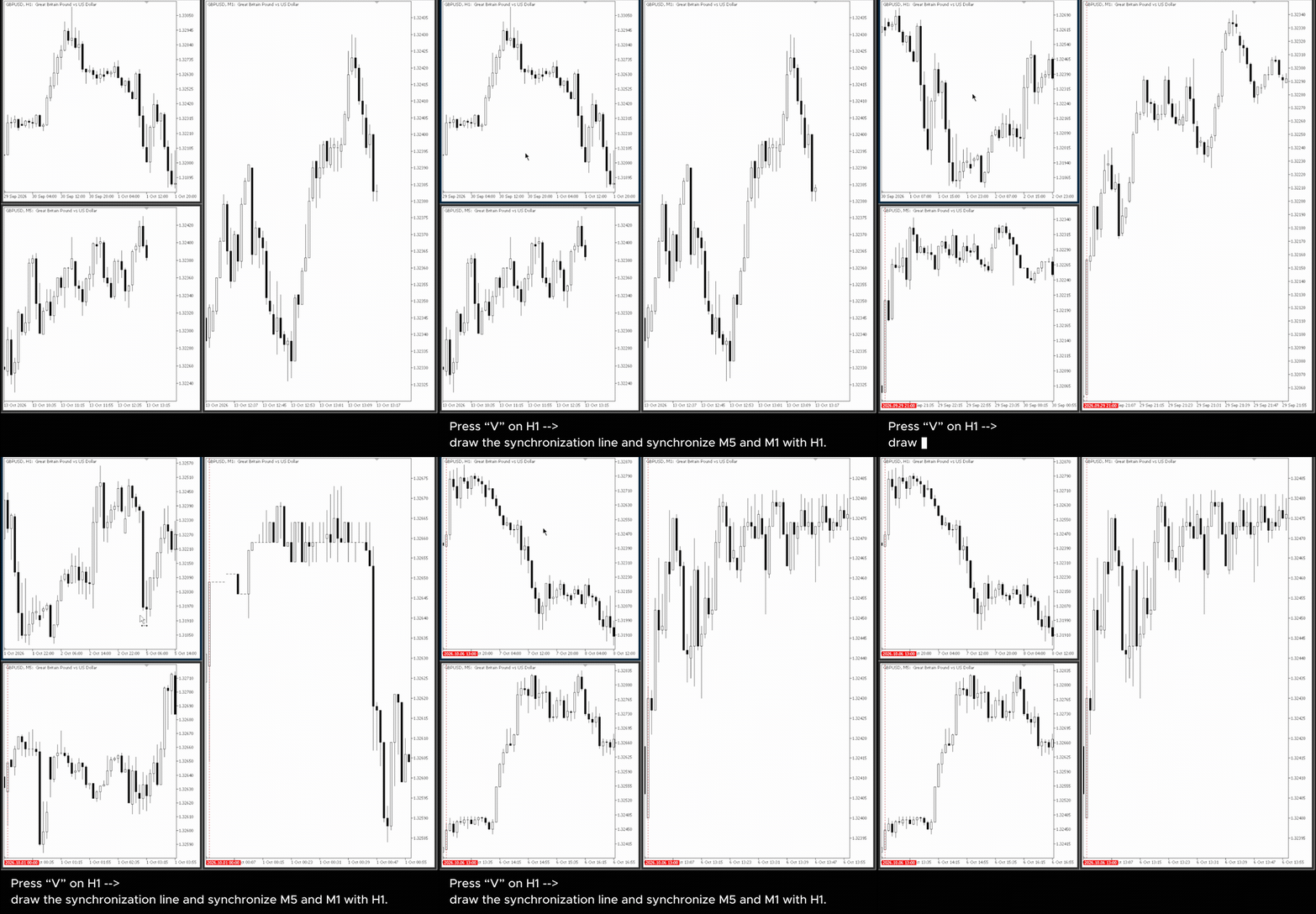
The interaction remains one-directional: pressing 'V' establishes a new reference time and updates the matching charts, but manually dragging the line does not yet cause the other charts to follow.
This limitation leads to the next stage of development, where object interaction and synchronization triggered by changes to the reference line can be considered.
Conclusion
In this first part, we started with a simple synchronization mechanism: a one-time script that uses a market timestamp as a common reference for multiple open charts of the same symbol.
The prototype established the basic navigation logic. The reference chart provides the timestamp, iBarShift() maps it to a bar index on each target timeframe, and ChartNavigate() moves the charts toward the corresponding market position. Although this approach demonstrates the core mechanism, differences in timeframe boundaries and other practical conditions mean that further refinement is still required.
We then adapted the logic into a chart indicator. By handling keyboard events, the trader can press 'V' to trigger synchronization. A vertical line represents the selected synchronization time on the participating charts, providing a persistent visual reference for the operation.
At this stage, the indicator provides a practical prototype for time-based chart navigation, but the interaction remains limited. Synchronization is triggered by a keyboard shortcut, and moving the vertical line itself does not yet update the other charts.
This limitation provides the starting point for the next stage of development.
In Part 2, we will extend the indicator to respond to changes in the synchronization line. By detecting the relevant chart events, we will work toward making the reference line an interactive control for synchronizing the participating charts.
The basic mechanism is now in place. The next step is to develop it into a more dynamic and responsive synchronization tool.
Warning: All rights to these materials are reserved by MetaQuotes Ltd. Copying or reprinting of these materials in whole or in part is prohibited.
This article was written by a user of the site and reflects their personal views. MetaQuotes Ltd is not responsible for the accuracy of the information presented, nor for any consequences resulting from the use of the solutions, strategies or recommendations described.

 How to Set Up an AI Hedge Fund in MetaTrader 5
 Where your backtest stops being real: Measuring the depth of your broker's tick history
 Features of Experts Advisors
 Building a PDF Creation Library in MQL5 (Part 2): Why PDFs Break

- Free trading apps
- Over 8,000 signals for copying
- Economic news for exploring financial markets
You agree to website policy and terms of use